autumn-team
 Fabrizio Reale
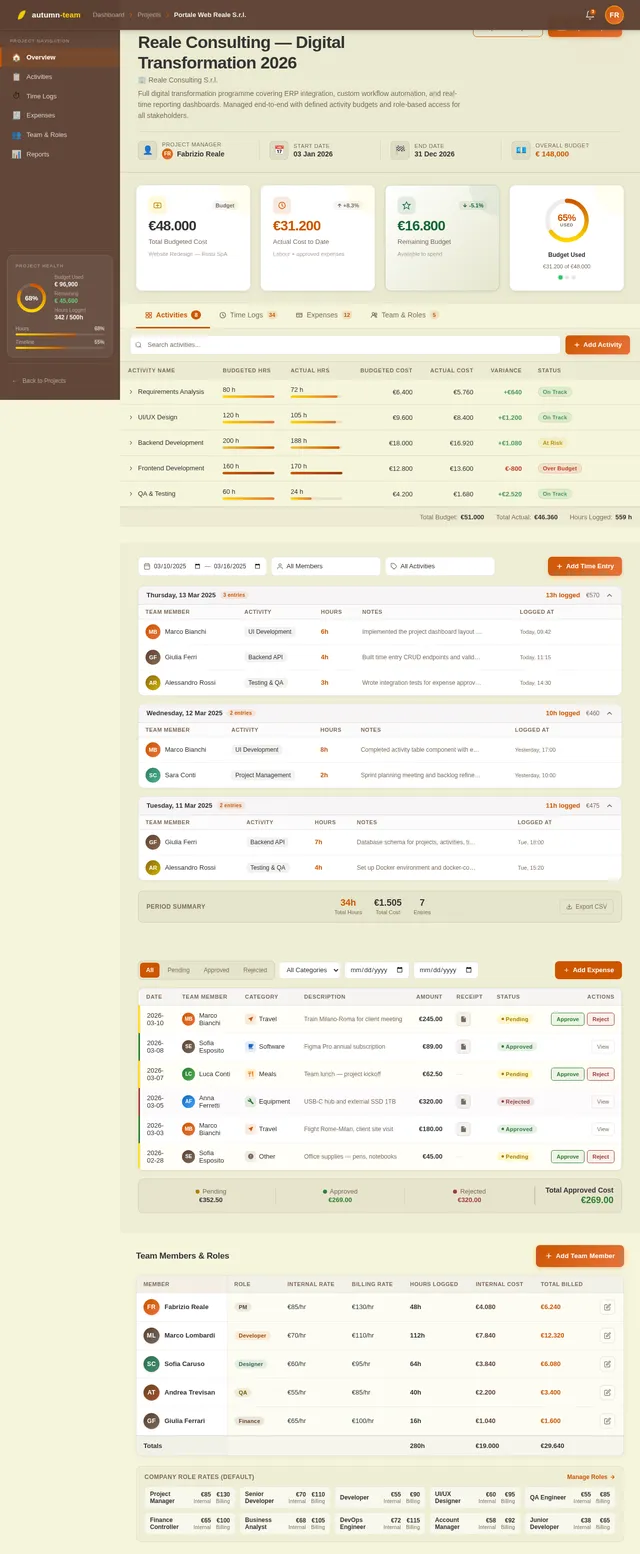
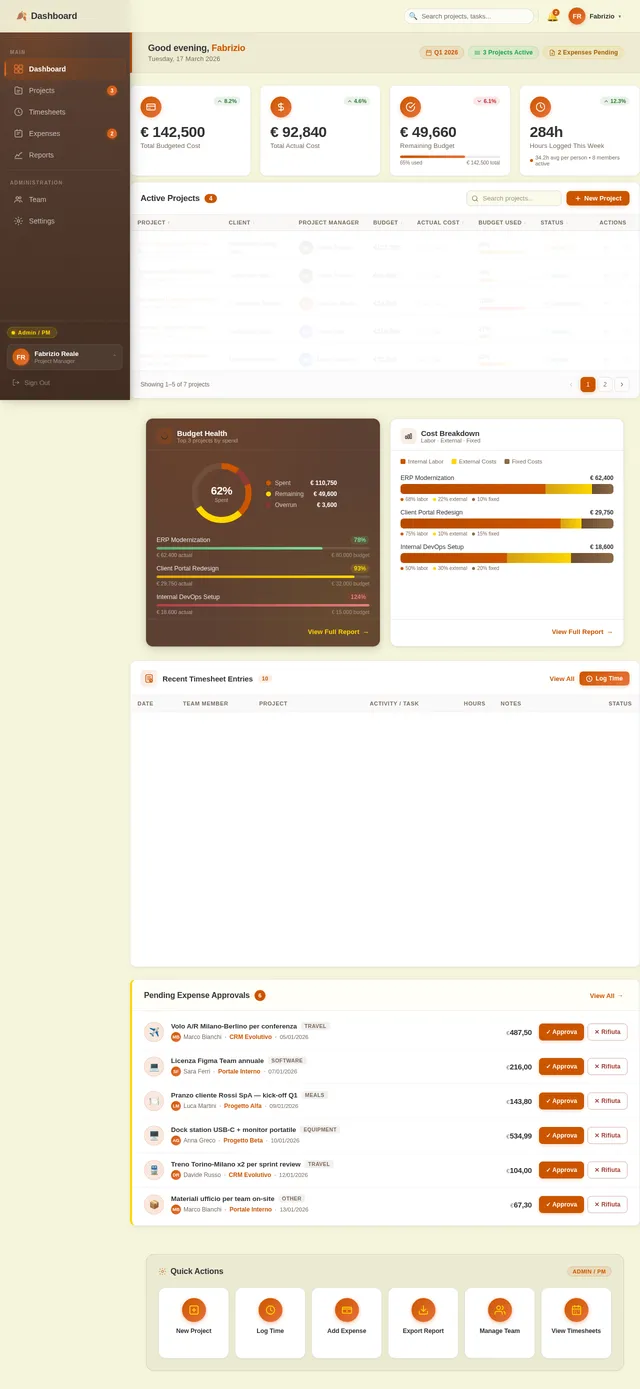
Here is a clean, structured prompt you can paste into an AI coding tool to generate your application. *** ## Project Title Team Work, Time, and Cost Tracking Tool ## Goal Build a web application that lets companies define projects with detailed cost structures, track teams’ hours and expenses, and always see remaining budget and project status in real time. [mastt](https://www.mastt.com/resources/project-cost-template) *** ## User Roles 1. Admin / Project Manager - Creates and edits clients and projects. - Defines budgets, activities, and cost rates. - Views all reports and dashboards. 2. Team Member / Operative - Sees only the projects/activities assigned to them. - Logs worked hours and project-related expenses. - Can see their own timesheets and expense history. 3. Finance / Controller (optional role) - Views cost and margin dashboards. - Exports data to accounting/invoicing systems. *** ## Core Concepts and Data 1. Client - Name, reference code. - Contact info (basic). 2. Project - Client. - Name, code, description. - Start date, end date (planned). - Overall budget (total), currency. - Status: Planned, In progress, On hold, Completed, Cancelled. - Project manager (user). 3. Activity / Task - Project. - Name, code. - Type: Billable / Non-billable. - Planned start/end dates. - Budgeted hours. - Budgeted cost (labor + fixed). - Optional cost code / category. [enerpize](https://www.enerpize.com/templates/project-cost) 4. Roles and Rates - Role (e.g., Developer, PM, Designer). - Internal cost rate per hour. - Billing rate per hour (optional). 5. Time Entry (Timesheet) - User. - Date. - Project. - Activity / Task. - Hours worked. - Optional notes. 6. Expense Entry - User. - Date. - Project. - Activity / Task (optional). - Category (travel, software, materials, etc.). - Amount, currency. - Description. - Receipt file upload (optional). - Status: Draft, Submitted, Approved, Rejected. [connecteam](https://connecteam.com/best-time-and-expense-tracking-software/) *** ## Functional Requirements ### A. Project and Budget Setup 1. Create/Edit Projects - Admin/PM can create projects with: client, name, description, dates, overall budget, project manager, status. - Attach activities/tasks with per-activity budgets in hours and cost. [slideshare](https://www.slideshare.net/slideshow/easy-guide-to-project-cost-tracking-template-docx/274127045) 2. Define Cost Structure - Maintain a list of roles with internal hourly cost rates and (optionally) billing rates. - For each project, allow: - Default role rates. - Custom overrides per project (e.g., higher rate for specific client). 3. Fixed Costs - Allow adding fixed costs to a project or a specific activity: - Name, category, planned amount, date. - Mark as one-off or recurring (e.g., monthly license). - Track planned vs actual for fixed costs. [mastt](https://www.mastt.com/resources/project-cost-template) 4. Work Breakdown / Activities - For each project, define activities/tasks with: - Budgeted hours per role or total hours. - Budgeted fixed costs. - Optional simple hierarchy (Phase → Task) is enough. *** ### B. Time Tracking 1. Time Entry - Team members can log hours by: date, project, activity/task, hours, notes. [getharvest](https://www.getharvest.com/blog/guide-to-time-and-expense-tracking) - Two modes are acceptable: - Manual entry (fill in fields). - Optional start/stop timer (if easy to implement). 2. Validation - Prevent logging time on closed/completed projects. - Configurable max hours per day per user (e.g., warn if > 12 hours). 3. Timesheet Views - Daily and weekly view for each user. - Users can filter by project and date range. - Project managers can view timesheets for their project team. *** ### C. Expense Tracking 1. Expense Entry - Team members can add project-related expenses with: date, project, optional activity, category, amount, description, and receipt upload. [blog.data-basics](https://blog.data-basics.com/the-ultimate-guide-to-time-and-expense-software) - Multi-currency support is a plus; base currency stored on project. 2. Approval Workflow - Statuses: Draft → Submitted → Approved/Rejected. - Project Manager (or Finance) can approve/reject expenses. - Approved expenses count toward actual costs of the project. 3. Expense Lists - Filterable list by project, user, date range, status, category. - Export to CSV/Excel. *** ### D. Budget, Remaining Budget, and Status 1. Budget Calculation Logic - For each project and activity, calculate: - Budgeted hours and budgeted labor cost (hours × role rate). - Budgeted fixed costs. - Total budgeted cost = labor + fixed. - Actuals: - Actual hours (sum of timesheets). - Actual labor cost (hours × relevant role rate). - Actual fixed/expense cost (approved expenses + recorded fixed costs). - Remaining budget = Budgeted total − Actual total. - Variance (absolute and percentage). [jotform](https://www.jotform.com/board-templates/project-cost-tracking-template) 2. Project Status Indicators - Show per project: - Budget used (%). - Hours used (%). - Timeline (today vs end date). - Simple traffic light logic: - Green: within budget (e.g., < 80%) and time. - Yellow: between 80–100% budget or close to end date. - Red: exceeds budget or overdue. 3. Activity-Level View - For each activity/task: planned vs actual hours and costs, remaining budget and variance. *** ### E. Reporting and Dashboards 1. Project Dashboard (for PMs and Admin) - List of all projects with: - Client, PM, status. - Budgeted cost, actual cost to date, remaining budget, variance. - Budget used (%). - Filters: by client, PM, status, date range. [scribd](https://www.scribd.com/document/503928692/IC-Project-Tracking-Template-8640-V1) 2. Detailed Project View - Tabs: - Overview: main KPIs (budget vs actual, remaining budget, status). - Activities: table of tasks with planned vs actual hours & costs. - Time: list or summary of timesheet entries. - Expenses: list or summary of expenses. 3. Time and Expense Reports - By user: hours and costs by period and project. - By project: hours, labor cost, expenses, total. - Exportable to CSV/Excel. *** ### F. Non-Functional Requirements 1. Platform & Tech (you decide, but specify) - Web-based application, responsive UI (desktop first, mobile-friendly). - REST or GraphQL API for all main entities (projects, time entries, expenses, reports). 2. Performance - List views and dashboards should load under 2 seconds for typical data sets. - Reports for a single project should generate under 5 seconds. [dataforest](https://dataforest.ai/blog/software-requirements-specification-understandable-framework) 3. Security & Access Control - Authentication with email/password (and ready to plug SSO in future). - Role-based permissions: Admin, PM, Team Member, Finance. - Data isolation per organization (future multi-tenant ready). 4. Auditability - Track who created/updated/deleted time entries and expenses. - Log status changes for expenses (who approved/rejected and when). [blog.data-basics](https://blog.data-basics.com/the-ultimate-guide-to-time-and-expense-software) *** ### G. Nice-to-Have Features (If time allows) 1. Invoicing Prep - Generate a summarized “billable time & expenses” report per client and project. - Show billable amount based on billing rates. 2. Integrations (future-ready) - Webhooks or basic API endpoints for integration with accounting/CRM. 3. Simple Notifications - Email or in-app alerts when: - Budget reaches certain thresholds (e.g., 80%, 100%). - Expenses are submitted/approved. *** ### Deliverables - Database schema or migration scripts. - Backend API. - Frontend UI for all roles. - Basic test data and instructions to run the app locally (e.g., Docker or simple setup). ***
Comments (0)
Sign in to leave a comment
System Requirements
System Requirements Document (SRD)
Project Name: autumn-team
1. Introduction
The autumn-team project is a web-based application designed to streamline project management, time tracking, and expense tracking for a single company. The tool enables project managers, team members, and finance controllers to collaborate efficiently, track budgets, and monitor project progress in real-time.
This document outlines the system requirements for the autumn-team project, tailored to meet the needs of Fabrizio Reale's organization in Italy. The system will focus on supporting a single company, ensuring simplicity and ease of use while maintaining scalability for future enhancements.
2. System Overview
The autumn-team system will provide a centralized platform for managing projects, tracking team hours, and monitoring expenses. It will include role-based access control for project managers, team members, and finance controllers, ensuring that users can only access relevant data.
Key features include:
- Project setup and budget management.
- Time tracking and validation.
- Expense tracking with approval workflows.
- Real-time dashboards and reporting.
The system will be web-based, responsive, and optimized for desktop use, with mobile-friendly features for team members logging hours and expenses on the go.
3. Functional Requirements
A. Project and Budget Setup
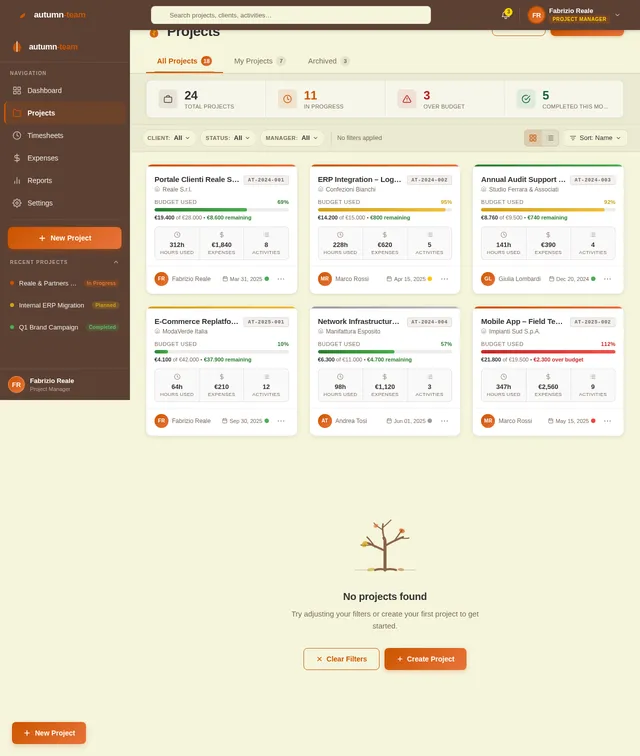
- As Admin/PM I should be able to create projects with client, name, description, dates, overall budget, project manager, and status.
- As Admin/PM I should be able to define activities/tasks with per-activity budgets in hours and costs.
- As Admin/PM I should be able to maintain a list of roles with internal hourly cost rates and billing rates.
- As Admin/PM I should be able to add fixed costs to projects or activities, including one-off or recurring costs.
B. Time Tracking
- As Team Member I should be able to log hours by date, project, activity/task, hours, and notes.
- As Admin/PM I should be able to prevent logging time on closed/completed projects.
- As Admin/PM I should be able to view daily and weekly timesheets for project teams.
C. Expense Tracking
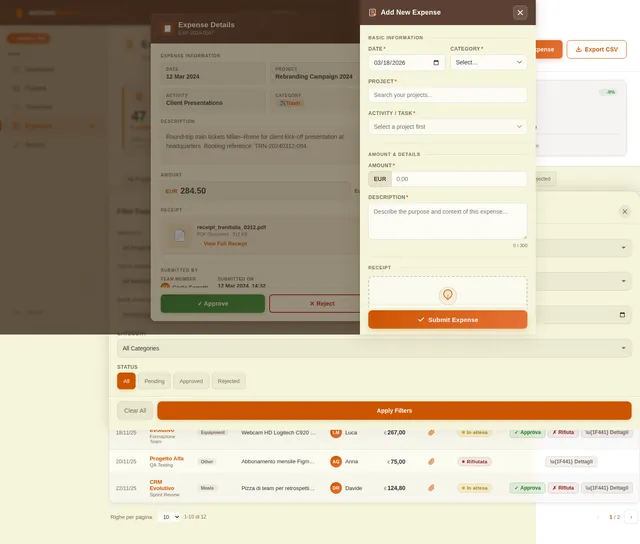
- As Team Member I should be able to add project-related expenses with date, project, category, amount, description, and receipt upload.
- As Admin/PM I should be able to approve/reject expenses submitted by team members.
- As Admin/PM I should be able to filter expense lists by project, user, date range, status, and category.
D. Budget, Remaining Budget, and Status
- As Admin/PM I should be able to calculate budgeted vs actual costs for projects and activities.
- As Admin/PM I should be able to view project status indicators (budget used, hours used, timeline).
- As Admin/PM I should be able to view activity-level planned vs actual hours and costs.
E. Reporting and Dashboards
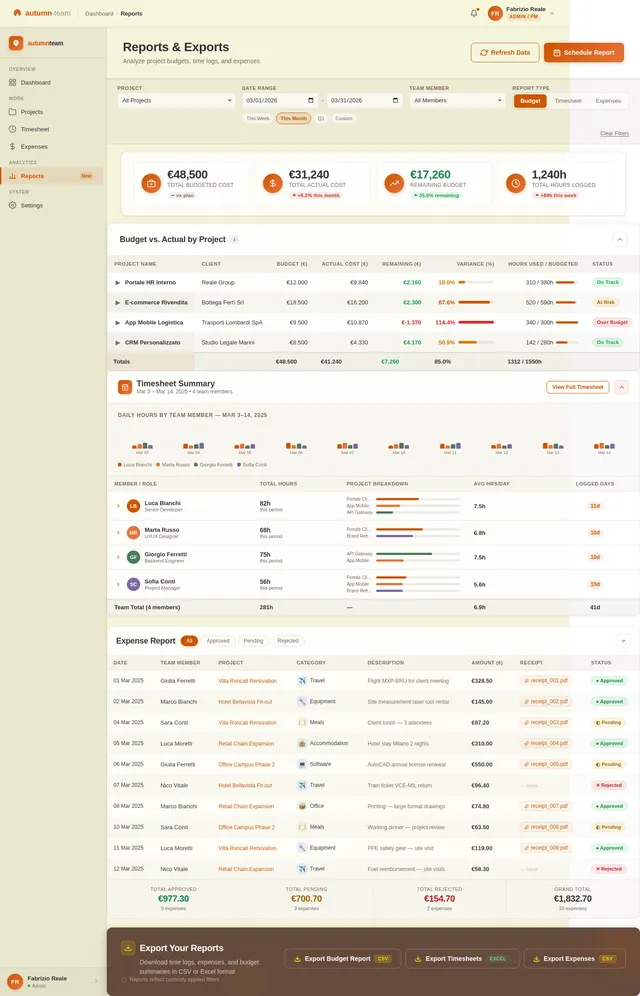
- As Admin/PM I should be able to view a project dashboard with key metrics (budgeted cost, actual cost, remaining budget, variance).
- As Admin/PM I should be able to export time and expense reports to CSV/Excel.
4. User Personas
Admin / Project Manager
- Creates and edits clients and projects.
- Defines budgets, activities, and cost rates.
- Views all reports and dashboards.
Team Member
- Logs worked hours and project-related expenses.
- Views their own timesheets and expense history.
Finance Controller
- Views cost and margin dashboards.
- Approves/rejects expenses.
- Exports data to accounting/invoicing systems.
5. Visuals Colors and Theme
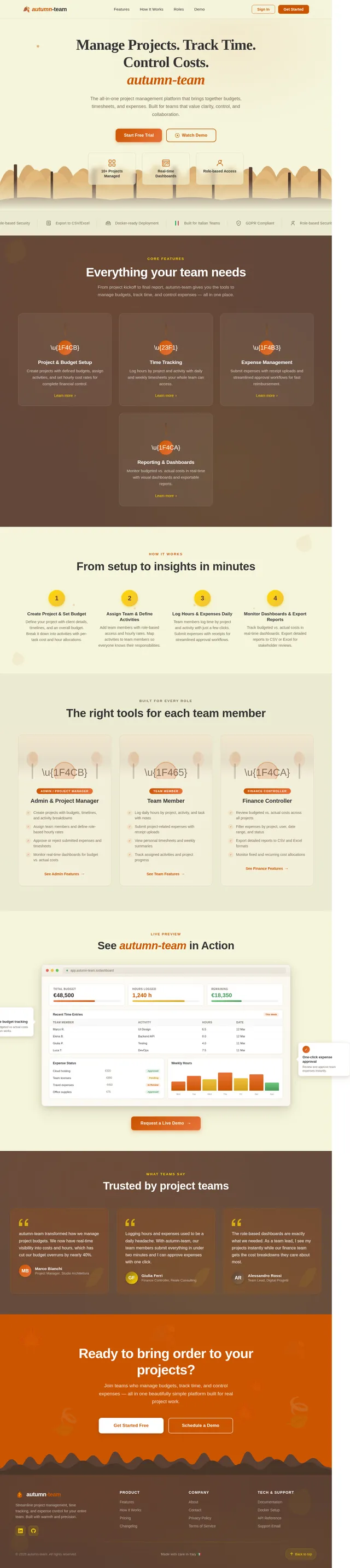
The autumn-team project will adopt a professional yet approachable theme inspired by autumn colors. Suggested palette:
- Primary: Burnt Orange (#CC5500)
- Secondary: Deep Brown (#5C4033)
- Accent: Golden Yellow (#FFD700)
- Background: Light Beige (#F5F5DC)
- Text: Dark Gray (#333333)
The theme will evoke warmth and productivity, aligning with the project's name and purpose.
6. Signature Design Concept
Interactive Autumn Forest Landing Page
The homepage will feature an immersive, animated autumn forest scene. As users scroll, leaves will gently fall, and trees will subtly change colors to reflect the passage of time. Key sections of the homepage (e.g., "Projects," "Time Tracking," "Expenses") will appear as interactive tree trunks or branches.
Micro-interactions:
- Hovering over a tree trunk will reveal project details, with a smooth fade-in effect.
- Clicking on a branch will expand it into a detailed view of the corresponding feature.
- A subtle wind animation will move leaves and branches, creating a dynamic and engaging experience.
Transitions:
- Smooth scrolling with parallax effects will make the forest feel alive.
- Sections will transition with a "leaf swipe" animation, where falling leaves reveal the next page.
This unforgettable design will make the autumn-team tool stand out while providing an intuitive and delightful user experience.
7. Non-Functional Requirements
- Platform: Web-based application, responsive UI (desktop first, mobile-friendly).
- Performance:
- List views and dashboards should load under 2 seconds for typical data sets.
- Reports for a single project should generate under 5 seconds.
- Security:
- Authentication with email/password.
- Role-based permissions: Admin, PM, Team Member, Finance.
- Auditability:
- Track who created/updated/deleted time entries and expenses.
- Log status changes for expenses (who approved/rejected and when).
8. Tech Stack
Frontend
- React for Web
Backend
- Python
- FastAPI
Database
- MySQL or MariaDB (using Alembic for migrations)
AI Tools
- GPT 5.2 for user-friendly responses
Local Orchestration
- Docker
- docker-compose
9. Assumptions and Constraints
- The system will support a single company only, with no multi-tenant functionality.
- All data will be isolated within the company, ensuring security and simplicity.
- The application will be optimized for desktop use, with mobile-friendly features for time and expense tracking.
10. Glossary
- Admin/PM: Administrator or Project Manager responsible for creating and managing projects.
- Team Member: User who logs hours and expenses for assigned projects.
- Finance Controller: User who manages financial aspects, including expense approvals and reporting.
- Budgeted Cost: The planned cost for a project or activity.
- Actual Cost: The actual cost incurred for a project or activity.
- Remaining Budget: The difference between budgeted and actual costs.
This updated SRD ensures the autumn-team project is tailored to the needs of a single company, providing a streamlined and engaging experience for all users.
No comments yet. Be the first!