autumn-realestate
 vansh kumar
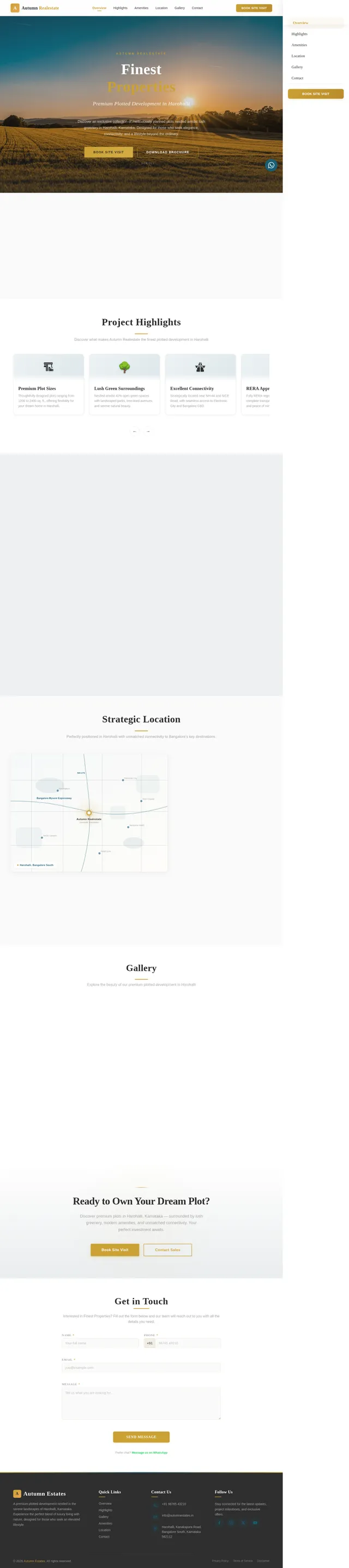
Create a premium modern real estate landing website for a plotted development. Project Name: Finest Properties Location: Harohalli, Karnataka Design Style: Minimal, elegant and cinematic real estate website with large images, immersive layouts and smooth scroll interactions. Color palette: Primary: Deep forest green Accent: Subtle gold Background: White and light neutral tones Typography: Large elegant headings with minimal body text. Images: Use large high-quality images but optimized for fast loading. Ensure the website is fully responsive and optimized for both desktop and mobile. --- HERO SECTION Use a FULL SCREEN CINEMATIC AERIAL VIDEO of greenery and plotted development. Important behavior: • The background video must remain FIXED in position. • Do NOT apply zoom animation to the video. • Only foreground elements move. Foreground elements: Heading: Finest Properties Subheading: Premium Plotted Development in Harohalli Description: Experience peaceful living surrounded by nature with modern infrastructure and excellent connectivity. Buttons: Book Site Visit Download Brochure Scroll behavior: • When the user scrolls, the hero text slowly moves upward. • Text fades slightly while scrolling. • The next section overlaps the hero section smoothly. • Video remains fixed in the background. --- PROJECT OVERVIEW Large minimal section. Layout: Two column layout. Left side: Short elegant project description. Right side: Large immersive landscape image of greenery or plotted layout. Animation: Content fades upward while entering viewport. --- PROJECT HIGHLIGHTS Instead of a grid layout create a horizontal scrolling card section. Cards appear side-by-side in a row. Cards include: Premium Gated Community 25+ Lifestyle Amenities Miyawaki Forest Wide Internal Roads Underground Utilities Excellent Connectivity Scrolling behavior: • As the user scrolls vertically the cards move horizontally. • Smooth side scrolling animation. Desktop: Wide cinematic horizontal scrolling. Mobile: Cards scroll horizontally using swipe gestures. Card design: • rounded corners • soft shadows • hover lift effect --- AMENITIES SECTION Use a Polaroid Scrapbook Collage Layout with a center hero image. Layout: • One large central image • Several smaller polaroid style images around it • Slight rotation (2–6 degrees) • White borders • Soft shadows Amenities: Clubhouse Amphitheatre Yoga Deck Children Play Area Pet Park Sports Courts Scroll animation: Images enter from different directions: • left • right • top • bottom They settle into the collage layout. --- LOCATION ADVANTAGES Minimal clean section. Title: Strategically Located in Harohalli Points: Easy access to Kanakapura Road Nearby industrial hubs Peaceful natural surroundings Nearby schools and hospitals Include a stylized map or location illustration. --- GALLERY SECTION Use a scrapbook collage layout similar to amenities. Images appear like scattered photographs but arranged neatly. Effects: • images slide into the screen from different directions • slight rotation during entry • hover zoom effect • click opens lightbox viewer --- CALL TO ACTION Dark background section. Text: Schedule Your Site Visit Today Buttons: Book Site Visit Contact Sales --- CONTACT SECTION Lead form fields: Name Phone Email Message Include WhatsApp contact option. --- FOOTER Company Name: Finest Properties Include: Quick Links Contact information Location: Harohalli, Karnataka --- FLOATING WHATSAPP BUTTON Add a floating WhatsApp button fixed at the bottom-right corner of the screen. Behavior: • visible across the entire website • circular WhatsApp icon • pulse animation every few seconds • hover scale effect on desktop • opens WhatsApp chat on click Default message: Hello, I am interested in Finest Properties in Harohalli. Please share more details. Ensure proper spacing on mobile so it does not overlap navigation bars. --- BACK TO TOP BUTTON Add a small back-to-top button in the footer area aligned to the right. Design: • circular button • up arrow icon • deep green color • subtle shadow Behavior: • appears only after user scrolls down • smooth scroll back to top • hover lift effect --- SCROLL ANIMATION SYSTEM Use smooth scroll-based animations across the entire site. General rules: • animations trigger when elements enter viewport • use staggered animation timing • use lightweight GPU-accelerated transforms • avoid heavy animation libraries Section reveal animations: • fade-up • fade-left • fade-right • fade-bottom --- IMAGE PARALLAX EFFECT Large images should have subtle parallax movement while scrolling to create depth. --- BUTTON INTERACTIONS Hover: • slight scale • soft glow shadow Click: • soft press animation. --- PERFORMANCE OPTIMIZATION • lazy load images • optimized video • GPU accelerated animations • smooth scrolling --- MOBILE OPTIMIZATION Animations should adapt for mobile: • shorter animation distance • simplified motion • collage sections convert to stacked cards • horizontal highlights allow swipe interaction Ensure the site loads fast and animations remain smooth on mobile devices.
Comments (0)
Sign in to leave a comment
No comments yet. Be the first!