autumn-dayz
אני רוצה משחק כמה dayz

Comments (0)
Sign in to leave a comment
System Requirements
System Requirements Document for autumn-dayz
1. Introduction
autumn-dayz is a browser-delivered, DayZ-style open-world survival game. The player controls a character in a first- or third-person view, explores a persistent open world, scavenges food, water, weapons and ammunition, fights threats such as zombies and other players, manages survival metrics (health, hunger, thirst), and tries to survive as long as possible until the character dies. The product intent is a tense, atmospheric survival experience that is quick to enter: a player can start a new session within moments of arriving, and a returning player can resume their durable character and survival progression.
The audience is players who want the tension, scavenging, exploration and constant threat of a DayZ-like survival game, delivered directly in the browser without installation.
This document is the System Requirements Document for the project; it specifies the product's features and workflows in full.
1.1 Success Criteria
- A new visitor can understand the game and begin a survival session from the public entry surface without prior knowledge of the product.
- A returning player can verify identity and resume their existing character, inventory and survival metrics exactly as they were left.
- Every accepted survival capability — world exploration and character movement, scavenging, combat against zombies and other players, survival metric management, and death/restart — is reachable and operable by the player.
- Character, inventory, survival metrics, combat outcomes and session death/restart state persist across sessions.
2. System Overview
autumn-dayz is delivered as a React frontend backed by a shared FastAPI backend process with MariaDB for application-owned persistent data. The game world, character state, inventory, survival metrics, combat resolution and session lifecycle are owned by the application; the player interacts through a set of first-party pages.
Actors
- \xd7\xa9\xd7\x97\xd7\xa7\xd7\x9f (Player) — the sole active human persona. The player establishes a durable game identity, starts or resumes a survival session, controls a character in the open world, scavenges resources, fights threats, manages survival metrics, and experiences character death and the choice to end or restart.
Accepted behavior and ownership
- Anonymous entry and orientation on Landing.
- Self-service identity establishment on Sign Up and returning verification on Login (application-owned identity, required to keep character and survival progression bound to the correct player across sessions).
- Starting a new session with a new character on Game Start.
- Open-world exploration and character control on World.
- Collection and management of food, water, weapons, ammunition and other resources on Inventory.
- Weapon use and fighting zombies and other players on Combat.
- Monitoring health, hunger and thirst and consuming food and water on Survival.
- Character death and the choice to end or restart the survival session on Session.
Delivery boundary
The game is a first-party, browser-delivered application with application-owned identity. All game state that must survive a session (character, inventory, survival metrics, combat outcomes, death/restart state) is persisted server-side by the shared backend in MariaDB. No third-party game platform, provider-owned surface or external destination owns any accepted capability.
Narrow exclusions
- No graphical gore or detailed violence; tension is conveyed through silhouettes and environment.
- No stock photography, clip-art or gradient-lobby imagery.
- No blue/indigo primary action color and no generic SaaS template look.
Removed from scope
- None.
2a. Product Interpretation and Delivery Boundary
The product is a playable survival game, not a marketing site about one. The public entry surface is the game's front door: it presents the autumn survival world and routes the player either into a new session or back into an existing one. Because a character, its inventory, its survival metrics and its death/restart state must remain bound to the correct player between sessions, the application owns player identity: a new player enrolls on Sign Up, and a returning player verifies on Login before protected game surfaces become available. Landing, Login and Sign Up are anonymously reachable; Game Start, World, Inventory, Combat, Survival and Session require a verified player identity.
Everything the player does inside the game — moving through the world, scavenging, fighting, managing survival metrics, dying and restarting — is current scope and owned by first-party pages. Nothing in the accepted requirements is deferred to a future horizon. The shared FastAPI backend and MariaDB are the single persistence and game-logic authority; the React frontend renders the world, HUD and game surfaces.
2c. Page Content and Component Coverage
Landing
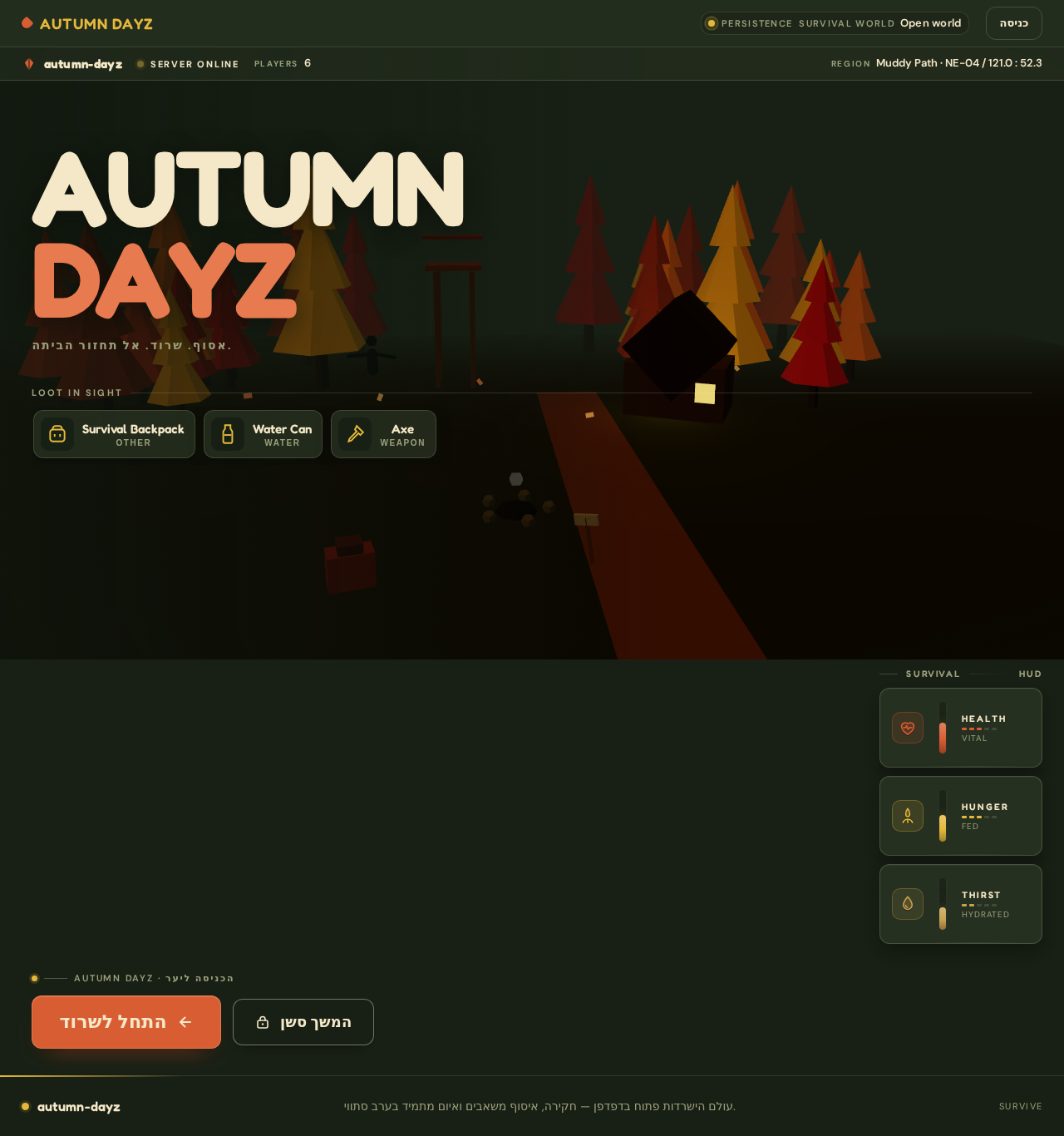
- Purpose / information: Anonymous first impression explaining the autumn survival game and guiding the player toward starting it. Presents the world, the survival premise, and the two entry paths (new session vs. resume).
- State: Server status indicator, live player count, region coordinates (HUD-style top bar). No player-specific state is shown while anonymous.
- Primary actions: "\xd7\x94\xd7\xaa\xd7\x97\xd7\x9c\x20\xd7\x9c\xd7\xa9\xd7\xa8וד" (start surviving) → routes an unauthenticated visitor to Sign Up; "\xd7\x94\xd7\x9e\xd7\xa9\xd7\x9a\x20\xd7\xa1\xd7\xa9\xd7\x9f" (resume session) → routes to Login.
- Supporting actions: Hover/tap on foreground loot objects (backpack, water can, axe) reveals a small name tag and a collect affordance (presentational on this surface; actual collection happens in Inventory).
- Domain entities: World region, server status, player count, loot object names.
- Component responsibilities: Full-viewport low-poly autumn forest diorama hero; two-line AUTUMN DAYZ wordmark; right-edge vertical HEALTH / HUNGER / THIRST gauges; top HUD bar (logo, server status, player count, coordinates, entry); floating start action bottom-left; secondary transparent resume action.
- States: Loading (scene assets) → success (interactive diorama); empty/error (scene fails to load) → static fallback scene with loot items as a horizontally scrollable accessible list; reduced-motion → static scene with the same accessible loot list.
Login
- Purpose / information: Returning verification so the player can resume their durable character and survival progression.
- State: Anonymous; form fields for credentials; inline validation and error messaging.
- Primary actions: Submit credentials → on success route to Game Start (resume path) with the player's existing character available.
- Supporting actions: Link to Sign Up for players without an identity.
- Domain entities: Player identity, credential verification result.
- Component responsibilities: Credential form, submit control, error region, cross-link to Sign Up.
- States: Idle, submitting (loading), success (redirect), error (invalid credentials — recoverable by retry), empty-field validation.
Sign Up
- Purpose / information: Self-service enrollment establishing a durable game identity for a new player.
- State: Anonymous; enrollment form; inline validation.
- Primary actions: Submit enrollment → on success route to Game Start to create the first character.
- Supporting actions: Link to Login for players who already have an identity.
- Domain entities: Player identity, enrollment result.
- Component responsibilities: Enrollment form, submit control, validation/error region, cross-link to Login.
- States: Idle, submitting, success (redirect), error (e.g., identity already exists — recoverable via Login), empty-field validation.
Game Start
- Purpose / information: Starts a new game session with a new character after the player has entered the game; also the resume entry point for a returning player's existing character.
- State: Authenticated. Shows whether the player has an existing character to resume or must create a new one.
- Primary actions: Start new session with a new character → routes into World with a fresh character and initial survival metrics. Resume existing character → routes into World with the persisted character.
- Supporting actions: Return to Landing.
- Domain entities: Character, session, initial survival metrics, persisted character state.
- Component responsibilities: New-session control, resume control (when a character exists), character summary, navigation into World.
- States: Loading (fetching character state), empty (no character yet — new-session only), success (session started), error (session start failed — retry).
World
- Purpose / information: The open-world context where the player moves and controls the character in first- or third-person view.
- State: Authenticated; live character position, view mode, nearby loot, nearby threats, region coordinates.
- Primary actions: Move the character through the world; switch first/third-person view; approach loot to trigger collection; approach threats to enter combat; open Inventory, Combat, Survival and Session surfaces via in-world wooden signposts.
- Supporting actions: Read HUD gauges; read server status and coordinates.
- Domain entities: World region, character position, view mode, loot spawns, threat spawns.
- Component responsibilities: World renderer, character controller, view-mode toggle, HUD gauges, signpost navigation to Inventory / Combat / Survival / Session.
- States: Loading (world assets), success (playable), empty (no loot/threats in current area — world still navigable), error (world load failure — retry), reduced-motion (static scene, accessible loot list).
Inventory
- Purpose / information: Collection and management of food, water, weapons, ammunition and other resources.
- State: Authenticated; current carried items with quantities and categories.
- Primary actions: Collect a nearby item into inventory; view carried items; select a weapon or consumable for use.
- Supporting actions: Return to World.
- Domain entities: Inventory item (food, water, weapon, ammunition, other), quantity, category.
- Component responsibilities: Item list/grid, collect control, item detail, category grouping, return-to-world control.
- States: Loading, empty (nothing carried — prompt to scavenge), success (item collected/updated), error (collection failed — retry), full/limit feedback if applicable.
Combat
- Purpose / information: Weapon use and fighting threats including zombies and other players.
- State: Authenticated; equipped weapon, ammunition count, current threats, combat outcome.
- Primary actions: Engage a zombie or another player with the equipped weapon; consume ammunition; observe combat outcome (threat defeated or player harmed).
- Supporting actions: Switch weapon; retreat to World.
- Domain entities: Weapon, ammunition, threat (zombie, other player), combat outcome, damage.
- Component responsibilities: Threat display, weapon/ammo display, attack control, outcome feedback, return-to-world control.
- States: Loading, empty (no threats present), success (threat defeated / survived), error (no weapon or no ammunition — recoverable by scavenging), damage feedback routed to Survival.
Survival
- Purpose / information: Monitoring health, hunger and thirst together with consuming food and water.
- State: Authenticated; current health, hunger and thirst values as vertical gauges.
- Primary actions: Consume food to reduce hunger; consume water to reduce thirst; observe health changes.
- Supporting actions: Return to World; view metric trends.
- Domain entities: Survival metrics (health, hunger, thirst), consumable item.
- Component responsibilities: Three vertical gauges with pictographic icons and distinct status colors, consume controls, metric feedback.
- States: Loading, empty (no consumables — prompt to scavenge), success (metric improved), warning (metric critical), error (consumption failed — retry).
Session
- Purpose / information: Character death and the choice to end or restart the survival session.
- State: Authenticated; session status (alive, dead), survival duration, final character summary.
- Primary actions: On character death, choose to end the session (return to Game Start/Landing) or restart with a new character (route to Game Start).
- Supporting actions: View survival duration and final state.
- Domain entities: Session, character death record, survival duration, restart state.
- Component responsibilities: Death summary, end-session control, restart control, navigation.
- States: Alive (session ongoing — informational), dead (death summary shown), success (restart or end confirmed), error (state transition failed — retry).
3. Functional Requirements
Each requirement is a distinct story point with provenance, lifecycle facts and observable acceptance.
FR-1 — Open-world survival game (explicit). As a Player I should play a survival game in the DayZ style, so that I experience tension, scavenging, exploration and constant threat. Lifecycle: trigger = player enters the game; result = a playable survival world; failure = world fails to load, recoverable by retry; continuation = player proceeds into World. Acceptance: the game presents an open survival world with the accepted capabilities below.
FR-2 — Explore an open world (explicit). As a Player I should explore an open world, so that I can find loot, structures and threats. Lifecycle: trigger = player is in World; input = movement; result = character traverses regions and discovers loot/threats; failure = none material; continuation = discovery leads to Inventory or Combat. Acceptance: the player can move through and discover distinct world areas.
FR-3 — Control a character in first or third person (explicit). As a Player I should control a character in first- or third-person view and move through the world, so that I can navigate and act. Lifecycle: trigger = player in World; input = movement and view-mode toggle; result = character moves and view changes; failure = none material; continuation = movement leads to scavenging or combat. Acceptance: the player can move the character and switch between first- and third-person views.
FR-4 — Collect equipment and resources (explicit). As a Player I should collect equipment and resources — food, water, weapons, ammunition — so that I can survive and fight. Lifecycle: trigger = player approaches loot in World; input = collect action; result = item added to Inventory; failure = collection fails, recoverable by retry; continuation = item is available for use in Survival or Combat. Acceptance: collected items appear in Inventory with correct category and quantity.
FR-5 — Fight threats (explicit). As a Player I should fight threats such as zombies and other players, so that I can defend myself and survive. Lifecycle: trigger = player encounters a threat; input = attack with equipped weapon; result = threat defeated or player harmed; failure = no weapon/ammunition, recoverable by scavenging; continuation = outcome feeds Survival metrics and Session. Acceptance: combat resolves against zombies and other players and produces an observable outcome.
FR-6 — Manage survival metrics (explicit). As a Player I should manage survival metrics such as health, hunger and thirst, so that I stay alive. Lifecycle: trigger = player in Survival; input = consume food/water; result = hunger/thirst reduced and health affected; failure = no consumables, recoverable by scavenging; continuation = metrics persist and drive survival duration. Acceptance: health, hunger and thirst are displayed and change in response to consumption and combat.
FR-7 — Survive as long as possible until death (explicit). As a Player I should survive as long as possible until the character dies, so that I achieve the game's goal. Lifecycle: trigger = session active; result = survival duration accrues; failure = character death; continuation = Session offers end or restart. Acceptance: survival duration is tracked and character death transitions to Session.
FR-8 — Self-service enrollment (required_inference). As a new Player I should establish a durable game identity on Sign Up, so that my character and progression are bound to me. Lifecycle: trigger = new visitor chooses to start; input = enrollment form; result = identity created and routed to Game Start; failure = identity already exists, recoverable via Login; continuation = first character creation. Acceptance: a new player can enroll and reach Game Start.
FR-9 — Returning verification (required_inference). As a returning Player I should verify my identity on Login, so that I can resume my protected character and survival state. Lifecycle: trigger = returning player chooses resume; input = credentials; result = verified and routed to Game Start with existing character; failure = invalid credentials, recoverable by retry; continuation = resume existing character. Acceptance: a verified returning player sees their persisted character.
FR-10 — Backend persistence (required_inference). As the system I should persist character, inventory, survival metrics, combat outcomes and session death/restart state, so that progression survives between sessions. Lifecycle: trigger = any state change; result = state written to MariaDB via the shared backend; failure = write failure surfaced as recoverable error; continuation = next session resumes correct state. Acceptance: state is durable and correctly restored on resume.
4. User Personas
###\x20\xd7\xa9\xd7\x97\xd7\xa7\xd7\x9f (Player)
- Product context: A player who wants a DayZ-style survival game in the browser. They arrive at Landing, may be new or returning, and want to get into a session quickly.
- Primary goal: Survive as long as possible in an open autumn world by exploring, scavenging, fighting threats and managing health, hunger and thirst.
- Distinct accepted responsibilities: Establishing or verifying identity (Sign Up / Login); starting a new session or resuming an existing character (Game Start); moving and controlling the character in first/third person (World); collecting food, water, weapons and ammunition (Inventory); fighting zombies and other players (Combat); monitoring and managing health, hunger and thirst and consuming food/water (Survival); experiencing character death and choosing to end or restart (Session).
- Relevant inputs or decisions: Whether to start new or resume; movement and view-mode choices; which loot to collect; when to fight vs. retreat; when to consume food/water; on death, whether to end or restart.
- Interactions with other accepted participants: Other players appear as threats in Combat; the player's own durable state is bound to their identity across sessions. No other human persona is in the accepted catalog.
- Observable success: The player survives an extended duration, their character and progression persist across sessions, and on death they can cleanly end or restart.
5. Core User Flows
Flow A — New player starts a session.
- Visitor lands on Landing (anonymous) and sees the autumn survival world, server status and player count.
- Visitor selects "\xd7\x94\xd7\xaa\xd7\x97\xd7\x9c\x20\xd7\x9c\xd7\xa9\xd7\xa8וד" → routed to Sign Up.
- Player completes enrollment and submits → identity created → routed to Game Start.
- On Game Start, player selects start new session → a new character is created with initial survival metrics → routed to World.
- Player moves the character, switches view mode, and explores. Failure: if enrollment fails (identity exists), the player is routed to Login to recover.
Flow B — Returning player resumes.
- Returning player selects "\xd7\x94\xd7\x9e\xd7\xa9\xd7\x9a\x20\xd7\xa1\xd7\xa9\xd7\x9f" on Landing → routed to Login.
- Player submits credentials → verified → routed to Game Start with existing character shown.
- Player selects resume → routed to World with persisted character, inventory and survival metrics. Failure: invalid credentials → inline error → retry.
Flow C — Scavenging.
- In World, player approaches a loot object (food, water, weapon, ammunition).
- Player triggers collect → item added to Inventory.
- Player opens Inventory via signpost, views the item, and selects a weapon or consumable for use. Failure: collection fails → retry.
Flow D — Combat.
- In World, player encounters a zombie or another player.
- Player opens Combat, engages with the equipped weapon, consuming ammunition.
- Outcome: threat defeated or player harmed (damage routed to Survival). Failure: no weapon/ammunition → player returns to scavenge.
Flow E — Managing survival metrics.
- Player opens Survival and reads health, hunger and thirst gauges.
- Player consumes food to reduce hunger and water to reduce thirst; health responds.
- Metrics persist to the backend. Failure: no consumables → prompt to scavenge.
Flow F — Death and restart.
- When health reaches zero, the character dies and the player is routed to Session.
- Session shows the death summary and survival duration.
- Player chooses to end the session (return to Game Start/Landing) or restart with a new character (route to Game Start). Failure: state transition fails → retry.
6. Visuals Colors and Theme
Authoritative creative direction: muse Bruno Simon, headline concept "עולם הישרדות סתווי\x20\xd7\xa9\xd7\x90\xd7\xa4\xd7\xa9\xd7\xa8 לה\xd7\x99\xd7\x9b\xd7\xa0\xd7\xa1 אליו" (an autumn survival world you can step into). The world itself is the interface.
Color tokens (dark mode):
- Background:
#182015(deep green-black, dusk forest) - Surface:
#263020(dark olive) - Text:
#F5E8C8(cream) - Primary:
#D95D32(rust orange — primary action) - Accent:
#E4B93B(amber — loot, warnings, thirst) - Muted:
#9BA07C
Blue/indigo is not a brand or CTA color.
Typography:
- Headings: Fredoka, weight 600–700, slightly condensed, game-like but not childish; uppercase English for statuses such as SURVIVE.
- Body: DM Sans; HUD text and numbers in DM Sans 600 with tabular figures.
- Scale (1.25): display
clamp(52px, 10vw, 128px), H1clamp(38px, 6vw, 76px), H2 30/42px, H3 22/28px, body 16/24px, HUD 13/18px, labels 11/14px.
Shape language: Low-poly objects with slightly rounded edges (backpack, can, axe, wooden cabin, pointed trees). HUD components are dark, thick panels with 12px corners, thin ceramic outlines and simple short-shadow icons. Survival metrics are vertical gauges, not SaaS cards.
Layout: First page is a wide game window with minimal HUD over an autumn world. Small top bar holds logo, server status and entry; start action floats bottom-left. On wide screens the world fills most of the screen with info pinned to margins; at 768px the HUD collapses to two strips; at 375px the world stays focal and metrics move to an accessible horizontal scroll row above the action button.
Imagery: Atmospheric low-poly 3D scene — orange autumn trees, muddy path, rusty watchtower, abandoned cabin, extinguished campfire, survival bag, distant zombie silhouette. No stock photos, clip-art or gradient lobbies.
Readability rule: All readable text and controls stay whole inside the viewport and their container at 375px, 768px and 1280px, wrapping or scaling to fit; no element covers them. Imagery and motion may crop, bleed, rotate or overlap freely as long as they cover no readable text or control.
7. Signature Design Concept
The public entry is a full-viewport low-poly autumn survival camp diorama at dusk. The two-line AUTUMN DAYZ wordmark sits left in cream at clamp(52px, 10vw, 128px) without covering the scene. Center-right, an orange path leads to a cabin and watchtower, with a backpack and axe in the foreground. A narrow HUD along the right edge shows HEALTH, HUNGER and THIRST as vertical gauges. A large rust-orange "\xd7\x94\xd7\xaa\xd7\x97\xd7\x9c\x20\xd7\x9c\xd7\xa9\xd7\xa8וד" button is pinned at the bottom, with a secondary transparent "\xd7\x94\xd7\x9e\xd7\xa9\xd7\x9a\x20\xd7\xa1\xd7\xa9\xd7\x9f" button. The scene moves with slight parallax and responds to mouse drag or touch; all text and controls remain outside the world's crop zones. Foreground loot objects (backpack, water can, axe) reveal a small name tag and collect affordance on hover or touch.
8. Interaction Model & Motion Direction
Interaction Model: Animated Motion Tempo: cinematic Hero Dimensionality: webgl
Landing Hero Motion Brief
- Focal subject: Low-poly autumn survival camp — orange trees, muddy path, rusty watchtower, abandoned cabin, extinguished campfire, survival bag, distant zombie silhouette.
- Input → transformation → outcome thesis: Mouse drag or touch → slight parallax camera movement over the forest with drifting leaves, campfire smoke and a flickering abandoned lamp → the player perceives a living world and is drawn to start or resume a session.
- Motion vocabulary: Gentle camera drift over the forest, single leaves moving in wind, campfire smoke, a point of light from an abandoned lamp; hovering loot reveals name and collect action; pressing start makes the character step forward along the path.
- Composed first frame: Two-line AUTUMN DAYZ wordmark left; orange path center-right to cabin and watchtower; backpack and axe foreground; right-edge vertical HEALTH/HUNGER/THIRST gauges; rust-orange start button bottom; transparent resume button.
- Reduced-motion state: Static scene with loot items presented as an accessible horizontally scrollable list.
Landing Hero 3D Scene Brief — DIRECTION-DERIVED A real-time WebGL/R3F low-poly autumn camp scene: a compact diorama showing the game's defining state — a survival camp at dusk with the path, cabin, watchtower, loot and distant zombie silhouette — rendered as the hero subject, with slight parallax camera response to pointer/touch and a static reduced-motion fallback.
9. Non-Functional Requirements
- NFR-1 (explicit, direction): Readable text and controls remain whole and uncovered at 375px, 768px and 1280px; imagery/motion may crop but never cover text or controls.
- NFR-2 (explicit, direction): Support
prefers-reduced-motionwith a usable static arrangement (wrapped rows or horizontal scrolling) so every item can be brought fully into view. - NFR-3 (explicit, direction): No blue/indigo primary action color; no generic SaaS template look; no stock photography or clip-art.
- NFR-4 (required_inference): Durable game state (character, inventory, survival metrics, combat outcomes, death/restart) persists in MariaDB via the shared FastAPI backend and is correctly restored on resume.
- NFR-5 (required_inference): Protected game surfaces (Game Start, World, Inventory, Combat, Survival, Session) are inaccessible without a verified identity; Landing, Login and Sign Up are anonymously reachable.
- NFR-6 (explicit, direction): No graphical gore or detailed violence; tension conveyed through silhouettes and environment.
10. Tech Stack
- Frontend: React application UI (with WebGL/R3F for the hero scene per the creative direction).
- Backend: Shared FastAPI process for application APIs and domain modules (game logic, identity, persistence).
- Database: MariaDB for application-owned persistent data.
- Infrastructure: docker-compose with
backend,databaseandfrontendservices.
11. Assumptions and Constraints
- A-1: The game is browser-delivered; no native client is required.
- A-2: Application-owned identity is used (per Planning Scope
app_owned_identity: true); Landing, Login and Sign Up are anonymous; all other pages require login. - A-3: "Other players" in Combat are represented as threats within the accepted single-persona scope; no additional human persona is introduced.
- A-4: The creative direction is authoritative for visuals and motion; unspecified details use labeled defaults.
- A-5: No future-horizon requirements are defined; all accepted requirements are current.
12. Glossary
- DayZ-style: Open-world survival game genre with scavenging, threats and survival metrics.
- Survival metrics: Health, hunger and thirst values that determine character survival.
- Session: A single survival run from character start to death, with end/restart choice.
- HUD: Heads-up display showing gauges, server status and coordinates.
- Loot: Collectible food, water, weapons, ammunition and other resources.
- Threat: A zombie or other player the character fights.
AUTUMNDAYZ
אסוף. שרוד. אל תחזור הביתה.
Survival gauges
- HEALTHVital
- HUNGERFed
- THIRSTHydrated
Autumn Dayz · הכניסה ליער
AUTUMNDAYZ
אסוף. שרוד. אל תחזור הביתה.
Survival gauges
- HEALTHVital
- HUNGERFed
- THIRSTHydrated
Autumn Dayz · הכניסה ליער
No comments yet. Be the first!