arc-recorder
 CAD
CADi want to make clone website of camcloudrecorder.com but there is a slight change the website's name should be "Arc Recorder" and pricing section should be in indian payment system base plan 99, and 499 and 999

Comments (0)
Sign in to leave a comment
System Requirements
System Requirements Document for arc-recorder
1. Introduction
Arc Recorder is a public marketing website for a cloud video-surveillance service, built as a rebranded clone of the structure, content, and feature presentation of camcloudrecorder.com. The product it presents lets households and small businesses keep cameras recording continuously to the cloud and watch them remotely — the site's job is to explain that offering and to sell it at Indian-rupee subscription tiers.
The audience is Indian households and small businesses (shops, clinics, godowns, parents watching children or elders) evaluating a peace-of-mind purchase, plus evaluators comparing the three plans before committing. The site is branded Arc Recorder throughout — never the original site's name — and its pricing section is denominated in Indian rupees with exactly three tiers: ₹99, ₹499, and ₹999.
2. System Overview
Arc Recorder is a two-destination public website:
- Landing — the anonymous first impression. It explains what the cloud recorder does, who it is for, and what its capabilities are, using the cloned site's structure and feature presentation, rebranded to Arc Recorder.
- Pricing — an independently navigable destination where a visitor compares the three Indian-rupee tiers (₹99 / ₹499 / ₹999) and selects a plan.
Both destinations are publicly reachable with no account required. The site presents the product and its plans; it does not itself operate cameras, store footage, or process payments in the current scope. No signed-in area, dashboard, or account-management surface is part of the current delivery.
2a. Product Interpretation and Delivery Boundary
The authoritative request is to clone camcloudrecorder.com with two deliberate changes: the brand becomes Arc Recorder, and the pricing section moves to the Indian payment system with base plans of ₹99, ₹499, and ₹999. Everything else — page structure, feature presentation, and marketing content — follows the reference site's structure and feature presentation, rewritten under the Arc Recorder brand.
Current delivery. Two first-party, anonymously accessible pages: Landing and Pricing. Visitors can read about the product, understand its capabilities, compare the three rupee tiers, and select a plan. Plan selection is the terminal commitment the site supports; the actual subscription purchase and any camera/cloud account work happen outside this site's current scope.
Access ownership. Both pages are public and require no identity. No application-owned account, login, or session continuity is established or needed, because no accepted journey requires a visitor to privately own or resume durable state on this site.
Future horizon. Anything beyond presenting the product and its plans — operating a recorder account, managing cameras, viewing live or stored footage, and completing a subscription transaction — is out of current scope and is not built here.
2b. Source Content Inventory
The reference directive for camcloudrecorder.com declares content_source authority, so the factual content it supplies is inventoried below. The reference site's own brand name is not carried over: the explicit user constraint replaces it with "Arc Recorder" everywhere. Pricing content is likewise replaced by the explicit Indian-rupee tiers.
Brand and identity
- Product/site name: Arc Recorder (explicit user override of the reference site's name).
- Product category: cloud video surveillance / cloud camera recorder.
- Positioning: cameras recording continuously to the cloud, viewable remotely.
Product capability content (as presented by the reference site, rebranded)
- Cloud recording of camera feeds, running continuously rather than on demand.
- Remote viewing of live and recorded footage from a phone or computer.
- Camera support for home and small-business premises.
- Cloud storage of recorded footage, with storage allowance varying by plan.
- Camera-count allowance varying by plan.
- Playback/review of recorded footage.
- Uptime/availability as a stated reliability claim.
- Use contexts: shopfront, driveway, godown/warehouse, reception, street at night, and watching children or elders at home.
Pricing content (explicit user override — replaces the reference site's pricing entirely)
- Currency: Indian rupees (₹), Indian payment system.
- Tier 1: ₹99 — base plan.
- Tier 2: ₹499.
- Tier 3: ₹999.
- Exactly three tiers; no other price points are introduced.
Media references (from the creative direction's imagery specification)
- Macro product photography of a dark IP camera lens and bezel.
- A hero "camera wall": a 3×3 mosaic of monochrome CCTV stills — Indian shopfront, driveway, godown, reception, street at night — with amber REC indicators and burned-in timestamps.
- Topographic-style line overlays used as section texture.
- A thin-gold-stroke schematic diagram of camera → cloud → phone.
2c. Page Content and Component Coverage
Landing
Information and state
- Brand identity: "Arc Recorder" set in condensed caps, presented as an instrument nameplate.
- Product proposition: continuous cloud recording of cameras with remote viewing, expressed for Indian households and small businesses.
- Capability content carried from the reference site's feature presentation, rebranded: cloud recording, remote viewing, camera support, cloud storage, playback/review, uptime claim.
- Use-context content: shopfront, driveway, godown, reception, street at night, watching children or elders.
- No personalized or persisted state; the page is identical for every visitor.
Primary actions
- Navigate to Pricing.
- Select the entry plan from the hero CTA ("Start recording — ₹99/mo"), which leads to Pricing with the ₹99 tier in focus.
Supporting actions
- Move between the page's ruled spec sections (01 / 02 / 03 …) via the section rail or in-page anchors.
- Follow the camera → cloud → phone schematic as an explanatory element.
Domain entities
- Product capability (name, short description).
- Use context (label, representative camera-feed still).
- Plan summary (tier price, camera count, storage allowance) shown as a teaser that links to Pricing.
- Uptime figure (99.98%) as a stated reliability reading.
Component responsibilities
- Hero instrument panel — full-bleed dark panel; left two-thirds is the 3×3 monochrome camera mosaic inside a hairline gold bezel with amber REC dots and burned-in timestamps; right third is the vertical HUD rail carrying the circular uptime gauge, the vertically set "ARC RECORDER" wordmark, and the chamfered amber CTA.
- Bezel-engraved headline — "RECORD EVERYTHING. LOSE NOTHING." at ~7vw, half-cropped by the viewport edge.
- Status rail — bottom rail of the hero carrying thin gold ticks and live-status readings.
- Ruled spec sections — left-aligned condensed section numbers (01 / 02 / 03) separated by 1px graphite rules; each section carries an inset 6px gold bezel ring.
- Capability rows — ruled label/value rows presenting each capability, not hover-lift cards.
- Camera → cloud → phone schematic — thin gold strokes on graphite.
- Plan teaser — three compact gauge readings (₹99 / ₹499 / ₹999) linking to Pricing.
States
- Loading: hero mosaic tiles resolve in sequence; uptime gauge needle settles to 99.98%; no layout shift.
- Empty: not applicable — all content is static and authored; no user-generated or fetched collections exist.
- Success: full hero and all spec sections rendered; CTA and Pricing navigation available.
- Error: if a mosaic still fails to load, its tile holds a graphite placeholder with its timestamp burn-in and REC dot intact so the mosaic grid never collapses.
- Recovery: failed tiles retry once on scroll-in; if still unavailable, the placeholder persists and the rest of the page remains fully usable.
Pricing
Information and state
- Three tiers only: ₹99, ₹499, ₹999, each set at 96px Barlow Condensed tabular numerals.
- Per-tier camera count and storage allowance, expressed as a circular gauge ring that fills according to those values.
- Ruled spec-sheet comparison table beneath the gauges: label/value rows aligned to a shared baseline grid.
- Currency is Indian rupees throughout; no other currency appears.
- Selected-tier state: the chosen tier carries the champagne-gold selected ring.
- No persisted state; selection is not retained across visits in current scope.
Primary actions
- Select a tier (₹99, ₹499, or ₹999).
- Proceed from the selected tier toward purchase.
Supporting actions
- Hover or focus a tier to sweep its storage gauge needle and preview its readings.
- Read the comparison table to compare camera count, storage, and other plan attributes across tiers.
Domain entities
- Plan tier (price in ₹, camera count, storage allowance, feature inclusions).
- Comparison attribute (label, per-tier value).
- Selection (the tier the visitor has chosen).
Component responsibilities
- Tier gauge panel — one per tier; ₹ figure at 96px tabular numerals, circular ring filling by camera count and storage, inset 6px gold bezel ring, selected ring in champagne gold.
- Comparison table — ruled label/value rows on a shared baseline grid, styled as a watch spec sheet.
- Selection control — chamfered, not pill-shaped; sets the selected tier and exposes the proceed action.
- Section numbering and rules — left-aligned condensed section number with 1px graphite separators, consistent with Landing.
States
- Loading: gauges render at zero fill, then sweep to their values once on scroll-in; ₹ numerals appear immediately so no price is ever hidden.
- Empty: not applicable — exactly three tiers are always present.
- Success: a tier is selected, its gold selected ring is visible, and the proceed action is available.
- Error: if the proceed action cannot be completed, an inline message states the failure in plain language and keeps the selected tier intact so the visitor can retry.
- Recovery: the visitor can re-select any tier or retry the proceed action without losing their place on the page.
3. Functional Requirements
FR-1 — Rebranded clone site (explicit) As a Site Visitor / Evaluator, I should see a website that follows the structure, content, and feature presentation of camcloudrecorder.com but is branded "Arc Recorder" throughout, so that I understand the product under its correct name.
- Trigger: visitor opens the site.
- Observable result: every brand mention reads "Arc Recorder"; no occurrence of the original site's name appears anywhere on the site.
- Access state: public, no identity required.
- Failure/recovery: not applicable — static authored content.
- Continuation: visitor proceeds to read capabilities or open Pricing.
FR-2 — Product explanation on Landing (explicit) As a Site Visitor / Evaluator, I should read what Arc Recorder does — continuous cloud recording of cameras with remote viewing — so that I can judge whether it is worth signing up for.
- Trigger: visitor lands on Landing.
- Observable result: the hero and ruled spec sections present the product proposition and its capabilities.
- Access state: public, no identity required.
- Failure/recovery: if a hero mosaic still fails to load, its tile holds a graphite placeholder with timestamp and REC dot so the explanation remains intact.
- Continuation: visitor moves to capability sections or to Pricing.
FR-3 — Capability and use-context presentation (explicit) As a Site Visitor / Evaluator, I should see the product's capabilities and the situations it is used in — cloud recording, remote viewing, camera support, cloud storage, playback/review, uptime, and contexts such as shopfront, driveway, godown, reception, street at night, and watching children or elders — so that I can match the product to my own situation.
- Trigger: visitor scrolls the Landing spec sections.
- Observable result: each capability and use context is presented as a ruled label/value row or a camera-feed still within the mosaic.
- Access state: public, no identity required.
- Failure/recovery: a failed still falls back to a graphite placeholder; the capability text is unaffected.
- Continuation: visitor continues to Pricing.
FR-4 — Indian-rupee pricing presentation (explicit) As a Prospective Customer, I should see the pricing section denominated in Indian rupees using the Indian payment system, so that I can evaluate cost in the currency I actually pay in.
- Trigger: visitor opens Pricing.
- Observable result: all prices display with the ₹ symbol; no non-INR currency appears.
- Access state: public, no identity required.
- Failure/recovery: not applicable — pricing content is static and always present.
- Continuation: visitor compares tiers.
FR-5 — Exactly three tiers: ₹99, ₹499, ₹999 (explicit) As a Prospective Customer, I should see exactly three plans priced at ₹99, ₹499, and ₹999, so that I can choose among a small, clear set of options.
- Trigger: visitor opens Pricing.
- Observable result: exactly three tier gauges render, reading ₹99, ₹499, and ₹999; no fourth tier or alternate price point is shown.
- Access state: public, no identity required.
- Failure/recovery: not applicable — the three tiers are always present.
- Continuation: visitor compares the tiers.
FR-6 — Tier comparison (explicit) As a Prospective Customer, I should compare the three tiers against each other — camera count, storage allowance, and included features — so that I can tell which plan fits my premises.
- Trigger: visitor reads the comparison table or hovers/focuses a tier gauge.
- Observable result: the gauge ring fills according to that tier's camera count and storage, and the ruled comparison table shows each attribute's value per tier on a shared baseline grid.
- Access state: public, no identity required.
- Failure/recovery: not applicable — comparison data is static.
- Continuation: visitor selects a tier.
FR-7 — Tier selection (explicit) As a Prospective Customer, I should select one of the three tiers, so that I can commit to the plan that fits me.
- Trigger: visitor activates a tier's selection control.
- Observable result: the selected tier carries the champagne-gold selected ring and the proceed action becomes available for that tier.
- Access state: public, no identity required; selection is not persisted across visits in current scope.
- Failure/recovery: if the proceed action cannot be completed, an inline message states the failure plainly and the selected tier remains intact for retry.
- Continuation: visitor proceeds toward purchase, or re-selects a different tier.
FR-8 — Entry from Landing to Pricing (explicit) As a Prospective Customer, I should reach Pricing directly from the Landing hero CTA ("Start recording — ₹99/mo") and from the plan teaser, so that I can move from interest to plan comparison without hunting for the pricing page.
- Trigger: visitor activates the hero CTA or a plan-teaser reading.
- Observable result: Pricing opens with the ₹99 tier in focus when the hero CTA was used.
- Access state: public, no identity required.
- Failure/recovery: if navigation fails, the visitor remains on Landing with the CTA still available to retry.
- Continuation: visitor compares and selects a tier.
4. User Personas
Prospective Customer
Product context. This persona arrives with a concrete premises in mind — a shop, a clinic, a godown, a driveway, or a home with children or elders — and is deciding whether Arc Recorder is the right way to keep an eye on it. They are buying peace of mind, not a gadget, and they are price-sensitive in rupees.
Primary goal. Choose one of the three plans (₹99, ₹499, or ₹999) that matches how many cameras and how much storage they need, and proceed to purchase it in Indian rupees.
Distinct accepted responsibilities. This persona does the comparison and the commitment work: reading the tier gauges, weighing camera count against storage allowance, reading the ruled spec-sheet comparison table, and selecting a tier. This is different from the evaluator's work, which stops at understanding the product.
Relevant inputs and decisions. Inputs are the three ₹ figures, each tier's camera count and storage allowance, and the feature inclusions in the comparison table. The decision is which single tier fits their premises — a trade-off between coverage (cameras) and retention (storage) against monthly cost.
Interactions with other accepted participants. The Prospective Customer reads the same Landing content the Site Visitor / Evaluator reads, but their interaction with Pricing is deeper: they hover or focus gauges to sweep the storage needle, read the comparison table, and activate a selection control. Their selection is the terminal commitment the site supports; the purchase itself happens outside this site's current scope.
Observable success. A tier carries the champagne-gold selected ring, the proceed action is available for that tier, and the visitor has moved toward purchase at the chosen rupee price.
Site Visitor / Evaluator
Product context. This persona is browsing the public marketing pages before committing to anything. They may be comparing Arc Recorder against other surveillance options, or simply trying to understand what cloud camera recording involves.
Primary goal. Find enough information about Arc Recorder's features and capabilities to judge whether it is worth signing up for.
Distinct accepted responsibilities. This persona does the comprehension work: reading the hero proposition, the capability rows, the use-context camera stills, the camera → cloud → phone schematic, and the uptime reading. They may open Pricing to see the shape of the offering without selecting anything.
Relevant inputs and decisions. Inputs are the capability content, the use contexts, and the stated uptime figure. The decision is whether the product is credible and relevant enough to pursue further.
Interactions with other accepted participants. The evaluator shares the Landing page with the Prospective Customer but does not perform the selection work; they may hand off to the Prospective Customer role by opening Pricing, or leave without selecting.
Observable success. The evaluator has found the capability and context information they needed and can state what Arc Recorder does and roughly what it costs.
5. Core User Flows
Flow 1 — Site Visitor / Evaluator: understand the product
- The visitor opens the Arc Recorder site and lands on Landing anonymously; no account or sign-in is requested.
- The hero instrument panel renders: the 3×3 monochrome camera mosaic inside its hairline gold bezel, amber REC dots pulsing on their 2s heartbeat, burned-in timestamps, and the vertical HUD rail with the uptime gauge settling to 99.98%.
- The visitor reads the bezel-engraved line "RECORD EVERYTHING. LOSE NOTHING." cropped by the viewport edge.
- The visitor scrolls into the ruled spec sections, reading capability rows (cloud recording, remote viewing, camera support, cloud storage, playback/review, uptime) and the camera → cloud → phone schematic.
- The visitor scans the use-context stills — shopfront, driveway, godown, reception, street at night — and recognizes their own situation.
- Observable result: the visitor can state what Arc Recorder does and who it is for.
- Failure/recovery: if a mosaic still fails to load, its tile holds a graphite placeholder with its timestamp and REC dot; the visitor retries by scrolling, and the rest of the page remains readable.
- Continuation: the visitor either opens Pricing to see the plans or leaves the site.
Flow 2 — Prospective Customer: compare the three rupee tiers
- The Prospective Customer arrives on Landing and activates the hero CTA "Start recording — ₹99/mo", or opens Pricing from the plan teaser or navigation.
- Pricing opens; when the hero CTA was used, the ₹99 tier is in focus.
- The three tier gauges render with their ₹ figures at 96px tabular numerals — ₹99, ₹499, ₹999 — and their rings sweep once from zero to their camera-count and storage values.
- The customer hovers or focuses each tier in turn; the storage gauge needle sweeps and the tier's readings become prominent.
- The customer reads the ruled spec-sheet comparison table beneath the gauges, comparing camera count, storage allowance, and included features across the three tiers on a shared baseline grid.
- Observable result: the customer knows which tier matches their premises and what each costs per month in rupees.
- Failure/recovery: if the gauge sweep does not run, the ₹ numerals and comparison table are still fully readable, so the comparison can proceed.
- Continuation: the customer selects a tier.
Flow 3 — Prospective Customer: select a plan
- From the comparison in Flow 2, the customer activates the selection control on their chosen tier — ₹99, ₹499, or ₹999.
- The selected tier takes the champagne-gold selected ring; the other two return to their inactive steel segments.
- The proceed action becomes available for the selected tier.
- Observable result: the customer's chosen plan is visibly committed on the page at its rupee price.
- Failure/recovery: if the proceed action cannot be completed, an inline message states the failure in plain language and the selected tier remains intact, so the customer can retry without redoing the comparison.
- Continuation: the customer proceeds toward purchase, or re-selects a different tier and repeats from step 2.
6. Visuals Colors and Theme
The creative direction is authoritative for this section. The muse is MARQ by Garmin — luxury instrument aesthetic — and the headline idea is "RECORD EVERYTHING. LOSE NOTHING." rendered as bezel engraving. Arc Recorder must read as an instrument that never sleeps: titanium darks, amber signal, dial-like data. No blue anywhere.
Colour tokens (dark mode)
| Role | Hex | Use |
|---|---|---|
| Background | #0E1013 | Brushed titanium black page ground |
| Surface | #171A1F | Raised graphite panels |
| Rule / hairline | #2A2E35 | 1px section and row separators |
| Text | #EDEAE4 | Bone-white body text |
| Muted | #8A8578 | Labels and metadata |
| Primary | #C8963E | Champagne gold — instrument bezels, active dial ticks, plan "selected" ring |
| Accent | #E8A33D | Hotter amber — live recording dots, CTA fill, ₹ numerals on Pricing |
| Inactive | #4A5058 | Faint steel for inactive dial segments (the only cool tone) |
Amber on graphite stays above 7:1 contrast at body size. Never render amber text on amber.
Typography
- Headings: Barlow Condensed 600/700, all-caps for section eyebrows and spec labels, tight 0.94 line-height on display sizes, wide 0.14em letterspacing on micro-labels. Headline scale is deliberately huge — clamp to ~9vw — so "RECORD EVERYTHING" spans the viewport like bezel engraving.
- Body: Saira.
- Scale: 1.25 modular — 96 / 72 / 48 / 32 / 22 / 17 / 14.
- Tabular numerals for all ₹ figures and uptime counters.
Shape language Instrument geometry: 2px-radius sharp panels with 1px hairline bezels, circular gauge rings with tick marks, ruled data rows, chamfered corners on the primary CTA, and a recurring bezel motif — every card is framed by a thin gold ring inset 6px from its edge, as if milled into titanium. No pill buttons, no soft blobs.
Layout
A ruled instrument grid, not a marketing grid. Full-bleed dark hero with the live-camera mosaic as the dominant element, overlaid with a HUD of thin gold ticks and a bottom status rail. Sections separated by 1px #2A2E35 rules with left-aligned condensed section numbers (01 / 02 / 03). Pricing is a three-column instrument panel: each tier is a gauge with the ₹ figure at 96px in Barlow Condensed tabular numerals, a ring that fills according to storage and camera count, and a ruled comparison table beneath. Comparison rows are label/value pairs aligned to a shared baseline grid, exactly like a watch spec sheet.
Imagery Macro-grade product photography of a dark IP camera lens and its bezel; topographic-style line overlays as section texture; and the hero camera wall — a 3×3 mosaic of monochrome CCTV stills (Indian shopfront, driveway, godown, reception, street at night) with amber REC indicators and timestamp burn-in. Diagrams, not illustrations: the camera → cloud → phone schematic is rendered in thin gold strokes.
7. Signature Design Concept
The instrument panel that never sleeps.
The public entry is not a centred headline with a button beneath it. It is a full-bleed dark instrument panel, and the product's own output is the hero image.
- Left two-thirds: a 3×3 mosaic of monochrome CCTV stills — Indian shopfront, driveway, godown, reception, street at night — each tile carrying an amber REC dot and a burned-in timestamp, the whole mosaic framed by a hairline gold bezel inset 6px from its edge.
- Right third: a vertical HUD rail. A circular uptime gauge reads 99.98% with tick marks around its ring. The wordmark ARC RECORDER is set vertically in condensed caps. A single chamfered amber CTA reads "Start recording — ₹99/mo".
- Bottom edge: the oversized line "RECORD EVERYTHING. LOSE NOTHING." runs at ~7vw, half-cropped by the viewport so it reads as engraving on the bezel rather than as a headline.
- Below the fold: the page continues as ruled spec sections with left-aligned condensed section numbers (01 / 02 / 03) separated by 1px graphite rules — never as centred feature cards.
The concept recomposes only accepted content: the product proposition, the capability set, the use contexts, the uptime claim, and the ₹99 entry price. It introduces no new behaviour, page, or destination.
8. Interaction Model & Motion Direction
Interaction Model: Animated Motion Tempo: restrained Hero Dimensionality: layered_2d
Landing Hero Motion Brief
- Focal subject: the 3×3 monochrome camera mosaic inside its hairline gold bezel, with the vertical HUD rail beside it.
- Input → transformation → outcome thesis: as the page settles, the mosaic tiles resolve in sequence and the uptime gauge needle sweeps to 99.98%; the amber REC dots then pulse on a 2s heartbeat and the mosaic begins a single slow 12s turntable drift. The visitor's input is arrival and scroll — the outcome is a panel that reads as a device already running, not a page loading.
- Motion vocabulary: needle sweeps, heartbeat pulses, counters that tick up once on scroll-in, one slow turntable drift. No bounce, no parallax theatrics, no gradient drift.
- Composed first frame: mosaic tiles at full opacity with REC dots lit and
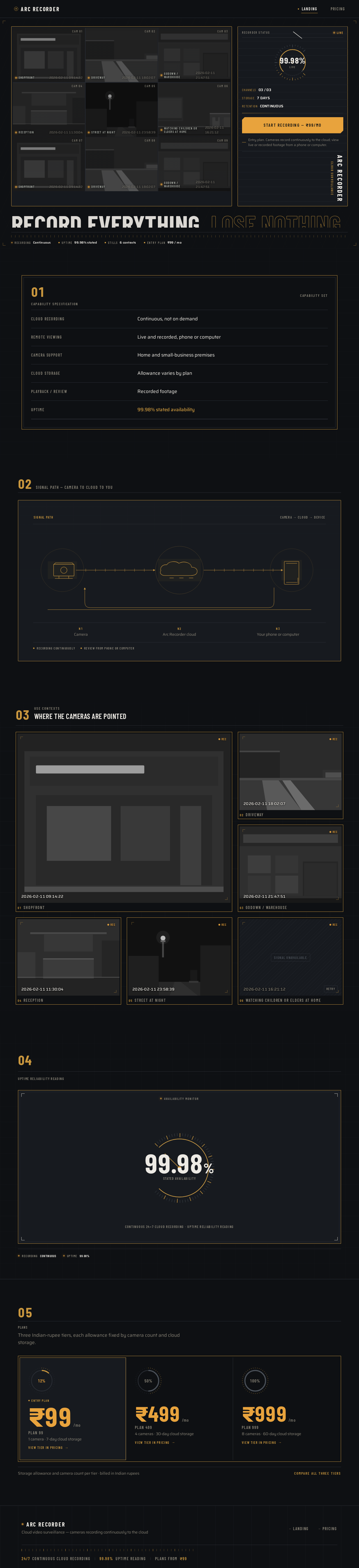
 CAM 01
 CAM 02
 CAM 03
 CAM 04
 CAM 05
 CAM 06CAM 07CAM 08CAM 09
Entry plan. Cameras record continuously to the cloud; view live or recorded footage from a phone or computer.
Capability specification
- Cloud recordingContinuous, not on demand
- Remote viewingLive and recorded, phone or computer
- Camera supportHome and small-business premises
- Cloud storageAllowance varies by plan
- Playback / reviewRecorded footage
- Uptime99.98% stated availability
Signal path — camera to cloud to you
Camera
Arc Recorder cloud
Your phone or computer
Where the cameras are pointed
REC2026-02-11 09:14:22REC2026-02-11 18:02:07REC2026-02-11 21:47:51REC2026-02-11 11:30:04 REC2026-02-11 23:58:39
 REC2026-02-11 16:21:12
Continuous 24×7 cloud recording · uptime reliability reading
CAM 01CAM 02CAM 03CAM 04CAM 05CAM 06CAM 07CAM 08CAM 09Entry plan. Cameras record continuously to the cloud; view live or recorded footage from a phone or computer.
Capability specification
- Cloud recordingContinuous, not on demand
- Remote viewingLive and recorded, phone or computer
- Camera supportHome and small-business premises
- Cloud storageAllowance varies by plan
- Playback / reviewRecorded footage
- Uptime99.98% stated availability
Signal path — camera to cloud to you
Camera
Arc Recorder cloud
Your phone or computer
Where the cameras are pointed
REC2026-02-11 09:14:22REC2026-02-11 18:02:07REC2026-02-11 21:47:51REC2026-02-11 11:30:04REC2026-02-11 23:58:39REC2026-02-11 16:21:12Continuous 24×7 cloud recording · uptime reliability reading
No comments yet. Be the first!