api-key
 حسام الشاذلي
عايز ابني او اعمل موقع لتشغيل وربط API key لجميع الموديلات من المزودين ويكون الموقع يدعم الاتصال مع openAI و كلود


Comments (0)
Sign in to leave a comment
System Requirements
System Requirements Document for api-key
1. Introduction
api-key is a website for running and linking API keys for models from multiple providers. A user brings their own provider API key, links it to the site, and then runs that provider's models through the site. The current release supports two named providers: OpenAI and Claude (Anthropic).
The product intent is narrow and deliberate: the site is the place where a user's own provider credentials are connected and where models from those connected providers are executed. The user supplies valid API keys for their own OpenAI or Claude provider accounts; the site does not sell, resell, or supply model access of its own.
The audience is technical: developers, AI tinkerers, and teams who already hold their own OpenAI and Anthropic keys and want one place to link them and run models from them.
2. System Overview
api-key is a first-party web application with application-owned identity. A visitor arrives at a public Landing page that explains what the site does and who it is for. From there the visitor can create an account on Sign Up or return on Login. Once identified, the user works in a signed-in area with a persistent left navigation rail containing Keys, Add Key, Run Model, and Results.
The signed-in area supports two recurring responsibilities:
- Linking keys. The user opens API Keys to see every linked OpenAI and Claude key and its connection status, and opens Add Key to supply and link a key for a supported provider. A linked provider API key must be available before that provider's models can be run.
- Running models. The user opens Run Model, selects a model from a connected OpenAI or Claude provider, and executes a run. The response returned from that run is viewed on Results, which is a revisitable output destination.
Actors:
- API Key Manager — the accepted human persona who adds, stores, and links provider API keys (OpenAI, Claude) so that model access works, and who confirms each key is connected and usable.
- Model Runner — the accepted human persona who selects a model from a connected provider and runs it through the site using the linked API key.
- OpenAI — external provider actor. Owns the user's OpenAI account, the user's OpenAI API key, and the OpenAI model endpoints the site calls.
- Claude (Anthropic) — external provider actor. Owns the user's Anthropic account, the user's Anthropic API key, and the Claude model endpoints the site calls.
Narrow exclusions for the current release:
- Provider support is limited to OpenAI and Claude as the named providers; other providers are not specified and are not part of the current release.
- API keys are supplied by the user for their own provider accounts. The site does not issue, sell, or supply provider keys.
2a. Product Interpretation and Delivery Boundary
Delivery ownership. The site is a first-party web application with custom UI. All seven destinations — Landing, Sign Up, Login, API Keys, Add Key, Run Model, and Results — are owned and rendered by the application. There is no provider-hosted or headless-only delivery surface in the current release.
Access ownership. Landing, Sign Up, and Login are anonymously reachable. API Keys, Add Key, Run Model, and Results require the user to be signed in. Identity is application-owned: the user establishes it on Sign Up and re-establishes it on Login. This identity exists because linked API-key records and prior model-run continuity must remain bound to the correct user across visits — a user who returns must find their own linked keys and their own prior run output, not someone else's. Sign Up and Login are therefore distinct anonymous entry boundaries; a protected destination never owns the interaction that establishes access to itself.
Provider ownership. OpenAI and Claude own the user's provider account, the validity and quota of the user's provider API key, and the model endpoints that produce model output. The site links the user's key and calls the provider; the provider decides whether the key is accepted and what the model returns. Provider-side rejection, quota exhaustion, or model unavailability are provider-owned outcomes that the site must surface truthfully rather than mask.
Current versus future. Everything described in this document is current. No future-horizon requirements were accepted in the authoritative thread; anything not stated here — additional providers, billing, team sharing, key rotation policy, usage analytics — is out of scope for this release and is not implied by the product category.
2b. Source Content Inventory
Not applicable. No reference directive in this project declares content_source, so no source content inventory is produced.
2c. Page Content and Component Coverage
Landing
- Information and state. Anonymous public entry. Explains what api-key is, who it is for (developers, AI tinkerers, and teams holding their own OpenAI and Anthropic keys), and what it does: link your own OpenAI and Claude API keys, then run those providers' models from one place. States plainly that the user brings their own key.
- Primary actions. Create an account (routes to Sign Up); sign in (routes to Login).
- Supporting actions. Navigate to the sign-in path for returning users; read the schematic explanation of how a key travels from the browser to OpenAI or Anthropic and how a response comes back.
- Domain entities. Provider (OpenAI, Claude); API key (conceptual, not yet supplied); model (conceptual).
- Component responsibilities. Hero block with the stacked headline, subline, and primary CTA; large pixel-art key-and-socket glyph; schematic request/response diagram; provider strip naming OpenAI and Claude; entry controls for Sign Up and Login.
- States. Loading: static content, no data fetch required. Empty: not applicable — the page is static explanatory content. Success: the visitor understands the product and chooses Sign Up or Login. Error: not applicable to page render; if a navigation target is unreachable, the visitor remains on Landing and can retry the entry control. Recovery: the visitor can re-select either entry control at any time.
Sign Up
- Information and state. Anonymous identity-establishment surface. Collects the minimum information needed to create the user's account so that linked keys and run output can be bound to that user.
- Primary actions. Submit the enrollment form to create the account and enter the signed-in area.
- Supporting actions. Move to Login if the visitor already has an account; correct and resubmit after a validation failure.
- Domain entities. User account (application-owned identity).
- Component responsibilities. Enrollment form with labeled fields; submit control; inline field-level validation messages; link to Login; submission progress indicator.
- States. Loading: submit control shows an in-progress state while the account is created. Empty: the form renders with empty fields on first arrival. Success: the account is created and the user lands in the signed-in area with access to API Keys, Add Key, Run Model, and Results. Error: invalid or incomplete input is reported inline against the offending field and the form retains what the user typed; if the account cannot be created, a clear message is shown and the form remains submittable. Recovery: the user corrects the field and resubmits, or switches to Login.
Login
- Information and state. Anonymous returning-verification surface. Verifies the returning user so their durable linked API-key records and prior model-run continuity become available again.
- Primary actions. Submit credentials to verify identity and enter the signed-in area.
- Supporting actions. Move to Sign Up if the visitor has no account; retry after a failed verification.
- Domain entities. User account (application-owned identity).
- Component responsibilities. Credential form with labeled fields; submit control; verification failure message; link to Sign Up; submission progress indicator.
- States. Loading: submit control shows an in-progress state while verification runs. Empty: the form renders with empty fields on first arrival. Success: the user is verified and lands in the signed-in area with their previously linked keys and prior run output reachable. Error: failed verification shows a clear, non-specific message and keeps the form submittable; the user's typed identifier is retained. Recovery: the user retries, or switches to Sign Up.
API Keys
- Information and state. Signed-in overview of every linked provider API key and its connection status. Groups keys by provider (OpenAI, Claude). Each key is represented by its masked value, its provider, its connection status, and its metadata (such as when it was linked). A full API key is never shown after it is saved; the masked monospace cell is the permanent representation.
- Primary actions. Open Add Key to link another key; open Run Model to run a model from a connected provider.
- Supporting actions. Inspect an individual key's status and metadata; copy the masked representation for reference; re-check a key's connection status.
- Domain entities. Linked API key (provider, masked value, connection status, linked-at metadata); Provider (OpenAI, Claude).
- Component responsibilities. Provider sections with all-caps headers and full-width rules; key cards in a two-up grid at desktop and one-up at mobile; masked-key monospace cell; 10px square status dot; per-key metadata row; empty-state block; Add Key entry control; Run Model entry control.
- States. Loading: key cards render as bordered placeholders while linked keys are fetched. Empty: no keys linked yet — an explicit empty state explains that a provider key must be linked before that provider's models can be run, with a direct control to Add Key. Success: each linked key shows its masked value and a solid pixel-green connected dot; a key that has just connected blinks its dot twice and then holds solid. Error: a key whose connection cannot be confirmed shows a non-connected status with a plain explanation and a control to re-check; if the key list cannot be loaded, an error state with a retry control replaces the grid. Recovery: the user re-checks the key, opens Add Key to link a replacement, or retries loading the list.
Add Key
- Information and state. Signed-in focused workspace for supplying and linking an API key for a supported provider. The user chooses the provider (OpenAI or Claude) and supplies the key value for their own provider account.
- Primary actions. Submit the provider and key value to link the key.
- Supporting actions. Choose between the two supported providers; cancel and return to API Keys; correct and resubmit after a validation or provider-rejection failure.
- Domain entities. Linked API key (provider, key value at submission time, connection status); Provider (OpenAI, Claude).
- Component responsibilities. Provider selector limited to OpenAI and Claude; key-value input; submit control; inline validation and provider-rejection messaging; cancel control returning to API Keys; submission progress indicator.
- States. Loading: submit control shows an in-progress state while the key is linked and its connection is confirmed. Empty: the form renders with no provider selected and an empty key field. Success: the key is linked, its status becomes connected, and the user is returned to API Keys where the new key card appears with its masked value. Error: a missing provider or missing key value is reported inline; a key the provider rejects is reported as not connected with a plain explanation and the form remains submittable so the user can correct the value. Recovery: the user corrects the provider or key value and resubmits, or cancels back to API Keys without creating a record.
Run Model
- Information and state. Signed-in workspace for selecting a model from a connected OpenAI or Claude provider and executing a run. Only providers with a linked, connected key are available for selection; a provider without a linked key cannot be run.
- Primary actions. Select a connected provider and one of its models, supply the run input, and execute the run.
- Supporting actions. Switch the selected provider; open Add Key when the desired provider has no linked key; review the run input before executing.
- Domain entities. Provider (OpenAI, Claude); Model (belongs to a provider); Linked API key (determines which providers are runnable); Run (provider, model, input, status, output reference).
- Component responsibilities. Provider selector showing only connected providers; model selector scoped to the chosen provider; run-input field; execute control; run-in-progress indicator; inline error surface for provider-side failures; link to Add Key when no provider is connected.
- States. Loading: provider and model selectors render as bordered placeholders while connected providers and their models are resolved. Empty: no provider has a linked key — an explicit empty state explains that a key must be linked first and offers a direct control to Add Key. Success: the run executes and its response is available on Results. Error: a provider-side rejection, quota failure, or model unavailability is reported plainly with the provider named, and the run input is preserved so the user can retry; if the run cannot be started at all, the execute control returns to its ready state with an explanation. Recovery: the user retries the run, switches to another connected provider or model, or opens Add Key to link or replace a key.
Results
- Information and state. Signed-in revisitable output destination for viewing the response returned from a model run. Shows the response together with the provider and model that produced it, so the user can tell which run they are looking at.
- Primary actions. Read the returned model output; return to Run Model to execute another run.
- Supporting actions. Copy the returned output; move between the current run's output and prior run output.
- Domain entities. Run (provider, model, input, status, output); Provider (OpenAI, Claude); Model.
- Component responsibilities. Output panel rendering the returned model response; run header naming provider and model; copy control; entry control back to Run Model; empty-state block; error block for runs that produced no output.
- States. Loading: the output panel shows a bordered placeholder while the run's response is retrieved. Empty: no run has been executed yet — an explicit empty state explains that a run must be executed first and offers a direct control to Run Model. Success: the returned model output is displayed in full with its provider and model named. Error: a run that failed or returned no output shows a plain explanation naming the provider, with a control to return to Run Model and retry. Recovery: the user returns to Run Model to retry or to run a different model, or retries loading the output.
3. Functional Requirements
Each requirement is a distinct story point with its provenance and observable acceptance.
FR-1 — Link an API key for a supported provider. As an API Key Manager, I should be able to supply and link an API key for a supported provider so that the provider's models become runnable from the site.
- Provenance:
explicit(the site is for linking API keys for models from the providers). - Trigger/input: the user opens Add Key, selects OpenAI or Claude, and supplies a key value for their own provider account.
- Observable result: a linked key record exists for that provider, its connection status is confirmed, and it appears on API Keys with its masked value.
- Access state: signed in.
- Failure/recovery: a missing provider or key value is reported inline; a key the provider rejects is reported as not connected with a plain explanation and the form remains submittable.
- Continuation: the user returns to API Keys, where the new key card is listed.
FR-2 — View linked keys and their connection status. As an API Key Manager, I should be able to see every linked provider API key and whether it is connected so that I know which providers are usable.
- Provenance:
explicit(linking API keys for models from the providers) with the overview surface established by the accepted page contract. - Trigger/input: the user opens API Keys.
- Observable result: keys are grouped by provider, each showing its masked value, connection status, and metadata; a newly connected key's status dot blinks twice and then holds solid.
- Access state: signed in.
- Failure/recovery: a key whose connection cannot be confirmed shows a non-connected status with a plain explanation and a re-check control; if the list cannot be loaded, an error state with retry replaces the grid.
- Continuation: the user opens Add Key to link another key, or Run Model to run a connected provider's model.
FR-3 — Never display a full saved API key. As an API Key Manager, I should see only a masked representation of each saved key so that my provider credentials are not exposed on screen.
- Provenance:
explicit(creative direction: showing a full API key after it is saved is forbidden; the masked monospace cell is the permanent representation). - Trigger/input: any rendering of a saved key on API Keys or elsewhere.
- Observable result: the key is shown as a masked monospace value in fixed-width cells, aligned across every card.
- Access state: signed in.
- Failure/recovery: not applicable — this is a rendering invariant, not an operation.
- Continuation: the user identifies the key by its masked value and metadata.
FR-4 — Run a model from a connected provider. As a Model Runner, I should be able to select a model from a connected OpenAI or Claude provider and execute a run so that I get model output from the site.
- Provenance:
explicit(models from the connected providers can be run through the site). - Trigger/input: the user opens Run Model, selects a connected provider and one of its models, supplies the run input, and executes.
- Observable result: the run executes against the selected provider and model, and its response becomes available on Results.
- Access state: signed in.
- Failure/recovery: a provider-side rejection, quota failure, or model unavailability is reported plainly with the provider named, and the run input is preserved for retry.
- Continuation: the user reads the response on Results, or returns to Run Model for another run.
FR-5 — A linked key is required before running that provider's models. As a Model Runner, I should be blocked from running a provider whose key is not linked, and told why, so that I do not attempt a run that cannot succeed.
- Provenance:
required_inference(a linked provider API key must be available before running that provider's models). - Trigger/input: the user opens Run Model while no key is linked for the desired provider.
- Observable result: only providers with a linked, connected key are selectable; when none is connected, an explicit empty state explains that a key must be linked first and offers a direct control to Add Key.
- Access state: signed in.
- Failure/recovery: the user opens Add Key, links a key, and returns to Run Model.
- Continuation: the newly connected provider becomes selectable and the run can proceed.
FR-6 — View the response returned from a model run. As a Model Runner, I should be able to view the response returned from a run, together with the provider and model that produced it, so that I can read and reuse the output.
- Provenance:
explicit(models can be run through the site) with the output destination established by the accepted page contract. - Trigger/input: the user opens Results after a run, or navigates to a prior run's output.
- Observable result: the returned model output is displayed in full with its provider and model named, and can be copied.
- Access state: signed in.
- Failure/recovery: a run that failed or returned no output shows a plain explanation naming the provider, with a control to return to Run Model and retry.
- Continuation: the user copies the output, or returns to Run Model to execute another run.
FR-7 — Connect to OpenAI. As an API Key Manager, I should be able to link an OpenAI API key so that OpenAI models can be run from the site.
- Provenance:
explicit(the site must support connection with OpenAI). - Trigger/input: the user selects OpenAI on Add Key and supplies their own OpenAI API key.
- Observable result: the OpenAI key is linked and its connection status is confirmed; OpenAI models become selectable on Run Model.
- Access state: signed in.
- Failure/recovery: a key OpenAI rejects is reported as not connected with a plain explanation and the form remains submittable.
- Continuation: the user runs an OpenAI model from Run Model.
FR-8 — Connect to Claude (Anthropic). As an API Key Manager, I should be able to link a Claude API key so that Claude models can be run from the site.
- Provenance:
explicit(the site must support connection with Claude). - Trigger/input: the user selects Claude on Add Key and supplies their own Anthropic API key.
- Observable result: the Claude key is linked and its connection status is confirmed; Claude models become selectable on Run Model.
- Access state: signed in.
- Failure/recovery: a key Anthropic rejects is reported as not connected with a plain explanation and the form remains submittable.
- Continuation: the user runs a Claude model from Run Model.
FR-9 — Self-service enrollment. As a visitor, I should be able to create my own account so that my linked keys and run output are bound to me and remain available when I return.
- Provenance:
required_inference(self-service enrollment for a user who begins using the site independently). - Trigger/input: the visitor opens Sign Up and submits the enrollment form.
- Observable result: the account is created and the user enters the signed-in area with access to API Keys, Add Key, Run Model, and Results.
- Access state: anonymous entry; the interaction is reachable without being signed in.
- Failure/recovery: invalid or incomplete input is reported inline against the offending field and the form retains what the user typed; if the account cannot be created, a clear message is shown and the form remains submittable.
- Continuation: the user links their first provider key on Add Key.
FR-10 — Returning verification. As a returning user, I should be able to verify myself so that I regain access to my durable linked API-key records and my prior model-run continuity.
- Provenance:
required_inference(returning verification for access to durable linked API-key records and prior model-run continuity). - Trigger/input: the user opens Login and submits their credentials.
- Observable result: the user is verified and lands in the signed-in area with previously linked keys and prior run output reachable.
- Access state: anonymous entry; the interaction is reachable without being signed in.
- Failure/recovery: failed verification shows a clear, non-specific message and keeps the form submittable with the typed identifier retained.
- Continuation: the user opens API Keys to review linked keys, or Run Model to execute a run.
FR-11 — Understand the product before committing. As a visitor, I should be able to understand what the site does and who it is for before creating an account so that I can decide whether to proceed.
- Provenance:
required_inference(anonymous first impression explaining the site, its users, and its ability to connect OpenAI and Claude API keys and run their models). - Trigger/input: the visitor opens Landing.
- Observable result: the page explains that the user brings their own OpenAI or Claude key, links it, and runs that provider's models from the site, with clear entry controls for Sign Up and Login.
- Access state: anonymous.
- Failure/recovery: if a navigation target is unreachable, the visitor remains on Landing and can retry the entry control.
- Continuation: the visitor chooses Sign Up or Login.
FR-12 — Provider support is limited to OpenAI and Claude. As a user, I should only be offered OpenAI and Claude as providers so that the site's provider scope matches what it actually supports.
- Provenance:
explicit(provider support is limited to OpenAI and Claude as the named providers; other providers are not specified). - Trigger/input: any provider selection on Add Key or Run Model.
- Observable result: the provider selector offers exactly OpenAI and Claude.
- Access state: signed in.
- Failure/recovery: not applicable — this is a scope invariant.
- Continuation: the user proceeds with one of the two supported providers.
FR-13 — The user supplies their own provider keys. As a user, I should supply my own OpenAI or Claude API key so that model access runs against my own provider account.
- Provenance:
explicit(API keys are supplied by the user for their own provider accounts). - Trigger/input: the user supplies a key value on Add Key.
- Observable result: the linked key belongs to the user's own provider account and is used for that provider's runs.
- Access state: signed in.
- Failure/recovery: a key the provider rejects is reported as not connected with a plain explanation.
- Continuation: the user runs models against their own provider account.
4. User Personas
API Key Manager
Product context. The API Key Manager is the persona whose recurring work is the key-to-provider connection itself. They hold their own OpenAI and Anthropic accounts and their own keys, and they treat the site as the place where those keys live and where their connection state is visible. They are technical: they know what an API key is, they know which provider issued it, and they expect the site to tell them plainly whether a key is working rather than hiding the answer behind a friendly abstraction.
Primary goal. Have every desired provider key linked and operational from the site, and be able to confirm at a glance that each one is connected and usable.
Distinct accepted responsibilities. This persona owns the linking lifecycle end to end: choosing a supported provider, supplying the key value for their own provider account, submitting it, and reading back the resulting connection status. They own the overview responsibility too — reviewing the set of linked keys grouped by provider, checking each key's status and metadata, and re-checking a key whose status is uncertain. They are the only persona whose work is about the credentials themselves rather than about what the credentials produce.
Relevant inputs and decisions. Which provider to link (OpenAI or Claude); the key value for that provider; whether a key that is not showing as connected should be re-checked or replaced; whether to link an additional provider key so that more models become runnable.
Interactions with other accepted participants. The API Key Manager's work is a prerequisite for the Model Runner's work: a provider's models cannot be run until that provider's key is linked and connected. The API Key Manager interacts with OpenAI and Claude as external providers, which own the user's account and decide whether a supplied key is accepted. The API Key Manager does not interact with the Model Runner directly; the handoff is the connection state itself.
Observable success. Every desired provider key appears on API Keys with its masked value and a solid connected status dot, and the corresponding provider is selectable on Run Model.
Model Runner
Product context. The Model Runner is the persona whose recurring work is executing models. They are technical — developers, AI tinkerers, or team members — and they want to get model output from the site without handling keys directly. They treat the linked key as plumbing that should already be in place, and they care about choosing the right provider and model and getting a usable response back.
Primary goal. Get model output from the site by selecting a model from a connected OpenAI or Claude provider and executing a run.
Distinct accepted responsibilities. This persona owns the run lifecycle: selecting a connected provider, choosing one of that provider's models, supplying the run input, executing the run, and reading the returned response together with the provider and model that produced it. They also own the recovery decision when a run fails — retrying, switching provider or model, or recognizing that a key needs to be linked and handing that work back to the key-linking path.
Relevant inputs and decisions. Which connected provider to run against; which model of that provider to use; what input to send; whether to retry a failed run, switch models, or link a key for a provider that is not yet connected.
Interactions with other accepted participants. The Model Runner depends on the API Key Manager's linked keys: only providers with a linked, connected key are selectable, and when none is connected the Model Runner is directed to the key-linking path. The Model Runner interacts with OpenAI and Claude as external providers, which own the model endpoints and decide what the model returns or whether the request is rejected. The Model Runner does not manage key values.
Observable success. A run executes against the chosen provider and model, and the returned response is readable on Results with its provider and model named.
5. Core User Flows
Flow A — A visitor understands the product and creates an account (API Key Manager or Model Runner)
- The visitor arrives at Landing without being signed in. The page explains that api-key is where you link your own OpenAI and Claude API keys and run those providers' models from one place, and names the audience: developers, AI tinkerers, and teams holding their own keys.
- The visitor reads the schematic showing a key travelling from the browser to OpenAI or Anthropic and a response coming back, and sees OpenAI and Claude named as the supported providers.
- The visitor selects the create-account control and arrives at Sign Up.
- The visitor fills in the enrollment form and submits it. The submit control shows an in-progress state.
- Observable result: the account is created and the user enters the signed-in area with access to API Keys, Add Key, Run Model, and Results.
- Failure and recovery: if a field is invalid or incomplete, the error is reported inline against that field and the form retains what the user typed; the user corrects it and resubmits. If the account cannot be created, a clear message is shown and the form remains submittable.
- Continuation: the user proceeds to Flow B to link their first provider key.
Flow B — The API Key Manager links an OpenAI or Claude API key
- The API Key Manager is signed in and opens API Keys. If no key is linked yet, the page shows an explicit empty state explaining that a provider key must be linked before that provider's models can be run, with a direct control to Add Key.
- The API Key Manager selects that control and arrives at Add Key.
- On Add Key, the API Key Manager chooses the provider — OpenAI or Claude. The selector offers exactly these two providers.
- The API Key Manager supplies the key value for their own provider account and submits. The submit control shows an in-progress state while the key is linked and its connection is confirmed.
- Observable result: the key is linked, its connection status becomes connected, and the user is returned to API Keys, where a new key card appears under its provider section showing the masked key value in a monospace cell, the provider, the connection status, and the linked-at metadata. The status dot blinks twice and then holds solid pixel-green.
- Failure and recovery: if the provider or key value is missing, the error is reported inline. If the provider rejects the key, it is reported as not connected with a plain explanation and the form remains submittable; the API Key Manager corrects the value and resubmits, or cancels back to API Keys without creating a record.
- Continuation: the API Key Manager repeats steps 2–5 for the second provider if they want both OpenAI and Claude models available, then proceeds to Flow C.
Flow C — The API Key Manager reviews linked keys and their connection status
- The API Key Manager is signed in and opens API Keys.
- The page shows keys grouped by provider — OpenAI and Claude — each with an all-caps provider header and a full-width rule. Each key card shows the masked key value, the connection status, and metadata.
- The API Key Manager inspects a key whose status is not showing as connected and selects the re-check control.
- Observable result: the key's connection status is refreshed and displayed truthfully — connected, or not connected with a plain explanation.
- Failure and recovery: if the key list cannot be loaded, an error state with a retry control replaces the grid; the API Key Manager retries. If a key remains not connected, the API Key Manager opens Add Key to link a replacement.
- Continuation: with the desired keys connected, the API Key Manager's prerequisite work is complete and the Model Runner's work becomes possible.
Flow D — The Model Runner runs a model from a connected provider
- The Model Runner is signed in and opens Run Model. The provider selector shows only providers with a linked, connected key.
- The Model Runner selects a connected provider — OpenAI or Claude.
- The Model Runner selects one of that provider's models. The model selector is scoped to the chosen provider.
- The Model Runner supplies the run input and executes the run. The run-in-progress indicator is shown.
- Observable result: the run executes against the selected provider and model using the linked key, and the response becomes available on Results.
- Failure and recovery: if the provider rejects the request, the quota is exhausted, or the model is unavailable, the failure is reported plainly with the provider named and the run input is preserved. The Model Runner retries, switches to another connected provider or model, or opens Add Key to link or replace a key.
- Continuation: the Model Runner proceeds to Flow E to read the response.
Flow E — The Model Runner reads the returned response
- The Model Runner arrives at Results after a run, or navigates to a prior run's output.
- The output panel shows the returned model output in full, with a run header naming the provider and model that produced it.
- Observable result: the Model Runner reads the response and can copy it with the copy control.
- Failure and recovery: if the run failed or returned no output, a plain explanation naming the provider is shown with a control to return to Run Model and retry. If the output cannot be loaded, the panel shows an error state and the Model Runner retries loading it.
- Continuation: the Model Runner returns to Run Model to execute another run, or leaves the site with the output copied.
Flow F — The Model Runner is blocked because no key is connected
- The Model Runner is signed in and opens Run Model while no provider has a linked key.
- Observable result: the page shows an explicit empty state explaining that a key must be linked before a provider's models can be run, with a direct control to Add Key. No provider is selectable.
- The Model Runner selects the control and arrives at Add Key, where they link a key for OpenAI or Claude following Flow B steps 3–5.
- Continuation: the Model Runner returns to Run Model, where the newly connected provider is now selectable, and proceeds with Flow D.
Flow G — A returning user regains access to their linked keys and prior run output
- The returning user arrives at Landing and selects the sign-in control, arriving at Login.
- The user submits their credentials. The submit control shows an in-progress state while verification runs.
- Observable result: the user is verified and lands in the signed-in area with their previously linked keys and prior run output reachable.
- Failure and recovery: failed verification shows a clear, non-specific message and keeps the form submittable with the typed identifier retained; the user retries, or switches to Sign Up if they have no account.
- Continuation: the user opens API Keys to review linked keys (Flow C) or Run Model to execute a run (Flow D).
6. Visuals, Colors and Theme
The creative direction is authoritative for this section. The muse is Susan Kare, and the headline idea is charming clarity: pixel-perfect API plumbing — a warm, handmade, grid-you-can-feel surface for a technical tool, deliberately not the generic blue-on-white SaaS dashboard.
Color tokens
Light mode (primary):
| Role | Hex | Use |
|---|---|---|
| Background | #F4F1EA | Warm paper ground for every page |
| Surface | #FFFDF8 | Bone-white surfaces so key cards read as physical tiles |
| Text | #1C1B18 | Ink black — all type and the chunky 2px borders |
| Primary | #1C1B18 | Ink black for primary structural elements |
| Accent | #E4572E | Burnt pixel-orange — spent sparingly: connected status dots, primary CTA fill, active tab underline, focus rings |
| Connected signal | #3E8E5A | Crisp pixel-green — used only for 'connected' status |
| Muted | #8A857B | Muted grey-brown for metadata, timestamps, and disabled states |
| Grid rule | #E3DED2 | 1px warm-grey ruled gutters and section rules |
No blue, indigo, or violet anywhere in the palette. The accent is burnt orange and status is pixel green.
Typography
- Headings and labels: Silkscreen at 400/700, all-caps for section labels and button text, with generous letterspacing of
0.04emso pixel counters stay legible. Headings are set large and blocky, never italic, never softened with rounding. - Body and all UI text: DM Mono at 400, with 500 for emphasis. Numbers are always monospace and tabular so key counts, token counts, and latencies line up in columns.
- Type scale (1.25 modular): 12 / 14 / 16 / 20 / 25 / 40 / 64. Hero display clamps 40px mobile → 64px desktop. Section headings 25/20. Body 16/14. Labels 12 all-caps with
0.08emtracking. - Line height: 1.55 for body, 1.05 for display.
Shape language
Chunky-outline rectangles with 4px radii — the Kare tile. Every control (button, input, key card, model row, tab) is a bordered box with a 2px ink stroke and a 4px hard offset shadow in ink at 100% opacity, no blur. Status is a filled 10px square dot, not a pill. Icons are 24px pixel-drawn glyphs on a visible 24-unit grid: a key, a plug, a bolt, a terminal caret, a clipboard. No soft shadows, no gradients, no glass.
Layout
A tidy 12-column grid with visible 1px ruled gutters in warm grey (#E3DED2), so the page reads as a ruled sheet of graph paper. A left rail (240px) holds the app nav as a vertical stack of bordered tiles with pixel icons: Keys, Add Key, Run Model, Results. The main column is a two-up grid of key cards at desktop, one-up at mobile. Provider sections are labelled with all-caps Silkscreen headers and a horizontal rule spanning the full content width. Everything aligns to an 8px baseline; nothing floats free.
Imagery
Pixel icons and simple pictograms only — no photography, no illustration for its own sake, no 3D. A single large pixel-art motif (a key turning in a lock, or a plug meeting a socket) is drawn on the landing hero as a 24-unit grid of filled squares. Supporting graphics are schematic: a ruled diagram showing your key travelling from browser to OpenAI or Anthropic and a response coming back, drawn in flat ink strokes with the accent used on the request arrow.
7. Signature Design Concept
The public entry is an asymmetric two-column hero on the warm paper ground, built from the direction's hero direction and signature moves.
Left 7 columns. A Silkscreen headline reading BRING YOUR OWN KEY, stacked in three lines, clamped 40px mobile → 64px desktop, each line sitting on its own ruled baseline like a form field. Beneath it, the subline in DM Mono explains the product in one sentence: link your own OpenAI and Claude API keys, then run those providers' models from one place. Directly under the subline sits the accent-filled CTA button — offset-shadow box and all — with the secondary sign-in control beside it.
Right 5 columns. A large pixel-art key-and-socket glyph drawn as a grid of ink squares, roughly 420px square at desktop and 260px at mobile, bleeding off the right edge of the viewport so it is cropped by the frame rather than contained. A thin accent-orange arrow runs from the glyph back to the CTA, tying the metaphor to the action.
Signature moves carried into the hero. Every interactive control is a bordered tile with a 2px ink stroke and a 4px hard offset shadow that collapses to zero on press, so the CTA physically clicks into the page. The 12-column grid is drawn, not implied: 1px warm-grey rules separate the columns and the section beneath the hero. The hero's pixel-art key glyph is cropped by the right viewport edge at 1280px and reflows below the CTA at 375px, never scaling down to a thumbnail.
No centred headline, no gradient, no floating cards. The concept recomposes only accepted content — the product explanation, the two providers, and the Sign Up and Login entry controls — and introduces no new behaviour, page, or destination.
8. Interaction Model & Motion Direction
Interaction Model: Static Motion Tempo: restrained Hero Dimensionality: flat
Landing Hero Motion Brief
- Focal subject: the pixel-art key-and-socket glyph on the right of the hero, drawn as a grid of ink squares and cropped by the right viewport edge.
- Input → transformation → outcome thesis: the visitor's attention moves from the stacked headline on its ruled baselines, along the thin accent-orange arrow, to the accent-filled CTA; the arrow's direction makes the relationship between the key glyph and the action legible without any state change. The outcome is a visitor who understands that they bring their own key and then chooses Sign Up or Login.
- Motion vocabulary: frame-by-frame micro animations at 100–150ms with
steps()easing, never smooth cubic-bezier. The CTA's offset shadow collapses to 0 on press so it visually clicks into the page. No parallax, no hover-lift, no bouncy springs. - Composed first frame: warm paper ground; left 7 columns carrying the three-line Silkscreen headline on ruled baselines, the DM Mono subline, and the offset-shadow CTA; right 5 columns carrying the ink pixel glyph, cropped by the frame; a thin accent-orange arrow running from the glyph back to the CTA; 1px warm-grey rules separating the columns.
- Reduced-motion state: with
prefers-reduced-motion, all of this resolves instantly to the end state — the press shadow collapse and the status-dot blink are skipped and the final visual state is shown immediately.
The only animation in the app is provider status: a 10px square dot blinks twice in steps() when a key connects, then holds solid pixel-green. With prefers-reduced-motion it resolves instantly to the solid end state.
9. Non-Functional Requirements
NFR-1 — Provider scope is limited to OpenAI and Claude.
Provenance: explicit. Rationale: the authoritative thread names OpenAI and Claude as the supported providers and states that other providers are not specified. The provider selector on Add Key and Run Model offers exactly these two.
NFR-2 — API keys are supplied by the user for their own provider accounts.
Provenance: explicit. Rationale: the authoritative thread establishes that the user brings their own keys. The site does not issue, sell, or supply provider credentials, and model access runs against the user's own provider account.
NFR-3 — A saved API key is never displayed in full.
Provenance: explicit (creative direction). Rationale: the masked monospace cell is the permanent representation of a saved key. This is a hard rendering constraint across every surface.
NFR-4 — Linked key records and run output are bound to the correct user.
Provenance: required_inference. Rationale: linked API-key records and prior model-run continuity must remain bound to the correct participant, which is why application-owned identity and returning verification exist. A signed-in user sees only their own linked keys and their own run output.
NFR-5 — Provider failures are surfaced truthfully.
Provenance: required_inference. Rationale: OpenAI and Claude own key validity, quota, and model availability. The site must report a provider-side rejection, quota failure, or model unavailability plainly with the provider named, rather than masking it as a generic error or a success.
NFR-6 — Readable text and controls stay whole at every viewport.
Provenance: explicit (creative direction). Rationale: headlines, wordmarks, labels, numbers, cards' text, and controls stay entirely inside the viewport and their container at 375px, 768px, and 1280px, wrapping or scaling (for example font-size: clamp(...) with its mobile size) to fit, and no other element covers any part of them. Imagery and decoration may be cropped, bled off an edge, or overlapped exactly as the direction asks, as long as they cover no readable text or control.
NFR-7 — Accessibility of motion.
Provenance: explicit (creative direction). Rationale: with prefers-reduced-motion, all micro animations resolve instantly to their end state, including the status-dot blink and the button press shadow collapse.
NFR-8 — No blue, indigo, or violet; no gradients, glass, or soft shadows.
Provenance: explicit (creative direction). Rationale: the palette is warm paper, ink, burnt orange, and pixel green; every edge is a hard 2px stroke; the generic indigo/blue-on-white SaaS template is forbidden for this project.
10. Tech Stack
No technology choices were specified by the user. The following are coherent defaults for this product and are labeled as such.
- Frontend: React
[Default — not specified by user]— a single-page application rendering the seven destinations, with the signed-in area behind an application-owned session. - Backend: Python / FastAPI
[Default — not specified by user]— serves the application API, holds the user's linked key records, and performs the outbound calls to the OpenAI and Claude model endpoints using the user's linked key. - Storage: a relational database
[Default — not specified by user]— persists user accounts, linked key records (provider, masked representation, connection status, linked-at metadata), and run records (provider, model, input, status, output). - Containerization: Docker and docker-compose
[Default — not specified by user]— packages the frontend, backend, and database for local and single-host deployment. - Orchestration: Kubernetes is not required for the current release
[Default — not specified by user]— the accepted scope is a single web application with one backend service and one database.
11. Assumptions and Constraints
Assumptions
- A-1. The user already holds an OpenAI or Anthropic account and a valid API key for it. The site does not create provider accounts or issue provider keys. (Source-backed: API keys are supplied by the user for their own provider accounts.)
- A-2. The site can reach the OpenAI and Claude model endpoints over the network to execute runs. (Required for the accepted run capability.)
- A-3. A user's linked keys and run output are private to that user; no sharing, team access, or delegated key management is assumed. (Narrow inference from application-owned identity; no sharing capability was accepted.)
- A-4. The set of models offered per provider is whatever that provider makes available to the user's own account; the site does not curate or gate models beyond provider availability. (Narrow inference from running models from the connected providers.)
Constraints
- C-1. Provider support is limited to OpenAI and Claude as the named providers; other providers are not specified and are out of scope for the current release. (Explicit.)
- C-2. API keys are supplied by the user for their own provider accounts. (Explicit.)
- C-3. A linked provider API key must be available before running that provider's models. (Required inference.)
- C-4. A saved API key is never displayed in full; the masked monospace cell is the permanent representation. (Explicit, creative direction.)
- C-5. No blue, indigo, or violet anywhere in the palette; no gradients, frosted glass, blurred shadows, or soft-edged surfaces; no photography, stock people, 3D renders, or abstract gradient blobs; no rounded pill buttons or 16px+ corner radii. (Explicit, creative direction.)
- C-6. Headings and body use Silkscreen and DM Mono respectively; Inter, Roboto, system-ui, and any neutral grotesque are excluded. (Explicit, creative direction.)
- C-7. No future-horizon requirements were accepted. Additional providers, billing, team sharing, key rotation policy, and usage analytics are not part of this release and are not implied by the product category.
12. Glossary
- API key — a credential issued by a model provider (OpenAI or Claude) that authorizes requests to that provider's model endpoints. In this product, the user supplies their own.
- Linked key — an API key the user has supplied and connected to the site for a specific provider, stored as a record with a masked representation, a connection status, and linked-at metadata.
- Masked key — the permanent on-screen representation of a saved key, shown as monospace characters in fixed-width cells (for example
sk-••••••••••••4f2a). A full saved key is never displayed. - Connection status — whether a linked key is currently accepted and usable for its provider. Rendered as a 10px square dot: solid pixel-green when connected, non-connected otherwise.
- Provider — an external model provider. The current release supports exactly two: OpenAI and Claude (Anthropic).
- Model — a specific model offered by a provider. Models are selectable on Run Model only for providers with a linked, connected key.
- Run — a single execution of a selected model from a connected provider with a supplied input, producing a response. A run records its provider, model, input, status, and output.
- Results — the signed-in destination where the response returned from a model run is viewed, together with the provider and model that produced it.
- API Key Manager — the accepted persona who adds, stores, and links provider API keys and confirms each key is connected and usable.
- Model Runner — the accepted persona who selects a model from a connected provider and runs it through the site using the linked API key.
- Kare tile — the shape language of this product: a bordered rectangle with a 4px radius, a 2px ink stroke, and a 4px hard offset shadow in ink at 100% opacity with no blur.
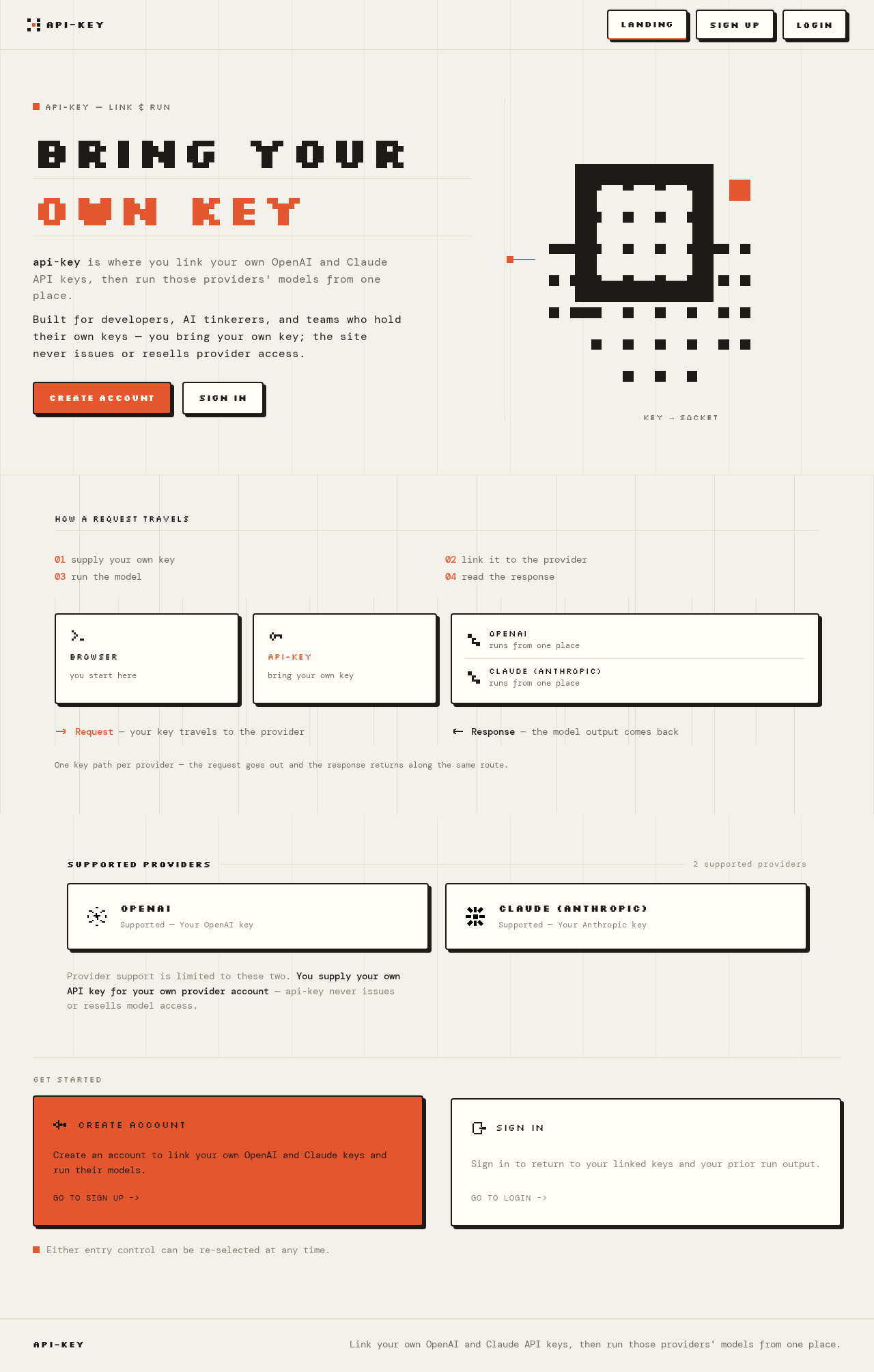
api-key — link & run
BRING YOUROWN KEY
api-key is where you link your own OpenAI and Claude API keys, then run those providers' models from one place.Built for developers, AI tinkerers, and teams who hold their own keys — you bring your own key; the site never issues or resells provider access.
Key → socket
How a request travels
- supply your own key
- link it to the provider
- run the model
- read the response
Request — your key travels to the provider
Response — the model output comes back
One key path per provider — the request goes out and the response returns along the same route.
Supported providers
2 supported providers- OpenAISupported — Your OpenAI key
- Claude (Anthropic)Supported — Your Anthropic key
Provider support is limited to these two. You supply your own API key for your own provider account — api-key never issues or resells model access.
Get Started
Either entry control can be re-selected at any time.
api-key — link & run
BRING YOUROWN KEY
api-key is where you link your own OpenAI and Claude API keys, then run those providers' models from one place.Built for developers, AI tinkerers, and teams who hold their own keys — you bring your own key; the site never issues or resells provider access.
Key → socket
How a request travels
- supply your own key
- link it to the provider
- run the model
- read the response
Request — your key travels to the provider
Response — the model output comes back
One key path per provider — the request goes out and the response returns along the same route.
Supported providers
2 supported providers- OpenAISupported — Your OpenAI key
- Claude (Anthropic)Supported — Your Anthropic key
Provider support is limited to these two. You supply your own API key for your own provider account — api-key never issues or resells model access.
Get Started
Either entry control can be re-selected at any time.
No comments yet. Be the first!