
amarya-ai

bySeun Ogundipe

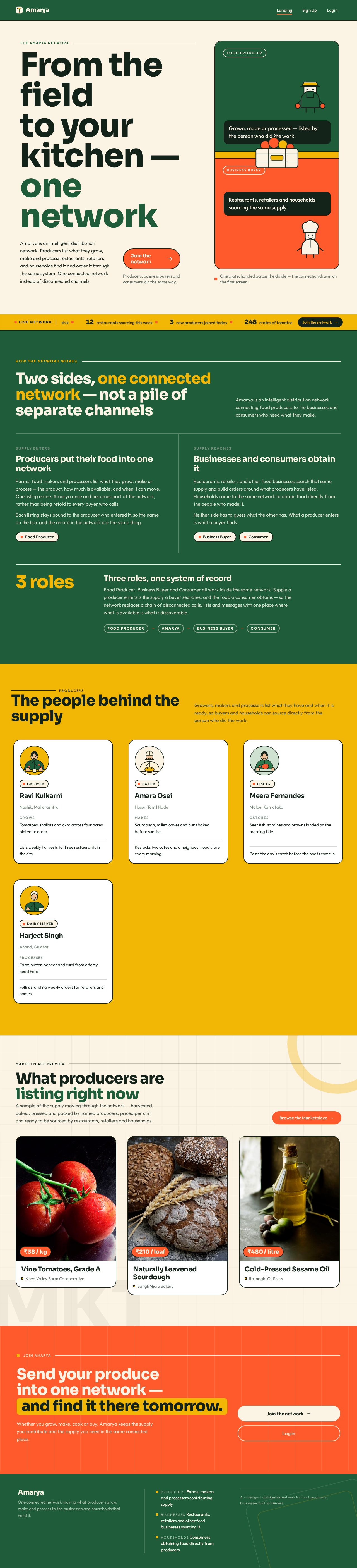
build Amarya as an intelligent distribution network connecting food producers to businesses and consumers.

Landing
Landing

Comments (0)

No comments yet. Be the first!

Project Tasks

25 planning tasks
#1

Generate system requirement document

1m 3s0.1 cr used
Done
#2

Generate personas & user flows

0m 14s0.1 cr used
Done
#7

Create flow for Food Producer

0m 13sCredits in parent
Done
#8

Create flow for Business Buyer

0m 12sCredits in parent
Done
#9

Create flow for Consumer

0m 12sCredits in parent
Done
#10

Landing

4m 25sCredits in subtasks
Done
#27

Fix Landing review findings: frontend/src/components/Landing Hero.jsx +… (+4 more)

0m 35s0.2 cr used
Done
#17

Landing / Amarya Header

0m 22s0.8 cr used
Done
#18

Landing / Hero

0m 29s0.8 cr used
Done
#19

Landing / Live Network Ticker

0m 25s0.8 cr used
Done
#20

Landing / Network Explainer

0m 30s0.8 cr used
Done
#21

Landing / Producer Band

0m 31s0.8 cr used
Done
#22

Landing / Marketplace Preview

0m 30s0.8 cr used
Done
#23

Landing / Closing Cta

0m 23s0.8 cr used
Done
#24

Landing / Amarya Footer

0m 23s0.8 cr used
Done
#25

Amarya Header

0m 22sCredits in parent
Done
#26

Amarya Footer

0m 23sCredits in parent
Done
#11

Sign Up

Credits in subtasks
Backlog
#12

Login

Credits in subtasks
Backlog
#13

Supply

Credits in subtasks
Backlog
#14

New Supply

Credits in subtasks
Backlog
#15

Marketplace

Credits in subtasks
Backlog
#16

Orders

Credits in subtasks
Backlog
#5

Architecture

0.1 cr needed
Backlog
#6

Workspace task plan

0.1 cr needed
Backlog
Landing design preview
Landing: Read network explanation
Sign Up: Choose Business Buyer role
Sign Up: 1. Submit enrollment
Sign Up: 2. Correct rejected enrollment
Marketplace: 1. Filter visible supply
Marketplace: 2. Clear filters on empty results
Marketplace: 3. Retry loading supply
Marketplace: 4. Open listing detail
Marketplace: 5. Select listing
Orders: 6. Review order composition
Orders: 7. Confirm order
Orders: 8. Revisit past order
Orders: 9. Return for unavailable listing
Orders: Retry loading history
Login: Submit credentials
Landing design preview
Landing: Read network explanation
Sign Up: Choose Business Buyer role
Sign Up: 1. Submit enrollment
Sign Up: 2. Correct rejected enrollment
Marketplace: 1. Filter visible supply
Marketplace: 2. Clear filters on empty results
Marketplace: 3. Retry loading supply
Marketplace: 4. Open listing detail
Marketplace: 5. Select listing
Orders: 6. Review order composition
Orders: 7. Confirm order
Orders: 8. Revisit past order
Orders: 9. Return for unavailable listing
Orders: Retry loading history
Login: Submit credentials