Page 1 of 26
System Requirements Document for amarya-ai
1. Introduction
Amarya is an intelligent distribution network that connects food producers to businesses and consumers. The product exists so that the food a producer grows, makes, or processes can move through one connected network to the restaurants, retailers, and households that need it — instead of through disconnected channels.
The audience is two-sided and spans a wide range of digital confidence:
- Food Producers — farms, food makers, and processors who need to be reachable through the network and whose recurring work is putting product and availability information into Amarya so it can be distributed onward.
- Business Buyers — restaurants, retailers, and other food businesses whose recurring work is discovering and obtaining producer supply through the network.
- Consumers — individuals who use Amarya to obtain food directly from producers.
Amarya is delivered as a first-party web application with application-owned identity. Producers self-enroll and manage the supply they contribute to the network; business buyers and consumers self-enroll and obtain food from that supply. The network is the product: supply entered by producers becomes discoverable and obtainable by buyers and consumers through the same system.
Page 2 of 26
2. System Overview
Amarya is a custom-UI web application backed by a first-party service layer and persistent storage. Its current scope is the complete, usable distribution lifecycle:
- A visitor learns what Amarya is on the Landing page.
- A producer, business buyer, or consumer establishes a first-use application identity on Sign Up, or verifies an existing identity on Login.
- A Food Producer reviews and maintains the supply they distribute through Amarya on Supply, and adds new food supply information on New Supply.
- A Business Buyer or Consumer discovers producer supply on Marketplace and completes and revisits obtaining food from producers on Orders.
Actors:
- Active human personas (closed set): Food Producer, Business Buyer, Consumer.
- Non-persona actors: the Amarya application and its backend service layer (identity verification, supply persistence, marketplace indexing, order persistence), and the persistent data store.
Ownership and access:
- Landing, Sign Up, and Login are publicly reachable.
- Supply and New Supply are role-restricted to Food Producers.
- Marketplace and Orders are role-restricted to Business Buyers and Consumers.
Narrow exclusions: Amarya does not currently include logistics fleet management, cold-chain telemetry, payments settlement infrastructure beyond recording what an order requires, or third-party marketplace syndication. These are not part of the accepted current scope and are not implemented.
Page 3 of 26
2a. Product Interpretation and Delivery Boundary
Amarya is delivered entirely as a first-party application. There is no provider-owned or external surface in the current scope: every page a human interacts with is owned and rendered by Amarya, and every durable record — identity, supply listing, order — is owned by Amarya's own backend and storage.
Access ownership is application-owned. Because a producer's supply must remain bound to the correct producer across sessions, and because a buyer's or consumer's order must remain bound to the correct participant, Amarya establishes and verifies its own identities. First use is self-service enrollment on Sign Up; returning participants verify on Login. The entry interactions for both are anonymous — a person who has no identity yet can reach Sign Up, and a person who has an identity but no active session can reach Login, without either being gated behind the state they establish.
Role-aware authorization separates producer supply management from buyer and consumer procurement. This is a separation of working surfaces, not a differentiated permission system over shared state: a Food Producer works on supply surfaces, and Business Buyers and Consumers work on discovery and order surfaces.
Current delivery horizon: everything described in this document. There is no accepted future-horizon requirement in the authoritative thread; nothing is deferred.
2b. Source Content Inventory
Not applicable. No reference directive in this project declares content_source authority, so no source content inventory is produced.
Page 4 of 26
2c. Page Content and Component Coverage
Page 5 of 26
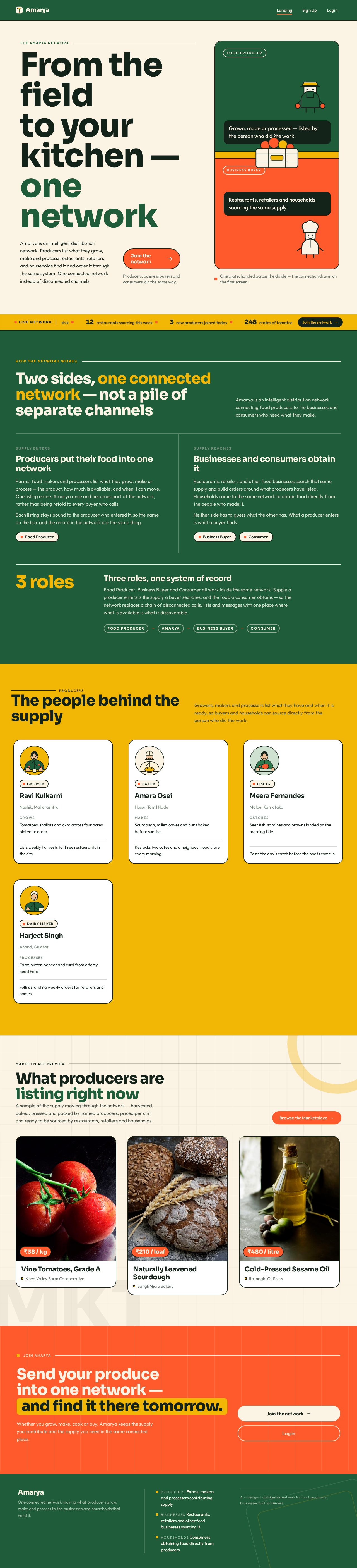
Landing
- Information and state: Public, anonymous. Explains that Amarya is an intelligent distribution network connecting food producers to businesses and consumers. Presents the two sides of the network — producers contributing supply, and businesses and consumers obtaining it — and the value of one connected network over disconnected channels. No personalized or session state.
- Primary actions: Go to Sign Up to join the network; go to Login to verify an existing identity.
- Supporting actions: Navigate to the network explanation, producer strip, marketplace preview, and closing call-to-action bands.
- Domain entities: none persisted; the page describes the network, its two sides, and the three participant roles.
- Component responsibilities:
- Hero band (cream ground) — headline "From the field to your kitchen — one network", supporting subhead, and the primary coral call-to-action into Sign Up.
- Hero composition — a green producer panel and a coral buyer panel joined by a sunflower divider, with an illustrated crate crossing the seam so the connection between the two sides is drawn on the first screen.
- Live-network ticker (sunflower band) — a single row of real network counts (listings, businesses sourcing, producers joined), pausing on hover.
- Network explainer band (green ground) — how supply enters the network and how it reaches businesses and consumers, opened by a 12px uppercase tracked eyebrow and a rule.
- Producer band (sunflower ground) — producer cards with a thick 2px ink border, a circle-cropped illustrated portrait, and a flat coral offset block on hover.
- Marketplace preview band (cream ground) — a preview of the kind of producer supply discoverable on Marketplace.
- Closing call-to-action band (coral ground) — the final invitation into Sign Up and Login.
- States:
- Loading: static content renders immediately; the ticker shows its counts once available.
- Empty: if no live counts are available, the ticker band renders its labels without numbers rather than showing a broken row.
- Success: the visitor understands the network and can reach Sign Up or Login.
- Error: if live counts fail to load, the ticker degrades to static descriptive text; the rest of the page is unaffected.
- Recovery: the visitor can still proceed to Sign Up or Login regardless of ticker state.
Page 6 of 26
Sign Up
- Information and state: Public, anonymous. Collects the information needed to establish a first-use application identity and to know which side of the network the person belongs to. No protected state is available before identity is established.
- Primary actions: Submit enrollment to create the identity.
- Supporting actions: Choose the participant role — Food Producer, Business Buyer, or Consumer; move to Login if an identity already exists.
- Domain entities: Participant identity (name, contact/verification detail, role: Food Producer | Business Buyer | Consumer).
- Component responsibilities:
- Role selection — the three accepted participant roles, presented as a clear choice that determines which surfaces the participant works on afterward.
- Identity fields — the minimum information required to establish and later verify the identity.
- Submit control — the single coral action that creates the identity.
- Link to Login — for people who already have an identity.
- States:
- Loading: the submit control shows an in-progress state while the identity is being created.
- Empty: all fields start empty with no pre-selected role.
- Success: the identity is created and the participant continues into the surface for their role — Supply for a Food Producer, Marketplace for a Business Buyer or Consumer.
- Error: missing or invalid fields are identified inline next to the field; a duplicate or rejected identity is reported at the form level with the reason.
- Recovery: entered values are preserved after a failed submission so the participant can correct and resubmit without re-entering everything.
Page 7 of 26
Login
- Information and state: Public, anonymous. Verifies an existing participant identity so the participant can resume their own supply or procurement work. No protected state is available before verification succeeds.
- Primary actions: Submit credentials to verify identity.
- Supporting actions: Move to Sign Up if no identity exists.
- Domain entities: Participant identity and its verification credential.
- Component responsibilities:
- Credential fields — the verification input for an existing identity.
- Submit control — the single coral action that verifies the identity.
- Link to Sign Up — for people who have not yet enrolled.
- States:
- Loading: the submit control shows an in-progress state while verification runs.
- Empty: fields start empty.
- Success: the identity is verified and the participant continues into the surface for their role — Supply for a Food Producer, Marketplace for a Business Buyer or Consumer.
- Error: incorrect credentials are reported without revealing which part was wrong; repeated failures are reported with the same non-revealing message.
- Recovery: the participant can retry immediately, or move to Sign Up if they do not have an identity.
Page 8 of 26
Supply
- Information and state: Role-restricted to Food Producers. Shows the supply this producer currently distributes through Amarya — the listings they have contributed, with their current details and availability. This is the producer's authoritative view of their own contribution to the network.
- Primary actions: Open New Supply to add food supply information to the network.
- Supporting actions: Review an existing listing's details; maintain a listing's information so what the network distributes stays accurate.
- Domain entities: Supply listing (produce/food item, description, quantity or availability, price, producer identity).
- Component responsibilities:
- Supply list — the producer's own listings, each showing item, availability, and price, with the producer's identity attached.
- Listing detail — the full information for one listing, editable in place.
- Add control — the coral action that opens New Supply.
- Empty-state panel — shown when the producer has contributed no supply yet, with the add action as the way forward.
- States:
- Loading: the list shows a loading state while the producer's listings are retrieved.
- Empty: no listings yet — the empty-state panel explains that nothing is being distributed and offers the add action.
- Success: the producer's listings are shown with their current details, and edits are reflected immediately.
- Error: if listings fail to load, the page reports the failure and offers a retry; if a listing update fails, the listing reverts to its previous values and the failure is reported on that listing.
- Recovery: retry reloads the list; a failed edit can be corrected and resubmitted without losing the rest of the list.
Page 9 of 26
New Supply
- Information and state: Role-restricted to Food Producers. A focused form for adding one new food supply listing to the Amarya network. The producer's identity is attached automatically; it is not re-entered.
- Primary actions: Submit the listing so it becomes part of the network's distributable supply.
- Supporting actions: Cancel and return to Supply without adding anything.
- Domain entities: Supply listing (produce/food item, description, quantity or availability, price, producer identity).
- Component responsibilities:
- Listing fields — item, description, quantity or availability, and price.
- Submit control — the single coral action that adds the listing to the network.
- Cancel control — returns to Supply with nothing added.
- States:
- Loading: the submit control shows an in-progress state while the listing is being added.
- Empty: all fields start empty.
- Success: the listing is added, the producer returns to Supply, and the new listing appears in their supply list and becomes discoverable on Marketplace.
- Error: missing or invalid fields are identified inline; a rejected submission is reported at the form level with the reason.
- Recovery: entered values are preserved after a failed submission so the producer can correct and resubmit.
Page 10 of 26
Marketplace
- Information and state: Role-restricted to Business Buyers and Consumers. Shows food supply made available by producers across the network, with each item's producer identity attached so the buyer or consumer knows who grew or made it. Filter and result state is held on the page.
- Primary actions: Select a listing to obtain it, which moves the participant into Orders to complete the acquisition.
- Supporting actions: Filter and narrow the visible supply; open a listing's full detail.
- Domain entities: Supply listing (item, description, availability, price, producer identity).
- Component responsibilities:
- Filter rail — the controls that narrow visible supply.
- Result grid — producer supply cards, each carrying the item image, title, producer name, and price whole inside the card at every viewport width.
- Listing detail — the full information for one listing, including the producer behind it.
- Select control — the coral action that begins obtaining the listing.
- Empty-state panel — shown when filters match no supply.
- States:
- Loading: the result grid shows a loading state while supply is retrieved.
- Empty: no supply matches the current filters — the empty-state panel says so and offers to clear the filters.
- Success: matching producer supply is shown, and selecting a listing moves the participant into Orders with that listing.
- Error: if supply fails to load, the page reports the failure and offers a retry; a listing that has become unavailable is reported when selected rather than silently failing.
- Recovery: retry reloads supply; clearing filters restores the full result set.
Page 11 of 26
Orders
- Information and state: Role-restricted to Business Buyers and Consumers. Shows the orders this participant has placed through Amarya and the state of each, and is where a selected listing is completed into an order. This is the participant's authoritative record of what they are obtaining from producers.
- Primary actions: Complete an order for a selected listing.
- Supporting actions: Revisit a past order and its details; review what was ordered and from which producer.
- Domain entities: Order (selected supply listing, quantity, participant identity, producer identity, order state, order total).
- Component responsibilities:
- Order composition — the selected listing, its producer, quantity, and the resulting total, presented as poster-scale numbers.
- Confirm control — the single coral action that places the order.
- Order history — the participant's past orders with their state and details.
- Empty-state panel — shown when the participant has placed no orders yet.
- States:
- Loading: order history shows a loading state while orders are retrieved.
- Empty: no orders yet — the empty-state panel explains this and points back to Marketplace.
- Success: the order is placed, appears in the participant's order history with its state, and the producer's supply reflects the order.
- Error: if the selected listing is no longer available, the order is not placed and the reason is reported; if order history fails to load, the page reports the failure and offers a retry.
- Recovery: the participant can return to Marketplace to select different supply, or retry loading their history.
Page 12 of 26
3. Functional Requirements
FR-1 — Intelligent distribution network
As a participant in the food chain, I should have Amarya operate as an intelligent distribution network so that food moves through one connected system rather than disconnected channels.
- Provenance: explicit
- Lifecycle: initiated by the network operator's product; observable result is that supply entered by producers is discoverable and obtainable by businesses and consumers through the same system.
- Acceptance: supply added by a producer is visible to business buyers and consumers on Marketplace without any separate channel or manual handoff.
FR-2 — Connect food producers to businesses
As a Food Producer, I should have my food supply reach businesses through Amarya so that my goods move to commercial buyers.
- Provenance: explicit
- Lifecycle: initiated by the Food Producer adding supply; indispensable participant is the Business Buyer, who discovers and obtains that supply; observable result is a placed order binding the buyer to the producer's listing.
- Acceptance: a listing added on New Supply is discoverable on Marketplace by a Business Buyer and can be completed into an order on Orders that records both the buyer and the producer.
FR-3 — Connect food producers to consumers
As a Food Producer, I should have my food supply reach consumers through Amarya so that individuals can obtain my goods directly.
- Provenance: explicit
- Lifecycle: initiated by the Food Producer adding supply; indispensable participant is the Consumer, who discovers and obtains that supply; observable result is a placed order binding the consumer to the producer's listing.
- Acceptance: a listing added on New Supply is discoverable on Marketplace by a Consumer and can be completed into an order on Orders that records both the consumer and the producer.
FR-4 — Self-service enrollment
As a Food Producer, Business Buyer, or Consumer, I should be able to enroll myself on Sign Up so that I can participate in the network without waiting on anyone else.
- Provenance: required_inference
- Access state: anonymous; Sign Up is reachable without an existing identity.
- Lifecycle: initiated by the visitor choosing a role and submitting enrollment; observable result is a created application identity bound to that role; continuation is into Supply for a Food Producer and Marketplace for a Business Buyer or Consumer.
- Failure/recovery: invalid or rejected enrollment is reported with the reason and the entered values are preserved for correction.
- Acceptance: a visitor with no identity can complete Sign Up and immediately reach the surface for their chosen role.
FR-5 — Returning verification
As a Food Producer, Business Buyer, or Consumer with an existing identity, I should be able to verify myself on Login so that I can resume my own supply or procurement work.
- Provenance: required_inference
- Access state: anonymous entry; protected state remains unavailable until verification succeeds.
- Lifecycle: initiated by the returning participant submitting credentials; observable result is a verified session bound to the correct participant; continuation is into Supply for a Food Producer and Marketplace for a Business Buyer or Consumer.
- Failure/recovery: incorrect credentials are reported without revealing which part was wrong, and the participant can retry or move to Sign Up.
- Acceptance: a returning participant reaches their own supply list or their own order history, not another participant's.
FR-6 — Role-aware authorization
As the Amarya system, I should separate producer supply management from buyer and consumer procurement so that each participant works on the surfaces their role owns.
- Provenance: required_inference
- Lifecycle: enforced at access time for Supply, New Supply, Marketplace, and Orders.
- Acceptance: Supply and New Supply are reachable only by a Food Producer identity; Marketplace and Orders are reachable only by a Business Buyer or Consumer identity.
FR-7 — Add food supply information
As a Food Producer, I should add food supply information on New Supply so that my goods enter the Amarya network.
- Provenance: required_inference
- Lifecycle: initiated by the producer completing the listing fields and submitting; observable result is a new supply listing attached to that producer's identity; continuation is a return to Supply with the listing present, and the listing becoming discoverable on Marketplace.
- Failure/recovery: invalid or rejected submissions are reported inline and at form level, with entered values preserved.
- Acceptance: a submitted listing appears in the producer's Supply list and is discoverable by Business Buyers and Consumers on Marketplace.
FR-8 — Review and maintain supply
As a Food Producer, I should review and maintain the supply information distributed through Amarya on Supply so that what the network distributes stays accurate.
- Provenance: required_inference
- Lifecycle: initiated by the producer opening Supply; observable result is the producer's own listings with their current details; continuation is editing a listing in place or opening New Supply.
- Failure/recovery: a failed load offers a retry; a failed update reverts the listing to its previous values and reports the failure on that listing.
- Acceptance: a producer sees only their own listings, and an edit is reflected in what Marketplace shows.
FR-9 — Discover producer supply
As a Business Buyer or Consumer, I should discover food supply made available by producers on Marketplace so that I can find what I need.
- Provenance: required_inference
- Lifecycle: initiated by the participant opening Marketplace and optionally filtering; observable result is matching producer supply with each item's producer identity attached; continuation is selecting a listing into Orders.
- Failure/recovery: a failed load offers a retry; filters matching nothing show an empty state with a way to clear them.
- Acceptance: a buyer or consumer sees supply from producers with the producer's name attached to each item, and can narrow the set with filters.
FR-10 — Complete and revisit obtaining food
As a Business Buyer or Consumer, I should complete and revisit obtaining food from producers on Orders so that I have a durable record of what I am getting and from whom.
- Provenance: required_inference
- Lifecycle: initiated by the participant selecting a listing on Marketplace and confirming on Orders; indispensable participant is the Food Producer, whose supply the order draws on and whose listing reflects the order; observable result is a placed order recording the participant, the producer, the listing, the quantity, and the total; continuation is the order appearing in the participant's order history and remaining revisitable.
- Failure/recovery: if the selected listing is no longer available the order is not placed and the reason is reported, with a route back to Marketplace; a failed history load offers a retry.
- Acceptance: a placed order appears in the participant's Orders history with its state and details, and is bound to the correct participant and the correct producer.
Page 13 of 26
4. User Personas
Page 14 of 26
Food Producer
A Food Producer is a farm, food maker, or processor. They may be a 55-year-old grower working from a phone between other jobs, and they are not looking for an enterprise portal — they are looking for a way to be reachable.
Product context: The producer's side of Amarya is supply. Everything they do in the product is about putting accurate product and availability information into the network and keeping it accurate, so that the network can carry it onward to businesses and consumers.
Primary goal: Their products being connected to businesses and consumers through Amarya.
Distinct accepted responsibilities:
- Establish a first-use identity on Sign Up as a Food Producer, or verify an existing one on Login.
- Add food supply information to the network on New Supply.
- Review and maintain the supply information distributed through Amarya on Supply, so what the network carries stays accurate.
Relevant inputs and decisions: What they have available, how much of it, what it costs, and how to describe it. The decision that matters is whether a listing accurately represents what they can actually supply right now.
Interactions with other accepted participants: The producer does not choose their buyers. Their supply is discovered by Business Buyers and Consumers on Marketplace, and those participants complete orders on Orders that draw on the producer's listings. The producer's observable result of that interaction is that their listing is being obtained through the network.
Observable success: Their listings appear in their Supply list, are discoverable on Marketplace, and are being ordered by businesses and consumers.
What makes this role different: The producer is the only role that creates supply. Their work is authoring and maintaining the network's inventory; every other role consumes it. Their success is measured by reach, not by acquisition.
Page 15 of 26
Business Buyer
A Business Buyer is a restaurant, retailer, or other food business. They may be a 28-year-old restaurant buyer sourcing for a menu, working quickly and comparing options.
Product context: The buyer's side of Amarya is procurement at commercial scale. They need to see what producers have available and obtain it reliably, with a record of what they committed to and from whom.
Primary goal: Reliably sourcing the food they need via Amarya rather than through disconnected channels.
Distinct accepted responsibilities:
- Establish a first-use identity on Sign Up as a Business Buyer, or verify an existing one on Login.
- Discover food supply made available by producers on Marketplace, narrowing it with filters.
- Complete and revisit obtaining food from producers on Orders.
Relevant inputs and decisions: Which producer's supply matches what the business needs, in what quantity, and at what price. The decision that matters is committing to a specific producer's listing.
Interactions with other accepted participants: The buyer depends on Food Producers having contributed supply; without producer listings there is nothing to discover. The producer is the counterparty on every order the buyer places, and the buyer's order is bound to that producer's listing.
Observable success: They find producer supply that matches their need, place an order, and can revisit that order and its details later.
What makes this role different: The buyer sources on behalf of a business, so the producer's identity and the order record matter as much as the item itself. They share the discovery and order surfaces with Consumers, but their reason for being there is commercial sourcing.
Page 16 of 26
Consumer
A Consumer is an individual obtaining food directly from producers.
Product context: The consumer's side of Amarya is direct access to producer food. They are not managing inventory and not sourcing for a business; they are finding something from a producer and getting it.
Primary goal: Getting food from producers via Amarya.
Distinct accepted responsibilities:
- Establish a first-use identity on Sign Up as a Consumer, or verify an existing one on Login.
- Discover food supply made available by producers on Marketplace.
- Complete and revisit obtaining food from producers on Orders.
Relevant inputs and decisions: Which producer's food they want and how much of it. The decision that matters is choosing a specific producer's listing over another.
Interactions with other accepted participants: Like the buyer, the consumer depends on Food Producers having contributed supply, and the producer is the counterparty on every order they place. Their order is bound to that producer's listing.
Observable success: They find producer food, place an order, and can revisit what they ordered and from which producer.
What makes this role different: The consumer shares the discovery and order surfaces with the Business Buyer, but their relationship to the network is personal rather than commercial — they are the endpoint of the distribution chain, not a reseller of it.
5. Core User Flows
Page 17 of 26
Flow 1 — A Food Producer joins and puts supply into the network
- The producer arrives at Landing with no identity and reads that Amarya is a distribution network connecting food producers to businesses and consumers.
- The producer selects the coral call-to-action and lands on Sign Up.
- On Sign Up, the producer selects the Food Producer role and enters the information needed to establish an identity.
- The producer submits. The identity is created and bound to the Food Producer role.
- The producer continues into Supply. Because they have contributed nothing yet, the empty-state panel explains that nothing is being distributed and offers the add action.
- The producer selects the add action and lands on New Supply.
- On New Supply, the producer enters the item, description, quantity or availability, and price. Their identity is attached automatically.
- The producer submits. The listing is added to the network.
- The producer returns to Supply, where the new listing now appears with its details.
- Failure and recovery: if the submission is rejected, the reason is reported and the entered values are preserved; the producer corrects the fields and resubmits without re-entering everything.
- Continuation: the listing is now discoverable on Marketplace by Business Buyers and Consumers, and the producer can return to Supply at any time to maintain it.
Flow 2 — A Food Producer maintains the supply the network distributes
- The producer returns to Amarya and goes to Login.
- On Login, the producer submits their credentials. Verification succeeds and the session is bound to their own identity.
- The producer continues into Supply, which shows their own listings with their current details.
- The producer opens a listing and updates its information so it reflects what they can actually supply right now.
- The update is reflected immediately in the list and in what Marketplace shows.
- Failure and recovery: if the update fails, the listing reverts to its previous values and the failure is reported on that listing; the producer can correct and resubmit. If the list itself fails to load, the page reports the failure and offers a retry.
- Continuation: the producer can add another listing via New Supply or leave; their supply remains in the network.
Page 18 of 26
Flow 3 — A Business Buyer sources food from a producer
- The buyer arrives at Landing and selects the call-to-action into Sign Up.
- On Sign Up, the buyer selects the Business Buyer role and enters the information needed to establish an identity.
- The buyer submits. The identity is created and bound to the Business Buyer role.
- The buyer continues into Marketplace, which shows food supply made available by producers with each item's producer identity attached.
- The buyer narrows the visible supply using the filter rail until the result grid shows what the business needs.
- The buyer opens a listing's full detail to see the item, its availability, its price, and the producer behind it.
- The buyer selects the listing. This moves them into Orders with that listing.
- On Orders, the buyer reviews the order composition — the selected listing, its producer, the quantity, and the resulting total — and confirms.
- The order is placed. It appears in the buyer's order history with its state and details, bound to the buyer and to that producer.
- Failure and recovery: if the listing has become unavailable, the order is not placed and the reason is reported; the buyer returns to Marketplace to select different supply. If filters match nothing, the empty state offers to clear them.
- Continuation: the buyer can revisit the order at any time on Orders, or return to Marketplace for more.
Flow 4 — A Consumer obtains food directly from a producer
- The consumer arrives at Landing and selects the call-to-action into Sign Up.
- On Sign Up, the consumer selects the Consumer role and enters the information needed to establish an identity.
- The consumer submits. The identity is created and bound to the Consumer role.
- The consumer continues into Marketplace and browses the supply producers have made available.
- The consumer selects a listing that they want. This moves them into Orders with that listing.
- On Orders, the consumer reviews the selected listing, its producer, the quantity, and the total, and confirms.
- The order is placed and appears in the consumer's order history, bound to the consumer and to that producer.
- Failure and recovery: if the listing is no longer available, the order is not placed and the reason is reported; the consumer returns to Marketplace.
- Continuation: the consumer can revisit what they ordered and from which producer on Orders.
Page 19 of 26
Flow 5 — A returning participant resumes their own work
- A Food Producer, Business Buyer, or Consumer who already has an identity goes to Login.
- They submit their credentials. Verification succeeds and the session is bound to their own identity.
- A Food Producer continues into Supply and sees their own listings. A Business Buyer or Consumer continues into Marketplace and sees producer supply.
- Failure and recovery: incorrect credentials are reported without revealing which part was wrong; the participant retries, or moves to Sign Up if they do not have an identity.
- Continuation: the participant resumes exactly the work their role owns — supply maintenance, or discovery and ordering.
Flow 6 — The producer's side of an order
- A Food Producer has listings in the network and is working on Supply.
- A Business Buyer or Consumer discovers one of those listings on Marketplace and completes an order on Orders.
- The producer's listing is the supply that order draws on, and the order records the producer as the counterparty alongside the buyer or consumer.
- The producer's observable result is that their supply is being obtained through the network, and their Supply view reflects the state of the listing that was ordered.
- Continuation: the producer can maintain or update that listing on Supply so what the network distributes stays accurate.
6. Visuals Colors and Theme
The creative direction is authoritative for this section. Muse: Haraldur Thorleifsson. Headline register: big-hearted boldness for a food network that moves real produce — warm, human, hard-working, optimistic; the feeling of a market at 6am, crates stacked, names on boxes, someone's family farm on the label. Confident and legible rather than delicate, because the audience spans a 55-year-old grower with a phone and a 28-year-old restaurant buyer.
Page 20 of 26
Colour tokens — light mode
| Role | Hex | Usage share |
|---|
| Background (cream ground) | #FBF3E4 | ~60% of every page |
| Surface | #FFFFFF | cards and panels on cream |
| Text (ink) | #14231A | all body text on cream and white |
| Primary (deep field green) | #1F5D3A | structural colour — headers, footer, producer panels, ~25% |
| Accent (hot coral-orange) | #FF5A2B | the single action colour — CTAs, live-network pulses, price tags, active nav underline; never more than ~5% of a screen |
| Harvest (sunflower) | #F2B705 | harvest blocks and highlight bands, ~8% |
| Muted (sage) | #7A8B7F | metadata, timestamps, disabled states |
Contrast rules: green-on-cream and ink-on-sunflower both clear 4.5:1 at body size. Coral is used only for text at 18px+ or as a fill with cream text on top. There is no blue or indigo primary anywhere; coral #FF5A2B is the only action colour.
Typography
- Headings: Sora, weights 700–800, tight tracking
-0.02em, sentence case, with occasional all-caps eyebrow labels at 12px / 0.16em tracking.
- Body: Outfit.
- Scale: 1.333 modular — 96 / 72 / 54 / 40 / 28 / 20 / 17 / 15.
- Applied sizes: hero display
clamp(44px, 9vw, 128px); section headline clamp(30px, 4.6vw, 54px); card title 20–24px; body 17px at 1.6 line-height; labels 12px uppercase tracked.
- Asymmetry: headlines run very large and asymmetric — a display line can take 9 of 12 columns and push the subhead into a narrow column beside it.
- Inter, Roboto, Arial, Helvetica, Poppins, and system-ui are not used for headings or body.
Page 21 of 26
Shape language
- Chunky rounded rectangles, 20–28px radii.
- Full pill buttons, 999px.
- Thick 2px ink borders on illustrated cards.
- Hard-edged colour blocks that butt directly against each other with no gaps — the flatness of a printed crate label.
- Circles for producer avatars and network nodes.
- No soft drop shadows for depth. Where a lift is needed it is a flat offset block in sunflower or coral, never a blur.
Layout
- A 12-column grid deliberately broken by full-bleed colour bands: hero, network explainer, producer strip, and CTA each occupy a full-width colour field with content inset to the grid.
- Landing reads top to bottom as a story: cream hero → green network band → sunflower producer band → cream marketplace preview → coral CTA band.
- App surfaces (Supply, New Supply, Marketplace, Orders) keep the same green header bar and cream ground but tighten to a 2-column working layout at 1280px (filter rail + result grid), collapsing to single column at 375px and 768px.
- Marketplace results are 3-up at 1280px, 2-up at 768px, 1-up at 375px. Every card's image, title, producer name, and price stay whole inside the card at all three widths.
- Headlines, wordmarks, labels, numbers, item images, cards, and controls stay entirely inside the viewport and their container at 375px, 768px, and 1280px, wrapping or scaling to fit. Crops and bleeds are for decoration only.
Imagery
- Custom flat vector illustration in the muse's character style: a grower with a crate of tomatoes, a baker, a fisher, a chef receiving a delivery — thick ink outlines, flat colour fills from the palette, no gradients.
- Honest documentary photography of produce and hands, colour-graded warm, cropped square or 4:5.
- Producer portraits are circle-cropped and always illustrated or illustrated-over-photo — never stock smiling businesspeople.
- Icons are thick-line, 2px, single-colour.
Page 22 of 26
7. Signature Design Concept
The crate crossing the seam.
The public entry is a cream (#FBF3E4) full-bleed hero split 7/5, not centred.
Left, 7 columns: a 9-column-wide Sora headline at clamp(44px, 9vw, 128px) reading "From the field to your kitchen — one network" set in ink (#14231A), with the words "one network" set in field green (#1F5D3A) on their own line. A coral (#FF5A2B) pill CTA is cut into the baseline area, leading to Sign Up. Beneath the headline, a single-row live ticker in ink on sunflower (#F2B705): "248 crates of tomatoes listed in Nashik · 12 restaurants sourcing this week · 3 new producers joined today".
Right, 5 columns: a stacked colour-block composition — a tall green (#1F5D3A) panel holding an illustrated grower handing a crate across a sunflower (#F2B705) divider into a coral (#FF5A2B) panel holding an illustrated chef. The crate crosses the seam so the two halves visibly connect. The network connection is literally drawn on the first screen.
No gradient, no floating glass card, no blue button.
Signature moves carried through the system:
- The hero split 7/5 with the illustrated crate crossing the seam between the green producer panel and the coral buyer panel.
- The sunflower live-network ticker running full-bleed under the hero with real listing counts, pausing on hover and wrapping into static rows under
prefers-reduced-motion.
- Producer cards carrying a thick 2px ink border, a circle-cropped illustrated portrait, and a flat coral offset block that appears on hover instead of a shadow — no blur anywhere in the system.
- Section transitions as hard colour-block wipes: the page changes ground from cream to green to sunflower to coral with no gaps or curves between bands, each band starting with a 12px uppercase tracked eyebrow and a rule.
- Numbers as typographic heroes — "248 crates", "1,400 producers", order totals — set in Sora 800 at 2–3× surrounding size with a small coral square bullet, so data reads as poster type rather than dashboard chrome.
Page 23 of 26
8. Interaction Model & Motion Direction
Interaction Model: Animated
Motion Tempo: expressive
Hero Dimensionality: layered_2d
Landing Hero Motion Brief
- Focal subject: the illustrated crate of produce, held by a grower in the green producer panel and received by a chef in the coral buyer panel, crossing the sunflower seam between them.
- Input → transformation → outcome thesis: as the visitor arrives, the cream hero's colour blocks wipe upward into place and the headline lines rise 24px with a 70ms stagger, so the page assembles itself like crates being stacked; the crate settles across the seam and the two panels read as one connected network. The outcome is that the visitor sees, before reading a word, that Amarya joins a producer to a buyer.
- Motion vocabulary: 420ms
cubic-bezier(0.22, 0.9, 0.24, 1) entrances; colour blocks wipe upward; headline lines rise 24px with a 70ms stagger; illustrated producer characters bob once on scroll-in; the live-network ticker scrolls continuously and pauses on hover.
- Composed first frame: cream ground, the green producer panel and coral buyer panel already in place with the crate resting across the sunflower seam, the headline fully legible in ink with "one network" in field green, the coral pill CTA at the baseline, and the sunflower ticker row beneath — a complete, readable composition before any motion begins.
- Reduced-motion state: everything collapses to static, fully visible content. The ticker stops and wraps into static rows; the colour blocks, headline lines, and character bobs appear in their final positions with no transition.
App-surface motion
- Marketplace card hover swaps the photo for the producer's portrait with a 260ms crossfade and pushes the card up 6px onto a flat coral offset.
- All motion collapses to static, fully visible content under
prefers-reduced-motion.
Page 24 of 26
9. Non-Functional Requirements
NFR-1 — Application-owned identity and session continuity
Amarya must establish and verify its own participant identities so that a producer's supply and a buyer's or consumer's orders remain bound to the correct participant across sessions.
- Provenance: required_inference
- Rationale: without durable, correctly bound identity, a producer's supply could be attributed to the wrong producer and an order could be bound to the wrong buyer or consumer, breaking the accepted distribution lifecycle.
NFR-2 — Role-aware access separation
Amarya must enforce that Supply and New Supply are reachable only by Food Producer identities, and Marketplace and Orders only by Business Buyer or Consumer identities.
- Provenance: required_inference
- Rationale: the accepted journeys assign supply management and procurement to different participants; without separation, a buyer could alter producer supply or a producer could place orders against their own listings.
NFR-3 — Anonymous reachability of entry surfaces
Landing, Sign Up, and Login must be reachable without an existing identity or active session.
- Provenance: required_inference
- Rationale: a protected destination cannot own the interaction that establishes access to itself; first-use enrollment and returning verification must both be reachable before identity is established.
NFR-4 — Durable supply and order records
Supply listings and orders must persist in Amarya's own storage so that supply remains discoverable and orders remain revisitable after the session that created them ends.
- Provenance: required_inference
- Rationale: the accepted journeys require a producer to maintain supply over time and a buyer or consumer to revisit past orders.
NFR-5 — Readable content at every supported viewport
Headlines, wordmarks, labels, numbers, item images, cards, and controls must stay entirely inside the viewport and their container at 375px, 768px, and 1280px, wrapping or scaling to fit, with no other element covering any part of them.
- Provenance: explicit (creative direction)
- Rationale: the audience spans a 55-year-old grower on a phone and a 28-year-old buyer on a desktop; unreadable or clipped content fails both.
NFR-6 — Reduced-motion compliance
All motion must collapse to static, fully visible content under prefers-reduced-motion, with the live-network ticker becoming a wrapping row.
- Provenance: explicit (creative direction)
- Rationale: motion is decorative and must never be the only way content becomes readable.
NFR-7 — Accessible colour contrast
Green-on-cream and ink-on-sunflower must clear 4.5:1 at body size; coral must be used only for text at 18px+ or as a fill with cream text on top.
- Provenance: explicit (creative direction)
- Rationale: the palette is saturated and must remain legible for the full audience range.
NFR-8 — No blur-based depth
No soft drop shadows, gradient blobs, glassmorphism, or frosted panels anywhere in the system; lifts are flat offset blocks in sunflower or coral.
- Provenance: explicit (creative direction)
- Rationale: the flat printed-crate-label language is the product's visual identity.
Page 25 of 26
10. Tech Stack
- Frontend: React — a custom-UI web application. The creative direction's typography (Sora, Outfit), palette, colour-block layout, and motion vocabulary are implemented directly in the frontend.
- Backend: Python / FastAPI — serves identity establishment and verification, supply listing persistence and retrieval, marketplace supply discovery, and order placement and history.
- Storage: a persistent data store for participant identities, supply listings, and orders. Required because supply must remain discoverable and orders must remain revisitable across sessions.
- Containerization: Docker and docker-compose for local and deployment packaging of the frontend, backend, and storage.
- Orchestration: Kubernetes is not required by any accepted requirement and is not included.
11. Assumptions and Constraints
Assumptions
- A-1: Participants reach Amarya through a modern web browser on either a phone or a desktop. The creative direction's 375px / 768px / 1280px breakpoints are the supported widths. (Assumption — not specified by user.)
- A-2: A participant holds exactly one role. The accepted journeys assign each participant to one side of the network, and no requirement describes a participant acting on both sides. (Assumption — not specified by user.)
- A-3: The live-network ticker counts on Landing are derived from real network state — listings, businesses sourcing, producers joined — and are not a separate data product. (Assumption — not specified by user.)
- A-4: Order state is recorded and revisitable; the accepted requirements do not describe fulfilment, delivery, or settlement steps beyond the order itself. (Assumption — not specified by user.)
Constraints
- C-1: Amarya is an intelligent distribution network connecting food producers to businesses and consumers. This is the product's defining scope. (Explicit.)
- C-2: Coral
#FF5A2B is the only action colour. Blue or indigo primary buttons on white are forbidden. (Explicit — creative direction.)
- C-3: Inter, Roboto, Arial, Helvetica, Poppins, and system-ui are not used for headings or body. (Explicit — creative direction.)
- C-4: No gradients, glassmorphism, frosted panels, or blurred drop shadows. (Explicit — creative direction.)
- C-5: No stock photography of smiling businesspeople shaking hands. Producer portraits are illustrated or illustrated-over-photo. (Explicit — creative direction.)
- C-6: No cropping or clipping of any headline, price, producer name, or control at 375px, 768px, or 1280px. (Explicit — creative direction.)
- C-7: The generic indigo/blue-on-white SaaS template is forbidden for this project. (Explicit — creative direction.)
- C-8: Current scope excludes logistics fleet management, cold-chain telemetry, payment settlement infrastructure beyond recording what an order requires, and third-party marketplace syndication. (Constraint — not specified by user; recorded as the narrow boundary of accepted current scope.)
Page 26 of 26
12. Glossary
- Amarya — the intelligent distribution network that connects food producers to businesses and consumers.
- Food Producer — a farm, food maker, or processor that contributes food supply to the Amarya network. The only role that creates supply.
- Business Buyer — a restaurant, retailer, or other food business that sources food from producers through Amarya.
- Consumer — an individual who obtains food directly from producers through Amarya.
- Supply listing — a single item of food supply contributed by a Food Producer, carrying the item, its description, its availability or quantity, its price, and the producer's identity.
- Marketplace — the surface where Business Buyers and Consumers discover food supply made available by producers.
- Order — the record of a Business Buyer or Consumer obtaining a specific supply listing from a specific producer, carrying the participant, the producer, the listing, the quantity, the total, and the order state.
- Participant — any of the three accepted active human personas: Food Producer, Business Buyer, or Consumer.
- Live-network ticker — the full-bleed sunflower band under the Landing hero showing real network counts, pausing on hover and wrapping into static rows under
prefers-reduced-motion.
- Role-aware authorization — the separation that restricts Supply and New Supply to Food Producers and Marketplace and Orders to Business Buyers and Consumers.




No comments yet. Be the first!