alexa-stand
 Edson O
ALEXA STAND DARCK BADER

Comments (0)
Sign in to leave a comment
System Requirements
System Requirements Document for alexa-stand
1. Introduction
alexa-stand is a public web project documenting a Darth Vader–themed stand for an Alexa smart speaker. The site presents the project as a build guide: it shows the finished stand and gives makers the design files and step-by-step instructions they need to construct the stand themselves.
The audience is hobbyist makers and Star Wars fans who browse finished builds, then download files and follow instructions. The emotional register is dark, industrial, and a little ironic — Star Wars fandom treated with streetwear-sector precision rather than toy-store novelty.
The product intent derived from the authoritative requirement thread is:
- The subject of the project is a Darth Vader–themed stand for an Alexa smart speaker.
- The site presents the project as a build guide with design files and instructions.
2. System Overview
The current delivery is a small, public, anonymous-access website with two pages:
- Landing — the anonymous first impression presenting the Darth Vader–themed Alexa stand project and routing visitors into the build guide content.
- Build Guide — the build guide content itself: design files and step-by-step instructions builders need to construct the stand.
Both pages are application-owned custom UI and are reachable without any account, sign-in, or identity establishment. There is no application-owned identity, no session continuity requirement, and no differentiated permissions in the current scope.
Active human actors are the Maker / Builder and the Project Showcase Visitor. There are no system, provider, or external-service actors in the current scope beyond ordinary static web delivery.
2a. Product Interpretation and Delivery Boundary
The site is a first-party, publicly readable build-guide site. Visitors arrive anonymously, learn what the project is, and — if they intend to build — move into the Build Guide to obtain the design files and follow the numbered instructions. Nothing on the site requires an account, and nothing on the site sells, ships, or transacts the stand.
Current boundary: the Landing page and the Build Guide page, with the design files and step-by-step instructions presented there.
Open / unresolved boundary: the user's final message was only "FILES", which does not resolve the open question of whether the site is a product page to sell the stand or a build-guide site. The build-guide direction is a provisional interpretation, and the selling-product-page alternative remains unresolved. This document therefore specifies the build-guide interpretation as the current commitment while explicitly recording that the sell-the-stand alternative is not resolved and is not implemented as a current capability. No cart, checkout, pricing, payment, shipping, or order capability is specified, because none has been accepted.
Future boundary: none accepted. No future-horizon requirements have been stated.
2b. Source Content Inventory
Not applicable — no reference directive declares a content_source.
2c. Page Content and Component Coverage
Landing
Purpose and information/state. Anonymous public entry surface. Presents the Darth Vader–themed Alexa stand project and routes visitors into the build guide content.
- Hero block. Full-bleed dark ground. Left 8 columns carry an oversized two-line display headline — "ALEXA" over "STAND" — with the words Darth Vader rendered as a smaller quoted label above it in acid yellow:
"DARTH VADER / BUILD FILES". Beneath the headline, a solid safety-orange bar holds the primary CTA GET THE FILES in black caps, pinned to the left edge of the type block, with a hazard-stripe strip running along its top edge. - Hero photograph. Right 4 columns: a portrait-cropped photograph of the matte-black Vader stand on concrete, bleeding off the right and bottom edges, with a small floating spec tag (
"PLA MATTE BLACK / 14H PRINT") overlapping its lower-left corner. - Exposed grid. A 1px exposed grid line runs the full viewport height behind the type; the 12-column grid hairlines continue into the Build Guide's left rail.
- Project summary block. A short statement of what the project is: a Darth Vader–themed stand for an Alexa smart speaker, presented as a build guide with design files and instructions.
- Spec panel. Flush-left label/value rows with hairline rules for the stand's build metadata (dimensions, filament, print time), titled with a quoted label such as
"SPEC". - Route into the guide. The primary CTA and a secondary quoted-label link both lead to the Build Guide.
Primary actions. GET THE FILES (primary, routes to Build Guide); secondary quoted-label link into the Build Guide.
Supporting actions. None beyond navigation into the Build Guide.
Domain entities. Project (the Alexa stand build), Build metadata (dimensions, filament, print time), Design file set (referenced, owned by Build Guide).
Component responsibilities.
- Hero type block — renders the display headline and quoted Vader label; scales with
clamp(56px, 12vw, 132px). - Primary CTA bar — solid
#FF4D00bar, black caps text, hazard-stripe top edge; routes to Build Guide. - Hero photograph — decorative/illustrative product photography; may bleed off edges; must never cover readable text or controls.
- Spec tag — small floating tag overlapping the photograph's lower-left corner.
- Spec panel — label/value rows with hairline rules.
- Grid-line layer — decorative 1px hairlines behind the type.
States.
- Loading: static content; no data fetch required. If the hero photograph is slow to load, the dark ground and type block render first and the photograph area holds its reserved aspect box.
- Empty: not applicable — the Landing page has no user-generated or fetched collection.
- Success: hero, spec panel, and CTA render fully; CTA routes to Build Guide.
- Error / recovery: if the hero photograph fails to load, the reserved image area collapses to the dark ground with the spec tag still legible; the headline, CTA, and route into the Build Guide remain fully usable. No error blocks the visitor from reaching the Build Guide.
Build Guide
Purpose and information/state. Owns the build guide content: the design files and the step-by-step instructions a builder needs to construct the stand. Also serves the Project Showcase Visitor who wants to understand how the stand was made.
- Marquee ticker. A marquee of quoted labels across the top of the Build Guide (e.g.
"BUILD FILES","STEP 03","PRINT SETTINGS"). - Numbered left rail. Steps
01–08in tabular orange numerals, drawn on the continued exposed grid hairlines; the hazard-stripe divider doubles as the progress marker in this rail. At 375px the rail becomes inline step chips. - Step content. Each step in a 7-column measure, titled with a quoted label (
"STEP 01"…"STEP 08"), with body copy and any step-specific diagram (exploded-parts line art in white on#0E0E0Ewith orange callout arrows). - Sticky FILES panel. Right-hand sticky panel titled
"FILES"listing the design files as industrial hang-tag chips with zip-tie notches and 3px borders; each chip flips on hover to reveal format and file size, and each chip is a download affordance. - Print settings block. A quoted-label block (
"PRINT SETTINGS") with flush-left label/value rows for filament, layer height, print time, and similar build metadata. - Hazard-stripe dividers. Full-bleed 45° hazard-stripe rules between sections that wipe in on scroll.
Primary actions. Download a design file from a file chip; read through the numbered steps in order.
Supporting actions. Hover/focus a file chip to reveal its format and size; jump to a step via the numbered rail.
Domain entities. Step (number, title, body, optional diagram), Design file (name, format, size, download reference), Print settings (label/value pairs), Build metadata.
Component responsibilities.
- Marquee ticker — scrolling quoted labels; becomes a static wrapped row under
prefers-reduced-motion. - Numbered rail — step index and progress marker; becomes inline step chips at 375px.
- Step block — quoted-label title, body measure, optional diagram.
- File chip — hang-tag shape, 3px border, 2px chamfer, flip-on-hover/focus to reveal format and size, download affordance.
- Sticky FILES panel — holds the file chips; sticky on desktop, reflows below content on mobile.
- Print settings block — label/value rows with hairline rules.
- Hazard-stripe divider — decorative wipe-in rule.
States.
- Loading: static content; steps and file chips render from the page's own content. If a file chip's metadata is not yet resolved, the chip shows its name and a neutral placeholder for format/size until the flip reveals the values.
- Empty: if no design files are available, the FILES panel shows a quoted-label empty state (
"FILES"with a short line stating files are not yet available) and the steps remain readable. - Success: all eight steps render; each file chip downloads its file; the rail reflects the current step.
- Error / recovery: if a file download fails, the chip returns to its resting state and surfaces a short inline message naming the file, with the chip remaining available to retry. If a step diagram fails to load, the step body remains fully readable and the diagram area collapses without covering text. The visitor can always continue reading subsequent steps.
3. Functional Requirements
FR-1 — Present the project as a Darth Vader–themed Alexa stand. As a Project Showcase Visitor, I should see the project presented as a Darth Vader–themed stand for an Alexa smart speaker, so that I understand what the project is.
- Provenance:
explicit. - Trigger/input: visitor opens the Landing page.
- Observable result: the hero presents the stand with the display headline "ALEXA / STAND" and the quoted label
"DARTH VADER / BUILD FILES", plus a photograph of the matte-black stand. - Access state: anonymous, no account.
- Failure/recovery: if the hero photograph fails, the headline and quoted label still communicate the subject.
- Continuation: the visitor can route into the Build Guide.
FR-2 — Present the project as a build guide with design files and instructions. As a Project Showcase Visitor, I should see that the project is a build guide offering design files and instructions, so that I understand how it was made.
- Provenance:
explicit. - Trigger/input: visitor reads the Landing page and/or opens the Build Guide.
- Observable result: the Landing page states the build-guide framing and routes into the Build Guide; the Build Guide presents the design files and the numbered step-by-step instructions.
- Access state: anonymous, no account.
- Failure/recovery: if the Build Guide content fails to render, the Landing page still states the build-guide framing.
- Continuation: the visitor proceeds into the Build Guide.
FR-3 — Route from the Landing page into the build guide content. As a Project Showcase Visitor, I should be able to move from the Landing page into the build guide content, so that I can reach the files and instructions.
- Provenance:
required_inference(indispensable handoff between the two accepted pages). - Trigger/input: visitor activates
GET THE FILESor the secondary quoted-label link. - Observable result: the Build Guide opens.
- Access state: anonymous, no account.
- Failure/recovery: the CTA remains available and retryable if navigation fails.
- Continuation: the visitor lands at the top of the Build Guide.
FR-4 — Obtain the design files. As a Maker / Builder, I should be able to obtain the design files for the stand, so that I have what I need to construct it.
- Provenance:
explicit(design files are part of the accepted build-guide content). - Trigger/input: builder opens the Build Guide and activates a file chip in the
"FILES"panel. - Observable result: the file downloads; the chip reveals its format and size on hover/focus before download.
- Access state: anonymous, no account.
- Failure/recovery: a failed download returns the chip to its resting state with a short inline message naming the file; the chip remains available to retry.
- Continuation: the builder returns to the steps or downloads another file.
FR-5 — Follow the step-by-step instructions. As a Maker / Builder, I should be able to follow step-by-step instructions, so that I can construct the stand in order.
- Provenance:
explicit(instructions are part of the accepted build-guide content). - Trigger/input: builder reads the Build Guide.
- Observable result: steps
01–08are presented in order with quoted-label titles, body copy, and step diagrams where applicable; the numbered rail shows progress. - Access state: anonymous, no account.
- Failure/recovery: if a step diagram fails to load, the step body remains readable and the builder continues to the next step.
- Continuation: the builder proceeds through the remaining steps.
FR-6 — Understand how the stand was made. As a Project Showcase Visitor, I should be able to see the build details, so that I understand how the stand was made.
- Provenance:
required_inference(the Showcase Visitor's accepted success condition). - Trigger/input: visitor opens the Build Guide.
- Observable result: the visitor can read the steps, the
"PRINT SETTINGS"block, and the"FILES"panel to understand the build. - Access state: anonymous, no account.
- Failure/recovery: if any single block fails, the remaining blocks still convey the build.
- Continuation: the visitor may return to the Landing page or leave.
4. User Personas
Maker / Builder
Product context. A hobbyist maker and Star Wars fan who wants to build a Darth Vader–themed Alexa stand. They arrive at the site already intending to make the object, and they judge the site by whether it gives them everything required to construct the stand themselves.
Primary goal. Have everything required to construct the stand themselves — the design files and the step-by-step instructions.
Distinct accepted responsibilities.
- Obtain the design files from the
"FILES"panel. - Follow the numbered steps
01–08in order. - Consult the
"PRINT SETTINGS"block for filament, layer height, and print time.
Relevant inputs or decisions. Which file to download; whether to proceed to the next step; whether the print settings match their own printer.
Interactions with other accepted participants. The Maker / Builder and the Project Showcase Visitor share the same two pages; the Maker / Builder's work is the deeper use of the Build Guide, while the Showcase Visitor stops at understanding. No handoff between the two is required.
Observable success. The builder has downloaded the design files and read through all eight steps, with the print settings understood.
What makes this role different. The Maker / Builder's success is possession of the means to build — files in hand and instructions followed — not merely comprehension. The Showcase Visitor's success is comprehension alone.
Project Showcase Visitor
Product context. A visitor who browses the project to see the finished Darth Vader–themed Alexa stand and its build details. They may be a Star Wars fan, a curious browser, or a maker evaluating whether to build.
Primary goal. Understand what the project is and how it was made.
Distinct accepted responsibilities.
- View the finished stand and the project framing on the Landing page.
- Read the build details on the Build Guide.
Relevant inputs or decisions. Whether the project interests them enough to continue into the Build Guide.
Interactions with other accepted participants. Shares both pages with the Maker / Builder; no handoff required.
Observable success. The visitor can describe what the project is (a Darth Vader–themed Alexa stand) and how it was made (design files plus numbered build steps).
What makes this role different. The Showcase Visitor's success is comprehension; they are not required to download files or follow the steps, though nothing prevents them from doing so.
5. Core User Flows
Flow A — Project Showcase Visitor: understand the project
- The visitor opens the Landing page anonymously.
- The hero renders the display headline "ALEXA / STAND", the quoted label
"DARTH VADER / BUILD FILES", theGET THE FILESCTA bar, and the portrait photograph of the matte-black stand on concrete with the spec tag"PLA MATTE BLACK / 14H PRINT". - The visitor reads the project summary block and the
"SPEC"panel to learn that the project is a Darth Vader–themed stand for an Alexa smart speaker, presented as a build guide with design files and instructions. - The visitor activates
GET THE FILES(or the secondary quoted-label link) and arrives at the top of the Build Guide. - The visitor reads the marquee of quoted labels, the numbered rail
01–08, the step content, the"PRINT SETTINGS"block, and the"FILES"panel. - Observable result: the visitor can describe what the project is and how it was made.
- Failure/recovery: if the hero photograph fails to load, the headline and quoted label still communicate the subject and the CTA still routes into the Build Guide. If a step diagram fails, the step body remains readable.
- Continuation: the visitor may return to the Landing page or leave.
Flow B — Maker / Builder: obtain the design files
- The builder opens the Landing page anonymously and recognizes the project as the Vader Alexa stand they want to build.
- The builder activates
GET THE FILESand arrives at the Build Guide. - The builder locates the sticky
"FILES"panel on the right. - The builder hovers or focuses a file chip; the hang-tag chip flips to reveal the file's format and size.
- The builder activates the chip; the file downloads.
- Observable result: the design file is in the builder's possession.
- Failure/recovery: if the download fails, the chip returns to its resting state and shows a short inline message naming the file; the builder retries the same chip.
- Continuation: the builder downloads further files or moves to the steps.
Flow C — Maker / Builder: follow the step-by-step instructions
- The builder is on the Build Guide with the design files downloaded.
- The builder reads
"STEP 01"in the 7-column measure, using the numbered rail01–08to track position; the hazard-stripe divider marks progress in the rail. - The builder consults the
"PRINT SETTINGS"block for filament, layer height, and print time before printing. - The builder works through steps
02–08in order, reading each quoted-label step title, body copy, and any exploded-parts diagram with orange callout arrows. - Observable result: the builder has followed all eight steps and has everything required to construct the stand.
- Failure/recovery: if a step diagram fails to load, the step body remains readable and the builder continues to the next step.
- Continuation: the builder completes the build.
6. Visuals Colors and Theme
Muse and headline. Virgil Abloh — Quoted industrial: a Darth Vader Alexa stand built like a spec sheet.
Mode. Dark mode only.
Colour tokens (exact hex, by role).
| Role | Token | Hex | Usage |
|---|---|---|---|
| Background | --bg | #0E0E0E | Charcoal-black ground, ~70% of the page |
| Surface | --surface | #1A1A1A | Raised panels |
| Hairline | --hairline | #2E2E2E | 1px panel borders and exposed grid lines |
| Text | --text | #F2F0EB | All body and heading text |
| Primary | --primary | #FF4D00 | CTA fills, section rules, step numbers, download affordances |
| Accent | --accent | #E8FF00 | Quotation-mark glyphs, active-tab underline, one data highlight — never on large areas |
| Muted | --muted | #8A8A85 | Metadata labels only |
Contrast. #F2F0EB on #0E0E0E ≈ 16:1. #0E0E0E on #FF4D00 ≈ 5.5:1, so orange buttons carry black text.
Typography.
- Headings: Archivo — Archivo Black / Archivo 800–900 for display, all-caps, tracking
+0.02em, leading0.92. - Labels and metadata: Archivo 600 uppercase at 11–12px with
+0.18emletterspacing, wrapped in literal quotation marks ("BUILD FILES"). - Body: Archivo 400 at 16–18px, 1.6 leading, sentence case.
- Scale (1.333 modular): display
clamp(56px, 12vw, 132px); h2 32→64; h3 22→32; label 11→12; body 16→18; mono-numeral 13→14. - Numerals set tabular.
Shape language. Hard edges, zero radius on panels and buttons (radius 0 everywhere except a 2px chamfer on file chips). Construction-tape hazard stripes (45° diagonal, #FF4D00 on #0E0E0E) as section dividers and button accents. Exposed 12-column grid lines drawn as 1px #2E2E2E hairlines in the hero gutter. Label-and-tag motifs: small rectangular tags with quotation marks and zip-tie-like notches on cards. Chunky 3px borders on interactive chips.
Layout. 12-column industrial grid, asymmetric: hero type occupies columns 1–8, a spec panel floats in columns 9–12. Sections separated by full-bleed hazard-stripe rules. Build Guide uses a numbered left rail (01–08) with step content in a 7-column measure and a sticky "FILES" download panel on the right. Metadata blocks (dimensions, filament, print time) arranged as flush-left label/value rows with hairline rules. Generous 96–128px vertical rhythm on desktop, 48px on mobile; everything reflows to a single column at 375px with the number rail becoming inline step chips.
Imagery. Product photography of the printed stand on raw concrete, hard flash, deep shadows, Vader helmet silhouette in profile. Macro shots of layer lines and matte-black filament. Industrial textures: concrete, gaffer tape, printed spec sheets. Diagrams of the stand's exploded parts drawn as white line art on #0E0E0E with orange callout arrows. No stock people, no gradient blobs.
Avoid. Blue or indigo accents of any kind; rounded, soft-shadow cards and pill buttons; gradient blobs or glassmorphism panels; centred SaaS hero with subheading and generic CTA; Star Wars toy-store kitsch or licensed-logo cosplay styling; Inter, Roboto, Arial or system-ui type; grid of identical hover-lift cards; decorative motion with bounce or float easing.
Readable-text rule. Headlines, wordmarks, labels, numbers, cards' text and controls stay entirely inside the viewport and their container at 375px, 768px and 1280px, wrapping or scaling to fit, with no other element covering any part of them. Imagery, decoration and motion may be cropped, bled off an edge, rotated, overlapped or cut as the direction asks, as long as they cover no readable text or control.
7. Signature Design Concept
The spec-sheet hero. The Landing page opens as a full-bleed #0E0E0E field with a 1px exposed 12-column grid running the full viewport height behind the type. In columns 1–8, the words Darth Vader sit as a small acid-yellow quoted label — "DARTH VADER / BUILD FILES" — above an oversized two-line display headline, ALEXA over STAND, in Archivo Black at clamp(56px, 12vw, 132px). Pinned beneath the headline and bleeding to the left viewport edge is a solid #FF4D00 bar 120px tall holding GET THE FILES in black caps, with a hazard-stripe strip running along its top edge. In columns 9–12, a portrait-cropped photograph of the matte-black Vader stand on concrete bleeds off the right and bottom edges, with a small floating spec tag — "PLA MATTE BLACK / 14H PRINT" — overlapping its lower-left corner.
The concept recomposes only accepted content: the project subject, the build-guide framing, the route into the Build Guide, and the stand's build metadata. It adds no behaviour, page, or destination. The quoted-label system, hazard-stripe rules, and exposed grid continue from the hero into the Build Guide's numbered rail and file chips, so the two pages read as one spec sheet.
8. Interaction Model & Motion Direction
Interaction Model: Animated Motion Tempo: expressive Hero Dimensionality: flat
Landing Hero Motion Brief
Focal subject. The oversized "ALEXA / STAND" display headline and the solid safety-orange GET THE FILES bar pinned beneath it, with the portrait Vader-stand photograph bleeding off the right and bottom edges.
Input → transformation → outcome thesis. On load, the exposed grid hairlines draw in first, then the quoted Vader label and the display headline reveal with a 160–240ms ease-out, then the orange CTA bar wipes in from the left edge with its hazard-stripe top edge trailing. The outcome is a fully composed spec-sheet hero with the route into the Build Guide live.
Motion vocabulary. Snappy and mechanical: 160–240ms ease-out on reveals; hazard-stripe dividers that wipe in on scroll; file chips that flip to reveal format and size on hover/focus. No bounce, no float.
Composed first frame. Dark #0E0E0E ground; grid hairlines visible; the quoted label "DARTH VADER / BUILD FILES" in acid yellow above the two-line headline; the orange CTA bar at rest beneath the headline; the photograph in place at right with its spec tag.
Reduced-motion state. Under prefers-reduced-motion, reveals become plain fades, the marquee becomes a static wrapped row, and wipes become plain fades; the hero renders in its composed final frame with no motion.
9. Non-Functional Requirements
- NFR-1 — Anonymous public access. Both pages are reachable without an account, sign-in, or identity establishment. Provenance:
required_inferencefrom the accepted public build-guide delivery; rationale: no accepted journey requires identity continuity, and no source states an access restriction. - NFR-2 — Readable text and controls at every breakpoint. Headlines, wordmarks, labels, numbers, cards' text and controls stay entirely inside the viewport and their container at 375px, 768px and 1280px, wrapping or scaling to fit, with no other element covering any part of them. Provenance:
explicit(user design constraint). - NFR-3 — Reduced-motion support. Under
prefers-reduced-motion, the marquee becomes a static wrapped row, wipes become plain fades, and every item remains fully readable. Provenance:explicit(creative direction). - NFR-4 — Contrast. Body and heading text meet the stated contrast ratios (
#F2F0EBon#0E0E0E≈ 16:1;#0E0E0Eon#FF4D00≈ 5.5:1). Provenance:explicit(creative direction). - NFR-5 — No blue/indigo. No blue or indigo accents of any kind appear. Provenance:
explicit(creative direction and user design constraint). - NFR-6 — Static-first delivery. The site is a static-first public site; no server-side state, database, or background worker is required by any accepted capability. Provenance:
required_inference; rationale: all accepted content is page-owned and no accepted journey creates durable server state.
10. Tech Stack
- Frontend: React (custom UI,
delivery_shape.custom_ui = true).[Default — not specified by user] - Styling: CSS with the token set in Section 6; Archivo served as a web font.
[Default — not specified by user] - Backend: none required by any accepted capability.
[Default — not specified by user] - Storage: none required; design files are served as static assets.
[Default — not specified by user] - Containerization: a single static-site container via
docker-compose.ymlis sufficient.[Default — not specified by user] - Kubernetes: not required.
[Default — not specified by user]
11. Assumptions and Constraints
Constraints (binding).
- The user's final message was only "FILES", which does not resolve the open question of whether the site is a product page to sell the stand or a build-guide site; the build-guide direction is a provisional interpretation and the selling-product-page alternative remains unresolved. No selling, pricing, cart, checkout, payment, shipping, or order capability is specified as current.
- The project subject is a Darth Vader–themed stand for an Alexa smart speaker.
- The site presents the project as a build guide with design files and instructions.
- The creative direction in Sections 6–8 is authoritative for visuals, motion, and the signature concept.
- No blue or indigo accents; no rounded soft-shadow cards or pill buttons; no gradient blobs or glassmorphism; no centred SaaS hero; no toy-store kitsch or licensed-logo cosplay styling; no Inter/Roboto/Arial/system-ui type; no hover-lift card grids; no bounce or float easing.
Assumptions (narrow, labeled).
[Assumption]The design files are downloadable static assets served by the site; no file-generation or file-management capability is accepted.[Assumption]The eight numbered steps (01–08) are the build guide's step count, taken from the creative direction's numbered rail.[Assumption]The stand's build metadata (dimensions, filament, print time) is presented as static label/value content authored with the site.[Assumption]No application-owned identity is required, because no accepted journey creates durable actor-specific state.
12. Glossary
- Alexa stand — the physical object the project documents: a stand for an Alexa smart speaker, themed as Darth Vader.
- Build guide — the site's presentation of the project as design files plus step-by-step instructions.
- Design files — the downloadable files a Maker / Builder uses to construct the stand.
- File chip — the industrial hang-tag styled download affordance in the
"FILES"panel that flips to reveal format and size. - Hazard stripe — the 45° diagonal
#FF4D00on#0E0E0Econstruction-tape rule used as a section divider and progress marker. - Numbered rail — the Build Guide's left rail of tabular orange step numerals
01–08. - Quoted label — the uppercase, wide-tracked, literal-quotation-mark section and file title motif (
"BUILD FILES","STEP 03","PRINT SETTINGS"). - Spec sheet — the industrial framing of the site as a printed specification document.
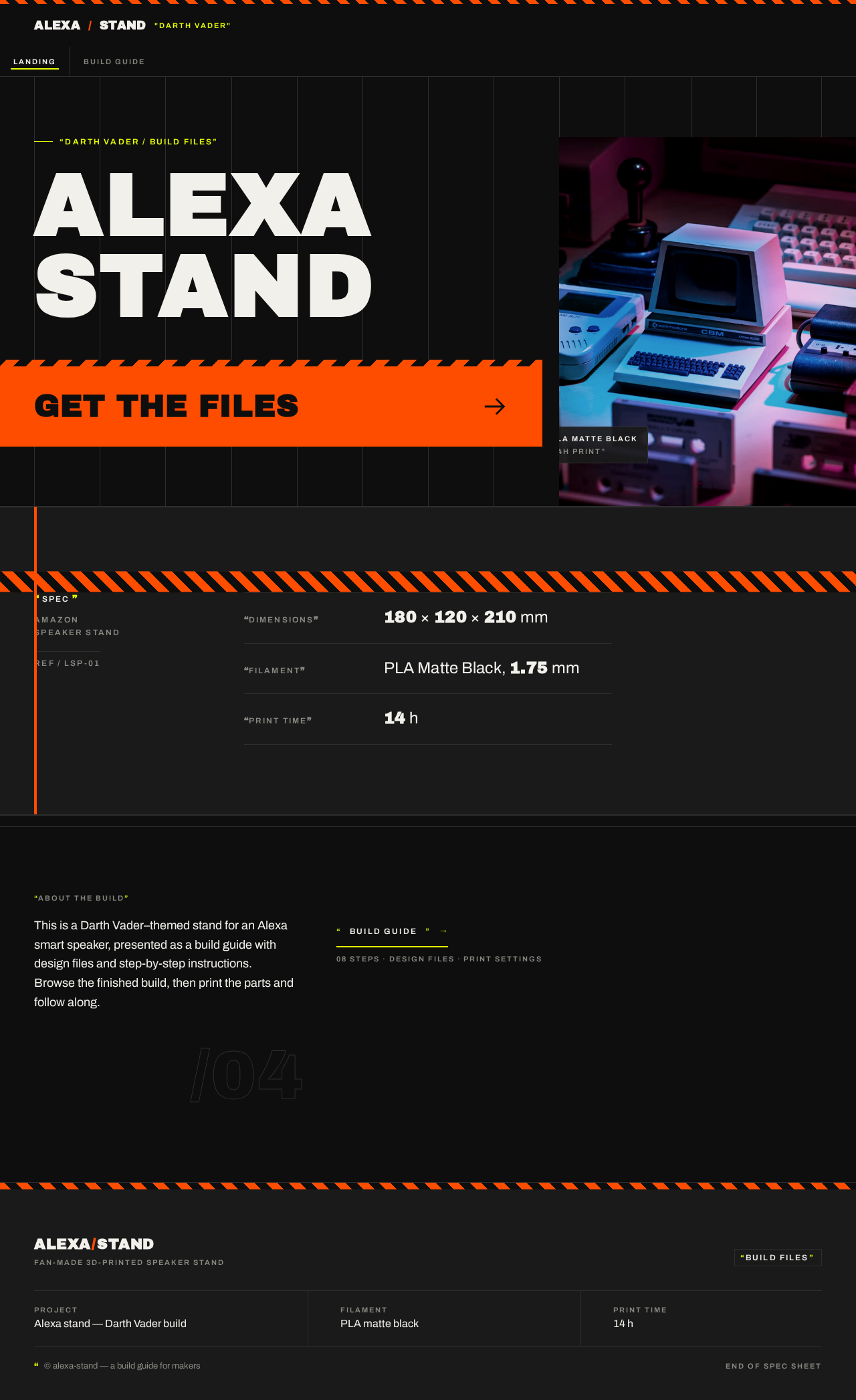

SPEC
Amazon
Speaker Stand
- DIMENSIONS
- 180 × 120 × 210 mm
- FILAMENT
- PLA Matte Black, 1.75 mm
- PRINT TIME
- 14 h
ABOUT THE BUILD
This is a Darth Vader–themed stand for an Alexa smart speaker, presented as a build guide with design files and step-by-step instructions. Browse the finished build, then print the parts and follow along.
SPEC
Amazon
Speaker Stand
- DIMENSIONS
- 180 × 120 × 210 mm
- FILAMENT
- PLA Matte Black, 1.75 mm
- PRINT TIME
- 14 h
ABOUT THE BUILD
This is a Darth Vader–themed stand for an Alexa smart speaker, presented as a build guide with design files and step-by-step instructions. Browse the finished build, then print the parts and follow along.
No comments yet. Be the first!