ai-video-generator
 Jaiki Ansari
Build a complete AI Video Generator web app. The app should allow a user to: 1. Enter a text prompt describing the video they want. 2. Choose video duration: 5, 10, 15, 30 or 60 seconds. 3. Choose aspect ratio: 9:16, 16:9 or 1:1. 4. Choose a style: Cinematic, Realistic, Anime, 3D, Documentary, Advertising or Viral Social Media. 5. Generate a storyboard automatically from the user's prompt. 6. Break the storyboard into individual scenes. 7. Generate suitable AI images/video clips for each scene using the available AI video/image generation APIs. 8. Add smooth transitions between scenes. 9. Generate optional AI voice-over from the script. 10. Add optional background music. 11. Combine all scenes, voice-over and music into one final video. 12. Show generation progress to the user. 13. Provide a preview player for the completed video. 14. Allow the user to regenerate individual scenes without regenerating the whole video. 15. Provide a Download Video button. Create a clean, modern, mobile-friendly interface suitable for beginners. Important: - Use real AI generation APIs where available. - Keep API keys secure on the server and never expose them in frontend code. - If a required video-generation API is unavailable, create the app with a clear provider/API configuration section so an API can be connected later. - Include proper error handling, loading states and retry functionality. - The app should be production-ready and actually functional, not just a static UI. Also include a simple prompt enhancer that automatically converts a user's short idea into a detailed cinematic video prompt with camera movement, lighting, environment, subject actions and scene continuity.

Comments (0)
Sign in to leave a comment
System Requirements
System Requirements Document for ai-video-generator
1. Introduction
ai-video-generator is a complete, production-ready AI Video Generator web application. A user types a short text idea, optionally expands it into a detailed cinematic prompt, chooses a duration, aspect ratio and visual style, and the application automatically generates a storyboard, breaks it into individual scenes, produces AI images/video clips for each scene, adds smooth transitions, optionally layers AI voice-over and background music, and assembles everything into one final downloadable video.
The product intent is to let a beginner turn a sentence into a finished video with minimal technical effort, while giving them real control at the points that matter: the prompt, the format, the style, and the ability to regenerate a single scene without redoing the whole video. The interface must be clean, modern and mobile-friendly, and the app must be genuinely functional — real AI generation APIs where available, secure server-side key handling, and a clear provider/API configuration section so an API can be connected later when a required video-generation API is unavailable.
The audience is two-fold: Video Creators (beginners, marketers, social creators) who produce the videos, and the App Operator / API Administrator who connects and maintains the AI providers that make generation work.
2. System Overview
The application is a first-party web app with a server-side backend that owns all AI provider calls, credential storage, generation orchestration, asset persistence and final video assembly. The frontend never holds API keys; it talks only to the application's own backend, which proxies and orchestrates provider work.
Current delivery and actors
- Video Creator — the primary human actor. Enters and enhances a prompt, selects duration (5/10/15/30/60 s), aspect ratio (9:16, 16:9, 1:1) and style (Cinematic, Realistic, Anime, 3D, Documentary, Advertising, Viral Social Media), generates and reviews a storyboard, reviews and regenerates individual scenes, optionally enables AI voice-over and background music, watches generation progress, previews the finished video and downloads it.
- App Operator / API Administrator — configures server-side AI providers and credentials so generation can run, and relies on clear status, error handling and retry behavior when a provider is unavailable or fails.
- Backend services — orchestrate storyboard generation, per-scene media generation, transitions, voice-over, music, final assembly and progress reporting. They are non-persona system actors, not destinations.
Accepted behavior
Prompt entry and enhancement; duration/aspect/style selection; automatic storyboard generation; storyboard breakdown into individual scenes; per-scene AI image/video generation via configured providers; smooth transitions between scenes; optional AI voice-over from the script; optional background music; final combination of scenes, voice-over and music into one video; visible generation progress; a preview player; per-scene regeneration without regenerating the whole video; and a Download Video button. Error handling, loading states and retry functionality apply throughout.
Ownership and exclusions
All AI provider calls, credential handling and video assembly are owned by the backend; the frontend only renders state and issues requests to the app's own API. Provider credentials are never exposed in frontend code. The app does not include adjacent capabilities such as social publishing, collaboration, billing, or template marketplaces — none were requested.
2a. Product Interpretation and Delivery Boundary
The product is a studio instrument for turning a sentence into a film. The user's own prompt, storyboard and generated scene frames are the only imagery the product needs; the interface is a dark, near-black canvas where generation itself is the hero.
Delivery is a first-party web application with an application-owned backend. Because creators must be able to return to durable projects (storyboards, scenes, generated assets, assembled videos) and operators must be able to manage provider configuration, the app owns identity: a self-service Sign Up establishes a creator's identity on first use, and Login verifies returning creators and operators before they resume protected work. Anonymous visitors can read the Landing page and reach Login/Sign Up; all project and configuration destinations require an established identity.
Provider work is owned by the backend and by the configured external AI providers. When a required video-generation API is unavailable, the app remains fully usable as a product: the Provider Settings destination lets the operator connect a provider later, and generation surfaces a clear, actionable configuration state rather than failing silently.
Everything described in this document is current. No future-horizon features are included in current pages or acceptance.
2c. Page Content and Component Coverage
Landing
- Information/state: Anonymous first impression. Oversized
PROMPT → FILMtitle card, a one-line explanation of what the app does, and a proof-of-output strip of sample scene frames. No project state is loaded. - Primary actions: Enter a prompt in the hero composer field; use the inline Enhance prompt action; press Generate (routes an anonymous visitor into identity establishment, then into the creation flow); navigate to Login / Sign Up.
- Supporting actions: Scroll to a short "how it works" sequence (prompt → storyboard → scenes → final video).
- Domain entities: Prompt (draft), sample scene frame.
- Component responsibilities: Full-bleed generative flow canvas seeded from a hash of the prompt text; hero title card; hero prompt field with coral bottom edge and inline Enhance action; Generate slab; right-edge sample-frame strip; auth entry links.
- States: Loading — canvas initialises, sample frames fade in. Empty — prompt field empty, Generate disabled with a hint. Success — prompt accepted, navigation into the creation flow. Error — enhancement or navigation failure shows an inline message with retry. Recovery — draft prompt is preserved locally so the visitor does not lose their idea.
Login
- Information/state: Returning-verification form for creators and operators. Anonymous access.
- Primary actions: Submit email + password; go to Sign Up.
- Supporting actions: Show/hide password; "forgot password" recovery entry.
- Domain entities: Account credentials, session.
- Component responsibilities: Credential form, validation messaging, submit control, link to Sign Up, error banner region.
- States: Loading — submit disabled with progress indicator. Empty — blank fields with inline validation. Success — session established, redirect to Dashboard (creator) or Provider Settings (operator). Error — invalid credentials or network failure shown inline with retry. Recovery — password recovery path and preserved email field.
Sign Up
- Information/state: Self-service enrollment for a new Video Creator. Anonymous access.
- Primary actions: Submit email + password to create an account; go to Login.
- Supporting actions: Show/hide password; inline password requirement hints.
- Domain entities: Account, session.
- Component responsibilities: Enrollment form, validation, submit control, link to Login.
- States: Loading — submit disabled with progress indicator. Empty — blank fields with inline validation. Success — account created, session established, redirect to Dashboard. Error — duplicate email or validation failure shown inline with retry. Recovery — user can correct and resubmit without losing entered values.
Dashboard
- Information/state: Revisitable overview of the creator's projects and their continuation points. Shows each project's title, style, duration, aspect ratio, current stage (draft / storyboard / scenes / generating / complete) and last-updated time.
- Primary actions: Open a project at its current stage; start a new project (Create Video).
- Supporting actions: Filter/sort projects by stage or recency; rename or delete a project.
- Domain entities: Project, prompt, storyboard, scene set, final video, stage status.
- Component responsibilities: Project list as square-cornered tiles with ruled data strips; stage badges; new-project control; empty-state panel.
- States: Loading — skeleton tiles. Empty — "no projects yet" panel with a direct Create Video action. Success — populated project list. Error — list load failure with retry. Recovery — retry reloads the list without losing the current view.
Create Video
- Information/state: Beginner-oriented workspace for composing the request. Holds the prompt text, the enhanced prompt (when used), and the selected duration, aspect ratio and style.
- Primary actions: Enter/edit the prompt; run Enhance prompt; select duration (5/10/15/30/60); select aspect ratio (9:16, 16:9, 1:1); select style (Cinematic, Realistic, Anime, 3D, Documentary, Advertising, Viral Social Media); press Generate to start storyboard generation.
- Supporting actions: Accept, edit or discard the enhanced prompt; reset selections to defaults.
- Domain entities: Prompt, enhanced prompt, duration, aspect ratio, style, project.
- Component responsibilities: Prompt composer with inline Enhance action; five lit duration cells; three proportional ratio glyphs; seven scrollable style chips; Generate slab; validation and provider-readiness messaging.
- States: Loading — enhancement in progress with the original prompt preserved. Empty — no prompt entered, Generate disabled. Success — prompt and selections accepted, project created, navigation to Storyboard. Error — enhancement failure or provider-unavailable state shown inline with retry and a link to Provider Settings for operators. Recovery — the user's original prompt and selections are never lost on failure.
Storyboard
- Information/state: The prompt-derived storyboard, broken into individual scenes. Each scene shows its index, duration, style and status, plus its script/description text.
- Primary actions: Generate the storyboard from the prompt; review the scene breakdown; proceed to Scene Editor; regenerate the storyboard.
- Supporting actions: Reorder scenes; edit a scene's description text; add or remove a scene.
- Domain entities: Storyboard, scene (index, description, duration, style, status).
- Component responsibilities: Vertical filmstrip of square-cornered scene tiles with ruled data strips; storyboard-level actions; per-scene edit controls.
- States: Loading — tiles materialise one by one as the storyboard resolves. Empty — no storyboard yet, with a direct generate action. Success — full scene list rendered. Error — storyboard generation failure with retry. Recovery — retry regenerates the storyboard without discarding the original prompt.
Scene Editor
- Information/state: Focused project workspace for scene media and finishing options. Shows each scene's generated image/clip, its transition, and the project's voice-over and music settings.
- Primary actions: Generate media for a scene; regenerate an individual scene without regenerating the whole video; choose a transition between scenes; enable/disable AI voice-over from the script; enable/disable background music; proceed to Generation.
- Supporting actions: Preview a scene's media inline; edit a scene's description before regenerating; reorder scenes.
- Domain entities: Scene media asset, transition, voice-over track, music track, project.
- Component responsibilities: Scene tiles with media preview and data strip; per-scene Regenerate action revealed on hover/focus; transition selector; voice-over and music toggles; assemble action.
- States: Loading — per-scene generation indicator on the affected tile only. Empty — scenes without media yet, each with a generate action. Success — media present, transitions set, options configured. Error — per-scene failure isolated to that tile with retry; provider-unavailable state with a link to Provider Settings. Recovery — retrying a single scene leaves all other scenes and the assembled video untouched.
Generation
- Information/state: Progress and operational state for generating scene media and assembling the final video. Shows overall progress, per-scene status, and the current stage (scene media → transitions → voice-over → music → assembly).
- Primary actions: Watch progress; retry a failed step; cancel an in-progress generation; proceed to Video Preview when complete.
- Supporting actions: Expand a failed step to see the error detail; jump to the affected scene in Scene Editor.
- Domain entities: Generation job, step, scene status, error, progress.
- Component responsibilities: Horizontal luminous progress rule; per-scene status list; stage labels; retry and cancel controls; error detail region.
- States: Loading — active job with live progress. Empty — no job running, with a link back to Scene Editor. Success — job complete, navigation to Video Preview. Error — failed step with a clear message, retry control, and provider-unavailable guidance pointing operators to Provider Settings. Recovery — retry resumes from the failed step rather than restarting completed work.
Video Preview
- Information/state: Completion destination for the assembled final video. Shows the player, the video's duration, aspect ratio and style, and its scene markers.
- Primary actions: Play/pause/scrub the video; Download Video; jump to a scene marker to select it for regeneration in Scene Editor.
- Supporting actions: Replay; return to Dashboard.
- Domain entities: Final video, scene markers, timecode.
- Component responsibilities: Full-width letterboxed stage; ruled timecode bar with coral playhead and teal scene markers; Download Video control; metadata strip.
- States: Loading — player buffering with a progress indicator. Empty — no completed video yet, with a link back to Generation. Success — video plays and downloads. Error — playback or download failure with retry. Recovery — retry re-requests the asset without losing the current position.
Provider Settings
- Information/state: Restricted configuration destination for connecting AI providers and managing server-side credentials. Lists each provider with its status dot, its role (image, video, voice-over, music), and its key field.
- Primary actions: Add or edit a provider's credentials; save; test the connection; enable/disable a provider.
- Supporting actions: View the request → queue → render → asset diagram for a provider; see last-used and last-error timestamps.
- Domain entities: Provider, credential, status, capability role.
- Component responsibilities: Ruled provider table; status dots; key fields with masked values; save/test controls; hairline request-flow diagram.
- States: Loading — table populating. Empty — no providers configured, with a clear "connect a provider" prompt. Success — provider saved and connection test passes. Error — invalid credential or unreachable provider shown inline with retry. Recovery — credentials can be corrected and re-tested without losing other provider entries.
3. Functional Requirements
Each requirement is a distinct story point with provenance, lifecycle facts and observable acceptance.
FR-1 — Enter a text prompt (explicit) As a Video Creator, I should enter a text prompt describing the video I want, so that the app knows what to generate.
- Trigger/input: text entered in the prompt composer on Create Video (or the hero composer on Landing).
- Observable result: the prompt is captured and carried into the project.
- Access state: requires an established identity before a durable project is created.
- Failure/recovery: empty or invalid input disables Generate with an inline hint; the entered text is never lost.
- Continuation: the user proceeds to enhance the prompt or select format options.
FR-2 — Choose video duration (explicit) As a Video Creator, I should choose a video duration from 5, 10, 15, 30 or 60 seconds, so that the output matches my intended length.
- Trigger/input: selection of one of exactly five duration cells.
- Observable result: the selected duration is stored on the project and shown in the data strip.
- Failure/recovery: no selection defaults to a single lit cell; the choice can be changed at any time before generation.
- Continuation: the user selects aspect ratio and style.
FR-3 — Choose aspect ratio (explicit) As a Video Creator, I should choose an aspect ratio from 9:16, 16:9 or 1:1, so that the video fits my target platform.
- Trigger/input: selection of one of exactly three proportional ratio glyphs.
- Observable result: the selected ratio is stored on the project and reflected in the preview stage.
- Failure/recovery: the choice can be changed before generation; changing it after generation prompts a re-render rather than silently mismatching.
- Continuation: the user selects a style.
FR-4 — Choose a style (explicit) As a Video Creator, I should choose a style from Cinematic, Realistic, Anime, 3D, Documentary, Advertising or Viral Social Media, so that the generated scenes match the look I want.
- Trigger/input: selection of one of exactly seven style chips.
- Observable result: the selected style is stored on the project and applied to storyboard and scene generation.
- Failure/recovery: the choice can be changed before generation; the chip row scrolls so every style is reachable.
- Continuation: the user generates the storyboard.
FR-5 — Prompt enhancer (explicit) As a Video Creator, I should use a simple prompt enhancer that automatically converts my short idea into a detailed cinematic video prompt, so that I get better results without writing a long prompt myself.
- Trigger/input: the inline Enhance prompt action on the prompt composer.
- Observable result: the short idea is expanded into a detailed cinematic prompt covering camera movement, lighting, environment, subject actions and scene continuity.
- Failure/recovery: if enhancement fails, the original prompt is preserved and an inline retry is offered.
- Continuation: the user accepts, edits or discards the enhanced prompt and proceeds to generate.
FR-6 — Generate a storyboard automatically (explicit) As a Video Creator, I should have a storyboard generated automatically from my prompt, so that I can see the video's structure before committing to full generation.
- Trigger/input: pressing Generate on Create Video.
- Observable result: a storyboard is produced and rendered on Storyboard.
- Failure/recovery: generation failure shows a clear error with retry; the prompt and selections are preserved.
- Continuation: the user reviews the storyboard and proceeds to scene breakdown.
FR-7 — Break the storyboard into individual scenes (explicit) As a Video Creator, I should see the storyboard broken into individual scenes, so that I can work with each part of the video.
- Trigger/input: storyboard generation completes.
- Observable result: each scene appears as a tile with its index, duration, style and status.
- Failure/recovery: a partial breakdown can be regenerated without discarding the prompt.
- Continuation: the user proceeds to Scene Editor.
FR-8 — Generate AI images/video clips per scene (explicit) As a Video Creator, I should have suitable AI images/video clips generated for each scene using the available AI video/image generation APIs, so that the storyboard becomes real footage.
- Trigger/input: scene media generation from Scene Editor or the assembly job on Generation.
- Observable result: each scene receives a generated image or clip, visible in its tile.
- Access state: requires an established identity; provider calls run server-side.
- Failure/recovery: a failed scene is isolated to its own tile with retry; if no provider is configured, a clear provider-unavailable state links operators to Provider Settings.
- Continuation: the user reviews media, sets transitions, and assembles.
FR-9 — Add smooth transitions between scenes (explicit) As a Video Creator, I should have smooth transitions added between scenes, so that the final video flows rather than cutting abruptly.
- Trigger/input: transition selection in Scene Editor or the default applied during assembly.
- Observable result: transitions are applied between adjacent scenes and are visible in the assembled video.
- Failure/recovery: a transition that cannot be applied is reported on the affected boundary with retry.
- Continuation: the user proceeds to assembly.
FR-10 — Optional AI voice-over (explicit) As a Video Creator, I should optionally generate AI voice-over from the script, so that the video can be narrated when I want it.
- Trigger/input: enabling the voice-over toggle in Scene Editor.
- Observable result: a voice-over track is generated from the script and included in the final video.
- Failure/recovery: voice-over failure does not block the rest of the video; it is reported with retry and can be disabled.
- Continuation: the user assembles the final video with or without voice-over.
FR-11 — Optional background music (explicit) As a Video Creator, I should optionally add background music, so that the video has a soundtrack when I want one.
- Trigger/input: enabling the music toggle in Scene Editor.
- Observable result: a music track is included in the final video.
- Failure/recovery: music failure does not block the rest of the video; it is reported with retry and can be disabled.
- Continuation: the user assembles the final video with or without music.
FR-12 — Combine into one final video (explicit) As a Video Creator, I should have all scenes, voice-over and music combined into one final video, so that I get a single deliverable.
- Trigger/input: the assemble action from Scene Editor.
- Observable result: a single assembled video is produced and becomes available on Video Preview.
- Failure/recovery: assembly failure is reported on Generation with retry that resumes from the failed step.
- Continuation: the user previews and downloads the video.
FR-13 — Show generation progress (explicit) As a Video Creator, I should see generation progress, so that I know the app is working and how far along it is.
- Trigger/input: any generation job starts.
- Observable result: overall progress and per-scene status are visible on Generation.
- Failure/recovery: a stalled or failed step is clearly marked with retry.
- Continuation: the user waits, retries, or proceeds to preview on completion.
FR-14 — Preview player (explicit) As a Video Creator, I should get a preview player for the completed video, so that I can watch it before downloading.
- Trigger/input: opening Video Preview after assembly completes.
- Observable result: the video plays with a timecode bar and scene markers.
- Failure/recovery: playback failure shows an inline error with retry.
- Continuation: the user downloads the video or jumps to a scene to regenerate it.
FR-15 — Regenerate individual scenes (explicit) As a Video Creator, I should be able to regenerate individual scenes without regenerating the whole video, so that I can fix one weak scene cheaply.
- Trigger/input: the per-scene Regenerate action in Scene Editor (also reachable from a scene marker on Video Preview).
- Observable result: only the selected scene's media is replaced; all other scenes and the assembled video remain intact.
- Failure/recovery: a failed regeneration is isolated to that scene with retry.
- Continuation: the user re-assembles the final video to include the updated scene.
FR-16 — Download Video button (explicit) As a Video Creator, I should get a Download Video button, so that I can save the finished video.
- Trigger/input: pressing Download Video on Video Preview.
- Observable result: the assembled video file is downloaded to the user's device.
- Failure/recovery: download failure shows an inline error with retry.
- Continuation: the user can return to Dashboard or download again.
FR-17 — Use real AI generation APIs where available (explicit) As an App Operator / API Administrator, I should have the app use real AI generation APIs where available, so that the product is genuinely functional rather than a mock.
- Trigger/input: provider configuration and generation requests.
- Observable result: generation calls real configured providers and returns real assets.
- Failure/recovery: unavailable providers surface a clear configuration state rather than a silent failure.
- Continuation: the operator connects or replaces a provider.
FR-18 — Keep API keys secure on the server (explicit) As an App Operator / API Administrator, I should have API keys kept secure on the server and never exposed in frontend code, so that credentials cannot be stolen from the client.
- Trigger/input: credential entry in Provider Settings.
- Observable result: credentials are stored server-side and never returned to the browser; the frontend only sees masked values and status.
- Failure/recovery: a credential that fails validation is reported without echoing the secret.
- Continuation: the operator corrects and re-tests the credential.
FR-19 — Provider/API configuration section (explicit) As an App Operator / API Administrator, I should get a clear provider/API configuration section when a required video-generation API is unavailable, so that an API can be connected later.
- Trigger/input: opening Provider Settings, or following the provider-unavailable guidance from a failed generation.
- Observable result: providers can be added, edited, enabled/disabled and connection-tested.
- Failure/recovery: invalid or unreachable providers are shown with a clear status and retry.
- Continuation: once a provider is configured, generation can use it.
FR-20 — Error handling, loading states and retry (explicit) As a Video Creator, I should get proper error handling, loading states and retry functionality, so that failures are recoverable rather than dead ends.
- Trigger/input: any request or generation step.
- Observable result: loading indicators during work, clear error messages on failure, and a retry control that resumes without discarding completed work.
- Failure/recovery: retry is available at the granularity of the failed step (whole job, single scene, single provider test).
- Continuation: the user resumes the workflow from where it failed.
FR-21 — Production-ready and functional (explicit) As a Video Creator, I should get a production-ready app that is actually functional, not just a static UI, so that I can rely on it to produce real videos.
- Trigger/input: normal end-to-end use.
- Observable result: the full pipeline — prompt → storyboard → scenes → media → transitions → optional voice-over/music → assembly → preview → download — completes with real assets.
- Failure/recovery: every stage has the error handling and retry described above.
- Continuation: the user can repeat the workflow for new projects.
FR-22 — Self-service enrollment (required_inference) As a Video Creator, I should complete self-service enrollment before creating durable projects, so that my projects and assets are bound to me and can be resumed.
- Trigger/input: first use of a protected action (Generate, Dashboard, Provider Settings).
- Observable result: an account is created and a session established.
- Access state: Sign Up is anonymously reachable; protected destinations remain unavailable until identity is established.
- Failure/recovery: validation or duplicate-account errors are shown inline with retry.
- Continuation: the user lands on Dashboard and can create a project.
FR-23 — Returning verification (required_inference) As a Video Creator or App Operator / API Administrator, I should verify my application identity before resuming protected projects or provider administration, so that my work and credentials stay bound to the correct person.
- Trigger/input: visiting a protected destination without a session.
- Observable result: a session is established and the user is returned to the destination they were trying to reach.
- Access state: Login is anonymously reachable.
- Failure/recovery: invalid credentials are shown inline with retry and a password-recovery path.
- Continuation: the user resumes their project or provider configuration.
FR-24 — Configure server-side providers before generation (required_inference) As an App Operator / API Administrator, I should configure server-side AI providers and credentials before generation can use those providers, so that generation has a working backend.
- Trigger/input: opening Provider Settings and saving credentials.
- Observable result: the provider shows an enabled, tested status and becomes available to generation.
- Failure/recovery: failed tests are reported with retry; other providers are unaffected.
- Continuation: creators can generate using the configured provider.
FR-25 — Backend-owned generation and persistence (required_inference) As a Video Creator, I should have generation run through backend services so that API keys remain server-side and my generated assets and progress persist across the workflow.
- Trigger/input: any generation or assembly action.
- Observable result: the frontend receives only job status, progress and asset references; assets and progress survive navigation and return visits.
- Failure/recovery: a lost connection does not lose the job; reopening Generation shows current state.
- Continuation: the user resumes from the current stage.
4. User Personas
Video Creator
Product context. A beginner, marketer or social creator who has an idea in a sentence and wants a finished video without learning a video editor. They arrive at Landing, understand the promise in one screen, and move into creation.
Primary goal. Turn a short text idea into a usable finished video with minimal technical effort.
Distinct accepted responsibilities. Entering the prompt; using the prompt enhancer to expand a short idea into a detailed cinematic prompt covering camera movement, lighting, environment, subject actions and scene continuity; choosing duration from 5/10/15/30/60 seconds; choosing aspect ratio from 9:16, 16:9 or 1:1; choosing a style from Cinematic, Realistic, Anime, 3D, Documentary, Advertising or Viral Social Media; generating and reviewing the storyboard; reviewing the scene breakdown; generating scene media; setting transitions; optionally enabling AI voice-over and background music; watching generation progress; previewing the completed video; regenerating individual scenes without regenerating the whole video; and downloading the final video.
Relevant inputs and decisions. The prompt text and whether to accept the enhanced version; the three format selections; whether to enable voice-over and music; which scene to regenerate; whether the preview is good enough to download.
Interactions with other accepted participants. The creator depends on the App Operator / API Administrator having configured working providers; when a provider is unavailable, the creator sees a clear configuration state rather than a broken flow. The creator's work is executed by backend services, which they observe only as progress and results.
Observable success. A finished video that plays in the preview player and downloads successfully, produced from their own idea, with any weak scene fixed individually rather than by redoing the whole video.
What makes this role different. The creator is the only actor who initiates and completes the creative lifecycle; their work is judged by the output artefact, not by configuration.
App Operator / API Administrator
Product context. The person responsible for making the app actually functional by connecting real AI video/image generation APIs. They work in Provider Settings, a deliberately quieter, ruled configuration surface than the studio.
Primary goal. Ensure generation works end-to-end with configured providers, and that a required API can be connected later when it is unavailable.
Distinct accepted responsibilities. Supplying and managing provider credentials; keeping those credentials secure on the server and never exposed in frontend code; enabling/disabling providers; testing connections; reading provider status and error detail; and relying on clear error handling, loading states and retry behavior when a provider is unavailable or fails.
Relevant inputs and decisions. Provider selection, credential entry, capability role (image, video, voice-over, music), and whether a provider is healthy enough to enable.
Interactions with other accepted participants. The operator's configuration directly determines whether the Video Creator's generation succeeds; when a provider is unavailable, the creator is routed to a clear configuration state that the operator resolves.
Observable success. Generation runs end-to-end using configured providers, credentials never appear in frontend code, and an unavailable provider can be connected later without changing the product.
What makes this role different. The operator never creates videos; their work is infrastructure and credential stewardship, judged by provider health and security rather than by output.
5. Core User Flows
Flow A — First-time creator produces a video end to end
- Landing (anonymous). The visitor sees the
PROMPT → FILMtitle card over the generative canvas and a proof-of-output strip of sample scene frames. They type a short idea into the hero prompt field. - Enhance (optional). They press Enhance prompt. The short idea is expanded into a detailed cinematic prompt covering camera movement, lighting, environment, subject actions and scene continuity. They accept or edit it.
- Identity establishment. Pressing Generate while anonymous routes them to Sign Up. They submit email and password; on success a session is established and they land on Dashboard with their draft prompt preserved.
- Create Video. On Create Video they confirm the prompt, then select duration (one of five lit cells), aspect ratio (one of three ratio glyphs) and style (one of seven chips). They press Generate.
- Storyboard. On Storyboard the storyboard is generated from the prompt and broken into individual scenes. Scene tiles materialise one by one, each showing index · duration · style · status. The creator reviews the breakdown and may edit a scene's description or reorder scenes.
- Scene Editor. They proceed to Scene Editor, where media is generated for each scene. They set transitions between scenes, and optionally enable AI voice-over from the script and background music.
- Generation. On Generation they watch overall progress and per-scene status across the stages: scene media → transitions → voice-over → music → assembly. If a step fails, they see the error detail and press retry, which resumes from the failed step rather than restarting completed work.
- Video Preview. When assembly completes they land on Video Preview, play the video, scrub the timecode bar, and press Download Video. The file downloads to their device.
- Continuation. They return to Dashboard, where the project shows as complete and can be reopened at any stage.
Flow B — Creator regenerates a single scene
- Video Preview or Scene Editor. The creator notices one scene looks wrong. From Video Preview they click that scene's teal marker; from Scene Editor they hover the scene tile to reveal its data strip and Regenerate action.
- Regenerate. They press Regenerate on that scene only. A loading indicator appears on that tile alone; all other scenes and the assembled video remain untouched.
- Result. The scene's media is replaced. If regeneration fails, the error is isolated to that tile with a retry; nothing else is affected.
- Re-assemble. They return to Generation and re-assemble so the final video includes the updated scene.
- Continuation. They preview and download the updated video.
Flow C — Creator recovers from a failed generation step
- Generation. A step fails — for example, scene media generation returns an error, or no provider is configured.
- Error detail. The failed step is clearly marked with a readable message. If the cause is a missing or unavailable provider, the creator sees a provider-unavailable state with guidance.
- Retry. The creator presses retry. The job resumes from the failed step; already-completed scenes and stages are preserved.
- Continuation. On success the job proceeds to assembly and Video Preview. If the provider is genuinely unavailable, the creator's work is preserved and the operator is the one who resolves it.
Flow D — Operator connects a provider
- Login. The App Operator / API Administrator opens Login and verifies their identity. On success they are routed to Provider Settings.
- Provider Settings. They see the ruled provider table with status dots, capability roles and key fields. If nothing is configured, an empty state prompts them to connect a provider.
- Configure. They add or edit a provider's credentials, choose its capability role (image, video, voice-over, music), and save. Credentials are stored server-side; the browser only ever sees masked values and status.
- Test. They press test. A passing test shows an enabled, healthy status; a failing test shows a clear error with retry, without echoing the secret.
- Result. The provider becomes available to generation. Creators can now generate using it.
- Continuation. The operator can add further providers, disable a failing one, or return later to connect an API that was previously unavailable.
Flow E — Returning creator resumes a project
- Login. The creator opens Login and verifies their identity.
- Dashboard. They land on Dashboard and see their projects with their current stage and last-updated time.
- Resume. They open the project at its current stage — Storyboard, Scene Editor, Generation or Video Preview — and continue from exactly where they left off, with all previously generated assets and progress intact.
6. Visuals Colors and Theme
The creative direction is authoritative. The muse is Refik Anadol; the headline concept is data made physical — the storyboard as a living generative sculpture. The product's own output (latent imagery, scene frames, progress) is the only imagery it needs.
Mode. Dark mode only.
Colour tokens (exact hex, by role).
| Role | Token | Value |
|---|---|---|
| Background (ink ground, ~70% of every screen) | --bg | #07070A |
| Surface (panels) | --surface | #121218 |
| Hairline (1px panel borders) | --hairline | #26262F |
| Text (warm bone, never pure white) | --text | #F2F0EA |
| Muted labels | --muted | #8A8794 |
| Primary (hot signal: active scene, primary CTA, progress fill) | --primary | #FF5A3C |
| Accent (secondary data, success/completed states) | --accent | #5EEAD4 |
| Warning (warnings, retries) | --warning | #FFC24B |
Colour appears only as emitted light — glows, thin strokes, fills — never as flat decorative blocks. No blue, indigo or violet anywhere. No gradient blobs; gradients exist only inside generative canvases and thin progress sweeps.
Typography.
- Headings: Space Grotesk 500/600, tight tracking
-0.02em, sentence case, oversized. The hero wordmarkPROMPT → FILMspans the viewport as a single line on desktop and wraps to three lines on mobile. - Scene titles and section heads: Space Grotesk 300/400 in wide-tracked uppercase micro-labels (
0.18em). - Body: IBM Plex Sans.
- Scale: 1.25 modular on a 16px base — display
clamp(2.75rem, 7vw, 6rem)(44px mobile → 96px desktop); h2 28/40; h3 20/24; body 16/17 with 1.65 leading; micro-label 11px uppercase0.18em. - Numerals are always tabular; monospace numerals for all durations, seconds, scene indices and timecodes.
Shape language. Almost no radii. The generative canvas is a hard-edged full-bleed rectangle. Panels are 4px-radius slabs with 1px #26262F hairlines. Controls are 2px-radius rectangles with a 2px luminous bottom edge when active. Progress is a horizontal luminous rule. Scene cards are square-cornered tiles with a thin data strip beneath (index · duration · style · status). No pills, no soft cards, no drop shadows — light, not shadow, does the layering.
Spacing rhythm. 4/8-pt rhythm throughout. The composer is a stack of labelled control rows: Duration as five equal cells 5/10/15/30/60 with the active one lit; Aspect as three ratio glyphs (9:16, 16:9, 1:1) drawn as proportional frames; Style as a horizontal scrollable row of seven named chips.
Layout. A two-zone page: a persistent left rail (72px collapsed / 240px expanded at 1280px; a top bar with a slide-over at 768px; a bottom tab bar at 375px) holding the prompt composer, duration/aspect/style controls and the Generate action; and a dominant right canvas where the storyboard assembles itself as a vertical filmstrip of scene tiles over a generative background. The preview player is a full-width letterboxed stage with a ruled timecode bar and scene markers. The provider/API configuration screen is a plain ruled table of providers, status dots and key fields, deliberately quieter than the studio.
Imagery. No stock photography, no 3D blobs, no device mockups. The only imagery is the product's own: user-generated scene frames and clips shown full-bleed in square-cornered tiles, plus a generative particle/flow canvas derived from the prompt's own text hash so every project's canvas is visibly unique. Provider configuration uses tiny monochrome diagrams (request → queue → render → asset) drawn in hairline strokes.
Accessibility. Readable text and controls stay whole at 375px, 768px and 1280px — headlines, wordmarks, labels, numbers, card text and controls stay entirely inside the viewport and their container, wrapping or scaling to fit, with nothing covering them. The horizontally scrollable style chip row may cross the container edge by design; every chip becomes fully readable as it scrolls, and under reduced motion the row remains scrollable so each chip can be brought fully into view.
7. Signature Design Concept
The first screen is a film title card, not a marketing headline.
Landing is a full-bleed near-black generative canvas (#07070A) with a slow luminous coral-and-teal flow field drifting behind everything. The flow field is seeded from a hash of the visitor's own prompt text, so the background literally changes when they change their idea — the page's ground is a function of the user's input.
Across this ground sits a single oversized Space Grotesk line — PROMPT → FILM — set at clamp(2.75rem, 7vw, 6rem), flush-left, spanning the viewport width and slightly overhanging the right edge on desktop so it reads as a film title card rather than a marketing headline. On mobile it wraps to three flush-left lines at 44px.
Immediately beneath it, pinned left in the lower third, sits the composer's first control: a 640px-max prompt field with a 2px coral bottom edge and the inline Enhance prompt action, with the Generate button as a solid coral slab to its right. On mobile the prompt field sits directly under the headline with the Generate slab full-width.
A vertical strip of four sample scene frames runs down the right edge at 60% opacity as proof-of-output, not as decoration.
The concept recomposes only accepted content, states and controls: the prompt field, the Enhance action, the Generate action, the auth entry links, and sample scene frames. It introduces no new behaviour, page or destination.
8. Interaction Model & Motion Direction
Interaction Model: Animated Motion Tempo: cinematic Hero Dimensionality: webgl
Landing Hero Motion Brief
Focal subject. The generative flow field itself — a real-time WebGL particle/flow canvas seeded from a hash of the visitor's prompt text, drifting behind the PROMPT → FILM title card.
Input → transformation → outcome thesis. The visitor types or edits their prompt → the prompt text is hashed and the flow field's seed, density and colour balance shift accordingly → the visitor sees the page's ground visibly become their idea, and the composer's coral bottom edge lights as the field settles. Only accepted behaviour is used: prompt entry, prompt enhancement, and the transition into generation.
Motion vocabulary. Continuous slow generative drift at 0.02–0.04 speed noise on a 60s+ loop that never competes with text; scene tiles materialise one by one as their frame resolves, each with a 240ms opacity + 8px rise and a 1px coral scan-line wipe; the progress rule fills left-to-right with a travelling teal highlight; the preview player scrubs with a coral playhead over a teal scene-marker track; hover on a scene tile raises its data strip and reveals Regenerate.
Composed first frame. Near-black ground; the flow field already drifting at low amplitude; PROMPT → FILM flush-left and overhanging the right edge; the prompt field with its coral bottom edge and inline Enhance action; the coral Generate slab; the four sample scene frames at 60% opacity down the right edge.
Reduced-motion state. All decorative motion is disabled under prefers-reduced-motion: the canvas becomes a static gradient still, the filmstrip wraps into rows, and the horizontally scrollable style chip row remains scrollable so every chip can be brought fully into view. No motion runs over readable text, and no motion continues unbounded for reduced-motion users.
Landing Hero 3D Scene Brief — DIRECTION-DERIVED
A single crafted real-time object: a flow field of luminous particles rendered in WebGL/R3F, occupying the full-bleed canvas behind the title card. The scene shows the product's defining state — a sentence becoming structure. Particle density, drift direction and the coral→teal→amber balance are driven by a hash of the current prompt text, so the object is visibly unique per project. The object is composed to sit behind, never over, readable text and controls: the title card, prompt field and Generate slab render above it with sufficient contrast, and the field's amplitude is damped in the lower third where the composer sits. Under reduced motion the scene renders as a single static gradient still.
9. Non-Functional Requirements
- NFR-1 — Server-side secret handling (explicit). API keys must be kept secure on the server and never exposed in frontend code. Rationale: explicit hard constraint; credentials must not be retrievable from the client. Acceptance: no provider credential is ever present in frontend bundles, network responses or client storage; the browser sees only masked values and status.
- NFR-2 — Real provider integration (explicit). Use real AI generation APIs where available. Rationale: explicit hard constraint; the app must be genuinely functional. Acceptance: generation calls configured providers and returns real assets.
- NFR-3 — Configurable provider fallback (explicit). If a required video-generation API is unavailable, the app must include a clear provider/API configuration section so an API can be connected later. Rationale: explicit hard constraint. Acceptance: Provider Settings allows adding, editing, enabling/disabling and testing providers, and generation surfaces a clear configuration state when none is available.
- NFR-4 — Production readiness (explicit). The app must be production-ready and actually functional, not just a static UI. Rationale: explicit hard constraint. Acceptance: the full pipeline completes with real assets.
- NFR-5 — Beginner-friendly, mobile-friendly interface (explicit). The interface must be clean, modern and mobile-friendly, suitable for beginners. Rationale: explicit hard constraint. Acceptance: usable at 375px, 768px and 1280px; readable text and controls stay whole at every viewport.
- NFR-6 — Error handling, loading states and retry (explicit). Every request and generation step must have loading indication, clear error messaging and retry that resumes without discarding completed work. Rationale: explicit hard constraint.
- NFR-7 — Durable project state (required_inference). Projects, storyboards, scene assets and progress must persist across navigation and return visits so a creator can resume. Rationale: required to make the accepted resume journey executable.
- NFR-8 — Isolated scene regeneration (explicit). Regenerating one scene must not require regenerating the whole video. Rationale: explicit hard constraint. Acceptance: only the selected scene's media is replaced; other scenes and the assembled video are untouched.
- NFR-9 — Accessible motion (direction). All decorative motion is disabled under
prefers-reduced-motion, with a usable static arrangement. Rationale: creative direction and accessibility. - NFR-10 — No forbidden palette (direction). No blue, indigo or violet anywhere in the UI; the generic indigo/blue-on-white SaaS template is forbidden for this project. Rationale: creative direction.
10. Tech Stack
- Frontend: React (web), with a component structure that supports the two-zone studio layout, the filmstrip, the preview player and the provider table.
[Default — not specified by user] - 3D/hero rendering: WebGL via React Three Fiber for the generative flow-field hero, as required by the creative direction's
webglhero dimensionality.[Default — not specified by user] - Backend: Python / FastAPI, owning provider orchestration, credential storage, generation jobs, asset persistence and final video assembly.
[Default — not specified by user] - Storage: Relational database for accounts, projects, storyboards, scenes, jobs and provider configuration; object storage for generated scene assets and assembled videos.
[Default — not specified by user] - Media processing: Server-side video assembly (scene concatenation, transitions, voice-over and music mixing) executed by backend workers.
[Default — not specified by user] - Packaging/deployment: Docker and docker-compose for local and single-host deployment.
[Default — not specified by user] - AI providers: External AI image/video/voice/music generation APIs, configured at runtime through Provider Settings; no provider is hardcoded as mandatory, so an unavailable API can be connected later. (explicit)
11. Assumptions and Constraints
Assumptions
- A1 (required_inference). Creators must be able to return to durable projects, so the app owns identity with self-service enrollment and returning verification. No invitation or provisioning boundary was established.
- A2 (required_inference). The App Operator / API Administrator is a distinct human role because provider configuration and credential stewardship is a separate responsibility from video creation.
- A3 (required_inference). Generation runs through backend services so keys stay server-side and assets/progress persist.
- A4 (required_inference). When no provider is configured, the app remains usable as a product and surfaces a clear configuration state rather than failing silently.
Constraints
- C1 (explicit). API keys must be kept secure on the server and never exposed in frontend code.
- C2 (explicit). Use real AI generation APIs where available.
- C3 (explicit). If a required video-generation API is unavailable, the app must include a clear provider/API configuration section so an API can be connected later.
- C4 (explicit). The app must be production-ready and actually functional, not just a static UI.
- C5 (explicit). The interface must be clean, modern and mobile-friendly, suitable for beginners.
- C6 (explicit). Video duration choices are limited to 5, 10, 15, 30 or 60 seconds.
- C7 (explicit). Aspect ratio choices are limited to 9:16, 16:9 or 1:1.
- C8 (explicit). Style choices are limited to Cinematic, Realistic, Anime, 3D, Documentary, Advertising or Viral Social Media.
- C9 (explicit). AI voice-over is optional.
- C10 (explicit). Background music is optional.
- C11 (explicit). Individual scene regeneration must not require regenerating the whole video.
- C12 (direction). Dark mode only; no blue, indigo or violet anywhere; no gradient blobs outside generative canvases and progress sweeps; no stock photography, 3D blobs or device mockups.
- C13 (direction). Readable text and controls stay whole at 375px, 768px and 1280px; imagery and decoration may bleed, but never over readable text or controls.
12. Glossary
- Prompt — the user's text description of the video they want.
- Enhanced prompt — the detailed cinematic prompt produced by the prompt enhancer, covering camera movement, lighting, environment, subject actions and scene continuity.
- Storyboard — the automatically generated structure of the video derived from the prompt.
- Scene — an individual unit of the storyboard, carrying an index, duration, style, status and its own generated media.
- Scene media — the AI-generated image or video clip produced for a scene.
- Transition — the smooth effect applied between adjacent scenes.
- Voice-over — the optional AI-generated narration produced from the script.
- Background music — the optional music track included in the final video.
- Final video — the single assembled output combining all scenes, transitions, voice-over and music.
- Provider — an external AI image, video, voice-over or music generation API configured by the App Operator / API Administrator.
- Provider Settings — the restricted configuration destination where providers and server-side credentials are managed.
- Generation job — the backend process that produces scene media and assembles the final video, with per-step progress and retry.
- Video Creator — the primary human actor who turns a text idea into a finished video.
- App Operator / API Administrator — the human actor who configures providers and manages server-side credentials.
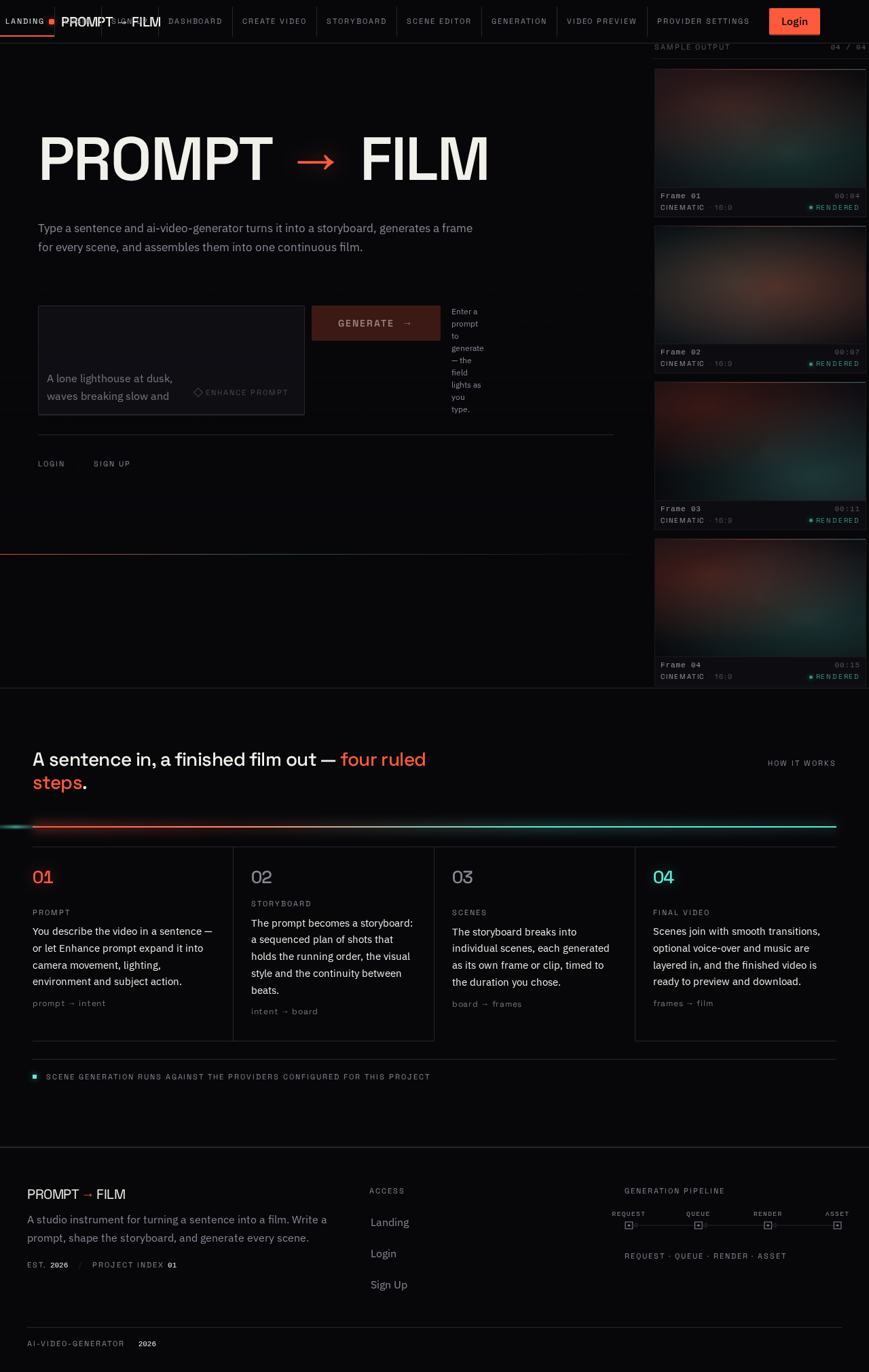
PROMPT→FILM
Type a sentence and ai-video-generator turns it into a storyboard, generates a frame for every scene, and assembles them into one continuous film.
Enter a prompt to generate — the field lights as you type.
How it works
A sentence in, a finished film out — four ruled steps.
- Prompt
You describe the video in a sentence — or let Enhance prompt expand it into camera movement, lighting, environment and subject action.
- Storyboard
The prompt becomes a storyboard: a sequenced plan of shots that holds the running order, the visual style and the continuity between beats.
- Scenes
The storyboard breaks into individual scenes, each generated as its own frame or clip, timed to the duration you chose.
- Final video
Scenes join with smooth transitions, optional voice-over and music are layered in, and the finished video is ready to preview and download.
PROMPT→FILM
Type a sentence and ai-video-generator turns it into a storyboard, generates a frame for every scene, and assembles them into one continuous film.
Enter a prompt to generate — the field lights as you type.
How it works
A sentence in, a finished film out — four ruled steps.
- Prompt
You describe the video in a sentence — or let Enhance prompt expand it into camera movement, lighting, environment and subject action.
- Storyboard
The prompt becomes a storyboard: a sequenced plan of shots that holds the running order, the visual style and the continuity between beats.
- Scenes
The storyboard breaks into individual scenes, each generated as its own frame or clip, timed to the duration you chose.
- Final video
Scenes join with smooth transitions, optional voice-over and music are layered in, and the finished video is ready to preview and download.
No comments yet. Be the first!