ai-image-video
 Arnab Chakraborty
Make a ai image and ai video making plartfom. Where people can make free 5 image and 3 , 30 second video . In a day if they want more then need upgrade. Plan , prompt to make image & video .


Comments (0)
Sign in to leave a comment
System Requirements
System Requirements Document for ai-image-video
1. Introduction
ai-image-video is an AI image and AI video making platform. People come to it to turn a written prompt into a generated image or a generated video, and to plan and refine those prompts before generating. The platform is free to use within a daily allowance: 5 images per day and 3 videos per day, each 30 seconds long. When a person wants more than that free daily allowance, they must upgrade their account to keep creating.
The audience is prompt-literate creators — designers, indie filmmakers, and social-first makers — who expect the tool itself to feel like a machine from a few years ahead. The product intent is therefore twofold and inseparable: a working generation platform with a legible free/paid energy budget, and an interface that makes generation feel volumetric, alive, and cinematic rather than like a form on a white page.
This document specifies the current delivery: the public entry, self-service enrollment and returning verification, the two generation studios (image and video), the daily usage surface that enforces the free allowance, and the upgrade surface that lifts it.
2. System Overview
ai-image-video is a first-party web application with application-owned identity and custom UI. A visitor arrives at a public Landing page that explains the platform, the free daily allowance, the prompt-to-generation workflow, and the upgrade path. From there a person can enroll through Sign Up or verify themselves through Login.
Once verified, a Creator works in two cohesive studios. Image Studio is where a creator plans and writes an image prompt and generates an AI image. Video Studio is where a creator plans and writes a video prompt and generates an AI video of up to 30 seconds. Both studios share the same daily allowance model, and both are backed by durable daily usage accounting so the free limits of 5 images and 3 videos per day are enforced truthfully.
Usage shows the creator their daily image and video consumption against the free allowance, and directs them to upgrade when a limit is reached. Upgrade is where a creator who needs more than 5 images or 3 thirty-second videos per day upgrades the account, after which they can continue generating beyond the free allowance.
Actors:
- Creator — the primary human who plans prompts, generates images and videos, consumes the free daily allowance, and hits the daily limit.
- Upgrading Subscriber — a creator who has exhausted the free daily allowance and chooses to upgrade in order to make more images and videos beyond 5 images and 3 thirty-second videos per day.
- Generation service (non-persona system actor) — the backend that renders images and videos from accepted prompts and reports results back to the creator's studio.
- Upgrade/payment provider (non-persona external actor) — the external service that completes the account upgrade transaction.
Narrow exclusions: this document does not add adjacent account-management capabilities (password reset flows, profile editing, team management, billing history, invoicing), social or community features, asset marketplaces, or any generation capability beyond prompt-driven image and video creation. Free-tier videos are 30 seconds long; longer durations are not part of the current free allowance.
2a. Product Interpretation and Delivery Boundary
Delivery is a first-party web application with custom UI. Identity is application-owned: a creator must be able to privately own and resume their generation history and their daily usage state, and the free daily allowance must remain bound to the correct person so that 5 images and 3 videos per day are counted per creator, not globally. Because the allowance is a per-person budget that gates a paid upgrade, identity continuity is indispensable to the accepted behavior.
The access boundary follows from that. Landing, Sign Up, and Login are anonymously reachable — a person must be able to learn about the platform and establish or verify identity before any protected state exists. Image Studio, Video Studio, Usage, and Upgrade require a verified identity, because each of them reads or writes creator-specific state: generation history, daily consumption, and account tier. The interaction that establishes access to protected destinations lives on Sign Up and Login, never inside a protected destination.
Current horizon: everything specified in sections 3 through 5 and 9 through 11. There is no accepted future-horizon requirement in the authoritative thread; nothing is deferred.
2b. Source Content Inventory
Not applicable — no reference directive with content_source authority was supplied.
2c. Page Content and Component Coverage
Landing
- Information/state: Anonymous public entry. Explains that this is an AI image and AI video making platform, that the free tier allows 5 images per day and 3 videos per day at 30 seconds each, that creation is prompt-driven with a planning step, and that more than the free daily allowance requires an upgrade. No creator-specific state is shown.
- Primary actions: Enter the prompt bar and begin composing a prompt; choose the IMAGE or VIDEO mode rail; proceed to Sign Up to enroll; proceed to Login to verify a returning account.
- Supporting actions: Select one of the example prompt chips to seed the prompt bar; read the free-allowance HUD strip.
- Domain entities: Free daily allowance (5 images, 3 × 30s video), prompt, generation mode (image/video).
- Component responsibilities: Full-bleed volumetric hero scene with the live 3D subject; oversized stacked headline; glass prompt bar with live caret and example prompt chips; mono HUD strip reading the free allowance with two circular gauge rings (cyan for images, magenta for video); vertical IMAGE/VIDEO mode rail on the far left edge; entry links to Sign Up and Login.
- States: Loading — hero subject initializes with a composed first frame so the headline and prompt bar are readable before the 3D subject finishes warming up. Empty — no prompt typed; example chips visible. Success — prompt composed and the person proceeds to enroll or verify. Error — if the real-time hero subject cannot initialize, the void, headline, prompt bar, HUD strip, and mode rail remain fully functional and readable as a static composition. Recovery — the person can still reach Sign Up and Login from the static composition.
Sign Up
- Information/state: Anonymous identity-access surface. Collects the minimum needed to establish a creator account so that generation history, daily usage, and upgrade tier can be retained and resumed. Enrollment is email and password only — there is no OTP step, no verification code, and no second factor of any kind.
- Primary actions: Submit enrollment details to create the account; proceed into the platform after enrollment succeeds.
- Supporting actions: Move to Login if the person already has an account.
- Domain entities: Creator account, credentials, account tier (free by default).
- Component responsibilities: Enrollment form; inline validation messaging; submit control; link to Login; post-enrollment handoff into the protected platform.
- States: Loading — submit control shows in-progress while the account is created. Empty — blank form. Success — account created and the person is handed into the protected platform with their free daily allowance intact at 5 images and 3 videos. Error — invalid or already-used enrollment details are reported inline without losing entered values. Recovery — the person corrects the flagged field and resubmits, or switches to Login.
Login
- Information/state: Anonymous identity-access surface for returning verification. Establishes which creator is resuming so that daily usage, generation history, and upgrade tier are correctly restored. Verification uses the same email and password the creator enrolled with — there is no OTP step, no verification code, and no second factor of any kind.
- Primary actions: Submit credentials to verify the returning creator; resume into the protected platform.
- Supporting actions: Move to Sign Up if the person has no account yet.
- Domain entities: Creator account, credentials, account tier, current-day usage counters.
- Component responsibilities: Credential form; inline error messaging; submit control; link to Sign Up; post-verification handoff that restores the creator's current-day usage state.
- States: Loading — submit control shows in-progress during verification. Empty — blank form. Success — verified and handed into the protected platform with the creator's remaining daily allowance correctly restored. Error — incorrect credentials reported inline without revealing which field was wrong. Recovery — retry, or switch to Sign Up.
Image Studio
- Information/state: Protected creator workspace for planning and prompting image generation. Shows the creator's remaining daily image allowance, the current prompt and its planning notes, and the resulting generated images with their metadata.
- Primary actions: Plan the image (compose and refine the prompt and its parameters); submit the prompt to generate an AI image; review the generated image.
- Supporting actions: Adjust prompt parameters in the right inspector column (aspect, seed); revisit prior generations in the left rail history; open Usage to inspect the daily allowance; open Upgrade when the image allowance is spent.
- Domain entities: Prompt, prompt plan/notes, image generation parameters (aspect, seed), generated image, generation metadata (prompt fragment, seed), daily image allowance counter.
- Component responsibilities: Left rail with mode switch, history, and usage telemetry; centre generation stage that is the largest object on screen; right inspector column for prompt parameters; prompt bar; generation trigger; result plate with burned-in HUD metadata; circular cyan image gauge ring.
- States: Loading — submitting a prompt fires the cyan scanline across the stage and the particle field condenses into the rendered frame over roughly 1.2s while the cyan gauge ring ticks down in mono figures. Empty — no prompt yet and no generations in this session; the stage shows the idle volumetric state. Success — the generated image lands as a full-bleed plate with burned-in HUD metadata (prompt fragment, seed) and the daily image counter reflects one fewer remaining image. Error — a failed generation reports the failure on the stage, does not consume a daily image, and leaves the prompt intact for resubmission. Recovery — the creator resubmits the preserved prompt or edits it and resubmits. Gated — when the daily image allowance is spent, the stage floods with the magenta bloom and the mono line types out the allowance-spent message, and the upgrade panel slides in as a glass slab from the right inspector column.
Video Studio
- Information/state: Protected creator workspace for planning and prompting video generation. Shows the creator's remaining daily video allowance, the current prompt and its planning notes, and the resulting generated videos with their metadata, including the 30-second duration badge.
- Primary actions: Plan the video (compose and refine the prompt and its parameters); submit the prompt to generate an AI video of up to 30 seconds; review the generated video.
- Supporting actions: Adjust prompt parameters in the right inspector column (aspect, seed, motion strength, duration up to 30s); revisit prior generations in the left rail history; open Usage to inspect the daily allowance; open Upgrade when the video allowance is spent.
- Domain entities: Prompt, prompt plan/notes, video generation parameters (aspect, seed, motion strength, duration up to 30s), generated video, generation metadata (prompt fragment, seed, 30s badge), daily video allowance counter.
- Component responsibilities: Left rail with mode switch, history, and usage telemetry; centre generation stage; right inspector column for prompt parameters including duration up to 30s; prompt bar; generation trigger; result plate with burned-in HUD metadata and 30s badge; circular magenta video gauge ring.
- States: Loading — submitting a prompt fires the scanline across the stage and the particle field condenses into the rendered frame while the magenta gauge ring ticks down in mono figures. Empty — no prompt yet and no generations in this session; the stage shows the idle volumetric state in the magenta video light source. Success — the generated video lands as a full-bleed plate with burned-in HUD metadata (prompt fragment, seed, 30s badge) and the daily video counter reflects one fewer remaining video. Error — a failed generation reports the failure on the stage, does not consume a daily video, and leaves the prompt intact for resubmission. Recovery — the creator resubmits the preserved prompt or edits it and resubmits. Gated — when the daily video allowance is spent, the stage floods with the magenta bloom and the mono line types out the allowance-spent message, and the upgrade panel slides in as a glass slab from the right inspector column.
Usage
- Information/state: Protected creator surface showing the current day's image and video consumption against the free allowance — images used out of 5, videos used out of 3 — plus the account tier. Numbers are tabular and right-aligned like instrument readouts.
- Primary actions: Read the daily allowance state; proceed to Upgrade when a limit is reached or when the creator wants more than the free allowance.
- Supporting actions: Return to Image Studio or Video Studio to continue creating while allowance remains.
- Domain entities: Daily image usage counter (of 5), daily video usage counter (of 3), allowance reset day, account tier.
- Component responsibilities: Two circular HUD gauge rings (cyan for images, magenta for video) with mono counters; tier readout; upgrade call-to-action that appears when a ring is empty; navigation back into the studios.
- States: Loading — gauge rings render in their resting state while the day's counters are read. Empty — no generations yet today; both rings full at 5 and 3. Success — counters reflect the true current-day consumption. Error — if counters cannot be read, the surface states that usage is unavailable rather than showing a false zero, and the creator is not blocked from the studios. Recovery — retry the read; the studios remain reachable. Gated — an emptied ring pulses once and the upgrade call-to-action is presented.
Upgrade
- Information/state: Protected surface where a creator who needs more than 5 images or 3 thirty-second videos per day upgrades the account. Shows the current tier and the fact that the free daily allowance has been or will be exceeded.
- Primary actions: Choose and complete the account upgrade so that generation beyond the free daily allowance becomes possible.
- Supporting actions: Return to Usage to review consumption; return to a studio after the upgrade completes.
- Domain entities: Account tier, upgrade selection, upgrade transaction, post-upgrade generation entitlement.
- Component responsibilities: Upgrade panel presented as a glass slab; tier comparison; upgrade confirmation control; handoff to the external upgrade/payment provider; post-upgrade state reflecting the lifted allowance.
- States: Loading — the upgrade panel shows in-progress while the transaction is completed with the provider. Empty — no upgrade selected yet. Success — the account tier is upgraded and the creator can generate more than 5 images and 3 thirty-second videos per day. Error — a failed or abandoned upgrade leaves the account on the free tier with the free daily allowance unchanged and reports the failure on the panel. Recovery — retry the upgrade, or return to Usage and continue on the free allowance.
3. Functional Requirements
FR-1 — Build an AI image and AI video making platform. (explicit) As a Creator, I should have a working platform on which I can make AI images and AI videos, so that I can turn prompts into finished generated media.
- Trigger/input: the creator opens the platform.
- Observable result: the platform is reachable, presents the image and video generation modes, and is backed by the generation service.
- Access state: the public entry is anonymously reachable; generation itself requires a verified creator identity.
- Failure/recovery: if the platform or its generation backend is unavailable, the failure is reported and the creator can retry.
- Continuation: the creator proceeds to enroll or verify, then into a studio.
FR-2 — Generate AI images from prompts. (explicit) As a Creator, I should write a prompt and generate an AI image from it, so that I get the image I described.
- Trigger/input: a submitted image prompt in Image Studio.
- Observable result: a generated image is presented as a result plate with its metadata (prompt fragment, seed), and the daily image counter decreases by one.
- Access state: requires a verified creator identity.
- Failure/recovery: a failed generation is reported on the stage, does not consume a daily image, and preserves the prompt for resubmission.
- Continuation: the creator reviews the image, refines the prompt, or generates again while allowance remains.
FR-3 — Generate AI videos from prompts. (explicit) As a Creator, I should write a prompt and generate an AI video from it, so that I get the video I described.
- Trigger/input: a submitted video prompt in Video Studio.
- Observable result: a generated video is presented as a result plate with its metadata (prompt fragment, seed, 30s badge), and the daily video counter decreases by one.
- Access state: requires a verified creator identity.
- Failure/recovery: a failed generation is reported on the stage, does not consume a daily video, and preserves the prompt for resubmission.
- Continuation: the creator reviews the video, refines the prompt, or generates again while allowance remains.
FR-4 — Free tier allows 5 images per day. (explicit) As a Creator, I should be able to make 5 images per day for free, so that I can create without paying until I need more.
- Trigger/input: each image generation attempt.
- Observable result: the first 5 image generations in a day succeed and are counted; the 6th and later attempts in the same day are gated.
- Access state: requires a verified creator identity so the count is bound to the correct creator.
- Failure/recovery: if the count cannot be read, the platform does not silently grant or silently deny; it reports the condition and the creator can retry.
- Continuation: the creator continues generating images until the 5th is reached, then is directed to Upgrade.
FR-5 — Free tier allows 3 videos per day, each 30 seconds long. (explicit) As a Creator, I should be able to make 3 videos per day for free, each 30 seconds long, so that I can create short video without paying until I need more.
- Trigger/input: each video generation attempt.
- Observable result: the first 3 video generations in a day succeed, each producing a 30-second video, and are counted; the 4th and later attempts in the same day are gated.
- Access state: requires a verified creator identity so the count is bound to the correct creator.
- Failure/recovery: if the count cannot be read, the platform does not silently grant or silently deny; it reports the condition and the creator can retry.
- Continuation: the creator continues generating videos until the 3rd is reached, then is directed to Upgrade.
FR-6 — Users who want more than the free daily allowance must upgrade. (explicit) As a Creator, I should be required to upgrade when I want more than 5 images or 3 thirty-second videos in a day, so that the free allowance stays bounded and I have a clear path to keep creating.
- Trigger/input: an attempt to generate beyond the free daily allowance.
- Observable result: the attempt is gated, the allowance-spent state is shown on the stage, and the upgrade panel is presented.
- Access state: requires a verified creator identity.
- Failure/recovery: if the upgrade cannot be completed, the account remains on the free tier with the free daily allowance unchanged.
- Continuation: the creator completes the upgrade and then generates beyond the free allowance.
FR-7 — Plan and prompt for image and video generation. (explicit) As a Creator, I should be able to plan and write prompts for both image and video generation, so that I can shape what the model produces before I spend allowance on it.
- Trigger/input: composing and refining a prompt and its parameters in Image Studio or Video Studio.
- Observable result: the prompt and its parameters (aspect, seed, and for video motion strength and duration up to 30s) are held in the studio ready for submission.
- Access state: requires a verified creator identity.
- Failure/recovery: invalid parameter values are reported inline and the prompt is preserved.
- Continuation: the creator submits the planned prompt to generate.
FR-8 — Self-service enrollment before creating and retaining an account-based generation history and usage state. (required_inference) As a Creator, I should be able to enroll myself before I start creating, so that my generation history and my daily usage are retained against my own account.
- Trigger/input: submitting an email address and a password on Sign Up; no OTP step is required.
- Observable result: a creator account exists, the creator is handed into the protected platform, and their free daily allowance begins at 5 images and 3 videos.
- Access state: Sign Up is anonymously reachable; the destinations it unlocks are protected.
- Failure/recovery: invalid or already-used enrollment details are reported inline without losing entered values.
- Continuation: the creator enters a studio and begins planning a prompt.
FR-9 — Returning verification before resuming protected generation, usage tracking, or upgrade access. (required_inference) As a Creator, I should be able to verify myself when I return, so that I resume my own generation history, my own remaining daily allowance, and my own account tier.
- Trigger/input: submitting the same email and password used at enrollment on Login; no OTP step is required.
- Observable result: the creator is verified and handed into the protected platform with their current-day usage counters and tier correctly restored.
- Access state: Login is anonymously reachable; the destinations it unlocks are protected.
- Failure/recovery: incorrect credentials are reported inline without revealing which field was wrong; the creator can retry or switch to Sign Up.
- Continuation: the creator resumes generating in a studio, or opens Usage.
FR-10 — Durable daily usage accounting for the 5-image and 3-video free allowances. (required_inference) As a Creator, I should have my daily image and video usage counted durably against my account, so that the free allowance of 5 images and 3 videos per day is enforced truthfully and resets each day.
- Trigger/input: each successful image or video generation.
- Observable result: the creator's current-day image and video counters advance, are visible on Usage and in the studio gauge rings, and reset on the next day.
- Access state: requires a verified creator identity.
- Failure/recovery: if counters cannot be read, the platform reports the condition rather than showing a false zero, and does not block access to the studios.
- Continuation: the creator continues creating while allowance remains, or is directed to Upgrade when a counter is exhausted.
FR-11 — Account upgrade completion before generation beyond the free daily allowances. (required_inference) As an Upgrading Subscriber, I should be able to complete an account upgrade, so that I can generate more than 5 images and 3 thirty-second videos per day.
- Trigger/input: choosing and confirming an upgrade on Upgrade.
- Observable result: the account tier is upgraded and generation beyond the free daily allowance becomes possible.
- Access state: requires a verified creator identity.
- Failure/recovery: a failed or abandoned upgrade leaves the account on the free tier with the free daily allowance unchanged and reports the failure on the panel.
- Continuation: the subscriber returns to a studio and generates beyond the free allowance.
4. User Personas
Creator
Product context. The Creator is the primary human who uses ai-image-video to make AI images and AI videos from prompts. They arrive with an idea and a prompt, not with a finished asset, and they expect the tool to feel like a machine from a few years ahead — volumetric, alive, and fast to respond. They are prompt-literate: they think in terms of prompt wording, aspect, seed, motion strength, and duration, and they want to plan before they spend.
Primary goal. To turn a written prompt into the image or video they described, and to keep creating for free within the daily allowance of 5 images and 3 thirty-second videos.
Distinct accepted responsibilities. The Creator plans and writes prompts for both image and video generation; submits those prompts to generate; reviews the generated results and their metadata; tracks their own daily consumption against the free allowance; and hits the daily limit, at which point they must upgrade to keep creating. Their work is distinct from the Upgrading Subscriber's because it is bounded by the free allowance — the Creator's job is to get the most out of 5 images and 3 thirty-second videos per day, and to recognize when that budget is spent.
Relevant inputs or decisions. The prompt text; the generation mode (image or video); prompt parameters — aspect and seed for images, and aspect, seed, motion strength, and duration up to 30s for video; the decision to submit now or refine the prompt first; the decision to continue on the free allowance or upgrade.
Interactions with other accepted participants. The Creator hands work to the generation service when they submit a prompt, and receives the rendered result back on the stage. When their allowance is spent, the Creator is handed toward the upgrade path, where the external upgrade/payment provider completes the transaction that the Upgrading Subscriber confirms.
Observable success. The Creator sees their generated image or video land as a result plate with its metadata, sees the daily gauge ring tick down truthfully, and can keep generating until the free allowance of 5 images and 3 thirty-second videos is reached.
Upgrading Subscriber
Product context. The Upgrading Subscriber is a Creator who has exhausted the free daily allowance — they have made their 5 images or their 3 thirty-second videos for the day — and has decided that they want to keep creating now rather than wait for the next day. They arrive at the upgrade decision already convinced of the product's value, because they have just used it to its free limit.
Primary goal. To regain the ability to generate additional images and videos beyond 5 images and 3 thirty-second videos per day.
Distinct accepted responsibilities. The Upgrading Subscriber reviews their consumption on Usage, recognizes that a ring is empty, opens Upgrade, chooses and completes the account upgrade, and then returns to a studio to generate beyond the free allowance. Their work is distinct from the Creator's because it is not about producing a specific asset — it is about lifting the allowance that was blocking production.
Relevant inputs or decisions. The observed state of the daily allowance; the choice of upgrade; the confirmation of the upgrade transaction; the decision to retry if the upgrade fails or to continue on the free allowance instead.
Interactions with other accepted participants. The Upgrading Subscriber confirms the upgrade, which is completed with the external upgrade/payment provider; on success the account tier changes and the Creator's generation path is unblocked.
Observable success. The account tier is upgraded, the free daily allowance no longer gates generation, and the subscriber can immediately generate more than 5 images and 3 thirty-second videos per day.
5. Core User Flows
Flow 1 — A visitor learns about the platform and enrolls (Creator)
- The visitor opens Landing anonymously. The full-bleed volumetric hero scene is present, with the oversized stacked headline set left and the live 3D subject at centre-right.
- The visitor reads the mono HUD strip:
FREE TODAY — 5 IMAGES · 3 × 30s VIDEO, with the cyan image gauge ring and the magenta video gauge ring both full. - The visitor types a
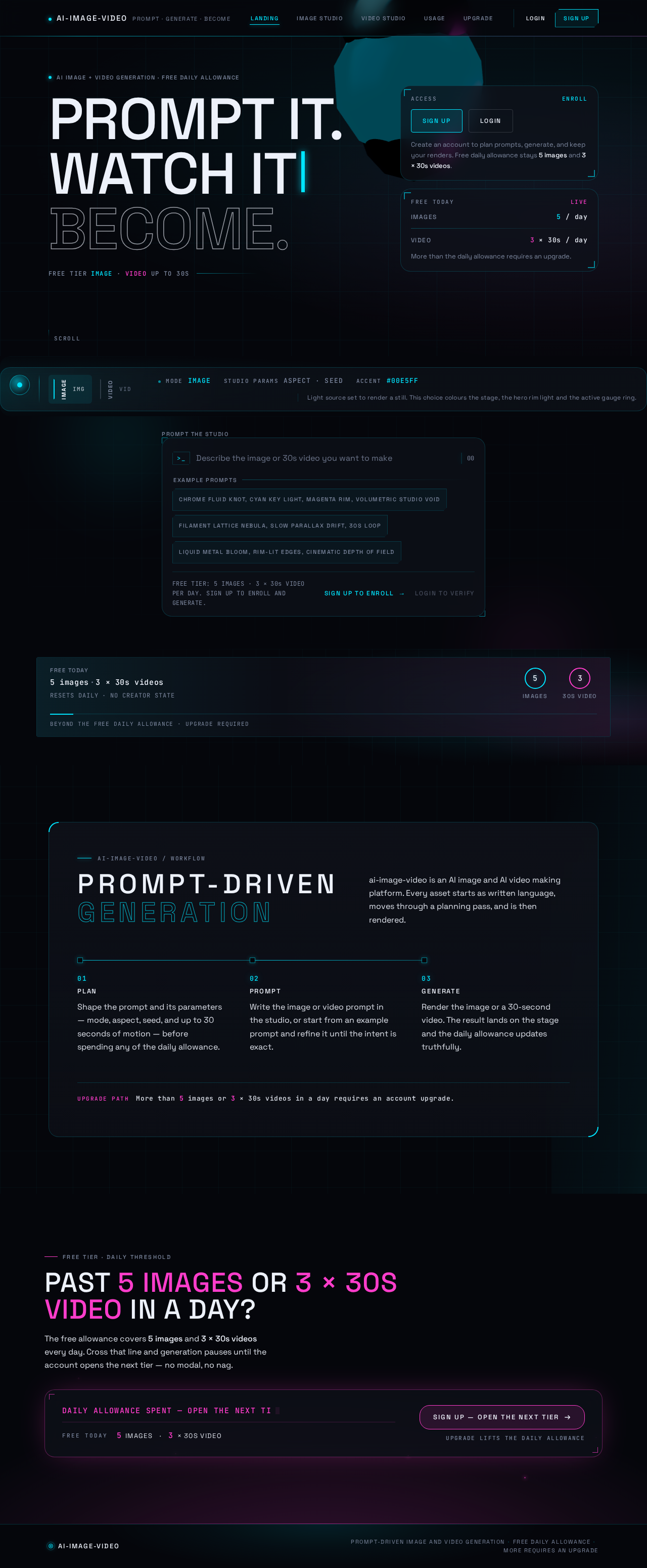
AI image + video generation · free daily allowance
Prompt it.Watch itBecome.
Free tier IMAGE · VIDEO up to 30s
5 images3 × 30s videos
RESETS DAILY · NO CREATOR STATEBeyond the free daily allowance · upgrade required
ai-image-video / workflow
Prompt-driven generation
ai-image-video is an AI image and AI video making platform. Every asset starts as written language, moves through a planning pass, and is then rendered.
- 01
PLAN
Shape the prompt and its parameters — mode, aspect, seed, and up to 30 seconds of motion — before spending any of the daily allowance.
- 02
PROMPT
Write the image or video prompt in the studio, or start from an example prompt and refine it until the intent is exact.
- 03
GENERATE
Render the image or a 30-second video. The result lands on the stage and the daily allowance updates truthfully.
More than 5 images or 3 × 30s videos in a day requires an account upgrade.
FREE TIER · DAILY THRESHOLD
PAST 5 IMAGES OR 3 × 30s VIDEO IN A DAY?
The free allowance covers 5 images and 3 × 30s videos every day. Cross that line and generation pauses until the account opens the next tier — no modal, no nag.
DAILY ALLOWANCE SPENT — OPEN THE NEXT TIER
- 5IMAGES
- 3× 30S VIDEO
AI image + video generation · free daily allowance
Prompt it.Watch itBecome.
Free tier IMAGE · VIDEO up to 30s
5 images3 × 30s videos
RESETS DAILY · NO CREATOR STATEBeyond the free daily allowance · upgrade required
ai-image-video / workflow
Prompt-driven generation
ai-image-video is an AI image and AI video making platform. Every asset starts as written language, moves through a planning pass, and is then rendered.
- 01
PLAN
Shape the prompt and its parameters — mode, aspect, seed, and up to 30 seconds of motion — before spending any of the daily allowance.
- 02
PROMPT
Write the image or video prompt in the studio, or start from an example prompt and refine it until the intent is exact.
- 03
GENERATE
Render the image or a 30-second video. The result lands on the stage and the daily allowance updates truthfully.
More than 5 images or 3 × 30s videos in a day requires an account upgrade.
FREE TIER · DAILY THRESHOLD
PAST 5 IMAGES OR 3 × 30s VIDEO IN A DAY?
The free allowance covers 5 images and 3 × 30s videos every day. Cross that line and generation pauses until the account opens the next tier — no modal, no nag.
DAILY ALLOWANCE SPENT — OPEN THE NEXT TIER
- 5IMAGES
- 3× 30S VIDEO
No comments yet. Be the first!