hello
ai-assistant-nova
by Kidd Marasigan
Kidd Marasiganimport streamlit as st # ============================== # PERSONAL AI ASSISTANT # ============================== st.set_page_config( page_title="My AI Assistant", page_icon="🤖" ) # Customize your AI here AI_NAME = "NOVA" SYSTEM_PERSONALITY = """ You are NOVA, a personal AI assistant. You are helpful, intelligent, friendly, and professional. You help with programming, learning, brainstorming, problem-solving, and everyday questions. """ # Initialize conversation memory if "messages" not in st.session_state: st.session_state.messages = [] # Website interface st.title(f"🤖 {AI_NAME}") st.caption("Your personal AI assistant") st.write(SYSTEM_PERSONALITY) # Display previous messages for message in st.session_state.messages: with st.chat_message(message["role"]): st.markdown(message["content"]) def generate_response(user_input): text = user_input.lower() if "hello" in text or "hi" in text: return f"Hello! I'm {AI_NAME}. How can I help you?" elif "your name" in text: return f"My name is {AI_NAME}, your personal AI assistant." elif "python" in text: return "Python is a programming language used in AI, automation, and software development." elif "who created you" in text: return "You are developing me as your own personal AI project!" else: return ( "That's interesting! I'm still learning how to respond " "to more questions. My creator will upgrade my AI brain soon." ) # Chat input user_input = st.chat_input("Message your AI...") if user_input: # Save user message st.session_state.messages.append({ "role": "user", "content": user_input }) # Generate response response = generate_response(user_input) # Save assistant response st.session_state.messages.append({ "role": "assistant", "content": response }) # Refresh interface st.rerun()

Comments (0)
Sign in to leave a comment
System Requirements
System Requirements Document for ai-assistant-nova
1. Introduction
ai-assistant-nova is a personal AI assistant web application. Its product intent is to give one person — its own creator — a small, self-built assistant named NOVA that they can open, talk to, and tinker with. NOVA presents itself as a helpful, intelligent, friendly, and professional personal assistant that helps with programming, learning, brainstorming, problem-solving, and everyday questions.
The audience is a single hobbyist user at home: curious, playful, and forgiving of the fact that NOVA's "AI brain" is a small set of canned keyword replies rather than a real language model. The product's honest truth is that it is a toy with personality, and the experience is designed around that truth — a tactile, kinetic chat stage where the interface itself responds to the cursor and where NOVA's replies physically arrive rather than simply appear.
The application is delivered as a single first-party web surface, the Landing page, which contains both the anonymous first impression of NOVA and the session chat experience. No account, sign-in, or identity establishment is required to use it.
Page 1 of 28
2. System Overview
NOVA is a browser-delivered chat application with one page. The page opens on a dark, full-viewport stage: NOVA's oversized kinetic wordmark anchors the top-left, a single quiet line of the assistant's personality description runs beneath it, and the conversation occupies a centred column. The chat input is a full-width bar docked to the bottom edge of the viewport and never scrolls away.
The single active human actor is the AI Assistant User. They open the assistant, read its identity and personality, type messages into the chat input, and read NOVA's replies in the conversation view. Conversation memory is kept for the session: every prior user and assistant message is stored and re-displayed in the chat, and the interface refreshes after each exchange so the new messages appear.
NOVA's replies are produced by a keyword-matching response function, not by language-model inference. It recognizes greetings, questions about its own name, the word "python", and questions about who created it; anything else receives a default fallback reply stating that it is still learning and that its creator will upgrade its AI brain soon. Conversation memory is session-scoped only — no cross-session persistence is specified or provided.
Actors
- AI Assistant User (human, active) — the single accepted persona; opens the assistant, sends messages, reads replies.
- NOVA response engine (system process) — the keyword-matching response function that produces NOVA's replies. It is not a persona and has no independent product goal.
Ownership and exclusions
Page 2 of 28
- All accepted behavior is owned by the single first-party Landing page. There are no provider-owned surfaces, no external destinations, and no separate headless delivery.
- No account creation, sign-in, profile management, or permission model exists or is required.
- No sidebar, settings panel, dashboard tiles, or additional navigable destinations exist.
- No real language-model inference, no external AI provider, and no cross-session conversation persistence are in scope.
2a. Product Interpretation and Delivery Boundary
NOVA is delivered as one first-party web page that a person opens directly in a browser. There is no gate in front of it: the page is anonymously reachable, and the chat experience lives on that same page rather than behind a separate entry step. Because conversation memory is session-scoped and no durable, actor-specific state must be privately owned or resumed across visits, no application-owned identity is established and no protected destination exists.
The current delivery horizon covers exactly what the source defines: the NOVA identity and personality presentation, the session chat with keyword-based replies, session-scoped conversation memory, and the interface refresh after each exchange. The fallback reply's statement that "my creator will upgrade my AI brain soon" is a message NOVA says to the user — it is not itself a current capability, and no upgrade, model integration, or training feature is in scope now.
Page 3 of 28
2b. Source Content Inventory
The authoritative content source is the user-supplied Streamlit script defining the NOVA personal AI assistant. Its verified product facts are preserved below.
Assistant identity
- Assistant name:
NOVA - Page title:
My AI Assistant - Page icon:
\xf0\x9f\xa4\x96 - Caption:
Your personal AI assistant
System personality text (displayed verbatim in the interface)
You are NOVA, a personal AI assistant. You are helpful, intelligent, friendly, and professional. You help with programming, learning, brainstorming, problem-solving, and everyday questions.
Keyword response rules (evaluated against the lowercased user input, in order)
| Trigger | Reply |
|---|---|
"hello" or "hi" contained in the input | Hello! I'm NOVA. How can I help you? |
"your name" contained in the input | My name is NOVA, your personal AI assistant. |
"python" contained in the input | Python is a programming language used in AI, automation, and software development. |
"who created you" contained in the input | You are developing me as your own personal AI project! |
| Anything else (default fallback) | That's interesting! I'm still learning how to respond to more questions. My creator will upgrade my AI brain soon. |
Chat input placeholder: Message your AI...
Page 4 of 28
Session memory record shape: each stored message is a record with a role (user or assistant) and a content string.
2c. Page Content and Component Coverage
Page 5 of 28
Landing
The single page of the product. It is anonymously reachable and contains both the first impression of NOVA and the complete session chat experience. There is no separate entry step, no protected state, and no navigation away.
Information and state
- NOVA's name, rendered as the oversized kinetic wordmark that anchors the top-left of the stage.
- The caption
Your personal AI assistant. - The assistant's personality description text, displayed as a single quiet line beneath the wordmark.
- The conversation history for the current session: the ordered list of stored messages, each with its
roleandcontent. - The current chat input value and its placeholder
Message your AI.... - The empty-conversation state: a small acid-yellow caret blinking inside the conversation column, with the line
Ask me about Python, or just say hello.
Primary actions
- Type a message into the docked chat input bar and send it.
- Read NOVA's reply in the conversation view.
Supporting actions
- Scroll the conversation column to review earlier messages in the session.
- Hover the NOVA wordmark to trigger its staggered letter ripple.
- Move the cursor across the stage to drive the acid-yellow radial highlight and the drifting vertical-stroke field.
Domain entities
Page 6 of 28
- Message — a stored conversation record with
role(userorassistant) andcontent. - Session conversation — the ordered in-memory list of messages for the current session; initialized empty on first load.
- Assistant identity — the fixed name
NOVA, the caption, and the personality description text. - Response rule set — the ordered keyword triggers and their canned replies, plus the default fallback.
Component responsibilities
- Stage shell — the full-viewport dark ground that hosts the wordmark, personality line, conversation column, and docked input bar; carries the cursor-following highlight and the vertical-stroke field.
- Wordmark — renders NOVA as oversized kinetic type, flush left, with the staggered hover ripple.
- Personality line — renders the assistant's personality description as a single muted line beneath the wordmark, followed by a hairline rule.
- Conversation column — the centred 720px column that renders the ordered message list, or the empty-conversation state when the list is empty.
- Message block — renders one stored message; assistant messages arrive with a slide-up and fade, user messages arrive instantly with a coral-red left rule.
- Chat input bar — the full-width bar docked to the bottom edge, holding the text field with placeholder
Message your AI...and the solid acid send block. - Response engine — evaluates the lowercased input against the ordered keyword rules and returns the matching reply or the default fallback.
States
Page 7 of 28
- Loading — the page renders its stage, wordmark, personality line, and empty conversation state immediately; there is no blocking data fetch.
- Empty — no messages in the session: the conversation column shows the blinking caret and the line
Ask me about Python, or just say hello. - Success (greeting) — input contains
helloorhi; NOVA repliesHello! I'm NOVA. How can I help you? - Success (name) — input contains
your name; NOVA repliesMy name is NOVA, your personal AI assistant. - Success (python) — input contains
python; NOVA repliesPython is a programming language used in AI, automation, and software development. - Success (creator) — input contains
who created you; NOVA repliesYou are developing me as your own personal AI project! - Success (fallback) — input matches no rule; NOVA replies
That's interesting! I'm still learning how to respond to more questions. My creator will upgrade my AI brain soon. - Error / recovery — the fallback reply is the product's only "I don't know" moment and is presented as a normal assistant message, not a failure state; the user recovers simply by sending another message. If the user submits an empty or whitespace-only input, no message is stored and no reply is generated, and the conversation is unchanged.
- Continuation — after every exchange the interface refreshes so the new user message and NOVA's reply both appear in the conversation column, and the input is ready for the next message.
Page 8 of 28
3. Functional Requirements
FR-1 — Open the NOVA assistant As an AI Assistant User, I should open the assistant and immediately see NOVA presented as my own personal AI assistant, so that I know what I am talking to.
- Provenance: explicit
- Lifecycle: The user navigates to the Landing page. No identity, account, or sign-in step is required. The page renders the NOVA wordmark, the caption
Your personal AI assistant, and the personality description text. - Observable acceptance: The NOVA wordmark, the caption, and the personality description are visible on first load.
- Failure/recovery: None applicable; the page is anonymously reachable and has no blocking dependency.
- Continuation: The user proceeds to read the personality line or send a message.
Page 9 of 28
FR-2 — See NOVA's identity and personality As an AI Assistant User, I should see NOVA's name, its robot icon, the caption describing it as my personal AI assistant, and its personality description, so that I understand what it is for.
- Provenance: explicit
- Lifecycle: On page load, the interface shows the assistant name
NOVAwith the robot icon\xf0\x9f\xa4\x96, the captionYour personal AI assistant, and the personality text stating that NOVA is helpful, intelligent, friendly, and professional and helps with programming, learning, brainstorming, problem-solving, and everyday questions. - Observable acceptance: All four elements — name, robot icon, caption, and personality description — are present and readable.
- Failure/recovery: None applicable.
- Continuation: The user sends a message.
FR-3 — Send a chat message As an AI Assistant User, I should type a message into the chat input and send it, so that I can talk to NOVA.
- Provenance: explicit
- Lifecycle: The user types into the chat input bar, whose placeholder reads
Message your AI..., and submits. The submitted text is stored as a message with roleuserand the typed content. - Observable acceptance: The user's message appears in the conversation view as a user message.
- Failure/recovery: An empty or whitespace-only submission stores nothing and produces no reply; the conversation is unchanged and the input remains ready.
- Continuation: NOVA's reply is generated and displayed.
Page 10 of 28
FR-4 — Receive a greeting reply As an AI Assistant User, I should get a greeting reply when I say hello or hi, so that the conversation starts naturally.
- Provenance: explicit
- Lifecycle: The lowercased input contains
helloorhi. NOVA repliesHello! I'm NOVA. How can I help you?, stored as a message with roleassistant. - Observable acceptance: The reply text appears in the conversation view as an assistant message.
- Failure/recovery: None applicable.
- Continuation: The user sends another message.
FR-5 — Ask NOVA its name As an AI Assistant User, I should be able to ask NOVA its name and get its name back, so that I can confirm who I am talking to.
- Provenance: explicit
- Lifecycle: The lowercased input contains
your name. NOVA repliesMy name is NOVA, your personal AI assistant. - Observable acceptance: The reply text appears in the conversation view as an assistant message.
- Failure/recovery: None applicable.
- Continuation: The user sends another message.
Page 11 of 28
FR-6 — Ask about Python As an AI Assistant User, I should be able to ask about Python and get an explanation, so that NOVA helps with programming topics.
- Provenance: explicit
- Lifecycle: The lowercased input contains
python. NOVA repliesPython is a programming language used in AI, automation, and software development. - Observable acceptance: The reply text appears in the conversation view as an assistant message.
- Failure/recovery: None applicable.
- Continuation: The user sends another message.
FR-7 — Ask who created NOVA As an AI Assistant User, I should be able to ask who created NOVA and get an answer, so that the assistant acknowledges that I am building it.
- Provenance: explicit
- Lifecycle: The lowercased input contains
who created you. NOVA repliesYou are developing me as your own personal AI project! - Observable acceptance: The reply text appears in the conversation view as an assistant message.
- Failure/recovery: None applicable.
- Continuation: The user sends another message.
Page 12 of 28
FR-8 — Receive the fallback reply for unrecognized input As an AI Assistant User, I should get a clear, in-character reply when NOVA does not recognize my message, so that the conversation continues instead of failing.
- Provenance: explicit
- Lifecycle: The lowercased input matches none of the keyword rules. NOVA replies
That's interesting! I'm still learning how to respond to more questions. My creator will upgrade my AI brain soon. - Observable acceptance: The fallback text appears in the conversation view as an assistant message.
- Failure/recovery: This reply is the recovery path for unrecognized input; the user continues by sending another message.
- Continuation: The user sends another message.
FR-9 — Keep conversation memory for the session As an AI Assistant User, I should see my earlier messages and NOVA's earlier replies still in the conversation, so that the exchange reads as one continuous conversation.
- Provenance: explicit
- Lifecycle: Every user message and every assistant reply is appended to the session's message list. On each render, the stored messages are re-displayed in order in the conversation view, each under its own role.
- Observable acceptance: After several exchanges, all prior user messages and assistant replies remain visible in the conversation column in the order they occurred.
- Failure/recovery: Memory is session-scoped only; if the session ends, the conversation is not restored. No cross-session persistence is provided.
- Continuation: The user keeps chatting within the same session.
Page 13 of 28
FR-10 — Refresh the interface after each exchange As an AI Assistant User, I should see the new messages appear immediately after I send, so that the conversation stays current.
- Provenance: explicit
- Lifecycle: After the user's message is stored and NOVA's reply is generated and stored, the interface refreshes so both new messages render in the conversation view.
- Observable acceptance: The user's message and NOVA's reply are both visible immediately after submission, without a manual reload.
- Failure/recovery: None applicable.
- Continuation: The input is ready for the next message.
FR-11 — Read the conversation as two distinct voices As an AI Assistant User, I should be able to tell my messages apart from NOVA's at a glance, so that I can follow the conversation.
- Provenance: required_inference
- Rationale: Indispensable for a usable chat lifecycle — the user must be able to attribute each message to its author. The source distinguishes roles (
user/assistant) in stored records and renders each under its own role. - Lifecycle: Each stored message renders under its own role, with the user's messages and NOVA's replies visually distinct.
- Observable acceptance: User messages and assistant messages are distinguishable in the conversation view.
- Failure/recovery: None applicable.
- Continuation: The user continues reading or sends another message.
4. User Personas
Page 14 of 28
AI Assistant User
Product context. This is the single active human in the product, and the person the assistant belongs to. They are building NOVA as their own personal AI project and use it at home, on their own, in a browser. They know it is a keyword chatbot rather than a frontier model, and they are comfortable with that — the pleasure is in having made it and in watching it respond.
Primary goal. Hold a conversation with NOVA about programming, learning, brainstorming, problem-solving, or everyday questions, and receive a relevant reply while the conversation history stays visible for the session.
Distinct accepted responsibilities.
- Opening the assistant and reading NOVA's identity, caption, and personality description to understand what it is for.
- Composing and sending messages through the chat input.
- Reading NOVA's replies and following the conversation as a continuous exchange.
- Recognizing when NOVA has fallen back to its "still learning" reply and continuing the conversation anyway.
Relevant inputs and decisions.
- The text they type into the chat input, whose placeholder reads
Message your AI.... - Whether to phrase a message around one of the topics NOVA recognizes — a greeting, its name, Python, or who created it — or to send something else and receive the fallback.
- Whether to keep chatting in the current session or stop, knowing the conversation will not persist.
Page 15 of 28
Interactions with other accepted participants. The AI Assistant User's only counterparty is NOVA itself, which answers through the keyword response engine. There is no other human participant, no administrator, and no external service the user interacts with.
Observable success. The user's message appears in the conversation, NOVA's reply appears beneath it, and the full exchange remains visible in the conversation column for the rest of the session.
Constraints carried from the source. The user's experience is bounded by the fact that NOVA's replies are canned keyword matches, not inference, and that conversation memory lasts only for the session.
5. Core User Flows
Flow 1 — Open NOVA and read who it is
- The AI Assistant User opens the Landing page in a browser. No sign-in, account, or identity step is presented.
- The dark full-viewport stage renders: NOVA's oversized kinetic wordmark anchors the top-left, the caption
Your personal AI assistantsits with it, and the personality description runs as a single quiet line beneath, followed by a hairline rule. - The conversation column is empty, showing a small acid-yellow caret blinking inside the 720px column with the line
Ask me about Python, or just say hello. - The chat input bar is docked to the bottom edge of the viewport with the placeholder
Message your AI...and a solid acid send block on the right. - Observable result: the user can see NOVA's name, its robot icon, the caption, and its personality description, and can see where to type.
- Next step: the user sends a message (Flow 2).
Page 16 of 28
Flow 2 — Send a message and receive a reply
- The AI Assistant User clicks into the docked chat input bar and types a message.
- The user submits the message.
- The submitted text is stored as a message with role
user, and the user's message appears in the conversation column immediately, marked with a coral-red left rule. - The response engine lowercases the input and evaluates it against the ordered keyword rules.
- NOVA's reply is stored as a message with role
assistantand appears in the conversation column, sliding up 24px and fading in over 420ms. - The interface refreshes so both new messages are rendered.
- Observable result: the user's message and NOVA's reply are both visible in the conversation, in order.
- Next step: the user sends another message, or scrolls back through the conversation.
Page 17 of 28
Flow 3 — Ask NOVA a recognized question
- The AI Assistant User types a message containing one of the recognized triggers — a greeting such as
helloorhi, the phraseyour name, the wordpython, or the phrasewho created you. - The user submits the message.
- The response engine matches the first applicable rule and returns its canned reply:
- greeting →
Hello! I'm NOVA. How can I help you? - name →
My name is NOVA, your personal AI assistant. - python →
Python is a programming language used in AI, automation, and software development. - creator →
You are developing me as your own personal AI project!
- greeting →
- The reply appears in the conversation column as an assistant message.
- Observable result: the user receives the specific reply for the topic they raised.
- Next step: the user continues the conversation.
Page 18 of 28
Flow 4 — Send something NOVA does not recognize
- The AI Assistant User types a message that contains none of the recognized triggers.
- The user submits the message.
- The response engine finds no matching rule and returns the default fallback:
That's interesting! I'm still learning how to respond to more questions. My creator will upgrade my AI brain soon. - The fallback appears in the conversation column as a normal assistant message — it is not presented as an error.
- Observable result: the conversation continues rather than failing; the user understands NOVA does not yet handle that input.
- Recovery and continuation: the user sends another message, optionally rephrasing around a topic NOVA recognizes, and the conversation proceeds.
Flow 5 — Review the session conversation
- The AI Assistant User has exchanged several messages with NOVA in the current session.
- The user scrolls the conversation column to review earlier messages.
- Every prior user message and every prior assistant reply is still present, in the order it occurred, each rendered under its own role.
- Observable result: the exchange reads as one continuous conversation for the session.
- Continuation: the user sends another message, or leaves the page. If the session ends, the conversation is not restored — no cross-session persistence is provided.
Page 19 of 28
6. Visuals, Colors and Theme
The creative direction is authoritative for this section. Its muse is Yugo Nakamura, and its headline idea is interaction as delight — NOVA answers the cursor, not a template. The interface itself is the playground: a dark full-viewport stage where motion carries the personality, and where the honest limitation of a keyword bot becomes the point rather than something to disguise.
Color tokens (dark mode)
| Role | Hex | Use |
|---|---|---|
| Background | #0E0E11 | Stark near-black ground for the full-viewport stage |
| Surface | #1A1A1F | Barely-lifted charcoal panels |
| Hairline | #2A2A31 | 1px borders and rules |
| Text | #F4F4F0 | Warm off-white body and heading text — never pure white |
| Primary | #F2F24B | Hot acid-yellow: NOVA's wordmark, the send affordance, the cursor-following highlight |
| Accent | #FF4D3D | Coral-red: the user's own messages and the one moment of error/fallback |
| Muted | #7A7A85 | The personality line and micro-labels |
Proportion: roughly 85% dark ground, 10% acid, 5% coral.
Typography
Page 20 of 28
- Headings: Space Grotesk 700, set in tight uppercase with
-0.03emtracking. Display sizes are intentionally oversized so the name reads as kinetic type rather than a page title. - Body: Space Grotesk 400 at 17px with 1.6 line-height.
- Scale: 1.25 modular — 96 / 64 / 40 / 28 / 20 / 17 / 14.
- Display wordmark:
clamp(56px, 12vw, 128px). Chat body: 17px. Micro-labels: 12px uppercase with 0.14em tracking.
Shape language
Minimal chrome on a full-viewport playground. Message blocks are hard-edged rectangles with no large radii — the motion carries the softness. 1px hairlines and a thin 2px acid underline are the only ornament. The single soft element is the cursor-following highlight blob, which is a blurred radial, not a card style.
Layout
One full-viewport stage. NOVA's wordmark sits top-left as the anchor; the personality line runs as a single quiet line beneath it; the conversation occupies a centred column of max-width 720px. The chat input is pinned to the bottom of the viewport as a full-width bar — the last line of the page, never scrolling away. No sidebar, no settings panel, no dashboard tiles.
Imagery
No photography, no illustration, no 3D props. The only imagery is generative: a faint field of short vertical strokes on the dark ground, drawn with CSS repeating-linear-gradient, that subtly parallaxes against the cursor. The interface is the image.
Page 21 of 28
Explicitly avoided: centred headline + subtext + blue button heroes; gradient-blob backgrounds and glassmorphism cards; Bootstrap blue or indigo (#0057FF, #2563EB, #6366F1) anywhere; Inter, Roboto, Arial, Poppins, or system-ui for any text; a rounded floating chat pill in the middle of the screen; sidebars, settings panels, or dashboard tiles; stock photography, character illustration, or 3D props; bouncy spring easing or particles that obscure text.
Readability constraint. Headlines, the wordmark, labels, numbers, and controls stay entirely inside the viewport and their container at 375px, 768px, and 1280px, wrapping or scaling to fit, with no other element covering any part of them. Decoration and motion may bleed, crop, or overlap freely as the direction asks, provided they cover no readable text or control.
Page 22 of 28
7. Signature Design Concept
The stage, not the page. The first screen is a dark full-viewport stage rather than a centred SaaS hero. NOVA is set as oversized kinetic type at clamp(56px, 12vw, 128px), flush left at the top of the stage, with the acid-yellow wordmark bleeding slightly past the left margin so it reads as a poster rather than a page title. At 1280px it bleeds; at 375px the clamp keeps it fully inside the viewport.
Beneath the wordmark, a single 17px line of the personality description runs in muted grey, followed by a hairline rule. The centre of the stage holds the empty conversation state: a small acid-yellow caret blinking inside the 720px column, with the line Ask me about Python, or just say hello. The chat input bar is docked to the bottom edge, full-width, with the send action as a solid acid block on the right. A faint vertical-stroke field sits behind everything and drifts a few pixels with the cursor.
The concept recomposes only accepted content and controls: NOVA's name, the caption, the personality line, the empty-conversation prompt, the message list, and the chat input. It introduces no new behavior, page, or destination.
Page 23 of 28
8. Interaction Model & Motion Direction
Interaction Model: Animated Motion Tempo: expressive Hero Dimensionality: layered_2d
Landing Hero Motion Brief
- Focal subject: NOVA's oversized kinetic wordmark, flush left on the dark stage, with the acid-yellow cursor-following highlight and the drifting vertical-stroke field behind it.
- Input → transformation → outcome thesis: as the cursor moves across the stage, the acid-yellow radial highlight tracks it at low opacity and the vertical-stroke field drifts 4–8px against it; when the user hovers the wordmark, its letters shift 2–4px in a staggered ripple. The outcome is a stage that visibly answers the user's presence before a single message is sent — the interface itself is the greeting.
- Motion vocabulary: a soft acid radial highlight following the cursor (pure CSS custom properties, no library); a 24px slide-up and fade at 420ms
cubic-bezier(0.16, 1, 0.3, 1)for NOVA's replies — elastic, not bouncy; a staggered 2–4px letter ripple on the wordmark; a typing indicator of three dots that compress and stretch rather than pulse; user messages arriving instantly with a coral-red left rule. - Composed first frame: dark
#0E0E11ground; the acid wordmark bleeding slightly past the left margin; the muted personality line and hairline rule beneath it; the blinking acid caret andAsk me about Python, or just say hello.in the centre column; the full-width input bar docked at the bottom with its solid acid send block. - Reduced-motion state: every motion becomes a simple fade — the cursor highlight and stroke-field drift stop, the wordmark ripple is suppressed, and replies appear without the slide. The stage remains fully usable and every element stays readable and in place.
Page 24 of 28
9. Non-Functional Requirements
NFR-1 — Keyword response behavior (explicit). NOVA's replies are produced by keyword matching against the lowercased user input, not by language-model inference. The rules are evaluated in order: greeting, name, python, creator, then the default fallback. Rationale: this is an explicit hard constraint in the authoritative source.
NFR-2 — Session-scoped memory only (explicit). Conversation memory lives for the session only. No cross-session persistence, storage, or restoration is specified or provided. Rationale: explicit hard constraint in the authoritative source.
NFR-3 — Anonymous access (explicit). The Landing page is reachable without an account, sign-in, or any identity step. No protected state exists. Rationale: the accepted access requirement for the single page is none, and no durable actor-specific state requires ownership.
NFR-4 — Single-page delivery (explicit). The product is delivered as one first-party page containing both the first impression and the chat experience. No additional navigable destinations, sidebars, or settings panels exist. Rationale: the accepted page contract contains exactly one page.
NFR-5 — Readability across viewports (explicit). Readable text and controls remain whole and inside the viewport and their container at 375px, 768px, and 1280px. The wordmark uses clamp(56px, 12vw, 128px) so it bleeds at wide viewports while staying fully inside at narrow ones. Rationale: explicit creative-direction constraint.
NFR-6 — Reduced-motion support (explicit). All motion respects prefers-reduced-motion by becoming a simple fade, leaving a fully usable static arrangement. Rationale: explicit creative-direction constraint.
Page 25 of 28
NFR-7 — No external AI provider (explicit). No external model provider, API key, or inference service is used. Rationale: the source defines a self-contained keyword function and states the AI brain will be upgraded later; no provider integration is accepted now.
10. Tech Stack
- Frontend: React (single-page application) rendering the Landing stage, conversation column, and docked chat input bar.
- Styling: CSS with custom properties for the cursor-following highlight and the vertical-stroke field; Space Grotesk loaded as the sole typeface.
- Backend: Python / FastAPI, serving the keyword response rules and the session conversation endpoints.
- Storage: none required for current scope — conversation memory is session-scoped and held in memory for the session.
- Containerization: Docker with
docker-compose.ymlrunning the frontend and the backend as the runnable services.
No Kubernetes deployment is required for the current scope.
Page 26 of 28
11. Assumptions and Constraints
Assumptions
- The product is used by a single person at a time in their own browser; no multi-user concurrency behavior is specified.
- The personality description text is displayed to the user as part of the interface, as the source renders it on the page.
- The robot icon
\xf0\x9f\xa4\x96accompanies the NOVA name in the interface, as the source sets it as the page icon and title prefix. - The keyword rules are evaluated in the order given in the source, so an input containing multiple triggers matches the first applicable rule.
- The typing indicator described in the creative direction is a presentation affordance for the moment between submission and reply; it introduces no new product behavior.
Constraints
- NOVA's replies are canned keyword matches, not inference. The fallback reply explicitly tells the user the AI brain will be upgraded later.
- Conversation memory is session-scoped only; nothing persists across sessions.
- The product is one anonymously reachable page with no account, sign-in, or permission model.
- No external AI provider, model API, or inference service is used.
- The visual direction forbids indigo/blue-on-white SaaS styling, the named forbidden typefaces, sidebars, settings panels, dashboard tiles, and 3D props.
Page 27 of 28
12. Glossary
- NOVA — the name of the personal AI assistant this product presents.
- AI Assistant User — the single active human persona: the person who opens NOVA, sends messages, and reads its replies.
- Message — a stored conversation record with a
role(userorassistant) and acontentstring. - Session conversation — the ordered in-memory list of messages for the current browser session; initialized empty and not persisted.
- Keyword response rule — one of the ordered trigger/reply pairs the response engine evaluates against the lowercased user input.
- Fallback reply — the default response returned when no keyword rule matches:
That's interesting! I'm still learning how to respond to more questions. My creator will upgrade my AI brain soon. - Landing — the single page of the product, containing both the first impression of NOVA and the session chat experience.
- Stage — the full-viewport dark surface that hosts the wordmark, personality line, conversation column, and docked input bar.
- Wordmark — NOVA's name rendered as oversized kinetic type at the top-left of the stage.
Page 28 of 28
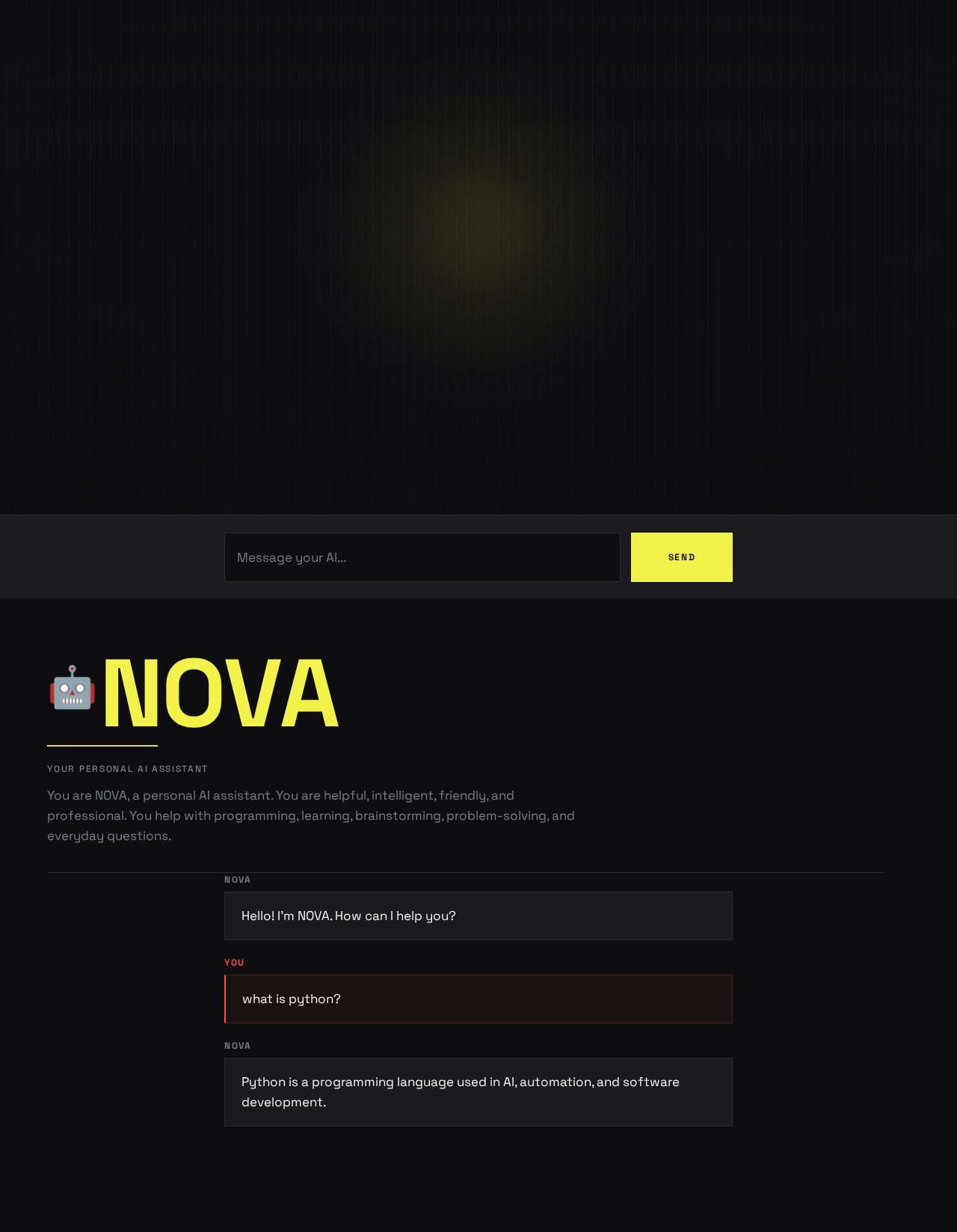
Your personal AI assistant
You are NOVA, a personal AI assistant. You are helpful, intelligent, friendly, and professional. You help with programming, learning, brainstorming, problem-solving, and everyday questions.
Session conversationYou Nova You Nova
Hello! I'm NOVA. How can I help you?
what is python?
Python is a programming language used in AI, automation, and software development.
Your personal AI assistant
You are NOVA, a personal AI assistant. You are helpful, intelligent, friendly, and professional. You help with programming, learning, brainstorming, problem-solving, and everyday questions.
Session conversationYou Nova You Nova
hello
Hello! I'm NOVA. How can I help you?
what is python?
Python is a programming language used in AI, automation, and software development.
No comments yet. Be the first!