agile-gaming
 Raza
RazaA Gaming App


Comments (0)
Sign in to leave a comment
System Requirements
System Requirements Document for agile-gaming
1. Introduction
agile-gaming is a gaming app for people who want to play adventure games — one or several — entirely offline. The product's intent is a personal shelf of self-contained adventure worlds: a player opens the app, picks an adventure, and plays it with no network connection, with progress kept on the device so a later session resumes where the last one stopped.
The audience is the Player: someone on a train, a plane, or in a cabin with no signal who wants a small, self-contained world they can keep in their pocket and return to. The app is not a storefront, not an esports product, and not an online service; its core promise is that the adventures always work, signal or no signal.
2. System Overview
agile-gaming is delivered as a React frontend application backed by a shared FastAPI backend process and a MariaDB database, provisioned through docker-compose. The frontend presents three first-party surfaces — Landing, Games, and Play — all reachable without any account or sign-in. The backend and database support the application's own operation; the offline-play promise is carried by the client, which retains the games and the player's progress locally on the device so that browsing, starting, playing, and resuming all work without a connection.
The single active human actor is the Player. The Player browses the available adventure games, sees retained progress, starts or resumes an adventure, and plays it offline. Progress is stored locally so the Player can leave and return to the same point later.
Current scope is deliberately narrow: a gaming app, adventure games (one or multiple), playable offline, with locally retained progress. There is no account system, no online multiplayer, no storefront or purchase flow, and no social or leaderboard feature in the current delivery.
Removed from scope
- Online-only play (also: network-required play, always-connected play)
2a. Product Interpretation and Delivery Boundary
The product is a client-first gaming app. Its defining behavior — playing adventure games offline — happens on the device, and the app's own local storage is the authoritative home of the player's games and progress. The shared backend and MariaDB database are provisioned infrastructure that support the application; they do not gate the core play experience, which must remain usable with no connection.
All three surfaces are openly reachable: there is no sign-in, no account creation, and no protected destination. The Player's continuity comes from local device storage, not from an application identity. Nothing in the current scope requires the Player to establish an account, and no account-management capability is part of this delivery.
Future ideas are kept out of the current pages and acceptance criteria and are listed only in the future section of this document.
2c. Page Content and Component Coverage
Landing
- Information and state: Anonymous public entry. States the product's promise — adventure games that play offline — and who it is for. Shows the last-played game name when a local save exists; shows a first-visit state when no save exists.
- Primary action: "Pick an adventure" — leads to Games.
- Supporting action: "Resume last save" — shown only when a local save exists; leads to Play for the last-played game at its saved point.
- Domain entities: Adventure game (title, short description, thumbnail diorama), local save summary (last-played game, saved progress).
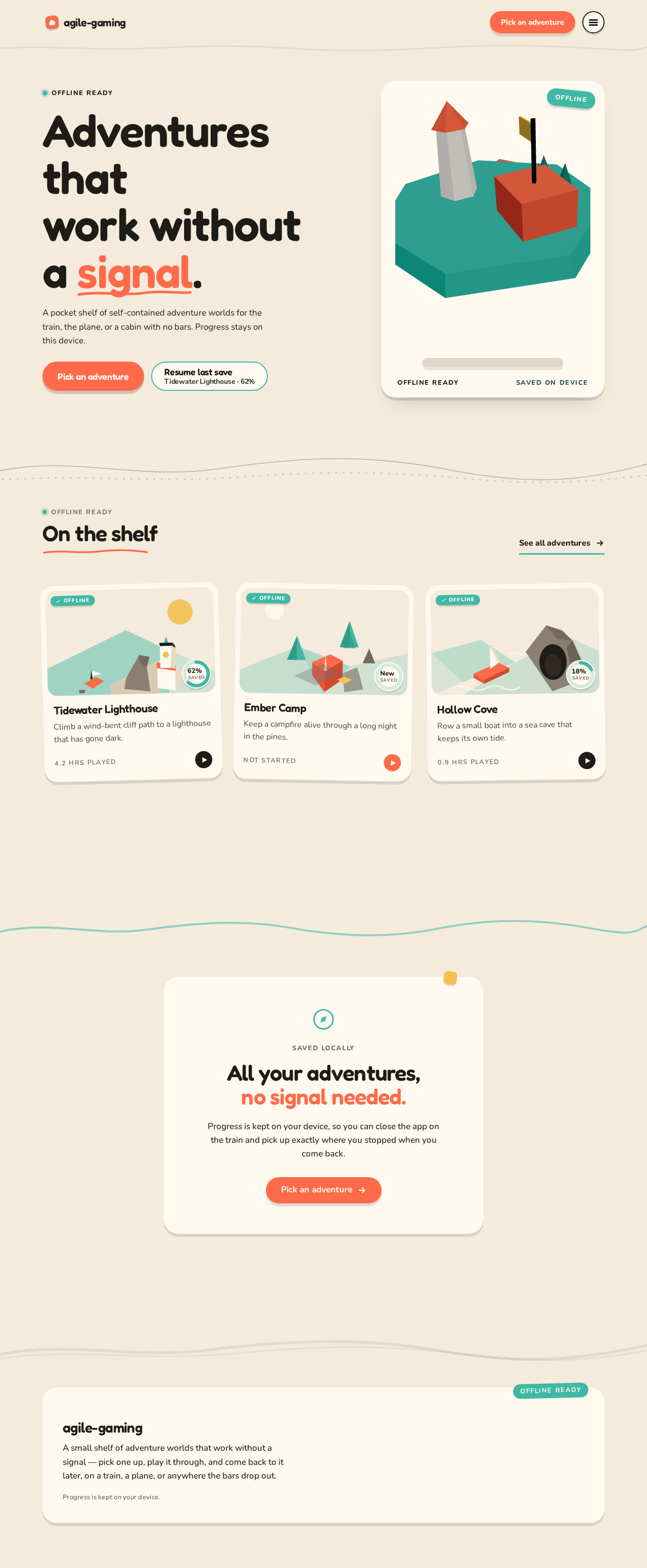
- Component responsibilities: Hero headline block; primary and secondary CTAs; low-poly island diorama hero subject with an "OFFLINE" sticker; a shelf row of game tiles previewing available adventures.
- States: Loading (local save lookup in progress); empty (no save yet — secondary CTA hidden, first-visit copy); success (save summary shown); error/recovery (local storage unreadable — the app still offers "Pick an adventure" and treats the session as a first visit).
Games
- Information and state: The shelf of available adventure games. Each game tile shows its title, a small isometric diorama thumbnail, and a teal progress ring reflecting saved progress. A persistent top bar shows an "Offline" teal pill.
- Primary action: Select a game tile to open it in Play.
- Supporting action: Resume a game that has saved progress directly from its tile.
- Domain entities: Adventure game (title, description, thumbnail), progress record (game, saved position, time played).
- Component responsibilities: Game tile grid (3-up at 1280px, horizontally scrollable shelf on mobile); progress ring per tile; top bar with offline pill; empty-state panel.
- States: Loading (game catalog and progress records being read); empty (no games available — explanatory panel); success (tiles with progress rings); error/recovery (a game's local data unreadable — that tile shows an unavailable state while other tiles remain usable).
Play
- Information and state: The active adventure session. A persistent top bar shows the current game name, a progress ring, and an "Offline" teal pill. The game scene occupies the main area.
- Primary action: Play the adventure — advance through its scenes and choices.
- Supporting actions: Pause/leave the session (progress is retained); resume from the saved point on return.
- Domain entities: Adventure game content, session state (current scene, choices made), progress record.
- Component responsibilities: Game viewport; top bar with game name, progress ring, offline pill; pause/leave control; save indicator.
- States: Loading (game content being read from local storage); empty (game content unavailable — explanatory panel with a return to Games); success (active play with progress ring updating); error/recovery (save write failure — the session continues and the app surfaces that progress could not be saved, offering a retry).
3. Functional Requirements
FR-1 — Gaming app delivery (explicit) As a Player, I should open a gaming app that presents adventure games, so that I have a single place to play them.
- Trigger: the Player opens the app.
- Observable result: the Landing surface presents the app and its adventure games.
- Access: open, no account required.
- Failure/recovery: if the app cannot read local data, it still presents the app and offers to pick an adventure.
- Continuation: the Player proceeds to Games.
FR-2 — Adventure games, one or multiple (explicit) As a Player, I should see the available adventure game or games, so that I can choose which one to play.
- Trigger: the Player opens Games (or the Landing shelf).
- Observable result: each available adventure game is presented with its title and thumbnail.
- Access: open, no account required.
- Failure/recovery: a game whose local data is unreadable shows an unavailable state while other games remain selectable.
- Continuation: the Player selects a game to open it in Play.
FR-3 — Play offline (explicit; hard constraint) As a Player, I should play an adventure game with no network connection, so that I can play on a train, a plane, or anywhere without signal.
- Trigger: the Player selects a game and begins play.
- Observable result: the game runs and responds to the Player's input without any network request; the top bar shows the "Offline" pill.
- Access: open, no account required.
- Failure/recovery: if game content cannot be read locally, Play shows an explanatory panel and a return to Games.
- Continuation: the Player keeps playing, pauses, or leaves.
FR-4 — Locally retained progress and resume (required_inference) As a Player, I should have my progress kept on the device and resume from it later, so that leaving the app does not lose my place.
- Trigger: the Player advances in a game, then pauses or leaves.
- Observable result: the progress record is written locally; the game's tile shows a progress ring, and Landing offers "Resume last save" with the last-played game name.
- Access: open, no account required; continuity comes from local device storage.
- Failure/recovery: if a save write fails, the session continues and the app surfaces that progress could not be saved, offering a retry.
- Continuation: on return, the Player resumes the game at the saved point.
4. User Personas
Player
- Product context: The Player wants adventure games they can play entirely offline — on a train, a plane, or in a cabin with no signal. They treat the app as a personal shelf of small, self-contained worlds they can pick up and keep in their pocket.
- Primary goal: Start or resume an adventure and play it without a connection, knowing their progress is kept.
- Distinct responsibilities: Browsing the available adventures; choosing one; playing it; pausing or leaving; returning later to resume from the saved point.
- Relevant inputs and decisions: Which adventure to play; whether to resume the last save or pick a different game; when to pause or leave.
- Interactions with other participants: None beyond the Player; the app and its local storage serve the Player directly, with no counterparty, recipient, or other human participant in the current scope.
- Observable success: The Player plays an adventure with no network connection, and on returning finds the game's progress ring and "Resume last save" reflecting where they stopped.
5. Core User Flows
Flow A — First visit and pick an adventure
- The Player opens the app with no prior save. Landing loads and shows the headline promise and the "Pick an adventure" CTA; because no local save exists, "Resume last save" is not shown.
- The Player selects "Pick an adventure" and arrives at Games.
- Games presents the available adventure game or games as tiles with thumbnails and an "Offline" pill in the top bar.
- The Player selects a game tile and arrives at Play.
- Play loads the game content from local storage and the Player begins playing; the top bar shows the game name, progress ring, and "Offline" pill.
- Failure/recovery: if the game content cannot be read locally, Play shows an explanatory panel and a return to Games, where the Player can choose another game.
Flow B — Play offline and leave
- The Player is in Play, mid-adventure, with no network connection.
- The Player advances through the game; the progress ring updates as they go.
- The Player pauses or leaves the session. The progress record is written locally.
- Failure/recovery: if the save write fails, the session continues and the app surfaces that progress could not be saved, offering a retry; the Player may retry the save or continue playing.
- The Player closes the app.
Flow C — Return and resume
- The Player reopens the app. Landing reads the local save and shows "Resume last save" with the last-played game name.
- The Player selects "Resume last save" and arrives at Play at the saved point.
- Alternatively, the Player selects "Pick an adventure", goes to Games, sees the progress ring on the last-played game's tile, and selects that tile to resume.
- The Player continues the adventure offline.
- Failure/recovery: if the local save is unreadable, Landing treats the session as a first visit and still offers "Pick an adventure"; Games shows the affected tile as unavailable while other games remain selectable.
6. Visuals Colors and Theme
The visual direction is "Playable worlds after Bruno Simon": discovery and toy-box delight, a personal shelf of adventures that always work.
Colour tokens (light mode)
| Role | Hex | Use |
|---|---|---|
| Background | #F4EBDD | Warm cream paper ground, ~65% of the page |
| Surface | #FFF9EF | Cards and panels, ~20% |
| Text | #1F1B16 | All body and display text |
| Primary | #FF6B4A | Coral — primary CTAs, "Continue" pill, active game tag, ~10% |
| Accent | #3FB8A6 | Teal — progress rings, offline badges, hover states |
| Muted | #8A7F70 | Metadata such as "4.2 hrs played" |
| Sticker | #F2C14E | Lemon — only inside the 3D hero scene and as a tiny sticker accent |
Typography
- Headings: Fredoka SemiBold, tight tracking (-0.02em), sentence case, line-height 1.02–1.08.
- Body: Nunito Regular/Medium at 17–18px, 1.6 leading.
- Scale: 1.25 modular with a display jump — display
clamp(40px, 7vw, 96px); h2clamp(28px, 3.4vw, 44px); h3 22px; body 17px; caption 13px uppercase Nunito Bold with 0.12em tracking for labels like "OFFLINE READY" and "SAVED LOCALLY". - Display sizes never drop below 40px on mobile.
Shape language
- Chunky rounded rectangles (radii 20–28px) on cards and buttons; pill CTAs (radius 999px).
- Soft offset shadows
0 6px 0 rgba(31,27,22,0.12)so surfaces feel like physical toy pieces. - Section dividers are gentle hand-drawn curves, not straight rules.
- Game tiles are slightly rotated (-1.5° to 1.5°) like stickers on a fridge.
- No gradients, no glass, no 1px hairline borders.
Layout
- Single-column editorial flow on mobile; 12-column grid on desktop with a 7-column hero headline and a 5-column 3D diorama.
- Below the hero, a horizontal shelf row of game tiles that scrolls on mobile and wraps into a 3-up grid at 1280px.
- Games and Play keep the cream ground with a persistent top bar showing the current game name, progress ring, and "Offline" teal pill.
- 96–128px vertical rhythm between sections; nothing is centred except the final "All your adventures, no signal needed" statement block.
Imagery
- Low-poly 3D scenes: one island for the featured adventure in the hero, and small isometric diorama thumbnails for each game tile (cliffs, lighthouses, campfires, boats, caves), all flat-shaded triangles in the toy palette.
- No stock photography, no character illustration, no UI screenshots.
- Offline/progress icons are thick-stroke vector pictograms in ink on cream.
7. Signature Design Concept
The public entry is a split hero on a cream ground that reads as a poster of a world you can pick up. The left seven columns carry an oversized three-line Fredoka headline — "Adventures that / work without / a signal." — with "signal" set in coral and a small hand-drawn underline. Beneath it sit a single coral pill CTA "Pick an adventure" and a teal-outlined secondary "Resume last save" showing the last-played game name in ink. The right five columns hold a full-height low-poly island diorama on a soft cream pedestal, slowly rotating and tilting toward the cursor, with a tiny lemon flag and a teal "OFFLINE" sticker pinned to its corner. Below the hero, game tiles sit as slightly rotated sticker cards with soft offset shadows and teal progress rings, snapping back to 0° on hover. The composition is deliberately not a centred headline with a gradient blob and a blue button; it is a drawn map of a shelf of adventures.
8. Interaction Model & Motion Direction
Interaction Model: Animated Motion Tempo: expressive Hero Dimensionality: webgl
Landing Hero Motion Brief
- Focal subject: a single low-poly island diorama on a soft cream pedestal, with a tiny lemon flag and a teal "OFFLINE" sticker pinned to its edge.
- Input → transformation → outcome thesis: as the pointer moves across the hero, the island tilts toward the cursor with damped easing while continuing its slow autonomous rotation; the outcome is a world that feels physically present and pickable, framing the "Pick an adventure" CTA.
- Motion vocabulary: slow autonomous rotation; damped cursor-follow tilt; short spring (scale 0.96 → 1, 220ms) as game tiles snap in on scroll-in; hover lifts a tile 4px and rotates it back to 0° with a soft shadow shift; gentle hand-drawn curved section dividers.
- Composed first frame: cream ground, three-line Fredoka headline with "signal" in coral and a hand-drawn underline, coral pill CTA and teal-outlined resume CTA on the left; the island diorama resting at a slight tilt on its pedestal on the right, "OFFLINE" sticker visible.
- Reduced-motion state: the island holds still, tiles appear without spring, and the shelf row becomes a normal horizontally scrollable row in which every item can be brought fully into view.
Landing Hero 3D Scene Brief — DIRECTION-DERIVED
One crafted real-time low-poly island: flat-shaded triangles in the toy palette (cream ground, coral and teal accents, a lemon flag), a soft cream pedestal, and a teal "OFFLINE" sticker. The island rotates slowly on its own and tilts toward the pointer with damped easing. It shows the product's defining state — a self-contained world you can pick up and play offline — and never covers readable text or controls.
9. Non-Functional Requirements
- Offline play (explicit, hard constraint): adventure games must be playable with no network connection. No core play interaction may depend on a network request.
- Local persistence (required_inference): games and progress are stored locally on the device so play and resume work without a connection. Local storage is the authoritative home of the Player's progress.
- No account requirement (required_inference): all three surfaces are openly reachable; no sign-in, account creation, or protected destination is part of the current scope.
- Readable text and controls (explicit design constraint): headlines, labels, numbers, cards' text and controls stay entirely inside the viewport and their container at 375px, 768px, and 1280px, wrapping or scaling to fit; no other element covers any part of them. Imagery, decoration, and motion may be cropped, bled, rotated, or overlapped as the direction asks, provided they cover no readable text or control. Moving and scrollable content may cross the viewport edge by design and is judged by whether every item becomes fully readable as it passes.
- Reduced motion (explicit design constraint): with
prefers-reduced-motion, provide a usable static arrangement — the island holds still, tiles appear without spring, and the shelf row becomes a normal horizontally scrollable row. - Accessibility of contrast: ink
#1F1B16on cream#F4EBDDand on surface#FFF9EF; coral#FF6B4Aused for CTAs with ink or surface text as appropriate to remain readable.
10. Tech Stack
- Frontend: React application UI, carrying the offline play experience and local progress storage on the device.
- Backend: shared FastAPI process for application APIs and domain modules.
- Database: MariaDB for application-owned persistent data.
- Orchestration: docker-compose provisioning the backend, database, and frontend services.
- 3D hero: real-time WebGL/R3F low-poly island diorama on the Landing surface, per the creative direction.
11. Assumptions and Constraints
- Assumption: the Player's device provides local storage sufficient to hold the adventure games and progress records; the app reads and writes them without a network connection.
- Assumption: the adventure game content is bundled with or locally available to the app so that play works offline.
- Constraint: games must be playable offline — this is a hard, explicit constraint and applies to all core play behavior.
- Constraint: no account, sign-in, or protected destination is part of the current scope; continuity comes from local device storage.
- Constraint: the visual direction forbids the generic indigo/blue-on-white SaaS template, glassmorphism, gradient meshes, stock photography, and the listed typefaces for headings or body.
- Constraint: no element presents or links to planning documents, specs, or success criteria.
12. Glossary
- Adventure game: a self-contained game world the Player explores and advances through, playable offline.
- Offline: with no network connection; the app's core play behavior works in this state.
- Progress record: the locally stored state of a Player's advancement in a game, used to resume a later session.
- Progress ring: the teal circular indicator on a game tile or in the Play top bar showing saved progress.
- Offline pill: the persistent teal badge in the Games and Play top bars signaling the offline promise.
- Local save: the on-device storage of games and progress that makes resume work without a connection.
- Diorama: a small low-poly 3D scene representing a game, used as a tile thumbnail and as the hero subject.
Offline ready
Adventures thatwork withouta signal.
A pocket shelf of self-contained adventure worlds for the train, the plane, or a cabin with no bars. Progress stays on this device.
On the shelf
Saved locally
All your adventures, no signal needed.
Progress is kept on your device, so you can close the app on the train and pick up exactly where you stopped when you come back.
Pick an adventureOffline ready
Adventures thatwork withouta signal.
A pocket shelf of self-contained adventure worlds for the train, the plane, or a cabin with no bars. Progress stays on this device.
On the shelf
Saved locally
All your adventures, no signal needed.
Progress is kept on your device, so you can close the app on the train and pick up exactly where you stopped when you come back.
Pick an adventure
No comments yet. Be the first!