agentic-ai-platform
We're on some kind of Agentic-AI Platform at https://8080.ai/ as its interface if you have any kind of web-browser of your own in which to be able to see and field-test it for yourself. Current Model-Selection is «Dopamine Ultra 1 ・ 10M context» and it seems to have been recently released. I wish to find out what capabilities and limitations we have whilst hoping that we don't run into some kind of «Add more credits (or subscribe) in order to let the AI continue processing» sort of pay-wall. Leaving it to you to make your own autonomous-decision(s) for what we can find out. Can I leave the probing decisions up to you?


Comments (0)
Sign in to leave a comment
Project Tasks
135 tasksGenerate system requirement document
Generate personas & user flows
Architecture
Workspace task plan
Create flow for Platform Prober
Landing
Probes
Probe Results
Landing / Hero
Landing / Instrument Band
Landing / Navigation
Landing / Footer
Navigation
Footer
Fix Landing: The required full-bleed generative particle hero is not a probe-data-driven field: and…
Fix Landing review finding: frontend/src/components/Landing Hero.jsx: the required…
Probes / Navigation Slot
Probes / Run Header
Probes / Suite Panel
Probes / Credit Wall Banner
Probes / Footer Slot
Probe Results / Navigation
Probe Results / Run Summary
Probe Results / Verdict
Probe Results / Findings
Probe Results / Rows
Probe Results / Return
Probe Results / Footer
Fix Probes: Tablet suite header breaks into an unusably narrow column because its controls and…
Fix Probes review finding: Tablet suite header breaks into an unusably narrow column…
Fix Probe Results: Probe rows layout collapses the name column on desktop; see selectors .prr-row and…
Fix Probe Results: Probe row outcome is truncated on mobile; see selector .prr-outcome.
Fix Probe Results review findings: Probe rows layout collapses the name column on desktop; (+1 more)
Fix Probe Results review finding: Probe rows layout collapses the name column on desktop;
Create backend_modules diagram
Create frontend_modules diagram
Create sequence diagram
Create service_network diagram
Show successful probe responses in the results view
Run a probe run and offer the results view
Show a failure reason when a probe has no usable response
Confirm provider-owned VS Code interface is out of console scope
Confirm provider-owned multi-agent orchestration and memory are out of console scope
Confirm provider-owned multi-model gateway is out of console scope
Open Probe Results for a stopped run
Record a not-encountered pay-wall verdict and complete the run
Show empty state on Probe Results when no completed run exists
Surface a credit-wall banner when the provider interrupts for credits or subscription
Send probe requests to 8080.ai with Dopamine Ultra 1 through the Lite LLM gateway
Re-run probes from the Probes page
Re-run a completed or failed run as a new probe run
Show per-probe outcomes, findings, and pay-wall verdict with evidence on Probe Results
Show run summary, capability and limitation findings, and teal pay-wall verdict
Show live per-probe status in teal
Record probe failures and decide whether the run continues or halts
Let the operator learn what 8080.ai can and cannot do
Re-run a completed or failed probe run
Read probe results
Send every probe with Dopamine Ultra 1 and show the model label
Halt the run at a pay-wall and show the interruption banner
Open Probe Results for a selected run
Mark a probe failed with its error summary on non-pay-wall failure
Read each probe's outcome, capability, and limitation finding
Show run summary header with model, endpoint, start time, and status
List capability and limitation findings for a completed run
View per-probe result rows and expand a row's detail
Stop a running probe run
Render full results with a clear verdict on success
Show the capability findings list
Show suite list skeleton while the run manifest loads
Record per-probe network and provider errors and surface failed probes
Show failure reason and re-run path when a run fails before producing results
Let the operator stop a running probe run
Halt run at a credit-wall probe and show an orange banner with the provider's text
Run the Describe → Plan → Build → Ship workflow stages
Let the operator stop a running probe run
Submit a plain-English goal and run the autonomous agent pipeline
Start a probe run against the target model endpoint
Send probes to 8080.ai via Lite LLM and record provider failures
Run the builder-chosen probe suite and report results, limits, and pay-wall evidence
Show the pay-wall verdict with evidence text and timestamp
Start a probe run, watch it execute, and read results and pay-wall verdict
Start a probe run from the Probes page
Record provider responses, including credit or subscription interruptions
Read or copy the pay-wall evidence text on Probe Results
Open Probe Results for a run
Show which model produced each finding
Confirm a run's responses carry no credit or subscription interruption
Re-run a failed probe or the whole run
Route model requests to the provider through the Lite LLM gateway
Show run status and each probe row's status
Expand a probe result to read its detail
Detect a pay-wall interruption in a probe response
Attach evidence to every finding
Deliver the console's engineering outputs
Stop a running probe run and keep collected results
Probe the current model selection Dopamine Ultra 1 ・ 10M context
Read per-probe findings and the pay-wall verdict with evidence
Run proceeds through every probe in the suite
Show per-probe result rows with outcome, capability, limitation, and duration
Record the pay-wall verdict as encountered with its evidence
Re-run affected probes as a new run record
Show limitation findings on the results page
Start a probe run and watch each probe go queued → running → completed
Detect and report a pay-wall without ever resolving it
Show the curated probe suite with its target model and endpoint
Read partial findings and pay-wall verdict from a stopped run
Offer the results view when a run completes
Confirm isolated-workspace behavior stays with the provider
Show the pay-wall verdict panel in teal or orange
Mark probes failed when the provider errors for non-pay-wall reasons
Detect and record a credit or subscription pay-wall during a probe run
Serve the curated probe suite with target model, endpoint, and live per-probe status
Present capability and limitation findings with the pay-wall verdict and its evidence
Re-run a completed or failed probe run
Open Probe Results for a halted run
Halt the run at the interrupting probe and show the orange hazard banner
Show a loading state where result rows count up as they enter the viewport
Drive the hero particle field from live probe data
Start a probe run from the Probes page
Return to Probes to re-run after reviewing results
Open Probe Results for the active or most recent run
Send autonomous probes to 8080.ai through the Lite LLM gateway
Record the pay-wall verdict with its evidence
Stop a run and keep the partial results
Show new run results on Probe Results
Mark probes failed when the provider rejects the model
Report what the model can and cannot do with a truthful pay-wall verdict
Detect and report a provider pay-wall interruption
Show where the pay-wall appeared so the operator decides next steps
Re-run a failed probe or the whole run
Attach evidence to every pay-wall verdict
Wire the Landing hero to live probe data and its fallbacks
Wire the Probes page to live runs, statuses, and the credit-wall banner
Wire Probe Results to live run data and pay-wall verdict
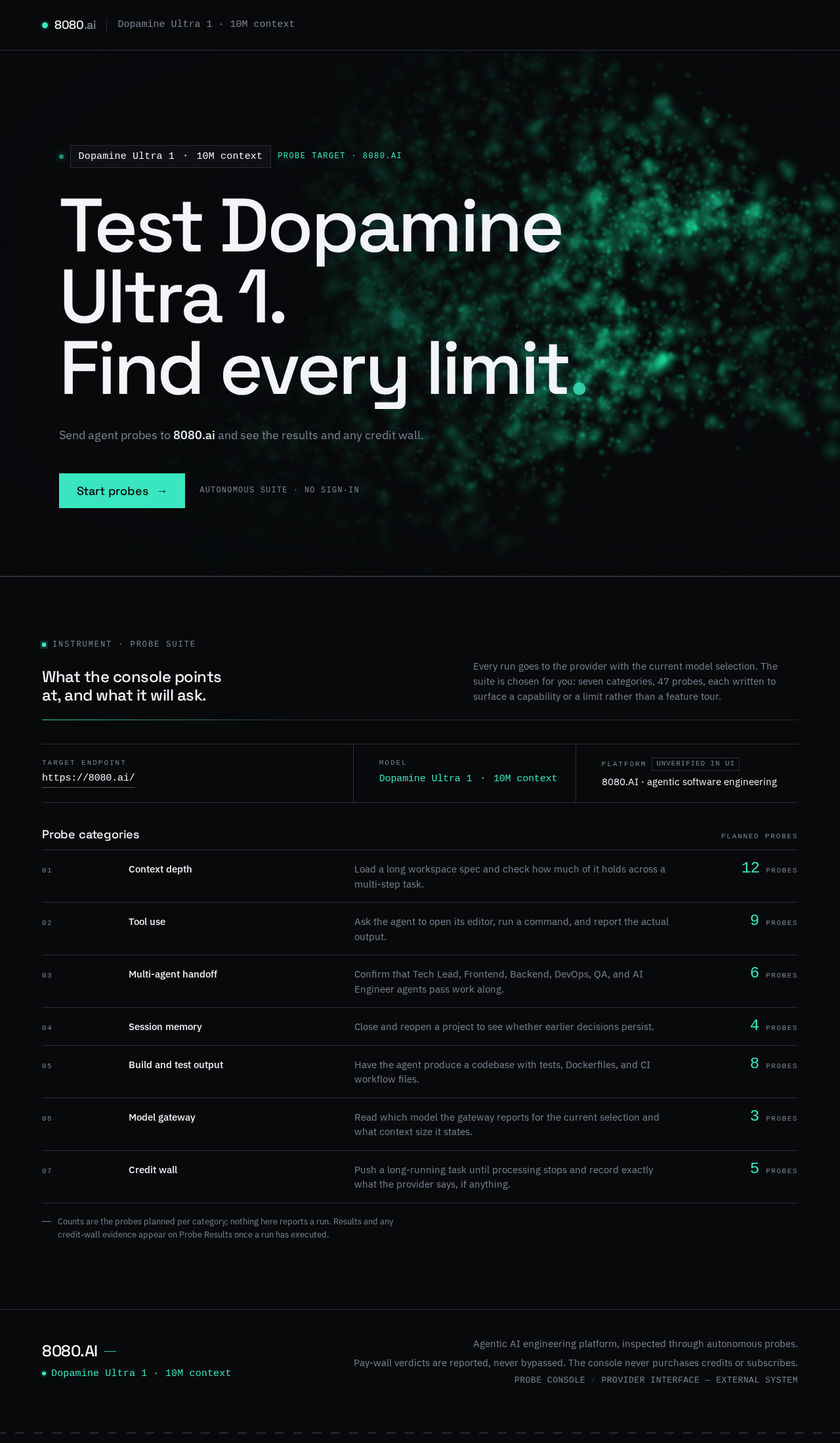
Dopamine Ultra 1 ・ 10M contextprobe target · 8080.ai
Test Dopamine Ultra 1.Find every limit
Send agent probes to 8080.ai and see the results and any credit wall.
What the console points at, and what it will ask.
Every run goes to the provider with the current model selection. The suite is chosen for you: seven categories, 47 probes, each written to surface a capability or a limit rather than a feature tour.
Probe categories
Planned probes- Context depthLoad a long workspace spec and check how much of it holds across a multi-step task.0probes
- Tool useAsk the agent to open its editor, run a command, and report the actual output.0probes
- Multi-agent handoffConfirm that Tech Lead, Frontend, Backend, DevOps, QA, and AI Engineer agents pass work along.0probes
- Session memoryClose and reopen a project to see whether earlier decisions persist.0probes
- Build and test outputHave the agent produce a codebase with tests, Dockerfiles, and CI workflow files.0probes
- Model gatewayRead which model the gateway reports for the current selection and what context size it states.0probes
- Credit wallPush a long-running task until processing stops and record exactly what the provider says, if anything.0probes
Counts are the probes planned per category; nothing here reports a run. Results and any credit-wall evidence appear on Probe Results once a run has executed.
Dopamine Ultra 1 ・ 10M contextprobe target · 8080.ai
Test Dopamine Ultra 1.Find every limit
Send agent probes to 8080.ai and see the results and any credit wall.
What the console points at, and what it will ask.
Every run goes to the provider with the current model selection. The suite is chosen for you: seven categories, 47 probes, each written to surface a capability or a limit rather than a feature tour.
Probe categories
Planned probes- Context depthLoad a long workspace spec and check how much of it holds across a multi-step task.0probes
- Tool useAsk the agent to open its editor, run a command, and report the actual output.0probes
- Multi-agent handoffConfirm that Tech Lead, Frontend, Backend, DevOps, QA, and AI Engineer agents pass work along.0probes
- Session memoryClose and reopen a project to see whether earlier decisions persist.0probes
- Build and test outputHave the agent produce a codebase with tests, Dockerfiles, and CI workflow files.0probes
- Model gatewayRead which model the gateway reports for the current selection and what context size it states.0probes
- Credit wallPush a long-running task until processing stops and record exactly what the provider says, if anything.0probes
Counts are the probes planned per category; nothing here reports a run. Results and any credit-wall evidence appear on Probe Results once a run has executed.
No comments yet. Be the first!