agentic-ai-platform
We're on some kind of Agentic-AI Platform at https://8080.ai/ as its interface if you have any kind of web-browser of your own in which to be able to see and field-test it for yourself. Current Model-Selection is «Dopamine Ultra 1 ・ 10M context» and it seems to have been recently released. I wish to find out what capabilities and limitations we have whilst hoping that we don't run into some kind of «Add more credits (or subscribe) in order to let the AI continue processing» sort of pay-wall. Leaving it to you to make your own autonomous-decision(s) for what we can find out. Can I leave the probing decisions up to you?


Comments (0)
Sign in to leave a comment
System Requirements
System Requirements Document for Agentic-AI Platform
1. Introduction
This document specifies the Agentic-AI Platform: a first-party probe console that lets a single operator — the Platform Prober — send autonomous capability and limitation probes to the Agentic-AI Platform interface at https://8080.ai/ using the current model selection «Dopamine Ultra 1 ・ 10M context», and read back what the model can and cannot do, together with a truthful verdict on whether a «Add more credits (or subscribe) in order to let the AI continue processing» pay-wall was encountered.
The product intent is derived from the requester's stated goal: find out the capabilities and limitations of the 8080.ai platform under Dopamine Ultra 1, while hoping not to run into a credit or subscription pay-wall, and with the probing decisions delegated to the builder as autonomous decisions. The console therefore does not ask the operator to author individual test cases; it runs a curated, builder-chosen probe suite on the operator's behalf and reports results, limits, and pay-wall evidence.
The audience is the single Platform Prober operating the console. The 8080.ai platform itself is an external, provider-owned system that the console inspects; it is not built, hosted, or modified by this product.
2. System Overview
2a. Product Interpretation and Delivery Boundary
The Agentic-AI Platform is a first-party web console with three destinations: Landing, Probes, and Probe Results. All three are anonymously reachable; no account, sign-in, or identity establishment is required, because the accepted journey is a single operator inspecting an external platform and no durable actor-specific state, commitment, entitlement, or value transfer must be bound to a named participant.
The console owns the probe orchestration and the presentation of results. The actual model work happens on the provider side: the backend sends requests to https://8080.ai/ with the Dopamine Ultra 1 model through the provisioned LiteLLM gateway, and the provider's responses — including any credit or subscription interruption — are recorded and surfaced. The console never purchases credits, never subscribes, and never attempts to bypass a pay-wall; it detects and reports one.
Current scope is the probe lifecycle: start a probe run, watch it execute, and read the results and pay-wall verdict. Future ideas such as scheduled recurring probes or multi-model comparison are explicitly out of current scope and are listed only in the future section.
Removed from scope
- Purchasing credits or subscribing on the operator's behalf (also: credit purchase, subscription checkout)
- Bypassing or circumventing a provider pay-wall (also: pay-wall workaround)
- Building, hosting, or modifying the 8080.ai platform itself (also: provider platform implementation)
- Multi-model comparison across models other than Dopamine Ultra 1 (also: model benchmarking suite)
2b. Source Content Inventory
The reference directive for https://8080.ai/ declares domain_context and feature_reference uses only; it does not declare content_source, so no source content inventory is included. The verified observations below are preserved as domain and feature context, with unverified items explicitly marked.
Platform context (domain_context)
- Product name: 8080.AI
- Platform type: Agentic AI–based software engineering platform
- Audience: engineers, developers, startups, and enterprises seeking production-ready AI-driven software development
- Positioning: an AI engineering team of coordinated agents — Tech Lead, Frontend, Backend, DevOps, QA, AI Engineer — that build, test, document, and debug production-grade software autonomously
- Intent: set a goal in plain English and have AI agents autonomously plan, build, test, debug, and deliver production-grade software
- Operational tone: transparent and "fail-loudly" — logs, traceability, reviewability, human-first architecture, opinionated defaults
- Technical scope: 100M token context per the official site (the 10M token context under Dopamine Ultra 1 is user commentary and unverified in the UI); Kubernetes-native, Helm charts, horizontal scaling, container orchestration; output includes complete codebases with frontend, backend, DB layer, API routes, auth, Docker, Helm charts, CI/CD pipelines, documentation, and tests
Feature reference
- Model selection: current model «Dopamine Ultra 1 ・ 10M context»; appears in user commentary but not visible in the interface currently — unverified
- Agentic workflow stages: Describe (plain English) → Plan (architecture, tasks, milestones) → Build (parallel agents: frontend, backend, infra, tests) → Ship (Dockerized, tested, documented, production/deploy-ready)
- Agents: Tech Lead, Frontend, Backend, DevOps, QA, AI Engineer
- Engineering outputs: production-ready full-stack codebase; unit and integration test suites with ≥80% coverage; Dockerfiles, docker-compose, Helm charts, health checks; API docs, README, architecture overview; GitHub Actions CI/CD workflows
- Scalability: 100M token context per official site; multi-agent orchestration with traffic across multiple agents in parallel; persistent project memory across sessions
- Visual interface: full VS Code in browser or 8080 desktop extension; isolated workspaces with their own Kubernetes namespace; multi-model gateway with flat-cost model routing and open model conversion
- UX controls: human-in-the-loop branch-per-task with PR reviews and human review/sign-off gates; org/team management with owners, admins, members, and shared views
- Paywall: pricing shows credits-per-month tiers (Standard with 4–X credits/month, Plus, Pro, Unlimited); no immediate paywall visible in the UI; credit usage not surfaced on the homepage; no explicit "add more credits to continue processing" prompt seen on the homepage — paywall status unverified in the UI
Unverified aspect
- The model name "Dopamine Ultra 1" with "10M context" appears only in user-provided commentary and is not reflected in the public interface at https://8080.ai/. Any details about that model remain unverified in the UI.
2c. Page Content and Component Coverage
Landing
- Information and state: public entry surface; presents the product name, the model tag «Dopamine Ultra 1 ・ 10M context», the headline "Test Dopamine Ultra 1. Find every limit.", the subline "Send agent probes to 8080.ai and see the results and any credit wall.", and the call to action "Start probes". No probe data is loaded on this page.
- Primary action: "Start probes" navigates to Probes.
- Supporting actions: none required; the model tag is a static label, not a selector.
- Domain entities: none persisted; the model label is a display constant.
- Component responsibilities:
- Full-bleed generative particle hero canvas (WebGL/R3F) rendering slow teal particle flow on the #08090B ground.
- Monospace model tag above the headline.
- Space Grotesk headline at clamp(44px, 9vw, 128px), left-aligned over the canvas.
- Subline in IBM Plex Sans.
- Primary call-to-action control in teal #39E6C0.
- States: loading — hero canvas initializes with a static first frame before particles animate; empty — not applicable; success — hero renders and the call to action is reachable; error — if WebGL is unavailable, the hero falls back to a static dark field with the same headline, tag, subline, and call to action fully readable; recovery — the call to action remains usable in every fallback.
Probes
- Information and state: shows the curated probe suite chosen autonomously by the builder, the target model label «Dopamine Ultra 1 ・ 10M context», the target endpoint https://8080.ai/, and the live status of each probe (queued, running, completed, failed, or blocked by credit wall).
- Primary action: start a probe run.
- Supporting actions: stop a running probe run; re-run a completed or failed run.
- Domain entities: Probe Run (identifier, start time, status, target model, target endpoint), Probe (name, category, status, duration, outcome summary), Credit Wall Event (detected or not, evidence text, timestamp).
- Component responsibilities:
- Probe suite list with one row per probe, tabular figures, hairline rules.
- Run control (start, stop, re-run).
- Live status indicator per probe, teal #39E6C0 for live agent data.
- Credit-wall banner in flat orange #FF6A3D with a hazard rule when a credit or subscription interruption is detected.
- Link to Probe Results for the active or most recent run.
- States: loading — suite list skeleton while the run manifest loads; empty — no run started yet, with the start control prominent; success — run completes and the operator is offered the results view; error — a probe fails for a non-pay-wall reason and is marked failed with its error summary; recovery — the operator can re-run the failed probe or the whole run; pay-wall — the run halts at the interrupting probe and the orange banner names the probe and shows the provider's interruption text.
Probe Results
- Information and state: shows the results of a completed or halted probe run: per-probe outcome, capability findings, limitation findings, and the pay-wall verdict (encountered or not encountered, with evidence).
- Primary action: read the results; return to Probes to run again.
- Supporting actions: expand an individual probe result to see its detail; copy or read the pay-wall evidence text.
- Domain entities: Probe Result (probe name, category, outcome, capability observed, limitation observed, duration), Pay-Wall Verdict (encountered, evidence, timestamp), Probe Run summary.
- Component responsibilities:
- Run summary header with model label, endpoint, start time, and overall status.
- Capability findings list.
- Limitation findings list.
- Pay-wall verdict panel: teal when not encountered, flat orange #FF6A3D with hazard rule when encountered.
- Per-probe result rows with expandable detail.
- Return control to Probes.
- States: loading — result rows count up as they enter the viewport; empty — no completed run exists, with a prompt to start one on Probes; success — full results render with a clear verdict; error — a run that failed before producing results shows the failure reason and a re-run path; recovery — the operator returns to Probes and re-runs.
3. Functional Requirements
FR-1 — Learn the platform's capabilities and limitations (explicit) As a Platform Prober, I should be able to find out the capabilities and limitations of the Agentic-AI Platform at https://8080.ai/, so that I know what the platform can and cannot do.
- Trigger: the operator starts a probe run on Probes.
- Observable result: Probe Results lists capability findings and limitation findings for the run.
- Access: anonymous; no identity required.
- Failure/recovery: if a probe fails for a non-pay-wall reason, it is marked failed with its error summary and can be re-run.
- Continuation: the operator reads the results and may return to Probes to run again.
FR-2 — Probe the current model selection (explicit) As a Platform Prober, I should be able to probe the current model selection «Dopamine Ultra 1 ・ 10M context», which appears to be recently released, so that my findings reflect the model actually in use.
- Trigger: a probe run starts.
- Observable result: every probe request is sent with the Dopamine Ultra 1 model, and the model label is shown on Probes and Probe Results.
- Access: anonymous.
- Failure/recovery: if the provider rejects or does not recognize the model, the probe is marked failed with the provider's message and the model label is preserved in the result.
- Continuation: the operator sees which model produced each finding.
FR-3 — Detect a credit or subscription pay-wall (explicit) As a Platform Prober, I should be able to see whether a «Add more credits (or subscribe) in order to let the AI continue processing» pay-wall occurs, so that I know whether continued processing is gated.
- Trigger: a probe response contains a credit, subscription, or continuation interruption.
- Observable result: the run halts at the interrupting probe, and a flat orange #FF6A3D banner with a hazard rule names the probe and shows the provider's interruption text; Probe Results records the pay-wall verdict as encountered with that evidence.
- Access: anonymous.
- Failure/recovery: if no interruption occurs, the verdict is recorded as not encountered and the run continues to completion.
- Continuation: the operator reads the verdict and evidence and decides what to do next outside the console; the console never purchases credits or subscribes.
FR-4 — Autonomous probing decisions (explicit) As a Platform Prober, I should be able to leave the probing decisions to the builder, so that I do not have to author test cases myself.
- Trigger: the operator opens Probes.
- Observable result: the curated probe suite is presented as the builder's chosen set, ready to run, with no authoring step required.
- Access: anonymous.
- Failure/recovery: if the suite cannot load, the page shows an error state with a retry control.
- Continuation: the operator starts the run.
FR-5 — Send probe requests to the provider endpoint (required_inference) As a Platform Prober, I should have my probe requests sent to https://8080.ai/ with the Dopamine Ultra 1 model, so that the accepted journey is executable.
- Trigger: a probe run starts.
- Observable result: the backend issues the requests through the LiteLLM gateway to the provider endpoint and records each response.
- Access: anonymous.
- Failure/recovery: network or provider errors are recorded per probe and surfaced as failed probes with their error summary.
- Continuation: successful responses feed the results view.
FR-6 — Start, stop, and re-run a probe run (required_inference) As a Platform Prober, I should be able to start a probe run, stop it while it is running, and re-run a completed or failed run, so that I control the probe lifecycle.
- Trigger: the operator uses the run control on Probes.
- Observable result: the run status changes to running, stopped, completed, or failed, and each probe row reflects its own status.
- Access: anonymous.
- Failure/recovery: a stop request marks the run stopped and preserves results collected so far; a re-run creates a new run record.
- Continuation: the operator moves to Probe Results for the affected run.
FR-7 — Read per-probe results (required_inference) As a Platform Prober, I should be able to read each probe's outcome, capability finding, and limitation finding, so that the results are usable rather than a single aggregate.
- Trigger: the operator opens Probe Results for a run.
- Observable result: per-probe rows show outcome, capability observed, limitation observed, and duration, with expandable detail.
- Access: anonymous.
- Failure/recovery: a probe with no usable response shows its failure reason instead of a finding.
- Continuation: the operator returns to Probes to run again.
4. User Personas
Platform Prober
- Product context: The Platform Prober is the single operator of the console. They have encountered the Agentic-AI Platform at https://8080.ai/ and noticed that the current model selection is «Dopamine Ultra 1 ・ 10M context», which appears to be recently released. They want to know what the platform can and cannot do under that model, and they are specifically worried about hitting a «Add more credits (or subscribe) in order to let the AI continue processing» pay-wall.
- Primary goal: Obtain a clear, evidence-backed picture of Dopamine Ultra 1's capabilities and limitations on 8080.ai, plus a definitive answer on whether a credit or subscription pay-wall interrupts processing.
- Distinct accepted responsibilities: Delegating the probing decisions to the builder rather than authoring test cases; starting, stopping, and re-running probe runs; reading per-probe findings; reading the pay-wall verdict and its evidence.
- Relevant inputs or decisions: The decision to start a run; the decision to stop a run early; the decision to re-run after a failure or pay-wall halt; the interpretation of the findings for their own purposes outside the console.
- Interactions with other accepted participants: The Prober interacts with the provider-owned 8080.ai platform only indirectly, through the console's probe requests. There is no other accepted human participant; the provider is a non-persona external actor.
- Observable success: Probe Results shows capability findings, limitation findings, and a pay-wall verdict with evidence, all attributed to the Dopamine Ultra 1 model and the https://8080.ai/ endpoint.
5. Core User Flows
Flow A — First visit and start of a probe run
- The Platform Prober opens the console and lands on Landing.
- Landing shows the model tag «Dopamine Ultra 1 ・ 10M context», the headline "Test Dopamine Ultra 1. Find every limit.", the subline "Send agent probes to 8080.ai and see the results and any credit wall.", and the call to action "Start probes" over the generative particle hero.
- The Prober selects "Start probes" and arrives on Probes.
- Probes presents the builder-chosen probe suite with the target model label and the target endpoint https://8080.ai/.
- The Prober starts the run. Each probe row moves from queued to running to completed, with live status in teal.
- Result: the run executes and the Prober is offered the results view. Next step: Flow B or Flow C depending on whether an interruption occurs.
Flow B — Run completes without a pay-wall
- On Probes, the run proceeds through every probe.
- No credit or subscription interruption appears in any response.
- The Prober opens Probe Results for the run.
- Probe Results shows the run summary, capability findings, limitation findings, and a pay-wall verdict of not encountered in teal.
- Result: the Prober has a complete picture of Dopamine Ultra 1's capabilities and limitations with no pay-wall. Next step: the Prober may return to Probes to re-run.
Flow C — Pay-wall encountered mid-run
- On Probes, a probe response contains a credit, subscription, or continuation interruption.
- The run halts at that probe. A flat orange #FF6A3D banner with a hazard rule names the probe and shows the provider's interruption text.
- The Prober opens Probe Results for the halted run.
- Probe Results shows the pay-wall verdict as encountered, with the evidence text and timestamp, alongside the findings collected before the halt.
- Result: the Prober knows exactly where and how the pay-wall appeared. Next step: the Prober decides what to do outside the console; the console does not purchase credits or subscribe.
Flow D — Probe failure and recovery
- On Probes, a probe fails for a non-pay-wall reason such as a network or provider error.
- The probe row is marked failed with its error summary; the run continues or halts according to the failure.
- The Prober selects re-run for the failed probe or the whole run.
- Result: a new run record is created and the affected probes execute again. Next step: the Prober reads the new results on Probe Results.
Flow E — Stopping a run early
- On Probes, the Prober selects stop while the run is running.
- The run status changes to stopped and results collected so far are preserved.
- The Prober opens Probe Results for the stopped run.
- Result: partial findings and any pay-wall verdict collected so far are visible. Next step: the Prober may re-run from Probes.
6. Visuals Colors and Theme
The creative direction is authoritative for this section: Data made physical for an agent probe console, after the muse Refik Anadol — a live instrument that shows data, not a marketing page.
Mode: dark only.
Colour tokens by role
- Background:
#08090B— black ground holding roughly 80% of the page. - Surface:
#12141A— panels and rows. - Text:
#F2F4F8— primary readable text. - Primary:
#39E6C0— teal, marks live agent data only. - Accent:
#FF6A3D— orange, marks a credit wall or a limit hit only. - Muted:
#7C8494— secondary labels and metadata. - Border:
#2A2E38— 1px panel and row borders.
Typography
- Headings: Space Grotesk, Medium weight, tight tracking, sentence case, very large sizes.
- Body: IBM Plex Sans.
- Scale: 1.333 modular — 44 / 32 / 24 / 18 / 15 px.
- Hero headline:
clamp(44px, 9vw, 128px). - Model tag and tabular figures: monospace.
Shape language: full-bleed dark canvas with thin luminous strokes and soft particle fields; panels are flat with 1px #2A2E38 borders; no rounded card grid.
Layout: full-bleed generative canvas hero on Landing; below it and on Probes and Probe Results, a single wide column of probe rows with tabular data and hairline rules.
Imagery: generative particle and fluid renders built from the probe data itself; no stock photos and no clip art.
Accessibility: readable text and controls stay whole at 375px, 768px, and 1280px, wrapping or scaling to fit; decoration and motion may bleed and crop but never cover readable text or controls; with prefers-reduced-motion, a usable static arrangement is provided.
7. Signature Design Concept
The public entry is a full-bleed black canvas of slow teal particle flow. A left-aligned headline in Space Grotesk sits over it at clamp(44px, 9vw, 128px), and the model label «Dopamine Ultra 1 ・ 10M context» shows as a small monospace tag above the headline. The particles are generated from the probe data itself, so the hero reads as a live instrument rather than a marketing banner. The call to action "Start probes" sits in teal beneath the subline. When a run later hits a credit wall, the same visual language flips to flat orange #FF6A3D with a hazard rule, making the limit feel physical rather than decorative.
8. Interaction Model & Motion Direction
Interaction Model: Animated Motion Tempo: cinematic Hero Dimensionality: webgl
Landing Hero Motion Brief
- Focal subject: a real-time WebGL/R3F particle field built from the probe data, rendered as slow teal flow on the
#08090Bground. - Input → transformation → outcome thesis: as the operator arrives, the particle field drifts and settles into a composed first frame; when probe data exists, the field's density and flow respond to that data, so the hero visibly carries the product's defining state — a live probe instrument — without adding any new behaviour.
- Motion vocabulary: slow generative particle flow, scroll-linked canvas morph, probe rows counting up when they enter the viewport, tabular figures.
- Composed first frame: black ground, teal particle flow at rest, monospace model tag above a left-aligned Space Grotesk headline, subline and teal call to action fully readable.
- Reduced-motion state: the particle field renders as a static composed frame; the headline, tag, subline, and call to action remain fully readable and usable.
Landing Hero 3D Scene Brief — DIRECTION-DERIVED A single crafted real-time particle system — a compact field of luminous teal points whose flow is driven by the probe data — occupies the full-bleed hero. It shows the product's defining state: a live probe instrument reading the model. The scene is one object, not a scene graph of props; it degrades to a static frame under reduced motion and to a static dark field when WebGL is unavailable.
9. Non-Functional Requirements
- Pay-wall constraint (explicit): the console must never purchase credits, subscribe, or otherwise resolve a «Add more credits (or subscribe) in order to let the AI continue processing» pay-wall on the operator's behalf; it detects and reports the interruption only.
- Provider boundary (explicit): the console must not build, host, or modify the 8080.ai platform; all model work is provider-owned and reached through the provisioned LiteLLM gateway.
- Transparency (basic_default): every finding and every pay-wall verdict must carry its evidence — the probe name, the provider's interruption text, and a timestamp — consistent with the platform's fail-loudly tone.
- Readability (explicit): readable text and controls stay whole at 375px, 768px, and 1280px; decoration and motion never cover them.
- Reduced motion (explicit): with
prefers-reduced-motion, a usable static arrangement is provided. - Anonymous access (required_inference): all three destinations are reachable without an account, because no durable actor-specific state or commitment must be bound to a named participant.
10. Tech Stack
- Frontend: React application UI, with WebGL/R3F for the generative hero.
- Backend: shared FastAPI process for application APIs and domain modules, including probe orchestration and result storage.
- Database: MariaDB for application-owned persistent data (probe runs, probes, results, pay-wall verdicts).
- Model gateway: LiteLLM gateway for the backend's model-provider calls to https://8080.ai/ with the Dopamine Ultra 1 model.
- Gateway storage: PostgreSQL supporting LiteLLM, separate from application-owned storage.
- Deployment: Docker and docker-compose for the provisioned services (backend, database, frontend, litellm, postgres).
11. Assumptions and Constraints
- Assumption (required_inference): the provider endpoint https://8080.ai/ accepts requests with the Dopamine Ultra 1 model through the LiteLLM gateway; if it does not, probes are marked failed with the provider's message.
- Assumption (required_inference): the probe suite is curated by the builder as the autonomous probing decision; the operator does not author test cases.
- Constraint (explicit): the console never purchases credits or subscribes.
- Constraint (explicit): the console never bypasses a provider pay-wall.
- Constraint (explicit): the console does not build, host, or modify the 8080.ai platform.
- Constraint (explicit): the model label «Dopamine Ultra 1 ・ 10M context» is preserved exactly wherever it appears.
- Unverified (source): the model name and its 10M context are user commentary and are not reflected in the public interface at https://8080.ai/; the console reports what the provider returns rather than asserting the model's specifications.
12. Glossary
- Agentic-AI Platform: the provider-owned software engineering platform at https://8080.ai/ that the console inspects.
- Dopamine Ultra 1 ・ 10M context: the current model selection being probed.
- Probe: a single curated request sent to the provider to observe a capability or limitation.
- Probe Run: one execution of the probe suite, with its own status and results.
- Pay-wall: a «Add more credits (or subscribe) in order to let the AI continue processing» interruption returned by the provider.
- Pay-Wall Verdict: the recorded answer to whether a pay-wall was encountered, with evidence.
- Platform Prober: the single operator of the console.
- LiteLLM gateway: the provisioned model gateway through which the backend reaches the provider.
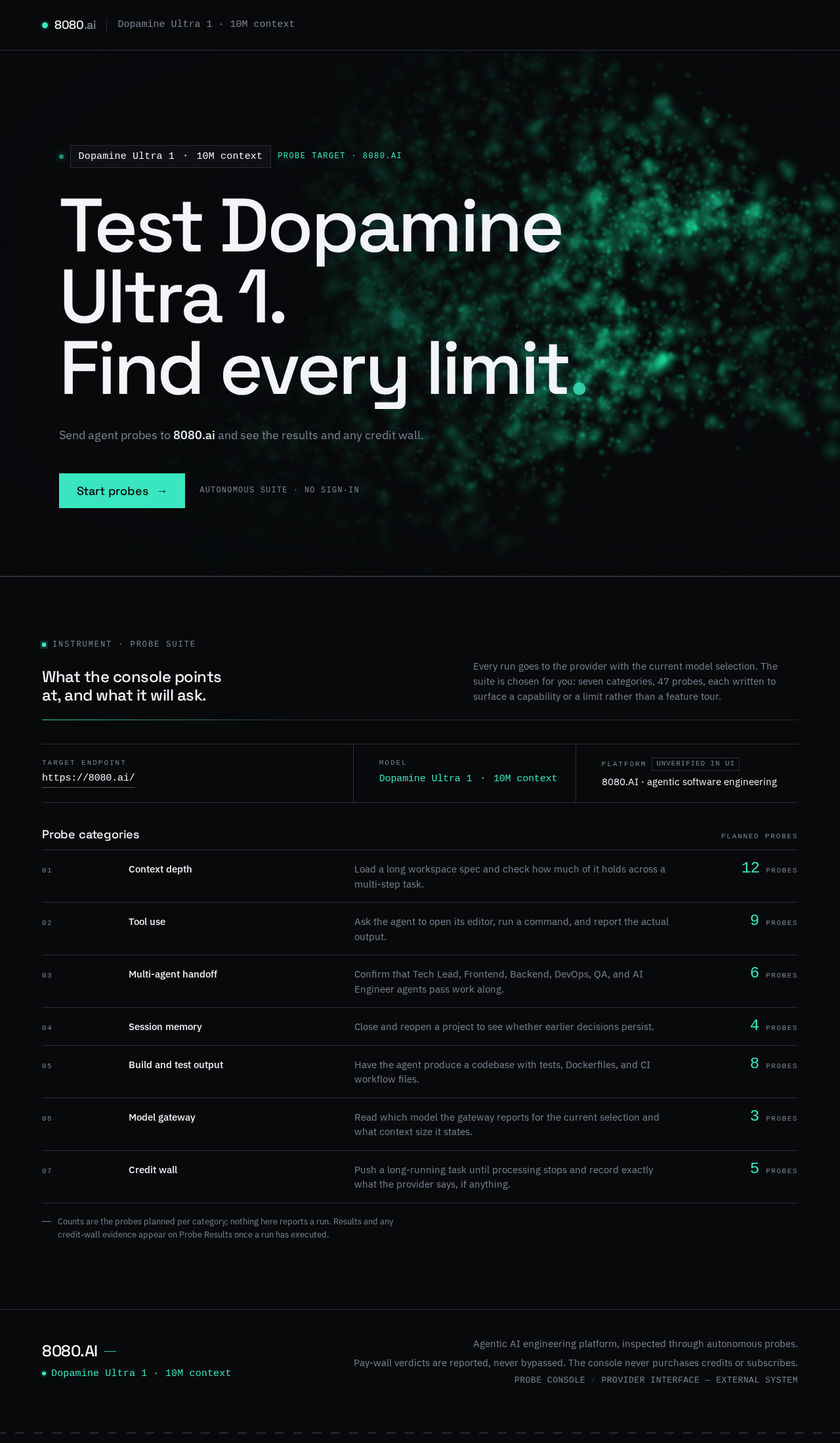
Dopamine Ultra 1 ・ 10M contextprobe target · 8080.ai
Test Dopamine Ultra 1.Find every limit
Send agent probes to 8080.ai and see the results and any credit wall.
What the console points at, and what it will ask.
Every run goes to the provider with the current model selection. The suite is chosen for you: seven categories, 47 probes, each written to surface a capability or a limit rather than a feature tour.
Probe categories
Planned probes- Context depthLoad a long workspace spec and check how much of it holds across a multi-step task.0probes
- Tool useAsk the agent to open its editor, run a command, and report the actual output.0probes
- Multi-agent handoffConfirm that Tech Lead, Frontend, Backend, DevOps, QA, and AI Engineer agents pass work along.0probes
- Session memoryClose and reopen a project to see whether earlier decisions persist.0probes
- Build and test outputHave the agent produce a codebase with tests, Dockerfiles, and CI workflow files.0probes
- Model gatewayRead which model the gateway reports for the current selection and what context size it states.0probes
- Credit wallPush a long-running task until processing stops and record exactly what the provider says, if anything.0probes
Counts are the probes planned per category; nothing here reports a run. Results and any credit-wall evidence appear on Probe Results once a run has executed.
Dopamine Ultra 1 ・ 10M contextprobe target · 8080.ai
Test Dopamine Ultra 1.Find every limit
Send agent probes to 8080.ai and see the results and any credit wall.
What the console points at, and what it will ask.
Every run goes to the provider with the current model selection. The suite is chosen for you: seven categories, 47 probes, each written to surface a capability or a limit rather than a feature tour.
Probe categories
Planned probes- Context depthLoad a long workspace spec and check how much of it holds across a multi-step task.0probes
- Tool useAsk the agent to open its editor, run a command, and report the actual output.0probes
- Multi-agent handoffConfirm that Tech Lead, Frontend, Backend, DevOps, QA, and AI Engineer agents pass work along.0probes
- Session memoryClose and reopen a project to see whether earlier decisions persist.0probes
- Build and test outputHave the agent produce a codebase with tests, Dockerfiles, and CI workflow files.0probes
- Model gatewayRead which model the gateway reports for the current selection and what context size it states.0probes
- Credit wallPush a long-running task until processing stops and record exactly what the provider says, if anything.0probes
Counts are the probes planned per category; nothing here reports a run. Results and any credit-wall evidence appear on Probe Results once a run has executed.
No comments yet. Be the first!