TEXFLOWW
 kapadia zaid
Build a modern SaaS web application called "TexFlow". Tagline: "Powering the Future of Textile Manufacturing." The application should look like Stripe, Linear, Notion and Vercel with a premium modern UI. Use a clean white and blue theme with glassmorphism, rounded cards, smooth animations, dark mode support and fully responsive design. ========================================= PROJECT ========================================= TexFlow is an AI-powered ERP and factory management platform built specifically for textile manufacturers. The first customer is a textile factory in Surat, India. Factory Profile • Total Power Looms: 380 • Factory A: 223 looms • Factory B: 157 looms • TFO Machines: 15 • Warping Machines: 5 Workers Day Shift 28 Loom Workers 1 Worker handles around 12–14 looms Night Shift 28 Loom Workers 1 Worker handles around 12–14 looms One operator per TFO machine. One operator per warping machine. The factory manufactures approximately 5–6 different textile qualities. ========================================= LANDING PAGE ========================================= Create an impressive startup landing page. Hero section with full-width background. Headline: Powering the Future of Textile Manufacturing Subheading: Manage Power Looms, TFO, Warping, Production, Inventory, Maintenance, Dispatch and AI Insights from one intelligent platform. Buttons Book Demo Watch Demo Animated statistics 380 Power Looms 15 TFO Machines 5 Warping Machines 56 Loom Workers 2 Production Units Sections Features How it Works Why TexFlow AI Features Testimonials Pricing Contact Professional Footer ========================================= LOGIN ========================================= Beautiful login page. Email Password Remember me Forgot Password Sign In ========================================= DASHBOARD ========================================= Modern executive dashboard. Cards Running Looms Stopped Looms Today's Production Today's Dispatch Pending Orders Factory Health Inventory Alerts Maintenance Tickets Charts Production per Day Production by Factory Machine Downtime Top Performing Workers Order Status Live Activity Feed ========================================= FACTORY PAGE ========================================= Factory A 223 Looms Factory B 157 Looms Each factory should show Running Stopped Production Efficiency Workers ========================================= LOOM MANAGEMENT ========================================= Display all 380 looms as modern cards. Each card should contain Machine Number Current Status Running Stopped Maintenance Worker Shift Quality Running Today's Production Last Maintenance Downtime Today Clicking a loom opens a detailed page. ========================================= TFO MANAGEMENT ========================================= Manage all 15 TFO machines. Machine Status Operator Yarn Output Maintenance ========================================= WARPING MANAGEMENT ========================================= Manage all 5 Warping Machines. Beam Number Quality Length Status Operator ========================================= INVENTORY ========================================= Inventory Management Yarn Zari Beams Spare Parts Low Stock Alerts Supplier Management Purchase History ========================================= PRODUCTION ========================================= Production Entry Each Taka contains Taka Number Machine Number Worker Shift Quality Meters Inspection Status Date Ready For Dispatch Production History ========================================= QUALITY CHECK ========================================= The Mender checks each Taka. Record Passed Minor Defect Rejected Comments Photo Upload ========================================= FOLDING ========================================= Folder enters Meters Machine Number Serial Number Quality Worker Shift Save Production ========================================= DISPATCH ========================================= Customer Order Number Quality Meter Range Taka Numbers Generate Challan Dispatch Status Vehicle Number Delivery Date ========================================= MAINTENANCE ========================================= Machine Problem Electrical Mechanical Motor Bearing Gear Warp Weft Other Assign To Machine Master Wireman Priority Critical Normal Low Status Repairing Completed Automatically calculate downtime. Maintain complete repair history. ========================================= WORKERS ========================================= Worker Directory Attendance Shift Assigned Machines Performance Production ========================================= AI ASSISTANT ========================================= Create an AI assistant page. Name TexFlow AI Chat Interface. Suggested Questions How many looms are stopped? Today's production? Pending dispatch? How much yarn is left? Which machine has maximum downtime? Which worker produced the highest output? Generate production report. ========================================= REPORTS ========================================= Daily Weekly Monthly Production Reports Machine Reports Worker Reports Inventory Reports Maintenance Reports Download PDF Download Excel ========================================= SETTINGS ========================================= Factory Details Users Permissions Dark Mode Notifications Language ========================================= DESIGN ========================================= Professional animations. Premium SaaS design. Large dashboard. Interactive charts. Beautiful icons. Responsive mobile design. Sticky sidebar. Modern top navigation. Professional typography. Rounded cards. Gradient buttons. Smooth transitions. No placeholder lorem ipsum. Generate realistic sample data based on the textile factory profile. Make this feel like a billion-dollar software startup.

Comments (0)
Sign in to leave a comment
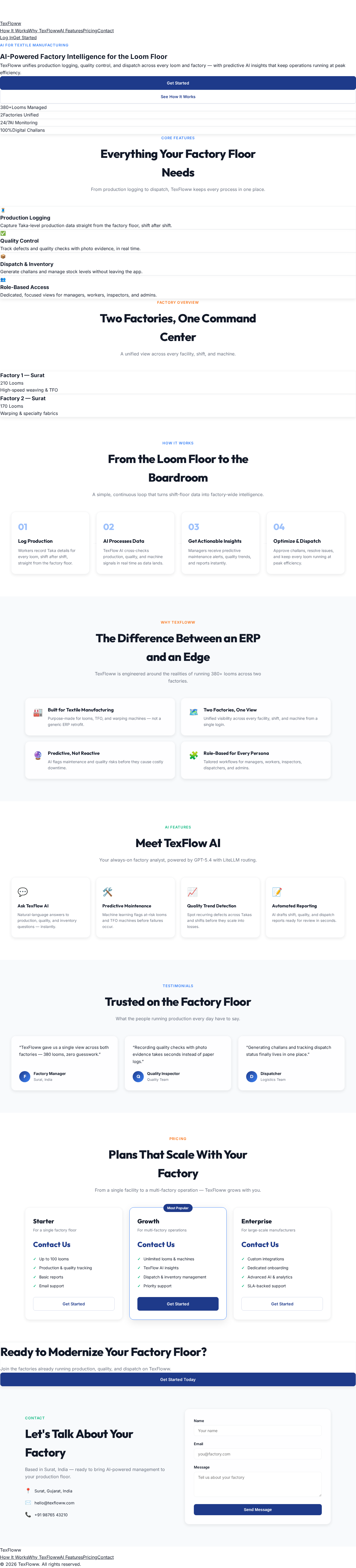
AI-Powered Factory Intelligence for the Loom Floor
TexFloww unifies production logging, quality control, and dispatch across every loom and factory — with predictive AI insights that keep operations running at peak efficiency.
Everything Your Factory Floor Needs
From production logging to dispatch, TexFloww keeps every process in one place.
Production Logging
Capture Taka-level production data straight from the factory floor, shift after shift.
Quality Control
Track defects and quality checks with photo evidence, in real time.
Dispatch & Inventory
Generate challans and manage stock levels without leaving the app.
Role-Based Access
Dedicated, focused views for managers, workers, inspectors, and admins.
Two Factories, One Command Center
A unified view across every facility, shift, and machine.
Factory 1 — Surat
210 Looms
High-speed weaving & TFO
Factory 2 — Surat
170 Looms
Warping & specialty fabrics
From the Loom Floor to the Boardroom
A simple, continuous loop that turns shift-floor data into factory-wide intelligence.
Log Production
Workers record Taka details for every loom, shift after shift, straight from the factory floor.
AI Processes Data
TexFlow AI cross-checks production, quality, and machine signals in real time as data lands.
Get Actionable Insights
Managers receive predictive maintenance alerts, quality trends, and reports instantly.
Optimize & Dispatch
Approve challans, resolve issues, and keep every loom running at peak efficiency.
The Difference Between an ERP and an Edge
TexFloww is engineered around the realities of running 380+ looms across two factories.
Built for Textile Manufacturing
Purpose-made for looms, TFO, and warping machines — not a generic ERP retrofit.
Two Factories, One View
Unified visibility across every facility, shift, and machine from a single login.
Predictive, Not Reactive
AI flags maintenance and quality risks before they cause costly downtime.
Role-Based for Every Persona
Tailored workflows for managers, workers, inspectors, dispatchers, and admins.
Meet TexFlow AI
Your always-on factory analyst, powered by GPT-5.4 with LiteLLM routing.
Ask TexFlow AI
Natural-language answers to production, quality, and inventory questions — instantly.
Predictive Maintenance
Machine learning flags at-risk looms and TFO machines before failures occur.
Quality Trend Detection
Spot recurring defects across Takas and shifts before they scale into losses.
Automated Reporting
AI drafts shift, quality, and dispatch reports ready for review in seconds.
Trusted on the Factory Floor
What the people running production every day have to say.
“TexFloww gave us a single view across both factories — 380 looms, zero guesswork.”
“Recording quality checks with photo evidence takes seconds instead of paper logs.”
“Generating challans and tracking dispatch status finally lives in one place.”
Plans That Scale With Your Factory
From a single facility to a multi-factory operation — TexFloww grows with you.
Starter
For a single factory floor
- Up to 100 looms
- Production & quality tracking
- Basic reports
- Email support
Growth
For multi-factory operations
- Unlimited looms & machines
- TexFlow AI insights
- Dispatch & inventory management
- Priority support
Enterprise
For large-scale manufacturers
- Custom integrations
- Dedicated onboarding
- Advanced AI & analytics
- SLA-backed support
Ready to Modernize Your Factory Floor?
Join the factories already running production, quality, and dispatch on TexFloww.
Get Started TodayLet's Talk About Your Factory
Based in Surat, India — ready to bring AI-powered management to your production floor.
- Surat, Gujarat, India
- hello@texfloww.com
- +91 98765 43210
AI-Powered Factory Intelligence for the Loom Floor
TexFloww unifies production logging, quality control, and dispatch across every loom and factory — with predictive AI insights that keep operations running at peak efficiency.
Everything Your Factory Floor Needs
From production logging to dispatch, TexFloww keeps every process in one place.
Production Logging
Capture Taka-level production data straight from the factory floor, shift after shift.
Quality Control
Track defects and quality checks with photo evidence, in real time.
Dispatch & Inventory
Generate challans and manage stock levels without leaving the app.
Role-Based Access
Dedicated, focused views for managers, workers, inspectors, and admins.
Two Factories, One Command Center
A unified view across every facility, shift, and machine.
Factory 1 — Surat
210 Looms
High-speed weaving & TFO
Factory 2 — Surat
170 Looms
Warping & specialty fabrics
From the Loom Floor to the Boardroom
A simple, continuous loop that turns shift-floor data into factory-wide intelligence.
Log Production
Workers record Taka details for every loom, shift after shift, straight from the factory floor.
AI Processes Data
TexFlow AI cross-checks production, quality, and machine signals in real time as data lands.
Get Actionable Insights
Managers receive predictive maintenance alerts, quality trends, and reports instantly.
Optimize & Dispatch
Approve challans, resolve issues, and keep every loom running at peak efficiency.
The Difference Between an ERP and an Edge
TexFloww is engineered around the realities of running 380+ looms across two factories.
Built for Textile Manufacturing
Purpose-made for looms, TFO, and warping machines — not a generic ERP retrofit.
Two Factories, One View
Unified visibility across every facility, shift, and machine from a single login.
Predictive, Not Reactive
AI flags maintenance and quality risks before they cause costly downtime.
Role-Based for Every Persona
Tailored workflows for managers, workers, inspectors, dispatchers, and admins.
Meet TexFlow AI
Your always-on factory analyst, powered by GPT-5.4 with LiteLLM routing.
Ask TexFlow AI
Natural-language answers to production, quality, and inventory questions — instantly.
Predictive Maintenance
Machine learning flags at-risk looms and TFO machines before failures occur.
Quality Trend Detection
Spot recurring defects across Takas and shifts before they scale into losses.
Automated Reporting
AI drafts shift, quality, and dispatch reports ready for review in seconds.
Trusted on the Factory Floor
What the people running production every day have to say.
“TexFloww gave us a single view across both factories — 380 looms, zero guesswork.”
“Recording quality checks with photo evidence takes seconds instead of paper logs.”
“Generating challans and tracking dispatch status finally lives in one place.”
Plans That Scale With Your Factory
From a single facility to a multi-factory operation — TexFloww grows with you.
Starter
For a single factory floor
- Up to 100 looms
- Production & quality tracking
- Basic reports
- Email support
Growth
For multi-factory operations
- Unlimited looms & machines
- TexFlow AI insights
- Dispatch & inventory management
- Priority support
Enterprise
For large-scale manufacturers
- Custom integrations
- Dedicated onboarding
- Advanced AI & analytics
- SLA-backed support
Ready to Modernize Your Factory Floor?
Join the factories already running production, quality, and dispatch on TexFloww.
Get Started TodayLet's Talk About Your Factory
Based in Surat, India — ready to bring AI-powered management to your production floor.
- Surat, Gujarat, India
- hello@texfloww.com
- +91 98765 43210
No comments yet. Be the first!