Support-Ticket-Automation

byRC

Support-ticket-to-FAQ automation ## What the product does **Support-ticket-to-FAQ automation** turns resolved customer conversations into reviewed, searchable help-center content. A typical workflow would be: 1. Connect Zendesk, Intercom, Freshdesk, Help Scout, or a shared support inbox. 2. Import resolved tickets and identify recurring questions. 3. Group similar tickets into topics. 4. Generate an FAQ or troubleshooting article from the best responses. 5. Flag uncertain claims, outdated instructions, and missing steps. 6. Send the draft to a human reviewer. 7. Publish it to the customer’s knowledge base and link it back to the original tickets. The core concept already exists in products such as Taskade’s ticket-to-knowledge-base workflow and dedicated FAQ-generation agents, which confirms that the workflow is technically feasible and commercially recognizable. cite [zbrain](https://zbrain.ai/agents/Customer-Service/all/Knowledge-Management/faq-generation-agent/) ## The customer pain Support teams repeatedly answer the same questions, but converting those answers into durable documentation is usually nobody’s priority. Agents solve the immediate ticket, while the knowledge base becomes incomplete, outdated, or difficult to search. The pain becomes especially acute when: - A SaaS company has 500–5,000 tickets per month. - New support agents repeatedly ask senior agents for the same answers. - Product changes make existing help articles obsolete. - Customers use different terminology from the company’s documentation. - The business wants self-service but lacks a dedicated technical writer. The product should therefore focus less on “write articles with AI” and more on **finding repeated unresolved documentation gaps**. ## A strong product workflow ### 1. Find repeatable questions The system clusters tickets such as: - “How do I change my billing email?” - “Why did my webhook fail?” - “Can I export this report as CSV?” - “Why is my Shopify order not syncing?” - “How do I invite another team member?” It should show the number of similar tickets, the time range, customer segments, and the agents who solved them. ### 2. Select the best source answers Not every ticket is safe to convert into documentation. The system should rank candidate source tickets using signals such as: - Multiple tickets with the same underlying question. - A successful customer outcome. - High customer satisfaction. - A recent product version. - A response containing concrete steps. - No unresolved escalation or sensitive customer information. A practical rule is to prioritize questions asked repeatedly or questions likely to recur. cite [instantdocs](https://instantdocs.com/blog/best-knowledge-base-software) ### 3. Generate a structured draft A useful generated article might contain: - Clear question-based title. - Short answer. - When the issue occurs. - Step-by-step resolution. - Screenshots or relevant links. - Common error messages. - “Still need help?” escalation instructions. - Product version and last-verified date. For example, instead of producing a vague article titled “Webhook issues,” it should create: > **Why is my webhook returning a 401 error?** > A 401 response usually means the endpoint is rejecting the authentication token. Verify that the token is active, copy it without extra spaces, and send the request again. If the problem continues, regenerate the token under Settings → Developers → API Keys. ### 4. Require approval Automatic publishing is risky because tickets can contain exceptions, temporary workarounds, confidential data, or incorrect agent answers. The safer product promise is: > “Find the documentation your customers need and create accurate drafts for approval.” The reviewer should be able to edit the draft, approve it, reject it, merge it with an existing article, or mark it as a temporary workaround. ### 5. Keep the knowledge base current The more defensible feature is not initial article generation—it is **documentation maintenance**. The product can alert customers when: - A new ticket contradicts an existing article. - An article has generated repeated “still need help” tickets. - A help article has not been verified after a product release. - A recurring question has no published answer. - Two articles appear to answer the same issue. ## Best initial niche Do not launch for every support team. A good starting market would be: ### B2B SaaS companies using Intercom or Zendesk These companies already have: - Structured ticket data. - Recurring product questions. - A measurable support cost. - Existing help-center infrastructure. - A buyer who understands support metrics. An even narrower version could target **Shopify app developers**. Their support questions are often repetitive, their teams are small, and the product can include Shopify-specific templates, webhook errors, installation issues, billing questions, and theme compatibility problems. Other attractive verticals include: - WordPress plugin companies. - HR and payroll software. - Property-management software. - E-commerce fulfillment tools. - Accounting and invoicing platforms. - API-first developer products. ## MVP feature set A solo founder could build the first version with: - One integration, preferably Zendesk or Intercom. - Ticket import for solved conversations. - Semantic clustering of recurring questions. - Candidate ranking. - AI-generated article drafts. - Redaction of names, emails, order numbers, and credentials. - Markdown and HTML export. - Human approval workflow. - Publishing to Notion, Help Scout, Intercom, or a basic hosted knowledge base. - A simple dashboard showing “tickets potentially avoided.” Avoid building a complete help-desk platform. The first product should sit on top of an existing support system and solve one neglected workflow. ## ROI model The ROI story is straightforward: \[ \text{Monthly savings} = \text{deflected tickets} \times \text{cost per ticket} \] Illustrative example: - 1,000 monthly tickets. - 15% are repetitive and documentation-appropriate. - A new FAQ deflects 30% of those tickets. - Effective support cost is ₹250 per ticket. \[ 1{,}000 \times 15\% \times 30\% \times ₹250 = ₹11{,}250 \] That excludes benefits such as faster onboarding, fewer escalations, and reduced dependency on senior agents. The product should show conservative estimates and distinguish between **articles created**, **article views**, **tickets avoided**, and **tickets merely influenced**. ## Pricing options A simple pricing model could be: | Plan | Target customer | Possible price | |---|---|---:| | Starter | Small SaaS, one support inbox | ₹2,000–₹4,000/month | | Growth | Support team with multiple agents | ₹8,000–₹20,000/month | | Agency | Agency managing several client help centers | ₹15,000–₹40,000/month | | Enterprise | Multiple workspaces, SSO, audit logs, private deployment | Custom | Pricing by ticket volume may be easier to understand than pricing by AI tokens. For example, charge according to the number of tickets analyzed each month, with unlimited human editing and publishing. The business can also offer a paid setup service: import historical tickets, clean the data, produce the first 25 articles, and configure the publishing workflow. ## Differentiation Generic AI writing tools are not the main threat. The more relevant competitors are help-desk platforms and knowledge-base tools that already offer some article-generation features. Existing products advertise one-click or AI-assisted ticket-to-article workflows, so a new product needs a narrower advantage. cite [instantdocs](https://instantdocs.com/blog/best-knowledge-base-software) Potential differentiation: - Better clustering of duplicate questions. - Stronger detection of outdated answers. - Industry-specific article templates. - Automatic PII and credential redaction. - Evidence links showing which tickets support each generated claim. - Article-quality scoring based on future ticket deflection. - “Knowledge gaps” reports for product and support leaders. - Native support for one underserved platform or geography. The most compelling positioning may be: > **“We find the 20 unanswered questions costing your support team the most time every month.”** That is more valuable than simply saying the product generates AI-written FAQs. ## How to validate it Before building a full application: 1. Choose one help desk and one niche, such as Intercom for Shopify apps. 2. Interview 10 support leads or founders. 3. Ask for an export of 500–1,000 solved tickets. 4. Manually cluster the tickets and create 10 article drafts. 5. Measure how many drafts the customer considers publishable. 6. Publish a few articles and track whether related tickets decline. 7. Charge for the pilot before building deeper integrations. A strong validation signal is not that prospects like the demo. It is that they provide ticket data, approve generated articles, and pay for a measurable reduction in repetitive support work. Build me this micro Saas

LandingDashboardArticle Review
Landing

Comments (0)

No comments yet. Be the first!

System Requirements

System Requirement Document
Page 1 of 6

Support-Ticket-Automation System Requirements Document

1. Introduction

The Support-Ticket-Automation project aims to transform resolved customer support conversations into reviewed, searchable help-center content. This document outlines the system requirements for automating the conversion of support tickets into FAQ articles, focusing on identifying repeated unresolved documentation gaps and generating AI-drafted articles for human approval.

2. System Overview

Page 2 of 6

2a. Product Interpretation and Delivery Boundary

  • Domain Descriptor: Support ticket analysis and documentation automation.

    • Source Evidence: The product automates the process of turning resolved support tickets into FAQ articles.
    • Confidence: 0.9
  • What is Being Built: A system that integrates with existing support platforms (e.g., Zendesk, Intercom) to import resolved tickets, identify recurring questions, and generate structured FAQ drafts for human review and publication.

  • Excluded Conventional Assumptions: The system is not a complete help-desk platform and does not focus on AI article writing alone.

  • First-Party Custom Pages:

    • Dashboard: Central hub for viewing ticket analysis and article generation.
    • Article Review: Interface for human reviewers to approve or edit drafts.
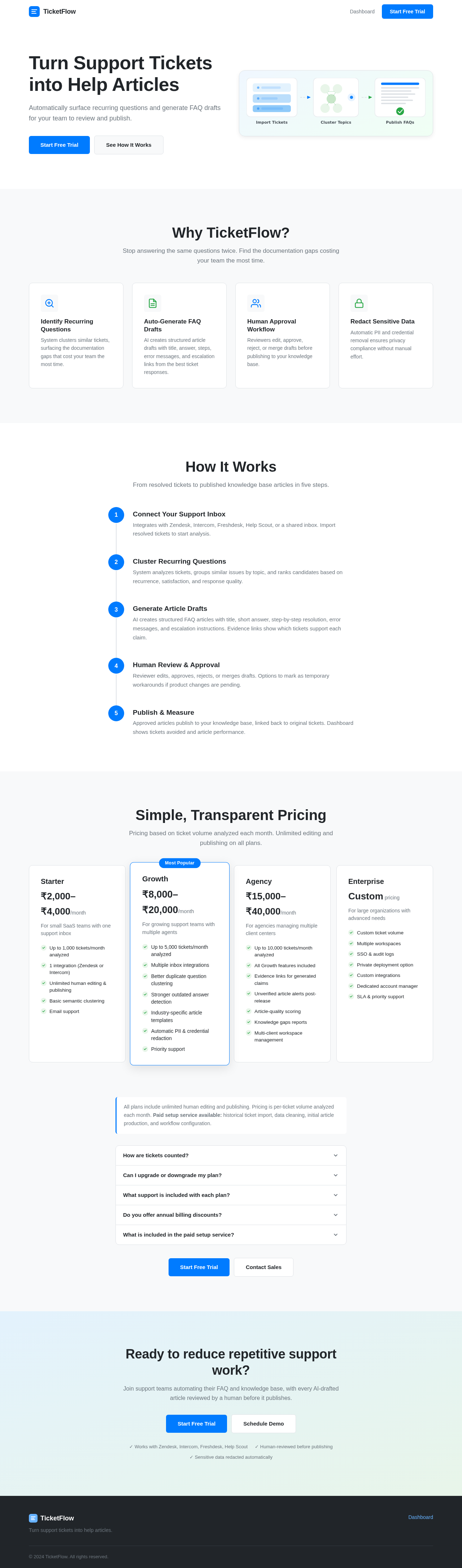
    • Landing: Public entry page for new customers.
  • Access: Integration with support systems is required, but the core human-facing workflows occur within the product's own interface.

  • Behavior Contracts:

    • Generate Article Drafts: Triggered by clustered topics, resulting in generated article drafts.
    • Review and Approve Drafts: Triggered when drafts are submitted for review, resulting in approved or rejected drafts.
    • Group Similar Tickets into Topics: Triggered by available resolved tickets, resulting in tickets grouped into semantic topics.
    • Rank Candidate Source Tickets Using Signals: Triggered by grouped tickets, resulting in a ranked list of candidate tickets for documentation.
    • Identify Recurring Questions: Triggered by clustered and ranked tickets, resulting in identified recurring questions.
    • Generate Structured Draft: Triggered by a selected recurring question, resulting in a structured article draft.
    • Flag Uncertain Claims, Outdated Instructions, and Missing Steps: Triggered by a generated draft, resulting in flagged issues.
    • Enforce Article Content Requirements: Ensures drafts include required content such as titles, answers, and steps.
    • Require Human Approval: Drafts are sent for human approval.
    • Alert for Article and Ticket Issues: Alerts for contradicting tickets, repeated "still need help" tickets, and other issues.
    • Redact Sensitive Information: Automatically redacts sensitive information from tickets and drafts.
    • Provide Evidence Links for Generated Claims: Adds evidence links to claims in generated drafts.
Page 3 of 6

2b. Source Content Inventory

  • Content Source: zbrain
    • Agent Name: FAQ Generation Agent
    • Description: Automates creation of FAQs by analyzing resolved helpdesk tickets using a Large Language Model (LLM).
    • Problems Addressed: Outdated FAQ content, delays in documentation updates, high manual effort.
    • Workflow Steps: Includes closed ticket inputs, processing resolved tickets, FAQ extraction, and continuous improvement through human feedback.
    • Sample Input Data: Includes ticket IDs, issue summaries, resolutions, and customer feedback.
    • Sample Generated FAQs: Provides examples of questions and answers generated from ticket data.
    • Benefits Summary: Highlights efficiency, accuracy, adaptability, and operational advantages.

3. Functional Requirements as Story Points

  • As a Support Agent, I should be able to connect the system to Zendesk, Intercom, Freshdesk, Help Scout, or a shared support inbox to import resolved tickets. explicit
  • As a Support Agent, I should be able to view a dashboard showing tickets potentially avoided by the system. explicit
  • As a System, I should automatically group similar tickets into topics for easier analysis. explicit
  • As a System, I should rank candidate source tickets using signals like recurrence and customer satisfaction. explicit
  • As a System, I should generate AI-drafted FAQ articles from the best ticket responses. explicit
  • As a Reviewer, I should be able to review, edit, approve, reject, merge, or mark drafts as temporary workarounds. explicit
  • As a System, I should publish approved articles to the customer’s knowledge base and link them back to the original tickets. explicit
  • As a System, I should alert when a new ticket contradicts an existing article or when an article generates repeated "still need help" tickets. explicit
  • As a System, I should redact names, emails, order numbers, and credentials from tickets and drafts to ensure privacy. explicit
  • As a System, I should provide evidence links showing which tickets support each generated claim. explicit
Page 4 of 6

4. User Personas

  • Support Agent: Manages and resolves support tickets using the system.
  • Reviewer: Reviews and approves generated article drafts.

5. Core User Flows

Support Agent Flow

  1. Connect Support System: Integrate with Zendesk, Intercom, or other platforms.
  2. Import Tickets: Import resolved tickets for analysis.
  3. View Dashboard: Access the dashboard to see ticket analysis and potential FAQs.

Reviewer Flow

  1. Receive Drafts: Access drafts submitted for review.
  2. Review and Edit: Edit, approve, reject, or merge drafts.
  3. Publish: Approve drafts for publication to the knowledge base.
Page 5 of 6

6. Visuals Colors and Theme

  • Primary: #007BFF
  • Primary Light: #66B2FF
  • Secondary: #6C757D
  • Accent: #28A745
  • Highlight: #FFC107
  • Background: #F8F9FA
  • Surface: #FFFFFF
  • Text: #212529
  • Text Muted: #6C757D
  • Border: #DEE2E6

7. Signature Design Concept

The design concept for the Support-Ticket-Automation project focuses on a clean, professional interface that facilitates efficient ticket analysis and article generation. The dashboard will feature a clear layout with intuitive navigation, allowing support agents and reviewers to quickly access the information they need. The use of a consistent color palette and typography will ensure readability and a cohesive user experience.

8. Interaction Model & Motion Direction

  • Interaction Model: Animated
    • Moderate scroll-triggered reveals and hover transitions.
    • Spring physics on interactive elements for a polished experience.
Page 6 of 6

9. Non-Functional Requirements

  • Integration with Existing Support Systems: The product must integrate seamlessly with platforms like Zendesk or Intercom. explicit
  • Focus on Documentation Gaps: The system should prioritize identifying documentation gaps over AI article writing. explicit

10. Tech Stack

  • Frontend: React for Web
  • Backend: Python, FastAPI
  • Database: MySQL or MariaDB
  • AI Models: GPT 5.4 for user-friendly response
  • AI Tools: Litellm for LLM Routing, Langchain
  • Local Orchestration: Docker, docker-compose

11. Assumptions and Constraints

  • The system will not be a complete help-desk platform.
  • Initial launch will target B2B SaaS companies using Intercom or Zendesk.
  • The product will focus on identifying unresolved documentation gaps.

12. Glossary

  • FAQ: Frequently Asked Questions
  • LLM: Large Language Model
  • PII: Personally Identifiable Information
  • SaaS: Software as a Service
  • Zendesk/Intercom: Customer support platforms used for ticket management.
Landing design preview
Dashboard: Reviewer views alerts for article and ticket issues
Article Review: draft received and ready for human approval
Article Review: Reviewer edits, approves, rejects, merges, or marks draft as workaround
Landing design preview
Dashboard: Reviewer views alerts for article and ticket issues
Article Review: draft received and ready for human approval
Article Review: Reviewer edits, approves, rejects, merges, or marks draft as workaround