Project Idea
 LOOP
LOOPStep 1: Removed Cover Page from Client Package. Step 2: if I attached Financials, 5500,8955 ,5558 and SAR then in Table content Page add Content Financials for Financials should be before Eligibility, then add Accordingly IRS Form 5500 for 5500, IRS Form 5558 for 5558, IRS Form 8955 for 8955 and Summary Annual Report – SAR for SAR that content should be add under Top Heavy Report. If I did not attached any one of those file then no need add that files which I do not attached. Please Note that, Financials, IRS Form 5500, IRS Form 5558, IRS Form 8955 and Summary Annual Report – SAR’s front should be Times New Roman and Front size 15. Step 3: Then the client package Convert into PDF, then Convert clickable TABLE OF CONTENTS into clickable Bookmark (do not include any sub highlights). If multiple pages have same headline, then Bookmark should be the first page instate of last page. Step 4: Change the Plan name According to Client Package on attached Cover page then convert into PDF then add this cover page before table content page of the final PDF. Step 5: Convert Cover Letter into PDF and attached with First PDF with Cover Letter Bookmark. Please Note that, Cover Letter should be attached first page of final PDF with First Bookmark. Step 6: Financial should be attached before Eligibility of final PDF with third Bookmark. Step 7: Form 5500, IRS Form 5558, IRS Form 8955 and Summary Annual Report – SAR should be attached Bookmark accordingly after Top Heavy Report. Please final note that, no need any kind of extra page for Financials, 5500,8955 ,5558 and SAR and do not change any kind of date Step 8: Plan Highlights should be attached before Cover Page of final PDF with second Bookmark. After all steps complete then provide me with the converted pdf. Name will Be “Administrative Report – "Document Name (First Letter Must be upper case") – 2025” Set the zoom to 100% for all pages. I want to be a offline website. My uploaded file will be pdf and docx please follow the instructions and build a working website


Comments (0)
Sign in to leave a comment
Project Tasks31
Implement CTASection for Home
As a frontend developer, implement the CTASection for the Home page. This is a static promotional section rendered as a `<section className="hm-cta">` containing a centered card (`hm-cta__card`) with two decorative background blobs (`hm-cta__decor--1` and `hm-cta__decor--2`), a headline ('Ready to Streamline Your Reports?'), a descriptive paragraph, and a styled anchor CTA button (`hm-cta__btn`) linking to `/Processing` with an inline SVG upload icon. A small note below the button reads 'No account required. Works completely offline.' Apply CTASection.css for card gradient, decor blob positioning, and button hover states.
Implement Navbar for Home
As a frontend developer, implement the Navbar for the Home page. Uses `useState` for `menuOpen` toggle. A `links` array defines four nav entries: Home (/), Processing (/Processing), Preview (/Preview), Download (/Download). Renders a `<nav className="hm-nav">` with: a logo anchor (`hm-nav__logo`) containing a file SVG icon and 'DocForge' text; a links container (`hm-nav__links`) that conditionally appends `hm-nav__links--open` when `menuOpen` is true, mapping `links` to anchor tags that call `setMenuOpen(false)` on click, plus a 'Get Started' CTA anchor to /Processing; and a hamburger `<button>` (`hm-nav__hamburger`) with three `<span>` bars that toggles `menuOpen` and conditionally applies `hm-nav__hamburger--open`. Apply Navbar.css for sticky/fixed positioning, logo styling, mobile hamburger animation, and responsive link collapse. Note: this Navbar component may already exist from earlier pages; reuse if available.
Implement DownloadSummary for Download
As a frontend developer, implement the DownloadSummary section for the Download page. This static section renders a 'Processing Report' labeled grid of four cards: (1) Document Package card (ds-card--docs) with a checklist (ds-checklist) of documentItems ['Financials', 'IRS Form 5500', 'IRS Form 5558', 'IRS Form 8955', 'SAR'] each with a checkmark SVG icon; (2) Formatting card (ds-card--format) with formatSpecs table rows showing Font=Times New Roman, Size=15pt, Zoom=100%, Output=Structured PDF; (3) a Bookmarks card with bookmarkItems ['Clickable bookmarks generated', 'Table of Contents linked', 'All sections navigable']; (4) an Order card with orderSteps ['Cover Letter', 'Plan Highlights', 'Financials', 'Eligibility', 'Top Heavy Report', 'IRS Forms & SAR']. All data is hardcoded arrays mapped via .map(). No state or animations involved.
Implement DownloadActions for Download
As a frontend developer, implement the DownloadActions section for the Download page. This static section renders a da-root container with three child elements: (1) a primary anchor tag (da-download-btn) with a download attribute and an inline SVG download arrow icon (polyline + line paths, strokeWidth=2.5) labeled 'Download Final PDF'; (2) a secondary actions row (da-secondary-actions) with two anchor links — 'Start New Package' linking to '/Home' (da-secondary-link--teal) and 'Preview Again' linking to '/Preview' (da-secondary-link--muted) separated by a da-secondary-divider pipe span; (3) a helper text row (da-helper) with a decorative da-badge-dot span (aria-hidden) and a da-filename span showing 'File: Administrative Report – Plan Name – 2025.pdf • ~24 pages'. No state or interactivity beyond native anchor behavior.
File Upload API Endpoint
As a Backend Developer, implement the POST /api/upload endpoint in FastAPI that accepts multipart form data with one or more PDF/DOCX files. Validate file types, save uploads to a temporary working directory, and return a job ID and list of uploaded file metadata (filename, size, type). This endpoint is required by the Home page HeroSection drag-and-drop upload zone and the Processing page document tracking.
Global State Management Setup
As a Frontend Developer, set up a global client-side state management solution (e.g., React Context + useReducer, or Zustand) to share job ID, uploaded file list, selected document types, plan name, and processing status across the Home → Processing → Preview → Download page flow. Without shared state, each page cannot access the job ID or document metadata produced by earlier pages. This is a cross-cutting concern required by all four pages. Note: depends on backend API tasks tmp_backend_file_upload and tmp_backend_process_job being available to integrate against.
Design System Theme Setup
As a Frontend Developer, create a shared theme/design-system configuration file (e.g., CSS custom properties or a theme.js/theme.css file) defining the project's color tokens: --primary: #2A9D8F, --primary-light: #A8DADC, --secondary: #E63946, --accent: #F4A261, --highlight: #E9C46A, --bg: #F1FAEE, --surface: rgba(42,157,143,0.8), --text: #1D3557, --text-muted: #457B9D, --border: rgba(233,69,96,0.2). This ensures all page components use consistent tokens rather than hardcoded hex values, and must be set up before any page-level CSS is finalized.
FastAPI App Skeleton Setup
As a Backend Developer, set up the FastAPI application skeleton including: project structure (app/, routers/, services/, models/), CORS middleware configured for localhost offline use, a health check endpoint GET /api/health, static file serving for the built React frontend (so the entire app runs offline from a single docker-compose up), and environment configuration via .env. This is the foundational backend task all other API tasks depend on.
Implement DocumentTypes for Home
As a frontend developer, implement the DocumentTypes section for the Home page. This section renders a static data-driven grid using a `documents` array (defined at module scope, no useState) containing 7+ document type objects — Cover Letter, Plan Highlights, Financials, Eligibility, Top Heavy Report, IRS Form 5500, and additional IRS/SAR entries — each with `name`, `desc`, `processing`, `iconBg` (CSS color token: crimson/gold/teal/orange), `badge` (optional chip label e.g. 'First Page', 'Before Cover'), and an inline SVG `icon`. Each card renders the icon in a colored circle, an optional badge chip, the document name, short description, and a 'processing' detail string describing PDF placement rules. Apply DocumentTypes.css for the card grid layout, icon circle coloring via `iconBg`, badge styling, and hover elevation effects.
Implement Footer for Home
As a frontend developer, implement the Footer section for the Home page. The `<footer className="hm-footer">` contains a two-column top area: a brand column with the DocForge SVG logo icon and tagline ('Offline document processing for financial professionals.'), and a links group with two sub-columns — 'Pages' (anchor links to /, /Processing, /Preview, /Download) and 'Documents' (static `<span>` text items: Cover Letter, Plan Highlights, Financials, Eligibility, Top Heavy Report, IRS Forms / SAR). The bottom bar renders a copyright line. Apply Footer.css for layout, brand styling, link hover states, and bottom border. Note: this Footer component may already exist from earlier pages; reuse if available.
Implement HeroSection for Home
As a frontend developer, implement the HeroSection for the Home page. Uses `useState` for `scrollY`, `planName`, `editingPlan`, `savedPlanName`, and `dragOver`; and `useRef` for `inputRef`. A passive scroll listener drives three parallax transforms (`parallaxSlow` at 0.2×, `parallaxMed` at 0.12×, `parallaxFast` at 0.35×) applied to `hm-hero__parallax-orb--1/2/3` and `hm-hero__parallax-dots` divs. The hero content includes a badge chip ('Offline Document Processing'), an `<h1>` with an accented span ('Polished PDFs'), and a subtitle paragraph. An interactive plan-name flow renders either a display chip (showing `savedPlanName` or a placeholder) or an `<input ref={inputRef}>` when `editingPlan` is true, with `handlePlanSave` on blur, `handlePlanKeyDown` handling Enter/Escape, and auto-focus via useEffect. A drag-and-drop upload zone tracks `dragOver` state via `handleDragOver`, `handleDragLeave`, and `handleDrop`. Apply HeroSection.css for parallax orb animations, gradient background, badge chip, plan-name editing styles, drag-over highlight state, and responsive layout.
Implement HowItWorks for Home
As a frontend developer, implement the HowItWorks section for the Home page. This is a static data-driven section rendered as `<section className="hm-how" id="how-it-works">`. A module-scope `steps` array defines four step objects — Upload (01), Configure (02), Process (03), Download (04) — each with a `number` string, `title`, `desc`, and an inline SVG `icon`. The section header contains a label chip ('How It Works'), an `<h2>` ('Four Steps to a Polished Report'), and a subtitle. The `hm-how__steps` container maps over the steps array rendering each step card with its number badge, SVG icon, title, and description. No state or interactivity. Apply HowItWorks.css for step card layout, numbered badge styling, connector lines between steps, and responsive grid/flex behavior.
Implement ProcessingHeader for Processing
As a frontend developer, implement the ProcessingHeader section for the Processing page by reusing the shared Navbar component (already implemented in Home page). The Navbar uses `useState` for `menuOpen` toggle, renders a `hm-nav` with logo SVG icon (DocForge brand), four navigation links (Home, Processing, Preview, Download) mapped from the `links` array, a CTA button pointing to `/Processing`, and a hamburger button with three `<span>` elements that toggles `hm-nav__hamburger--open` and `hm-nav__links--open` CSS classes. Import from `../styles/Navbar.css`. Verify the component renders correctly on the Processing page route.
Document Processing Job API
As a Backend Developer, implement the POST /api/process endpoint in FastAPI that accepts a job ID and a configuration payload specifying which financial documents are included (Financials, IRS Form 5500, IRS Form 5558, IRS Form 8955, SAR), the plan name, and any ordering preferences. Triggers the background document processing pipeline and returns a job status object. Also implement GET /api/process/{job_id}/status to poll processing progress for each document step. This endpoint drives the ProcessingDocuments, ProcessingPipeline, ProcessingActions, and ProcessingLog sections.
PDF Generation Engine Service
As a Backend Developer, implement the core PDF processing service using Python libraries (e.g., PyMuPDF/fitz, python-docx, reportlab, or pikepdf). This service must: (1) convert DOCX to PDF, (2) apply Times New Roman font size 15 formatting to Financials, IRS Form 5500/5558/8955, and SAR sections, (3) convert the clickable Table of Contents into clickable PDF bookmarks (first occurrence only for duplicate headings, no sub-bookmarks), (4) assemble the final PDF in the correct order: Cover Letter → Plan Highlights → [existing TOC/Cover Page with updated Plan name] → Financials (before Eligibility) → ... → Top Heavy Report → IRS Form 5500 → IRS Form 5558 → IRS Form 8955 → SAR, (5) set page zoom to 100% for all pages, (6) name the output file 'Administrative Report – {Document Name} – 2025.pdf'. Omit any section the user did not attach. This is the core business logic engine.
Implement ProcessingPipeline for Processing
As a frontend developer, implement the ProcessingPipeline section for the Processing page. The section renders a 5-step pipeline using the `STEPS` array (`upload`, `format`, `bookmark`, `order`, `generate`) with a `STATUS_MAP` that maps `done`→`completed`, `active`→`active`, `waiting`→`upcoming`. Each step renders a dedicated SVG icon component (`UploadIcon`, `FormatIcon`, `BookmarkIcon`, `OrderIcon`, `GenerateIcon`) at 28×28px, plus a `CheckIcon` (22×22, white stroke) for completed steps. The `STEP_DETAILS` map provides display names and status strings (e.g., 'Times New Roman 15pt', 'TOC → PDF bookmarks', 'Financials before Eligibility'). Import from `../styles/ProcessingPipeline.css` (9095 chars of styles).
Implement ProcessingDocuments for Processing
As a frontend developer, implement the ProcessingDocuments section for the Processing page. Uses `useState` and `framer-motion` (`motion`, `AnimatePresence`) for animated document card expansion. Renders 6 document cards from the `DOCUMENTS` array: `Financials_Q4_2025.pdf` (bookmarking, 85% teal), `IRS_5500_2025.docx` (formatting, 62% teal), `Cover_Letter_2025.pdf` (complete, 100% teal), `Plan_Highlights_2025.docx` (queued, 0% orange), `IRS_8955_2025.pdf` (queued, 0% orange), and `SAR_Report_2025.docx` (warning state). Each card displays status, progress bar with `progressColor` (teal/orange), and 4 substeps with `done`/`active`/`pending` states. The `getConversionLabel(fileExt)` helper returns 'Validating PDF structure' for PDFs and 'Converting DOCX to PDF' for DOCX files. Import from `../styles/ProcessingDocuments.css`.
Implement ProcessingLog for Processing
As a frontend developer, implement the ProcessingLog section for the Processing page. Uses `useState`, `useEffect`, `useRef`, and `useCallback` hooks alongside `framer-motion` (`motion`, `AnimatePresence`) for animated log entry rendering. Renders a filterable log panel with 4 filter buttons (`all`, `info`, `warning`, `error`) using the `FILTERS` array. The `LEVEL_MAP` maps log levels to icon components (`InfoIcon`, `WarningIcon`, `ErrorIcon`, `SuccessIcon`) and color classes. Additional SVG icons include `ChevronUpIcon`, `ChevronDownIcon`, `TrashIcon`, and `ClockIcon`. Accepts `logEntries` via props (defaults to `DEFAULT_ENTRIES = []`). Includes auto-scroll behavior via `useRef`, clear log via `TrashIcon`, and collapsible entries via chevron icons. Import from `../styles/ProcessingLog.css`.
Implement PreviewDocumentInfo for Preview
As a frontend developer, implement the PreviewDocumentInfo section for the Preview page. This section renders a horizontal info bar (pdi-root/pdi-bar) displaying an inline-editable plan name ('Acme Corp 401(k) Plan') using useState(planName), useState(editing), useState(editValue), and a useRef(inputRef). When the edit pencil icon is clicked, handleStartEdit() sets editing=true and populates editValue; a useEffect auto-focuses and selects the input. handleSave() trims and commits the name; handleCancel() discards. handleKeyDown supports Enter (save) and Escape (cancel). Below the name, four metaChips (Documents: '8 files', Pages: '142 pages', Size: '4.2 MB', Processed: 'Jun 25, 2026') are rendered as styled pdi-chip elements each with a colored icon (pdi-chip__icon--docs/pages/size/date) and label/value pair. This is the entry-point section for the Preview page and must declare page-level dependencies on the Processing page tasks.
PDF Preview Generation API
As a Backend Developer, implement the GET /api/process/{job_id}/preview endpoint that returns page-by-page rendered previews of the generated PDF (e.g., as base64-encoded PNG images or a temporary PDF URL served locally). Also implement GET /api/process/{job_id}/info to return document metadata: total pages, file size, plan name, document count, and processing date. This endpoint is required by the PreviewDocumentInfo section (metaChips: Documents, Pages, Size, Processed) and the PreviewViewer carousel.
Final PDF Download API
As a Backend Developer, implement the GET /api/process/{job_id}/download endpoint that streams the generated final PDF file to the client with the correct Content-Disposition header using the filename format 'Administrative Report – {Document Name} – 2025.pdf'. Also implement cleanup logic to remove temporary files after download or after a configurable TTL. This endpoint is required by the DownloadActions section's primary download anchor.
Plan Name Update API
As a Backend Developer, implement the PATCH /api/process/{job_id}/plan-name endpoint that accepts a new plan name string and re-triggers the PDF assembly step to update the plan name on the Cover Page before regenerating the final PDF. Returns updated job status. This endpoint is required by the PreviewDocumentInfo inline plan-name editing flow (handleSave) and the SRD requirement to update Plan name according to the client package.
Integrate Home Upload Flow
As a Tech Lead, verify the end-to-end integration between the Home page HeroSection drag-and-drop upload zone and the POST /api/upload backend endpoint. Ensure files are uploaded correctly, job ID is stored in global state, file metadata is returned and rendered, and the user is navigated to /Processing on success. Confirm document type selection (DocumentTypes section) is passed as configuration to the processing job. Note: frontend tasks 1582bcc3 (HeroSection), 52a06b09 (DocumentTypes), and global state task tmp_global_state must also be linked.
Implement ProcessingActions for Processing
As a frontend developer, implement the ProcessingActions section for the Processing page. Uses `useState` (`isCancelling`, `isLoading`) and `useCallback` hooks with `framer-motion` (`motion`, `AnimatePresence`) for animated state transitions. Accepts props: `documentsComplete`, `totalDocuments`, `timeRemaining`, `onPreview`. Computes `allComplete = totalDocuments > 0 && documentsComplete === totalDocuments` to toggle `pa-root--completed` CSS class and swap the time display for a 'Processing complete' badge with a checkmark SVG. Renders a `pa-counter` showing '{documentsComplete} of {totalDocuments} documents complete' with a document SVG icon, a `pa-time` row with clock SVG, a 'Preview' button (disabled unless `allComplete`) that calls `props.onPreview` or falls back to `window.location.href = '/Preview'`, a 'Cancel' button that sets `isCancelling`, and a 'Download Logs' handler. Import from `../styles/ProcessingActions.css`.
Implement PreviewViewer for Preview
As a frontend developer, implement the PreviewViewer section for the Preview page. This is the most complex section, featuring a 3D parallax document carousel using framer-motion (motion, AnimatePresence, useMotionValue, useSpring, useTransform) and D3. The ParallaxCard sub-component uses useRef(cardRef) with rotateX/rotateY MotionValues driven by mouse position (handleMouseMove/handleMouseLeave), spring-animated via useSpring({stiffness:260, damping:28}), and a dynamic cardShadow useTransform that calculates depth-based box-shadow. PreviewViewer manages useState(zoomLevel, 100), useState(showScrollProgress), useRef(scrollContainerRef), useRef(progressCanvasRef), and renders pagesCount=6 parallax pages. Zoom controls (handleZoomIn/handleZoomOut/handleZoomReset via useCallback) clamp between minZoom=60 and maxZoom=160 in steps of 10. A scroll event listener on the container (passive, cleaned up on unmount) toggles showScrollProgress when scrollTop > 40. D3 is used for a progress canvas visualization. All wrapped in pv- prefixed CSS classes with transformStyle: 'preserve-3d' and willChange: 'transform'.
Implement PreviewActionBar for Preview
As a frontend developer, implement the PreviewActionBar section for the Preview page. This is a sticky action bar (pab-root/pab-inner) with two zones: a left filename display (pab-filename) showing a document SVG icon + computed label 'Administrative Report – Retirement Plan Package – 2025.pdf', and a right actions group (pab-actions) with three anchor elements: a pab-link-regenerate linking to /Processing with a refresh SVG icon and 'Regenerate' label, a pab-btn-back linking to /Processing with a left-arrow SVG and 'Go Back to Processing' label, and a pab-btn-download linking to /Download with a download SVG (strokeWidth 2.5) and 'Download Final PDF' label. No local state is used. This section is independent of PreviewViewer and PreviewDocumentInfo and can be built in parallel after the page entry-point dependency is satisfied.
Implement PreviewFooter for Preview
As a frontend developer, implement the PreviewFooter section for the Preview page. This reuses the shared Footer component (hm-footer prefixed CSS classes from Footer.css) that may already exist from the Home page task [9c9f05cc-8ed1-4aa9-b4d9-533c56a7847b]. The footer renders an hm-footer__brand block with a DocForge SVG logo and tagline 'Offline document processing for financial professionals', plus an hm-footer__links-group with two columns: a 'Pages' column with anchor links to /, /Processing, /Preview, /Download, and a 'Documents' column listing Cover Letter, Plan Highlights, Financials, Eligibility, Top Heavy Report, IRS Forms / SAR as static hm-footer__text spans. The bottom bar shows a copyright notice. No local state. If the Footer component already exists from the Home page, wire it in; otherwise implement from this JSX. Depends only on the page entry-point section.
Implement DownloadHero for Download
As a frontend developer, implement the DownloadHero section for the Download page. This section uses a canvas-based 2D particle animation system (canvasRef, animRef) with 60 particles (PARTICLE_COUNT), spawned across a spread radius (PARTICLE_SPREAD=2.8) using randomized angles, velocities, colors ('#2A9D8F', '#A8DADC', '#F4A261', etc.), radius, and lifetime (PARTICLE_LIFETIME=1.8s). The useEffect hook initializes the canvas with devicePixelRatio scaling, spawns staggered particles via spawnParticle(), and drives a requestAnimationFrame loop (animate()). framer-motion's useAnimation (checkmarkControls) animates a checkmark SVG. A steps array ('Formatting applied', 'Bookmarks generated', 'Table of Contents created', 'Documents ordered') is displayed as completion indicators. Note: component may already have Navbar from Home page. Depends on Preview page task 885dd38f-2e6d-4faa-b857-354d980ca44a for page chaining.
Integrate Processing Page API
As a Tech Lead, verify the end-to-end integration between the Processing page sections (ProcessingDocuments, ProcessingPipeline, ProcessingActions, ProcessingLog) and the backend processing job API (POST /api/process and GET /api/process/{job_id}/status). Ensure the job is triggered on page load using the job ID from global state, polling updates the document progress cards and pipeline steps in real time, log entries stream correctly, and the Preview button activates when all documents are complete. Note: frontend tasks 23404c93, 48445e05, 5c795a7c, 5dfd8960 must also be linked.
Integrate Preview Page API
As a Tech Lead, verify the end-to-end integration between the Preview page sections (PreviewDocumentInfo, PreviewViewer, PreviewActionBar) and the backend preview and plan-name APIs (GET /api/process/{job_id}/info, GET /api/process/{job_id}/preview, PATCH /api/process/{job_id}/plan-name). Ensure document metadata populates the metaChips, page previews render in the 3D carousel, and inline plan-name edits trigger a re-generation and update the PreviewDocumentInfo display. Note: frontend tasks 885dd38f, 374098b5, 5056ebe3 must also be linked.
Integrate Download Page API
As a Tech Lead, verify the end-to-end integration between the Download page sections (DownloadHero, DownloadSummary, DownloadActions) and the backend download endpoint (GET /api/process/{job_id}/download). Ensure the download anchor in DownloadActions is wired to the correct job ID from global state, the file is streamed with the correct filename ('Administrative Report – {Plan Name} – 2025.pdf'), and the DownloadSummary cards reflect the actual documents processed. Note: frontend tasks 102fa52a, 83831bca, 9408220d must also be linked.
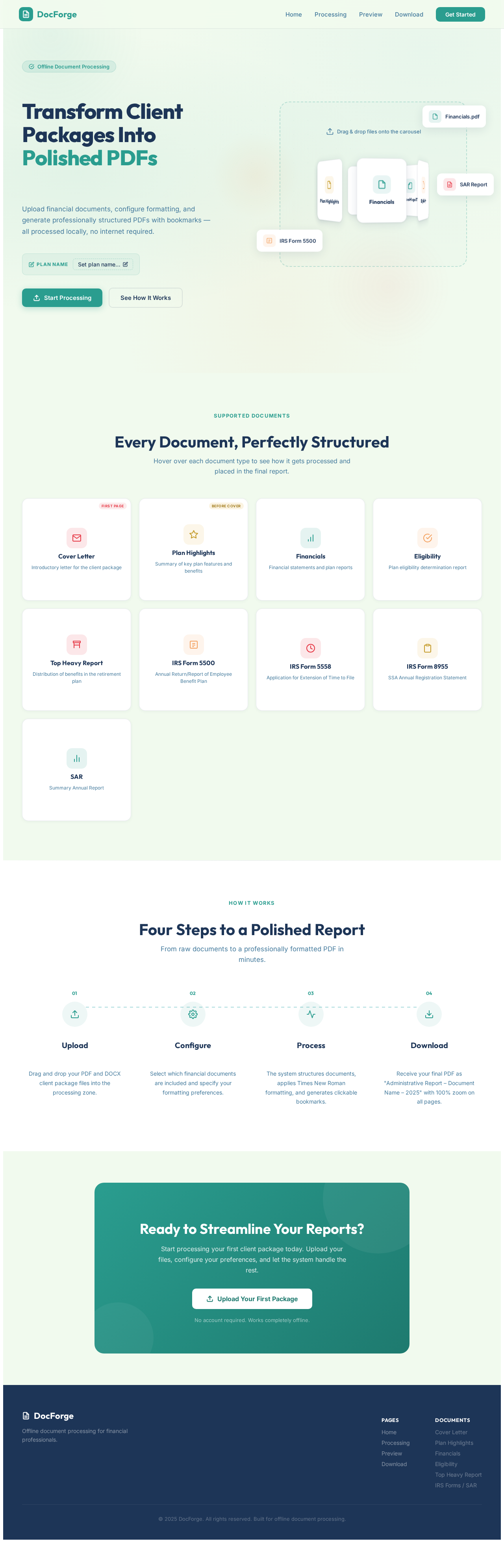
Transform Client Packages Into Polished PDFs
Upload financial documents, configure formatting, and generate professionally structured PDFs with bookmarks — all processed locally, no internet required.
Every Document, Perfectly Structured
Hover over each document type to see how it gets processed and placed in the final report.
Attached as the very first page of the final PDF with a dedicated bookmark, anchoring the document's navigation.
Placed before the Cover Page in the final PDF, providing an overview before the formal letter.
Formatted in Times New Roman, font size 15. Placed before the Eligibility section in the final PDF.
Appended after the Financials section. The Financial section must always precede Eligibility in the final PDF order.
Positioned after Eligibility. IRS forms and SAR are attached after this report with bookmarks.
Attached after the Top Heavy Report with a dedicated bookmark for quick navigation.
Included with proper formatting and auto-generated bookmark in the Table of Contents.
Added after SAR with consistent Times New Roman formatting and bookmark navigation.
Positioned after Top Heavy Report. Includes plan financial summary with a bookmark.
Four Steps to a Polished Report
From raw documents to a professionally formatted PDF in minutes.
Upload
Drag and drop your PDF and DOCX client package files into the processing zone.
Configure
Select which financial documents are included and specify your formatting preferences.
Process
The system structures documents, applies Times New Roman formatting, and generates clickable bookmarks.
Download
Receive your final PDF as "Administrative Report – Document Name – 2025" with 100% zoom on all pages.
Ready to Streamline Your Reports?
Start processing your first client package today. Upload your files, configure your preferences, and let the system handle the rest.
Upload Your First PackageNo account required. Works completely offline.
No comments yet. Be the first!