Project Details
 Rakesh T Kanjni
Project Database


Comments (0)
Sign in to leave a comment
Project Tasks53
Implement Navbar for Home
As a frontend developer, implement the Navbar section for the Home page. Build the `Navbar` component using `useState` to toggle the mobile menu (`open` state). Render a sticky `<header className='nb-root'>` with: a logo using `Building2` icon from lucide-react linking to `/Home`, a desktop `<nav>` rendering `quickLinks` array (Home, Categories, Projects, Project Details), a search bar with `Search` icon, and auth buttons (`LogIn` icon) linking to `/Login`. Implement a mobile drawer (`nb-mobile` / `nb-open` classes) toggled by a `Menu`/`X` button (`nb-toggle`) with `aria-expanded`. The mobile drawer duplicates search, links, and auth. Import `Navbar.css`. Note: this component will be reused across all pages.
Implement LoginForm for Login
As a frontend developer, implement the LoginForm section for the Login page. This section renders a card-based login form (`<section className="lf-section">` > `lf-container` > `lf-card`) with a Lock icon header. State hooks: `useState` for `email`, `password`, `remember` (checkbox), `showPassword` (toggle Eye/EyeOff icon), `loading`, `submitted`, `errors` (field-level object), and `formError` (banner-level string). `useRef` for `mountedRef` (cleanup guard) and `timeoutRef` (setTimeout reference). Client-side validation via `validate()` checks email regex and password min-length (6 chars), setting field errors on submit. `handleSubmit` runs validation, sets `loading=true`, then after 1200ms timeout navigates to `/Projects` via `window.location.href`. A dev-login shortcut (`handleDevLogin`) skips validation and navigates after 800ms. `clearFieldError` removes individual field errors on input change when `submitted` is true. Renders AlertCircle for form-level errors and individual field error messages. Includes a 'Remember me' checkbox and a password visibility toggle button. The form uses `noValidate`. This section is independent of LoginHero and can be built in parallel.
Implement LoginSignupPrompt for Login
As a frontend developer, implement the LoginSignupPrompt section for the Login page. This is a simple static section (`<section className="lsp-root">`) containing a decorative divider (`lsp-divider`), a text row with a 'Don't have an account?' prompt and an anchor link to `/Register` labelled 'Create one now' with an ArrowRight lucide icon (`lsp-arrow`), and a subtext paragraph encouraging sign-up to explore project specs, pricing, and WhatsApp sharing. No state or effects. Uses ArrowRight from lucide-react at size 15. This section is independent of LoginHero and LoginForm and can be built in parallel.
Implement Auth API Endpoints
As a backend developer, implement authentication API endpoints using FastAPI. Create POST /api/auth/login (accepts email/password, returns JWT token and user profile), POST /api/auth/logout (invalidates token), GET /api/auth/me (returns current user profile). Use JWT with python-jose, bcrypt for password hashing. Implement middleware for protected route validation. Support roles: real_estate_agent, property_buyer, developer. Note: Basic login/auth setup is already done; this task focuses on the real estate specific role-based access endpoints needed by the frontend Login page (task 890d5afb).
Create Database Models and Migrations
As a backend developer, design and implement MySQL database models using SQLAlchemy ORM with Alembic migrations. Models required: User (id, email, password_hash, role, created_at), Project (id, name, category, location, google_pin, plot_size, towers, basements, storeys, total_units, possession, parking, floor_plate, status, created_at, updated_at), ProjectPricing (project_id FK, regular_rate, dp_rate, semi_dp_rate, frc, plc, extra_package, md, rm, parking_charge, govt_charges), ProjectRERA (project_id FK, rera_number, rera_status, rera_authority, verified_date, valid_until, document_path), ProjectGallery (id, project_id FK, image_path, category, alt_text, file_size, width, height), UnitSize (id, project_id FK, unit_type, area_sqft, ceiling_height_ft, count). Create initial Alembic migration and seed data script with sample projects matching the frontend hardcoded data.
Setup Global State Management
As a frontend developer, set up global state management for the React Native / React web application. Configure React Context or Zustand store with slices for: authStore (user, token, role, isAuthenticated, login/logout actions), projectStore (projects list, selected project, filters, pagination, loading/error states), categoryStore (active category, categories list). Create custom hooks: useAuth(), useProjects(), useCategories(). Implement API client (Axios or fetch wrapper) with base URL config, JWT Authorization header injection, and error interceptor for 401 redirect to /Login. This is a prerequisite for all frontend sections that need live API data instead of hardcoded data.
Setup Design System and Theme
As a frontend developer, establish the global design system and theme configuration. Create a centralized theme file defining: CSS variables for color palette (professional blues and teals per SRD Section 6), typography scale, spacing tokens, border radii, and shadow levels. Create a shared globals.css or theme.ts. Define reusable utility classes for status badges, category chips, price formatting, and card layouts that are referenced by multiple section CSS namespaces (nb-*, ftr-*, cg-*, pl-*, prdh-*, etc.). This prevents design inconsistencies across the 36 section tasks.
Implement HomeCategorySelector for Home
As a frontend developer, implement the `HomeCategorySelector` section using framer-motion for 3D tilt card interactions. Build the `CategoryCard` component using `useRef`, `useMotionValue`, `useSpring`, and `useTransform` to compute `rotateX`/`rotateY` spring values from mouse position relative to the card element via `handleMove`/`handleLeave` handlers. Each card renders: a count badge (`hcs-count`), a lucide icon (`Building2`, `HomeIcon`, `Trees`, `LandPlot`, `Factory`), category name, description, and an `ArrowRight` CTA. Apply `whileHover={{ scale: 1.05 }}` and `whileTap={{ scale: 0.98 }}` on `motion.a` links to `/Categories`. The section wraps cards in parallax layers (`hcs-bg`, `hcs-mid`) using CSS `--scroll` variable. Import `HomeCategorySelector.css`.
Implement HomeFeaturedProjects for Home
As a frontend developer, implement the `HomeFeaturedProjects` section featuring a draggable carousel. Use `useState` for `active` index, `useRef` for `trackRef` and `containerRef`, `useMotionValue` for `x` position, and a `stepRef` for per-slide step size. Implement `measure` (via `useCallback`) to compute overflow bounds and step size on mount and window resize. Build `goTo(index)` using framer-motion `animate(x, target, { type: 'spring', stiffness: 320 })`. Render 4 project cards (Aurora Business Bay, Meridian Heights, Verdant Plot Estate, Ironworks Industrial Park) with Unsplash images, `MapPin`, `LandPlot`, `Building`, `Hand` icons, and a `buildFpWhatsAppLink` helper that encodes project details into a WhatsApp share URL. Include `ChevronLeft`/`ChevronRight` navigation buttons and dot indicators tied to `active` state. Import `HomeFeaturedProjects.css`.
Implement HomeProjectShowcase for Home
As a frontend developer, implement the `HomeProjectShowcase` section with filterable and sortable project grid. Use `useState` for active category filter and sort order, and `useMemo` to derive filtered/sorted project list from the 8+ project objects (Meridian Trade Tower, Aurum Corporate Park, Lakeview Residences, Skyline Greens Phase II, Greenfield Estates, Palm Meadows Plots, etc.). Render category filter tabs using icons (`Building2`, `Home`, `Trees`, `LandPlot`, `Factory`). Implement sort toggle (`ArrowUpDown`) and filter panel (`SlidersHorizontal`). Each project card displays: name, location with `MapPin`, category, plot size with `Ruler`, units, price, RERA number, and status badge (`ready`/`soon`). Use framer-motion `AnimatePresence` for card enter/exit animations and `ChevronDown` for expandable filter UI. Include `buildWhatsAppLink` helper for WhatsApp sharing. Import `HomeProjectShowcase.css`.
Implement HomeWhyChooseUs for Home
As a frontend developer, implement the `HomeWhyChooseUs` section featuring animated feature cards with gradient hover overlays. Build the `FeatureCard` component using `useMotionValue` for an `overlay` opacity value and `useMotionTemplate` to construct a dynamic `linear-gradient` background string applied via framer-motion `style`. Animate `overlay` from 0 to 0.92 on `onHoverStart` and back on `onHoverEnd` using `animate()`. Each card renders a zero-padded index (`wcu-card-index`), a lucide icon (`FileText`, `BadgeIndianRupee`, `ShieldCheck`, `Compass`, `Activity`) wrapped in a `motion.div` with `variants` that rotate 360° on hover, a title, and a description with opacity/y transition variants. Section includes parallax decorative layers (`wcu-decor-bg`) driven by CSS `--scroll` variable. Import `HomeWhyChooseUs.css`.
Implement HomeCTA for Home
As a frontend developer, implement the `HomeCTA` section with staggered entrance animations and an animated primary CTA button. Use `useState` for `hovered` state to trigger a shimmer sweep effect (`hcta-shimmer` element animating `x` from `-120%` to `230%`). Define framer-motion `container` variant with `staggerChildren: 0.14` and `fadeUp` variant with `y: 24 → 0` transitions. Wrap content in `motion.div` with `whileInView` trigger (`viewport: { once: true, amount: 0.4 }`). Render: eyebrow label with dot, headline, subheadline, and action buttons. The primary button (`hcta-btn-primary`) links to `/Projects` with an infinite pulsing `boxShadow` animation cycling golden glow values and `whileHover={{ y: -2, scale: 1.015 }}`. Include `trustItems` row rendering `ShieldCheck` and `Building2` trust badges. Add parallax layers (`hcta-layer-bg`, `hcta-layer-mid`) and a `hcta-grid` decorative overlay. Include a WhatsApp share link using `WHATSAPP_TEXT` encoded constant. Import `HomeCTA.css`.
Implement Footer for Home
As a frontend developer, implement the `Footer` component for the Home page. Render a `<footer className='ftr-root'>` with a decorative `ftr-glow` div and a 4-column `ftr-grid` layout: (1) Brand column with `Building2` icon, 'Global EstateHub' name, 'Project Intelligence' sub-label, tagline paragraph, and social icon links (`Facebook`, `Linkedin`, `Twitter`, `Instagram` from lucide-react) each wrapped in `ftr-social` anchors; (2) Explore nav column rendering `exploreLinks` array (Home, Categories, Projects, Project Details); (3) Categories nav column rendering `categoryLinks` (Commercial, Residential, Land & Plots, Industrial); (4) Contact/legal column. Bottom bar shows dynamic `year` via `new Date().getFullYear()` and renders `legalLinks` (Privacy Policy, Terms of Service, RERA Compliance). Import `Footer.css`. Note: this component will be reused across all pages.
Implement LoginHero for Login
As a frontend developer, implement the LoginHero section for the Login page. This section renders a full-width `<section className="lhr-root">` with a mouse-tracking ambient glow div (ref: glowRef) that translates on cursor movement via a `window.addEventListener('mousemove')` effect. State hooks: `useState` for `mousePos` ({x, y} normalized 0–1), `useRef` for `accentRef` and `glowRef`. A trust badge renders a pulsing dot + Shield icon with 'Secure Platform' label. The headline references 'Project Details' with an animated underline bar (`lhr-accent-bar`) whose `scaleX` transform is derived from `mousePos.x` (range 0.85–1.15). Three trust signals (Lock, Shield, Fingerprint from lucide-react) are mapped from the SIGNALS array with dividers between them. The glow element uses `transform: translate(calc(-50% + Xpx), calc(-50% + Ypx))` driven by mouse offset. Depends on Navbar task from Home page to establish page chain.
Implement CategoriesHeader for Categories
As a frontend developer, implement the CategoriesHeader section for the Categories page. This section renders a `<section className='ca-ch'>` with an inner container containing a decorative `ca-ch-accent-line` span, an `<h1>` with a highlighted span (`ca-ch-title-highlight`), and a subtitle paragraph. It includes a `CategoryIcon` component with SVG micro-icons for 5 variants (commercial, residential, land, plot, industrial) using switch-case rendering. A `CATEGORIES` array defines the chip data. The component uses `useState(null)` for `activeCategory` to manage interactive category chip selection state. The chip row renders clickable category pills with icons and labels, toggling active state on click. Note: the Navbar component from the Home page (task 050c6b5b-7988-4d06-b2a0-5e03050928ec) should be reused.
Implement CategoriesGrid for Categories
As a frontend developer, implement the CategoriesGrid section for the Categories page. This section renders a `<section className='cg-grid'>` with a `cg-inner` container and a `cg-cards` flex/grid wrapper. It maps over a `categories` array of 5 items (Commercial 142, Residential 218, Land 87, Plot 64, Industrial 54 projects) each with an `id`, `title`, `count`, `href` ('/Projects'), and an inline SVG icon. Each category renders as an `<a className='cg-card'>` anchor tag with a `cg-card-icon-wrap` div containing the SVG and a `cg-card-body` with `cg-card-title` and project count spans. All cards link to '/Projects'. This is a static presentational grid with no state.
Implement ProjectsListSection for Categories
As a frontend developer, implement the ProjectsListSection section for the Categories page. This section renders a sticky filter/sort toolbar (`pls-root`, `pls-sticky` class toggled via `isSticky` state). Uses `useState` for `activeCategory` ('Commercial'), `sortBy` ('name_asc'), `viewMode` ('grid'), and `projectCount` (24). A `useEffect` hook creates an `IntersectionObserver` with a dynamically inserted sentinel `<div>` to detect when the toolbar leaves the viewport and toggle the `pls-sticky` class. The left side renders a `pls-category-badge` with an SVG envelope icon and active category label, plus a `pls-project-count` span. The right side renders a `pls-sort-group` with a `<select>` mapped from `SORT_OPTIONS` (5 options: name_asc, name_desc, price_low, price_high, recent) and a `pls-view-toggle` button group with grid/list view toggle buttons using `aria-pressed`.
Implement FilterBar for Categories
As a frontend developer, implement the FilterBar section for the Categories page. This is a complex interactive filter panel with multiple state hooks: `priceMin`/`priceMax` (0–100000000), `dragging` ('min'|'max'|null), `selectedAmenities` (Set), `possession` ('all'), `expandedSections` (object), and an `activePreset` state. Features a custom dual-handle price range slider with `sliderTrackRef`, `priceToVal` callback converting pointer clientX to price value, and `handleSliderPointerDown` that calls `e.preventDefault()` and initiates drag. A `useEffect` attaches `pointermove`/`pointerup` listeners to `window` during dragging. A `formatPrice` utility formats values to ₹Cr/₹L/₹ notation. Includes `PRICE_PRESETS` (5 presets: <₹50L to ₹5Cr+), `AMENITIES` array (7 items with counts: parking 412, security 389, power_backup 356, gym 298, pool 187, garden 265, clubhouse 203), and `POSSESSION_OPTIONS` (4 statuses). Renders collapsible filter sections for price range, amenities checkboxes, and possession status dropdown.
Implement ProjectCards for Categories
As a frontend developer, implement the ProjectCards section for the Categories page. This section renders a `<section className='pc-section'>` with a `pc-container` and `pc-grid` layout. Maps over a `PROJECTS` array of 6 hardcoded project objects (Meridian Trade Tower, Lakeview Residences, Greenfield Industrial Park, The Palm Court Offices, Silver Oak Bungalows, TechHive Corporate Hub), each with `id`, `name`, `location`, `image` (empty string), `priceRange`, `plotSize`, `towers`, `units`, and `rera` fields. Each project renders as an `<a className='pc-card'>` linking to '/Project Details'. The `pc-card-img-wrap` conditionally renders an `<img>` with `loading='lazy'` or a fallback initials avatar computed by `fallbackInitials()` (splits name on spaces, takes first char of each word, uppercases, max 2 chars). A `handleWhatsAppShare` handler calls `e.stopPropagation()`, `e.preventDefault()`, builds a WhatsApp share URL with project name/location/price/RERA, and opens via `window.open` with 'noopener,noreferrer'.
Implement Pagination for Categories
As a frontend developer, implement the Pagination section for the Categories page. This section renders a `<section className='pg-root'>` with a `pg-inner` container, a decorative `pg-separator` div, and a `pg-controls` nav with `aria-label='Pagination'`. Uses `useState` for `currentPage` (1) and `magnetStyle` ({}) and `useRef` for `btnRefs` array. The `buildPageRange(current, total, windowSize=2)` utility generates smart page arrays with '…' ellipsis tokens for large page counts (always shows first/last page, window of 2 around current). Calculates `totalPages` from `SAMPLE_PROJECTS` (20 items) / `ITEMS_PER_PAGE` (6) = 4 pages. Implements magnetic hover effect via `handlePointerMove` that computes dx/dy offset from button center with 0.12 multiplier and applies `translate(dx, dy)` style directly to `btnRefs.current[index]`, reset on `handlePointerLeave`. Renders Previous/Next nav buttons (disabled at bounds) and numbered page buttons mapping `pageRange`, with '…' rendered as non-interactive spans. Displays `startItem`–`endItem` of total count summary.
Implement Projects API Endpoints
As a backend developer, implement all project-related REST API endpoints using FastAPI: GET /api/projects (list with pagination, filter by category, sort options), GET /api/projects/{id} (full project detail), POST /api/projects (create new project, developer only), PUT /api/projects/{id} (update project, developer only), DELETE /api/projects/{id} (soft delete, developer only). Request/response models using Pydantic. Supports query params: category, page, per_page, sort_by, sort_order, search. Returns project fields: name, category, location, google_pin, plot_size, towers, basements, storeys, total_units, possession, parking, floor_plate, rera_number, rera_status, rera_expiry, pricing fields, gallery images. These endpoints support frontend tasks: ProjectsList (72993b13), ProjectsCategories (9494156e), ProjectDetailsPanel (994b64e2), ProjectCards (c4fff463), HomeProjectShowcase (04e7eb54), HomeFeaturedProjects (4dedf57a).
Implement Categories API Endpoints
As a backend developer, implement category API endpoints: GET /api/categories (returns category list: Commercial, Residential, Land, Plot, Industrial with project counts), GET /api/categories/{category}/projects (returns paginated project list for a given category with filter/sort support). These endpoints support: CategoriesGrid (3f445367), CategoriesHeader (86317558), ProjectsListSection (9ec18a17), HomeCategorySelector (a276f18d), FilterBar (05b18eae).
Integrate Login Page
As a Tech Lead, verify the end-to-end integration between the Login frontend implementation and the Auth backend API. Ensure the LoginForm (890d5afb) submits credentials to POST /api/auth/login, the JWT token is stored in global state (temp_global_state), the 401/403 error responses from the API are surfaced as formError banners, and successful login redirects the developer role to /Projects. Verify the dev-login shortcut is disabled in production. Note: LoginHero (efff1c8b) and LoginSignupPrompt (bb633ccb) are static and do not require API wiring.
Implement ProjectsHeader for Projects
As a frontend developer, implement the ProjectsHeader section for the Projects page. This section renders a breadcrumb nav (Home → Projects) using ChevronRight from lucide-react, an h1 with accent span 'Explore Projects', and a subtitle. It includes a controls row with two dropdown-toggle buttons: a Filter button (SlidersHorizontal icon) that opens a filter panel with CATEGORY_FILTERS chips ('Commercial', 'Residential', 'Land', 'Plot', 'Industrial') and shows an active badge count, and a Sort button (ArrowUpDown icon) with SORT_OPTIONS dropdown. State hooks: useState for viewMode ('grid'/'list'), filterOpen, sortOpen, activeFilters (array), activeSort ('newest'). View toggle buttons use Grid3X3 and List icons. Active filter summary row with clear-all (X icon) appears when filters or non-default sort is selected. Uses prh-* CSS class namespace with prh-decor and prh-decor-2 decorative elements. Depends on CategoriesHeader task from Categories page (page-level chain) and Navbar from Home if reused.
Implement ProjectsCategories for Projects
As a frontend developer, implement the ProjectsCategories section for the Projects page. This section renders a horizontally scrollable category chip bar using a scrollRef (useRef) with smooth scroll via scrollBy and a useCallback scrollTo helper. CATEGORIES array maps Building2, Home, Map, LayoutGrid, Factory icons to labels Commercial/Residential/Land/Plot/Industrial. Each chip is a role='tab' button with aria-selected and pc-chip/pc-active CSS classes plus a pc-chip-dot indicator. Left/right arrow buttons (ChevronLeft/ChevronRight, 20px) scroll the container by 55% of its clientWidth. State: useState for active category string (default 'Commercial'). Uses pc-* CSS namespace inside a pc-inner wrapper.
Implement ProjectsList for Projects
As a frontend developer, implement the ProjectsList section for the Projects page. This section renders a paginated grid/list of 9 hardcoded PROJECTS (Meridian Trade Tower, Lakeview Residences, Greenfield Industrial Park, Silver Oak Farmlands, etc.) with ITEMS_PER_PAGE=9. Each project card displays title, category icon (getBadgeClass helper mapping 'new'/'featured'/'hot'/'premium' to pl-badge-* classes), location (MapPin icon), price, priceLabel, plotSize (Ruler icon), towers count (Building2 icon), units, and badge chips. Includes a Search input with Search icon for filtering. Pagination controls use ChevronLeft/ChevronRight buttons. State: useState for current page and search query. Uses pl-* CSS namespace.
Implement SpecificationsSection for Projects
As a frontend developer, implement the SpecificationsSection for the Projects page. This section renders 5 collapsible SPEC_SECTIONS accordion items: 'Plot Size & Area' (Ruler icon), 'Towers & Structure' (Building2 icon), 'Unit Distribution & Sizes' (Users icon, cols layout with two subsections for Commercial and Residential units plus standaloneRows), 'Parking & Vehicle Access' (Car icon, 6 rows including EV Charging Bays highlight), and 'Floor Plate & Layout' (Grid3X3 icon). Each section has a summary label and rows with optional highlight styling. ChevronDown icon rotates on expand. Additional icons imported: Layers, ArrowUp, Maximize2, Warehouse, Briefcase, Home, Trees, Building. State: useState for expanded section id. Uses IntersectionObserver via useRef/useEffect/useCallback for scroll-triggered reveal animations. Uses ss-* CSS namespace.
Implement PricingSection for Projects
As a frontend developer, implement the PricingSection for the Projects page. This section renders a pricing table with 10 PRICING_ROWS (Regular Rate ₹12,500/sqft, DP Rate ₹11,200/sqft, Semi DP Rate, FRC ₹350, PLC ₹2,50,000 lump sum, Extra Package ₹1,75,000, MD ₹450, RM ₹3,800/month, Parking ₹4,50,000/slot, Government Charges 7.5%). Highlighted rows (highlight: true) have distinct styling. Each row is expandable (toggleCard via useCallback, openCard state) showing a detail string with ChevronDown rotation. A cursor-reactive magnetic transform effect uses useEffect + mousemove listener on tableRef (useRef) to apply subtle CSS transforms to hovered tbody rows. hoveredRow state tracks the active row. AlertCircle and IndianRupee icons from lucide-react used in header/cells. Uses ps-* CSS namespace.
Implement RERASection for Projects
As a frontend developer, implement the RERASection for the Projects page. This section displays RERA compliance information for RERA number 'PRM/KA/RERA/1251/446/PR/210625/003526', registration date '25 June 2021', expiry '24 June 2026', and authority 'Karnataka Real Estate Regulatory Authority (K-RERA)'. Uses IntersectionObserver (threshold 0.2) via sectionRef and useEffect to set visible state (rra-reveal/rra-visible CSS animation classes with staggered delays rra-reveal-delay-1, rra-reveal-delay-2). Layout has a badge column with rra-badge-glow decorative element, rra-badge showing RERA number and CheckCircle verified icon, and a details column (rra-details-card) with CalendarDays (registration), CalendarCheck (expiry), Building2 (authority) icon rows. rra-bg-accent decorative div. Uses rra-* CSS namespace.
Implement ProjectsActions for Projects
As a frontend developer, implement the ProjectsActions section for the Projects page. This section renders a Quick Actions bar with four action buttons: 'Share on WhatsApp' (MessageCircle icon, opens wa.me URL with encoded project text via window.open), 'Save to Favorites' (Heart icon with pa-btn-favorite/pa-saved/pa-pulse CSS states, toggles saved state and pulse animation for 650ms), 'Request Callback' (Phone icon), and 'Download Brochure' (FileText icon). A toast notification system (toasts array state, toastIdRef counter) displays stacked toasts with TOAST_DURATION=2800ms auto-dismiss, exiting:true flag for exit animation, and manual dismissal via X button and dismissToast callback (300ms cleanup). Toast types: 'success', 'info', 'favorite' with CheckCircle2 icon. All handlers use useCallback. Uses pa-* CSS namespace with a pa-inner wrapper and pa-label 'Quick Actions'.
Implement Pricing API Endpoints
As a backend developer, implement pricing-related API endpoints: GET /api/projects/{id}/pricing (returns all pricing fields: regular_rate, dp_rate, semi_dp_rate, frc, plc, extra_package, md, rm, parking, govt_charges), PUT /api/projects/{id}/pricing (update pricing, developer only). Pydantic models for request/response validation. Auto-calculate dp_rate (10% of regular_rate) and semi_dp_rate (5% of regular_rate) server-side as well. These endpoints support: ProjectDetailsPricing (4429ca89), PricingSection (ac4662a9), EditProjectPricing (741619a0).
Implement RERA API Endpoints
As a backend developer, implement RERA-related API endpoints: GET /api/projects/{id}/rera (returns rera_number, rera_status, rera_authority, verified_date, valid_until, compliance items), PUT /api/projects/{id}/rera (update RERA info, developer only), POST /api/projects/{id}/rera/document (upload RERA document, stores in file storage). Validate RERA number format server-side against regex. Compute expiry warning flags (expired / warning for <=90 days). These endpoints support: ProjectDetailsRERA (cfb95295), RERASection (27cd8f7b), EditProjectRERA (1cc5a89a).
Implement Gallery API Endpoints
As a backend developer, implement gallery/image management API endpoints: GET /api/projects/{id}/gallery (list images with category, alt text, dimensions, size), POST /api/projects/{id}/gallery (upload image, multipart/form-data, stores in file storage, categories: overview/floorplans/elevations/amenities), DELETE /api/projects/{id}/gallery/{image_id} (remove image). Integrate with local file storage or S3-compatible bucket. Return signed URLs or static file paths. These endpoints support: EditProjectGallery (a750a696), ProjectDetailsHeader (26bca3e2).
Implement WhatsApp Share API
As a backend developer, implement a server-side WhatsApp share URL generator endpoint: GET /api/projects/{id}/share/whatsapp (returns a pre-encoded WhatsApp wa.me URL with full project details: name, location, price, RERA, specifications summary). This ensures consistent share message formatting across all share buttons in the app. Supports frontend tasks: ProjectDetailsActions (c76ae775), ProjectsActions (1a7aa7f1), ProjectCards (c4fff463), HomeCTA (707068a8), HomeFeaturedProjects (4dedf57a).
Implement Specifications API Endpoints
As a backend developer, implement project specifications API endpoints: GET /api/projects/{id}/specifications (returns structured spec data: plot size, towers, basements, storeys, total units, super built-up area, unit sizes per type with area/height/count, parking info, floor plate details), PUT /api/projects/{id}/specifications (update specs, developer only). Returns data compatible with SpecificationsSection (d2d1e78f), ProjectDetailsSpecifications (3e7655b9), EditProjectSpecifications (ca7bdf03).
Integrate Categories Page
As a Tech Lead, verify the end-to-end integration between the Categories page frontend sections and the Categories backend API. Ensure CategoriesGrid (3f445367) and HomeCategorySelector (a276f18d) fetch live category counts from GET /api/categories, FilterBar (05b18eae) passes filter params to GET /api/categories/{category}/projects, and ProjectsListSection (9ec18a17) and ProjectCards (c4fff463) render API-sourced project data. Verify pagination, search, and sort query params are correctly forwarded. Note: depends on global state (temp_global_state) being wired.
Integrate Home Page
As a Tech Lead, verify the end-to-end integration between the Home page frontend sections and the backend APIs. Ensure HomeFeaturedProjects (4dedf57a) fetches featured projects from GET /api/projects?featured=true. HomeProjectShowcase (04e7eb54) fetches and filters projects from GET /api/projects with category params. HomeCategorySelector (a276f18d) fetches category counts from GET /api/categories. HomeCTA (707068a8) WhatsApp share link uses encoded project data. Verify Navbar (050c6b5b) auth state reflects logged-in user from authStore and shows correct links per role.
Implement ProjectDetailsPanel for Projects
As a frontend developer, implement the ProjectDetailsPanel section for the Projects page. This section renders a slide-in panel using framer-motion AnimatePresence with panelVariants (x: '100%' → 0 spring animation, stiffness 300, damping 32) and overlayVariants (opacity fade 0.25s). A trigger button (Eye icon, ChevronRight) opens the panel. The panel displays PROJECT_DATA: Meridian Trade Tower image (Unsplash URL), category, location with MapPin and Google Maps link, developer, launchDate, possessionStatus with pdp-status-{possessionClass} dynamic CSS class, and a 4-item metrics grid (Total Units, Towers, Storeys, Plot Size). An expandable details section (expandedVariants with height: 'auto', ChevronDown icon rotates) shows 8 expandedDetails rows. Share button (Share2 icon) opens WhatsApp via window.open with encoded text. State: useState for panelOpen and expanded. Uses pdp-* CSS namespace.
Implement ProjectDetailsHeader for Project Details
As a frontend developer, implement the ProjectDetailsHeader section for the Project Details page. This section renders a hero image gallery with a main large image and 3 thumbnail images sourced from Unsplash, a sticky breadcrumb bar (prdh-breadcrumb) that transitions to a scrolled state using a useRef + scroll event listener checking getBoundingClientRect against a 72px threshold, and a full-screen lightbox modal with keyboard navigation (Escape, ArrowLeft, ArrowRight) and prev/next chevron controls. State hooks include useState for activeImage, lightboxOpen, lightboxIndex, and scrolled. The lightbox locks body scroll via document.body.style.overflow. Category badge uses CATEGORY_CLASS_MAP to apply dynamic CSS class (prdh-cat-commercial etc). Displays project name, category badge, location string, and a Google Maps external link. Note: this is a new page-level component — no shared dependency with Navbar/Footer from other pages.
Implement ProjectDetailsOverview for Project Details
As a frontend developer, implement the ProjectDetailsOverview section for the Project Details page. This section renders a 4-card metric grid (pdo-grid) using an IntersectionObserver (threshold: 0.15, rootMargin: '0px 0px -40px 0px') that triggers a reveal animation by toggling the pdo-revealed CSS class on pdo-card-reveal elements. Each card displays a Lucide icon (Building2, Ruler, Layers, CalendarCheck), a numeric metric with suffix or a status badge (pdo-status with pdo-status-dot), and a label. The 'Ready to Move' card renders a pdo-status--ready styled badge instead of a numeric value. Uses useRef on the grid container and useState for revealed. Section heading structure: pdo-label, pdo-heading (h2), pdo-subtitle.
Implement ProjectDetailsSpecifications for Project Details
As a frontend developer, implement the ProjectDetailsSpecifications section for the Project Details page. This section renders an accordion-style specification browser driven by SPEC_CATEGORIES data (ids: plot-size, basement, floor-plate, unit-sizes, and more). Each category has a label, category tag, summary, and one or more groups of key-value row tables. Uses ChevronDown from lucide-react for accordion toggle indicators. State hooks manage which accordion panel is open/expanded. Each spec group renders a labeled table of rows with key and value columns. Category pills show the category type (Dimensions, Structure, Pricing). The section supports multiple groups per category (e.g., basement has 'Basement Levels' and 'Basement Usage' groups). Uses useRef and IntersectionObserver for scroll-reveal entry animations.
Implement ProjectDetailsPricing for Project Details
As a frontend developer, implement the ProjectDetailsPricing section for the Project Details page. This section renders a structured pricing table from pricingData (10 rows: Regular Rate, DP Rate, Semi DP Rate, FRC, PLC, Extra Package, Maintenance Deposit, Registration & Misc, Parking, Government Charges) each with a value, unit, rowClass, and category. Rows are styled using ROW_CATEGORIES mapping (primary, secondary, highlight, neutral CSS classes). Includes a compareActive toggle button (useState) that activates a comparison mode UI. Uses an IntersectionObserver with threshold 0.15 and a hasAnimated guard (useState) to trigger a one-time entrance animation. Section header includes a rupee SVG icon (pdp-icon), title row (pdp-title-row), and a compare toggle control. Uses useRef on sectionRef for intersection tracking.
Implement ProjectDetailsRERA for Project Details
As a frontend developer, implement the ProjectDetailsRERA section for the Project Details page. This section displays RERA registration info: RERA_NUMBER ('PRM/KA/RERA/1251/446/PR/301125/006542'), VERIFIED_DATE, AUTHORITY, and VALID_UNTIL constants. Renders 3 compliance item cards (complianceItems array) each with an inline SVG icon, title, and description (Registered Authority, Verified On, Valid Until). Includes a copy-to-clipboard button using useCallback that handles both navigator.clipboard API and legacy execCommand fallback, with a copied state (useState) that auto-resets after 2200ms via copyTimeoutRef (useRef). Cleans up the timeout on unmount. Uses IntersectionObserver (threshold: 0.15) on sectionRef to set visible state for entrance animation. The rra-root section gains a visibility class when scrolled into view.
Implement ProjectDetailsActions for Project Details
As a frontend developer, implement the ProjectDetailsActions section for the Project Details page. This section renders a sticky action bar (pda-root) that detects when it becomes stuck using an IntersectionObserver with threshold [0.98] on the root element itself — when intersectionRatio drops below 0.98, the pda-stuck class is applied for a shadow/elevated visual state. Contains two CTA buttons: a 'Share on WhatsApp' anchor (pda-btn-primary) opening a pre-encoded WhatsApp share URL in a new tab with a WhatsApp SVG path icon and an animated pda-pulse-dot indicator, and a 'Contact Developer' anchor (pda-btn-secondary) linking to '/Edit Project' with a phone SVG stroke icon. Uses useState for stuck and useRef on rootRef. The pda-inner wrapper contains both buttons with pda-btn-icon wrappers.
Implement EditProjectHeader for Edit Project
As a frontend developer, implement the EditProjectHeader section for the Edit Project page. This header component uses useState for `lastSaved` (initialized to '2 minutes ago') and `status` (initialized to 'draft'), and a useEffect interval (every 30s) that computes relative time strings ('Just now', 'X minutes ago', 'X hours ago') from a fixed timestamp. Renders a breadcrumb nav with links to /Categories and /Projects plus an active 'Meridian Trade Tower' item using `eph-breadcrumb`, `eph-breadcrumb-item`, and `eph-breadcrumb-sep` classes. Title row shows the project title, an animated `eph-edit-dot` indicator labeled 'Editing', and a dynamic `eph-status-badge--draft` or `eph-status-badge--published` badge with an `eph-status-dot`. Meta row displays a save icon SVG alongside 'Last saved {lastSaved}', a separator, and 'ID: PRJ-2024-0847'. Note: this is a new page-level header and not shared with existing pages.
Integrate Projects Page
As a Tech Lead, verify the end-to-end integration between the Projects page frontend sections and the Projects/Pricing backend APIs. Ensure ProjectsList (72993b13) fetches from GET /api/projects with pagination, search, and category filter params. ProjectsHeader (17b004b4) filter/sort state maps to API query params. PricingSection (ac4662a9) and SpecificationsSection (d2d1e78f) fetch from project-specific endpoints. ProjectDetailsPanel (994b64e2) fetches full project detail on panel open. RERASection (27cd8f7b) fetches RERA data. ProjectsActions (1a7aa7f1) WhatsApp share uses server-generated URL from GET /api/projects/{id}/share/whatsapp.
Integrate Project Details Page
As a Tech Lead, verify the end-to-end integration between the Project Details page frontend sections and the backend APIs. Ensure ProjectDetailsHeader (26bca3e2) fetches project name, category, location, and gallery images from GET /api/projects/{id} and GET /api/projects/{id}/gallery. ProjectDetailsOverview (7ad7579a), ProjectDetailsSpecifications (3e7655b9), and ProjectDetailsPricing (4429ca89) fetch from their respective endpoints. ProjectDetailsRERA (cfb95295) fetches from GET /api/projects/{id}/rera. ProjectDetailsActions (c76ae775) WhatsApp share uses server URL. Verify loading states, error boundaries, and back-navigation to Projects page with preserved filters.
Implement EditProjectSpecifications for Edit Project
As a frontend developer, implement the EditProjectSpecifications section for the Edit Project page. This form section manages complex multi-field state via useState for projectName, googlePin, and unit category fields. It renders collapsible unit-size groups driven by the UNIT_CATEGORIES array (showrooms, offices, apartments, bungalows, farmhouses), each with Area (sq ft), Ceiling Height (ft), and Count fields. Includes dropdown selects for tower count (TOWER_OPTIONS: 1–8+), basement type (BASEMENT_OPTIONS: none/single/double/triple/multi-level), and storeys (STOREY_OPTIONS: G+4 through G+40). Collapsible group state is toggled per category id. Uses `eps-` CSS prefix throughout. All fields are controlled inputs with placeholder text (e.g., 'e.g. 450', 'e.g. 12').
Implement EditProjectPricing for Edit Project
As a frontend developer, implement the EditProjectPricing section for the Edit Project page. Uses useState for `values` (regularRate, dpRate, semiDpRate, frc, plc, extraPackage, md, rm, parking, govtCharges), `errors`, and `touched`. Uses useMemo for `parsedValues` converting all string inputs to floats. Auto-calculates dpRate (10% of regularRate) and semiDpRate (5% of regularRate) on regularRate change via handleChange. Input sanitization strips non-numeric characters and prevents multiple decimals. Field configs are split into three groups: CSRates (with hasCalc flags and calcLabel hints), FeeRates, and OtherCharges. Includes a `formatINR` utility that formats values into ₹ Cr / ₹ L / ₹ localeString. Renders inline validation errors and formatted previews per field. Uses `epp-` CSS prefix.
Implement EditProjectRERA for Edit Project
As a frontend developer, implement the EditProjectRERA section for the Edit Project page. Uses useState for reraNumber (pre-filled 'RERA-REG-2023-00482'), reraStatus ('Registered'), reraExpiry ('2027-09-15'), uploadedFile, dragOver, and reraNumberError. Imports lucide-react icons: Upload, FileText, X, CheckCircle, AlertTriangle, Shield, Calendar, ChevronDown, AlertCircle. Validates RERA number against regex `/^[A-Z]{2,4}-[A-Z]{2,4}-\d{4}-\d{4,8}$/i` on change and blur. Uses useMemo for `verificationStatus` ('valid'/'pending'/'invalid') computed from reraNumber validity, reraStatus, and reraExpiry date comparison (including 6-month future threshold). Uses useMemo for `expiryWarning` computing days-to-expiry with 'expired' or 'warning' types for ≤90 days. Supports file drag-and-drop upload with dragOver state, fileInputRef, and formatFileSize utility. RERA_STATUS_OPTIONS dropdown: Registered/Pending/Exempted. Uses `eprera-` CSS prefix.
Implement EditProjectGallery for Edit Project
As a frontend developer, implement the EditProjectGallery section for the Edit Project page. Uses useState for `images` (initialized with INITIAL_IMAGES array of 7 items across 4 categories: overview, floorplans, elevations, amenities), `activeCategory` ('overview'), and `dragOver`. Uses useRef for fileInputRef and useCallback for handleDragOver, handleDragLeave, handleDrop, and handleFileSelect event handlers. CATEGORIES array drives tab navigation with ids: overview, floorplans, elevations, amenities. filteredImages filters INITIAL_IMAGES by activeCategory. Drag-and-drop zone sets dragOver state; file drop or input selection calls addImages(files). Each image card shows name, alt text, size, dimensions metadata. Supports per-image delete. Uses `epg-` CSS prefix. Note: gallery image upload is client-side only (no API call in the provided JSX).
Implement EditProjectActions for Edit Project
As a frontend developer, implement the EditProjectActions section for the Edit Project page. Uses useState for `hasUnsaved` (true), `validationErrors` (array with 2 pre-seeded errors for 'Project Name' and 'RERA Number'), `isSaving` (false), and `isPublishing` (false). Renders an `ea-bar` container that gains `ea-unsaved` class when hasUnsaved is true. Validation summary shows error count with a circle-alert SVG icon and error message ('X required fields have errors') when errorCount > 0, or a checkmark SVG and 'All required fields are complete' when 0. When hasUnsaved, shows an `ea-unsaved-dot` indicator and yellow 'Unsaved changes' text. Action buttons: 'Save Draft' calls saveDraft() which sets isSaving=true, then after 800ms sets isSaving=false and hasUnsaved=false; 'Publish' calls publish() which sets isPublishing=true, then after 1200ms sets isPublishing=false. Both buttons are disabled during their respective loading states and render inline SVG icons. Uses `ea-` CSS prefix.
Integrate Edit Project Page
As a Tech Lead, verify the end-to-end integration between the Edit Project page frontend sections and the backend APIs. Ensure EditProjectHeader (d89d5976) displays live project ID and last-saved timestamp from PUT response metadata. EditProjectSpecifications (ca7bdf03) pre-fills from GET /api/projects/{id}/specifications and PUTs on save. EditProjectPricing (741619a0) pre-fills from GET /api/projects/{id}/pricing and PUTs on save. EditProjectRERA (1cc5a89a) loads and saves RERA data including document upload via POST /api/projects/{id}/rera/document. EditProjectGallery (a750a696) uploads images to POST /api/projects/{id}/gallery and deletes via DELETE endpoint. EditProjectActions (7f24860f) triggers the combined save/publish workflow and shows server-side validation errors. Access gated to developer role via auth middleware.
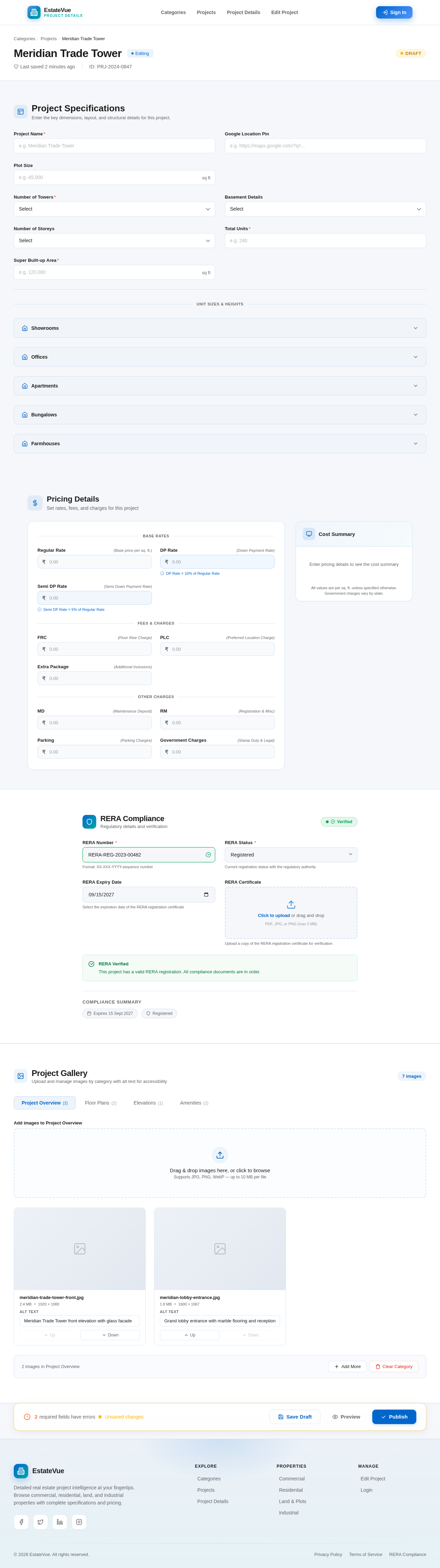
Meridian Trade Tower
EditingProject Specifications
Enter the key dimensions, layout, and structural details for this project.
Pricing Details
Set rates, fees, and charges for this project
RERA Compliance
Regulatory details and verification
Compliance Summary
Project Gallery
Upload and manage images by category with alt text for accessibility
Drag & drop images here, or click to browse
Supports JPG, PNG, WebP — up to 10 MB per file
meridian-trade-tower-front.jpg
meridian-lobby-entrance.jpg
No comments yet. Be the first!