Project Details
 Rakesh T Kanjni
Project Database


Comments (0)
Sign in to leave a comment
System Requirements
System Requirements Document
1. Introduction
This document outlines the system requirements for the "Real Estate Project Details" application designed for Android devices. The application will manage and display detailed information about various real estate projects, including commercial, residential, land, plot, and industrial properties.
2. System Overview
The application will allow users to view and manage real estate project details, categorized into commercial, residential, land, plot, and industrial properties. It will provide detailed information about each project, including specifications, pricing, and the ability to share details via WhatsApp.
3. Functional Requirements
As a user, I want to:
- View Project Categories: Select from categories such as Commercial, Residential, Land, Plot, and Industrial.
- View Commercial Property Details: Access detailed information about commercial properties, including showrooms, offices, and corporate houses.
- View Residential Property Details: Access detailed information about residential properties, including apartments, bungalows, and farmhouses.
- View Land and Plot Details: Access detailed information about land and plots, including ownership and contact details.
- View Project Specifications: See detailed specifications for each project, including:
- Project Name
- Google Location Pin
- Plot Size
- Number of Towers
- Basement Details
- Number of Storeys
- Total Units
- Super Built-up Area
- Sizes and Heights of Showrooms, Offices, Apartments, Bungalows, and Farmhouses
- Possession Details
- Parking Information
- Floor Plate Details
- RERA Number
- View Pricing Information: Access pricing details such as Regular Rate, DP Rate, Semi DP Rate, FRC, PLC, Extra Package, MD, RM, Parking, and Government Charges.
- Share Project Details: Share project details via WhatsApp.
4. User Personas
- Real Estate Agent: A professional who needs to access detailed project information to assist clients in making informed decisions.
- Property Buyer: An individual looking to purchase property and requires comprehensive details about available projects.
- Developer: A real estate developer who wants to manage and update project details within the application.
5. Core User Flows
Real Estate Agent
- Open the application on an Android device.
- Select a category (e.g., Commercial).
- Browse through the list of available projects.
- Select a project to view detailed specifications and pricing.
- Share project details with clients via WhatsApp.
- Use the information to advise clients.
Property Buyer
- Open the application on an Android device.
- Select a category of interest.
- Browse through the list of available projects.
- Select a project to view detailed specifications and pricing.
- Share project details with family or friends via WhatsApp.
- Make informed decisions based on the provided information.
Developer
- Log into the application.
- Select a project to update.
- Modify project details and save changes.
- Ensure updated information is available to all users.
6. Visuals Colors and Theme
- Color Theme: Professional blues and teals to convey trust and reliability.
- Design Style: Clean and modern with intuitive navigation.
7. Signature Design Concept
- A minimalist design focusing on ease of access to detailed information with a user-friendly interface.
8. Interaction Model & Motion Direction
- Interaction Model: Touch-based navigation with swipe gestures for browsing categories and projects.
- Motion Direction: Smooth transitions between screens to enhance user experience.
9. Non-Functional Requirements
- The application must be responsive and perform well on a range of Android devices.
- Ensure data security and privacy for all user information.
10. Tech Stack
- Frontend: React Native for cross-platform mobile application development.
- Backend: Python with FastAPI for handling API requests.
- Database: MySQL with Alembic migrations for data management.
11. Assumptions and Constraints
- The application will be developed for Android devices only.
- Users must have internet access to view and update project details.
12. Glossary
- RERA: Real Estate Regulatory Authority
- DP Rate: Down Payment Rate
- FRC: Floor Rise Charges
- PLC: Preferential Location Charges
- MD: Maintenance Deposit
- RM: Registration and Miscellaneous Charges
This document provides a comprehensive overview of the requirements for the Real Estate Project Details application, ensuring all necessary functionalities and user interactions are clearly defined.
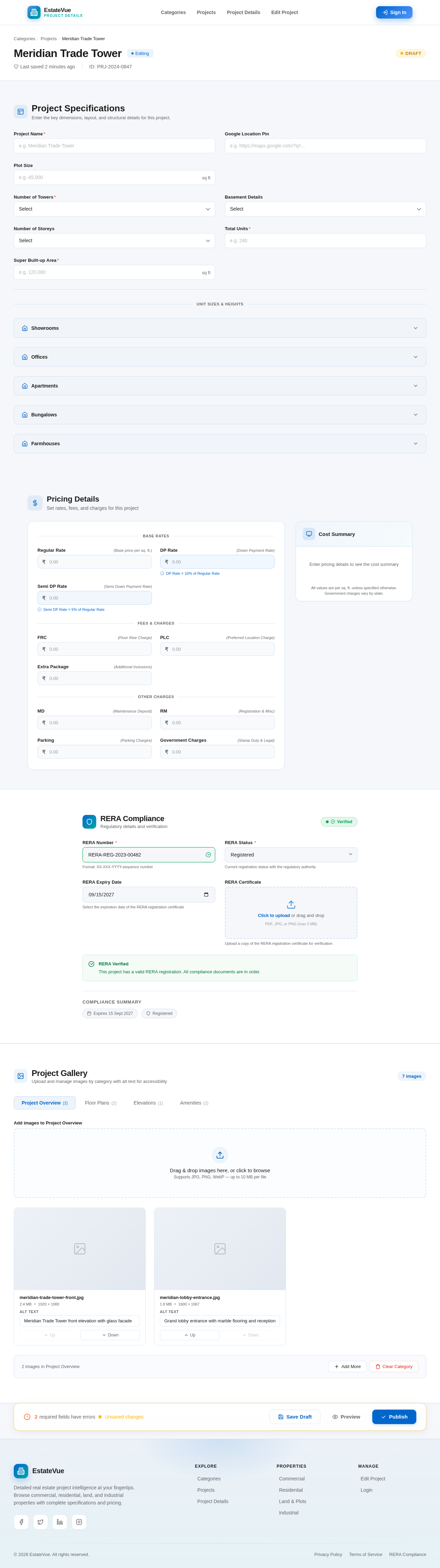
Meridian Trade Tower
EditingProject Specifications
Enter the key dimensions, layout, and structural details for this project.
Pricing Details
Set rates, fees, and charges for this project
RERA Compliance
Regulatory details and verification
Compliance Summary
Project Gallery
Upload and manage images by category with alt text for accessibility
Drag & drop images here, or click to browse
Supports JPG, PNG, WebP — up to 10 MB per file
meridian-trade-tower-front.jpg
meridian-lobby-entrance.jpg
No comments yet. Be the first!