PDF Chatbot
 Sharvari Gohane
Build a complete production-style PDF Chatbot using Python, Streamlit, LangChain, Google Gemini API, and FAISS. Requirements: Allow users to upload multiple PDF files. Extract text from PDFs. Split documents into chunks. Generate embeddings and store them in FAISS. Implement Retrieval-Augmented Generation (RAG). Use Gemini API to answer questions based only on the uploaded PDFs. Show source text chunks used for the answer. Create a clean and modern Streamlit UI. Include error handling and loading indicators. Generate a requirements.txt file. Generate a README.md with setup instructions. Organize the code into multiple files following best practices. Explain the project architecture.


Comments (0)
Sign in to leave a comment
System Requirements
PDF Chatbot
Introduction
The PDF Chatbot project aims to develop a sophisticated chatbot application that allows users to interact with PDF documents using natural language queries. The system will leverage advanced technologies such as Python, Streamlit, LangChain, Google Gemini API, and FAISS to provide accurate and contextually relevant responses based on the content of uploaded PDF files.
System Overview
The PDF Chatbot is designed to facilitate seamless interaction with PDF documents by enabling users to upload multiple files, extract and process text, and receive answers to their queries. The system will utilize Retrieval-Augmented Generation (RAG) to enhance the accuracy of responses by referencing specific text chunks from the PDFs. A modern Streamlit UI will ensure a user-friendly experience, while robust error handling and loading indicators will enhance system reliability.
Functional Requirements
- As a User, I should be able to upload multiple PDF files to the system.
- As a User, I should be able to extract text from the uploaded PDFs.
- As a User, I should be able to have the documents split into manageable chunks for processing.
- As a User, I should be able to have the system generate embeddings from the document chunks and store them in FAISS.
- As a User, I should be able to ask questions and receive answers based on the uploaded PDFs using the Gemini API.
- As a User, I should be able to see the source text chunks that were used to generate the answer.
- As a User, I should experience a clean and modern UI provided by Streamlit.
- As a User, I should encounter error handling and loading indicators to ensure smooth operation.
- As a Developer, I should be able to generate a requirements.txt file for dependencies.
- As a Developer, I should be able to generate a README.md with setup instructions.
- As a Developer, I should be able to organize the code into multiple files following best practices.
- As a Developer, I should be able to understand the project architecture through documentation.
User Personas
- User: Individuals who interact with the PDF Chatbot to upload PDFs and receive answers to their queries.
- Developer: Individuals responsible for maintaining and enhancing the PDF Chatbot system.
Core User Flows
- User uploads PDF files -> System extracts text -> Documents are split into chunks -> Embeddings are generated and stored in FAISS -> User asks a question -> System uses Gemini API to generate an answer -> Source text chunks are displayed.
- Developer sets up the environment -> Generates requirements.txt and README.md -> Organizes code into multiple files -> Documents project architecture.
Visuals Colors and Theme
- primary: #2A9D8F (Teal)
- primary_light: #A8DADC (Light Teal)
- secondary: #E63946 (Crimson)
- accent: #F4A261 (Orange)
- highlight: #E9C46A (Gold)
- bg: #F1FAEE (Off White)
- surface: rgba(38, 70, 83, 0.8) (Dark Teal)
- text: #1D3557 (Navy Blue)
- text_muted: #457B9D (Muted Blue)
- border: rgba(233, 69, 96, 0.2) (Light Crimson)
Signature Design Concept
The homepage of the PDF Chatbot will feature an interactive "Document Galaxy" concept. Users will navigate through a 3D galaxy where each star represents an uploaded PDF. Hovering over a star will reveal the document's title, and clicking on it will zoom into a detailed view where users can interact with the document's content. The galaxy will be rendered using @react-three/fiber and @react-three/drei, providing a visually stunning and engaging experience. The transition between stars will be smooth, with animations powered by framer-motion, creating a sense of exploration and discovery.
Interaction Model & Motion Direction
The landing page will employ a "parallax" interaction model, creating a layered depth effect as users scroll through the page. Decorative elements will move at different speeds to enhance the sense of depth, while the main content will scroll naturally. This approach will provide a visually rich first impression, ideal for engaging users in the PDF Chatbot's capabilities.
Non-Functional Requirements
- The system must handle concurrent uploads and queries efficiently.
- The UI should be responsive and accessible across various devices and screen sizes.
- The system should ensure data privacy and security for uploaded documents.
- The system should provide quick response times for user queries.
Tech Stack
- Frontend: Streamlit
- Backend: Python
- Database: FAISS for embeddings storage
- AI Models: Google Gemini API
- AI Tools: LangChain
- Local Orchestration: Docker, docker-compose
Assumptions and Constraints
- The system assumes users have a basic understanding of how to interact with web applications.
- The system is constrained to using the specified technologies and tools for development.
- The system assumes the availability of the Google Gemini API for processing queries.
Glossary
- PDF: Portable Document Format, a file format for capturing and sending electronic documents.
- FAISS: Facebook AI Similarity Search, a library for efficient similarity search and clustering of dense vectors.
- RAG: Retrieval-Augmented Generation, a method for improving the accuracy of AI-generated responses by referencing specific data sources.
- Streamlit: An open-source app framework for Machine Learning and Data Science projects.
- Embeddings: Numerical representations of text data used for similarity search and machine learning tasks.
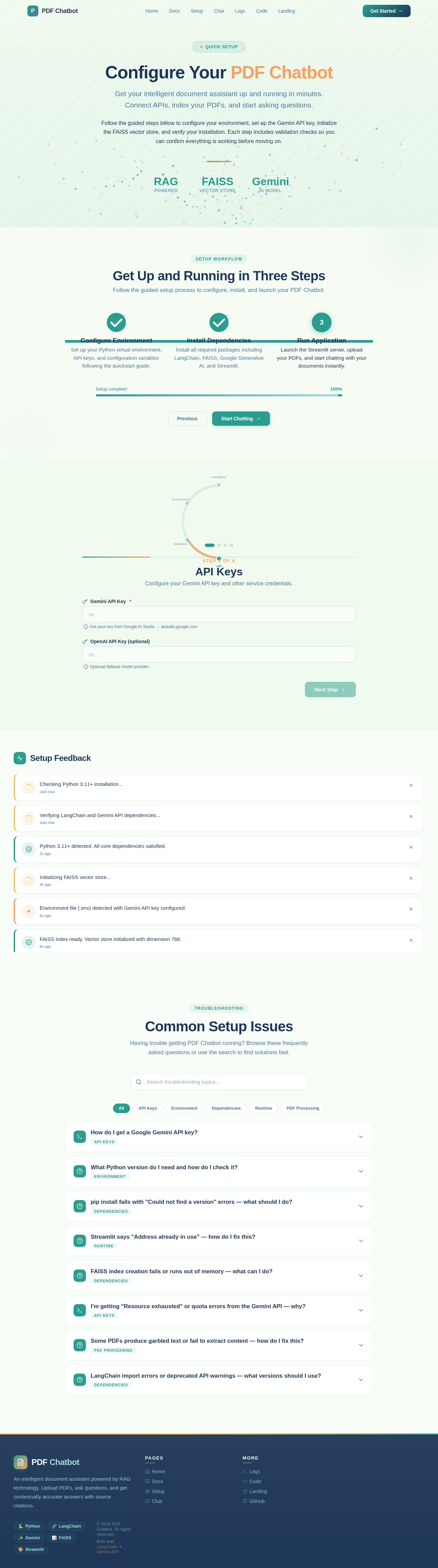
Configure Your PDF Chatbot
Get your intelligent document assistant up and running in minutes. Connect APIs, index your PDFs, and start asking questions.
Follow the guided steps below to configure your environment, set up the Gemini API key, initialize the FAISS vector store, and verify your installation. Each step includes validation checks so you can confirm everything is working before moving on.
Get Up and Running in Three Steps
Follow the guided setup process to configure, install, and launch your PDF Chatbot.
Configure Environment
Set up your Python virtual environment, API keys, and configuration variables following the quickstart guide.
Install Dependencies
Install all required packages including LangChain, FAISS, Google Generative AI, and Streamlit.
Run Application
Launch the Streamlit server, upload your PDFs, and start chatting with your documents instantly.
API Keys
Configure your Gemini API key and other service credentials.
Setup Feedback
Checking Python 3.11+ installation...
Verifying LangChain and Gemini API dependencies...
Python 3.11+ detected. All core dependencies satisfied.
Initializing FAISS vector store...
Environment file (.env) detected with Gemini API key configured.
FAISS index ready. Vector store initialized with dimension 768.
Building document chunker pipeline...
Port 8501 is already in use. Streamlit cannot bind to the default port.
Common Setup Issues
Having trouble getting PDF Chatbot running? Browse these frequently asked questions or use the search to find solutions fast.
No comments yet. Be the first!