Dental-system
 Jatin Yadav
Create a AI-Powered Dental Clinic Operating System as centralized SaaS platform


Comments (0)
Sign in to leave a comment
System Requirements
System Requirements Document
1. Introduction
This document outlines the system requirements for the AI-Powered Dental Clinic Operating System, a centralized SaaS platform designed to streamline clinical, operational, administrative, financial, and patient engagement workflows in dental clinics. The platform integrates various modules such as EMR, Scheduling, Patient Management, Communication, Billing, Inventory, Reporting, and AI-assisted workflows within a secure, HIPAA-compliant environment.
2. System Overview
The AI-Powered Dental Clinic Operating System aims to centralize clinic operations, reduce manual documentation efforts, improve patient engagement, enhance treatment visibility, automate operational workflows, and support AI-assisted clinical workflows. The platform architecture includes a React-based frontend, FastAPI backend services, PostgreSQL and Redis databases, AWS S3 storage, and AI capabilities for speech-to-text, SOAP generation, imaging assistance, and treatment monitoring.
3. Functional Requirements
User Stories
- As a Super Administrator, I want to manage all aspects of the clinic's operations, including user roles and permissions, to ensure smooth functioning.
- As a Practice Owner/Executive, I want to access high-level reports and analytics to make informed business decisions.
- As an Office Manager, I want to oversee daily operations and manage staff schedules to ensure efficient clinic workflow.
- As a Receptionist, I want to manage patient appointments and check-ins to maintain an organized schedule.
- As a Treatment Coordinator, I want to assist in planning and coordinating patient treatments to optimize care delivery.
- As an Orthodontist/Doctor, I want to access patient records and treatment plans to provide accurate and timely care.
- As a Clinical Assistant, I want to support the orthodontist in clinical procedures to enhance patient care.
- As a Billing & Insurance Specialist, I want to manage billing and insurance claims to ensure accurate financial processing.
- As an HR Manager, I want to manage staff records and HR processes to maintain a compliant and efficient workforce.
- As a Marketing Manager, I want to track patient engagement and marketing efforts to improve clinic visibility.
- As a Patient Portal User, I want to access my medical records and communicate with the clinic to stay informed about my treatment.
- As a System Administrator, I want to optimize operational workflows to improve clinic efficiency.
- As a Patient, I want to view and update my patient profile to ensure my information is accurate.
- As a User, I want to access role-specific dashboards to view relevant information and tasks.
- As a User, I want to use search and filters to quickly find specific information within the system.
- As a Developer, I want to access Timeline APIs to integrate patient timeline data into other systems.
Module-Specific Requirements
-
Dashboard & Analytics Module
- View appointment overviews, revenue metrics, patient statistics, inventory alerts, pending approvals, operational KPIs, and AI usage metrics.
-
Patient Management Module
- Manage patient demographics, medical and dental history, allergies, insurance records, emergency contacts, documents, imaging, communications, and treatment history.
-
Appointment & Scheduling Module
- Facilitate online booking, rescheduling, cancellations, chair utilization, calendar views, reminders, and follow-up scheduling.
-
AI Consultation Assistant
- Provide live transcription, consultation summaries, observation extraction, treatment discussion assistance, and follow-up recommendations.
-
Clinical Documentation & SOAP Notes
- Generate AI-assisted SOAP notes, consultation summaries, follow-up notes, and treatment notes with an approval workflow.
-
Imaging & Diagnostic Intelligence
- Support X-rays, CBCT scans, clinical photos, intraoral images, and provide AI assistance for comparative analysis, orthodontic monitoring, and diagnostic support.
-
Video-Based Treatment Monitoring
- Enable patient video uploads, consultation recordings, progress tracking, and comparative treatment assessments.
-
Electronic Medical Records (EMR)
- Maintain a clinical record repository including consultations, diagnoses, prescriptions, treatment plans, imaging, attachments, and audit history.
-
Communication & Patient Engagement
- Facilitate staff-to-patient and staff-to-staff communication through notifications, SMS, email, messaging history, and document sharing.
-
Billing & Insurance
- Manage invoices, payments, claims, coverage tracking, financial reporting, and insurance documentation.
-
Inventory Management
- Track stock, batches, vendors, purchase orders, expiry monitoring, and provide forecasting assistance.
-
Reporting & Business Intelligence
- Generate patient, appointment, revenue, treatment, inventory, and staff performance reports with export and filtering capabilities.
-
Workflow Automation Engine
- Automate appointment reminders, follow-ups, approvals, inventory alerts, task assignments, and escalation workflows.
4. User Personas
- Super Administrator
- Practice Owner/Executive
- Office Manager
- Receptionist
- Treatment Coordinator
- Orthodontist/Doctor
- Clinical Assistant
- Billing & Insurance Specialist
- HR Manager
- Marketing Manager
- Patient Portal User
5. Core User Flows
-
Patient Appointment Booking
- Patient accesses the portal.
- Searches for available appointment slots.
- Books an appointment.
- Receives confirmation and reminders.
-
Clinical Documentation Workflow
- Doctor accesses patient records.
- Conducts consultation with AI assistance.
- Reviews and approves AI-generated notes.
- Updates patient records.
-
Billing and Insurance Processing
- Billing specialist generates invoice.
- Processes insurance claims.
- Tracks payments and coverage.
- Updates financial records.
6. Visuals Colors and Theme
- Color Theme: Professional blues and teals for a healthcare-focused aesthetic.
- Theme Support: Dark/Light theme options.
7. Signature Design Concept
- Design: Clean, modern interface with intuitive navigation and responsive design for desktop, tablet, and mobile.
8. Interaction Model & Motion Direction
- Interaction Model: Role-based dashboards with real-time updates and global navigation.
- Motion Direction: Smooth transitions and animations for a seamless user experience.
9. Non-Functional Requirements
- Security: AES-256 encryption, TLS 1.2+, audit logging, session management, MFA support, role-based access, retention policies, and compliance controls.
- Performance: Real-time updates and responsive design for optimal user experience.
- Scalability: Support for single clinic deployment with potential for future expansion.
10. Tech Stack
- Frontend: React.js
- Backend: Python + FastAPI
- Database: PostgreSQL, Redis
- Storage: AWS S3
- Infrastructure: AWS cloud services
11. Assumptions and Constraints
- Single clinic deployment.
- English language support.
- Client-provided third-party accounts and infrastructure subscriptions.
12. Glossary
- EMR: Electronic Medical Records
- SOAP: Subjective, Objective, Assessment, Plan (a method of documentation)
- RBAC: Role-Based Access Control
- AI: Artificial Intelligence
- HIPAA: Health Insurance Portability and Accountability Act
This document serves as a comprehensive guide for the development and deployment of the AI-Powered Dental Clinic Operating System, ensuring all functional and non-functional requirements are met to deliver a robust and efficient platform.
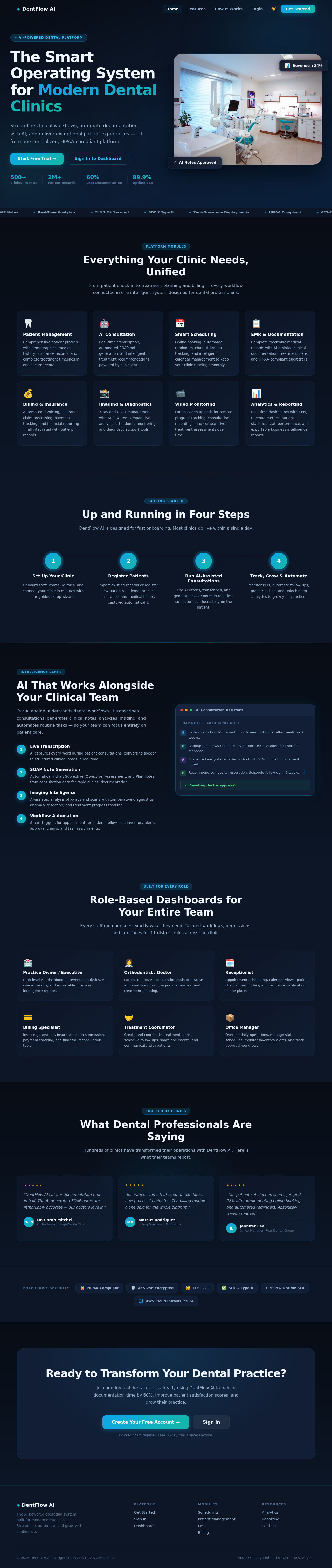
The Smart Operating System for Modern Dental Clinics
Streamline clinical workflows, automate documentation with AI, and deliver exceptional patient experiences — all from one centralized, HIPAA-compliant platform.

Everything Your Clinic Needs, Unified
From patient check-in to treatment planning and billing — every workflow connected in one intelligent system designed for dental professionals.
Patient Management
Comprehensive patient profiles with demographics, medical history, insurance records, and complete treatment timelines in one secure record.
AI Consultation
Real-time transcription, automated SOAP note generation, and intelligent treatment recommendations powered by clinical AI.
Smart Scheduling
Online booking, automated reminders, chair utilization tracking, and intelligent calendar management to keep your clinic running smoothly.
EMR & Documentation
Complete electronic medical records with AI-assisted clinical documentation, treatment plans, and HIPAA-compliant audit trails.
Billing & Insurance
Automated invoicing, insurance claim processing, payment tracking, and financial reporting — all integrated with patient records.
Imaging & Diagnostics
X-ray and CBCT management with AI-powered comparative analysis, orthodontic monitoring, and diagnostic support tools.
Video Monitoring
Patient video uploads for remote progress tracking, consultation recordings, and comparative treatment assessments over time.
Analytics & Reporting
Real-time dashboards with KPIs, revenue metrics, patient statistics, staff performance, and exportable business intelligence reports.
Up and Running in Four Steps
DentFlow AI is designed for fast onboarding. Most clinics go live within a single day.
Set Up Your Clinic
Onboard staff, configure roles, and connect your clinic in minutes with our guided setup wizard.
Register Patients
Import existing records or register new patients — demographics, insurance, and medical history captured automatically.
Run AI-Assisted Consultations
The AI listens, transcribes, and generates SOAP notes in real time so doctors can focus fully on the patient.
Track, Grow & Automate
Monitor KPIs, automate follow-ups, process billing, and unlock deep analytics to grow your practice.
AI That Works Alongside Your Clinical Team
Our AI engine understands dental workflows. It transcribes consultations, generates clinical notes, analyzes imaging, and automates routine tasks — so your team can focus entirely on patient care.
Live Transcription
AI captures every word during patient consultations, converting speech to structured clinical notes in real time.
SOAP Note Generation
Automatically draft Subjective, Objective, Assessment, and Plan notes from consultation data for rapid clinical documentation.
Imaging Intelligence
AI-assisted analysis of X-rays and scans with comparative diagnostics, anomaly detection, and treatment progress tracking.
Workflow Automation
Smart triggers for appointment reminders, follow-ups, inventory alerts, approval chains, and task assignments.
Role-Based Dashboards for Your Entire Team
Every staff member sees exactly what they need. Tailored workflows, permissions, and interfaces for 11 distinct roles across the clinic.
Practice Owner / Executive
High-level KPI dashboards, revenue analytics, AI usage metrics, and exportable business intelligence reports.
Orthodontist / Doctor
Patient queue, AI consultation assistant, SOAP approval workflow, imaging diagnostics, and treatment planning.
Receptionist
Appointment scheduling, calendar views, patient check-in, reminders, and insurance verification in one place.
Billing Specialist
Invoice generation, insurance claim submission, payment tracking, and financial reconciliation tools.
Treatment Coordinator
Create and coordinate treatment plans, schedule follow-ups, share documents, and communicate with patients.
Office Manager
Oversee daily operations, manage staff schedules, monitor inventory alerts, and track approval workflows.
What Dental Professionals Are Saying
Hundreds of clinics have transformed their operations with DentFlow AI. Here is what their teams report.
"DentFlow AI cut our documentation time in half. The AI-generated SOAP notes are remarkably accurate — our doctors love it."
"Insurance claims that used to take hours now process in minutes. The billing module alone paid for the whole platform."
"Our patient satisfaction scores jumped 28% after implementing online booking and automated reminders. Absolutely transformative."
Ready to Transform Your Dental Practice?
Join hundreds of dental clinics already using DentFlow AI to reduce documentation time by 60%, improve patient satisfaction scores, and grow their practice.
No credit card required. Free 30-day trial. Cancel anytime.
No comments yet. Be the first!