
Chat-App

byMansi Bighane

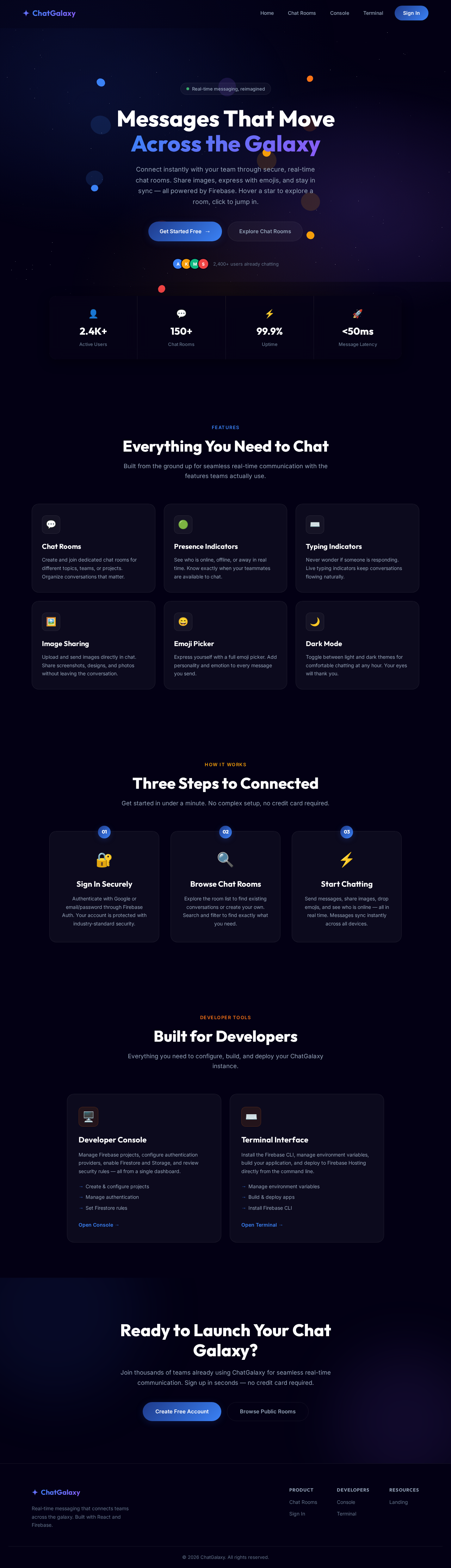
Create index.html with a two-column layout: left sidebar + right chat area Sidebar: app logo, search bar, list of contact cards Chat area: top header bar, message list area, bottom input box Style with CSS - use flexbox for the two-column split Add message bubble styles: sent (right, green) vs received (left, white) Make it responsive: on mobile the sidebar hides and chat fills screen Select the message input and send button using document.querySelector() On button click or Enter key: read the input value Create a new message bubble element using document.createElement() Append it to the messages list with appendChild() Add a timestamp using new Date().toLocaleTimeString() Clear the input field after sending Auto-scroll to the latest message with scrollIntoView() Delete the default App.jsx content Create components folder: src/components/ Create Sidebar.jsx, which renders the contact list Create ChatWindow.jsx, which renders the message area Create MessageBubble.jsx, which renders one message (props: text, isSent) Create MessageInput.jsx, which text input + send button Import and assemble them all inside App.jsx Go to console.firebase.google.com → click "Add project" Name it "chat-app" → disable Google Analytics (not needed) → Create Click the web icon to add a web app → register it → copy the config object In your project, create src/firebase.js and paste the config Run: npm install firebase in your terminal AUTHENTICATION : In Firebase Console → Authentication → Get started → Enable Google provider Also enable Email/Password if you want email login Create src/context/AuthContext.jsx to hold the logged-in user state Wrap your entire app in inside main.jsx Create Login.jsx with a "Sign in with Google" button Create a ProtectedRoute component that redirects to login if not signed in Show user name and photo in the sidebar header Go to Firebase Console → Firestore Database → Create database → Start in test mode Collection: users/ → document per user (uid) → fields: name, photoURL, email, lastSeen Collection: rooms/ → document per room → fields: name, createdBy, createdAt Subcollection: rooms/{roomId}/messages/ → one doc per message Message fields: text, senderId, senderName, senderPhoto, timestamp When a user first logs in, create or update their document in users/ To send a message: use addDoc() to write to rooms/{roomId}/messages To receive messages: use onSnapshot() - it fires every time data changes Order messages by timestamp ascending so newest is at the bottom Set up the listener inside a useEffect, return cleanup to unsubscribe Auto-scroll to the bottom when new messages arrive Show a loading state while messages first load ADD CHAT ROOMS : Install React Router: npm install react-router-dom Set up routes: / for room list, /room/:roomId for a specific chat room In Sidebar, list all rooms from Firestore using onSnapshot on rooms/ collection Add a "New room" button that calls addDoc() on rooms/ with a name When user clicks a room, navigate to /room/:roomId The ChatWindow reads roomId from useParams() to know which messages to load ADD ONLINE/OFFLINE PRESENCE Enable Realtime Database in Firebase Console (different from Firestore) Install: npm install firebase - already installed, just import the RTDB module When user logs in: write their status to /status/{uid} = "online" Use onDisconnect() to automatically set it to "offline" when they close the tab In Sidebar, listen to /status/{uid} for each contact and show a colored dot Also update Firestore lastSeen timestamp on disconnect ADD TYPING INDICATOR : Enable Realtime Database in Firebase Console (different from Firestore) Install: npm install firebase -already installed, just import the RTDB module When user logs in: write their status to /status/{uid} = "online" Use onDisconnect() to automatically set it to "offline" when they close the tab In Sidebar, listen to /status/{uid} for each contact and show a colored dot Also update Firestore lastSeen timestamp on disconnect ADD IMAGE UPLOAD : Enable Firebase Storage in Firebase Console Add a paperclip / image button next to the text input When user picks a file, upload it to Storage at: chat-images/{roomId}/{timestamp}_{filename} Get the download URL after upload completes Send a message with type: "image" and the imageURL instead of text In MessageBubble, check the message type and render if it is an image Add a loading spinner while the image uploads ADD EMOJI PICKER / DARK MODE : Install: npm install emoji-picker-react Add a smiley face button next to the input - clicking it toggles the picker On emoji select, append the emoji character to the input value For dark mode: add a class "dark" to and define CSS variables for both themes Toggle the class on button click and save the preference to localStorage On app load, read localStorage and apply the saved theme TASK : SECURE FIRESTORE RULES BEFORE DEPLOYING ( CRITICAL ) : Go to Firebase Console → Firestore → Rules Change from "test mode" (open to everyone) to authenticated-only rules Users should only be able to write messages as themselves (senderId must match their uid) Users should only read rooms they are members of (or all rooms for a public app) Click Publish after updating rules Test the rules using the Rules Playground in the console MOVE SECRETS TO ENVIRONMENT VARIABLES : Create a .env file in the root of your project (same level as package.json) Paste all Firebase config values with VITE_ prefix (required by Vite) Update firebase.js to use import.meta.env.VITE_... instead of hardcoded strings Add .env to .gitignore so it is never committed When deploying to Vercel or Firebase Hosting, add the env vars in their dashboard FIREBASE DEPLOY : Install Firebase CLI globally: npm install -g firebase-tools Login: firebase login — opens a browser for Google auth Initialize: firebase init hosting and select your project, set build/ as public dir, say yes to SPA rewrite Build your React app: npm run build and create a dist/ folder Deploy: firebase deploy — gives you a live .web.app URL Every time you update the app: npm run build → firebase deploy make a chat app web

LandingTerminalLogin
Landing

Comments (0)

No comments yet. Be the first!

Project Tasks

No tasks yet

Add a task now to track work. System-generated tasks will be added here later.

Landing design preview
Console: Create Project
Console: Configure Auth
Console: Enable Firestore
Console: Enable Storage
Console: Secure Rules
Terminal: Manage EnvVars
Terminal: Install CLI
Terminal: Build App
Terminal: Deploy Hosting
Console: Verify Live App
Landing design preview
Console: Create Project
Console: Configure Auth
Console: Enable Firestore
Console: Enable Storage
Console: Secure Rules
Terminal: Manage EnvVars
Terminal: Install CLI
Terminal: Build App
Terminal: Deploy Hosting
Console: Verify Live App