
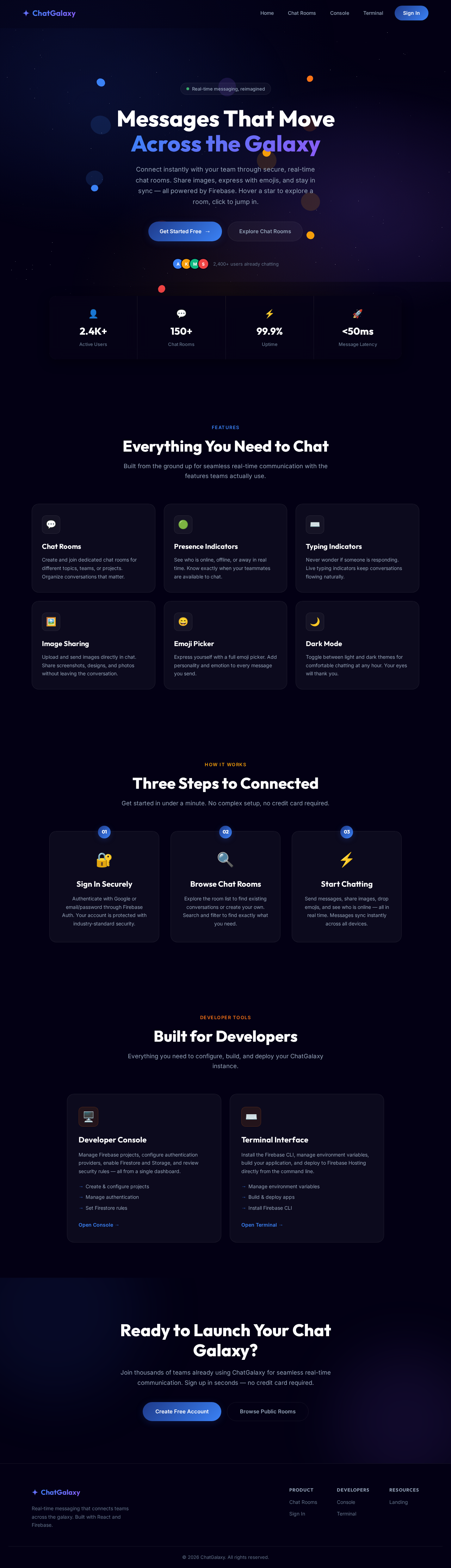
Chat-App

byMansi Bighane

Create index.html with a two-column layout: left sidebar + right chat area Sidebar: app logo, search bar, list of contact cards Chat area: top header bar, message list area, bottom input box Style with CSS - use flexbox for the two-column split Add message bubble styles: sent (right, green) vs received (left, white) Make it responsive: on mobile the sidebar hides and chat fills screen Select the message input and send button using document.querySelector() On button click or Enter key: read the input value Create a new message bubble element using document.createElement() Append it to the messages list with appendChild() Add a timestamp using new Date().toLocaleTimeString() Clear the input field after sending Auto-scroll to the latest message with scrollIntoView() Delete the default App.jsx content Create components folder: src/components/ Create Sidebar.jsx, which renders the contact list Create ChatWindow.jsx, which renders the message area Create MessageBubble.jsx, which renders one message (props: text, isSent) Create MessageInput.jsx, which text input + send button Import and assemble them all inside App.jsx Go to console.firebase.google.com → click "Add project" Name it "chat-app" → disable Google Analytics (not needed) → Create Click the web icon to add a web app → register it → copy the config object In your project, create src/firebase.js and paste the config Run: npm install firebase in your terminal AUTHENTICATION : In Firebase Console → Authentication → Get started → Enable Google provider Also enable Email/Password if you want email login Create src/context/AuthContext.jsx to hold the logged-in user state Wrap your entire app in inside main.jsx Create Login.jsx with a "Sign in with Google" button Create a ProtectedRoute component that redirects to login if not signed in Show user name and photo in the sidebar header Go to Firebase Console → Firestore Database → Create database → Start in test mode Collection: users/ → document per user (uid) → fields: name, photoURL, email, lastSeen Collection: rooms/ → document per room → fields: name, createdBy, createdAt Subcollection: rooms/{roomId}/messages/ → one doc per message Message fields: text, senderId, senderName, senderPhoto, timestamp When a user first logs in, create or update their document in users/ To send a message: use addDoc() to write to rooms/{roomId}/messages To receive messages: use onSnapshot() - it fires every time data changes Order messages by timestamp ascending so newest is at the bottom Set up the listener inside a useEffect, return cleanup to unsubscribe Auto-scroll to the bottom when new messages arrive Show a loading state while messages first load ADD CHAT ROOMS : Install React Router: npm install react-router-dom Set up routes: / for room list, /room/:roomId for a specific chat room In Sidebar, list all rooms from Firestore using onSnapshot on rooms/ collection Add a "New room" button that calls addDoc() on rooms/ with a name When user clicks a room, navigate to /room/:roomId The ChatWindow reads roomId from useParams() to know which messages to load ADD ONLINE/OFFLINE PRESENCE Enable Realtime Database in Firebase Console (different from Firestore) Install: npm install firebase - already installed, just import the RTDB module When user logs in: write their status to /status/{uid} = "online" Use onDisconnect() to automatically set it to "offline" when they close the tab In Sidebar, listen to /status/{uid} for each contact and show a colored dot Also update Firestore lastSeen timestamp on disconnect ADD TYPING INDICATOR : Enable Realtime Database in Firebase Console (different from Firestore) Install: npm install firebase -already installed, just import the RTDB module When user logs in: write their status to /status/{uid} = "online" Use onDisconnect() to automatically set it to "offline" when they close the tab In Sidebar, listen to /status/{uid} for each contact and show a colored dot Also update Firestore lastSeen timestamp on disconnect ADD IMAGE UPLOAD : Enable Firebase Storage in Firebase Console Add a paperclip / image button next to the text input When user picks a file, upload it to Storage at: chat-images/{roomId}/{timestamp}_{filename} Get the download URL after upload completes Send a message with type: "image" and the imageURL instead of text In MessageBubble, check the message type and render if it is an image Add a loading spinner while the image uploads ADD EMOJI PICKER / DARK MODE : Install: npm install emoji-picker-react Add a smiley face button next to the input - clicking it toggles the picker On emoji select, append the emoji character to the input value For dark mode: add a class "dark" to and define CSS variables for both themes Toggle the class on button click and save the preference to localStorage On app load, read localStorage and apply the saved theme TASK : SECURE FIRESTORE RULES BEFORE DEPLOYING ( CRITICAL ) : Go to Firebase Console → Firestore → Rules Change from "test mode" (open to everyone) to authenticated-only rules Users should only be able to write messages as themselves (senderId must match their uid) Users should only read rooms they are members of (or all rooms for a public app) Click Publish after updating rules Test the rules using the Rules Playground in the console MOVE SECRETS TO ENVIRONMENT VARIABLES : Create a .env file in the root of your project (same level as package.json) Paste all Firebase config values with VITE_ prefix (required by Vite) Update firebase.js to use import.meta.env.VITE_... instead of hardcoded strings Add .env to .gitignore so it is never committed When deploying to Vercel or Firebase Hosting, add the env vars in their dashboard FIREBASE DEPLOY : Install Firebase CLI globally: npm install -g firebase-tools Login: firebase login — opens a browser for Google auth Initialize: firebase init hosting and select your project, set build/ as public dir, say yes to SPA rewrite Build your React app: npm run build and create a dist/ folder Deploy: firebase deploy — gives you a live .web.app URL Every time you update the app: npm run build → firebase deploy make a chat app web

LandingTerminalLogin
Landing

Comments (0)

No comments yet. Be the first!

System Requirements

System Requirement Document

Chat-App System Requirements Document

1. Introduction

The Chat-App project aims to develop a responsive web application that facilitates real-time communication between users. The application will utilize Firebase for authentication and data storage, ensuring a secure and efficient chat experience. This document outlines the system requirements for the Chat-App, detailing the functional and non-functional aspects necessary for successful implementation.

2. System Overview

The Chat-App is designed to provide users with a seamless messaging experience, featuring a two-column layout for desktop views and a responsive design for mobile devices. The application will include various features such as chat rooms, online/offline presence indicators, typing indicators, image uploads, emoji picker, and dark mode. Firebase will be used for authentication and real-time data storage, with secure Firestore rules and environment variable management to ensure data security.

Page 1 of 6

3. Functional Requirements

  • As a User, I should be able to view a responsive two-column layout with a sidebar and chat area.
  • As a User, I should be able to see the app logo, search bar, and a list of contact cards in the sidebar.
  • As a User, I should be able to view a header bar, message list area, and input box in the chat area.
  • As a User, I should be able to send and receive messages with auto-scroll and timestamps.
  • As a User, I should be able to create and join chat rooms.
  • As a User, I should be able to see online/offline presence indicators for contacts.
  • As a User, I should be able to see typing indicators when someone is typing.
  • As a User, I should be able to upload and send images in chat.
  • As a User, I should be able to use an emoji picker to add emojis to messages.
  • As a User, I should be able to toggle dark mode for the application.
  • As a Developer, I should be able to secure Firestore rules to ensure authenticated-only access.
  • As a Developer, I should be able to manage environment variables securely.
  • As a Developer, I should be able to deploy the application using Firebase Hosting.
Page 2 of 6

4. User Personas

  • User: A general user who can send and receive messages, join chat rooms, and utilize additional features like image uploads and emoji picker.
  • Developer: A technical user responsible for implementing and maintaining the application, ensuring security, and managing deployments.

5. Core User Flows

  • User logs in via Google or Email/Password -> User views contact list -> User selects a chat room -> User sends/receives messages -> User uploads images or selects emojis -> User toggles dark mode.
  • Developer sets up Firebase project -> Developer configures authentication and Firestore rules -> Developer manages environment variables -> Developer deploys application to Firebase Hosting.

6. Visuals Colors and Theme

  • primary: #1E3A8A (Deep Blue)
  • primary_light: #3B82F6 (Light Blue)
  • secondary: #F59E0B (Amber)
  • accent: #EF4444 (Red)
  • highlight: #F97316 (Orange)
  • bg: #F3F4F6 (Light Gray)
  • surface: rgba(255, 255, 255, 0.8) (White)
  • text: #111827 (Dark Gray)
  • text_muted: #6B7280 (Muted Gray)
  • border: rgba(209, 213, 219, 0.2) (Light Gray)
Page 3 of 6

7. Signature Design Concept

The Chat-App will feature an interactive "Message Galaxy" homepage. Users will navigate through a 3D galaxy map where each star represents a chat room. Hovering over a star will display room details, and clicking will zoom into the chat room. The galaxy will be animated using @react-three/fiber and @react-three/drei, providing a dynamic and engaging user experience. The background will subtly shift colors based on the time of day, creating an immersive environment.

8. Interaction Model & Motion Direction

The landing page will utilize a "parallax" interaction model, with layered depth via scroll. Decorative elements like stars and nebulae will translate at different speeds, while the main content scrolls naturally. Internal pages such as chat rooms and settings will adopt a "static" model for clarity and ease of use.

9. Non-Functional Requirements

  • The application must be responsive and accessible on both desktop and mobile devices.
  • The system should handle concurrent users efficiently, ensuring real-time message delivery.
  • Data security and user privacy must be prioritized, with secure authentication and data storage practices.
Page 4 of 6

10. Tech Stack

  • Frontend: React for Web
  • Backend: Firebase for authentication and Firestore for real-time data storage
  • Database: Firestore and Realtime Database for presence and typing indicators
  • Deployment: Firebase Hosting

11. Assumptions and Constraints

  • Users must have a Google account or email/password for authentication.
  • The application will be deployed on Firebase Hosting, requiring internet access for use.
  • Firestore rules must be configured to ensure data security and privacy.
Page 5 of 6

12. Glossary

  • Firestore: A NoSQL database provided by Firebase for real-time data storage.
  • Firebase Hosting: A web hosting service provided by Firebase for deploying web applications.
  • React: A JavaScript library for building user interfaces.
  • Flexbox: A CSS layout model for creating responsive designs.
  • Parallax: An interaction model where background elements move at different speeds than foreground content.

This document provides a comprehensive overview of the requirements for the Chat-App project, ensuring all necessary aspects are covered for successful development and deployment.

Page 6 of 6
Landing design preview
Console: Create Project
Console: Configure Auth
Console: Enable Firestore
Console: Enable Storage
Console: Secure Rules
Terminal: Manage EnvVars
Terminal: Install CLI
Terminal: Build App
Terminal: Deploy Hosting
Console: Verify Live App
Landing design preview
Console: Create Project
Console: Configure Auth
Console: Enable Firestore
Console: Enable Storage
Console: Secure Rules
Terminal: Manage EnvVars
Terminal: Install CLI
Terminal: Build App
Terminal: Deploy Hosting
Console: Verify Live App