Baby Teeth Braces
Build an orthodontic site that specializes in braces for baby teeth. Use images and photos of pround parents releaved that their toddler now has straight teeth. Nevermind the fact that all of those teeth are going to fall out!


Comments (0)
Sign in to leave a comment
System Requirements
Baby Teeth Braces System Requirements Document
1. Introduction
The "Baby Teeth Braces" project aims to create an orthodontic website specializing in braces for baby teeth. The site will target parents who are concerned about their toddler's crooked smile and provide them with solutions to improve their child's dental aesthetics. The project will include features such as appointment booking, testimonials from satisfied parents, and educational content with strong calls to action.
2. System Overview
The Baby Teeth Braces website will serve as a platform for parents to learn about orthodontic solutions for their toddlers, book appointments, and read testimonials from other parents. The site will use engaging visuals and educational content to drive conversions and alleviate the concerns of parents regarding their child's dental health.
3. Functional Requirements
- As a Parent, I should be able to view testimonials from satisfied parents to gain confidence in the service.
- As a Parent, I should be able to book an appointment online for my child's orthodontic consultation.
- As a Parent, I should be able to access educational content pieces that inform me about the benefits of early orthodontic intervention.
- As a Parent, I should be able to see strong calls to action that encourage me to book an appointment or contact the clinic.
4. User Personas
- Parent: Concerned about their toddler's dental aesthetics and looking for orthodontic solutions. Interested in testimonials and educational content to make informed decisions.
5. Core User Flows
- Parent visits the website -> Reads testimonials -> Views educational content -> Clicks on call to action -> Books an appointment.
- Parent visits the website -> Reads educational content -> Gains confidence -> Books an appointment.
6. Visuals Colors and Theme
- primary: #4A90E2 (a calming blue to convey trust and professionalism)
- primary_light: #B3D4FC (a lighter tint of blue for hover states and secondary UI)
- secondary: #F5A623 (a warm orange for headlines and emphasis)
- accent: #E94E77 (a vibrant pink for CTAs and active states)
- highlight: #F8E71C (a bright yellow for hover states and notifications)
- bg: #FFFFFF (a clean white background)
- surface: rgba(74, 144, 226, 0.1) (a subtle blue for card/panel backgrounds)
- text: #333333 (a dark grey for primary text)
- text_muted: #777777 (a softer grey for secondary text)
- border: rgba(233, 233, 233, 0.5) (a light grey for borders)
7. Signature Design Concept
The homepage will feature an interactive "Smile Transformation Journey" where users can drag a slider to see before-and-after images of toddlers' smiles. As the slider moves, testimonials from parents appear alongside the images, providing a narrative of satisfaction and relief. This interactive element will be built using framer-motion for smooth transitions and engaging animations. The journey will conclude with a prominent call to action to book an appointment, making the experience both informative and action-driven.
8. Interaction Model & Motion Direction
The landing page will use a "parallax" interaction model to create a layered depth effect as users scroll. This will include atmospheric elements like floating bubbles and smiling faces that move at different speeds, enhancing the storytelling aspect of the site. Internal pages will maintain a "static" interaction model for clarity and ease of use.
9. Non-Functional Requirements
- The website should load within 3 seconds to ensure a smooth user experience.
- The site must be mobile-responsive to cater to parents accessing it from various devices.
- Ensure accessibility standards are met, including screen reader compatibility and keyboard navigation.
10. Tech Stack
- Frontend: React for Web
- Backend: Python, FastAPI
- Database: MySQL or MariaDB
- AI Models: Not applicable
- AI Tools: Not applicable
- Local Orchestration: Docker
- Server-side Orchestration: Kubernetes
11. Assumptions and Constraints
- The target audience primarily consists of parents in the US.
- The website must comply with HIPAA regulations for handling patient information.
- Budget constraints may limit the use of advanced AI tools or models.
12. Glossary
- Orthodontic: Related to the correction of irregularities in the teeth and jaws.
- Parallax: A scrolling effect where background images move slower than foreground images, creating an illusion of depth.
- CTA (Call to Action): A prompt on a website that tells the user to take some specified action.
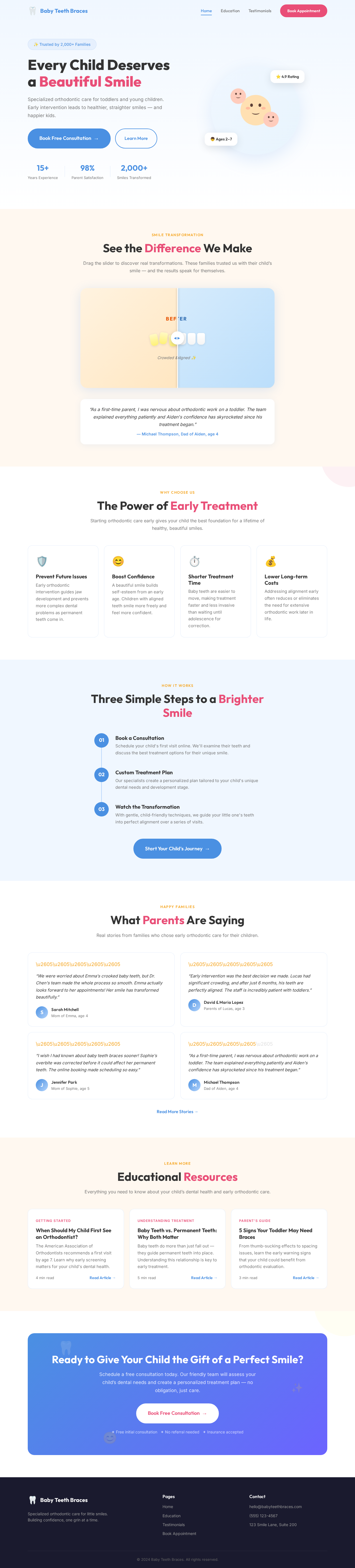
Every Child Deserves a Beautiful Smile
Specialized orthodontic care for toddlers and young children. Early intervention leads to healthier, straighter smiles — and happier kids.
See the Difference We Make
Drag the slider to discover real transformations. These families trusted us with their child’s smile — and the results speak for themselves.
“We were worried about Emma's crooked baby teeth, but Dr. Chen's team made the whole process so smooth. Emma actually looks forward to her appointments! Her smile has transformed beautifully.”
— Sarah Mitchell, Mom of Emma, age 4The Power of Early Treatment
Starting orthodontic care early gives your child the best foundation for a lifetime of healthy, beautiful smiles.
Prevent Future Issues
Early orthodontic intervention guides jaw development and prevents more complex dental problems as permanent teeth come in.
Boost Confidence
A beautiful smile builds self-esteem from an early age. Children with aligned teeth smile more freely and feel more confident.
Shorter Treatment Time
Baby teeth are easier to move, making treatment faster and less invasive than waiting until adolescence for correction.
Lower Long-term Costs
Addressing alignment early often reduces or eliminates the need for extensive orthodontic work later in life.
Three Simple Steps to a Brighter Smile
Book a Consultation
Schedule your child's first visit online. We'll examine their teeth and discuss the best treatment options for their unique smile.
Custom Treatment Plan
Our specialists create a personalized plan tailored to your child's unique dental needs and development stage.
Watch the Transformation
With gentle, child-friendly techniques, we guide your little one's teeth into perfect alignment over a series of visits.
What Parents Are Saying
Real stories from families who chose early orthodontic care for their children.
“We were worried about Emma's crooked baby teeth, but Dr. Chen's team made the whole process so smooth. Emma actually looks forward to her appointments! Her smile has transformed beautifully.”
“Early intervention was the best decision we made. Lucas had significant crowding, and after just 6 months, his teeth are perfectly aligned. The staff is incredibly patient with toddlers.”
“I wish I had known about baby teeth braces sooner! Sophie's overbite was corrected before it could affect her permanent teeth. The online booking made scheduling so easy.”
“As a first-time parent, I was nervous about orthodontic work on a toddler. The team explained everything patiently and Aiden's confidence has skyrocketed since his treatment began.”
Educational Resources
Everything you need to know about your child’s dental health and early orthodontic care.
When Should My Child First See an Orthodontist?
The American Association of Orthodontists recommends a first visit by age 7. Learn why early screening matters for your child's dental health.
Baby Teeth vs. Permanent Teeth: Why Both Matter
Baby teeth do more than just fall out — they guide permanent teeth into place. Understanding this relationship is key to early treatment.
5 Signs Your Toddler May Need Braces
From thumb-sucking effects to spacing issues, learn the early warning signs that your child could benefit from orthodontic evaluation.
Ready to Give Your Child the Gift of a Perfect Smile?
Schedule a free consultation today. Our friendly team will assess your child’s dental needs and create a personalized treatment plan — no obligation, just care.
Book Free Consultation →✦ Free initial consultation ✦ No referral needed ✦ Insurance accepted
No comments yet. Be the first!