
AI Learning Assistant

bySai Keerthana Yalla

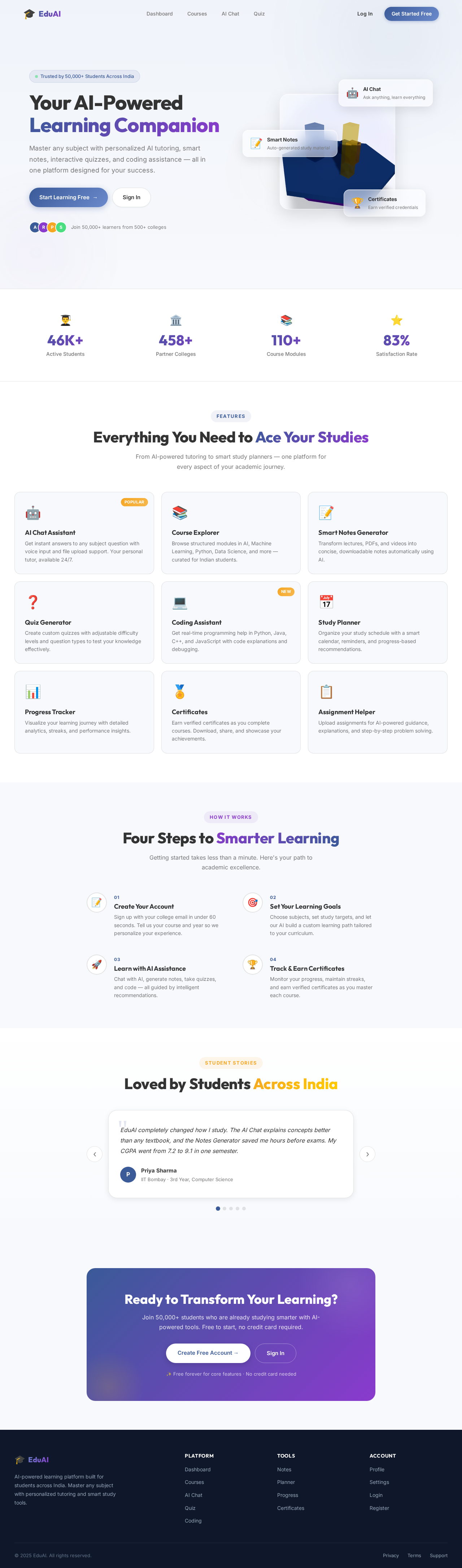
# AI Learning Assistance – Complete Web Application Build a modern, responsive, and professional web application called **AI Learning Assistance**. ## Theme * Modern AI education platform * Clean UI with blue, purple, and white color palette * Glassmorphism cards * Smooth animations * Mobile, tablet, and desktop responsive * Professional dashboard design * Light and Dark mode toggle --- # Authentication Create a complete authentication system. ### Landing Page * Attractive hero section * AI-themed illustration * Navigation Bar * Home * Features * Courses * Dashboard * About * Contact * Login * Register Hero section should include: * Title: **Learn Smarter with AI Learning Assistance** * Subtitle: "Your intelligent learning companion for personalized education, quizzes, notes, coding assistance, and career growth." Buttons: * Get Started * Explore Features Sections: * Features * Testimonials * FAQ * Footer --- # Login Page Create a beautiful login page with: * Email * Password * Remember Me * Forgot Password * Login button Alternative login: * Continue with Google * Continue with GitHub * Continue with Microsoft Link: * Don't have an account? Register Validation: * Email validation * Password validation * Error messages --- # Registration Page Fields: * Full Name * Username * Email * Phone Number * College * Course * Year of Study * Password * Confirm Password Checkbox: * Accept Terms and Conditions Buttons: * Register * Sign in with Google After registration: Redirect to Dashboard. --- # User Dashboard After login, display: Top welcome card: "Welcome back, Student!" Cards: * AI Chat Assistant * My Courses * Study Planner * Notes Generator * Quiz Generator * Coding Assistant * Assignment Helper * Progress Tracker * Certificates * Profile Dashboard sidebar: * Dashboard * AI Chat * Courses * Notes * Quiz * Coding * Assignments * Calendar * Progress * Certificates * Settings * Logout --- # AI Chat Assistant ChatGPT-like interface. Features: * Chat with AI * Voice input * Copy response * Regenerate response * Download conversation * Chat history * Markdown support * Code formatting * File upload * Image upload * PDF upload Suggested prompts: * Explain Python * Summarize this chapter * Create quiz * Solve coding problem * Generate notes * Explain mathematics * Translate text --- # Course Module Display learning paths. Categories: * Artificial Intelligence * Machine Learning * Deep Learning * Python * Java * C Programming * Data Structures * SQL * Web Development * Cloud Computing * Data Science * Cyber Security Each course includes: * Image * Description * Instructor * Duration * Difficulty * Rating * Progress bar * Continue Learning button --- # AI Notes Generator Generate notes from: * Text * PDF * PPT * DOCX * Images Options: * Short Notes * Detailed Notes * Bullet Notes * Exam Notes Download as: * PDF * DOCX --- # Quiz Generator Generate quizzes using AI. Options: * Easy * Medium * Hard Question types: * MCQs * True or False * Fill in the blanks * Short Answer Features: * Timer * Score * Instant feedback * Correct answers * Leaderboard * Download report --- # Coding Assistant Programming support. Languages: * Python * Java * C * C++ * JavaScript * HTML * CSS * SQL Features: * Code editor * Syntax highlighting * AI code explanation * Debug code * Optimize code * Generate code * Explain errors * Coding interview questions --- # Assignment Helper Generate: * Reports * Essays * Research summaries * Presentations * References * Citations Export: * PDF * DOCX --- # Study Planner Calendar with: * Daily tasks * Weekly schedule * Monthly planner * Study reminders * Deadlines * Upcoming exams Progress tracking. --- # Progress Tracker Charts showing: * Hours studied * Courses completed * Quiz scores * Weekly progress * Monthly progress * Learning streak * Skills mastered Gamification: * XP Points * Badges * Levels * Rewards --- # Certificates Display earned certificates. Allow: * View * Download * Share --- # Profile Page Editable profile. Fields: * Photo * Name * Email * Phone * College * Skills * Interests * Learning Goals Buttons: * Save Changes * Change Password --- # Notifications Notification center showing: * Assignment reminders * New courses * Quiz reminders * AI suggestions * Achievements --- # Settings Options: * Dark Mode * Language Selection * Notification Preferences * Privacy Settings * Security Settings * Delete Account * Logout --- # Search Global search for: * Courses * Notes * Chat history * Quizzes * Coding questions --- # Footer Include: * About * Contact * Privacy Policy * Terms of Service * Help Center * FAQ * Social Media Links --- # Admin Panel Admin Dashboard with: * Total Users * Active Users * Courses * AI Usage Statistics * Quiz Statistics * Reports * User Management * Course Management * Content Management --- # UI Requirements Use: * React * TypeScript * Tailwind CSS * Modern component library * Framer Motion animations * Lucide Icons * Responsive layouts * Beautiful cards * Smooth page transitions * Professional dashboards * Loading animations * Toast notifications * Skeleton loading --- # Backend Ready Structure Prepare the application to support: * Firebase Authentication * Google Authentication * Email Authentication * Cloud Firestore database * File uploads * AI API integration (OpenAI/Gemini) * User progress storage * Secure authentication * Role-based access (Student/Admin) --- # Additional Features * AI-powered study recommendations * Personalized learning roadmap * Flashcards * Bookmark lessons * Favorite chats * Download notes * Export quiz reports * AI homework help * AI career guidance * Resume analysis * Interview preparation * Daily study streak * Leaderboard * Feedback form * Contact support * Fully responsive design * Fast loading * Accessible UI * SEO-friendly pages The final result should look like a premium educational SaaS platform with a polished, modern interface comparable to leading AI education platforms such as ChatGPT, Coursera, and Notion AI.

LandingQuizCoursesLoginCertificates
Landing

Comments (0)

No comments yet. Be the first!

Architecture

No Services Diagrams Yet

Architecture diagrams will be automatically generated when the Project Manager creates tasks for your project.

Landing design preview
Landing: View Info
Login: Sign In
AdminDashboard: View Statistics
AdminDashboard: Manage Users
AdminDashboard: Manage Courses
AdminDashboard: Manage Content
AdminDashboard: View Reports
Settings: Adjust Platform