space-ai
 Hemen Ashodia
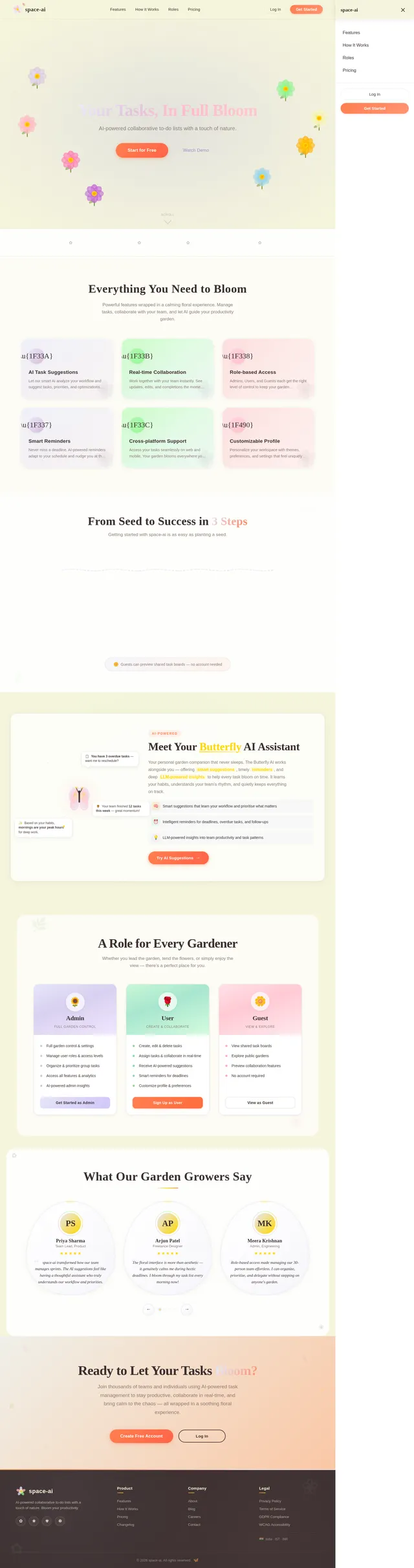
build an AI to do list use floral theme
Comments (0)
Sign in to leave a comment
System Requirements
System Requirements Document (SRD)
Project Name: space-ai
1. Introduction
The space-ai project is an AI-powered collaborative to-do list application designed to enhance productivity while offering a visually soothing floral theme. This project is tailored for users in India (IN), ensuring locale-specific defaults such as IST timezone and INR currency where applicable. The application will leverage AI to provide smart task suggestions, reminders, and seamless collaboration. Users will have distinct access levels to ensure structured task management and role-based functionality.
2. System Overview
The space-ai application is a collaborative to-do list platform with AI-driven features. It allows users to create, manage, and share tasks while maintaining a visually appealing floral aesthetic. The system will support multiple user roles with distinct access levels, ensuring a structured and organized approach to task management. AI capabilities will enhance user experience by providing intelligent task suggestions, reminders, and insights. The platform is designed for both individual and group productivity, making it ideal for personal use, teams, or communities.
Key features include:
- AI-powered task management and suggestions.
- Role-based access levels for structured collaboration.
- A floral-themed user interface for a calming and inviting experience.
- Real-time updates and notifications for shared tasks.
- Cross-platform compatibility (web and mobile).
3. Functional Requirements
- As a User, I should be able to create, edit, and delete tasks.
- As a User, I should be able to assign tasks to myself or others.
- As a User, I should be able to mark tasks as complete.
- As a User, I should be able to view tasks assigned to me or shared with me.
- As an Admin, I should be able to manage user roles and access levels.
- As an Admin, I should be able to organize and prioritize tasks for the group.
- As a Guest, I should be able to view shared tasks but not edit them.
- As a User, I should receive AI-powered task suggestions based on my activity.
- As a User, I should receive reminders for upcoming or overdue tasks.
- As a User, I should be able to collaborate with others in real-time.
- As a User, I should be able to customize my profile and preferences.
4. User Personas
Admin:
- Responsible for managing user roles and access levels.
- Can organize and prioritize tasks for the group.
- Has full access to all features and settings.
User:
- Can create, edit, delete, and complete tasks.
- Can assign tasks to themselves or others.
- Can collaborate with others in real-time.
Guest:
- Can view shared tasks but cannot edit or create tasks.
5. Visuals Colors and Theme
The space-ai application will feature a floral theme to create a calming and inviting user experience. The color palette will include:
- Primary Colors: Soft pastel tones such as lavender (#E6E6FA), mint green (#98FB98), and blush pink (#FFC0CB).
- Accent Colors: Sunflower yellow (#FFD700) and coral orange (#FF7F50) for highlights and buttons.
- Background: A subtle floral pattern with light beige (#F5F5DC) as the base.
- Typography: Elegant serif fonts for headings and clean sans-serif fonts for body text.
6. Signature Design Concept
The space-ai homepage will feature an interactive blooming garden. Upon loading the page, users will see a serene garden with flowers in various stages of bloom. Each flower represents a task or feature.
- Animation: Flowers bloom as users hover over them, revealing task details or feature descriptions.
- Interaction: Clicking on a flower opens a modal or navigates to the corresponding section (e.g., task list, AI suggestions).
- Micro-interactions: Subtle animations like petals swaying in the breeze or bees buzzing around flowers add a dynamic, lively feel.
- Color Shifts: The garden's colors subtly change based on the time of day (e.g., warm tones for morning, cool tones for evening).
- AI Integration: A floating AI assistant (shaped like a butterfly) guides users through the app, offering tips and suggestions.
This unique design will make the application memorable and enjoyable to use, while reinforcing the floral theme.
7. Non-Functional Requirements
- The system should support at least 10,000 concurrent users.
- The application should load within 3 seconds on a standard 4G connection.
- The system should comply with GDPR and Indian data protection regulations.
- The application should be accessible, adhering to WCAG 2.1 AA standards.
- The system should provide real-time updates with minimal latency.
8. Tech Stack
- Frontend: React for web, React Native for mobile app.
- Backend: Python with FastAPI.
- Database: MySQL for structured data, WeaviateDB for vector-based AI features.
- AI Models:
- GPT 5.2 for user-friendly responses.
- Claude 4.5 Opas for academic or coding-related tasks.
- Google Nano Banana for image generation.
- AI Tools: Litellm for LLM routing, Langchain for AI workflow orchestration.
- Orchestration: Docker and Kubernetes for deployment.
9. Assumptions and Constraints
- The application will primarily target users in India, with IST as the default timezone.
- The floral theme will be universally appealing and not overly gender-specific.
- The system will require internet connectivity for AI features.
- The application will support both desktop and mobile platforms.
10. Glossary
- AI: Artificial Intelligence.
- Admin: A user role with full access to manage tasks and user roles.
- User: A standard user who can create, edit, and complete tasks.
- Guest: A limited-access user who can only view shared tasks.
- WCAG: Web Content Accessibility Guidelines.
- GDPR: General Data Protection Regulation.
- IST: Indian Standard Time.
No comments yet. Be the first!