zinc-lycon
 usman mutolib
Build lycon stitches app

Comments (0)
Sign in to leave a comment
System Requirements
System Requirements Document for zinc-lycon
1. Introduction
The zinc-lycon project aims to develop the Lycon Stitches app, a software tool designed for creative and technical professionals. The app will facilitate the creation of marketplace skills by combining design and code, leveraging modern UI trends and layered translucency to engage tech-savvy users.
2. System Overview
The Lycon Stitches app will be delivered as a standalone application that enables users to create and manage marketplace skills. The app will feature a visually appealing interface with frosted glass panels and soft gradients, aligning with modern design trends. The primary audience includes creative and technical professionals seeking to develop and publish reusable skills.
2a. Product Interpretation and Delivery Boundary
The Lycon Stitches app will be delivered as a standalone application with a focus on creating marketplace skills. The app will not include adjacent capabilities such as account management or external integrations beyond the skill generation and management functionalities. The application will be accessible to users without requiring differentiated permissions or role-based access controls.
2b. Source Content Inventory
Not applicable as no content source directive was provided.
2c. Page Content and Component Coverage
Lycon Stitches App
-
Skill Creation Interface
- Input fields for skill description, interaction type, and runtime type
- Options for public or private skill visibility
- Configuration for free-text acceptance
- Submission button to generate the skill
-
Skill Management Dashboard
- List of created skills with status indicators
- Actions to edit, publish, or delete skills
- Visibility of skill configuration and operations
-
Skill Details Page
- Detailed view of skill description and configuration
- Editable fields for skill operations and pricing
- API publication controls
-
Error and Success Notifications
- Display of success messages upon skill creation or updates
- Error messages for failed operations or invalid inputs
-
Loading and Empty States
- Loading indicators during skill generation
- Empty state messages when no skills are available
3. Functional Requirements
- As a user, I should be able to create a new marketplace skill by providing a description, interaction type, and runtime type. (explicit)
- As a user, I should be able to manage my created skills, including editing, publishing, and deleting them. (explicit)
- As a user, I should receive notifications for successful operations and errors during skill management. (explicit)
4. User Personas
- Creative Professional: Responsible for designing and conceptualizing new skills. Engages with the app to create visually appealing and functional skills.
- Technical Professional: Focuses on the technical execution and configuration of skills. Utilizes the app to manage skill operations and API settings.
5. Core User Flows
-
Skill Creation Flow
- The user accesses the Skill Creation Interface.
- The user inputs the skill description, selects interaction and runtime types, and configures visibility.
- The user submits the form to generate the skill.
- The app processes the request and displays a success or error notification.
-
Skill Management Flow
- The user navigates to the Skill Management Dashboard.
- The user views the list of created skills and selects a skill to manage.
- The user edits the skill details or operations and saves changes.
- The app updates the skill and provides feedback through notifications.
6. Visuals Colors and Theme
- Muse: Michal Malewicz
- Palette:
- Background: #F2F4F8
- Surface: #FFFFFF
- Text: #333333
- Primary: #FF6D70
- Accent: #82B1FF
- Muted: #C1C7D0
- Typography:
- Headings: Plus Jakarta Sans, Semi-bold
- Body: Manrope
- Scale: 1.25 modular
- Shape Language: Frosted glass cards, floating layers with generous radii
- Layout: Frosted glass panels with 1px light borders
- Motion: Gentle float and hover-lift with blur transitions
7. Signature Design Concept
The public entry of the Lycon Stitches app will feature a full-bleed hero with a frosted glass panel centered over a soft gradient background. The primary and accent colors will focus on the call-to-action, creating an immersive first impression with a modern aesthetic.
8. Interaction Model & Motion Direction
- Interaction Model: Animated
- Motion Tempo: Expressive
- Hero Dimensionality: Layered_2d
- Landing Hero Motion Brief: The hero section will feature a frosted glass panel with gradient background. Upon user interaction, elements will gently float and lift, with smooth blur transitions enhancing the user experience.
9. Non-Functional Requirements
- The app must maintain a responsive design to ensure usability across various devices and screen sizes. (basic_default)
- The app should provide a seamless user experience with minimal load times and smooth transitions. (basic_default)
10. Tech Stack
- Frontend: React
- Backend: Python/FastAPI
- Storage: Appropriate storage solution for skill data
- Deployment: Docker/docker-compose
11. Assumptions and Constraints
- The app will not include user account management or external integrations beyond skill generation and management.
- The app will be delivered as a standalone application without differentiated permissions or role-based access controls.
12. Glossary
- Skill: A reusable workflow or functionality that can be published and managed within the marketplace.
- Marketplace: A platform where skills are published, discovered, and utilized by users.
- Frosted Glass Panel: A UI design element that mimics the appearance of frosted glass, providing a modern and layered aesthetic.
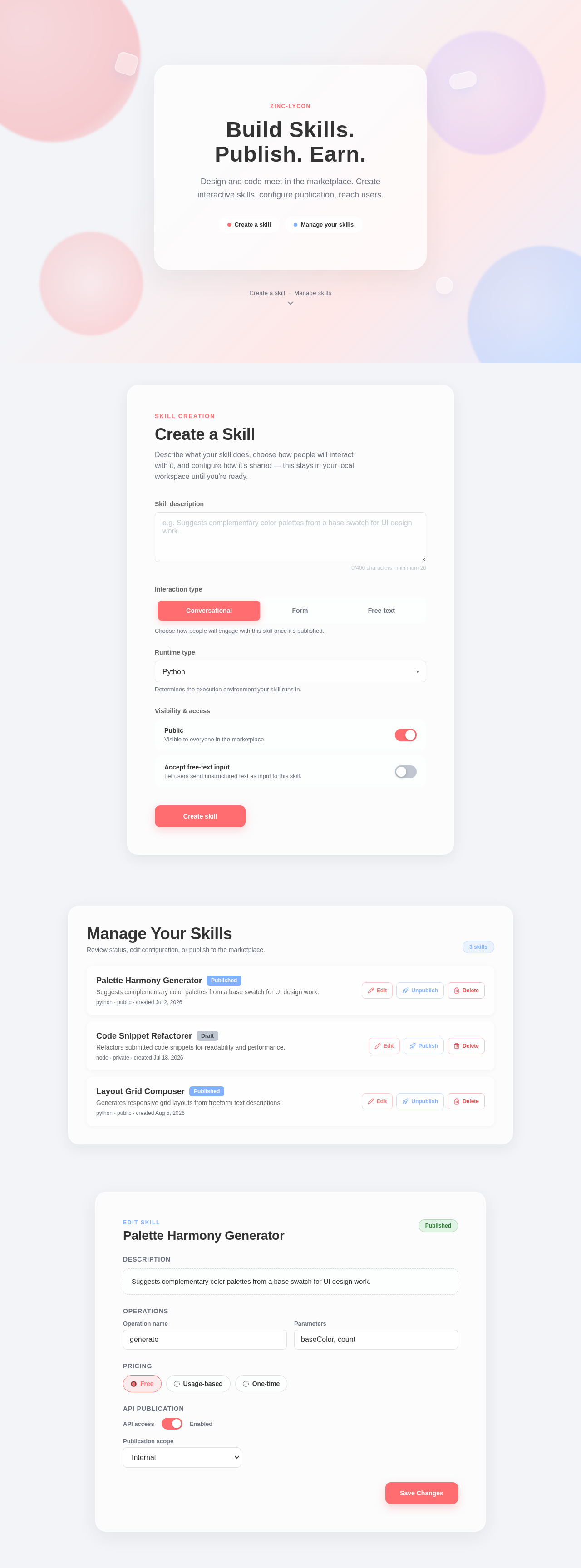
Build Skills. Publish. Earn.
Design and code meet in the marketplace. Create interactive skills, configure publication, reach users.
Skill Creation
Create a Skill
Describe what your skill does, choose how people will interact with it, and configure how it's shared — this stays in your local workspace until you're ready.
Choose how people will engage with this skill once it's published.
Determines the execution environment your skill runs in.
Manage Your Skills
Review status, edit configuration, or publish to the marketplace.
Palette Harmony Generator
PublishedSuggests complementary color palettes from a base swatch for UI design work.
Code Snippet Refactorer
DraftRefactors submitted code snippets for readability and performance.
Layout Grid Composer
PublishedGenerates responsive grid layouts from freeform text descriptions.
Palette Harmony Generator
Build Skills. Publish. Earn.
Design and code meet in the marketplace. Create interactive skills, configure publication, reach users.
Skill Creation
Create a Skill
Describe what your skill does, choose how people will interact with it, and configure how it's shared — this stays in your local workspace until you're ready.
Choose how people will engage with this skill once it's published.
Determines the execution environment your skill runs in.
Manage Your Skills
Review status, edit configuration, or publish to the marketplace.
Palette Harmony Generator
PublishedSuggests complementary color palettes from a base swatch for UI design work.
Code Snippet Refactorer
DraftRefactors submitted code snippets for readability and performance.
Layout Grid Composer
PublishedGenerates responsive grid layouts from freeform text descriptions.
No comments yet. Be the first!