AI Conversations
Natural, context-aware chat powered by large language models that understand your customers.
 Karmanya Joshi
Build a complete, production-ready **AI Chatbot SaaS platform** called **ChatFlow AI**. Tagline: **“Build an AI chatbot. Deploy it anywhere.”** The product must be a functional SaaS application, not a static landing page or UI mockup. Users should be able to sign up, create AI chatbots, train them with knowledge, customize them, test them, deploy them to websites, manage conversations, view analytics, collect leads, and manage subscriptions. ## BRAND & UI Create a modern, premium SaaS interface inspired by products like Intercom, Chatbase, Botpress, and Crisp, but with a cleaner and simpler design. Use: * Clean typography * Spacious layouts * Professional dashboard * Subtle borders and shadows * Modern cards * Smooth hover states * Loading skeletons * Toast notifications * Empty/error/success states * Responsive design Avoid excessive gradients, unnecessary animations, clutter, and generic template styling. The application must work on desktop, tablet, and mobile. ## LANDING PAGE Create: Navbar: * ChatFlow AI logo * Product * Features * Pricing * Documentation * Login * Get Started Hero: **“Create AI Chatbots That Actually Help Your Customers”** Subtitle: “Build, train, customize, and deploy intelligent AI chatbots for your website without complicated setup.” Buttons: * Create Chatbot * See How It Works Show a premium chatbot/dashboard product preview. Feature section: * AI conversations * Knowledge-base training * Website integration * Custom personality * Analytics * Multiple chatbots * Lead collection * Human handoff * Custom branding * API access How it works: 1. Create 2. Train 3. Deploy Pricing: **Free – ₹0/month** * 1 chatbot * Limited conversations * Basic customization * Basic analytics * ChatFlow branding **Pro – ₹999/month** * 5 chatbots * Higher conversation limits * Knowledge-base training * Advanced analytics * Remove branding * Lead collection **Business – ₹2,999/month** * Large chatbot limits * Advanced analytics * Team members * API access * Priority support * Integrations * White-label options Pricing limits must be configurable rather than hardcoded throughout the application. ## AUTHENTICATION Implement: * Sign up * Login * Logout * Forgot password * Reset password * Email verification * Protected routes * Google login if supported After login, send users to the dashboard. ## ONBOARDING Create a simple onboarding wizard: 1. Choose chatbot purpose: Customer Support, Sales, Education, Personal Assistant, E-commerce, Internal Bot, Other. 2. Create chatbot: Name, description, language, personality. 3. Add knowledge: PDF, DOCX, TXT, website URL, manual text, FAQs. 4. Customize: Avatar, color, welcome message, position. 5. Test chatbot. ## DASHBOARD Create a professional SaaS dashboard. Sidebar: * Overview * My Chatbots * Conversations * Knowledge * Analytics * Leads * Integrations * Team * Billing * Settings Top bar: * Search * Notifications * Help * Profile Overview metrics: * Total chatbots * Conversations * Messages * Active users * Leads * Average response time * Resolution rate Charts: * Conversations over time * Messages * User activity * Bot performance Use clearly labeled demo data for new accounts. ## CHATBOT MANAGEMENT “My Chatbots” page with cards showing: * Name * Status * Conversations * Created date * Last active * AI model Actions: * Open * Edit * Test * Duplicate * Deploy * Analytics * Delete Add **+ Create Chatbot**. ## CHATBOT BUILDER This is the core feature. Tabs: ### General Name, description, avatar, language, status. ### Personality Tone, personality, response style, behavior instructions, system instructions. Example: “You are a friendly customer-support assistant. Give concise and accurate answers.” ### Knowledge Upload: * PDF * DOCX * TXT * Website URLs * Text * FAQs Show source name, type, status, date, size, and delete action. Prepare the architecture for RAG/vector search. ### Appearance Configure: * Primary color * Avatar * Chat icon * Position * Welcome message * Placeholder * Font size * Border radius * Light/dark mode ### Behavior Configure: * Response length * Lead collection * Email collection * Human handoff * Fallback response * Conversation history * Suggested questions ### AI Configure: * AI model * Temperature * Maximum tokens * Response style * Context length Keep advanced settings understandable. ## CHATBOT PLAYGROUND Create a live chatbot testing page. Left: Configuration. Right: Live chatbot preview. Changes should appear in the preview immediately. Include: * Messages * Typing indicator * Input * Send * Suggested questions * Clear conversation * Conversation history ## EMBEDDABLE CHATBOT Create a deployable website widget with: * Floating chat button * Chat window * Header * Avatar * Messages * Input * Send button * Suggested prompts * Minimize/close controls Make it responsive. Generate a unique chatbot ID for every bot. Provide an embed-code section similar to: ```html <script src="CHATBOT_WIDGET_URL"></script> <script> ChatFlow.init({ chatbotId: "YOUR_CHATBOT_ID" }); </script> ``` The actual widget should use the selected chatbot's configuration. ## DEPLOYMENT Create “Deploy Your Chatbot”. Options: * Website embed * Public share link * API * Integrations Prepare architecture for: * WordPress * Shopify * Slack * Discord * WhatsApp If an integration is unavailable, clearly mark it **Coming Soon** instead of creating fake functionality. ## CONVERSATIONS Create a conversation inbox. Show: * User * Date * Bot * Status * Message count * Satisfaction rating Features: * Search * Filters * Date filtering * Export * Mark resolved * Notes * Human takeover Click a conversation to view the full transcript. ## ANALYTICS Create: * Conversations * Messages * Unique users * Average conversation length * Resolution rate * Response time * Leads * Satisfaction Charts: * Daily conversations * Weekly conversations * Monthly conversations * Popular questions * Most active bots Filters: Today, 7 days, 30 days, 90 days, Custom. ## LEADS Allow bots to collect: * Name * Email * Phone * Company * Custom fields Leads page: Name, email, company, source, chatbot, date, status. Include search, filters, CSV export, and delete. ## KNOWLEDGE BASE Centralized knowledge management supporting: * PDF * DOCX * TXT * Website URLs * FAQs * Plain text Show processing status, file size, last updated, and delete controls. The AI should retrieve relevant information from selected knowledge sources before generating answers. ## BILLING Billing page showing: * Current plan * Usage * Conversation usage * Renewal date * Payment status Actions: * Upgrade * Downgrade * Cancel * View invoices Use configurable subscription plans and usage limits. ## TEAM For Business plans, allow workspace owners to invite users. Roles: * Owner * Admin * Member * Viewer Implement proper role-based access control. ## SETTINGS Profile: Name, email, avatar. Workspace: Name, logo, timezone. Notifications: Email notifications, conversation alerts, usage alerts. Security: Password, sessions, 2FA architecture. API: Create/revoke API keys. ## ADMIN PANEL Create a protected admin dashboard showing: * Users * Active users * Revenue * Subscriptions * Chatbots * Conversations * System usage Admin actions: * View users * Suspend users * Change plans * View chatbot statistics * Manage pricing * Manage platform settings ## DATABASE Use a properly structured relational database with entities such as: Users, Workspaces, WorkspaceMembers, Chatbots, ChatbotSettings, KnowledgeSources, Documents, Conversations, Messages, Leads, Plans, Subscriptions, Invoices, APIKeys, Integrations, Analytics, Notifications. Use proper relationships, indexes, validation, and pagination. Users must only access resources belonging to their workspace. ## AI ARCHITECTURE Use an abstraction layer: **AI Provider → Chatbot Engine → Knowledge Retrieval → Response → Conversation Storage** Support: * System instructions * Chat history * RAG/knowledge retrieval * Streaming responses * Usage/token tracking * Error handling Never expose AI/API secrets in frontend code. Store secrets securely on the server. ## SECURITY Implement: * Authentication * Authorization * Protected routes * Server-side validation * Input sanitization * Rate limiting * Secure API key storage * Environment variables * CORS * Secure file validation * File size limits * Subscription access control ## PERFORMANCE Use: * Pagination * Lazy loading * Debounced search * Efficient database queries * Cached dashboard data * Optimized API calls Do not load thousands of conversations at once. ## ERROR HANDLING Every important action needs: * Loading state * Success state * Empty state * Error state Never leave blank screens. Do not create fake buttons. Every action must work, have a backend implementation, or clearly display **Coming Soon**. If an external AI/API/payment service requires credentials, create the integration structure and environment-variable configuration instead of pretending it works. ## FINAL USER FLOW The complete experience should be: **Sign Up → Create Chatbot → Add Knowledge → Configure Personality → Test → Customize → Deploy → Receive Conversations → Analytics → Leads → Billing** Prioritize this complete working flow over unnecessary extra features. Build the application as a scalable, maintainable commercial SaaS product.

Sign in to leave a comment
ChatFlow AI is a comprehensive, production-ready AI Chatbot SaaS platform designed to enable users to build, train, customize, and deploy intelligent AI chatbots for websites. The platform targets businesses and individuals looking for a scalable and maintainable solution to manage customer interactions, gather analytics, and handle subscriptions seamlessly. The product is inspired by leading SaaS interfaces like Intercom and Chatbase, offering a clean, professional, and premium user experience.
ChatFlow AI provides a full suite of features for creating and managing AI chatbots, including onboarding, customization, deployment, conversation management, analytics, and billing. The platform supports multiple user roles and offers a responsive design for desktop, tablet, and mobile devices. The system ensures secure authentication and authorization, robust error handling, and efficient performance.
ChatFlow AI is delivered as a SaaS platform accessible via a web interface. Users can sign up, log in, and manage their chatbots and related data through a secure, role-based access control system. The platform supports integration with various external services and provides a structured relational database to manage user and chatbot data. The product is designed to be scalable and maintainable, with configurable pricing plans and usage limits.
Not applicable as no explicit content_source directive was provided.
The landing page features a full-width interface preview as the hero, with a large coral 'Create Chatbot' button. Oversized headings in Space Grotesk with tight tracking are used, and editorial numerals serve as decorative elements in analytics sections. The warm off-white background creates a soft contrast with interface elements, and interactive component demos are embedded within the landing page.
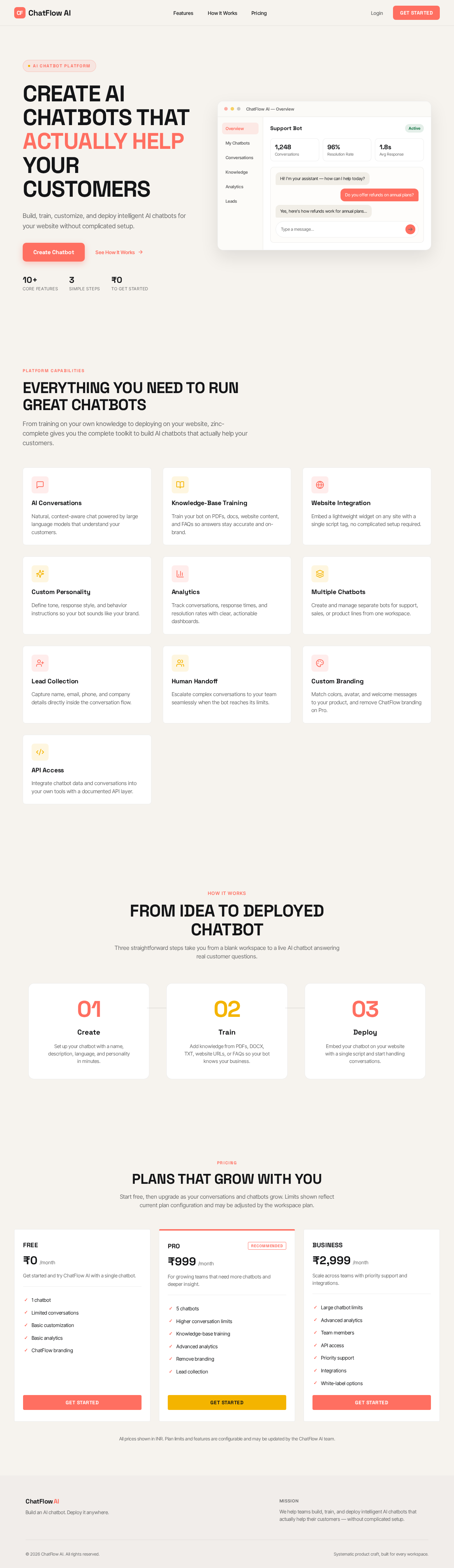
Build, train, customize, and deploy intelligent AI chatbots for your website without complicated setup.
From training on your own knowledge to deploying on your website, zinc-complete gives you the complete toolkit to build AI chatbots that actually help your customers.
Natural, context-aware chat powered by large language models that understand your customers.
Train your bot on PDFs, docs, website content, and FAQs so answers stay accurate and on-brand.
Embed a lightweight widget on any site with a single script tag, no complicated setup required.
Define tone, response style, and behavior instructions so your bot sounds like your brand.
Track conversations, response times, and resolution rates with clear, actionable dashboards.
Create and manage separate bots for support, sales, or product lines from one workspace.
Capture name, email, phone, and company details directly inside the conversation flow.
Escalate complex conversations to your team seamlessly when the bot reaches its limits.
Match colors, avatar, and welcome messages to your product, and remove ChatFlow branding on Pro.
Integrate chatbot data and conversations into your own tools with a documented API layer.
Three straightforward steps take you from a blank workspace to a live AI chatbot answering real customer questions.
Set up your chatbot with a name, description, language, and personality in minutes.
Add knowledge from PDFs, DOCX, TXT, website URLs, or FAQs so your bot knows your business.
Embed your chatbot on your website with a single script and start handling conversations.
Start free, then upgrade as your conversations and chatbots grow. Limits shown reflect current plan configuration and may be adjusted by the workspace plan.
Get started and try ChatFlow AI with a single chatbot.
For growing teams that need more chatbots and deeper insight.
Scale across teams with priority support and integrations.
All prices shown in INR. Plan limits and features are configurable and may be updated by the ChatFlow AI team.
Build, train, customize, and deploy intelligent AI chatbots for your website without complicated setup.
From training on your own knowledge to deploying on your website, zinc-complete gives you the complete toolkit to build AI chatbots that actually help your customers.
Natural, context-aware chat powered by large language models that understand your customers.
Train your bot on PDFs, docs, website content, and FAQs so answers stay accurate and on-brand.
Embed a lightweight widget on any site with a single script tag, no complicated setup required.
Define tone, response style, and behavior instructions so your bot sounds like your brand.
Track conversations, response times, and resolution rates with clear, actionable dashboards.
Create and manage separate bots for support, sales, or product lines from one workspace.
Capture name, email, phone, and company details directly inside the conversation flow.
Escalate complex conversations to your team seamlessly when the bot reaches its limits.
Match colors, avatar, and welcome messages to your product, and remove ChatFlow branding on Pro.
Integrate chatbot data and conversations into your own tools with a documented API layer.
Three straightforward steps take you from a blank workspace to a live AI chatbot answering real customer questions.
Set up your chatbot with a name, description, language, and personality in minutes.
Add knowledge from PDFs, DOCX, TXT, website URLs, or FAQs so your bot knows your business.
Embed your chatbot on your website with a single script and start handling conversations.
Start free, then upgrade as your conversations and chatbots grow. Limits shown reflect current plan configuration and may be adjusted by the workspace plan.
Get started and try ChatFlow AI with a single chatbot.
For growing teams that need more chatbots and deeper insight.
Scale across teams with priority support and integrations.
All prices shown in INR. Plan limits and features are configurable and may be updated by the ChatFlow AI team.
No comments yet. Be the first!