
zen-you

byPriyans Rajesh Kevadia

You are a senior product strategist and full-stack SaaS architect. Design a micro SaaS for ONE specific trade business: [CHOOSE ONE: house cleaning, HVAC, plumbing, electrician, roofing, landscaping, pest control, painting, moving, garage door repair]. Goal: Create a quote generator that helps small trade businesses produce professional estimates in under 3 minutes, send them by SMS/email, and increase quote-to-close conversion. Product requirements: - Single-trade focus only. - Simple, mobile-friendly workflow. - Users can create a service catalog with prices, labor rates, add-ons, taxes, discounts, and markup rules. - Users can generate quotes from: - manual form entry, - customer request form, - photo upload, - notes, - optional AI-assisted estimate drafting. - Quote output must include: - customer details, - job details, - line items, - subtotal, tax, discounts, total, - optional good/better/best packages, - terms and conditions, - branded PDF and shareable web link. - Include online approval/signature. - Include automated follow-ups if quote is not accepted. - Include payment link or deposit collection as an upsell. - Include basic CRM features: - leads, - quote status, - reminders, - won/lost tracking. - Include admin settings for: - business profile, - logo/colors, - service pricing rules, - email/SMS templates, - quote expiration, - team roles. Core differentiator: Make it better than generic quoting tools by being deeply tailored to one trade. Include trade-specific fields, presets, and workflows. Deliverables: 1. Product concept summary. 2. Target customer profile. 3. MVP feature list. 4. V1 feature list. 5. Suggested pricing tiers. 6. Differentiation against generic tools like Jobber, Housecall Pro, PandaDoc, and SumoQuote. 7. User flow from lead to approved quote. 8. Database schema. 9. API endpoints. 10. Page-by-page app structure. 11. Tech stack recommendation. 12. AI prompt logic for generating estimates safely. 13. Launch plan for the first 30 days. 14. SEO/content strategy for customer acquisition. 15. Monetization and upsell opportunities. Constraints: - Keep the MVP buildable by a solo founder. - Prefer simple workflows over feature bloat. - Optimize for one trade first, expansion later. - Make every feature directly tied to faster quoting or higher close rates. Output format: - Use clear headings. - Be specific and practical. - Include assumptions where needed. - If trade choice matters, make a recommendation for the best first trade to target and explain why.

Landing
Landing

Comments (0)

No comments yet. Be the first!

System Requirements

System Requirement Document
Page 1 of 5

zen-you System Requirements Document

1. Introduction

The zen-you project is a micro SaaS platform designed to streamline the quoting process for small trade businesses. The focus is on creating a tailored quote generator that allows businesses to produce professional estimates quickly, send them via SMS/email, and improve quote-to-close conversion rates. This document outlines the system requirements for zen-you, ensuring it meets the needs of its target users effectively.

2. System Overview

zen-you is a specialized tool for a single trade business, providing a simple, mobile-friendly workflow for generating quotes. It includes features such as a service catalog, AI-assisted estimate drafting, and CRM functionalities. The platform aims to differentiate itself from generic quoting tools by offering trade-specific fields and workflows.

Page 2 of 5

3. Functional Requirements as Story Points

  • As a Trade Business Owner, I should be able to create a service catalog with prices, labor rates, add-ons, taxes, discounts, and markup rules.
  • As a Trade Business Owner, I should be able to generate quotes from manual form entry, customer request forms, photo uploads, notes, and AI-assisted estimate drafting.
  • As a Trade Business Owner, I should be able to include customer details, job details, line items, subtotal, tax, discounts, total, optional packages, terms and conditions in the quote output.
  • As a Trade Business Owner, I should be able to send quotes as branded PDFs and shareable web links.
  • As a Trade Business Owner, I should be able to include online approval/signature in quotes.
  • As a Trade Business Owner, I should be able to automate follow-ups if a quote is not accepted.
  • As a Trade Business Owner, I should be able to include a payment link or deposit collection as an upsell.
  • As a Trade Business Owner, I should be able to manage leads, quote status, reminders, and won/lost tracking.
  • As an Admin, I should be able to configure business profile, logo/colors, service pricing rules, email/SMS templates, quote expiration, and team roles.

4. User Personas

  • Trade Business Owner: The primary user who manages the quoting process, service catalog, and customer interactions.
  • Admin: A user responsible for configuring business settings and managing team roles.

5. Core User Flows

  • Trade Business Owner creates a service catalog -> Generates a quote using AI-assisted drafting -> Sends quote via SMS/email -> Customer reviews and approves quote online -> Automated follow-up if not accepted -> Payment link sent for deposit collection.
Page 3 of 5

6. Visuals Colors and Theme

  • primary: #007BFF (blue)
  • primary_light: #66B2FF (light blue)
  • secondary: #6C757D (gray)
  • accent: #28A745 (green)
  • highlight: #FFC107 (yellow)
  • bg: #F8F9FA (light gray)
  • surface: #FFFFFF (white)
  • text: #212529 (dark gray)
  • text_muted: #6C757D (muted gray)
  • border: #DEE2E6 (light gray)

7. Signature Design Concept

Interactive Quote Builder

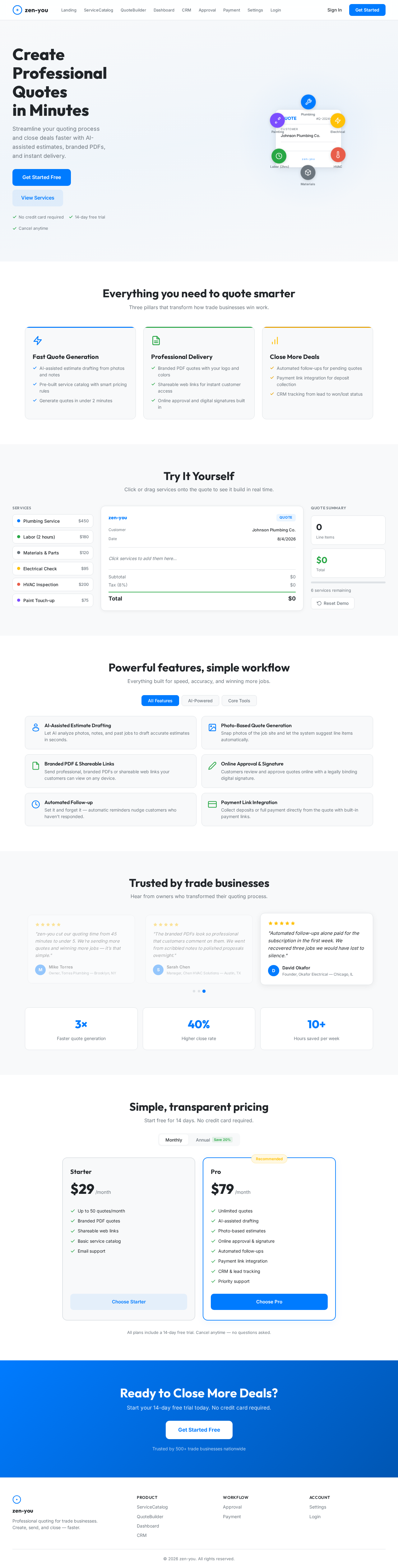
The homepage features an interactive quote builder that visually represents the quoting process. Users can drag and drop service items into a quote template, which dynamically updates the total cost and displays a preview of the final quote. This interactive experience is enhanced with smooth animations using motion/react to provide a seamless user experience. The quote builder serves as both a functional tool and a visual centerpiece, engaging users from the first interaction.

Page 4 of 5

LANDING HERO MOTION BRIEF

The landing page features a dynamic animation where service icons gather around a central quote document. As users interact, the document transforms to show different quote elements being added, such as customer details and line items. The animation loops every 10 seconds, highlighting the ease and speed of creating a professional quote with zen-you.

8. Interaction Model & Motion Direction

  • Interaction Model: Animated
  • The landing page includes moderate scroll-triggered reveals and hover transitions, with spring physics on interactive elements to enhance user engagement.

9. Non-Functional Requirements

  • The system must be mobile-friendly and responsive across all devices.
  • The platform should ensure data security and privacy compliance.
  • The application must support high availability and performance for seamless user experience.

10. Tech Stack

  • Frontend: React for Web
  • Backend: Python, FastAPI
  • Database: MySQL or MariaDB
  • AI Models: GPT 5.4 for user-friendly response
  • AI Tools: Litellm for LLM Routing
  • Local Orchestration: Docker, docker-compose
  • Server-side Orchestration: Kubernetes
Page 5 of 5

11. Assumptions and Constraints

  • The MVP should be buildable by a solo founder.
  • The platform is optimized for one trade initially, with potential for expansion.
  • All features are directly tied to faster quoting or higher close rates.

12. Glossary

  • MVP: Minimum Viable Product
  • CRM: Customer Relationship Management
  • AI: Artificial Intelligence
  • PDF: Portable Document Format
  • SMS: Short Message Service

This document outlines the comprehensive requirements for the zen-you project, ensuring it meets the needs of its target users effectively while providing a unique and engaging user experience.

Landing design preview
Login: Sign In
Settings: Configure Business Profile
Settings: Set Logo Colors
Settings: Configure Pricing Rules
Settings: Manage Email SMS Templates
Settings: Set Quote Expiration
Settings: Manage Team Roles
Dashboard: View Overview
Landing design preview
Login: Sign In
Settings: Configure Business Profile
Settings: Set Logo Colors
Settings: Configure Pricing Rules
Settings: Manage Email SMS Templates
Settings: Set Quote Expiration
Settings: Manage Team Roles
Dashboard: View Overview