zen-page
i want to create a single page todo app

Comments (0)
Sign in to leave a comment
System Requirements
zen-page System Requirements Document
Introduction
The purpose of this document is to outline the system requirements for the "zen-page" project, a single-page todo application designed to offer a minimalist and user-friendly task management experience.
System Overview
The zen-page project is a single-page application (SPA) that allows users to manage their tasks efficiently. The application is designed to be simple, fast, and intuitive, focusing on providing a straightforward list of tasks without unnecessary complexity. The application will be accessible via web browsers and will cater to users who prefer a minimalist approach to task management.
Functional Requirements
- As a User, I should be able to add new tasks to my todo list.
- As a User, I should be able to view all my tasks in a single list.
- As a User, I should be able to mark tasks as completed.
- As a User, I should be able to delete tasks from my list.
User Personas
- User: The primary user of the application who wants to manage personal tasks in a simple and efficient manner.
Visuals Colors and Theme
- primary: #2A9D8F (a calming teal)
- primary_light: #A8DADC (a lighter tint of teal for hover states)
- secondary: #E76F51 (a contrasting coral for emphasis)
- accent: #F4A261 (a vibrant orange for CTAs and active states)
- highlight: #FFB703 (a warm amber for notifications and active indicators)
- bg: #F1FAEE (a soft, clean background color)
- surface: rgba(233, 245, 248, 0.8) (a subtle card/panel background)
- text: #264653 (a deep blue for primary text)
- text_muted: #8D99AE (a muted gray for secondary text)
- border: rgba(38, 70, 83, 0.2) (a subtle border color)
Signature Design Concept
The zen-page application will feature an interactive "Zen Garden" theme on the homepage. Users will experience a serene digital garden where each task is represented as a plant. As users add tasks, new plants grow in the garden. Completing a task will cause the plant to bloom, while deleting a task will gently fade the plant away. This concept will be brought to life using @react-three/fiber for 3D interactions and framer-motion for smooth animations. The garden will subtly change with the time of day, providing a dynamic and calming user experience.
Interaction Model & Motion Direction
The landing page will utilize a "parallax" interaction model, creating a layered depth effect as users scroll through their tasks. The garden elements will move at different speeds, enhancing the immersive experience. Internal pages will maintain a "static" interaction model to ensure clarity and focus on task management.
Non-Functional Requirements
- The application should load within 2 seconds on a standard broadband connection.
- The user interface should be responsive and accessible on both desktop and mobile devices.
- The application should handle up to 1,000 tasks without performance degradation.
Tech Stack
- Frontend: React for Web
- Backend: FastAPI
- Database: MySQL, using Alembic for migrations
- Local Orchestration: Docker, docker-compose
Assumptions and Constraints
- The application will be developed and tested primarily for the Indian market, considering local timezone and language preferences.
- The application will not require user authentication for the initial version.
- The application will be hosted on a cloud platform to ensure scalability.
Glossary
- SPA: Single Page Application
- CTA: Call to Action
- UI: User Interface
- UX: User Experience
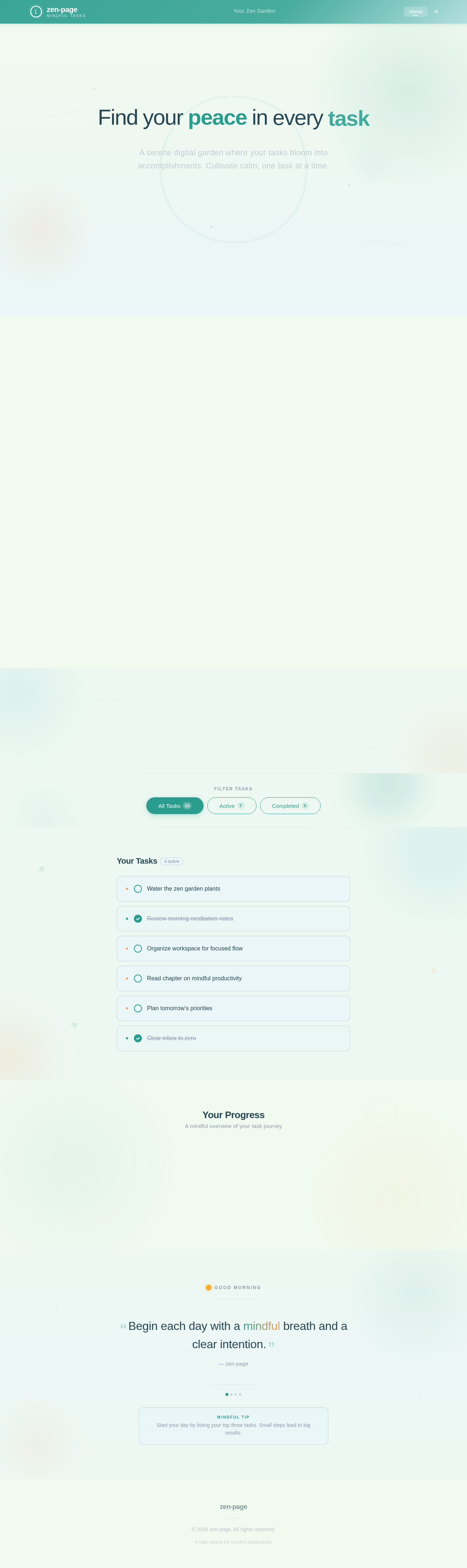
Findyourpeaceineverytask
A serene digital garden where your tasks bloom into accomplishments. Cultivate calm, one task at a time.
Minimalist task management that clears your mind. No clutter, no noise — just the essentials, beautifully arranged.
Your Zen Garden
Each task grows as a plant in your garden. Complete tasks to watch them bloom, or let go of what no longer serves you.
Hover over a plant to see its task. The garden rotates gently for you.
Plant a new seed in your garden
Press Enter or click Add Task to plant your seed
Your Tasks4 active
Your Progress
A mindful overview of your task journey
Stay centered in the flow of your work — balance is the path to productivity.
Mindful Tip
Take a mindful pause between tasks. A 2-minute breath break sharpens focus.
No comments yet. Be the first!