zen-food
Generate the online food ordering app that listed multiple restaurant and house kitchen also


Comments (0)
Sign in to leave a comment
System Requirements
System Requirements Document for zen-food
1. Introduction
zen-food is an online food ordering app that lists multiple restaurants and multiple home kitchens in one marketplace, so customers can order food from either kind of kitchen. The product intent is a two-sided food marketplace: hungry customers browse many restaurants and home kitchens, and owner-operators make their kitchen and dishes available and credible in the same listing.
The audience is:
- Customers in India who want to find a restaurant or home kitchen, view its dishes, and place a food order.
- Restaurant / Home Kitchen Owners who operate a listed restaurant or home kitchen and need their kitchen and dishes to appear in the app's listing so customers can order from them.
This document is the System Requirements Document for zen-food. It specifies the current product behavior, the closed persona set, the page contract, the functional requirements, the core user flows, and the visual and technical direction.
Success Criteria
- A customer can reach the app anonymously, browse a listing that contains both restaurants and home kitchens, open a chosen kitchen's dishes, and complete a food order.
- A restaurant or home kitchen owner can enroll, sign in, and make their kitchen and dishes available in the listing.
- Every listing card visibly distinguishes a restaurant from a home kitchen.
- The two marketplaces (restaurants and home kitchens) read as one coherent system.
2. System Overview
zen-food is delivered as a first-party web application with three provisioned services:
- frontend — React application UI.
- backend — a shared FastAPI process hosting the application APIs and domain modules for listings, dishes, orders, and kitchen management.
- database — MariaDB for application-owned persistent data (kitchens, dishes, orders, and account records).
The app is application-owned: it holds durable state for orders and kitchen listings, and it establishes its own identity for customers and kitchen owners. Anonymous visitors can reach the public entry surface; protected work (browsing the listing, ordering, and kitchen management) requires an established identity.
Actors:
- Customer (human persona) — browses restaurants and home kitchens, selects dishes, and places an order.
- Restaurant / Home Kitchen Owner (human persona) — operates a listed restaurant or home kitchen and makes its menu and dishes available to customers.
- Backend / database (system actors) — persist listings, dishes, orders, and accounts; no human-facing capability is owned solely by a system process.
Current delivery covers: the public landing surface, the combined restaurant-and-home-kitchen listing, a chosen kitchen's dish view with order assembly, checkout and order placement, kitchen management for owners, and self-service sign-up and login.
Narrow exclusions: no delivery-tracking, no rider management, no loyalty program, no reviews, no multi-currency, and no third-party provider-owned surfaces are part of the current scope.
Removed from scope
- None.
2a. Product Interpretation and Delivery Boundary
zen-food is a first-party application. All accepted human-facing work — browsing, ordering, and kitchen management — is owned by zen-food's own pages and backed by the shared FastAPI backend and MariaDB database.
Access boundary: the Landing page is anonymously reachable and is the entry point before any identity is established. Login and Sign Up are also anonymously reachable and are the only surfaces that establish identity. The Restaurants, Restaurant Details, and Checkout pages are role-restricted to the Customer role; Kitchen Management is role-restricted to the Restaurant / Home Kitchen Owner role. A protected destination does not own the interaction that establishes access to itself: identity is established on Login or Sign Up, then the actor proceeds to the protected destination.
Current vs. future: everything specified in this document is current. No future-horizon requirements are accepted at this time.
2b. Source Content Inventory
Not applicable — no reference directive with content_source was supplied.
2c. Page Content and Component Coverage
Landing
- Information/state: Anonymous public entry. Explains that zen-food is an online food ordering app listing multiple restaurants and home kitchens. Hero headline "Real kitchens. Real food. Delivered." with the terracotta accent on "Real food."; one-line subhead; a pill search field with a sage CTA; a tall soft-cornered hero photograph bleeding off the right edge; a floating sage card reading "Home kitchen · 12 min"; a horizontally scrollable "Kitchens near you" rail mixing restaurants and home kitchens, each card carrying an origin tag (sage "Restaurant" pill or terracotta "Home kitchen" pill); a single hand-drawn organic sage arc divider between hero and rail.
- Primary actions: Enter a search term and submit via the sage CTA; scroll the "Kitchens near you" rail; select a kitchen card to proceed toward the listing/details; navigate to Login or Sign Up.
- Supporting actions: Navigate to Restaurants; open Sign Up; open Login.
- Domain entities: Kitchen (restaurant or home kitchen), Dish (preview), origin type.
- Component responsibilities: Hero panel (headline, subhead, search field, CTA, hero photograph, floating origin card); organic arc divider; "Kitchens near you" horizontal rail with origin-tagged cards; top navigation with wordmark and Login/Sign Up entry.
- States: Loading — rail skeleton cards. Empty — rail shows a calm "No kitchens near you yet" message with a link to Restaurants. Success — rail populated with mixed restaurants and home kitchens. Error — rail shows a retry affordance. Recovery — retry reloads the rail.
Restaurants
- Information/state: Role-restricted to Customer. Durable browse owner for the list of available restaurants and home kitchens. Filter rail on the left (sticky on desktop; pill row on mobile) beside a 3-up card grid that drops to 1 column at 375px. Each card carries an origin tag (sage "Restaurant" pill or terracotta "Home kitchen" pill) on the photograph's top-left, a warm-tinted shadow, and a tabular price.
- Primary actions: Filter the listing (by origin type and other available filters); select a kitchen card to open Restaurant Details.
- Supporting actions: Clear filters; return to Landing.
- Domain entities: Kitchen (restaurant or home kitchen), origin type, dish preview, price.
- Component responsibilities: Filter rail / mobile pill row; card grid; origin-tag pill; kitchen card with photograph, name in Fraunces 600, and tabular price.
- States: Loading — card grid skeleton. Empty — "No kitchens match these filters" with a clear-filters action. Success — populated grid. Error — retry affordance. Recovery — clearing filters or retrying restores the grid.
Restaurant Details
- Information/state: Role-restricted to Customer. Focused owner for viewing a chosen restaurant's or home kitchen's dishes and adding items to an order. Kitchen name in Fraunces 600; menu with aligned label/value rows and tabular prices; sticky order-summary sheet on desktop and a bottom bar under 768px; terracotta price numerals in Work Sans tabular figures; sage pill "Add to order" that pulses softly on tap.
- Primary actions: Add a dish to the order; adjust quantity; review the order summary; proceed to Checkout.
- Supporting actions: Return to Restaurants; remove an item from the order.
- Domain entities: Kitchen, Dish, Order line item, quantity, price.
- Component responsibilities: Kitchen header with origin tag; menu list with aligned rows; sticky order-summary sheet / mobile bottom bar; "Add to order" pill with 180ms scale pulse; cart pill.
- States: Loading — menu skeleton. Empty — "This kitchen has no dishes listed yet." Success — dish added, cart pill pulses, summary updates. Error — add-to-order failure with retry. Recovery — retry re-adds the item.
Checkout
- Information/state: Role-restricted to Customer. Completion owner for placing a food order with the chosen restaurant or home kitchen. Shows the selected kitchen, order lines, quantities, and total in tabular figures.
- Primary actions: Confirm and place the order; return to Restaurant Details to edit the order.
- Supporting actions: Cancel checkout.
- Domain entities: Order, order lines, kitchen, total.
- Component responsibilities: Order review panel; place-order CTA; edit-order link.
- States: Loading — order summary skeleton. Empty — "Your order is empty" with a return-to-listing action. Success — order placed confirmation with order reference. Error — placement failure with retry. Recovery — retry re-submits the order.
Kitchen Management
- Information/state: Role-restricted to Restaurant / Home Kitchen Owner. Calm two-pane editor: listings left, dish editor right, with aligned label/value rows. Owner makes their kitchen and dishes available in the app's listing.
- Primary actions: Create or edit the kitchen listing (name, origin type as restaurant or home kitchen, description); add, edit, and remove dishes with prices; publish the kitchen so it appears in the listing.
- Supporting actions: Save drafts; sign out.
- Domain entities: Kitchen, origin type, Dish, price, publish state.
- Component responsibilities: Listings pane; dish editor pane; aligned label/value rows; publish control.
- States: Loading — pane skeleton. Empty — "You have no kitchen yet" with a create action. Success — listing saved/published and visible in Restaurants. Error — save failure with retry. Recovery — retry preserves entered values.
Login
- Information/state: Anonymous identity-access surface. Returning verification for customers and kitchen owners who control durable orders and listings.
- Primary actions: Enter credentials and sign in; navigate to Sign Up.
- Supporting actions: Return to Landing.
- Domain entities: Account, role (Customer or Restaurant / Home Kitchen Owner).
- Component responsibilities: Credential form; submit control; link to Sign Up.
- States: Loading — submit disabled with progress. Empty — blank form. Success — signed in and routed to the appropriate destination (Restaurants for Customer, Kitchen Management for Owner). Error — invalid credentials message. Recovery — correct and resubmit.
Sign Up
- Information/state: Anonymous identity-access surface. Self-service first-use enrollment for customers and kitchen owners, who independently begin using the app with no invitation boundary established.
- Primary actions: Choose role (Customer or Restaurant / Home Kitchen Owner); enter enrollment details; create account.
- Supporting actions: Navigate to Login; return to Landing.
- Domain entities: Account, role.
- Component responsibilities: Role selector; enrollment form; submit control; link to Login.
- States: Loading — submit disabled with progress. Empty — blank form. Success — account created and routed to the appropriate destination. Error — validation or duplicate-account message. Recovery — correct and resubmit.
3. Functional Requirements
FR-1 — Online food ordering app (explicit) As a Customer, I should use zen-food as an online food ordering app so that I can order food online.
- Trigger/input: Customer opens the app.
- Observable result: The app presents itself as an online food ordering app with a public Landing entry.
- Access state: Anonymous on Landing; identity required for ordering.
- Failure/recovery: If the app fails to load, the Customer can retry.
- Continuation: Proceed to browse the listing.
FR-2 — List multiple restaurants (explicit) As a Customer, I should see multiple restaurants listed so that I can choose among them.
- Trigger/input: Customer opens Restaurants.
- Observable result: A listing of multiple restaurants, each card tagged with a sage "Restaurant" pill.
- Access state: Role-restricted to Customer.
- Failure/recovery: Load failure shows a retry affordance.
- Continuation: Select a restaurant to open Restaurant Details.
FR-3 — List multiple home kitchens (explicit) As a Customer, I should see multiple home kitchens listed so that I can choose among them.
- Trigger/input: Customer opens Restaurants.
- Observable result: A listing of multiple home kitchens, each card tagged with a terracotta "Home kitchen" pill, in the same listing as restaurants.
- Access state: Role-restricted to Customer.
- Failure/recovery: Load failure shows a retry affordance.
- Continuation: Select a home kitchen to open Restaurant Details.
FR-4 — Order food from listed restaurants and home kitchens (explicit) As a Customer, I should order food from a listed restaurant or home kitchen so that I receive the food I chose.
- Trigger/input: Customer selects dishes on Restaurant Details and proceeds to Checkout.
- Observable result: An order is placed with the chosen kitchen and a confirmation with an order reference is shown.
- Access state: Role-restricted to Customer.
- Failure/recovery: Placement failure shows a retry; the order can be edited before retry.
- Continuation: Order confirmation is displayed; Customer can return to the listing.
FR-5 — Anonymous entry to Landing (required_inference) As an anonymous visitor, I should reach the Landing page before any identity establishment so that I can understand the app and begin.
- Trigger/input: Visitor opens the app root.
- Observable result: Landing renders with hero, search, and "Kitchens near you" rail.
- Access state: None (anonymous).
- Failure/recovery: Load failure shows a retry.
- Continuation: Navigate to Restaurants, Login, or Sign Up.
FR-6 — Self-service enrollment via Sign Up (required_inference) As a Customer or Restaurant / Home Kitchen Owner, I should complete self-service enrollment via Sign Up so that I can begin using the app.
- Trigger/input: Actor opens Sign Up and submits enrollment details with a chosen role.
- Observable result: Account is created and the actor is routed to the appropriate destination.
- Access state: None (anonymous).
- Failure/recovery: Validation or duplicate-account error is shown; the actor corrects and resubmits.
- Continuation: Proceed to Restaurants (Customer) or Kitchen Management (Owner).
FR-7 — Returning verification via Login (required_inference) As a returning Customer or Restaurant / Home Kitchen Owner, I should verify my identity via Login so that I can resume my orders or listings.
- Trigger/input: Actor opens Login and submits credentials.
- Observable result: Actor is signed in and routed to the appropriate destination.
- Access state: None (anonymous).
- Failure/recovery: Invalid credentials message; actor corrects and resubmits.
- Continuation: Proceed to Restaurants (Customer) or Kitchen Management (Owner).
FR-8 — Kitchen owner authorization for Kitchen Management (required_inference) As a Restaurant / Home Kitchen Owner, I should be authorized for Kitchen Management before managing listings so that only I can manage my kitchen.
- Trigger/input: Owner signs in with the Owner role.
- Observable result: Kitchen Management is accessible; the owner can create, edit, and publish their kitchen and dishes.
- Access state: Role-restricted to Restaurant / Home Kitchen Owner.
- Failure/recovery: Unauthorized access is redirected to Login.
- Continuation: Publish the kitchen so it appears in Restaurants.
4. User Personas
Customer
- Product context: A hungry person in India using zen-food to find food from either a restaurant or a home kitchen.
- Primary goal: Find a kitchen or restaurant, order food from it, and complete the order.
- Distinct accepted responsibilities: Browse the combined listing of restaurants and home kitchens; open a chosen kitchen's dishes; add dishes to an order; place the order at Checkout.
- Relevant inputs or decisions: Which kitchen to choose (restaurant vs. home kitchen, distinguished by the origin tag); which dishes and quantities; whether to confirm the order.
- Interactions with other accepted participants: The Customer's order is placed with the chosen Restaurant / Home Kitchen Owner, whose kitchen and dishes must be listed for the order to be possible.
- Observable success: The Customer finds a kitchen, orders food from it, and sees an order confirmation.
Restaurant / Home Kitchen Owner
- Product context: An owner-operator of a restaurant or a home kitchen who needs their kitchen to look credible and appetising in zen-food's listing.
- Primary goal: Make their kitchen and dishes available in the app's listing so customers can order its food.
- Distinct accepted responsibilities: Enroll via Sign Up with the Owner role; sign in via Login; create or edit the kitchen listing and its origin type; add, edit, and remove dishes with prices; publish the kitchen so it appears in the listing.
- Relevant inputs or decisions: Kitchen name, origin type (restaurant or home kitchen), description, dishes and prices, publish decision.
- Interactions with other accepted participants: The Owner's published kitchen and dishes become visible to Customers in Restaurants and Restaurant Details, enabling Customer orders.
- Observable success: Their kitchen is listed and customers can order its food.
5. Core User Flows
Flow A — Customer browses and orders from a restaurant or home kitchen
- Starting context: Anonymous visitor opens zen-food.
- Landing: The visitor sees the hero ("Real kitchens. Real food. Delivered."), the search field, and the "Kitchens near you" rail mixing restaurants and home kitchens with origin tags. (Owner: Landing)
- Identity: The visitor selects Sign Up (new) or Login (returning) and establishes a Customer identity. (Owner: Sign Up / Login)
- Browse: The Customer opens Restaurants and sees the combined listing with sage "Restaurant" and terracotta "Home kitchen" pills. They may filter by origin type. (Owner: Restaurants)
- Select kitchen: The Customer selects a kitchen card and opens Restaurant Details. (Owner: Restaurant Details)
- Add dishes: The Customer adds dishes via the sage "Add to order" pill; the cart pill pulses softly and the sticky order summary (or mobile bottom bar) updates with terracotta tabular prices. (Owner: Restaurant Details)
- Checkout: The Customer proceeds to Checkout, reviews the order, and confirms placement. (Owner: Checkout)
- Observable result: An order confirmation with an order reference is shown.
- Failure/recovery: If placement fails, the Customer retries; if a dish add fails, they retry the add.
- Continuation: The Customer returns to Restaurants to order again.
Flow B — Restaurant / Home Kitchen Owner enrolls and publishes a kitchen
- Starting context: Anonymous visitor opens zen-food.
- Landing: The visitor sees the public entry and navigates to Sign Up. (Owner: Landing)
- Enroll: The visitor selects the Restaurant / Home Kitchen Owner role, enters enrollment details, and creates an account. (Owner: Sign Up)
- Authorize: The Owner is routed to Kitchen Management, which is role-restricted to Owners. (Owner: Kitchen Management)
- Create listing: In the two-pane editor, the Owner enters the kitchen name, origin type (restaurant or home kitchen), and description in the listings pane. (Owner: Kitchen Management)
- Add dishes: The Owner adds dishes with prices in the dish editor pane, using aligned label/value rows. (Owner: Kitchen Management)
- Publish: The Owner publishes the kitchen. (Owner: Kitchen Management)
- Observable result: The kitchen and its dishes appear in Restaurants with the correct origin tag, and Customers can order from it.
- Failure/recovery: If save fails, the Owner retries and entered values are preserved.
- Continuation: The Owner returns to Kitchen Management to edit dishes or the listing.
Flow C — Returning Owner signs in and updates a listing
- Starting context: A returning Owner opens zen-food.
- Login: The Owner opens Login and submits credentials. (Owner: Login)
- Authorize: The Owner is routed to Kitchen Management. (Owner: Kitchen Management)
- Update: The Owner edits a dish price or adds a new dish and saves. (Owner: Kitchen Management)
- Observable result: The updated listing is reflected in Restaurants.
- Failure/recovery: Save failure shows a retry; values are preserved.
- Continuation: The Owner signs out or continues editing.
6. Visuals Colors and Theme
Muse: Yves Béhar — humane technology, warm materials. Headline: "Real kitchens. Real food. Delivered."
Palette (light mode):
- Background (oat ground):
#F7F2E9— ~60% of every screen. - Surface (off-white):
#FFFDF8— cards and sheets, ~25%. - Text (ink):
#2A2723. - Primary (deep sage):
#3F5D4E— buttons, navigation, active states, wordmark. - Accent (terracotta):
#C4562B— price, "Add", order-status pulses, home-kitchen badge. - Muted (warm grey):
#8C8375— metadata.
Sage and terracotta never appear as large flat fields together; one dominates per section.
Typography:
- Headings: Fraunces, optical size 72, soft "wonk" axis engaged, weight 500–600, tracking −0.02em, sentence case, leading 1.05–1.15. Kitchen names in Fraunces 600.
- Body: Work Sans; prices and numerals in Work Sans tabular figures.
- Scale (1.25 modular): 96/72/56/40/28/20/16/14. Display
clamp(48px, 8vw, 112px); section headsclamp(32px, 4.5vw, 56px); card titles 20–24px; body 16px/1.6; labels 14px medium with 0.04em tracking.
Shape language: Soft continuous curves — 24px radii on cards, 32px on hero panels, fully pill buttons and filter chips. One organic asymmetric arc per page as a section divider. No hard 90° corners except hairline table rules inside menus. Shadows soft, warm-tinted, low: 0 8px 24px rgba(42,39,35,0.06).
Layout: Single 12-column grid with wide outer margins (24px mobile / 48px tablet / 96px desktop). Landing: full-bleed warm hero with offset product panel, horizontally scrollable "Kitchens near you" rail, two-column split pairing a kitchen portrait with its menu excerpt. Restaurants: filter rail (sticky left on desktop; pill row on mobile) beside a 3-up card grid dropping to 1 column at 375px. Restaurant Details: sticky order-summary sheet on desktop, bottom bar on mobile. Kitchen Management: calm two-pane editor with aligned label/value rows.
Imagery: Natural-light food photography on warm linen and unglazed ceramic, top-down and 3/4 angles, real hands and kitchen surfaces, no stock-model smiles. Home-kitchen cards get a small circular portrait of the cook's hands or kitchen window. Supporting texture: oat paper grain, terracotta glaze close-ups, sage linen. Icons are soft-cornered 1.5px line pictograms.
Avoid: Blue/indigo primary buttons on white; identical hover-lift grids without origin distinction; gradient-blob or glassmorphism heroes; neon or candy-bright accents; stock photography of smiling models; bouncy or confetti motion; hard 90° corners; dense dashboard chrome on Kitchen Management.
7. Signature Design Concept
The public entry (Landing) is an asymmetric split on a full-bleed oat ground:
- Left 5 columns: An oversized Fraunces headline set at
clamp(48px, 8vw, 112px)— "Real kitchens. Real food. Delivered." — broken into three stacked lines with the terracotta accent on "Real food.", a one-line Work Sans subhead, and a pill search field with a sage CTA pinned beneath it. - Right 6 columns: A single tall, soft-cornered 32px-radius photograph of a home-cooked dish on linen, bled off the right viewport edge and slightly overlapping the type column at desktop.
- Floating card: A small sage card at the photo's lower-left corner reading "Home kitchen · 12 min" in tabular Work Sans.
- Signature moves: Every listing card carries an honest origin tag — sage "Restaurant" pill or terracotta "Home kitchen" pill — on the photograph's top-left, so the two marketplaces are visibly one system. A single hand-drawn organic arc divider in sage at 2px sits between the hero and the listing rail. The "Kitchens near you" rail mixes restaurants and home kitchens in one continuous scroll, each card a soft 24px panel with a warm-tinted shadow and tabular price.
No centred stack, no gradient blob, no blue button.
8. Interaction Model & Motion Direction
Interaction Model: Animated Motion Tempo: restrained Hero Dimensionality: layered_2d
Landing Hero Motion Brief
- Focal subject: The tall home-cooked dish photograph on linen, bled off the right edge.
- Input → transformation → outcome thesis: As the visitor scrolls, the food photograph drifts gently against the type (parallax), reinforcing the "real kitchens" warmth while the headline stays anchored; the search field and CTA remain fully readable and interactive throughout.
- Motion vocabulary: Breathing, slow easing (400–600ms,
cubic-bezier(0.22,1,0.36,1)); one purposeful loop — a gentle parallax drift of the food photograph against the type as you scroll. Card hovers lift 2px and warm the shadow. Add-to-order gives a soft 180ms scale pulse on the cart pill. No bounce, no confetti, no auto-carousels beyond the slow kitchen rail. - Composed first frame: Oat ground fills the viewport; the three-line Fraunces headline sits left with "Real food." in terracotta; the subhead and pill search field with sage CTA sit beneath; the tall photograph occupies the right six columns, bleeding off the right edge and overlapping the type column slightly; the floating sage "Home kitchen · 12 min" card sits at the photo's lower-left.
- Reduced-motion state: Parallax drift is disabled; the hero renders as a static asymmetric split with the photograph in its composed position; the "Kitchens near you" rail wraps into rows or allows horizontal scrolling so every card can be brought fully into view.
9. Non-Functional Requirements
- NFR-1 — Readable text and controls (explicit, creative direction): Headlines, wordmarks, labels, numbers, cards' text and controls stay entirely inside the viewport and their container at 375px, 768px, and 1280px, wrapping or scaling (e.g.,
font-size: clamp(...)) to fit; no other element covers any part of them. Imagery, decoration, and motion may be cropped, bled, rotated, overlapped, or cut as the direction asks, as long as they cover no readable text or control. - NFR-2 — Scrolling content (explicit, creative direction): Moving and scrollable content (the "Kitchens near you" rail) may cross the viewport or container edge by design; every item must become fully readable as it passes. With
prefers-reduced-motion, provide a usable static arrangement (wrap into rows or allow horizontal scrolling). - NFR-3 — Durable state (required_inference): Orders, kitchen listings, dishes, and accounts persist in MariaDB so that returning actors resume their state.
- NFR-4 — Identity continuity (required_inference): Application-owned identity binds orders to the correct Customer and listings to the correct Owner; protected destinations are role-restricted as specified in the page contract.
- NFR-5 — Accessible contrast (basic_default): Text and controls meet WCAG AA contrast against their surfaces.
- NFR-6 — Responsive layout (explicit, creative direction): Layout follows the 12-column grid with 24/48/96px outer margins and the specified breakpoint behavior (3-up to 1 column at 375px; sticky sheet to bottom bar under 768px).
10. Tech Stack
- frontend: React application UI.
- backend: Shared FastAPI process hosting application APIs and domain modules for listings, dishes, orders, and kitchen management.
- database: MariaDB for application-owned persistent data.
- Containerization: Docker / docker-compose for the three provisioned services (frontend, backend, database).
- Kubernetes: Not required for current deployment.
11. Assumptions and Constraints
- A-1 (required_inference): Identity is application-owned and self-service; no invitation or provisioning boundary is established.
- A-2 (required_inference): Role selection at Sign Up determines whether the actor is routed to Restaurants (Customer) or Kitchen Management (Owner).
- A-3 (basic_default): Currency is INR, consistent with the user's country context.
- A-4 (explicit): The palette, fonts, surfaces, tone, and layout in Sections 6–8 are binding; the generic indigo/blue-on-white SaaS template is forbidden.
- A-5 (explicit): The app lists both restaurants and home kitchens in one system; origin distinction is visible on every listing card.
- A-6 (basic_default): No delivery-tracking, rider management, loyalty, reviews, or multi-currency in current scope.
12. Glossary
- Kitchen: A listed food provider — either a restaurant or a home kitchen.
- Restaurant: A commercial kitchen listed in zen-food.
- Home kitchen: A home-based kitchen listed in zen-food, distinguished by a terracotta "Home kitchen" pill.
- Origin tag: The sage "Restaurant" or terracotta "Home kitchen" pill on a listing card.
- Listing: The set of kitchens and dishes visible to Customers in Restaurants.
- Order: A Customer's selection of dishes from one kitchen, placed at Checkout.
- Owner: A Restaurant / Home Kitchen Owner persona who manages a kitchen listing.
- Customer: A persona who browses and orders food.
- Kitchen Management: The role-restricted page where Owners create, edit, and publish their kitchen and dishes.
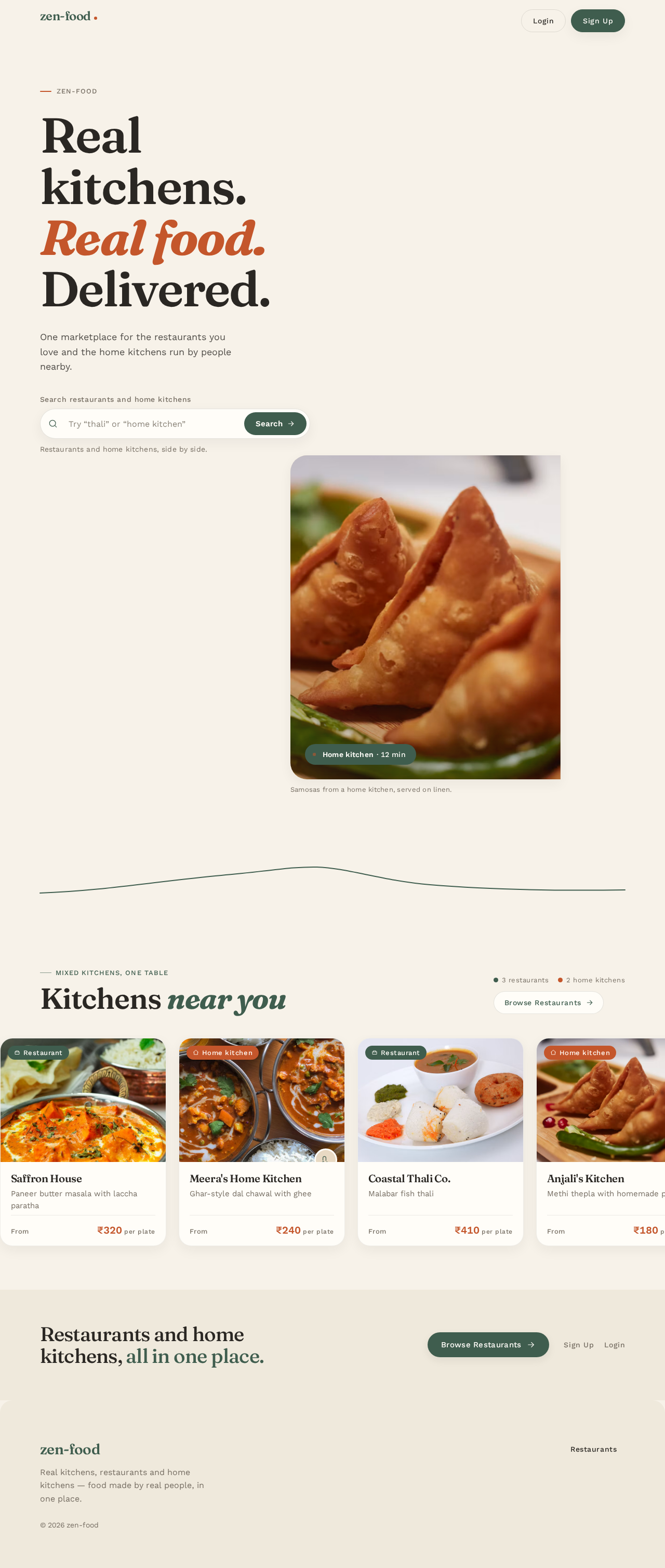
zen-food
Real kitchens.Real food.Delivered.
One marketplace for the restaurants you love and the home kitchens run by people nearby.

Samosas from a home kitchen, served on linen.
Kitchens near you
- 3 restaurants
- 2 home kitchens
Restaurant
Saffron House
Paneer butter masala with laccha paratha
From₹320per plateHome kitchen
Meera's Home Kitchen
Ghar-style dal chawal with ghee
From₹240per plateRestaurant
Coastal Thali Co.
Malabar fish thali
From₹410per plateHome kitchen
Anjali's Kitchen
Methi thepla with homemade pickle
From₹180per plateRestaurant
Tandoor Lane
Charcoal chicken tikka
From₹350per plate
Restaurants and home kitchens, all in one place.
zen-food
Real kitchens.Real food.Delivered.
One marketplace for the restaurants you love and the home kitchens run by people nearby.
Samosas from a home kitchen, served on linen.
Kitchens near you
- 3 restaurants
- 2 home kitchens
Saffron House
Paneer butter masala with laccha paratha
From₹320per plateMeera's Home Kitchen
Ghar-style dal chawal with ghee
From₹240per plateCoastal Thali Co.
Malabar fish thali
From₹410per plateAnjali's Kitchen
Methi thepla with homemade pickle
From₹180per plateTandoor Lane
Charcoal chicken tikka
From₹350per plate
No comments yet. Be the first!