YouTube URLINPUT
INPUTyt-clipping-agent
by letsmoj moj
letsmoj mojyt clipping agent completely fre with no paid and free with api


Comments (0)
Sign in to leave a comment
System Requirements
Page 1 of 11
System Requirements Document for yt-clipping-agent
1. Introduction
yt-clipping-agent is a completely free YouTube clipping agent. It takes YouTube content — a video or a channel — as input and produces clips from that content, at no cost, with no paid tier, no paid requirement, and no paid option anywhere in the product. It is usable both through a first-party web interface and through an API, so that programmatic integrators can drive clipping without touching the UI.
The product intent is deliberately narrow and honest: a precision utility that turns YouTube sources into usable clips, driven either by a person working in the interface or by a system calling the API. The audience is two kinds of technical-leaning users — solo clip creators who want usable clips from YouTube content without paying, and API integrators who want to trigger clipping programmatically at no cost. The design register is competence and momentum: a sharp, no-nonsense machine that never asks for a credit card.
Page 2 of 11
2. System Overview
yt-clipping-agent is delivered as a first-party web application with an application-owned identity layer and a first-party API surface. The current delivery includes:
- An anonymous public entry that explains the free YouTube clipping agent, who it is for, and how it works.
- Self-service enrollment and returning verification, so that clipping inputs, generated clips, and API configuration persist to the correct person.
- A source intake surface that accepts a YouTube video or channel as the source for clipping.
- A generation surface that runs clipping for the selected YouTube content and presents the generated results.
- A revisitable clips workspace for reviewing generated clips.
- An API surface that configures and uses the agent API to trigger clipping programmatically.
Actors are the Clip Creator (supplies a YouTube video or channel and the clipping goal, runs the agent, reviews resulting clips) and the API Integrator (connects the agent to its API, supplies required API credentials or keys, triggers clipping programmatically). YouTube is an external content provider, not a persona; the clipping pipeline itself is system work.
Narrow exclusions: there is no paid tier, no paid requirement, no paid option, no pricing table, no upgrade prompt, and no paid-tier visual language. Nothing in the product may require payment to use clipping, to use the API, or to retain clipping inputs, generated clips, or API configuration.
Page 3 of 11
2a. Product Interpretation and Delivery Boundary
Delivery is first-party web plus first-party API. The web application owns the anonymous entry, the enrollment and verification boundary, and all authenticated working surfaces. The API is owned by the application and is reachable by an authenticated integrator who holds credentials or keys issued through the application.
Access ownership is as follows. The Landing, Sign Up, and Login surfaces are anonymously reachable — a visitor can read the entry surface and can establish or verify identity without already being signed in. Sources, Generate, Clips, and API require a verified identity, because each of them reads or writes durable person-specific state: saved sources, generated clips, and API configuration. A protected surface never owns the interaction that establishes access to itself; enrollment and verification live on their own anonymously reachable surfaces.
The API Integrator's credentials or keys are supplied before programmatic triggering, and are issued and managed inside the authenticated API surface. Programmatic clipping calls are authenticated with those credentials.
Current versus future: everything described in this document is current. No future-horizon capabilities are accepted, and none are specified here. YouTube content retrieval is external provider work; the application does not own YouTube's content, playback, or terms.
2b. Source Content Inventory
Not applicable. No reference directive in this project declares a content_source, so no source content inventory is produced.
2c. Page Content and Component Coverage
Page 4 of 11
Landing
- Information and state: Anonymous public entry. Explains that yt-clipping-agent is a completely free YouTube clipping agent, who it is for (solo clip creators and API integrators), and how it works (YouTube URL → transcript → segment → clip). States plainly that there is no paid tier and no credit card requirement.
- Primary action: Enter the product — proceed to Sign Up to start clipping, or to Login to continue an existing workflow.
- Supporting actions: Read the pipeline explanation; read the API-first statement; follow the link to the API surface description.
- Domain entities: Product description, pipeline stages (YouTube URL, transcript, segment, clip), free-forever claim, cost-per-clip figure.
- Component responsibilities: Full-bleed graphite hero with a flush-left oversized headline set in three stacked lines, the word "FREE" in tangerine; a 13px uppercase micro-label above the headline reading "OPEN API · UNLIMITED CLIPS · $0"; a live product fragment on the right — a real clipping timeline with five clip blocks already cut, timestamps in JetBrains Mono, and a single acid-green "no credit card" badge pinned to the timeline panel's top-right corner; below the fold edge, a hairline rule and one row of tabular stats (clips generated, average latency, cost per clip); a hairline-stroke schematic diagram of the pipeline with tangerine and acid-green accents; entry controls to Sign Up and Login.
- States: Loading — hero chrome and timeline render immediately, stat row shows a placeholder dash per column. Empty — not applicable; the entry surface always carries its explanatory content. Success — the visitor reads the explanation and reaches an entry control. Error — if the stat row cannot be populated, the row renders with muted dashes and the entry controls remain fully usable. Recovery — the visitor can proceed to Sign Up or Login regardless of stat availability.
Sign Up
- Information and state: Anonymous first-use enrollment surface. Collects the minimum identity information needed to bind clipping inputs, generated clips, and API configuration to one person. States that enrollment is free and requires no payment method.
- Primary action: Create the identity and enter the product.
- Supporting actions: Move to Login if the person already has an identity; return to Landing.
- Domain entities: Identity record, credential, enrollment timestamp.
- Component responsibilities: Compact form with 6px-radius controls and 2px hairline borders; inline field-level validation; a single tangerine primary action; a muted link to Login; a hairline footer stat row reading "COST $0.00 · RATE LIMIT NONE · KEY ACTIVE".
- States: Loading — submit control shows an in-progress state and is not re-submittable. Empty — fields render empty with labels and no error text. Success — identity is created and the person is taken into the authenticated product at Sources. Error — an already-enrolled identity, an invalid field, or an unavailable service renders a specific inline message next to the offending field or at form level, the entered values are preserved, and the person can correct and resubmit. Recovery — the person can switch to Login without losing the context of why they arrived.
Login
- Information and state: Anonymous returning-verification surface. Verifies a returning person so they can continue using their saved clipping workflow and API configuration.
- Primary action: Verify identity and resume the authenticated product.
- Supporting actions: Move to Sign Up if the person has no identity; return to Landing.
- Domain entities: Identity record, credential, verification attempt.
- Component responsibilities: Compact credential form matching Sign Up's control language; a single tangerine primary action; a muted link to Sign Up; the same hairline footer stat row.
- States: Loading — verification in progress, submit disabled. Empty — fields render empty with labels. Success — the person lands in the authenticated product and their saved sources, clips, and API configuration are available. Error — incorrect credentials or an unavailable service render a specific message without revealing which part of the credential was wrong; entered values are preserved. Recovery — the person can retry, or move to Sign Up.
Page 5 of 11
Sources
- Information and state: Authenticated intake for the YouTube content to be clipped. Shows the person's saved sources with their type (video or channel), the source reference, and when it was added.
- Primary action: Add a YouTube video or channel as the source for clipping.
- Supporting actions: Select an existing saved source to carry into Generate; remove a saved source; open Generate for the selected source.
- Domain entities: Source record (type: video or channel; YouTube reference; added timestamp; owning identity), selection state.
- Component responsibilities: Left rail navigation (Sources / Generate / Clips / API) at 240px with hairline dividers, the active item marked by a 2px tangerine left bar and keyboard shortcut hints in muted text to the right of each label; a source intake control that accepts a YouTube video or channel reference; a tabular list of saved sources with aligned columns and no card grid; a single tangerine primary action to proceed to Generate.
- States: Loading — the source list renders its column headers with a muted in-progress indicator. Empty — an explicit empty state explains that no source has been added yet and points at the intake control as the next action. Success — the added source appears in the tabular list with its type and timestamp, and is selected for Generate. Error — an unparseable or unreachable YouTube reference renders a specific inline message, the entered reference is preserved, and the person can correct it; a failed removal leaves the row in place with a message. Recovery — retry the intake, choose a different saved source, or remove the failing row.
Generate
- Information and state: Authenticated clipping run for the selected YouTube content. Shows the selected source, the clipping parameters in effect, the run's progress, and the generated results as they arrive.
- Primary action: Run clipping for the selected YouTube content.
- Supporting actions: Adjust clipping parameters before running; cancel an in-progress run; open a generated result in Clips; return to Sources to change the source.
- Domain entities: Clipping run (selected source, parameters, start time, status), clip result (clip ID, start timestamp, duration, status), run history for the selected source.
- Component responsibilities: Asymmetric split — 60% preview column, 40% parameter panel; a strict horizontal timeline ruler with square clip blocks and hairline tick marks, clip blocks snapping in with a 180ms scale-in; a thin tangerine scan line sweeping the timeline ruler as the live processing indicator; tabular numerals for durations and timestamps; a single tangerine primary action to run; the hairline footer stat row.
- States: Loading — the timeline ruler renders with tick marks and the scan line indicates that the run is starting. Empty — before any run, the surface shows the selected source and the parameter panel with an explicit prompt to run clipping. Success — clip blocks appear on the timeline with their clip IDs, start timestamps, and durations, and the run is recorded in history. Error — a failed run renders a specific message identifying the failure, the selected source and parameters are preserved, and the person can retry; a partially completed run keeps the clips that were produced and marks the remainder as failed. Recovery — retry the run, adjust parameters and re-run, or return to Sources.
Clips
- Information and state: Authenticated, revisitable workspace for reviewing generated clips. Shows every generated clip belonging to the person with its clip ID, source, start timestamp, duration, and status.
- Primary action: Review a generated clip and decide whether it is usable.
- Supporting actions: Filter and sort the clip list; open a clip's detail; return to Generate to produce more clips from the same source; remove a clip.
- Domain entities: Clip (clip ID, source reference, start timestamp, duration, status, owning identity), clip list view state.
- Component responsibilities: Tabular data rows aligned in columns like a spreadsheet — ID, timestamp, duration, status — with no card grid and no hover-lift cards; JetBrains Mono for clip IDs and timestamps; tabular numerals for durations; the left rail navigation with Clips active; the hairline footer stat row.
- States: Loading — column headers render with a muted in-progress indicator. Empty — an explicit empty state explains that no clips have been generated yet and points at Generate as the next action. Success — clips render as aligned rows and a selected clip's detail is readable. Error — a failed clip load renders a specific message with a retry control; a failed removal leaves the row in place with a message. Recovery — retry the load, or navigate to Generate to produce clips.
Page 6 of 11
API
- Information and state: Authenticated surface for configuring and using the agent API to trigger clipping programmatically. Shows the integrator's API credentials or keys, their status, the published operation contract, and the request/response exchange.
- Primary action: Configure API credentials or keys and trigger clipping programmatically.
- Supporting actions: Issue or rotate a credential or key; copy a key; build a request; send a request and read the response; read the operation contract.
- Domain entities: API credential or key (value shown once at issue, status, owning identity), operation contract (endpoint, method, parameters), request, streaming response.
- Component responsibilities: Split panel — request builder on the left, a real streaming JSON response on the right that types in character-by-character at 8ms/char with syntax colouring in tangerine and acid green; JetBrains Mono for keys and identifiers; a live API status dot in acid green; the left rail navigation with API active; the hairline footer stat row reading "COST $0.00 · RATE LIMIT NONE · KEY ACTIVE".
- States: Loading — the console renders its panel chrome and the status dot shows a pending state. Empty — before any credential exists, an explicit state explains that no key has been issued and points at the issue action. Success — a key is active, a request is sent, and the response streams into the right panel with its status. Error — an authentication failure, an invalid request, or an unavailable service renders a specific message in the response panel with the request preserved for correction; a failed key issue leaves no partial key. Recovery — retry the request, correct the request body, or re-issue the key.
Page 7 of 11
3. Functional Requirements
FR-1 — Free YouTube clipping agent (explicit). As a Clip Creator, I should be able to use a YouTube clipping agent that is completely free, so that I can obtain clips from YouTube content without paying.
- Trigger/input: the person opens the product and supplies YouTube content to clip.
- Observable result: clips are produced from the supplied YouTube content, and no payment, paid tier, or paid requirement is presented or enforced at any point.
- Access state: the clipping capability is reachable through the authenticated product; the free claim is stated on the anonymous Landing surface.
- Failure/recovery: if clipping fails, the person sees a specific failure message, their source and parameters are preserved, and they can retry at no cost.
- Continuation: produced clips are available in Clips for review.
- Provenance: explicit.
FR-2 — No paid option anywhere (explicit). As a Clip Creator, I should never encounter a paid tier, a paid requirement, or a paid option, so that the "completely free" promise holds across the whole product.
- Trigger/input: any use of the product, including clipping, reviewing clips, and using the API.
- Observable result: no pricing table, no upgrade prompt, no paid-tier visual language, and no payment step appears; the recurring footer stat row reads "COST $0.00 · RATE LIMIT NONE · KEY ACTIVE".
- Access state: applies to anonymous and authenticated surfaces alike.
- Failure/recovery: not applicable — this is a standing constraint, not an operation.
- Continuation: not applicable.
- Provenance: explicit.
FR-3 — Usable via an API (explicit). As an API Integrator, I should be able to drive the clipping agent through its API, so that I can trigger clipping programmatically at no cost.
- Trigger/input: the integrator configures credentials or keys on the API surface and sends a clipping request.
- Observable result: the request is accepted and a response streams back into the console with the clipping result; the same capability is available to a programmatic caller outside the interface.
- Access state: the API surface requires a verified identity; programmatic calls require the issued credential or key.
- Failure/recovery: an authentication failure, an invalid request, or an unavailable service renders a specific message with the request preserved for correction, and the integrator can retry.
- Continuation: the integrator can send further requests with the same credential.
- Provenance: explicit.
FR-4 — Self-service enrollment before first protected use (required_inference). As a Clip Creator or API Integrator, I should be able to enroll myself before first protected use, so that my clipping inputs, generated clips, and API configuration are retained for me.
- Trigger/input: an anonymous visitor chooses to start using the product from Landing.
- Observable result: an identity is created and the person enters the authenticated product at Sources.
- Access state: Sign Up is anonymously reachable; the protected surfaces are not reachable before enrollment.
- Failure/recovery: an already-enrolled identity, an invalid field, or an unavailable service renders a specific inline message, entered values are preserved, and the person can correct and resubmit or switch to Login.
- Continuation: the person proceeds to add a source.
- Provenance: required_inference.
FR-5 — Returning verification before accessing saved state (required_inference). As a Clip Creator or API Integrator, I should be able to verify myself on return, so that I can continue using my saved sources, generated clips, and API configuration.
- Trigger/input: a returning person opens Login and supplies their credentials.
- Observable result: verification succeeds and the person's saved sources, clips, and API configuration are available.
- Access state: Login is anonymously reachable; Sources, Generate, Clips, and API remain unavailable until verification succeeds.
- Failure/recovery: incorrect credentials or an unavailable service render a specific message without revealing which part of the credential was wrong; entered values are preserved and the person can retry or move to Sign Up.
- Continuation: the person resumes at Sources, Clips, or API.
- Provenance: required_inference.
FR-6 — Supply a YouTube video or channel as the clipping source (required_inference). As a Clip Creator, I should be able to supply a YouTube video or channel as the source for clipping, so that the agent has content to work from.
- Trigger/input: the person enters a YouTube video or channel reference on Sources.
- Observable result: the source is saved with its type and timestamp and is selected for Generate.
- Access state: Sources requires a verified identity.
- Failure/recovery: an unparseable or unreachable YouTube reference renders a specific inline message, the entered reference is preserved, and the person can correct it; a failed removal leaves the row in place with a message.
- Continuation: the person proceeds to Generate with the selected source.
- Provenance: required_inference.
FR-7 — Run clipping and see generated results (required_inference). As a Clip Creator, I should be able to run clipping for the selected YouTube content and see the generated results, so that I obtain clips from that content.
- Trigger/input: the person selects a saved source on Sources and runs clipping on Generate, optionally adjusting clipping parameters first.
- Observable result: clip blocks appear on the timeline with clip IDs, start timestamps, and durations, and the run is recorded in history.
- Access state: Generate requires a verified identity.
- Failure/recovery: a failed run renders a specific message identifying the failure with the source and parameters preserved for retry; a partially completed run keeps the clips that were produced and marks the remainder as failed.
- Continuation: the person opens a generated result in Clips.
- Provenance: required_inference.
FR-8 — Review generated clips in a revisitable workspace (required_inference). As a Clip Creator, I should be able to review my generated clips in a workspace I can return to, so that I can decide whether each clip is usable.
- Trigger/input: the person opens Clips, optionally filtering or sorting the list.
- Observable result: every generated clip belonging to the person renders as an aligned tabular row with clip ID, source, start timestamp, duration, and status, and a selected clip's detail is readable.
- Access state: Clips requires a verified identity.
- Failure/recovery: a failed clip load renders a specific message with a retry control; a failed removal leaves the row in place with a message.
- Continuation: the person returns to Generate to produce more clips from the same source, or removes a clip.
- Provenance: required_inference.
FR-9 — Configure and use API credentials or keys (required_inference). As an API Integrator, I should be able to configure the API credentials or keys the agent requires and use them to trigger clipping, so that I can drive the agent programmatically.
- Trigger/input: the integrator issues or rotates a credential or key on the API surface and sends a clipping request.
- Observable result: the key is active with a live status indicator, and the response streams into the console with its status.
- Access state: the API surface requires a verified identity; the issued credential or key is required for programmatic calls.
- Failure/recovery: a failed key issue leaves no partial key; an authentication failure or invalid request renders a specific message in the response panel with the request preserved for correction.
- Continuation: the integrator sends further requests with the same credential.
- Provenance: required_inference.
Page 8 of 11
4. User Personas
Page 9 of 11
Clip Creator
Product context. The Clip Creator is a solo creator who works with YouTube content and wants usable clips out of it. They arrive at yt-clipping-agent because it is completely free — no paid tier, no credit card, no upgrade path — and because it does the clipping work rather than asking them to do it by hand. They work in the interface, not through code.
Primary goal. Obtain usable clips from YouTube content without paying for the service.
Distinct accepted responsibilities. The Clip Creator supplies a YouTube video or channel as the source for clipping; supplies the clipping goal by adjusting parameters before a run; runs the agent to produce clips; and reviews the resulting clips to decide whether they are usable. They also enroll themselves on first use and verify themselves on return so their sources and clips persist.
Relevant inputs and decisions. The YouTube video or channel reference; the clipping parameters for a run; the decision to keep, re-run, or remove a clip after reviewing it; the decision to change the source and run again.
Interactions with other accepted participants. The Clip Creator shares the identity boundary with the API Integrator — both enroll and verify through the same Sign Up and Login surfaces — but their working surfaces differ: the Clip Creator works on Sources, Generate, and Clips, while the API Integrator works on API. The Clip Creator does not configure API credentials as part of their clipping work. YouTube is an external content provider whose content the Clip Creator supplies by reference; it is not a participant in the product.
Observable success. Clip blocks appear on the Generate timeline with clip IDs, start timestamps, and durations; the clips are listed as aligned rows in Clips; the person can return later and find the same sources and clips waiting; and at no point is payment requested.
Page 10 of 11
API Integrator
Product context. The API Integrator is a technical user who wants to drive the clipping agent from code rather than from the interface. They chose yt-clipping-agent because it is free and because it exposes an API — the two facts are inseparable for them: a free tool with no API would not serve them, and an API that costs money would not either.
Primary goal. Drive the agent through the API at no cost to produce clips.
Distinct accepted responsibilities. The API Integrator connects the clipping agent to its API; supplies the required API credentials or keys; triggers clipping programmatically; and reads the returned response to confirm the result. They enroll themselves on first use and verify themselves on return so their API configuration persists.
Relevant inputs and decisions. The credential or key issued through the API surface; the request body for a clipping call; the decision to rotate a key; the decision to correct and resend a rejected request.
Interactions with other accepted participants. The API Integrator shares the identity boundary with the Clip Creator but works on the API surface, where the request builder and streaming response console live. They do not supply YouTube sources through Sources or review clips in Clips as part of their programmatic workflow; the clipping they trigger is driven by their own request. YouTube is an external content provider, not a participant.
Observable success. A key is active with a live status indicator; a request is accepted; a response streams back into the console with its status; and the recurring footer stat row confirms "COST $0.00 · RATE LIMIT NONE · KEY ACTIVE".
Page 11 of 11
5. Core User Flows
Flow 1 — Clip Creator: first visit, enroll, and produce a first clip
- The Clip Creator arrives at Landing anonymously. The hero states that yt-clipping-agent is a completely free YouTube clipping agent, the micro-label reads "OPEN API · UNLIMITED CLIPS · $0", and the live timeline fragment shows five clip blocks with an acid-green "no credit card" badge.
- The Clip Creator reads the pipeline explanation (YouTube URL → transcript → segment → clip) and the tabular stat row below the fold edge, and chooses to start.
- The Clip Creator lands on Sign Up and enters the minimum identity information. The surface states that enrollment is free and requires no payment method.
- Observable result: the identity is created and the Clip Creator enters the authenticated product at Sources. If enrollment fails — an already-enrolled identity, an invalid field, or an unavailable service — a specific inline message appears, the entered values are preserved, and the Clip Creator can correct and resubmit or switch to Login.
- On Sources, the Clip Creator enters a YouTube video or channel reference. The left rail shows Sources active with its 2px tangerine bar.
- Observable result: the source is saved with its type (video or channel) and timestamp and appears as a row in the tabular source list, selected for Generate. If the reference is unparseable or unreachable, a specific inline message appears, the entered reference is preserved, and the Clip Creator can correct it.
- The Clip Creator proceeds to Generate. The asymmetric split shows the 60% preview column and the 40% parameter panel, with the selected source named.
- The Clip Creator adjusts clipping parameters, then runs clipping with the single tangerine primary action.
- Observable result: a thin tangerine scan line sweeps the timeline ruler while the run is in progress; clip blocks then snap onto the timeline with a 180ms scale-in, each carrying its clip ID, start timestamp, and duration in tabular numerals. If the run fails, a specific message identifies the failure, the source and parameters are preserved, and the Clip Creator can retry at no cost; if the run partially completes, the produced clips remain and the remainder is marked failed.
- The Clip Creator opens a generated result in Clips.
- Observable result: the clip renders as an aligned tabular row — ID, timestamp, duration, status — in JetBrains Mono and tabular numerals, and its detail is readable. The Clip Creator decides whether the clip is usable.
- Continuation: the Clip Creator returns to Generate to produce more clips from the same source, or removes a clip that is not usable. Every surface ends with the hairline footer stat row reading "COST $0.00 · RATE LIMIT NONE · KEY ACTIVE".
Flow 2 — Clip Creator: return and resume a saved clipping workflow
- The Clip Creator returns and opens Login anonymously.
- The Clip Creator supplies their credentials and
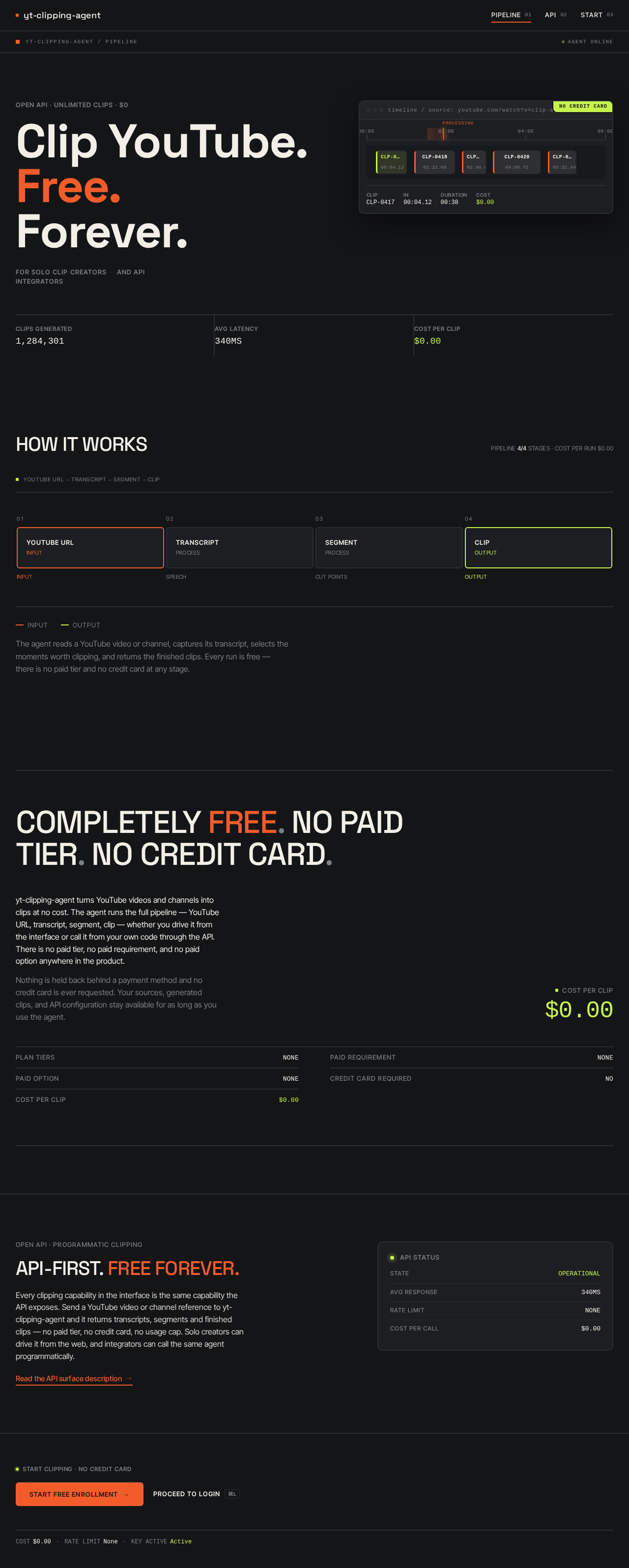
yt-clipping-agent / pipelineagent online
Open API · Unlimited Clips · $0
Clip YouTube.Free.Forever.
For solo clip creatorsand API integrators
no credit card
timeline / source: youtube.com/watch?v=clip-agent
00:0002:0004:0006:00
processing
ClipCLP-0417In00:04.12Duration00:38Cost$0.00
CLIPS GENERATED1,284,301
AVG LATENCY340MS
COST PER CLIP$0.00
HOW IT WORKS
YOUTUBE URL → TRANSCRIPT → SEGMENT → CLIP
TranscriptPROCESS
SPEECHSegmentPROCESS
CUT POINTSClipOUTPUT
OUTPUTInputOutput
The agent reads a YouTube video or channel, captures its transcript, selects the moments worth clipping, and returns the finished clips. Every run is free — there is no paid tier and no credit card at any stage.
COMPLETELY FREE. NO PAID TIER. NO CREDIT CARD.
yt-clipping-agent turns YouTube videos and channels into clips at no cost. The agent runs the full pipeline — YouTube URL, transcript, segment, clip — whether you drive it from the interface or call it from your own code through the API. There is no paid tier, no paid requirement, and no paid option anywhere in the product.
Nothing is held back behind a payment method and no credit card is ever requested. Your sources, generated clips, and API configuration stay available for as long as you use the agent.
Cost per clip$0.00
- Plan tiers
- NONE
- Paid requirement
- NONE
- Paid option
- NONE
- Credit card required
- NO
- Cost per clip
- $0.00
Open API · Programmatic clipping
API-FIRST. Free forever.
Every clipping capability in the interface is the same capability the API exposes. Send a YouTube video or channel reference to yt-clipping-agent and it returns transcripts, segments and finished clips — no paid tier, no credit card, no usage cap. Solo creators can drive it from the web, and integrators can call the same agent programmatically.
Read the API surface descriptionStart Clipping · No Credit Card
yt-clipping-agent / pipelineagent online
Open API · Unlimited Clips · $0
Clip YouTube.Free.Forever.
For solo clip creatorsand API integrators
no credit card
timeline / source: youtube.com/watch?v=clip-agent
00:0002:0004:0006:00
processing
ClipCLP-0417In00:04.12Duration00:38Cost$0.00
CLIPS GENERATED1,284,301
AVG LATENCY340MS
COST PER CLIP$0.00
HOW IT WORKS
YOUTUBE URL → TRANSCRIPT → SEGMENT → CLIP
YouTube URLINPUT
INPUTTranscriptPROCESS
SPEECHSegmentPROCESS
CUT POINTSClipOUTPUT
OUTPUTInputOutput
The agent reads a YouTube video or channel, captures its transcript, selects the moments worth clipping, and returns the finished clips. Every run is free — there is no paid tier and no credit card at any stage.
COMPLETELY FREE. NO PAID TIER. NO CREDIT CARD.
yt-clipping-agent turns YouTube videos and channels into clips at no cost. The agent runs the full pipeline — YouTube URL, transcript, segment, clip — whether you drive it from the interface or call it from your own code through the API. There is no paid tier, no paid requirement, and no paid option anywhere in the product.
Nothing is held back behind a payment method and no credit card is ever requested. Your sources, generated clips, and API configuration stay available for as long as you use the agent.
Cost per clip$0.00
- Plan tiers
- NONE
- Paid requirement
- NONE
- Paid option
- NONE
- Credit card required
- NO
- Cost per clip
- $0.00
Open API · Programmatic clipping
API-FIRST. Free forever.
Every clipping capability in the interface is the same capability the API exposes. Send a YouTube video or channel reference to yt-clipping-agent and it returns transcripts, segments and finished clips — no paid tier, no credit card, no usage cap. Solo creators can drive it from the web, and integrators can call the same agent programmatically.
Read the API surface description
No comments yet. Be the first!