workout-tracker
 Sushil Singh
build me an workout tracker app for mobile (ios/android)


Comments (0)
Sign in to leave a comment
System Requirements
System Requirements Document for workout-tracker
1. Introduction
workout-tracker is a mobile workout tracking application for iOS and Android. Its intent is narrow and concrete: let a lifter record the workouts they perform — the exercises and the sets within each session — and then review their workout history over time. The product exists so that training effort becomes a durable, reviewable record rather than something remembered or guessed at.
The audience is the individual lifter training on a phone in a gym, who wants proof of progress: what was lifted, when, and how it compares to prior sessions. The product is not a coaching platform, a social network, or a wellness companion; it is a personal training log.
Because workout records are private and must persist across sessions and devices, the app establishes an application-owned identity: a new user enrolls through self-service sign-up, and a returning user verifies identity at login before reaching their private workout records. The public Landing page explains the product before identity is established.
This document is the System Requirements Document for the product described above.
2. System Overview
2a. Product Interpretation and Delivery Boundary
workout-tracker is delivered as a first-party mobile application for iOS and Android, backed by an application-owned API and persistent store. All product surfaces are custom first-party UI owned by the application.
Access is split into two boundaries:
- Anonymous boundary. The Landing page is publicly reachable and explains the workout tracker before identity establishment. Sign Up and Login are also anonymously reachable, because a protected destination cannot own the interaction that establishes access to itself.
- Protected boundary. Log Workout, History, and Workout Details require a verified identity. Workout records are private to the signed-in user and are bound to that user's identity so they can be resumed and revisited across sessions.
Identity is application-owned and established by self-service enrollment (Sign Up) with returning verification (Login). This identity exists solely to keep workout records private and continuous for the correct person; it does not introduce differentiated roles, permissions, or shared-state visibility controls.
The current delivery horizon covers: enrollment, returning verification, logging a workout with its exercises and sets, viewing workout history, and viewing the details of a single past workout. Nothing beyond that is in current scope.
Removed from scope
- None. No concept was explicitly removed by the user.
2b. Source Content Inventory
Not applicable — no reference directive declares content_source.
2c. Page Content and Component Coverage
Landing
- Purpose and access. Public entry surface, reachable without identity. Explains the workout tracker before identity establishment.
- Information and state. Product name/wordmark; the headline "LOG THE WORK"; a short statement of what the app does (log workouts, review history); entry controls to begin enrollment or returning verification. No user-specific data is shown.
- Primary actions. Navigate to Sign Up ("Start training"); navigate to Login for a returning user.
- Supporting actions. Scroll through the editorial content bands.
- Domain entities. None persisted; presentation only.
- Component responsibilities.
- Full-bleed black hero band with the stacked all-caps headline and a cropped monochrome barbell photograph at the right edge.
- Lime rule and red "Start training" control pinned beneath the headline.
- Editorial content bands describing logging and history, using ruled rows and solid colour blocks rather than cards.
- Persistent, clearly labeled path to Login for returning users.
- States.
- Loading: static content; no data fetch required.
- Empty: not applicable.
- Success: content renders; both entry controls are reachable and whole at 375px, 768px, and 1280px.
- Error: not applicable.
- Recovery: if a signed-in user reaches Landing, they can proceed to Login or continue into the app.
Sign Up
- Purpose and access. Anonymous identity-access surface where a new user creates an account so their workout records can be kept private and continuous.
- Information and state. Enrollment form fields for establishing a new account; inline validation state; submission-in-progress state; success state that transitions the user into the protected app.
- Primary actions. Submit enrollment to create the account and establish a session.
- Supporting actions. Navigate to Login if the user already has an account; return to Landing.
- Domain entities. User identity (account) owned by the application.
- Component responsibilities.
- Enrollment form with labeled inputs and a single primary submit control.
- Inline field-level validation messaging.
- Submission control that reflects in-progress state and prevents duplicate submission.
- Link to Login.
- States.
- Loading: submit control shows in-progress state while the request is in flight.
- Empty: pristine form with no errors.
- Success: account created and session established; user is taken into the protected app to begin logging.
- Error: field validation errors shown inline; submission failure shown as a recoverable message with the entered values preserved.
- Recovery: the user corrects the flagged field or retries submission without re-entering everything.
Login
- Purpose and access. Anonymous identity-access surface where a returning user verifies identity to reach private workout records.
- Information and state. Credential form; inline validation state; submission-in-progress state; success state that restores the user's own workout records.
- Primary actions. Submit credentials to verify identity and establish a session.
- Supporting actions. Navigate to Sign Up if the user has no account; return to Landing.
- Domain entities. User identity (account) owned by the application.
- Component responsibilities.
- Credential form with labeled inputs and a single primary submit control.
- Inline error messaging for failed verification.
- Link to Sign Up.
- States.
- Loading: submit control shows in-progress state while verification is in flight.
- Empty: pristine form with no errors.
- Success: identity verified; the user lands in the protected app with their own records available.
- Error: failed verification shown as a clear, non-revealing message; entered identifier preserved.
- Recovery: the user retries credentials or switches to Sign Up.
Log Workout
- Purpose and access. Protected surface where the signed-in user records a workout with its exercises and sets.
- Information and state. The in-progress workout being composed: its exercises, and for each exercise its sets with weight and reps; the workout's date; a save-in-progress state; a saved state.
- Primary actions. Add an exercise to the workout; add a set to an exercise with weight and reps; save the workout.
- Supporting actions. Remove an exercise or set before saving; abandon the in-progress workout.
- Domain entities. Workout; Exercise entry within a workout; Set entry with weight and reps.
- Component responsibilities.
- Workout header with the session date.
- Exercise list where each exercise is a ruled ledger block.
- Set rows rendered as ruled ledger lines: set number in red at the left edge, with weight and reps in tabular columns separated by hairline dividers.
- Add-exercise and add-set controls.
- Save control reflecting in-progress and saved states.
- States.
- Loading: not applicable for a new workout; existing draft state renders immediately when resumed.
- Empty: no exercises yet, with a clear prompt to add the first exercise.
- Success: workout saved and attributed to the signed-in user; the user can continue to History or start another workout.
- Error: save failure shown as a recoverable message with the composed workout preserved in place.
- Recovery: the user retries save; nothing entered is lost.
History
- Purpose and access. Protected surface listing the signed-in user's past workouts for review.
- Information and state. The user's saved workouts in reverse-chronological order, each showing enough to identify the session (date and a summary of its contents); loading state while records are fetched; empty state when the user has no saved workouts.
- Primary actions. Open a past workout to view its details.
- Supporting actions. Start a new workout from History.
- Domain entities. Workout records belonging to the signed-in user.
- Component responsibilities.
- Reverse-chronological list of workout entries using ruled rows and hairline dividers.
- Per-entry summary with the session date and its exercises/sets summary.
- Entry control that opens Workout Details for that workout.
- New-workout control.
- States.
- Loading: list placeholder while records are fetched.
- Empty: clear message that no workouts have been logged yet, with a control to log the first workout.
- Success: the user's workouts listed newest first.
- Error: fetch failure shown as a recoverable message with a retry control.
- Recovery: retry restores the list; the user can still start a new workout.
Workout Details
- Purpose and access. Protected surface showing the details of one past workout belonging to the signed-in user.
- Information and state. The selected workout's date, its exercises, and for each exercise its sets with set number, weight, and reps.
- Primary actions. Review the full set log of the workout.
- Supporting actions. Return to History.
- Domain entities. Workout; Exercise entry; Set entry with weight and reps.
- Component responsibilities.
- Workout header with the session date.
- Exercise blocks with ruled set rows: red set number at the left edge, weight and reps in tabular columns with hairline dividers.
- Back control to History.
- States.
- Loading: placeholder while the workout is fetched.
- Empty: not applicable — a workout with no exercises is not a saved state; if a record cannot be found, an explicit not-found message with a path back to History is shown.
- Success: full set log rendered.
- Error: fetch failure shown as a recoverable message with a retry control.
- Recovery: retry reloads the workout; the user can always return to History.
3. Functional Requirements
FR-1 — Mobile workout tracking on iOS and Android (explicit) As a Workout Tracker User, I should use the workout tracker as a mobile app on both iOS and Android, so that I can track training from my phone.
- Trigger/input: the user opens the app on an iOS or Android device.
- Observable result: the app runs natively on both platforms and presents the Landing page when no identity is established.
- Access state: anonymous entry.
- Failure/recovery: if the app cannot reach the backend, the user sees a recoverable message and can retry.
- Continuation: proceed to enrollment or login.
FR-2 — Self-service enrollment before first use (required_inference) As a Workout Tracker User, I should create my own account before first use, so that my workout records are private to me and persist.
- Trigger/input: the user selects "Start training" on Landing and submits the Sign Up form.
- Observable result: an application-owned account is created and a session is established; the user enters the protected app.
- Access state: anonymous at Sign Up; protected after success.
- Failure/recovery: validation errors are shown inline; a failed submission preserves entered values and allows retry.
- Continuation: the user begins logging a workout.
FR-3 — Returning identity verification (required_inference) As a Workout Tracker User, I should verify my identity on return, so that I can reach my own private workout records.
- Trigger/input: the returning user opens Login and submits credentials.
- Observable result: identity is verified and the user's own workout records become available.
- Access state: anonymous at Login; protected after success.
- Failure/recovery: failed verification shows a clear, non-revealing message and allows retry or a switch to Sign Up.
- Continuation: the user lands in the protected app.
FR-4 — Log a workout (explicit) As a Workout Tracker User, I should log my workouts, so that each training session is recorded.
- Trigger/input: the signed-in user opens Log Workout, adds exercises, and adds sets with weight and reps.
- Observable result: the workout is saved and attributed to the signed-in user, with its exercises and sets.
- Access state: login required.
- Failure/recovery: a failed save shows a recoverable message and preserves the composed workout in place for retry.
- Continuation: the user can start another workout or open History.
FR-5 — Record exercises and sets within a workout (required_inference) As a Workout Tracker User, I should record each exercise in a workout and each set's weight and reps, so that the log reflects what I actually did.
- Trigger/input: within Log Workout, the user adds an exercise and adds sets to it with weight and reps.
- Observable result: each set appears as a ruled ledger row with its set number, weight, and reps, and is persisted with the workout on save.
- Access state: login required.
- Failure/recovery: the user can remove an exercise or set before saving; a failed save preserves all entries.
- Continuation: save the workout.
FR-6 — View workout history (explicit) As a Workout Tracker User, I should view my workout history, so that I can review past sessions over time.
- Trigger/input: the signed-in user opens History.
- Observable result: the user's saved workouts are listed newest first with a per-session summary.
- Access state: login required.
- Failure/recovery: a fetch failure shows a recoverable message with retry; the user can still start a new workout.
- Continuation: open a workout's details or start a new workout.
FR-7 — View a single past workout's details (required_inference) As a Workout Tracker User, I should open one past workout and see its full set log, so that I can inspect exactly what I lifted in that session.
- Trigger/input: the user selects a workout entry in History.
- Observable result: Workout Details shows the session date, its exercises, and each set's number, weight, and reps.
- Access state: login required.
- Failure/recovery: a fetch failure or missing record shows a recoverable message with a path back to History.
- Continuation: return to History.
4. User Personas
Workout Tracker User
- Product context. An individual lifter training on a phone in a gym, using workout-tracker as a personal training log. The person wants proof of progress — what was lifted, when, and how it compares to prior sessions — rather than a wellness or coaching experience. (Provenance: required_inference from the accepted planning scope.)
- Primary goal. Record each training session accurately and be able to review past sessions to see progress over time.
- Distinct accepted responsibilities.
- Enrolls once through self-service Sign Up so records are private and persist.
- Verifies identity at Login on return to reach their own records.
- Composes a workout in Log Workout: adds exercises, then adds sets with weight and reps, and saves.
- Reviews the reverse-chronological list in History.
- Opens a single session in Workout Details to inspect its full set log.
- Relevant inputs and decisions. The exercises performed, the weight and reps of each set, and the decision of when a workout is complete enough to save.
- Interactions with other accepted participants. None beyond the application itself. The persona is the sole active human actor; there is no coach, partner, or administrator in current scope.
- Observable success. A saved workout appears in History, opens in Workout Details with its exact sets, and remains available on return after logging in again.
- What makes this role distinct. The role's work is entirely self-directed data capture under gym conditions — fast entry of dense set data on a small screen — followed by retrospective review. There is no shared state, no approval, and no counterparty.
5. Core User Flows
Flow A — First use: enroll and log the first workout
- The user opens workout-tracker on an iOS or Android phone with no identity established. The app shows Landing.
- On Landing, the user reads the headline "LOG THE WORK" and the short explanation of logging and history, then taps the red "Start training" control.
- The app opens Sign Up. The user fills in the enrollment form and submits.
- Observable result: the account is created and a session is established; the user enters the protected app.
- The user opens Log Workout, adds an exercise, then adds sets to it with weight and reps. Each set appears as a ruled ledger row with its set number in red and weight and reps in tabular columns.
- The user taps save. Observable result: the workout is saved and attributed to the user.
- Continuation: the user opens History and sees the new workout at the top of the list.
Failure/recovery: if the Sign Up submission fails, inline errors appear and the entered values are preserved for correction and retry. If the save in step 6 fails, a recoverable message appears and the composed workout remains in place for retry.
Flow B — Returning use: verify identity and review history
- The returning user opens the app and goes to Login (from Landing or directly).
- The user submits credentials.
- Observable result: identity is verified and the user's own workout records become available.
- The user opens History. The list loads newest first, each row showing the session date and a summary of its contents.
- The user selects a workout. Workout Details opens showing the session date, its exercises, and each set's number, weight, and reps.
- Continuation: the user returns to History, or starts a new workout from there.
Failure/recovery: failed verification shows a clear, non-revealing message; the user retries or switches to Sign Up. If History fails to load, a retry control restores the list and the user can still start a new workout. If a selected workout cannot be found, an explicit not-found message offers a path back to History.
Flow C — Log an additional workout from History
- The signed-in user is on History reviewing past sessions.
- The user taps the new-workout control.
- Log Workout opens. The user adds exercises and sets with weight and reps, removing any entry entered in error before saving.
- The user saves. Observable result: the new workout is persisted and appears at the top of History on return.
Failure/recovery: a failed save preserves the composed workout for retry; nothing entered is lost.
Flow D — Empty history on a new account
- A newly enrolled user opens History before logging anything.
- Observable result: an empty state explains that no workouts have been logged yet and offers a control to log the first workout.
- The user taps it and continues into Log Workout (Flow A, step 5).
6. Visuals Colors and Theme
The creative direction is authoritative: Editorial swagger for the daily grind, after Tobias van Schneider — a mobile training log for lifters who want proof of progress. The feeling is discipline, effort, and earned pride, not calm wellness. Oversized type and one hot accent give raw training data the confidence of a sports magazine, and the editorial layout keeps dense set lists readable.
Mode. Dark mode only.
Colour tokens (exact hex, by role).
| Role | Hex | Use |
|---|---|---|
| Background | #0E0E0E | App ground; black ground at 80 percent |
| Surface | #1A1A1A | Raised bands, input fields, list grounds |
| Text | #F4F1EA | Warm off-white body and heading type |
| Primary | #FF3B1F | Actions, buttons, set numbers, stat band flip |
| Accent | #E8FF47 | Personal records only — the lime rule and the growing PR bar |
| Muted | #8C8C8C | Secondary labels, metadata, hairline-adjacent text |
Hairline rules are 1px in a low-contrast tone derived from #8C8C8C against #0E0E0E/#1A1A1A. The accent lime is reserved exclusively for personal-record marking and is never used for general actions.
Typography.
- Headings: Archivo Black, all-caps, tracking
-0.03em, leading0.9. Numbers are large and heavy. - Body: Archivo.
- Scale: 1.333 modular — 56 / 40 / 28 / 18 / 15. Headline uses
clamp()from 44px on mobile to 128px on desktop. - Stat numbers: 96px on desktop, 44px on mobile.
Shape language. Sharp corners; no radius above 2px. Hairline 1px rules divide rows. Solid colour blocks and full-bleed bands replace cards.
Layout. Asymmetric editorial grid. One oversized headline spans the viewport. Set logs use ruled rows with the set number in red at the left edge. Wide margins on desktop; full-bleed bands on mobile.
Spacing rhythm. Generous vertical band spacing on desktop, tightened but still full-bleed on mobile; consistent hairline separation between ledger rows so dense set lists stay scannable.
Imagery style. High-contrast monochrome photography of hands, plates, and chalk. Large crops, generous grain, no stock gym smiles. Hover swaps a monochrome image for its colour version.
Readability constraint. Headlines, wordmarks, labels, numbers, and controls stay entirely inside the viewport and their container at 375px, 768px, and 1280px, wrapping or scaling to fit, with nothing covering them. Imagery and decoration may crop, bleed, or overlap freely.
7. Signature Design Concept
"LOG THE WORK" — a full-bleed black band that reads like a magazine cover.
On the public Landing page, a full-bleed #0E0E0E band fills the viewport. A cropped, high-contrast monochrome photograph of a loaded barbell sits at the right edge, bleeding off the frame with visible grain. The headline LOG THE WORK is set in Archivo Black at 128px on desktop (clamped down to 44px on mobile), stacked in three lines over the image on the left. Beneath it, a lime #E8FF47 rule pins the composition, and directly under the rule sits the red #FF3B1F "Start training" control. A quiet, clearly labeled path to Login sits in the same band for returning users.
Below the hero, editorial content bands describe logging and history using ruled rows and solid colour blocks — never cards. A black-on-off-white stat band presents the product's promise in 96px numbers on desktop and 44px on mobile, flipping to red on scroll.
The concept recomposes only accepted content and controls: the product name, the headline, the explanation of logging and history, the Sign Up entry, and the Login entry. It introduces no new behaviour or destination.
8. Interaction Model & Motion Direction
Interaction Model: Animated Motion Tempo: restrained Hero Dimensionality: flat
Landing Hero Motion Brief
- Focal subject. The cropped monochrome barbell photograph at the right edge of the full-bleed black band, with the stacked Archivo Black headline "LOG THE WORK" over it.
- Input → transformation → outcome thesis. As the user scrolls the Landing page, the hero's monochrome barbell image slowly crossfades toward its colour version while the three headline lines reveal in sequence; the lime rule draws in beneath the headline and the red "Start training" control settles into place. The outcome is a composed, confident first frame that hands the user to Sign Up or Login — no new behaviour, only the accepted entry controls becoming fully present.
- Motion vocabulary. Slow crossfades and type reveals on scroll; hover swaps a monochrome image for the colour version. No bounce, no spring.
- Composed first frame. Black ground; barbell photograph cropped at the right edge; "LOG THE WORK" stacked in three lines at the left; lime rule and red "Start training" control pinned beneath; Login path visible.
- Reduced-motion state. With
prefers-reduced-motion, the hero renders in its final composed state immediately: colour image in place, headline fully visible, rule and control static. Content bands wrap into rows so every item is fully readable without scroll-linked reveals.
Signature moves carried through the app. Set rows as ruled ledger lines with the red set number at the left edge and weight/reps in tabular columns with hairline dividers; a lime vertical bar that grows beside the week strip to mark a new personal record; a black-on-off-white stat band that flips to red on scroll with numbers at 96px desktop / 44px mobile.
9. Non-Functional Requirements
- NFR-1 — Mobile platform targets (explicit). The app targets iOS and Android mobile devices. Layouts must remain usable and readable at 375px, 768px, and 1280px widths, with all readable text and controls fully inside the viewport and their containers.
- NFR-2 — Durable private state (required_inference). Workout records persist in application-owned storage and remain bound to the correct user across sessions and devices; a returning user's records are restored after identity verification.
- NFR-3 — Identity continuity (required_inference). Protected surfaces (Log Workout, History, Workout Details) are unreachable without a verified identity; anonymous surfaces (Landing, Sign Up, Login) are reachable without one. Identity establishment is self-service and does not introduce differentiated roles or permission tiers.
- NFR-4 — Data integrity on save (required_inference). A workout is saved atomically with its exercises and sets; a failed save leaves no partial record and preserves the user's composed input for retry.
- NFR-5 — Readability of dense data (explicit, from creative direction). Set logs remain scannable: tabular numeric columns, hairline row separation, and set numbers distinguished by the primary colour.
- NFR-6 — Motion accessibility (explicit, from creative direction). All motion is restrained and non-springy; under
prefers-reduced-motionevery surface provides a usable static arrangement with all content fully readable. - NFR-7 — Credential handling (required_inference). Failed verification messages do not reveal whether an account exists.
10. Tech Stack
- Frontend: React application UI, delivered as a mobile app for iOS and Android.
- Backend: a single shared FastAPI process hosting the application APIs and domain modules for identity, workouts, exercises, and sets. Feature APIs extend this existing process rather than adding new services.
- Database: MariaDB for application-owned persistent data — user identities and workout records with their exercises and sets.
- Infrastructure:
docker-compose.ymlprovisions the three runnable services:frontend,backend, anddatabase. No additional services are required for the current workflows.
11. Assumptions and Constraints
- A-1 (explicit constraint). The product is mobile-only for iOS and Android; no web or desktop client is in current scope.
- A-2 (required_inference). Application-owned identity is used solely to keep workout records private and continuous for the correct person. No roles, sharing, or permission tiers exist.
- A-3 (required_inference). A workout consists of a session date, one or more exercises, and for each exercise one or more sets recorded with weight and reps. These are the minimum fields needed to make logging and history review usable.
- A-4 (required_inference). Enrollment is self-service; no invitation, provisioning, or administrator approval is required.
- A-5 (required_inference). Personal-record marking (the lime accent and growing PR bar) is a presentation treatment of logged set data; no separate PR-tracking capability is in current scope.
- A-6 (default — not specified by user). Dark mode only, per the creative direction; no light theme is provided.
- A-7 (default — not specified by user). The app is delivered as a React-based mobile application; the specific native packaging toolchain is an implementation detail.
12. Glossary
- Workout — A single training session recorded by a user, identified by its date and containing one or more exercises.
- Exercise — A named movement within a workout, containing one or more sets.
- Set — A single effort within an exercise, recorded with a set number, a weight, and a rep count.
- Set log — The ruled ledger presentation of an exercise's sets: red set number at the left edge, weight and reps in tabular columns with hairline dividers.
- History — The reverse-chronological list of a signed-in user's saved workouts.
- Workout Details — The view of one past workout's full set log.
- Personal record (PR) — A best-effort marker on logged set data, indicated by the lime accent and the growing lime bar beside the week strip.
- Anonymous boundary — The set of surfaces reachable without a verified identity: Landing, Sign Up, Login.
- Protected boundary — The set of surfaces requiring a verified identity: Log Workout, History, Workout Details.
- Workout Tracker User — The sole active human persona: an individual lifter who logs workouts and reviews history.
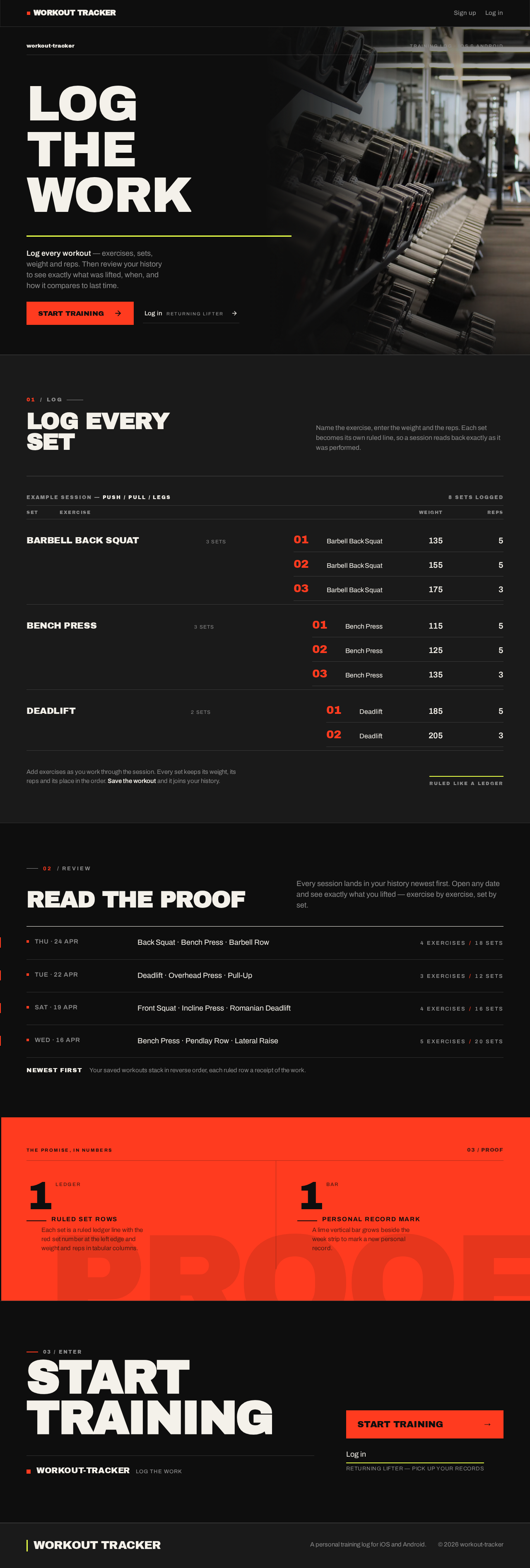

LOGTHEWORK
Log every workout — exercises, sets, weight and reps. Then review your history to see exactly what was lifted, when, and how it compares to last time.
01LOG
Log every
Set
Name the exercise, enter the weight and the reps. Each set becomes its own ruled line, so a session reads back exactly as it was performed.
Barbell Back Squat
3 sets- 01Barbell Back Squat135lb5reps
- 02Barbell Back Squat155lb5reps
- 03Barbell Back Squat175lb3reps
Bench Press
3 sets- 01Bench Press115lb5reps
- 02Bench Press125lb5reps
- 03Bench Press135lb3reps
Deadlift
2 sets- 01Deadlift185lb5reps
- 02Deadlift205lb3reps
02 / REVIEW
Read the proof
Every session lands in your history newest first. Open any date and see exactly what you lifted — exercise by exercise, set by set.
Back Squat · Bench Press · Barbell Row
Deadlift · Overhead Press · Pull-Up
Front Squat · Incline Press · Romanian Deadlift
Bench Press · Pendlay Row · Lateral Raise
Your saved workouts stack in reverse order, each ruled row a receipt of the work.
The promise, in numbers
- 1ledgerRULED SET ROWS
Each set is a ruled ledger line with the red set number at the left edge and weight and reps in tabular columns.
- 1barPERSONAL RECORD MARK
A lime vertical bar grows beside the week strip to mark a new personal record.
03 / Enter
StartTraining
LOGTHEWORK
Log every workout — exercises, sets, weight and reps. Then review your history to see exactly what was lifted, when, and how it compares to last time.
01LOG
Log every
Set
Name the exercise, enter the weight and the reps. Each set becomes its own ruled line, so a session reads back exactly as it was performed.
Barbell Back Squat
3 sets- 01Barbell Back Squat135lb5reps
- 02Barbell Back Squat155lb5reps
- 03Barbell Back Squat175lb3reps
Bench Press
3 sets- 01Bench Press115lb5reps
- 02Bench Press125lb5reps
- 03Bench Press135lb3reps
Deadlift
2 sets- 01Deadlift185lb5reps
- 02Deadlift205lb3reps
02 / REVIEW
Read the proof
Every session lands in your history newest first. Open any date and see exactly what you lifted — exercise by exercise, set by set.
Back Squat · Bench Press · Barbell Row
Deadlift · Overhead Press · Pull-Up
Front Squat · Incline Press · Romanian Deadlift
Bench Press · Pendlay Row · Lateral Raise
Your saved workouts stack in reverse order, each ruled row a receipt of the work.
The promise, in numbers
- 1ledgerRULED SET ROWS
Each set is a ruled ledger line with the red set number at the left edge and weight and reps in tabular columns.
- 1barPERSONAL RECORD MARK
A lime vertical bar grows beside the week strip to mark a new personal record.
03 / Enter
No comments yet. Be the first!