work-that-grade
 Deborah Alison
Build a "CGPA Coach" web app for university students. DESIGN: Use a clean, modern, mobile-first UI with big rounded cards, soft shadows, white background, and bottom navigation. Style should feel premium like Apple + Notion. The app must work perfectly on phone. CORE FEATURES: 1. User Authentication: Signup with Name, Email, Password, University, and Current Level. Login with Email and Password. Show "Welcome, [Name]" on the dashboard. 2. Dashboard: - Card 1: "My CGPA" showing current CGPA and progress bar to graduation - Card 2: "Goal Simulator" - User sets graduation goal: 1st Class, 2:1, 2:2. App calculates what average score they need in remaining courses to hit it. - Card 3: "Study Plan" - Based on goal and learning speed, calculate "You need to study X hours per week to reach your goal" - Card 4: "Reminders" - List of upcoming tests and assignments 3. Settings: - User can set "Learning Speed": Fast, Average, Slow - User can pick Reminder Tone: Hype, Guilt-trip, Sassy 4. Courses Page: - Add/Edit/Delete courses with: Course Code, Course Units, Test 1 Score, Test 2 Score, Exam Score - Auto calculate Grade for each course - Auto calculate Semester GPA and Overall CGPA - Show chart of CGPA progress over time - For each course show "Study Hours Needed: 6hrs to move from C to B" 5. Funny Reminders: - In-app notifications and email reminders for upcoming tests/assignments - Tone: Funny and Duolingo-style - Example reminders: "👀 Your 2:1 needs 4hrs this week, [Name]", "🔥 Study 1hr today and secure that B" TECH: Use React, Node.js, and PostgreSQL. Make database for Users, Courses, and Reminders. Deploy it so I get a shareable link.


Comments (0)
Sign in to leave a comment
System Requirements
System Requirements Document for work-that-grade
1. Introduction
The "CGPA Coach" is a web application designed for university students to help them manage their academic progress. It provides tools for tracking CGPA, setting academic goals, creating study plans, and receiving reminders for upcoming tests and assignments. The application is built with a clean, modern, mobile-first design to ensure ease of use on smartphones.
2. System Overview
The CGPA Coach app is a mobile-first web application that provides university students with a personalized dashboard to track their academic performance. It includes features for setting academic goals, managing courses, and receiving reminders. The app uses React for the front-end, Node.js for the back-end, and PostgreSQL for data storage. It is designed to be deployed with a shareable link for easy access.
2a. Product Interpretation and Delivery Boundary
The application is intended for university students, providing them with tools to manage their academic records and goals. It includes user authentication, a personalized dashboard, course management, and reminder notifications. The app is designed to be mobile-first, with a clean and modern interface inspired by Apple and Notion. The application is deployed with a shareable link, allowing students to access it easily.
2b. Source Content Inventory
Not applicable as there is no explicit content_source directive.
2c. Page Content and Component Coverage
Landing
- Information/State: Introduction to CGPA Coach, its purpose, and features.
- Primary Actions: Navigate to Sign Up or Login.
- Components: Hero section with oversized type and color blocks.
- States: Loading, success.
Sign Up
- Information/State: Form fields for Name, Email, Password, University, Current Level.
- Primary Actions: Submit form to create an account.
- Components: Input fields, submit button.
- States: Loading, success, error.
Login
- Information/State: Form fields for Email and Password.
- Primary Actions: Submit form to log in.
- Components: Input fields, submit button.
- States: Loading, success, error.
Dashboard
- Information/State: Current CGPA, graduation progress, goal simulation, study plan, reminders.
- Primary Actions: View CGPA details, set goals, view study plan, view reminders.
- Components: Cards for CGPA, Goal Simulator, Study Plan, Reminders.
- States: Loading, success, error.
Courses Page
- Information/State: Course details, grades, GPA calculations, progress chart.
- Primary Actions: Add, edit, delete courses; view study hours needed.
- Components: Course list, input fields, chart.
- States: Loading, success, error.
Reminders
- Information/State: List of upcoming tests and assignments.
- Primary Actions: View reminders, set reminder tones.
- Components: Reminder list, tone settings.
- States: Loading, success, error.
Settings
- Information/State: Learning speed and reminder tone preferences.
- Primary Actions: Update settings.
- Components: Dropdowns for learning speed and reminder tone.
- States: Loading, success, error.
3. Functional Requirements
- As a University Student, I should be able to sign up with my Name, Email, Password, University, and Current Level to create an account. (explicit)
- As a University Student, I should be able to log in with my Email and Password to access my dashboard. (explicit)
- As a University Student, I should see a personalized "Welcome, [Name]" greeting on my dashboard. (explicit)
- As a University Student, I should see my current CGPA and graduation progress on the dashboard. (explicit)
- As a University Student, I should be able to set a graduation goal and see the required average score to achieve it. (explicit)
- As a University Student, I should receive a study plan with weekly study-hours targets based on my goal and learning speed. (explicit)
- As a University Student, I should see reminders for upcoming tests and assignments. (explicit)
- As a University Student, I should be able to set my learning speed and reminder tone preferences. (explicit)
- As a University Student, I should be able to manage my courses, including adding, editing, and deleting them. (explicit)
- As a University Student, I should see my course grades, semester GPA, and overall CGPA automatically calculated. (explicit)
- As a University Student, I should see a chart of my CGPA progress over time. (explicit)
- As a University Student, I should see the study hours needed to improve my course grades. (explicit)
- As a University Student, I should receive funny, Duolingo-style reminders for upcoming tests and assignments. (explicit)
4. User Personas
- University Student: The primary user of the app, responsible for managing academic records, setting goals, configuring study preferences, and receiving reminders.
5. Core User Flows
-
Sign Up Flow
- The University Student accesses the Sign Up page.
- Fills in Name, Email, Password, University, and Current Level.
- Submits the form to create an account.
- Receives confirmation and is redirected to the Login page.
-
Login Flow
- The University Student accesses the Login page.
- Enters Email and Password.
- Submits the form to log in.
- Is redirected to the Dashboard with a personalized greeting.
-
Dashboard Interaction
- The University Student views the Dashboard.
- Sees current CGPA, graduation progress, and reminders.
- Sets a graduation goal and views the required average score.
- Receives a study plan with weekly study-hours targets.
-
Course Management
- The University Student accesses the Courses Page.
- Adds, edits, or deletes courses.
- Views course grades, semester GPA, and overall CGPA.
- Sees a chart of CGPA progress and study hours needed for grade improvement.
-
Reminder Management
- The University Student accesses the Reminders page.
- Views upcoming tests and assignments.
- Sets reminder tones and receives notifications.
-
Settings Configuration
- The University Student accesses the Settings page.
- Updates learning speed and reminder tone preferences.
6. Visuals Colors and Theme
- Muse: Haraldur Thorleifsson
- Palette:
- Background: #FFFFFF
- Surface: #F6F6F6
- Text: #333333
- Primary: #FF6B6B
- Accent: #FFD93D
- Muted: #CCCCCC
- Typography:
- Headings: Sora — Bold, large size
- Body: Outfit
- Scale: 1.25 modular, 48/34/24/16/14
- Shape Language: Chunky rounded cards, color-blocked sections
- Layout: Mobile-first, bottom navigation
- Imagery: Custom character and spot illustrations
7. Signature Design Concept
A full-width color block hero with oversized type introduces the CGPA Coach on the Landing page. The design uses primary and accent colors to highlight key interactive elements. Bottom navigation ensures ease of use, and playful hover effects add personality to the interface.
8. Interaction Model & Motion Direction
- Interaction Model: Animated
- Motion Tempo: Expressive
- Hero Dimensionality: Layered_2d
- Landing Hero Motion Brief: The hero section features a color-blocked background with oversized friendly type. Upon user interaction, elements animate with lively entrance animations and hover pops, providing interactive feedback. Reduced-motion settings simplify animations for accessibility.
9. Non-Functional Requirements
- The application must be mobile-first and work perfectly on smartphones. (explicit)
- The interface must be clean, modern, and premium, inspired by Apple and Notion. (explicit)
- The application must be deployed with a shareable link. (explicit)
- The application must use React, Node.js, and PostgreSQL. (explicit)
10. Tech Stack
- Front-end: React
- Back-end: Node.js
- Database: PostgreSQL
- Deployment: Shareable link
11. Assumptions and Constraints
- The application is exclusively for university students. (explicit)
- The design must adhere to the specified visual style and layout constraints. (explicit)
- The application must support only the specified graduation goals, learning speeds, and reminder tones. (explicit)
12. Glossary
- CGPA: Cumulative Grade Point Average
- GPA: Grade Point Average
- 1st Class, 2:1, 2:2: Graduation classifications in the UK education system
- Reminder Tone: The style of notification messages (Hype, Guilt-trip, Sassy)
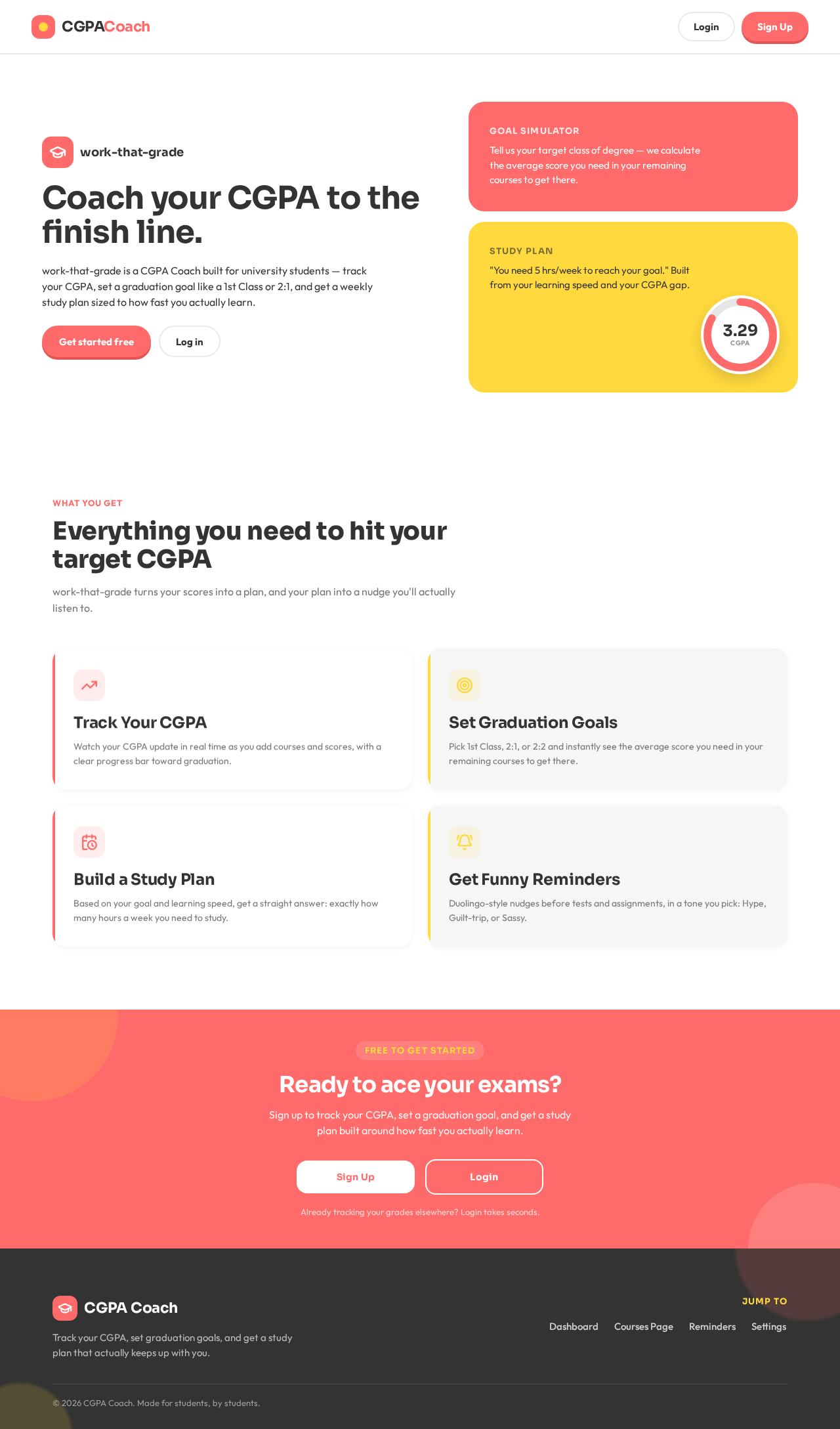
CoachyourCGPAtothefinishline.
work-that-grade is a CGPA Coach built for university students — track your CGPA, set a graduation goal like a 1st Class or 2:1, and get a weekly study plan sized to how fast you actually learn.
Tell us your target class of degree — we calculate the average score you need in your remaining courses to get there.
"You need 5 hrs/week to reach your goal." Built from your learning speed and your CGPA gap.
Everything you need to hit your target CGPA
work-that-grade turns your scores into a plan, and your plan into a nudge you'll actually listen to.
Track Your CGPA
Watch your CGPA update in real time as you add courses and scores, with a clear progress bar toward graduation.
Set Graduation Goals
Pick 1st Class, 2:1, or 2:2 and instantly see the average score you need in your remaining courses to get there.
Build a Study Plan
Based on your goal and learning speed, get a straight answer: exactly how many hours a week you need to study.
Get Funny Reminders
Duolingo-style nudges before tests and assignments, in a tone you pick: Hype, Guilt-trip, or Sassy.
CoachyourCGPAtothefinishline.
work-that-grade is a CGPA Coach built for university students — track your CGPA, set a graduation goal like a 1st Class or 2:1, and get a weekly study plan sized to how fast you actually learn.
Tell us your target class of degree — we calculate the average score you need in your remaining courses to get there.
"You need 5 hrs/week to reach your goal." Built from your learning speed and your CGPA gap.
Everything you need to hit your target CGPA
work-that-grade turns your scores into a plan, and your plan into a nudge you'll actually listen to.
Track Your CGPA
Watch your CGPA update in real time as you add courses and scores, with a clear progress bar toward graduation.
Set Graduation Goals
Pick 1st Class, 2:1, or 2:2 and instantly see the average score you need in your remaining courses to get there.
Build a Study Plan
Based on your goal and learning speed, get a straight answer: exactly how many hours a week you need to study.
Get Funny Reminders
Duolingo-style nudges before tests and assignments, in a tone you pick: Hype, Guilt-trip, or Sassy.
No comments yet. Be the first!