word-unscrambler
 prabhat rahi
Act as a legal compliance specialist for web applications. Generate a complete, legally compliant, and easy-to-read Privacy Policy and Terms of Service for my browser-based "Word Unscramble" game website. The website runs entirely client-side (in the user's browser), does not require user accounts, might use third-party tools like Google Analytics or Google AdSense in the future, and is built for users globally (compliant with basic GDPR and CCPA principles). Please format the output in clean HTML/Tailwind CSS sections so I can embed it directly into a webpage modal or dedicated policy pages. ### 1. PRIVACY POLICY REQUIREMENTS: - Effective Date: Use the current date. - Data Collection: Clearly state that the website does not collect personal information (no names, no emails, no accounts). It strictly processes game data (scrambling words) locally in the browser. - Third-Party Services: Explain that third-party tools (like Google Analytics or AdSense) may collect anonymous usage data, IP addresses, and cookies to analyze traffic and display ads. Include a standard note on how users can disable cookies in their browsers. - Children's Privacy: Add a COPPA-compliant clause stating the game is family-friendly and does not knowingly collect data from children under 13. ### 2. TERMS OF SERVICE REQUIREMENTS: - Acceptance of Terms: A simple clause stating that by playing the game, users agree to these terms. - Intellectual Property: State that the game logic, design, UI, and custom word banks belong to the website owner. - Prohibited Activities: Explicitly ban users from deploying automated bots, web scrapers, or cheating scripts to manipulate the game or extract the word bank. - Limitation of Liability: A robust "As-Is" disclaimer stating that the owner is not liable for any website downtime, loss of high scores, data bugs, or browser glitches. Generate these documents side-by-side or in clearly separated, copy-pasteable blocks using professional yet simple language.


Comments (0)
Sign in to leave a comment
System Requirements
System Requirements Document for word-unscrambler
1. Introduction
word-unscrambler is a browser-based word unscrambler for a broad, family-friendly audience. It processes word data locally in the visitor’s browser and requires no user accounts. The current deliverable includes a public entry experience and clear, copy-pasteable Privacy Policy and Terms of Service content in HTML/Tailwind CSS sections.
The legal content is intended to explain the site’s local processing, possible future third-party services, children’s privacy, acceptable use, intellectual property, and liability in professional, simple language. It is designed for a global audience and should reflect basic GDPR and CCPA principles.
2. System Overview
The site runs entirely client-side in the user’s browser. Word data is processed locally; the site does not collect personal information such as names or email addresses and does not require accounts. Third-party tools such as Google Analytics or Google AdSense are possible future integrations, not current integrations.
The current experience has an anonymous public entry and separate, independently usable legal content: a Privacy Policy and Terms of Service. The legal sections must be suitable for embedding in a webpage modal or dedicated policy pages. The Website Owner supplies and uses the legal content; Site Visitors read it.
The site also carries a comprehensive footer and the informational pages standard web utilities provide. An “Other pages / Related Tools” section sits above the footer and links to Jumble Solver, Word Finder, Words with Friends Cheat, Word Solver, and Wordle Solver. The bottom footer carries a copyright notice (e.g., © 2026 WordUnscrambler.me) and quick text links for WordUnscrambler.me, Word Scramble, Word Descrambler, Sitemap, About, Contact, and Privacy. Sitemap, About, and Contact are separate, accessible pages; Contact provides a route for user feedback and reports. The footer and related-tools links are navigation only and add no server-side processing.
Current scope does not include user accounts, server-side word processing, or third-party analytics or advertising integrations. The Terms must prohibit automated bots, web scrapers, and cheating scripts when used to manipulate the site or extract its word bank.
The runnable inventory is a single frontend service (React application UI). All pages, the footer, and the local unscrambling logic are delivered by that client-side application; no additional service, queue worker, or ingress route is required for the footer, related-tools links, or the informational pages.
2a. Product Interpretation and Delivery Boundary
The public entry introduces the browser-based word unscrambler and provides access to the legal documents. The word unscrambler’s word processing remains in the browser; no account or server-side identity is required. The legal documents are separate, clearly labeled, copy-pasteable HTML/Tailwind CSS sections. They may be presented in a modal or on dedicated policy pages.
The current Privacy Policy describes possible future analytics or advertising services without representing them as active integrations. No future capability is included in current acceptance criteria.
The footer, the “Other pages / Related Tools” section, and the Sitemap, About, and Contact pages are current deliverables. They are navigational and informational surfaces: they do not introduce accounts, tracking, server-side word processing, or active analytics/advertising. The related-tools and quick links are presented as site navigation; where a linked destination is not part of this deliverable, the link is presented as a labeled navigation entry without implying an active integration.
2b. Page Content and Component Coverage
Landing
- Information and state: Public introduction to the browser-based word unscrambler, explaining that word data is processed locally in the browser and that accounts are not required.
- Primary actions: Enter word data and request unscrambling; navigate to the Privacy Policy or Terms of Service.
- Supporting actions: None beyond access to the legal documents.
- Domain entities: Word input, local unscrambling result, legal-document links.
- Component responsibilities: Present the word unscrambler entry area and its result; provide clear links to each legal document; render the shared “Other pages / Related Tools” section above the footer and the shared bottom footer.
- States: On initial load, show the entry area. With no word entered, show the input ready for use. On successful processing, show the result in the browser. If processing cannot produce a result, keep the input available so the visitor can revise it and try again. If the page fails to load, the visitor can retry loading it. Legal links lead to their respective document sections. The related-tools section and footer remain visible and usable at 375px, 768px, and 1280px, wrapping rather than clipping.
Shared Footer and Related Tools (nested under Landing)
- Information and state: An “Other pages / Related Tools” section above the footer listing Jumble Solver, Word Finder, Words with Friends Cheat, Word Solver, and Wordle Solver; a bottom footer with the copyright notice (e.g., © 2026 WordUnscrambler.me) and quick text links for WordUnscrambler.me, Word Scramble, Word Descrambler, Sitemap, About, Contact, and Privacy.
- Primary actions: Follow a related-tool link; follow a footer quick link.
- Supporting actions: Return to the public entry via the WordUnscrambler.me link.
- Domain entities: Related-tool link list, copyright notice, footer quick-link list.
- Component responsibilities: One shared footer component reused across every page rather than duplicated per page; keep the related-tools list and quick links clearly labeled, keyboard reachable, and visually consistent with the purple theme.
- States: Show both the related-tools section and the footer on every page. If a linked destination fails to load, the visitor can retry or return to the public entry. With reduced motion, the footer and related-tools links remain fully readable and usable in a static arrangement.
Legal
- Information and state: A clear legal-document index that distinguishes the Privacy Policy from the Terms of Service.
- Primary actions: Open either document.
- Supporting actions: Return to the public entry.
- Domain entities: Privacy Policy, Terms of Service.
- Component responsibilities: Keep the two documents separately identifiable and reachable; render the shared related-tools section and footer.
- States: Show both document choices when loaded. If a document destination fails to load, allow the visitor to retry or return to the legal index. The shared related-tools section and footer remain visible and usable.
Privacy Policy
- Information and state: A self-contained policy section with an effective date of October 18, 2026; no-personal-information and local-processing statements (text/letters processed locally in the browser, no tracking, no account requirement); possible future third-party service disclosures; cookie guidance including safe cookie/local storage usage; and children’s privacy.
- Primary actions: Read the policy.
- Supporting actions: Navigate to the Terms of Service or return to the legal index; use the shared related-tools section and footer.
- Domain entities: Effective date, local word processing, no tracking, safe cookie/local storage usage, third-party services, cookies, children’s privacy.
- Component responsibilities: Present the policy as clean, readable HTML/Tailwind CSS suitable for direct embedding in a modal or dedicated page; render the shared related-tools section and footer.
- States: Show the complete policy when loaded. If content fails to load, allow retry or return to the legal index. The shared related-tools section and footer remain visible and usable.
Terms of Service
- Information and state: A self-contained terms section covering acceptance, intellectual property, prohibited activities, and the as-is limitation of liability, written as terms of use for a browser-based word tool.
- Primary actions: Read the terms.
- Supporting actions: Navigate to the Privacy Policy or return to the legal index; use the shared related-tools section and footer.
- Domain entities: Acceptance of terms, site intellectual property, prohibited activities, liability disclaimer.
- Component responsibilities: Present the terms as clean, readable HTML/Tailwind CSS suitable for direct embedding in a modal or dedicated page; render the shared related-tools section and footer.
- States: Show the complete terms when loaded. If content fails to load, allow retry or return to the legal index. The shared related-tools section and footer remain visible and usable.
Sitemap
- Information and state: A basic site-navigation page listing the site’s pages and destinations, including the public entry, the legal documents, and the informational pages.
- Primary actions: Open any listed destination.
- Supporting actions: Return to the public entry.
- Domain entities: Site page list, navigation destinations.
- Component responsibilities: Present the page list as clean, readable HTML/Tailwind CSS consistent with the purple theme; render the shared related-tools section and footer.
- States: Show the complete list when loaded. If a listed destination fails to load, the visitor can retry or return to the public entry. The shared related-tools section and footer remain visible and usable.
About
- Information and state: A basic informational page describing the browser-based word unscrambler, its local processing, and the absence of accounts and tracking.
- Primary actions: Read the page.
- Supporting actions: Navigate to the Privacy Policy, Terms of Service, or Contact; return to the public entry.
- Domain entities: Product description, local processing, no accounts, no tracking.
- Component responsibilities: Present the information as clean, readable HTML/Tailwind CSS consistent with the purple theme; render the shared related-tools section and footer.
- States: Show the complete page when loaded. If content fails to load, allow retry or return to the public entry. The shared related-tools section and footer remain visible and usable.
Contact
- Information and state: A basic page for user feedback and reports about the site, presented entirely client-side with no account requirement and no collection of personal information such as names or emails.
- Primary actions: Read the feedback/report guidance and submit feedback or a report through the client-side route the page provides.
- Supporting actions: Navigate to the Privacy Policy or Sitemap; return to the public entry.
- Domain entities: Feedback, reports, client-side submission guidance.
- Component responsibilities: Present the feedback/report guidance as clean, readable HTML/Tailwind CSS consistent with the purple theme; render the shared related-tools section and footer.
- States: Show the guidance when loaded. If a submission cannot be completed, keep the visitor’s input available so it can be revised and retried. If content fails to load, allow retry or return to the public entry. The shared related-tools section and footer remain visible and usable.
Privacy
- Information and state: The footer quick link labeled “Privacy” resolves to the site’s privacy content (the Privacy Policy).
- Primary actions: Open the privacy content.
- Supporting actions: Return to the public entry.
- Domain entities: Privacy Policy content.
- Component responsibilities: Keep the footer quick link clearly labeled and reachable; render the shared related-tools section and footer.
- States: Show the privacy content when loaded. If it fails to load, allow retry or return to the public entry.
Related Tools and Footer Quick-Link Destinations
- Information and state: The related-tools destinations (Jumble Solver, Word Finder, Words with Friends Cheat, Word Solver, Wordle Solver) and the footer quick-link destinations (WordUnscrambler.me, Word Scramble, Word Descrambler) are labeled navigation entries reachable from the shared related-tools section and footer.
- Primary actions: Open the selected destination.
- Supporting actions: Return to the public entry.
- Domain entities: Related-tool entries, footer quick-link entries.
- Component responsibilities: Keep each entry clearly labeled and reachable from the shared footer; do not imply an active third-party integration or tracking.
- States: Show the entries on every page. If a destination fails to load, the visitor can retry or return to the public entry.
3. Functional Requirements
-
As a Site Visitor, I should be able to use the word unscrambler in my browser without an account.
- Provenance:
explicit - Trigger/input: The visitor enters word data and requests unscrambling.
- Access: Public and anonymous; no account is required.
- Observable result: Word data is processed locally in the browser and the result is shown there.
- Failure and recovery: If processing cannot produce a result, the visitor can revise the input and try again. If the page fails to load, the visitor can retry.
- Continuation: The visitor can continue using the word unscrambler or navigate to either legal document.
- Provenance:
-
As a Site Visitor, I should be able to read a Privacy Policy that states the site does not collect personal information and processes word data locally.
- Provenance:
explicit - Trigger/input: The visitor opens the Privacy Policy from the public entry or legal index.
- Access: Public and anonymous.
- Observable result: The policy states that the site does not collect personal information, including names or emails, does not require accounts, and processes word data locally in the browser.
- Failure and recovery: If the policy does not load, the visitor can retry or return to the legal index.
- Continuation: The visitor can read the Terms of Service or return to the word unscrambler.
- Provenance:
-
As a Site Visitor, I should be able to read the Privacy Policy’s third-party services and cookie disclosure.
- Provenance:
explicit - Trigger/input: The visitor reads the Privacy Policy.
- Access: Public and anonymous.
- Observable result: The policy explains that third-party tools such as Google Analytics or Google AdSense may be used in the future and may collect anonymous usage data, IP addresses, and cookies to analyze traffic and display ads. It explains that users can disable cookies through their browser settings. The policy does not imply these tools are currently integrated.
- Failure and recovery: If the policy does not load, the visitor can retry or return to the legal index.
- Continuation: The visitor can continue reading the policy or navigate to the Terms of Service.
- Provenance:
-
As a Site Visitor, I should be able to read the Privacy Policy’s children’s privacy clause.
- Provenance:
explicit - Trigger/input: The visitor reads the Privacy Policy.
- Access: Public and anonymous.
- Observable result: The policy states that the site is family-friendly and does not knowingly collect data from children under 13.
- Failure and recovery: If the policy does not load, the visitor can retry or return to the legal index.
- Continuation: The visitor can continue reading the policy or navigate to the Terms of Service.
- Provenance:
-
As a Site Visitor, I should be able to read the Terms of Service and understand that using the site means accepting them.
- Provenance:
explicit - Trigger/input: The visitor uses the site or opens the Terms of Service.
- Access: Public and anonymous.
- Observable result: The terms state that by playing the game, users agree to the terms.
- Failure and recovery: If the terms do not load, the visitor can retry or return to the legal index.
- Continuation: The visitor can continue using the site or read the Privacy Policy.
- Provenance:
-
As a Site Visitor, I should be able to read who owns the site’s intellectual property.
- Provenance:
explicit - Trigger/input: The visitor reads the Terms of Service.
- Access: Public and anonymous.
- Observable result: The terms state that the game logic, design, UI, and custom word banks belong to the website owner.
- Failure and recovery: If the terms do not load, the visitor can retry or return to the legal index.
- Continuation: The visitor can continue reading the terms or return to the word unscrambler.
- Provenance:
-
As a Site Visitor, I should be able to understand which activities the Terms of Service prohibit.
- Provenance:
explicit - Trigger/input: The visitor reads the Terms of Service.
- Access: Public and anonymous.
- Observable result: The terms explicitly prohibit deploying automated bots, web scrapers, or cheating scripts to manipulate the site or extract the word bank.
- Failure and recovery: If the terms do not load, the visitor can retry or return to the legal index.
- Continuation: The visitor can continue reading the terms or return to the word unscrambler.
- Provenance:
-
As a Site Visitor, I should be able to read the as-is limitation-of-liability disclaimer.
- Provenance:
explicit - Trigger/input: The visitor reads the Terms of Service.
- Access: Public and anonymous.
- Observable result: The terms state that the site is provided “as is” and that the owner is not liable for website downtime, loss of high scores, data bugs, or browser glitches.
- Failure and recovery: If the terms do not load, the visitor can retry or return to the legal index.
- Continuation: The visitor can continue reading the terms or return to the word unscrambler.
- Provenance:
-
As a Site Visitor, I should be able to reach the related tools and footer quick links from any page.
- Provenance:
explicit - Trigger/input: The visitor scrolls to the “Other pages / Related Tools” section above the footer or to the bottom footer.
- Access: Public and anonymous; no account is required.
- Observable result: The related-tools section lists Jumble Solver, Word Finder, Words with Friends Cheat, Word Solver, and Wordle Solver. The bottom footer shows the copyright notice (e.g., © 2026 WordUnscrambler.me) and quick text links for WordUnscrambler.me, Word Scramble, Word Descrambler, Sitemap, About, Contact, and Privacy. Each entry is clearly labeled and reachable.
- Failure and recovery: If a linked destination fails to load, the visitor can retry or return to the public entry.
- Continuation: The visitor can continue using the word unscrambler or open any listed destination.
- Provenance:
-
As a Site Visitor, I should be able to open the Sitemap, About, and Contact pages.
- Provenance:
explicit - Trigger/input: The visitor selects Sitemap, About, or Contact from the footer.
- Access: Public and anonymous; no account is required.
- Observable result: Sitemap lists the site’s pages and destinations for navigation; About describes the browser-based word unscrambler and its local processing; Contact provides guidance for user feedback and reports.
- Failure and recovery: If a page fails to load, the visitor can retry or return to the public entry. If a Contact submission cannot be completed, the visitor’s input stays available for revision and retry.
- Continuation: The visitor can navigate to any other listed page or return to the word unscrambler.
- As a Site Visitor, I should be able to read that text/letters are processed locally with no tracking or account requirement and that cookie/local storage use is safe.
- Provenance:
explicit - Trigger/input: The visitor opens the Privacy Policy (including via the footer “Privacy” link).
- Access: Public and anonymous.
- Observable result: The policy states that text/letters are processed locally in the browser, that no tracking is used, that no account is required, and that any cookie or local storage usage is safe and described.
- Failure and recovery: If the policy does not load, the visitor can retry or return to the legal index.
- Continuation: The visitor can continue reading the policy or navigate to the Terms of Service.
- As a Website Owner, I should be able to use the Privacy Policy and Terms of Service as clearly separated, copy-pasteable HTML/Tailwind CSS sections.
- Provenance:
explicit - Trigger/input: The owner takes the generated policy content for use in the site.
- Access: The content is delivered for owner use; no account or owner-only application access is required.
- Observable result: The Privacy Policy and Terms of Service are separate, clearly labeled blocks suitable for embedding in a webpage modal or dedicated policy pages, written in professional, simple language.
- Failure and recovery: If a block is incomplete or not clearly separated, the owner can identify and use the corresponding complete section independently.
- Continuation: The owner can embed either or both sections in the intended site context.
4. User Personas
Site Visitor
- Product context: A public visitor to a browser-based word unscrambler intended for a broad, family-friendly audience.
- Primary goal: Unscramble words locally in the browser and understand the site’s privacy and use terms.
- Distinct responsibilities: Provide word data for local processing; read the Privacy Policy to understand local processing, no tracking, safe cookie/local storage usage, possible future third-party data collection, cookie controls, and children’s privacy; read the Terms of Service to understand acceptance, ownership, prohibited activities, and the as-is disclaimer; use the related-tools section and footer quick links to reach the Sitemap, About, Contact, and other listed destinations.
- Relevant inputs or decisions: Word data to unscramble; whether to read either or both legal documents; which related tool or footer quick link to open; feedback or reports to send through Contact; browser cookie settings if the visitor chooses to disable cookies.
- Interactions with other accepted participants: The visitor reads the legal content prepared for the site by the Website Owner. No account or direct exchange of personal information is required.
- Observable success: The visitor sees a local unscrambling result, can access both clearly separated legal documents, and can reach the related tools, Sitemap, About, and Contact from the shared footer on any page.
Website Owner
- Product context: The owner of the browser-based word unscrambler and its legal content.
- Primary goal: Provide clear Privacy Policy and Terms of Service content that can be embedded directly in the site.
- Distinct responsibilities: Use the policy sections to describe local processing, no tracking, and the absence of personal information collection; disclose safe cookie/local storage usage and possible future third-party services and cookie controls; state the children’s privacy clause; set out acceptance, intellectual property, prohibited activities, and liability terms; and provide the shared footer, related-tools section, and the Sitemap, About, and Contact pages.
- Relevant inputs or decisions: The legal content and its placement in a modal or dedicated policy pages; the related-tool and footer quick-link labels and destinations.
- Interactions with other accepted participants: Makes the legal content and the informational pages available for Site Visitors to read.
- Observable success: Both documents are complete, clearly separated, professionally and simply worded, and usable as HTML/Tailwind CSS sections; the footer and related-tools section appear consistently on every page; Sitemap, About, and Contact are reachable and usable.
5. Core User Flows
1. Unscramble a word
- The Site Visitor opens Landing anonymously.
- The visitor enters word data in the unscrambler input and requests unscrambling.
- The browser processes the word data locally and displays the result.
- If processing cannot produce a result, the visitor revises the input and tries again. If the page fails to load, the visitor retries loading it.
- The visitor can continue using the unscrambler or open Privacy Policy or Terms of Service.
2. Read the Privacy Policy
- The Site Visitor opens Landing and selects the Privacy Policy link, or opens Legal and selects Privacy Policy.
- Privacy Policy displays the effective date, the no-personal-information and local-processing statements, the possible future third-party services and cookie disclosure, and the children’s privacy clause.
- The visitor reads the policy. If it fails to load, the visitor retries or returns to Legal.
- The visitor may continue to Terms of Service or return to Landing.
3. Read the Terms of Service
- The Site Visitor opens Landing and selects the Terms of Service link, or opens Legal and selects Terms of Service.
- Terms of Service displays acceptance of terms, ownership of the game logic, design, UI, and custom word banks, the prohibition on bots, scrapers, and cheating scripts for manipulation or word-bank extraction, and the as-is liability disclaimer.
- The visitor reads the terms. If they fail to load, the visitor retries or returns to Legal.
- The visitor may continue using the site or return to Landing.
4. Prepare and use the legal content
- The Website Owner receives the Privacy Policy and Terms of Service as separate, clearly labeled HTML/Tailwind CSS sections.
- The owner selects the intended placement: a webpage modal or dedicated policy pages.
- The owner embeds the sections so Site Visitors can open and read each document separately.
- Site Visitors read the available documents from Landing, Legal, Privacy Policy, or Terms of Service.
5. Navigate the footer and related tools
- The Site Visitor scrolls to the bottom of any page.
- The “Other pages / Related Tools” section lists Jumble Solver, Word Finder, Words with Friends Cheat, Word Solver, and Wordle Solver.
- The bottom footer shows the copyright notice (e.g., © 2026 WordUnscrambler.me) and quick text links for WordUnscrambler.me, Word Scramble, Word Descrambler, Sitemap, About, Contact, and Privacy.
- The visitor selects a related tool or quick link and the corresponding destination opens. If a destination fails to load, the visitor retries or returns to Landing.
- The visitor can continue using the word unscrambler or open another listed destination.
6. Find site information and send feedback
- The Site Visitor selects Sitemap, About, or Contact from the footer.
- Sitemap lists the site’s pages and destinations; About describes the browser-based word unscrambler and its local processing; Contact presents guidance for feedback and reports.
- On Contact, the visitor submits feedback or a report through the client-side route the page provides. If the submission cannot be completed, the input stays available for revision and retry.
- The visitor returns to Landing or opens another listed page.
6. Visuals Colors and Theme
Muse: Aaron Draplin.
Headline: “UNSCRAMBLE / WORDS”
Use a bold, hand-built wordcraft style for the word unscrambler and a calm, trustworthy reading treatment for legal content.
- Palette: Dark-mode plum ground
#542078; deep aubergine surface#35134D; cream text#FFF8E8; raspberry primary#E24A73; mustard accent#F2B544; muted lavender#C7A9D8; teal#39B9B5; leaf green#8EBD4F. - Contrast roles: Use cream on plum or deep plum on cream for body text. Reserve raspberry and mustard for key actions, section markers, and letter tiles. Use teal and leaf green as small tile accents.
- Typography: Alfa Slab One for headings and Fira Sans for body text.
- Type scale: Display 48px on mobile to 88px on desktop; section headings 30–40px; subsection headings 21–24px; body 16–18px with 1.6 line-height; labels 12–14px.
- Shape language: Chunky rectangular letter tiles with slightly varied rotations for decoration, thick dark outlines, squared-off corners, and stamp-like section labels. Keep text containers square and stable; do not rotate legal text, labels, controls, or important numbers.
- Layout: Use an asymmetric, poster-like landing composition. At 375px, stack the hero and legal sections. At 768px, use a two-column hero only when labels and controls remain fully inside their containers. At 1280px, allow display type and tile arrangement to occupy the broad upper field. Present the legal documents as clearly separated, copy-pasteable sections with strong headings, numbered clauses, and a comfortable reading measure.
- Footer and related tools: Keep the current clean purple theme. Present the “Other pages / Related Tools” section above the footer as a labeled row of related-tool links (Jumble Solver, Word Finder, Words with Friends Cheat, Word Solver, Wordle Solver) on a deep aubergine surface with cream text and stamp-like labels. Present the bottom footer with the copyright notice (e.g., © 2026 WordUnscrambler.me) and the quick text links (WordUnscrambler.me, Word Scramble, Word Descrambler, Sitemap, About, Contact, Privacy) as upright, fully readable text separated by thick rules. At 375px the related-tool and quick-link rows wrap into stacked lines; at 768px and 1280px they may sit in multiple columns. No link label may clip or be covered by decoration.
- Imagery: Typography and letter tiles are the primary imagery. Use flat-color tile faces, subtle paper grain, and occasional thick-line word-game symbols. Do not add unrelated stock photography or let decoration overlap readable text or controls.
- Responsive integrity: At 375px, 768px, and 1280px, keep all readable text and controls fully within the viewport and their containers. Wrap or scale content to fit; decoration must not cover text or controls. Any moving or scrollable content must allow every item to become fully readable. With reduced motion, provide a usable static arrangement; rows may wrap or scroll so each item can be brought fully into view.
- Avoid: Do not reproduce the reference image’s exact composition. Do not use blue-indigo as the primary accent on white, generic SaaS gradients, gradient blobs, or identical hover-lift card grids. Keep legal pages visually quiet, with stable reading surfaces and strong contrast.
7. Signature Design Concept
Create a left-aligned, plum-ground public entry with the two-line display headline “UNSCRAMBLE / WORDS” in cream. A row of oversized, individually colored rectangular letter tiles acts as a hand-built wordmark, positioned beside or above the unscrambler workbench without obscuring it.
Place the word-entry control and mustard action button inside a solid cream or deep-aubergine workbench panel with a thick outline. Keep the input clearly labeled and align the panel to the headline’s grid. Use the accepted local unscrambling input and result as the only functional content in the workbench; the visual concept adds no new behavior or destination.
8. Interaction Model & Motion Direction
Interaction Model: Animated
Motion Tempo: restrained
Hero Dimensionality: flat
Landing Hero Motion Brief
- Focal subject: The two-line “UNSCRAMBLE / WORDS” headline and its chunky, multicolored letter tiles.
- Input → transformation → outcome thesis: A visitor enters word data; the browser processes it locally; the unscrambling result appears in the workbench.
- Motion vocabulary: Letter tiles snap into place on load. Actions receive immediate, tactile state feedback. Keep movement restrained and avoid decorative motion behind text.
- Composed first frame: Show the left-aligned headline and tile wordmark above or beside the outlined workbench, with the input and mustard action button fully visible and unobstructed.
- Reduced-motion state: Use a fully static arrangement. Keep all content usable and readable without animation.
9. Non-Functional Requirements
-
Client-side processing
- Requirement: Word data is processed locally in the user’s browser; the site runs entirely client-side.
- Provenance:
explicit - Rationale: This is a hard delivery and data-processing constraint.
-
No accounts or personal information collection
- Requirement: The site does not require accounts and does not collect personal information such as names or emails.
- Provenance:
explicit - Rationale: This is an explicit privacy and access constraint.
-
Global audience and privacy principles
- Requirement: The legal content is written for a global audience and follows basic GDPR and CCPA principles.
- Provenance:
explicit - Rationale: The user specified these as legal-content goals.
-
Legal content usability
- Requirement: The Privacy Policy and Terms of Service are easy to read, professionally and simply worded, clearly separated, and suitable for direct embedding as HTML/Tailwind CSS sections in a modal or dedicated policy pages.
- Provenance:
explicit - Rationale: This is the requested content format and use.
-
Responsive readability and reduced motion
- Requirement: Readable text and controls remain whole and usable at 375px, 768px, and 1280px; reduced-motion preferences receive a usable static arrangement. This includes the related-tools section, the footer copyright notice, and every footer quick link.
- Provenance:
explicit - Rationale: Required by the supplied creative direction.
-
Shared footer consistency
- Requirement: One shared footer component, including the “Other pages / Related Tools” section and the bottom footer, is reused across every page rather than duplicated per page, and its styling matches the current clean purple theme.
- Provenance:
explicit - Rationale: The user requested a comprehensive footer and consistent styling across the site.
-
Client-side informational pages
- Requirement: Sitemap, About, and Contact are separate, accessible pages delivered entirely client-side, with no account requirement, no tracking, and no collection of personal information such as names or emails.
- Provenance:
explicit - Rationale: The user required these pages while keeping the site fully client-side.
10. Tech Stack
- Client-side browser application: Required by the source; word data processing remains in the browser.
- Frontend service: A single React application UI service (the
frontendservice indocker-compose.yml) delivers the landing workbench, the legal documents, the Sitemap, About, and Contact pages, and the shared footer and related-tools section. No additional container, queue worker, or ingress route is needed for these pages. - HTML and Tailwind CSS: Required format for the legal sections, which must be suitable for direct embedding in a modal or dedicated policy pages; also used for the footer, related-tools section, and informational pages.
- Server-side services, accounts, and third-party integrations: Not part of the current scope. Google Analytics and Google AdSense are possible future services only.
11. Assumptions and Constraints
- Explicit constraint: The site runs entirely client-side and does not require user accounts.
- Explicit constraint: Word data is processed locally in the browser; the site does not collect personal information such as names or emails.
- Explicit constraint: Third-party tools such as Google Analytics or Google AdSense are future possibilities, not current integrations.
- Explicit constraint: The Privacy Policy must use the current date. For this document, the effective date is October 18, 2026.
- Explicit constraint: The Terms of Service must prohibit automated bots, web scrapers, and cheating scripts when used to manipulate the site or extract the word bank.
- Explicit constraint: The as-is disclaimer must identify website downtime, loss of high scores, data bugs, and browser glitches.
- Explicit constraint: The Privacy Policy must state that text/letters are processed locally in the browser with no tracking and no account requirement, and must mention safe cookie/local storage usage.
- Explicit constraint: The “Other pages / Related Tools” section above the footer must link to Jumble Solver, Word Finder, Words with Friends Cheat, Word Solver, and Wordle Solver.
- Explicit constraint: The bottom footer must contain a copyright notice (e.g., © 2026 WordUnscrambler.me) and quick text links for WordUnscrambler.me, Word Scramble, Word Descrambler, Sitemap, About, Contact, and Privacy.
- Explicit constraint: Sitemap, About, and Contact must exist as separate accessible pages; Contact provides a route for user feedback and reports.
- Explicit constraint: Styling must match the current clean purple theme and remain fully responsive on mobile and desktop.
- Scope boundary: No additional account, server-side processing, or active analytics/advertising capability is included. The footer, related-tools links, and informational pages are client-side navigation and content only.
12. Glossary
- Local processing: Processing word data in the visitor’s browser rather than sending it to a server.
- Third-party service: An external tool such as Google Analytics or Google AdSense that may be used in the future.
- As-is disclaimer: A statement that the site is provided without a guarantee of uninterrupted or error-free operation, including the specified downtime, high-score loss, data bug, and browser glitch cases.
- Related tools: The “Other pages / Related Tools” section above the footer listing Jumble Solver, Word Finder, Words with Friends Cheat, Word Solver, and Wordle Solver.
- Footer quick links: The bottom footer text links for WordUnscrambler.me, Word Scramble, Word Descrambler, Sitemap, About, Contact, and Privacy, shown alongside the copyright notice.
- Local storage: Browser-side storage used by the site, described in the Privacy Policy as safe usage with no tracking and no account requirement.
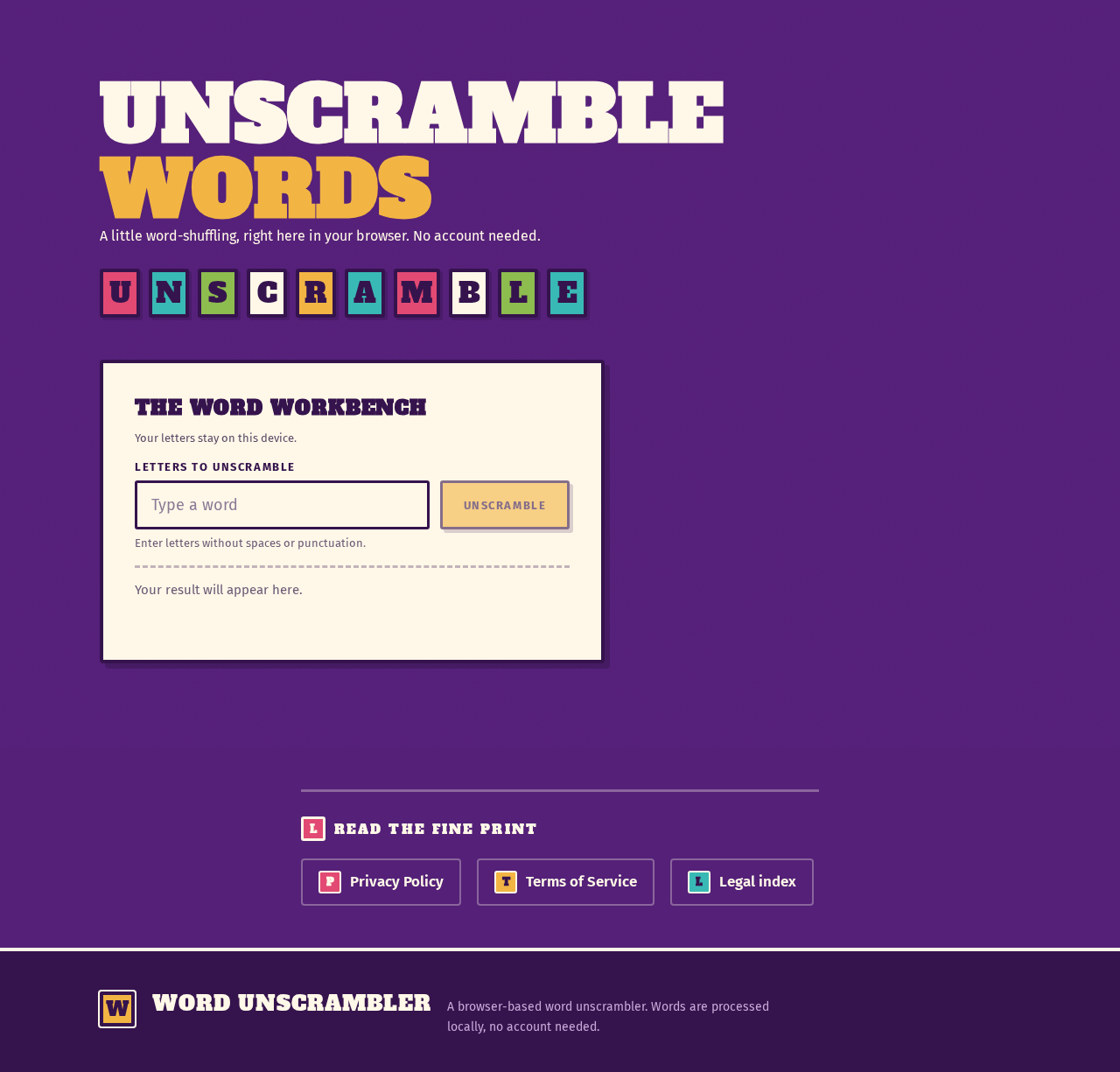
UNSCRAMBLEWORDS
A little word-shuffling, right here in your browser. No account needed.
The word workbench
Your letters stay on this device.
Enter letters without spaces or punctuation.
Your result will appear here.
Read the fine print
UNSCRAMBLEWORDS
A little word-shuffling, right here in your browser. No account needed.
The word workbench
Your letters stay on this device.
Enter letters without spaces or punctuation.
Your result will appear here.
Read the fine print
No comments yet. Be the first!