word-unscrambler-unscramble
 prabhat rahi
Create a complete single-page web application for "Word Unscrambler" (domain: unscramble.website) using HTML5, CSS3, and JavaScript, fulfilling all website launch requirements: 1. SEO & META TAGS (<head>): - Set title: "Word Unscrambler - Solve Word Scrambles & Find Hidden Words" - Include meta description, keywords ("word unscrambler, unscramble words, anagram solver, word finder"), canonical link ("https://unscramble.website/"), and Open Graph social sharing tags. - Include favicon tag linking to "/favicon.ico". - Include Cookie Consent CDN CSS & JS script before closing body. 2. DESIGN & ACCESSIBILITY: - Dark theme matching #1a1b26 background with card components (#24283b) and accent buttons (#bb9af7, #f7768e). - Fully responsive mobile design with viewport meta tag. - Semantic HTML tags (<header>, <main>, <nav>, <section>, <footer>) and ARIA labels. 3. STRUCTURE & SECTIONS: - Header: Site title, description, favicon icon, and top navigation tabs ("UNSCRAMBLE WORDS", "WORD SCRAMBLE", "CHECK DICTIONARY", "RANDOM WORD"). - Main Tool Card: Clear input box for scrambled letters with a prominent call-to-action (CTA) button labeled "UNSCRAMBLE". - Interactive FAQ Section: Accordion-style expandable questions and answers regarding tool usage. - Contact/Test Form: Input field with submission handler for user feedback. - Footer: Copyright notice, plus working links to "/privacy-policy.html" and "/terms.html". 4. JAVASCRIPT & SAFETY: - Input sanitization on user queries to prevent cross-site scripting (XSS). - Interactive toggle logic for FAQ accordion. - Cookie banner initialization script. Also generate separate files for: - privacy-policy.html - terms.html - 404.html (custom error page) - robots.txt - sitemap.xml -


Comments (0)
Sign in to leave a comment
System Requirements
System Requirements Document for word-unscrambler-unscramble
1. Introduction
This System Requirements Document (SRD) specifies the complete single-page Word Unscrambler web application for unscramble.website, along with its required supporting files. The product is a public, no-account word puzzle for casual players and people solving anagrams. Visitors enter scrambled letters and use the tool in their browser; their letters stay on their device.
The application uses HTML5, CSS3, and JavaScript. Its public entry provides the word tool, the specified navigation tabs, an interactive FAQ, a feedback form, and footer links. Separate privacy-policy, terms, and custom 404 documents, plus robots.txt and sitemap.xml, are also required.
Success criteria
The launch deliverable includes the specified SEO metadata and favicon, responsive accessible presentation, all named page and file destinations, working tool and FAQ interactions, a feedback form submission handler, XSS-safe handling of user queries, and the requested cookie-consent initialization. The word tool must not require an account or send entered letters off the visitor’s device.
2. System Overview
Word Unscrambler is a public single-page web application with a dark, poster-like visual identity. Its primary accepted behavior is a browser-based word unscrambling tool. The public entry also includes the four explicitly named navigation tabs, an FAQ accordion, a feedback form, and footer links to the privacy and terms documents.
The active human personas are Word unscrambler visitor and Feedback submitter. The visitor enters scrambled letters and submits them to the tool; the visitor may also expand FAQ answers. The feedback submitter enters feedback and submits it through the form handler. These are public interactions: no account is required, and the tool’s letters remain on the visitor’s device.
The application is a single-page web application, with the separately requested privacy-policy.html, terms.html, and 404.html documents. It also supplies robots.txt and sitemap.xml. The navigation labels WORD SCRAMBLE, CHECK DICTIONARY, and RANDOM WORD are required destinations, but no distinct behavior or content for them is specified. Their presence must not be used to imply unrequested word-scrambling, dictionary-checking, or random-word capabilities.
Removed from scope
- No concepts were explicitly removed from scope.
2a. Product Interpretation and Delivery Boundary
The application is public and requires no account. The word tool processes entered letters on the visitor’s device; it must not transmit those letters to a server. The required navigation tabs are separately navigable destinations in the page contract, but only UNSCRAMBLE WORDS has specified tool content and behavior. The other three destinations must remain limited to their accepted, unspecified scope rather than acquiring inferred features.
The privacy policy, terms, and 404 documents are separate public files. robots.txt and sitemap.xml are generated supporting files, not human-facing application pages. The feedback form requires an input and submission handler; no recipient, storage, delivery service, or post-submission workflow is specified, so none is assumed.
2c. Page Content and Component Coverage
UNSCRAMBLE WORDS
- Information and state: Public entry for Word Unscrambler, with site title and description, the word tool, FAQ, feedback form, and footer. The tool input holds scrambled letters locally on the visitor’s device. Tool results or validation feedback are shown in the page after submission.
- Primary actions: Enter scrambled letters and activate the prominent
UNSCRAMBLEbutton. - Supporting actions: Navigate using the four required tabs; expand or collapse FAQ answers; enter and submit feedback; follow the privacy and terms links.
- Domain entities: Scrambled-letter query, tool result or validation state, FAQ question and answer, feedback input, and public document links.
- Components:
- Semantic header with site title, description, favicon icon, and navigation.
- Main tool card with a clear input and
UNSCRAMBLEcall to action. - FAQ section with interactive accordion controls.
- Contact/test feedback form with an input and submission handler.
- Footer with copyright notice and working links to
/privacy-policy.htmland/terms.html.
- States and recovery: The input is empty before entry. On submission, sanitize the query before processing or rendering it. Show the tool’s result when the query can be handled; show a clear validation or failure state for unusable input or an unsuccessful operation, retaining the visitor’s ability to correct the input and submit again. FAQ items expose their answer when expanded and return to the collapsed state when toggled. The feedback form provides an observable submission-handler response; because no delivery or persistence behavior is specified, it must not claim that feedback was delivered or stored.
- Access and privacy: Public, no account. Scrambled letters remain on the visitor’s device.
WORD SCRAMBLE
- Information and state: Required navigation destination; distinct content and behavior are unspecified.
- Primary and supporting actions: The destination is reachable from the top navigation. No additional action is specified.
- Domain entities and component responsibilities: Navigation destination only; no separate word-scrambling capability or data is defined.
- States and recovery: Keep the destination reachable and present a usable response if its content is unspecified or unavailable; do not imply an unrequested feature.
CHECK DICTIONARY
- Information and state: Required navigation destination; distinct content and behavior are unspecified.
- Primary and supporting actions: The destination is reachable from the top navigation. No additional action is specified.
- Domain entities and component responsibilities: Navigation destination only; no dictionary-checking capability or dictionary data is defined.
- States and recovery: Keep the destination reachable and present a usable response if its content is unspecified or unavailable; do not imply an unrequested feature.
RANDOM WORD
- Information and state: Required navigation destination; distinct content and behavior are unspecified.
- Primary and supporting actions: The destination is reachable from the top navigation. No random-word generation behavior is specified.
- Domain entities and component responsibilities: Navigation destination only; no random-word capability or word source is defined.
- States and recovery: Keep the destination reachable and present a usable response if its content is unspecified or unavailable; do not imply an unrequested feature.
privacy-policy.html
- Information and state: Separate public privacy-policy document.
- Primary and supporting actions: Reachable through the footer link at
/privacy-policy.html; readable as a standalone document. - Domain entities and component responsibilities: Privacy-policy document and its route.
- States and recovery: The link must resolve to the document. No specific policy text is supplied; do not invent factual privacy practices.
terms.html
- Information and state: Separate public terms document.
- Primary and supporting actions: Reachable through the footer link at
/terms.html; readable as a standalone document. - Domain entities and component responsibilities: Terms document and its route.
- States and recovery: The link must resolve to the document. No specific terms text is supplied; do not invent legal terms.
404.html
- Information and state: Separate custom error document for invalid routes.
- Primary and supporting actions: Display when the site serves its custom not-found document.
- Domain entities and component responsibilities: Custom error document.
- States and recovery: Provide a clear not-found state. No additional recovery destination or behavior is specified.
3. Functional Requirements
-
As a Word unscrambler visitor, I should be able to open the public Word Unscrambler entry page.
Provenance: explicit.
Lifecycle and access: The visitor opens the public application without an account. The page presents the site title and description, required navigation, tool, FAQ, feedback form, and footer.
Observable acceptance: The entry page is available at the canonical public URL and contains the required sections. If the page cannot be loaded, the site serves its custom 404 document for an invalid route. -
As a Word unscrambler visitor, I should be able to enter scrambled letters and submit them using the
UNSCRAMBLEbutton.
Provenance: explicit.
Lifecycle and access: The visitor enters letters in the tool input and activates the clearly labeled button. The query is sanitized before processing or rendering. The tool operates in the browser; entered letters stay on the visitor’s device and are not sent to a server.
Observable acceptance: Submission produces a visible result or a clear validation/failure state. The visitor can correct the input and submit again. No account is required.
-
As a Word unscrambler visitor, I should be able to expand and collapse FAQ answers about tool usage.
Provenance: explicit.
Lifecycle and access: The visitor activates an FAQ accordion control. The corresponding answer becomes visible; toggling the control changes its expanded/collapsed state.
Observable acceptance: FAQ controls respond to interaction and expose their state accessibly. The visitor can continue using the tool or other page content afterward. -
As a Feedback submitter, I should be able to enter feedback and submit it through the contact/test form handler.
Provenance: explicit.
Lifecycle and access: The submitter enters feedback in the form input and submits it. The handler provides an observable response.
Observable acceptance: The form accepts input and invokes its submission handler. No recipient, delivery, storage, or persistence is specified; the interface must not claim that feedback was delivered or stored. The submitter can continue using the page. -
As a Word unscrambler visitor, I should be able to navigate to each required top-navigation destination.
Provenance: explicit.
Lifecycle and access: The visitor can selectUNSCRAMBLE WORDS,WORD SCRAMBLE,CHECK DICTIONARY, orRANDOM WORD.UNSCRAMBLE WORDSowns the specified tool, FAQ, feedback form, and public entry. The other destinations have no specified distinct behavior.
Observable acceptance: Each named tab is present and navigable. Unspecified destinations do not claim or implement unrequested capabilities.
-
As a Word unscrambler visitor, I should be able to open the privacy policy and terms from the footer.
Provenance: explicit.
Lifecycle and access: The visitor selects the footer link to/privacy-policy.htmlor/terms.html.
Observable acceptance: Each link resolves to its separately generated public document. No unsupplied policy or terms facts are asserted. -
As a Word unscrambler visitor, I should receive a custom not-found document for an invalid route.
Provenance: explicit.
Lifecycle and access: A request for an invalid route is handled by the site’s custom 404 document.
Observable acceptance:404.htmlis generated and presents a clear not-found state. -
As a Word unscrambler visitor, I should be able to use the site with the specified SEO and sharing metadata available to browsers and crawlers.
Provenance: explicit.
Lifecycle and access: On loading the public entry, the document head supplies the required title, description, keywords, canonical URL, Open Graph tags, and favicon link.
Observable acceptance: The title is exactlyWord Unscrambler - Solve Word Scrambles & Find Hidden Words; keywords are exactlyword unscrambler, unscramble words, anagram solver, word finder; canonical URL ishttps://unscramble.website/; Open Graph social-sharing tags are present; favicon link is/favicon.ico.
- As a Word unscrambler visitor, I should be able to use the site’s cookie-consent initialization.
Provenance: explicit.
Lifecycle and access: The public page loads the requested Cookie Consent CDN CSS and JavaScript before the closing body tag and initializes the cookie banner.
Observable acceptance: The CDN assets are included in the required location and the banner initialization script runs. No additional cookie behavior or consent policy is specified.
4. User Personas
Word unscrambler visitor
Provenance: required_inference, from the accepted public word-tool journey.
This is a casual player or someone solving an anagram who wants to enter scrambled letters and use the browser-based tool without creating an account. Their primary responsibility is to submit a letter query and inspect the resulting tool state. They may also use the FAQ to understand the tool and navigate the required tabs or footer documents. Their letters remain on their device. Success is an observable result or clear validation state, with the ability to correct and resubmit.
Feedback submitter
Provenance: required_inference, from the accepted feedback-form requirement.
This visitor’s distinct responsibility is to provide feedback through the contact/test form and invoke its submission handler. They supply feedback as form input and observe the handler’s response. No delivery recipient, storage, or persistence is specified. Success is confirmation that the handler responded, without an unsupported claim that feedback was delivered or retained.
5. Core User Flows
1. Unscramble letters
- The Word unscrambler visitor opens the public
UNSCRAMBLE WORDSdestination without an account. - The visitor enters scrambled letters in the tool input. The letters remain on the visitor’s device.
- The visitor activates
UNSCRAMBLE. - The application sanitizes the query before processing or rendering it.
- The tool displays a result or a clear validation/failure state. If the input is unusable or the operation fails, the visitor can correct the input and submit again.
- The visitor continues using the tool, FAQ, navigation, or footer links.
2. Read an FAQ answer
- The Word unscrambler visitor opens
UNSCRAMBLE WORDS. - The visitor activates an FAQ accordion control.
- The corresponding answer becomes visible and the control exposes its expanded state.
- The visitor may toggle it closed or continue to the tool or another page section.
3. Submit feedback
- The Feedback submitter opens
UNSCRAMBLE WORDS. - The submitter enters feedback in the contact/test form input.
- The submitter invokes the form submission handler.
- The page presents an observable handler response. If submission cannot be handled, the page presents a failure response rather than claiming delivery.
- The submitter continues using the page. No external recipient, delivery, or storage step is specified.
4. Navigate to a required tab
- The Word unscrambler visitor opens the public application.
- The visitor selects one of
UNSCRAMBLE WORDS,WORD SCRAMBLE,CHECK DICTIONARY, orRANDOM WORD. - The selected destination is reached. The
UNSCRAMBLE WORDSdestination presents the specified tool and supporting sections. - The other three destinations remain limited to their specified navigation presence because no distinct content or behavior is defined.
5. Open the privacy policy or terms
- The Word unscrambler visitor opens
UNSCRAMBLE WORDS. - The visitor selects the footer link to
/privacy-policy.htmlor/terms.html. - The corresponding separate public document opens. If a route is unavailable, the site’s not-found handling applies.
6. Encounter an invalid route
- A visitor requests an invalid route.
- The site serves
404.htmlas its custom error document. - The visitor sees a clear not-found state. No further recovery action is specified.
6. Visuals Colors and Theme
Muse: Paula Scher. The visual direction is a typography-led, colour-blocked poster for a playful, immediate, no-account word puzzle. Use the supplied screenshot as a style reference for palette, typography mood, visual density, and component style only; do not copy its section structure.
- Background:
#1a1b26dark ground. - Card surface:
#24283b. - Primary accent and links:
#bb9af7lavender. - Secondary accent and status emphasis:
#f7768ecoral, used sparingly. - Text:
#fff7e8warm cream for strong contrast. - Muted text:
#c5b8d4. - Small poster detail: warm yellow may be used as a non-competing detail; it must not replace the specified background, card surface, or button accents.
- Headings: Archivo Black, heavy, tightly tracked, condensed-feeling poster caps.
- Body: Barlow.
- Type scale: Responsive display headline from 56px mobile to 112px desktop; section headings 32px/40px; body 16–18px; uppercase labels 13–14px with generous tracking.
- Shape and surfaces: Flat, hard-edged poster geometry; square-cornered panels, thick dark outlines, offset block shadows, and individual letter tiles in alternating saturated colours. Keep readable text and controls inside their containers.
- Layout: Asymmetric, left-aligned poster composition. Place the oversized headline and short description above a horizontal rack of letter tiles, then anchor the tool in a prominent cream workbench panel. Keep the input and lavender
UNSCRAMBLEbutton side by side when space allows and stack them on narrow screens. - Responsive behavior: Include a viewport meta tag. At 375px, 768px, and 1280px, scale and wrap the headline, tiles, and controls so no readable text or control is cropped, covered, or outside the viewport. Tiles may wrap or scroll if every item can be brought fully into view.
- Imagery: Use typography and scrambled letters as the artwork. Do not use stock photography or decorative gradients.
- Accessibility: Use semantic HTML elements including
<header>,<main>,<nav>,<section>, and<footer>, with ARIA labels for relevant controls and regions. Maintain readable contrast and usable controls at mobile widths.
7. Signature Design Concept
Build the public entry as a left-aligned wordplay poster on the specified dark ground. A large, two-line display headline uses warm cream and lavender, with the second line emphasized in coral or the specified accent. Beneath it, a short plain-language promise leads into a row of chunky, individually coloured letter tiles with thick dark outlines and offset shadows.
Anchor the existing unscrambler tool below the title treatment in a cream workbench panel. The panel contains the accepted scrambled-letter input and lavender UNSCRAMBLE button, aligned in one row when space permits and stacked on mobile. A dashed horizontal rule separates the input from results; any found words are rendered as compact, high-contrast typographic tiles. This concept recomposes only the accepted tool content and states; it adds no behavior or destination.
8. Interaction Model & Motion Direction
Interaction Model: Animated
Motion Tempo: expressive
Hero Dimensionality: flat
Landing Hero Motion Brief
- Focal subject: The oversized wordplay headline and its row of scrambled-letter tiles.
- Input → transformation → outcome thesis: The visitor enters scrambled letters, activates
UNSCRAMBLE, and sees the tool’s result or validation state revealed in the workbench. The animation communicates that accepted transformation without implying additional capabilities. - Motion vocabulary: Staggered letter-tile entrance and a quick colour-block reveal for results. Avoid perpetual motion and overly bouncy movement.
- Composed first frame: Left-aligned poster headline above the short promise and letter tiles, with the cream tool panel anchored below. Keep all text and controls fully visible.
- Reduced-motion state: Provide a static, fully usable layout. Disable or reduce entrance and result animations under
prefers-reduced-motion; wrap tiles or allow horizontal scrolling so each tile can be brought fully into view.
9. Non-Functional Requirements
- Responsive presentation — explicit. The application must be fully responsive and include a viewport meta tag. Headline, tiles, text, and controls must remain readable and usable on mobile, including 375px, 768px, and 1280px widths.
- Semantic and accessible structure — explicit. Use the requested semantic HTML elements and ARIA labels. FAQ controls and form controls must be usable and expose relevant interaction state.
- XSS safety — explicit. Sanitize user queries to prevent cross-site scripting. Do not render user input as executable markup.
- Local handling of tool letters — explicit. The word tool requires no account, and entered letters stay on the visitor’s device. Do not transmit the scrambled-letter query to a server.
- SEO and sharing — explicit. Provide the exact title, keywords, canonical URL, Open Graph tags, and favicon path specified in Functional Requirement 8.
- Cookie-consent assets — explicit. Include the requested Cookie Consent CDN CSS and JavaScript before the closing body tag and initialize the cookie banner.
- Visual fidelity — explicit. Preserve the specified dark background, card surface, and lavender/coral button accents. Apply the supplied style reference and creative direction only to unspecified visual details.
- Motion and readability — explicit creative direction. Use expressive but purposeful, non-continuous motion and provide a usable static reduced-motion state. Do not crop or cover readable text or controls.
10. Tech Stack
- HTML5, CSS3, and JavaScript — explicit. These are the requested implementation technologies.
- No backend, database, account system, or separate service is specified. The word tool’s letters remain on the visitor’s device.
- Include the requested Cookie Consent CDN CSS and JavaScript assets. No specific CDN provider or URL is supplied; select compatible assets without changing the required placement and initialization.
11. Assumptions and Constraints
- Assumption — unspecified navigation destinations:
WORD SCRAMBLE,CHECK DICTIONARY, andRANDOM WORDare required navigable destinations, but their content and behavior are unspecified. Do not infer capabilities from their labels. - Assumption — feedback handling: The form must accept input and invoke a submission handler, but no recipient, delivery, or persistence is specified. Provide an observable handler response without claiming delivery or storage.
- Assumption — legal document content: The privacy-policy and terms files are required, but no factual policy or terms content is supplied. Do not invent product-specific privacy practices or legal commitments.
- Constraint — single-page application: Keep the main application a single-page web application. The separately required privacy policy, terms, and 404 documents remain separate files.
- Constraint — local word input: The tool requires no account, and scrambled letters stay on the visitor’s device.
- Constraint — supporting files: Generate
privacy-policy.html,terms.html,404.html,robots.txt, andsitemap.xml. - Constraint — no adjacent capabilities: Do not add account management, server-side word processing, dictionary lookup, random-word generation, or feedback delivery/storage beyond what the source specifies.
12. Glossary
- Scrambled letters: The visitor-entered letter query submitted to the word tool.
- FAQ accordion: An interactive control that expands or collapses a tool-usage answer.
- Cookie Consent CDN: The externally hosted CSS and JavaScript assets requested for cookie-banner initialization.
- Canonical URL: The preferred public URL specified for the application,
https://unscramble.website/. - Custom 404 document: The separately generated
404.htmlpage for invalid routes.
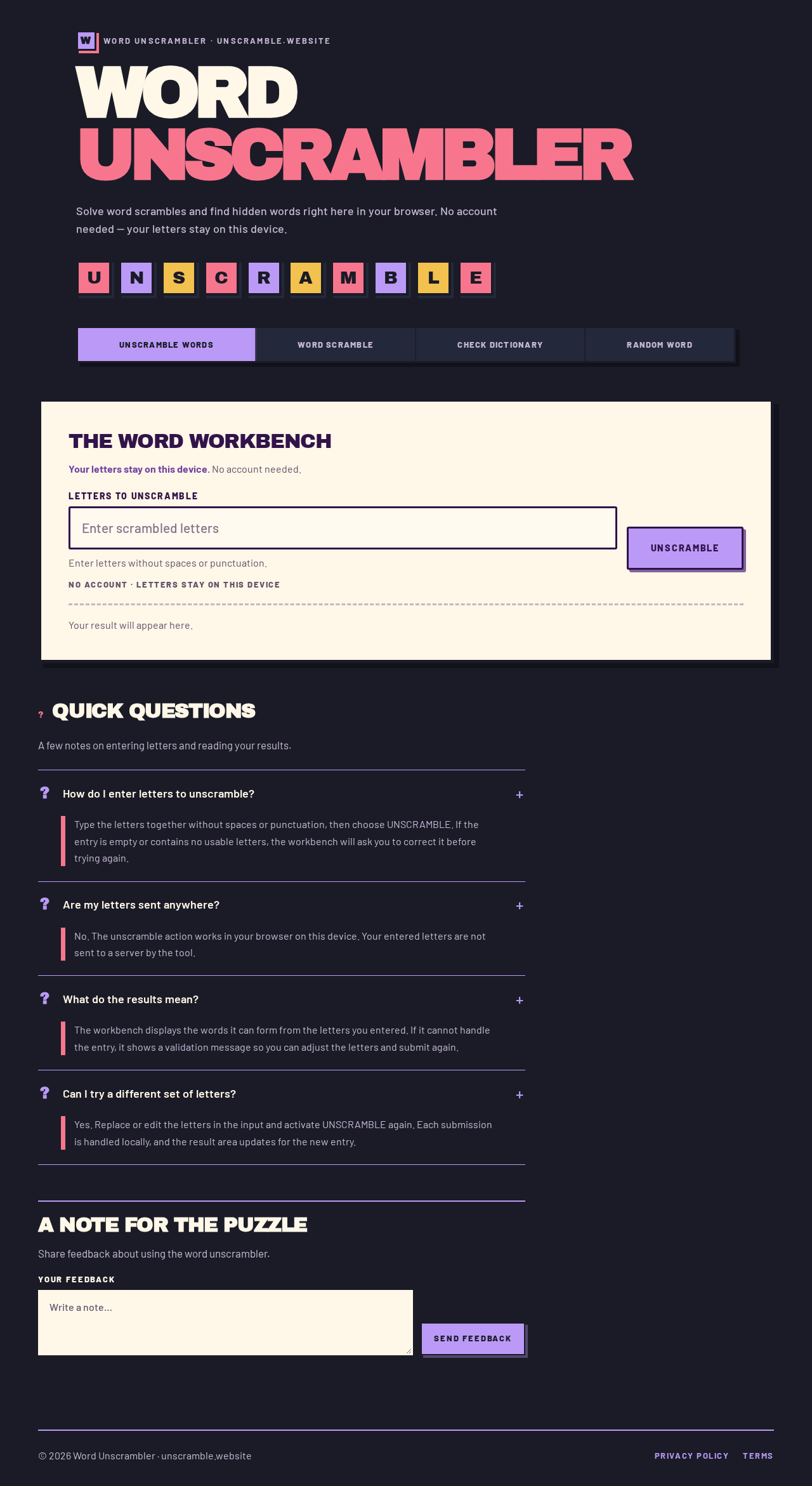
Word Unscrambler · unscramble.website
WordUnscrambler
Solve word scrambles and find hidden words right here in your browser. No account needed — your letters stay on this device.
The word workbench
Your letters stay on this device. No account needed.
Enter letters without spaces or punctuation.
QUICK QUESTIONS
A few notes on entering letters and reading your results.
Type the letters together without spaces or punctuation, then choose UNSCRAMBLE. If the entry is empty or contains no usable letters, the workbench will ask you to correct it before trying again.
No. The unscramble action works in your browser on this device. Your entered letters are not sent to a server by the tool.
The workbench displays the words it can form from the letters you entered. If it cannot handle the entry, it shows a validation message so you can adjust the letters and submit again.
Yes. Replace or edit the letters in the input and activate UNSCRAMBLE again. Each submission is handled locally, and the result area updates for the new entry.
A NOTE FOR THE PUZZLE
Share feedback about using the word unscrambler.
Word Unscrambler · unscramble.website
WordUnscrambler
Solve word scrambles and find hidden words right here in your browser. No account needed — your letters stay on this device.
The word workbench
Your letters stay on this device. No account needed.
Enter letters without spaces or punctuation.
QUICK QUESTIONS
A few notes on entering letters and reading your results.
Type the letters together without spaces or punctuation, then choose UNSCRAMBLE. If the entry is empty or contains no usable letters, the workbench will ask you to correct it before trying again.
No. The unscramble action works in your browser on this device. Your entered letters are not sent to a server by the tool.
The workbench displays the words it can form from the letters you entered. If it cannot handle the entry, it shows a validation message so you can adjust the letters and submit again.
Yes. Replace or edit the letters in the input and activate UNSCRAMBLE again. Each submission is handled locally, and the result area updates for the new entry.
A NOTE FOR THE PUZZLE
Share feedback about using the word unscrambler.
No comments yet. Be the first!