Automatically trace uploaded artwork into clean, editable vectors with background removal, accurate edge detection, and smooth simplified curves ready for CNC paths.
woodtales
by Nishank Sharma
Nishank SharmaBuild a professional web-based and desktop-compatible application called **WoodTales Vector & Relief Converter** for CNC Router, CNC engraving, and woodworking design workflows. ## Main Purpose The application should allow users to upload an image and automatically convert it into **high-precision, CNC-ready design files**, eliminating or significantly reducing the need to manually redraw designs in ArtCAM or similar software. The final output should be ready to import directly into CNC design and machining software. --- # CORE FEATURES ## 1. Image to Vector Conversion Allow users to upload: * JPG / JPEG * PNG * WEBP * BMP * TIFF Automatically detect the artwork and convert it into clean vectors. Generate: * SVG * DXF * CDR-compatible vector format * PDF Vector * EPS The vector conversion must: * Remove unnecessary background * Detect edges accurately * Preserve original design proportions * Create smooth curves * Minimize unnecessary nodes * Automatically simplify excessive vector points * Preserve sharp corners where required * Detect closed and open paths * Create CNC-friendly paths * Allow manual adjustment before export --- # 2. Image to CNC Relief (2D/3D) The application must convert suitable images into **high-quality CNC relief designs**, similar to ArtCAM relief modelling. The user should be able to generate: * 2D grayscale relief * 2.5D relief * 3D heightmap * CNC carving relief The AI should understand depth automatically. For example: * White = highest area * Black = lowest/background area * Grey = intermediate depth Allow users to select: * Maximum relief height in mm * Minimum depth * Relief smoothing * Detail intensity * Edge sharpness * Background depth * Carving depth * Invert relief The system should intelligently identify: * Flowers * Leaves * Mandalas * Religious designs * Decorative patterns * Human faces * Animals * Furniture ornaments * Architectural designs * Traditional Indian carving patterns The generated relief should preserve fine details while remaining practical for CNC machining. Export options: * STL * OBJ * 3D heightmap * PNG grayscale heightmap * CNC-compatible relief file formats where technically possible --- # 3. Image to DXF Create an advanced **Image-to-DXF converter** specifically optimized for CNC routers. The user should be able to choose: ### Conversion Type * Outline Vector * Centerline Vector * Silhouette * Engraving Lines * Single Line Drawing * Filled Shape Vector ### DXF Options * Units: MM / Inches * Scale * Line thickness detection * Curve smoothing * Node reduction * Closed path detection * Layer separation The exported DXF must be clean and compatible with CNC software. Avoid: * Double lines * Broken vectors * Excessive nodes * Unnecessary overlapping paths --- # 4. Image to CDR-Compatible Design Allow users to convert images into professional vector artwork that can be opened and edited in CorelDRAW. The application should generate: * Clean vector paths * Editable curves * Separate layers * Editable outlines If direct `.CDR` generation is technically restricted due to proprietary format limitations, generate the highest-quality **SVG, PDF, EPS, or AI-compatible vector output** that can be imported into CorelDRAW without losing vector editability. The application should clearly inform users which format provides the best compatibility. --- # 5. AI DESIGN ANALYSIS Before conversion, the AI should analyze the uploaded image and automatically recommend the best conversion type. For example: ### If the image is a logo: Recommend: **Vector + SVG + DXF** ### If the image is a black-and-white carving design: Recommend: **DXF + Vector** ### If the image contains depth or sculpture: Recommend: **3D Relief + STL + Heightmap** ### If the image is furniture carving: Recommend: **Relief + CNC-ready vector outline** ### If the image is a photograph: Recommend: **AI Relief / Heightmap / Engraving** Show the user: > "Recommended Conversion: CNC Relief + DXF Outline" with a one-click conversion button. --- # 6. CNC READINESS CHECK Before downloading, automatically analyze the generated design. Check for: * Open vectors * Broken paths * Duplicate vectors * Overlapping vectors * Excessive nodes * Extremely small details * Unmachinable areas * Sharp internal corners * Thin sections Provide a **CNC Design Health Score from 0–100**. Example: **CNC Ready Score: 92/100** Warnings: ⚠ Small details may not be machinable with a 6mm tool. ⚠ Some vectors are open. ⚠ Reduce node count for smoother CNC machining. Provide an automatic **Fix Design** button. --- # 7. TOOL / BIT SIMULATION Allow the user to select CNC tool size: * 0.8 mm * 1 mm * 2 mm * 3 mm * 4 mm * 6 mm * Custom size The application should preview whether fine details can be machined using the selected bit. Show: * Machinable areas * Unmachinable small areas * Areas requiring a smaller bit --- # 8. DESIGN EDITOR Include a professional visual editor. Users should be able to: * Remove background * Crop image * Resize design * Rotate * Mirror * Adjust contrast * Convert to black and white * Adjust threshold * Smooth vectors * Reduce nodes * Join paths * Close paths * Remove duplicate vectors * Separate layers * Change relief depth Provide before-and-after comparison. --- # 9. WORKFLOW The workflow should be extremely simple: ### Step 1 Upload Image ### Step 2 AI Automatically Analyzes Image ### Step 3 Select Output Type: * Vector * DXF * SVG * Relief * STL * Heightmap * CDR-Compatible Vector ### Step 4 Choose Quality: * Fast * High Quality * Ultra Precision ### Step 5 AI Processes and Cleans Design ### Step 6 Preview Result ### Step 7 Run CNC Readiness Check ### Step 8 Download Final File The goal is that the user can go from: **IMAGE → READY-TO-USE CNC DESIGN** in the shortest possible time. --- # 10. USER INTERFACE Create a premium modern interface designed for professional CNC businesses. Dashboard should include: * Upload Design * Recent Projects * Image to Vector * Image to Relief * Image to DXF * CNC Design Analyzer Use a clean professional layout with a large drag-and-drop upload area. Show conversion previews side-by-side: **Original Image | Vector Result | Relief Preview** Include zoom and pan controls. --- # 11. PRECISION REQUIREMENTS This application must prioritize **accuracy over simple image tracing**. The conversion engine should: * Preserve fine ornamental details * Create smooth Bezier curves * Intelligently reduce nodes * Preserve design symmetry * Detect repeating patterns * Maintain original proportions * Remove noise * Automatically repair broken lines * Create clean closed vectors The final output should require **minimal or zero manual editing in ArtCAM or CorelDRAW**. --- # 12. ADVANCED AI FEATURE Add an optional feature called: ## "AI CNC Design Enhancement" When enabled, AI should: * Restore missing design details * Improve low-resolution images * Remove unwanted background * Reconstruct damaged patterns * Improve symmetry * Convert rough sketches into clean CNC artwork * Improve ornamental details * Detect carving depth * Automatically create a professional CNC-ready version The user should be able to compare: **Original | Enhanced | CNC Ready** --- # TECHNICAL REQUIREMENTS Build the application with a scalable architecture. Recommended processing pipeline: **Image Upload → Image Enhancement → Background Removal → AI Image Analysis → Vector/Relief Generation → Path Cleanup → CNC Validation → Export** Use appropriate technologies for: ### Vector Processing * Potrace or equivalent vector tracing technology * OpenCV image processing * SVG path optimization * Bezier curve generation * DXF export engine ### 3D Relief Processing * Grayscale heightmap generation * Depth estimation * Mesh generation * STL export * Relief smoothing algorithms ### AI Processing Use AI/computer vision models capable of: * Object detection * Depth estimation * Image segmentation * Image enhancement * Pattern recognition --- # IMPORTANT OUTPUT REQUIREMENT The generated files must be practical, editable, and production-ready. The objective is NOT simply to convert an image format. The objective is: > **Automatically transform an image into a clean, professionally designed, CNC-ready Vector, DXF, SVG, Relief, STL, or CorelDRAW-compatible design that normally requires manual work in ArtCAM.** The application should focus especially on: * CNC Router work * MDF designs * HDHMR designs * Wood carving * PVC carving * WPC carving * Furniture designs * Jali designs * Mandala designs * Decorative wall panels * Door designs * Religious designs * 2D engraving * 2.5D carving * 3D relief carving The final product should save CNC designers significant time and reduce dependence on manual tracing and relief creation software.


Comments (0)
Sign in to leave a comment
System Requirements
Page 1 of 10
System Requirements Document for woodtales
1. Introduction
WoodTales Vector & Relief Converter is a professional web-based and desktop-compatible application designed for CNC router, CNC engraving, and woodworking design workflows. The application enables users to upload images and automatically convert them into high-precision, CNC-ready design files, significantly reducing the need for manual redrawing in software like ArtCAM. The final output is ready for direct import into CNC design and machining software.
2. System Overview
WoodTales Vector & Relief Converter is built to serve CNC design professionals by providing a streamlined workflow for converting images into CNC-ready formats. The application supports various image formats and offers conversion into vector, relief, and DXF files, among others. It includes AI-driven analysis and recommendations, CNC readiness checks, and a comprehensive design editor. The application is accessible via a web interface and is compatible with desktop environments.
Page 2 of 10
2a. Product Interpretation and Delivery Boundary
The application is designed for professional CNC and woodworking use, focusing on precision and efficiency. It supports self-service enrollment for CNC designers, requiring authentication to access saved projects and generated designs. The application includes backend processing for image analysis, conversion, and validation, ensuring outputs are practical, editable, and production-ready. The delivery scope excludes direct CDR generation due to proprietary limitations but provides compatible alternatives.
2b. Source Content Inventory
Not applicable as no explicit content source directive is provided.
2c. Page Content and Component Coverage
Landing
- Purpose: Introduce WoodTales, its audience, and workflow.
- Components: Overview of features, benefits, and a call-to-action for sign-up.
Sign Up
- Purpose: Allow CNC designers to enroll and retain project data.
- Components: Registration form, terms of service, and privacy policy.
Login
- Purpose: Authenticate returning users for project access.
- Components: Login form, password recovery, and security prompts.
Page 3 of 10
Dashboard
- Purpose: Central hub for accessing workflow destinations and recent projects.
- Components: Navigation to Upload Design, Recent Projects, and conversion tools.
Upload Design
- Purpose: Manage and upload supported artwork.
- Components: Drag-and-drop area, file format guidelines, and upload history.
Recent Projects
- Purpose: Access and manage previous conversion projects.
- Components: Project list, search/filter options, and project details.
AI Analysis
- Purpose: Review image analysis and conversion recommendations.
- Components: Image preview, recommended conversion types, and one-click conversion.
Conversion Setup
- Purpose: Configure output, quality, and conversion settings.
- Components: Output type selection, quality settings, and conversion parameters.
Image to Vector
- Purpose: Convert images into clean, editable CNC vectors.
- Components: Vector settings, preview, and export options.
Page 4 of 10
Image to Relief
- Purpose: Generate 2D, 2.5D, and 3D relief designs.
- Components: Relief settings, preview, and export options.
Image to DXF
- Purpose: Advanced DXF conversion with CNC-focused options.
- Components: Conversion type selection, DXF settings, and export options.
Design Processing
- Purpose: Enhance, convert, and clean up paths.
- Components: Processing status, enhancement options, and cleanup tools.
Preview
- Purpose: Compare original, enhanced, and CNC-ready results.
- Components: Side-by-side previews, zoom/pan controls, and inspection tools.
Design Editor
- Purpose: Edit images, vectors, layers, paths, and reliefs.
- Components: Editing tools, before-and-after comparison, and layer management.
CNC Design Analyzer
- Purpose: Evaluate CNC readiness and provide fixes.
- Components: Health score, warnings, and automatic fix options.
Page 5 of 10
Tool Simulation
- Purpose: Simulate machinability with selected CNC tool sizes.
- Components: Tool size selection, machinability preview, and recommendations.
Exports
- Purpose: Review and download production-ready files.
- Components: Export options, file format selection, and download links.
Page 6 of 10
3. Functional Requirements
-
As a CNC Designer, I should be able to upload images in JPG, PNG, WEBP, BMP, and TIFF formats for conversion.
Provenance: explicit
Lifecycle: Upload image, receive confirmation
Acceptance: Image is uploaded and ready for processing -
As a CNC Designer, I should be able to convert images into clean CNC-ready vectors with background removal and accurate edge detection.
Provenance: explicit
Lifecycle: Select image, configure settings, convert, and preview
Acceptance: Vector is generated with specified settings -
As a CNC Designer, I should be able to generate 2D, 2.5D, and 3D relief designs with configurable parameters.
Provenance: explicit
Lifecycle: Select image, configure relief settings, generate, and preview
Acceptance: Relief is generated with specified settings -
As a CNC Designer, I should be able to convert images to DXF with advanced options for CNC routers.
Provenance: explicit
Lifecycle: Select image, configure DXF settings, convert, and preview
Acceptance: DXF is generated with specified settings -
As a CNC Designer, I should be able to receive AI-driven conversion recommendations based on image analysis.
Provenance: explicit
Lifecycle: Upload image, receive recommendation, and accept conversion
Acceptance: Recommendation is provided and conversion initiated -
As a CNC Designer, I should be able to run CNC readiness checks and receive a health score with warnings.
Provenance: explicit
Lifecycle: Complete conversion, run check, and review results
Acceptance: Health score and warnings are displayed -
As a CNC Designer, I should be able to simulate machinability with selected CNC tool sizes.
Provenance: explicit
Lifecycle: Select tool size, run simulation, and review machinability
Acceptance: Simulation results are displayed -
As a CNC Designer, I should be able to use a visual design editor for detailed adjustments.
Provenance: explicit
Lifecycle: Open editor, make adjustments, and save changes
Acceptance: Adjustments are applied and saved -
As a CNC Designer, I should be able to download final CNC-ready files in various formats.
Provenance: explicit
Lifecycle: Complete conversion, select format, and download
Acceptance: File is downloaded in the selected format
Page 7 of 10
4. User Personas
- CNC Designer: Responsible for uploading artwork, reviewing AI recommendations, configuring conversions, editing results, validating machinability, and downloading production-ready files.
5. Core User Flows
CNC Designer Flow
- Landing Page: Access the application and learn about its features.
- Sign Up/Login: Register or log in to access personalized features.
- Dashboard: Navigate to upload designs or access recent projects.
- Upload Design: Upload an image for conversion.
- AI Analysis: Review AI recommendations and select conversion type.
- Conversion Setup: Configure output and quality settings.
- Design Processing: Enhance and convert the image.
- Preview: Compare original and converted designs.
- Design Editor: Make detailed adjustments if necessary.
- CNC Design Analyzer: Run readiness checks and review the health score.
- Tool Simulation: Simulate machinability with selected tool sizes.
- Exports: Download the final CNC-ready file.
Page 8 of 10
6. Visuals Colors and Theme
- Muse: Dieter Rams
- Palette:
- Background: #F7F7F5
- Surface: #FFFFFF
- Text: #1B1B1B
- Primary: #FFA500
- Accent: #006400
- Muted: #B0B0B0
- Typography:
- Headings: Saira, Medium weight, uppercase
- Body: Source Sans Pro
- Scale: 1.25 modular
- Shape Language: Rounded-rectangle controls, strict grid alignment
- Layout: Dense, ordered, responsive grid
- Motion: Instant feedback, restrained tempo
- Imagery: Diagrammatic line art, product silhouettes
- Hero Direction: Full-bleed grid of vectorized CNC design previews
7. Signature Design Concept
The landing page features a split-screen hero showcasing side-by-side previews of original and converted designs. A prominent CNC readiness score is displayed with visual feedback. Interactive tool size simulation overlays are available on designs, providing instant feedback. The design uses rounded-rectangle buttons and controls, maintaining a systematic and professional appearance.
Page 9 of 10
8. Interaction Model & Motion Direction
- Interaction Model: Static
- Motion Tempo: Restrained
- Hero Dimensionality: Flat
- Landing Hero Motion Brief: The hero section features a composed grid of CNC design previews with a bold primary orange call-to-action. The design is static, focusing on clarity and precision without unnecessary motion.
9. Non-Functional Requirements
- Scalability: The application must handle multiple concurrent users and large image files efficiently.
- Performance: Conversion processes should complete within a reasonable time frame to maintain user engagement.
- Security: User data and designs must be protected with industry-standard security measures.
- Compatibility: The application must function seamlessly on major web browsers and desktop environments.
10. Tech Stack
- Frontend: React
- Backend: Python/FastAPI
- Vector Processing: Potrace, OpenCV
- 3D Relief Processing: STL export, mesh generation
- AI Processing: Object detection, image segmentation
- Deployment: Docker, Kubernetes (if required)
Page 10 of 10
11. Assumptions and Constraints
- Assumptions:
- Users are familiar with CNC design workflows.
- The application will be used in professional settings.
- Constraints:
- Direct CDR generation is not required due to proprietary limitations.
- The application must prioritize accuracy and precision.
12. Glossary
- CNC: Computer Numerical Control
- DXF: Drawing Exchange Format
- SVG: Scalable Vector Graphics
- STL: Stereolithography
- AI: Artificial Intelligence
- Bezier Curve: A parametric curve used in vector graphics
- Node: A point in a vector path that defines its shape
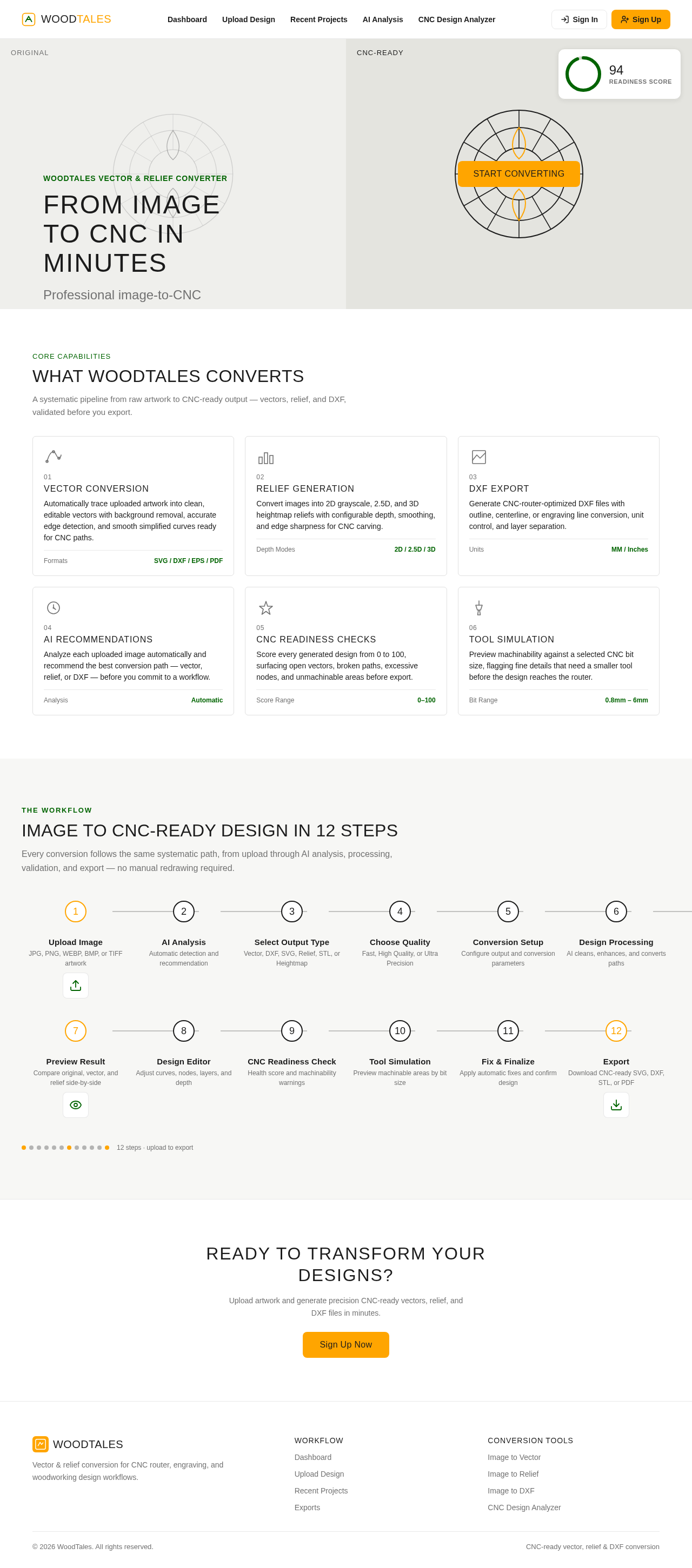
Original
WoodTales Vector & Relief Converter
From Image to CNC in Minutes
Professional image-to-CNC conversion without manual redrawing. Upload artwork and generate precision-ready vectors, DXF, and relief files for CNC router, engraving, and woodworking workflows.
Core Capabilities
What WoodTales Converts
A systematic pipeline from raw artwork to CNC-ready output — vectors, relief, and DXF, validated before you export.
Convert images into 2D grayscale, 2.5D, and 3D heightmap reliefs with configurable depth, smoothing, and edge sharpness for CNC carving.
Generate CNC-router-optimized DXF files with outline, centerline, or engraving line conversion, unit control, and layer separation.
Analyze each uploaded image automatically and recommend the best conversion path — vector, relief, or DXF — before you commit to a workflow.
Score every generated design from 0 to 100, surfacing open vectors, broken paths, excessive nodes, and unmachinable areas before export.
Preview machinability against a selected CNC bit size, flagging fine details that need a smaller tool before the design reaches the router.
The Workflow
Image to CNC-Ready Design in 12 Steps
Every conversion follows the same systematic path, from upload through AI analysis, processing, validation, and export — no manual redrawing required.
- 1Upload ImageJPG, PNG, WEBP, BMP, or TIFF artwork
- 2AI AnalysisAutomatic detection and recommendation
- 3Select Output TypeVector, DXF, SVG, Relief, STL, or Heightmap
- 4Choose QualityFast, High Quality, or Ultra Precision
- 5Conversion SetupConfigure output and conversion parameters
- 6Design ProcessingAI cleans, enhances, and converts paths
- 7Preview ResultCompare original, vector, and relief side-by-side
- 8Design EditorAdjust curves, nodes, layers, and depth
- 9CNC Readiness CheckHealth score and machinability warnings
- 10Tool SimulationPreview machinable areas by bit size
- 11Fix & FinalizeApply automatic fixes and confirm design
- 12ExportDownload CNC-ready SVG, DXF, STL, or PDF
12 steps · upload to export
Ready to Transform Your Designs?
Upload artwork and generate precision CNC-ready vectors, relief, and DXF files in minutes.
Sign Up NowOriginal
WoodTales Vector & Relief Converter
From Image to CNC in Minutes
Professional image-to-CNC conversion without manual redrawing. Upload artwork and generate precision-ready vectors, DXF, and relief files for CNC router, engraving, and woodworking workflows.
Core Capabilities
What WoodTales Converts
A systematic pipeline from raw artwork to CNC-ready output — vectors, relief, and DXF, validated before you export.
Automatically trace uploaded artwork into clean, editable vectors with background removal, accurate edge detection, and smooth simplified curves ready for CNC paths.
Convert images into 2D grayscale, 2.5D, and 3D heightmap reliefs with configurable depth, smoothing, and edge sharpness for CNC carving.
Generate CNC-router-optimized DXF files with outline, centerline, or engraving line conversion, unit control, and layer separation.
Analyze each uploaded image automatically and recommend the best conversion path — vector, relief, or DXF — before you commit to a workflow.
Score every generated design from 0 to 100, surfacing open vectors, broken paths, excessive nodes, and unmachinable areas before export.
Preview machinability against a selected CNC bit size, flagging fine details that need a smaller tool before the design reaches the router.
The Workflow
Image to CNC-Ready Design in 12 Steps
Every conversion follows the same systematic path, from upload through AI analysis, processing, validation, and export — no manual redrawing required.
- 1Upload ImageJPG, PNG, WEBP, BMP, or TIFF artwork
- 2AI AnalysisAutomatic detection and recommendation
- 3Select Output TypeVector, DXF, SVG, Relief, STL, or Heightmap
- 4Choose QualityFast, High Quality, or Ultra Precision
- 5Conversion SetupConfigure output and conversion parameters
- 6Design ProcessingAI cleans, enhances, and converts paths
- 7Preview ResultCompare original, vector, and relief side-by-side
- 8Design EditorAdjust curves, nodes, layers, and depth
- 9CNC Readiness CheckHealth score and machinability warnings
- 10Tool SimulationPreview machinable areas by bit size
- 11Fix & FinalizeApply automatic fixes and confirm design
- 12ExportDownload CNC-ready SVG, DXF, STL, or PDF
12 steps · upload to export
Ready to Transform Your Designs?
Upload artwork and generate precision CNC-ready vectors, relief, and DXF files in minutes.
Sign Up Now
No comments yet. Be the first!