wooden-start
 Diya Trivedi
start a project to build a simple single page design of calculator

Comments (0)
Sign in to leave a comment
System Requirements
wooden-start System Requirements Document
1. Introduction
The "wooden-start" project aims to develop a simple, single-page calculator design. This document outlines the system requirements for the project, ensuring that all necessary functionalities and design elements are captured and implemented effectively.
2. System Overview
The "wooden-start" project will deliver a basic calculator application that operates on a single web page. The calculator will perform standard arithmetic operations and provide a user-friendly interface suitable for a broad audience.
3. Functional Requirements as Story Points
- As a User, I should be able to perform basic arithmetic operations such as addition, subtraction, multiplication, and division.
- As a User, I should be able to clear the current input or result to start a new calculation.
- As a User, I should be able to view the current input and result on the calculator display.
- As a User, I should be able to use a decimal point for fractional calculations.
- As a User, I should be able to use the calculator on both desktop and mobile devices.
4. User Personas
- User: A general user who needs to perform basic arithmetic calculations quickly and efficiently.
5. Core User Flows
- User opens the calculator page.
- User inputs numbers and selects an arithmetic operation.
- User views the result on the display.
- User clears the input/result to perform another calculation.
6. Visuals Colors and Theme
[Default — not specified by user]
- primary: #3498db (a calming blue for the main interface)
- primary_light: #85c1e9 (a lighter blue for hover states)
- secondary: #2ecc71 (a green for secondary actions)
- accent: #e74c3c (a red for error states or clear button)
- highlight: #f1c40f (a yellow for active indicators)
- bg: #ecf0f1 (a light grey for the background)
- surface: #ffffff (white for the calculator body)
- text: #2c3e50 (dark blue for primary text)
- text_muted: #95a5a6 (grey for secondary text)
- border: #bdc3c7 (light grey for borders)
7. Signature Design Concept
The calculator will feature an interactive, tactile design where each button appears to press down when clicked, providing a physical feedback illusion. The interface will resemble a wooden desk with a calculator sitting on it, giving a warm, inviting feel. The buttons will have a subtle shadow effect that enhances the 3D illusion, making the interaction feel more realistic.
Landing Hero Motion Brief
The landing page will feature a continuous animation of the calculator buttons being pressed in a sequence, demonstrating its functionality. This animation will loop every 10 seconds, showing different arithmetic operations being performed. The animation will be built using motion/react for smooth transitions and interactions. The first frame will display a clean, inviting calculator ready for user interaction, with unobstructed copy and CTAs.
8. Interaction Model & Motion Direction
- Interaction Model: Animated
- The calculator will feature moderate hover transitions and spring physics on button interactions to enhance user experience.
- Motion Direction: The landing page will have a continuous 2D motion loop showcasing the calculator's functionality.
9. Non-Functional Requirements
- The calculator must load quickly and be responsive on both desktop and mobile devices.
- The application should be accessible, adhering to WCAG 2.1 standards.
10. Tech Stack
[Default — not specified by user]
- Frontend: React for Web
- Backend: None required for a single-page application
- Database: None required for a single-page application
11. Assumptions and Constraints
- The calculator will only perform basic arithmetic operations.
- The application will be a single-page design without the need for backend integration.
- The design will be responsive and accessible across different devices and screen sizes.
12. Glossary
- Arithmetic Operations: Basic mathematical operations including addition, subtraction, multiplication, and division.
- Responsive Design: An approach to web design that makes web pages render well on a variety of devices and window or screen sizes.
- WCAG 2.1: Web Content Accessibility Guidelines, a set of recommendations for making web content more accessible.
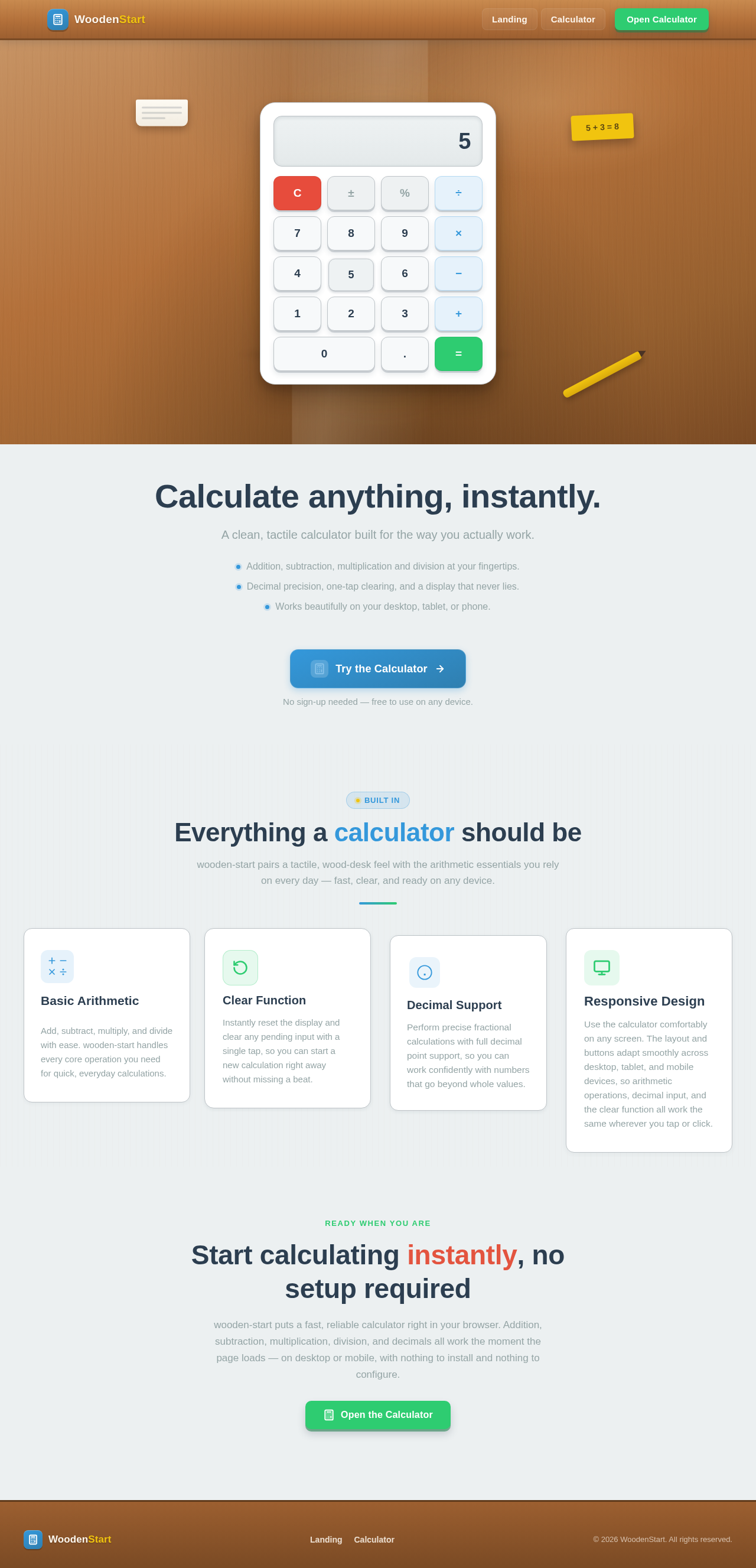
Animated preview of the wooden-start calculator resting on a warm wooden desk, performing addition and multiplication automatically.
Calculate anything, instantly.
A clean, tactile calculator built for the way you actually work.
- Addition, subtraction, multiplication and division at your fingertips.
- Decimal precision, one-tap clearing, and a display that never lies.
- Works beautifully on your desktop, tablet, or phone.
Everything a calculator should be
wooden-start pairs a tactile, wood-desk feel with the arithmetic essentials you rely on every day — fast, clear, and ready on any device.
Basic Arithmetic
Add, subtract, multiply, and divide with ease. wooden-start handles every core operation you need for quick, everyday calculations.
Clear Function
Instantly reset the display and clear any pending input with a single tap, so you can start a new calculation right away without missing a beat.
Decimal Support
Perform precise fractional calculations with full decimal point support, so you can work confidently with numbers that go beyond whole values.
Responsive Design
Use the calculator comfortably on any screen. The layout and buttons adapt smoothly across desktop, tablet, and mobile devices, so arithmetic operations, decimal input, and the clear function all work the same wherever you tap or click.
Ready when you are
Start calculating instantly, no setup required
wooden-start puts a fast, reliable calculator right in your browser. Addition, subtraction, multiplication, division, and decimals all work the moment the page loads — on desktop or mobile, with nothing to install and nothing to configure.
Open the CalculatorAnimated preview of the wooden-start calculator resting on a warm wooden desk, performing addition and multiplication automatically.
Calculate anything, instantly.
A clean, tactile calculator built for the way you actually work.
- Addition, subtraction, multiplication and division at your fingertips.
- Decimal precision, one-tap clearing, and a display that never lies.
- Works beautifully on your desktop, tablet, or phone.
Everything a calculator should be
wooden-start pairs a tactile, wood-desk feel with the arithmetic essentials you rely on every day — fast, clear, and ready on any device.
Basic Arithmetic
Add, subtract, multiply, and divide with ease. wooden-start handles every core operation you need for quick, everyday calculations.
Clear Function
Instantly reset the display and clear any pending input with a single tap, so you can start a new calculation right away without missing a beat.
Decimal Support
Perform precise fractional calculations with full decimal point support, so you can work confidently with numbers that go beyond whole values.
Responsive Design
Use the calculator comfortably on any screen. The layout and buttons adapt smoothly across desktop, tablet, and mobile devices, so arithmetic operations, decimal input, and the clear function all work the same wherever you tap or click.
Ready when you are
Start calculating instantly, no setup required
wooden-start puts a fast, reliable calculator right in your browser. Addition, subtraction, multiplication, division, and decimals all work the moment the page loads — on desktop or mobile, with nothing to install and nothing to configure.
Open the Calculator
No comments yet. Be the first!