wooden-interview
 abhimanyu upadhyay
interview invisible assistant app


Comments (0)
Sign in to leave a comment
System Requirements
System Requirements Document (SRD)
Project Name: Wooden-Interview
1. Introduction
The Wooden-Interview project aims to create an advanced invisible assistant application tailored for interview scenarios. Initially focused on supporting interviewees, the scope has now been expanded to include features for interviewers, inspired by the functionality of the Parakeet AI app. This document outlines the system requirements for the Wooden-Interview application, ensuring it delivers cutting-edge real-time assistance to both interviewees and interviewers.
The application is designed for users in India (IN), with locale-specific defaults such as IST timezone and INR currency where applicable.
2. System Overview
Wooden-Interview is a dual-purpose invisible assistant application designed to enhance the interview experience for both interviewees and interviewers. The system leverages AI-driven tools to provide real-time transcription, feedback, analytics, and suggestions during interviews.
Key features include:
- Real-time transcription and analysis of conversations.
- Contextual suggestions and tips for interviewees to improve their responses.
- Interviewer-specific tools for evaluating candidates, generating feedback, and managing interview sessions.
- A seamless, distraction-free interface that operates in the background, ensuring users remain focused on the interview.
The system will be accessible via web and mobile platforms, ensuring flexibility and ease of use.
3. Functional Requirements
Interviewee Features:
- As an Interviewee, I should be able to receive real-time transcription of my spoken answers.
- As an Interviewee, I should be able to get contextual suggestions for improving my responses during the interview.
- As an Interviewee, I should be able to view post-interview analytics, including strengths and weaknesses.
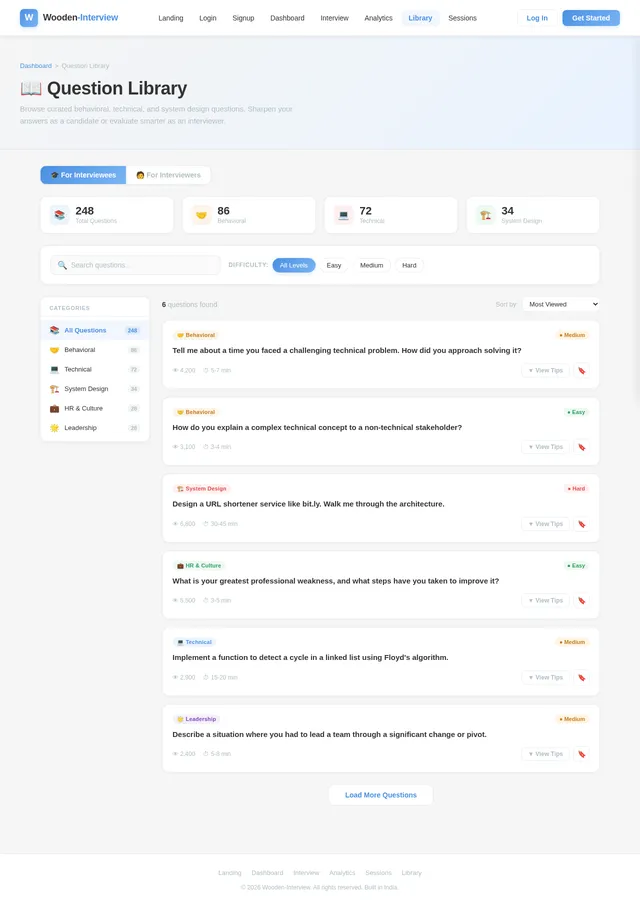
- As an Interviewee, I should be able to access a library of common interview questions and tips.
Interviewer Features:
- As an Interviewer, I should be able to receive real-time transcription of the candidate's responses.
- As an Interviewer, I should be able to generate automated feedback based on the candidate's performance.
- As an Interviewer, I should be able to access analytics to evaluate the candidate's strengths and weaknesses.
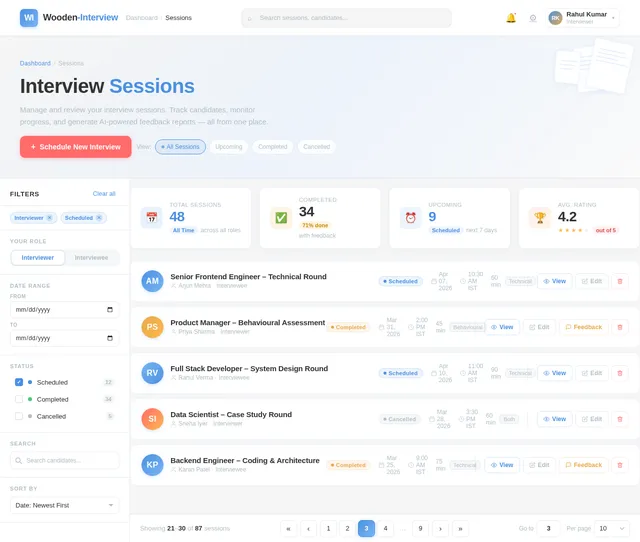
- As an Interviewer, I should be able to manage interview sessions, including scheduling and tracking.
- As an Interviewer, I should be able to access a library of behavioral and technical questions for interviews.
4. User Personas
1. Interviewee
- Description: A candidate preparing for or participating in an interview.
- Goals: To improve performance, receive real-time assistance, and gain insights into their strengths and weaknesses.
- Pain Points: Nervousness, lack of preparation, difficulty articulating responses.
2. Interviewer
- Description: A recruiter, hiring manager, or technical lead conducting interviews.
- Goals: To evaluate candidates effectively, streamline the interview process, and provide constructive feedback.
- Pain Points: Time-consuming evaluations, difficulty tracking candidate performance, lack of structured feedback tools.
5. Visuals Colors and Theme
Color Palette
The Wooden-Interview application will use a professional yet approachable color scheme to ensure a calm and focused environment during interviews.
- Background: #F5F5F5 (Soft Gray)
- Surface: #FFFFFF (Pure White)
- Text: #333333 (Deep Charcoal)
- Accent: #4A90E2 (Calm Blue)
- Muted Tones: #B0BEC5 (Neutral Steel)
6. Signature Design Concept
Concept: Interactive Floating Desk Environment
The Wooden-Interview homepage will feature a 3D interactive floating desk environment. Users will feel as though they are sitting at a virtual desk, surrounded by tools and resources.
- Visuals: A sleek wooden desk with subtle animations—papers fluttering, a glowing assistant orb, and a virtual notebook that opens when clicked.
- Interactions:
- Clicking on the assistant orb will activate the invisible assistant.
- Hovering over the notebook will reveal tips and analytics.
- The desk environment will subtly shift based on the time of day (e.g., warm tones in the morning, cooler tones in the evening).
- Transitions: Smooth zoom-in and zoom-out effects when navigating between sections.
- Micro-interactions: Buttons and icons will have a tactile "press" effect, enhancing user engagement.
This immersive design will make the application feel alive and engaging while maintaining a professional tone.
7. Non-Functional Requirements
- The system must provide real-time transcription with an accuracy of at least 95%.
- The application must support both web and mobile platforms.
- The system must ensure data privacy and comply with GDPR and Indian data protection laws.
- The application must load within 3 seconds on standard internet connections.
- The system must support scalability to handle up to 10,000 concurrent users.
8. Tech Stack
Frontend
- React for Web
- React Native for Mobile App
Backend
- Python
- FastAPI
Database
- MySQL or MariaDB (preferred for structured data)
- MongoDB (for unstructured data)
AI Models
- GPT 5.4 for user-friendly responses
- Claude 4.6 Opas for academic or coding work
- Gemini 3.1 Pro for friendly responses
- Google Nano Banana for image generation
AI Tools
- Litellm for LLM Routing
- Langchain
Orchestration
- Docker and Docker-Compose for local orchestration
- Kubernetes for server-side orchestration
9. Assumptions and Constraints
Assumptions
- Users will have access to stable internet connections during interviews.
- The application will primarily be used in English, with potential for localization in the future.
- The target audience is familiar with basic app navigation.
Constraints
- The system must comply with Indian data protection laws.
- The application must operate seamlessly across multiple devices and platforms.
- The AI models must be optimized to ensure low latency during real-time interactions.
10. Glossary
- Invisible Assistant: A background tool that provides real-time support without distracting the user.
- Transcription: The process of converting spoken words into text.
- Analytics: Data-driven insights into user performance and behavior.
- Micro-interactions: Small, subtle animations or effects that enhance user experience.
- Orchestration: The automated arrangement and coordination of system components.
End of Document.

Your Invisible Interview Assistant
Real-time transcription, suggestions, and analytics for seamless interviews. Empowering both interviewees and interviewers with AI-driven insights.
Your Virtual Interview Workspace
An intelligent desk environment with real-time transcription, contextual suggestions, and everything you need for a seamless interview.
Click the AI Assistant orb to discover how Wooden-Interview transforms your interview experience.
Designed for Both Sides of the Table
Whether you are preparing for your next opportunity or conducting evaluations, Wooden-Interview adapts to your role with purpose-built tools.
For Interviewees
Gain confidence with real-time assistance, smart suggestions, and detailed post-interview analytics to sharpen your performance.
For Interviewers
Streamline candidate evaluations with automated transcription, structured feedback, and actionable analytics for every session.
Everything You Need for Better Interviews
Powerful AI-driven tools designed for both interviewees and interviewers to make every session more effective.
Real-time Transcription
Get instant, accurate transcription of every spoken word during your interview. Our AI captures responses in real time so you never miss a detail.
BothContextual Suggestions
Receive intelligent, context-aware tips to strengthen your answers on the fly. Improve clarity, structure, and impact while the conversation flows naturally.
IntervieweePost-Interview Analytics
Review detailed performance breakdowns after each session. Identify strengths, uncover areas for improvement, and track your progress over time.
BothQuestion Library
Access a curated collection of behavioral and technical interview questions. Practice with real-world scenarios tailored to your target role and industry.
BothSession Management
Schedule, organize, and track all your interview sessions from one dashboard. Manage candidate pipelines and keep your hiring process on track.
InterviewerAutomated Feedback
Generate structured, AI-powered feedback reports for every candidate automatically. Save hours on evaluations while delivering consistent, actionable insights.
InterviewerYour Path to Interview Success
From sign-up to mastery — see how Wooden-Interview guides you through every step of your interview preparation and performance.
Discover Wooden-Interview
Explore how our invisible assistant can transform your interview performance with real-time support.
Explore Features →Create Your Account
Sign up in seconds with email or social login. Your data stays secure and private.
Get Started →Your Personal Dashboard
Access your upcoming interviews, past sessions, analytics, and preparation resources all in one place.
View Dashboard →Start Interview Session
Launch your invisible assistant before the interview begins. It runs silently in the background, ready to help.
Try a Session →Transcription & Suggestions
Get real-time transcription of conversations with contextual tips and response suggestions as you speak.
See How It Works →Review Your Analytics
Analyse strengths, weaknesses, and improvement areas with detailed post-interview performance reports.
View Analytics →Question Library
Browse curated interview questions, practice with mock sessions, and build confidence for your next interview.
Browse Library →Your Path to Better Hiring
From sign-up to actionable insights — see how Wooden-Interview empowers interviewers to evaluate candidates effectively and efficiently.
Landing Page
Discover how Wooden-Interview streamlines your hiring process with AI-powered tools.
Learn more→Login / Sign Up
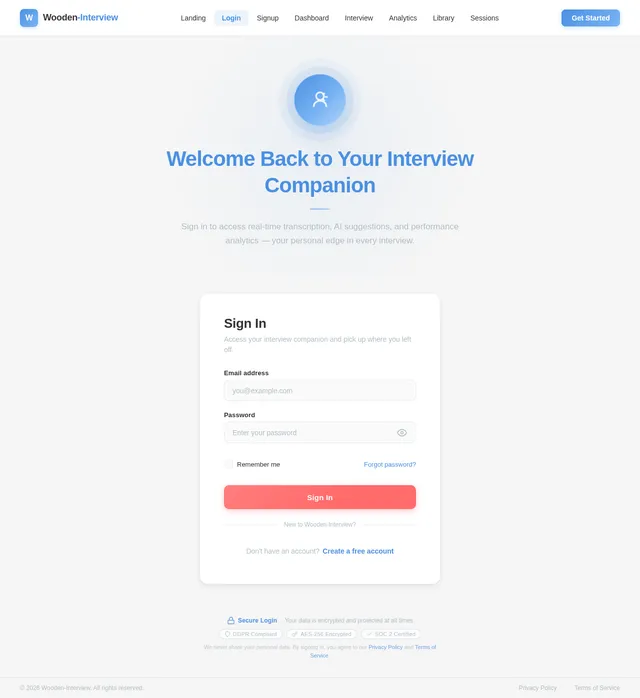
Create your interviewer account or sign in to access your recruiting dashboard.
Learn more→Dashboard
View upcoming interviews, candidate pipeline, and session summaries at a glance.
Learn more→Manage Sessions
Organize and track all your interview sessions with candidates in one place.
Learn more→Schedule Interview
Set up interviews with calendar integration and send automated invitations.
Learn more→Transcription & Evaluation
Get real-time transcription of candidate responses with AI-assisted performance scoring.
Learn more→Automated Feedback
Generate structured, objective feedback reports for each candidate automatically.
Learn more→Analytics & Insights
Analyze hiring patterns, candidate strengths, and optimize your interview process.
Learn more→Powerful Post-Interview Analytics
Gain deep insights into candidate performance, transcription accuracy, and interview trends. Make data-driven hiring decisions with confidence.
Transcription Accuracy
96.4%
↑ +2.1% this monthSessions Analyzed
1,247
↑ +18% this monthAvg. Session Score
8.3/10
↑ +0.5 this monthImprovement Rate
73%
↑ +12% this monthWeekly Session Performance
Last 6 daysCandidate Strengths Breakdown
All sessionsStrengths Detected
Clear articulation and structured responses identified in 84% of sessions.
Areas to Improve
Filler word usage and pacing flagged as common areas for growth.
Session Trends
Candidate scores trending upward over the last 30 days across all metrics.
Ready to Transform Your Interview Experience?
Whether you are preparing for your next big opportunity or evaluating top talent, Wooden-Interview gives you real-time AI-powered transcription, smart suggestions, and actionable analytics.
Free to get started. No credit card required.
Frequently Asked Questions
Everything you need to know about using Wooden-Interview as an interviewee or interviewer.
No comments yet. Be the first!