wooden-calculator
 Diya Trivedi
build a simple single page design of calculator

Comments (0)
Sign in to leave a comment
System Requirements
System Requirements Document for wooden-calculator
1. Introduction
wooden-calculator is a simple calculator delivered as a single-page design. The product intent is narrow and explicit: one page that lets a person perform everyday arithmetic — entering numbers and operators, reading the result, and clearing the calculation — presented as a hand-built, tactile instrument rather than a sleek app.
The audience is anyone who needs quick arithmetic and wants the tool to feel trustworthy, tactile, and unpretentious. The design language (a kraft-paper ground, a cream calculator card with a thick ink border, stamped keys, a slab-serif result display) serves that intent: the calculator reads as a physical object you would keep on a bench.
The product is anonymous and self-contained. There is no account, no saved history, and no multi-page navigation; the entire experience is the one calculator page.
2. System Overview
2a. Product Interpretation and Delivery Boundary
The accepted outcome is a simple calculator on a single page. That single page — Calculator — is the anonymous public entry and the only destination. It owns number and operator entry, the expression and result display, and clearing the calculation. No identity, sign-in, or account state is required or offered; the page is usable immediately on load.
Delivery is a first-party React frontend served alongside a shared FastAPI backend and a MariaDB database (provisioned infrastructure). The calculator's arithmetic and display state are a self-contained client-side interaction on the single page; the provisioned backend and database are available infrastructure and do not, by themselves, introduce product requirements, domain entities, authentication, or persistence. No current requirement calls for server-side calculation, saved calculations, or user data.
The current delivery horizon is exactly this one page and its arithmetic interaction. Anything beyond it (history, memory keys, scientific functions, accounts) is out of scope for the current product and is not represented as a page, control, or requirement.
2c. Page Content and Component Coverage
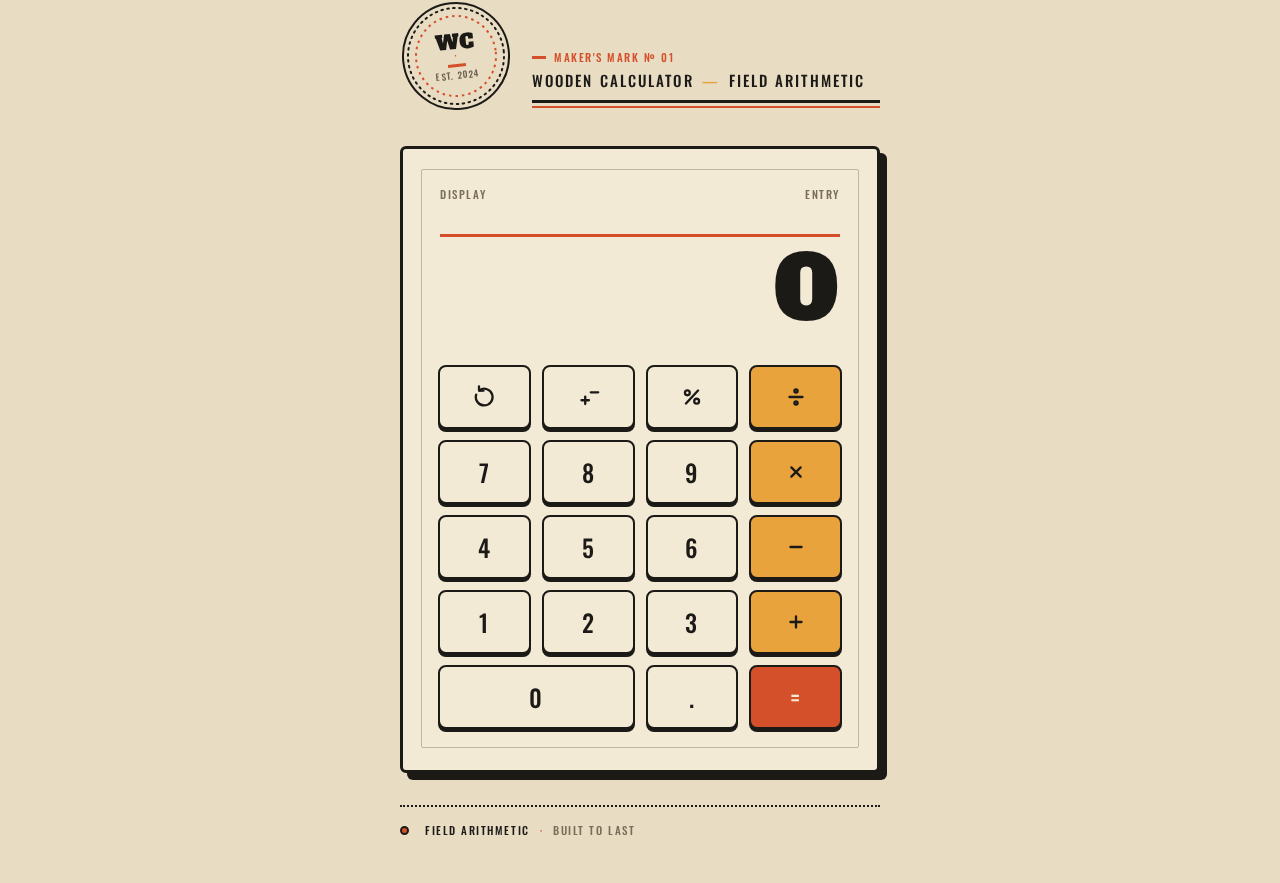
Calculator
The single page. Anonymous, publicly reachable, no identity required. Everything below lives on this one page; there is no navigation to any other destination.
Information and state
- Current expression line: a smaller Oswald line in muted brown-grey (#7A6E5B) showing the operands and operator entered so far (e.g.,
12 × 4). - Result display: a single oversized Alfa Slab One line of digits, right-aligned, sitting over a solid burnt-orange (#D4502A) top rule. This is the loudest element on screen.
- Keypad state: which operator (if any) is pending, and whether the display is showing a fresh entry or a computed result.
- No loading state is required for arithmetic; the page renders its initial state (display
0, empty expression) immediately.
Primary actions
- Number keys
0–9and decimal point.— append digits to the current entry. - Operator keys
÷,×,−,+(mustard #E8A33D) — set the pending operation. - Equals key
=(the only solid burnt-orange key) — evaluate the pending expression and show the result. AC— clear the current calculation, returning display to0and expression to empty.±— toggle the sign of the current entry.%— apply percent to the current entry.
Supporting actions and marks
- Circular maker's badge stamp top-left:
WC · WOODEN CALCULATOR · EST. 2024, dotted inner ring, rotated −6°. - Full-width all-caps Oswald rule line:
WOODEN CALCULATOR — FIELD ARITHMETIC. - Footer strip in 11px Oswald uppercase, 0.14em tracking:
FIELD ARITHMETIC · BUILT TO LAST, separated by a dotted 2px rule. - Halftone-dot paper grain at 8% opacity over the kraft ground.
Domain entities (conceptual, client-side only)
- Expression: the sequence of operands and a pending operator.
- Entry: the number currently being typed.
- Result: the computed value shown in the display.
Component responsibilities
- Badge stamp — decorative maker's mark; no interaction.
- Rule line — static all-caps label.
- Calculator panel — 3px ink border, 6px radius, cream fill, chunky offset shadow; contains display and keypad.
- Display row — expression line + result digits over the orange top rule.
- Keypad grid — strict 4×5 grid:
AC ± % ÷/7 8 9 ×/4 5 6 −/1 2 3 +/0(spanning two columns).=. Each key is a stamped button: cream fill, 2px ink stroke, 3px solid ink offset shadow collapsing on press. - Footer strip — static maker's line.
States
- Empty/initial: display
0, expression empty. - Entry: digits accumulate in the display; expression line reflects the pending operator once set.
- Success:
=replaces the display with the computed result; expression line shows the completed expression. - Error/recovery: an invalid operation (e.g., division by zero) shows an error indication in the display;
ACclears it and returns to the initial state. Recovery is always available viaAC. - Reduced motion: load reveal and digit flip removed; key press remains instant.
3. Functional Requirements
FR-1 — Enter numbers and operators (explicit) As a Calculator User, I should be able to press number keys and operator keys to build an arithmetic expression, so that I can compute a result.
- Trigger/input: pressing
0–9,., and one of÷ × − +. - Observable result: digits append to the current entry in the display; the chosen operator appears in the expression line and becomes the pending operation.
- Access state: anonymous, no identity required.
- Failure/recovery: none beyond
ACclearing the entry. - Continuation: the user presses
=to evaluate.
FR-2 — Evaluate and display the result (explicit)
As a Calculator User, I should be able to press = to evaluate the pending expression and see the result, so that I get my answer.
- Trigger/input: pressing
=. - Observable result: the display shows the computed result in the oversized result line; the expression line shows the completed expression.
- Access state: anonymous.
- Failure/recovery: on an invalid operation (e.g., division by zero) the display shows an error indication;
ACclears it. - Continuation: the user may continue with a new calculation or press
AC.
FR-3 — Clear the calculation (explicit)
As a Calculator User, I should be able to press AC to clear the current calculation, so that I can start fresh or recover from an error.
- Trigger/input: pressing
AC. - Observable result: display returns to
0, expression line empties, pending operator cleared. - Access state: anonymous.
- Continuation: the user begins a new entry.
FR-4 — Sign toggle and percent (explicit)
As a Calculator User, I should be able to press ± to toggle the sign of the current entry and % to apply percent to it, so that I can handle negative values and percentages.
- Trigger/input: pressing
±or%. - Observable result: the current entry's sign flips, or its percent value is shown, in the display.
- Access state: anonymous.
- Continuation: the user continues the calculation.
FR-5 — Single-page, simple presentation (explicit) As a Calculator User, I should see the entire calculator on one simple page, so that I can use it without navigation or clutter.
- Observable result: one page containing badge, rule line, calculator panel, and footer; no other destinations.
- Access state: anonymous public entry.
4. User Personas
Calculator User
- Product context: A person who opens the single-page calculator to perform everyday arithmetic — quick sums, percentages, sign changes — and wants it to feel like a trustworthy, tactile tool rather than a sleek app.
- Primary goal: Get an accurate result from a simple, self-contained page with minimal friction.
- Distinct accepted responsibilities: Enter numbers and operators, evaluate with
=, read the result, and clear or correct the calculation withAC,±, or%. - Inputs/decisions: Which numbers and operator to enter; when to evaluate; when to clear or correct.
- Interactions with other participants: None — the calculator is a single-user, self-contained tool with no counterparty.
- Observable success: The correct result appears in the display after pressing
=, and the user can clear and start again at any time.
5. Core User Flows
Flow A — Perform a calculation
- Start: The Calculator User opens the Calculator page (anonymous, no sign-in). The display shows
0and the expression line is empty. - Enter first operand: The user presses number keys (e.g.,
1,2); the display shows12. - Choose operator: The user presses
×; the expression line shows12 ×and the operator is pending. - Enter second operand: The user presses
4; the display shows4. - Evaluate: The user presses
=; the display shows the result48in the oversized result line, and the expression line shows12 × 4. - Continue or clear: The user may start a new calculation or press
ACto reset to0.
Flow B — Correct or clear
- Start: Mid-calculation, the user realizes an entry is wrong.
- Clear: The user presses
AC; the display returns to0and the expression line empties. - Recover: The user re-enters the calculation from step 2 of Flow A.
Flow C — Sign and percent
- Start: The user has entered a value (e.g.,
50). - Toggle sign: The user presses
±; the display shows-50. - Apply percent: The user presses
%; the display shows the percent value of the entry. - Continue: The user proceeds with
=orACas needed.
Flow D — Error and recovery
- Start: The user enters an invalid operation (e.g., division by zero) and presses
=. - Error: The display shows an error indication.
- Recover: The user presses
AC; the display returns to0and the calculator is ready for a new calculation.
6. Visuals Colors and Theme
The CREATIVE DIRECTION is authoritative for this section.
- Muse / headline: Aaron Draplin — "Bold, honest, hand-built arithmetic — a calculator stamped like a Field Notes cover."
- Mode: Light.
- Colors (exact hex by role):
- Background (kraft ground):
#E8DCC3 - Surface (cream card):
#F3EAD6 - Text / ink:
#1C1A17 - Primary (burnt orange — equals key, badge mark, display top rule):
#D4502A - Accent (mustard — operator keys, small label):
#E8A33D - Muted (helper labels, metadata):
#7A6E5B - Proportions: ~65% kraft/cream ground, ~20% ink, ~10% orange, ~5% mustard; no white-first composition.
- Background (kraft ground):
- Fonts:
- Headings: Alfa Slab One — badge wordmark and giant result digits only; all-caps, tracked 0.02em.
- Body/labels: Oswald (regular and medium) — all-caps with 0.14em tracking at small sizes; no light weights.
- Type scale (1.25 modular with display jump):
- Badge wordmark:
clamp(28px, 5vw, 44px) - Result digits:
clamp(44px, 9vw, 88px)in Alfa Slab One - Keypad legends: 20–24px Oswald medium
- Labels/metadata: 11–13px Oswald uppercase, 0.14em tracking
- Body/helper: 15px Oswald regular
- Badge wordmark:
- Shape language: Hard-edged and chunky. Calculator panel: 3px ink border, 6px radius. Keys: 8px radius, 2px ink stroke, 3px solid ink offset shadow. Rules/dividers: 2–3px solid. Badges: circular stamps with 2px ring and inner dotted ring. No gradients, no blur, no soft shadows.
- Layout: Single column, centred, max-width 520px on desktop; full-bleed with 20px gutters at 375px. Order: badge stamp top-left, oversized all-caps rule line, calculator panel (display row over orange top rule, then 4×5 keypad), footer strip with dotted rule. One screen on desktop; on mobile the panel fills the width and badge/footer compress.
- Imagery: No photography. Thick-line vector pictograms for
AC,±,%,÷ × − +at consistent 2.5px stroke, optically centred. Halftone-dot paper grain at 8% opacity on the kraft ground. CircularWCmaker's mark and dotted-ringEST. 2024stamp as the only decorative elements.
7. Signature Design Concept
The public entry is a poster for a tool: the calculator itself, presented as a physical printed card on a kraft-paper bench. A cream panel with a 3px ink border and a chunky offset shadow sits centred slightly low on the page. At the top of the panel, an oversized Alfa Slab One result display (clamp(44–88px)) sits over a solid burnt-orange rule, with a smaller Oswald expression line above it in muted brown-grey — the result is the loudest thing on screen. Above the panel, a circular maker's badge stamp (WC · WOODEN CALCULATOR · EST. 2024, dotted inner ring, rotated −6°) sits at the top-left, beside a full-width all-caps Oswald rule line reading WOODEN CALCULATOR — FIELD ARITHMETIC. The keypad fills the lower two-thirds in a strict 4×5 grid of stamped keys: cream fill, 2px ink stroke, 3px solid ink offset shadow; the equals key is the only solid burnt-orange key, and the four operator keys are the only mustard ones. A footer strip in 11px Oswald uppercase reads FIELD ARITHMETIC · BUILT TO LAST, separated by a dotted 2px rule. No centred headline, no subtext, no blue button, no gradient — just the object, the stamp, and the rule.
8. Interaction Model & Motion Direction
Interaction Model: Animated Motion Tempo: restrained Hero Dimensionality: flat
Landing Hero Motion Brief
- Focal subject: the calculator panel itself — the stamped card with its oversized result display and chunky keypad.
- Input → transformation → outcome thesis: a key press depresses the key 2px with its offset shadow collapsing (90ms linear), and the result digit flips with a 120ms frame-step snap when
=is pressed — the tool responds like a stamp, not a toy. - Motion vocabulary: mechanical, restrained; 90ms linear key press; 120ms frame-step digit flip; a single 200ms fade-and-slide-up-8px load reveal for the panel. No bounces, no particles, no parallax.
- Composed first frame: kraft ground with halftone grain; badge stamp top-left; all-caps rule line; cream panel centred slightly low with ink border and offset shadow; result display showing
0over the orange rule; keypad at rest. - Reduced-motion state:
prefers-reduced-motionremoves the load reveal and the digit flip, keeping only the instant key press.
9. Non-Functional Requirements
- Single page (explicit): The design must be a single page; no additional destinations or navigation.
- Simplicity (explicit): The design must be simple — one panel, one keypad, one footer; no dense multi-column chrome.
- Readable text and controls (explicit, from creative direction): Headlines, wordmarks, labels, numbers, and controls stay entirely inside the viewport and their container at 375px, 768px, and 1280px, wrapping or scaling (e.g.,
clamp(...)) to fit; no other element covers any part of them. - Accessibility (required_inference): Keys are operable by pointer and keyboard; focus states are visible; the result display is readable at the specified type scale; reduced-motion preference is honored.
- No persistence or identity (explicit boundary): No accounts, no saved calculations, no server-side state required for the calculator interaction.
10. Tech Stack
- Frontend: React application UI (single page).
- Backend: shared FastAPI process for application APIs and domain modules (provisioned; no current calculator API required).
- Database: MariaDB for application-owned persistent data (provisioned; no current calculator persistence required).
- Deployment: docker-compose with the provisioned
backend,database, andfrontendservices.
11. Assumptions and Constraints
- Assumption (required_inference): The calculator's arithmetic and display state are handled client-side on the single page; the provisioned backend and database are available infrastructure but are not required by the current calculator interaction.
- Constraint (explicit): The product is a single page named Calculator; no other pages exist.
- Constraint (explicit): The design must be simple and must follow the supplied creative direction (palette, fonts, surfaces, tone, layout).
- Constraint (explicit): The generic indigo/blue-on-white SaaS template is forbidden.
- Out of scope: Accounts, saved history, memory keys, scientific functions, multi-page navigation.
12. Glossary
- Calculator: The single-page product that performs everyday arithmetic.
- Expression: The sequence of operands and a pending operator shown in the expression line.
- Entry: The number currently being typed into the display.
- Result: The computed value shown in the oversized result display.
- AC: All-clear key that resets the calculation.
- Stamped key: A keypad button rendered as a physical stamped button with an ink stroke and offset shadow.
Wooden Calculator Field Arithmetic
No comments yet. Be the first!