wooden-bot
 Priyal Vadgama
hi who are you?

Comments (0)
Sign in to leave a comment
System Requirements
wooden-bot
Introduction
The "wooden-bot" project is designed to provide a simple and efficient solution for managing personal tasks through a straightforward checklist application. This document outlines the system requirements for the project, ensuring that it meets the needs of the user, Priyal Vadgama, in India.
System Overview
The wooden-bot project aims to deliver a personal task management tool that allows users to create, manage, and track their to-do lists efficiently. The application will be designed with a focus on simplicity and ease of use, catering specifically to individual users who require a straightforward checklist feature.
Functional Requirements
- As a User, I should be able to create a new task in the checklist.
- As a User, I should be able to view all tasks in my checklist.
- As a User, I should be able to mark tasks as completed.
- As a User, I should be able to delete tasks from my checklist.
- As a User, I should be able to edit existing tasks in my checklist.
User Personas
- User: An individual who uses the wooden-bot application to manage personal tasks through a checklist.
Core User Flows
- User creates a new task -> Task is added to the checklist -> User views the checklist -> User marks a task as completed -> User edits or deletes a task as needed.
Visuals Colors and Theme
- primary: #4A90E2 (a calming blue for primary actions)
- primary_light: #A6C8F0 (a lighter blue for hover states)
- secondary: #F5A623 (a warm orange for emphasis and headlines)
- accent: #D0021B (a vibrant red for CTAs and active states)
- highlight: #F8E71C (a bright yellow for notifications and active indicators)
- bg: #FFFFFF (a clean white for the page background)
- surface: rgba(255, 255, 255, 0.9) (a subtle white for card/panel backgrounds)
- text: #333333 (a dark gray for primary text)
- text_muted: #9B9B9B (a lighter gray for secondary text)
- border: rgba(0, 0, 0, 0.1) (a light gray for borders)
Signature Design Concept
The wooden-bot application will feature an interactive "wooden desk" theme on the homepage. Users will see a virtual wooden desk with sticky notes representing tasks. Each sticky note can be clicked to reveal task details or marked as complete by dragging it to a "completed" section on the desk. The desk will have subtle animations using framer-motion to simulate the feel of interacting with physical objects, enhancing the user's engagement with the application.
Interaction Model & Motion Direction
The landing page will employ a "parallax" interaction model, creating a layered depth effect as users scroll through their tasks. The wooden desk and sticky notes will move at different speeds, providing a dynamic and visually appealing experience. Internal pages will maintain a "static" interaction model to ensure clarity and focus on task management.
Non-Functional Requirements
- The application should load within 2 seconds on a standard internet connection.
- The application should be accessible on both desktop and mobile devices.
- The application should ensure data privacy and security for user tasks.
Tech Stack
- Frontend: React for Web
- Backend: Python with FastAPI
- Database: MySQL or MariaDB, using alembic for migrations
- Local orchestration: Docker
- Server-side orchestration: Kubernetes
Assumptions and Constraints
- The application is intended for personal use and does not require multi-user support.
- The application will be developed and tested in the Indian timezone (IST).
- Currency and locale settings will default to Indian standards.
Glossary
- Checklist: A list of tasks that a user can manage, including creating, viewing, editing, marking as completed, and deleting tasks.
- Task: An individual item within the checklist that represents a user's to-do item.
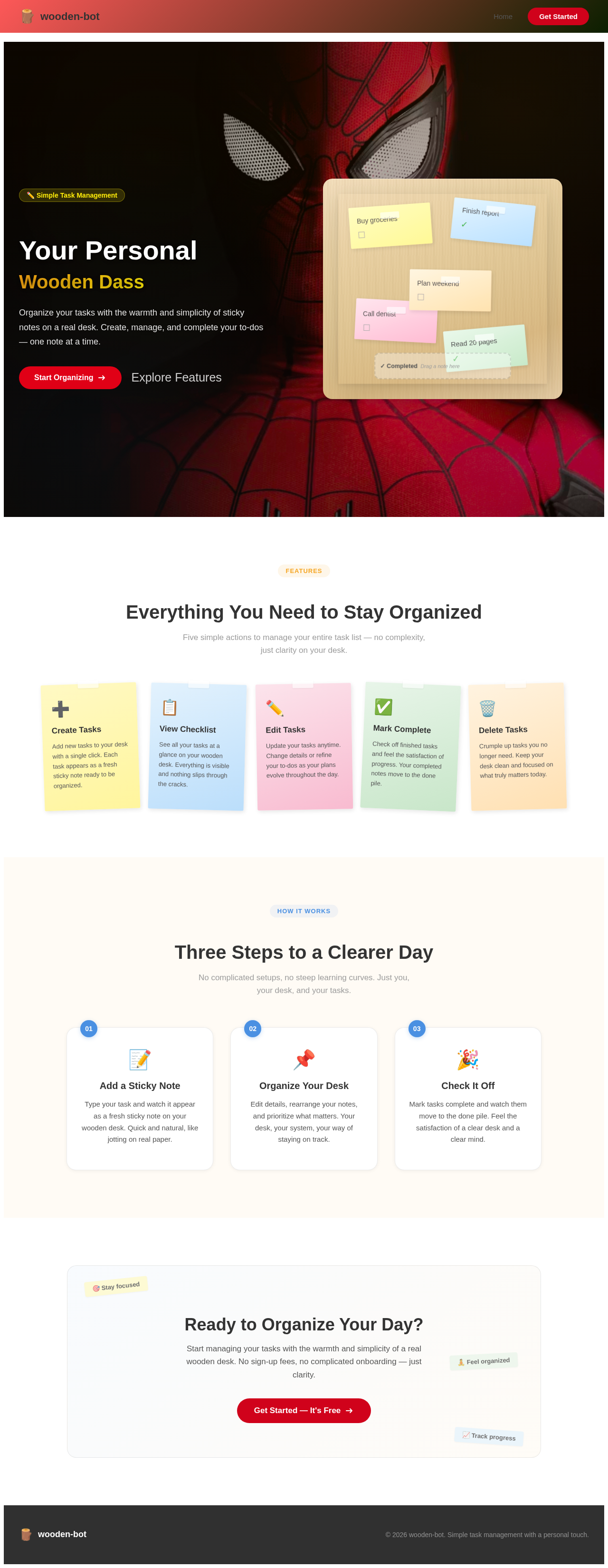
Your Personal
Wooden Dass
Organize your tasks with the warmth and simplicity of sticky notes on a real desk. Create, manage, and complete your to-dos — one note at a time.
Everything You Need to Stay Organized
Five simple actions to manage your entire task list — no complexity, just clarity on your desk.
Create Tasks
Add new tasks to your desk with a single click. Each task appears as a fresh sticky note ready to be organized.
View Checklist
See all your tasks at a glance on your wooden desk. Everything is visible and nothing slips through the cracks.
Edit Tasks
Update your tasks anytime. Change details or refine your to-dos as your plans evolve throughout the day.
Mark Complete
Check off finished tasks and feel the satisfaction of progress. Your completed notes move to the done pile.
Delete Tasks
Crumple up tasks you no longer need. Keep your desk clean and focused on what truly matters today.
Three Steps to a Clearer Day
No complicated setups, no steep learning curves. Just you, your desk, and your tasks.
Add a Sticky Note
Type your task and watch it appear as a fresh sticky note on your wooden desk. Quick and natural, like jotting on real paper.
Organize Your Desk
Edit details, rearrange your notes, and prioritize what matters. Your desk, your system, your way of staying on track.
Check It Off
Mark tasks complete and watch them move to the done pile. Feel the satisfaction of a clear desk and a clear mind.
Ready to Organize Your Day?
Start managing your tasks with the warmth and simplicity of a real wooden desk. No sign-up fees, no complicated onboarding — just clarity.
Get Started — It's FreeYour Personal
Wooden Dass
Organize your tasks with the warmth and simplicity of sticky notes on a real desk. Create, manage, and complete your to-dos — one note at a time.
Everything You Need to Stay Organized
Five simple actions to manage your entire task list — no complexity, just clarity on your desk.
Create Tasks
Add new tasks to your desk with a single click. Each task appears as a fresh sticky note ready to be organized.
View Checklist
See all your tasks at a glance on your wooden desk. Everything is visible and nothing slips through the cracks.
Edit Tasks
Update your tasks anytime. Change details or refine your to-dos as your plans evolve throughout the day.
Mark Complete
Check off finished tasks and feel the satisfaction of progress. Your completed notes move to the done pile.
Delete Tasks
Crumple up tasks you no longer need. Keep your desk clean and focused on what truly matters today.
Three Steps to a Clearer Day
No complicated setups, no steep learning curves. Just you, your desk, and your tasks.
Add a Sticky Note
Type your task and watch it appear as a fresh sticky note on your wooden desk. Quick and natural, like jotting on real paper.
Organize Your Desk
Edit details, rearrange your notes, and prioritize what matters. Your desk, your system, your way of staying on track.
Check It Off
Mark tasks complete and watch them move to the done pile. Feel the satisfaction of a clear desk and a clear mind.
Ready to Organize Your Day?
Start managing your tasks with the warmth and simplicity of a real wooden desk. No sign-up fees, no complicated onboarding — just clarity.
Get Started — It's Free
No comments yet. Be the first!