wish
 sarthak sethi
Create a fully responsive romantic birthday surprise website using HTML, CSS, and JavaScript with smooth animations, modern UI, and cute romantic aesthetics. The website should feel emotional, interactive, playful, and mobile-friendly. 🌸 Landing Screen (Password Unlock Page) The first screen should have: A split-screen layout: LEFT SIDE: Large romantic birthday image placeholder Add soft glowing animation Floating hearts in background Placeholder: [ADD IMAGE HERE] RIGHT SIDE: A stylish keypad/password input section Heading at top: Enter Passcode To Unlock 🎁 Numeric keypad design Password input should hide digits with dots Correct password: 2105 Password Logic If wrong password entered: Shake animation Show red text: Try Again ❌ If correct password entered: Unlock animation Fade transition to next page 🎉 Surprise Page After entering correct password: Display a full-screen romantic page with: Main Text Large animated heading: Ready For Your Surprise? 💖 Buttons Two cute buttons: YES 💕 NO 🙈 Button Behavior YES button: Opens a modal/card/slideshow Allow placeholders for GIFs/images Add smooth popup animation Placeholder examples: [ADD GIF HERE] [ADD IMAGE HERE] NO button: Move away playfully when hovered Impossible to click easily 💌 Second Question Section After clicking YES: Show next romantic question: Do You Love Me? ❤️ Again add: YES 😘 NO 🙃 Behavior YES: Show hearts explosion animation Display sweet message: I Knew It 💞 NO: Button runs away again 😊 Third Question Section After previous interaction: Display: Do You Know I Love Your Dimple? 🥺 Again: YES 💖 NO 😅 YES Response Show: Your Smile Is My Favorite Thing In The World 🌍💘 Add: Floating hearts Sparkle effects Romantic transition animations 🎵 Background Music Add background music running automatically on loop throughout the website. Use placeholder: [ADD SONG HERE] Requirements: Auto-play Loop enabled Hidden audio controls Soft romantic music 🎨 Design Requirements Use: Pink, purple, black, and soft white color palette Glassmorphism cards Smooth transitions Cute hover animations Floating hearts particles Romantic fonts Mobile responsive layout Fullscreen sections Modern aesthetic ✨ Extra Features Add: Confetti animation on successful unlock Typing text effect Fade-in transitions Heartbeat animation on important texts Smooth scrolling Background blur effects 📱 Technical Requirements Generate: Complete HTML Complete CSS Complete JavaScript Organized clean code All code in one file if possible Easy placeholders for: Images GIFs Music Use comments clearly like: <!-- ADD YOUR IMAGE HERE --> 💖 Final Ending Message At the end display: Happy Birthday My Love 🎂💖 You Make My World Beautiful ✨ With: Slow zoom animation Floating hearts Background sparkles Romantic ending screen


Comments (0)
Sign in to leave a comment
Project Tasks30
Implement LoginHeader for Login
As a frontend developer, implement the LoginHeader section for the Login page. This section uses React refs (logoPathRef, logoFillRef, brandingRef, brandNameRef) with a 4-phase GSAP timeline: Phase 1 draws a heart SVG path using strokeDashoffset animation over 1.2s (power2.inOut), Phase 2 fills the heart with opacity fade (0.4s), Phase 3 fades in branding text (0.6s), Phase 4 starts an infinite heartbeat pulse on brandNameRef scaling 1.0→1.08→1.0→1.05→1.0 with a matching logoPulse timeline on the SVG fill. The component renders a decorative parallax layer with two orbs (lh-deco-orb--pink, lh-deco-orb--purple) using CSS var(--scroll) transform, plus an SVG heart using the heartPath constant 'M26 50 C26 50 4 34 4 18...'. All timelines are killed on unmount. Styles are in LoginHeader.css using lh-* BEM classes.
Implement LoginImageLeft for Login
As a frontend developer, implement the LoginImageLeft section for the Login page. This section defines a HEART_CONFIGS array of 12 heart objects (each with size sm/md/lg, left/top positioning, delay, drift, duration, color) and a HeartSVG sub-component rendering SVG hearts. The LoginImageLeft component uses refs (rootRef, heartsLayerRef, heartRefs array, imageWrapRef, glowOverlayRef) and useState for imageLoaded. A gsap.context() animates each heart: staggered fade-in to random opacity 0.25–0.6, infinite y-oscillation (sine.inOut yoyo), gentle x sway at 1.3x duration offset, and subtle scale pulse for heartbeat feel. All animations use individual per-heart config delays. Styles are in LoginImageLeft.css using lil-* BEM classes.
Implement LoginKeypadRight for Login
As a frontend developer, implement the LoginKeypadRight section for the Login page. This section includes a MagneticButton sub-component that uses gsap.to for magnetic mouse-tracking (0.15 multiplier, power2.out) and elastic snap-back on mouseleave, combined with framer-motion whileHover (scale 1.08) and whileTap (scale 0.92) spring transitions. The main LoginKeypadRight component manages useState hooks: password (string), error, isShaking (bool), isUnlocked (bool), errorDots (bool), errorKeys (bool). A KEYS array defines digits 1–9 plus delete. The spawnHeartBurst callback uses burstContainerRef to dynamically create DOM span elements with class lkr-burst-particle, animating 12 emoji particles (❤️💖💗💕✨🌟) outward via gsap.fromTo with angle/distance calculations. Correct password is '1234', MAX_LENGTH is 6. AnimatePresence from framer-motion wraps conditional UI states. Styles in LoginKeypadRight.css using lkr-* BEM classes.
Implement LoginFooter for Login
As a frontend developer, implement the LoginFooter section for the Login page. This section uses refs (rootRef, leftLineRef, rightLineRef, heartPathRef, dotLeftRef, dotRightRef, loveRef, copyrightRef) with a gsap.context() timeline (delay 0.8s). The animation sequence: calls getTotalLength() on leftLine, rightLine, and heartPath SVG elements to set initial strokeDasharray/strokeDashoffset, then simultaneously draws leftLine and rightLine (0.7s power2.inOut at t=0), draws heartPath after lines meet (1.0s at t=0.4), pops dotLeft and dotRight with back.out(2) scale 1.2 (t=1.1, t=1.2), settles dots to scale 1 (t=1.5), fades in loveRef with y=0 (0.6s at t=1.6), then fades in copyrightRef (0.5s at t=2.0). The footer renders a decorative SVG separator (viewBox 0 0 260 48) with animated heart and lines. ctx.revert() is called on unmount. Styles in LoginFooter.css using lf-* BEM classes.
Setup React Frontend Project
Initialize the React frontend project with Vite or Create React App. Install and configure all required dependencies: gsap, framer-motion, react-router-dom. Set up the global theme (CSS custom properties for colors: #FF69B4, #FFB6C1, #9370DB, #FFD700, #FFA07A, #FFFFFF, rgba(255,182,193,0.8), #000000, #696969, rgba(255,105,180,0.2)). Configure romantic fonts (Google Fonts: Dancing Script or similar). Set up global CSS reset and base styles. Configure path aliases and folder structure (pages/, components/, sections/, assets/). This is a prerequisite for all frontend section tasks.
Implement LoginHeader for Surprise
As a frontend developer, implement the LoginHeader section for the Surprise page. This section renders a header with an animated SVG heart logo using GSAP timeline animations: Phase 1 draws the heart SVG path (heartPath constant 'M26 50 C26 50 4 34...') via strokeDashoffset over 1.2s using logoPathRef; Phase 2 fills the heart with color via logoFillRef opacity transition; Phase 3 fades in branding text via brandingRef; Phase 4 starts an infinite heartbeat pulse on brandNameRef (scale 1.08→1.0→1.05→1.0 cycle) and a synchronized logoPulse on the SVG fill (scale 1.1→1.0→1.06→1.0). The component uses useRef for logoPathRef, logoFillRef, brandingRef, and brandNameRef. It also renders decorative parallax orbs (lh-deco-orb--pink, lh-deco-orb--purple) via CSS custom property --scroll. Imports LoginHeader.css. Note: a similar LoginHeader component exists from the Login page — reuse or extend that component if applicable. All GSAP timelines are cleaned up on unmount.
Implement LoginSplitContainer for Surprise
As a frontend developer, implement the LoginSplitContainer section for the Surprise page. This is the most complex section: a split-layout passcode entry UI with advanced animations. State hooks: digits (array), errorState (bool), errorMsg (string), success (bool), pressedKey (string|null), confettiHearts (array). Custom hook useMouseParallax tracks normalized mouse position {x, y}. Uses framer-motion useScroll, useTransform, useSpring on rootRef for scroll-depth-modulated parallax intensity (rawIntensity transforms scrollYProgress [0,0.5]→[1,2.2]). Left panel and right keypad have opposing mouse parallax via leftX/leftY and rightX/rightY spring-transformed values driven by mouse.x/mouse.y * intensity. CORRECT_CODE is '0214', CODE_LENGTH is 4. FLOATING_HEARTS array defines 10 animated heart emojis (♥ ♡ 💕 💗 💖 💓) with staggered delays and durations rendered as CSS keyframe floaters. On correct passcode entry triggers success state with confettiHearts burst; on incorrect entry triggers errorState with errorMsg and GSAP shake animation. pressedKey state drives keypad button press visual feedback. Imports LoginSplitContainer.css, gsap, and framer-motion. Note: similar split container exists from Login page — reuse left image panel (LoginImageLeft) and right keypad (LoginKeypadRight) components if they exist.
Implement LoginFooter for Surprise
As a frontend developer, implement the LoginFooter section for the Surprise page. This footer uses a GSAP context (gsap.context with rootRef) to orchestrate a multi-step SVG drawing animation with 0.8s initial delay: left decorative line (leftLineRef) and right decorative line (rightLineRef) draw in simultaneously over 0.7s via strokeDashoffset (getTotalLength() computed at runtime); heart SVG path (heartPathRef) draws in at t=0.4 over 1.0s; accent dots (dotLeftRef, dotRightRef) appear with back.out(2) scale pop at t=1.1/1.2 then settle at t=1.5; love message (loveRef) fades in with y translate at t=1.6; copyright text (copyrightRef) fades in at t=2.0. The footer element uses className 'lf-root' and contains a decorative SVG separator with viewBox '0 0 260 48'. All refs: rootRef, leftLineRef, rightLineRef, heartPathRef, dotLeftRef, dotRightRef, loveRef, copyrightRef. Imports LoginFooter.css. Note: a LoginFooter component exists from the Login page — reuse or extend if applicable. Context is reverted on unmount.
Setup App Routing
Configure react-router-dom (v6) routes for all pages: Login (/), Surprise (/surprise), Question2 (/question2), Question3 (/question3), Ending (/ending). Implement a route guard so users cannot navigate directly to later pages without completing prior steps (store progress in sessionStorage or React context). Set up App.jsx entry point with BrowserRouter and route definitions. This is a prerequisite for all page-level navigation (YES button navigations across all sections).
Configure Static Site Deployment
Configure the project for static site deployment. Set up Vite build configuration (vite.config.js) with correct base path, output directory, and asset handling. Create a deployment configuration for a static hosting provider (e.g., Netlify netlify.toml or Vercel vercel.json) with SPA redirect rules (all routes → index.html for client-side routing). Add build scripts to package.json. Configure environment for production build. Since this is a pure frontend project with no backend, a simple CDN/static host is sufficient. Ensure GIF/image assets are properly referenced and bundled.
Setup GIF and Image Assets
Set up the assets directory structure and placeholder assets for all GIF and image slots referenced across pages. Create an assets/images/ and assets/gifs/ directory. Source and add sample romantic GIFs (as specified in the SRD: 'all code samples including relevant sample GIFs chosen by the AI'). Add romantic birthday image placeholder for LoginImageLeft. Add a placeholder audio file for background music with clear comments '/* ADD SONG HERE */'. Document all placeholder locations in a single assets-manifest comment block. This ensures all section components have valid src references and do not throw 404s during development.
Implement Question2Header for Question2
As a frontend developer, implement the Question2Header section for the Question2 page. This header component uses GSAP and Framer Motion for rich entrance animations. It includes: multiple useRef hooks (heartFillRef, brandRef, rootRef, stepPillRef, sparkle1Ref, sparkle2Ref, sparkle3Ref), a GSAP context timeline that sequences root slide-down (y: -50), brand name pop-in with back.out easing, step pill fade-in, and sparkle sequential pop-ins. A repeating heartbeat animation loop pulses the heart SVG fill (scale 1.18 → 1.0 → 1.1 → 1.0). Three sparkles have independent gentle float animations with sine.inOut easing on different durations (1.4s, 1.7s, 1.2s) and delays. The component uses gsap.context() for scoped cleanup via ctx.revert() on unmount. Note: this header component may already exist from a previous page — check for reuse before implementing.
Implement Question2Hero for Question2
As a frontend developer, implement the Question2Hero section for the Question2 page. This section renders the main question headline 'Do You Love Me?' with layered GSAP and Framer Motion animations. It uses wrapRef, accentRef, subtitleRef, and emojiRef. The GSAP entrance timeline animates: wrap opacity/y fade-in (0.9s, delay 0.15s), accent underline width reveal from 0% to 100% (power2.inOut, 1.0s), subtitle opacity/y reveal (0.7s), and emoji bounce-in fromTo with scale 0 → 1 and rotation -30 → 0 using back.out(2). Framer Motion wraps both the question container (opacity 0 → 1, y: 28 → 0, cubic-bezier easing) and the subtitle paragraph (opacity 0 → 1, y: 14 → 0, delay 0.85s). Decorative floating hearts are rendered from DECO_HEARTS array ['❤️','💕','💗','💖','💝','💞','🩷','💓'] as aria-hidden spans with CSS float animation. Includes a q2h-pulse-ring wrapper around the emoji and q2h-underline-accent span for the animated underline.
Implement Question2ButtonContainer for Question2
As a frontend developer, implement the Question2ButtonContainer section for the Question2 page. This is the most complex interactive section, featuring a YES/NO button pair with playful dodge mechanics. State includes: yesGlow (boolean), ripples (array), and noControls (useAnimation). Framer Motion spring values drive the NO button: noX, noY, noRotate, noScale (stiffness 280, damping 18) and YES button: yesScale, yesRotate. GSAP entrance animates the cardRef from opacity 0 / y 32 / scale 0.96 using back.out(1.6). The NO button implements cursor-dodge logic in handleNoMouseMove — computing dx/dy from button center, normalizing the dodge vector with dodgePower=72, clamping to maxOffset=90, and applying rotation based on dx/dist * 12. Touch support via handleNoTouchMove with e.preventDefault() and dodgePower=64. The YES button shows yesGlow state and ripple effects on click. Both buttons use motion.button with spring-animated style transforms. Full mobile-responsive interaction with touch event handlers.
Implement Question2HeartAnimation for Question2
As a frontend developer, implement the Question2HeartAnimation section for the Question2 page. This section renders a full ambient heart particle system plus click-triggered explosion effects. FloatingHeart is a sub-component using a GSAP repeat:-1 timeline with three phases: fade-in (15% of duration, power1.in), hold opacity (55%), fade-out (30%, power1.out) with overlap offset. A secondary sway animation uses gsap.to with yoyo:true on x. makeHeart() factory generates hearts with randomized size (14-28px desktop, 12-20px mobile), char from HEART_CHARS=['♥','❤','💕','💗','💖','💓'], color from HEART_COLORS=[PRIMARY #FF69B4, PRIMARY_LIGHT #FFB6C1, HIGHLIGHT #FFA07A, SECONDARY #9370DB, '#FF85C2', '#FFD0DC'], random left%, duration, delay, opacity, and drift. ExplosionParticle sub-component uses gsap.fromTo for radial burst: computing tx=Math.cos(angle)*dist and ty=Math.sin(angle)*dist (dist 80-240px), animating scale 0.3→0 and opacity 1→0 over 0.9-1.4s with onComplete callback invoking onDone(id) for cleanup. AnimatePresence wraps explosion particles. isMobile breakpoint adjusts heart sizing.
Implement Global Background Music
Implement a global persistent background music component that auto-plays and loops throughout all pages. Create a MusicContext (React Context) that holds a single HTMLAudioElement ref persisted across route changes. The audio should auto-play on first user interaction (handling browser autoplay policy) and loop continuously. Use a placeholder audio src with a comment '/* ADD SONG HERE */'. The music player state (playing/paused/volume) should persist across page navigations. Wire this into the App.jsx root layout so it is not re-mounted on route change. The EndingMusicPlayer component (task 6341a20e) for 'Perfect – Ed Sheeran' is a separate visible player on the Ending page — this global music context handles the background ambient track.
Assemble Surprise Page
Assemble the Surprise page by composing LoginHeader (reused), LoginSplitContainer, and LoginFooter (reused) section components into the Surprise page component. Wire YES button navigation to /question2 and NO button dodge mechanic within the page. Apply page-level layout. Depends on: temp_routing_setup, e460d2af (LoginHeader for Surprise), 3a1657e4 (LoginSplitContainer for Surprise), 6d9b4bf6 (LoginFooter for Surprise).
Assemble Question2 Page
Assemble the Question2 page by composing Question2Header, Question2HeartAnimation, Question2Hero, and Question2ButtonContainer section components. Wire YES button navigation to /question3. Apply page-level layout. Depends on: temp_routing_setup, 7ea3fdf0 (Question2Header), 866a6635 (Question2HeartAnimation), 1d8c6be3 (Question2Hero), 545f270d (Question2ButtonContainer).
Assemble Question3 Page
Assemble the Question3 page by composing Question3Header, Question3Container, Question3Buttons, and Question3Footer section components. Wire YES button navigation to /ending. Apply page-level layout. Depends on: temp_routing_setup, 1ef0291f (Question3Header), a4cca117 (Question3Container), 875572f1 (Question3Buttons), 308bc9e8 (Question3Footer).
Assemble Ending Page
Assemble the Ending page by composing EndingHero, EndingBirthdayMessage, EndingImageGallery, EndingMusicPlayer, and EndingCTA section components. This is the final destination page — no navigation away. Apply page-level layout and ensure smooth scroll between sections via ScrollTrigger. Depends on: temp_routing_setup, dc4fdebd (EndingHero), a7b65540 (EndingBirthdayMessage), a5ef4f40 (EndingImageGallery), 6341a20e (EndingMusicPlayer), 026ab223 (EndingCTA).
Implement Question3Header for Question3
As a frontend developer, implement the Question3Header section for the Question3 page. This reuses the LoginHeader component (may already exist from Login and Surprise pages). The component uses four refs (logoPathRef, logoFillRef, brandingRef, brandNameRef) with a GSAP timeline that sequences: (1) SVG heart path stroke-dashoffset draw-in over 1.2s with power2.inOut, (2) heart fill opacity fade-in overlapping by 0.3s, (3) branding text fade-in overlapping by 0.2s, then (4) infinite heartbeat pulse timelines on both brandNameRef (scale 1.08→1.0→1.05→1.0) and logoFillRef (scale 1.1→1.0→1.06→1.0) with precise ease curves. Includes decorative parallax layer with two orbs (lh-deco-orb--pink, lh-deco-orb--purple) using CSS custom property --scroll for translateY. All timelines are killed on cleanup. Import LoginHeader.css styles.
Assemble Login Page
Assemble the Login page by composing LoginHeader, LoginImageLeft, LoginKeypadRight, and LoginFooter section components into a single Login page component. Wire up navigation: on successful passcode entry in LoginKeypadRight, navigate to /surprise using react-router-dom. Ensure global background music context is triggered on first interaction here. Apply page-level layout CSS (full viewport height, overflow handling). Depends on: temp_routing_setup, 8e497351 (LoginHeader), c45424be (LoginImageLeft), 8f0ab16a (LoginKeypadRight), 3720fa79 (LoginFooter).
Implement Question3Container for Question3
As a frontend developer, implement the Question3Container section for the Question3 page. The component uses six refs (cardRef, badgeRef, headlineRef, subtextRef, gifRef, sparklesRef) initialized via gsap.set to hidden/offset states. A GSAP context timeline sequences: card slides up (opacity 0→1, y 40→0, 0.7s), gifRef scales in with back.out(1.4) easing, badgeRef/headlineRef/subtextRef stagger in with overlapping offsets, sparklesRef fades to opacity 0.55. The qc-card uses framer-motion's motion.div with whileHover scale 1.012 and spring physics (stiffness 260, damping 22). Decorative corner hearts (qc-corner-heart--tl/tr/bl/br) are positioned absolutely. A qc-gif-placeholder div with a 🥰 emoji acts as GIF placeholder. The headline reads 'Do your dimples make everyone around you smile? ✨' with an em tag for italic styling. A qc-question-badge with animated dot precedes the headline. Import Question3Container.css.
Implement Question3Buttons for Question3
As a frontend developer, implement the Question3Buttons section for the Question3 page. State includes: dodgeIndex (0), showHint (bool), hearts (array of particle objects), yesError and noError (bools). Uses framer-motion's useAnimation, useMotionValue, useTransform hooks alongside refs (yesBtnRef, noBtnRef, rootRef, heartIdRef). On mount, GSAP staggered scale-in animates .qb-yes-btn (delay 0.1s) and .qb-no-wrapper (delay 0.2s) from scale 0.75/opacity 0. The spawnHearts useCallback generates 6–10 heart particles (from HEART_EMOJIS array: ♥ 💕 💖 💗 💓 💝 ✨) distributed radially, auto-removed after 1500ms. YES click: computes button center relative to rootRef, calls spawnHearts(cx, cy, 10), GSAP pulse on yesBtnRef (scale 1.12→1.0), then navigates to Ending page. NO button dodge mechanic: cycles through DODGE_DIRECTIONS array (8 directional vectors) via noControls.start(), incrementing dodgeIndex, showing hint after threshold. Import Question3Buttons.css and framer-motion/gsap dependencies.
Implement Question3Footer for Question3
As a frontend developer, implement the Question3Footer section for the Question3 page. This reuses the LoginFooter component (may already exist from Login and Surprise pages). The component uses eight refs (rootRef, leftLineRef, rightLineRef, heartPathRef, dotLeftRef, dotRightRef, loveRef, copyrightRef). On mount within gsap.context, SVG path lengths are measured via getTotalLength() for three paths (leftLine, rightLine, heartPath), then set via strokeDasharray/strokeDashoffset. A GSAP timeline (delay 0.8s) sequences: left and right lines draw simultaneously over 0.7s (power2.inOut), heart path draws in starting at t=0.4s over 1.0s, accent dots (dotLeftRef, dotRightRef) appear at t=1.1/1.2s with back.out(2) scale 1.2 then settle to scale 1 at t=1.5s, love message fades in at t=1.6s (y offset), copyright at t=2.0s. SVG separator uses viewBox='0 0 260 48'. Import LoginFooter.css styles.
Implement EndingHero for Ending
As a frontend developer, implement the EndingHero section for the Ending page. This section uses React refs (rootRef, badgeRef, headlineRef, subheadingRef, scrollIndRef) with GSAP and ScrollTrigger for entrance animations. A GSAP timeline staggers badge opacity, headline scale+position (back.out easing), subheading slide-up, and scroll indicator fade-in. A ScrollTrigger on rootRef re-reveals the headline on scroll re-entry. 13 floating heart particles (FLOAT_HEARTS array) are rendered as <span> elements with CSS animation using per-item left/delay/duration/size inline styles. Two decorative blob divs (eh-blob--pink, eh-blob--purple) provide background depth. Apply EndingHero.css for layout and floating heart keyframe animations.
Implement EndingBirthdayMessage for Ending
As a frontend developer, implement the EndingBirthdayMessage section for the Ending page. This section renders a multi-line love letter via a MESSAGE_LINES array containing mixed string/accent-object content, rendered by renderLineContent() which maps accent types ('primary', 'gold', 'purple') to CSS classes (ebm-accent, ebm-accent--gold, ebm-accent--purple). Uses useInView from framer-motion to trigger a GSAP staggered line reveal (lineRefs array). State hooks include replayKey (to re-trigger animation via key prop) and allVisible. A signatureRef and replayRef are animated via GSAP. Six AMBIENT_HEARTS float in the background via inline style delay/duration. A replay button resets replayKey to re-run the letter animation. Apply EndingBirthdayMessage.css for card layout and ambient heart keyframes.
Implement EndingImageGallery for Ending
As a frontend developer, implement the EndingImageGallery section for the Ending page. This section renders 8 GALLERY_ITEMS (memory cards with emoji, caption, tag, placeholderText, bgFrom/bgTo gradient colors) as GalleryCard components. Each GalleryCard uses a cardRef with GSAP for 3D tilt on mousemove (rotateX/rotateY computed from cursor offset relative to card center, transformPerspective: 800) and resets on mouseleave. Cards use framer-motion cardVariants (hidden: opacity 0 y:36 → visible with staggered delay via custom index prop). ScrollTrigger drives the grid reveal animation on section entry. Apply EndingImageGallery.css for the responsive grid layout and card gradient backgrounds.
Implement EndingMusicPlayer for Ending
As a frontend developer, implement the EndingMusicPlayer section for the Ending page. This section is a full-featured audio player for 'Perfect – Ed Sheeran'. State includes isPlaying, currentTime, duration, volume (0.7 default), showAutoplayNotice, isPulse, and isMuted. Uses audioRef, cardRef, playBtnRef, progressWrapRef, and hasTriedAutoplay ref. GSAP animates card entrance (fromTo opacity/y/scale). An autoplay attempt fires on mount via audioRef.play() promise with catch showing showAutoplayNotice. handlePlayPause toggles play/pause and triggers a CSS pulse via isPulse state with a 360ms setTimeout reset. handleProgressClick computes seek position from click offset on progressWrapRef. handleTimeUpdate and handleLoadedMetadata update currentTime/duration. Volume and mute controls are wired to audioRef. AnimatePresence from framer-motion handles autoplay notice visibility. formatTime() formats seconds to M:SS display. Apply EndingMusicPlayer.css for player card UI and animations.
Implement EndingCTA for Ending
As a frontend developer, implement the EndingCTA section for the Ending page. This section features a canvas-based heart burst particle system (spawnHeartBurst) that fires 28 physics-simulated heart particles (gravity, vx/vy, alpha fade, rotation) rendered via requestAnimationFrame using a custom drawHeart bezier function with HEART_COLORS array. Refs include rootRef, taglineRef, headlineRef, primaryBtnRef, secondaryBtnRef, and canvasRef. An IntersectionObserver triggers a GSAP timeline on scroll entry: tagline and headline slide up (opacity/y), primaryBtn scales in (fromTo scale 0→1), secondaryBtn fades in. Button click handlers call spawnHeartBurst with the click origin coordinates (e.clientX, e.clientY). The canvas is positioned fixed/absolute as a full-viewport overlay during the burst animation and clears itself when all particles fade. Apply EndingCTA.css for section layout and button styles.
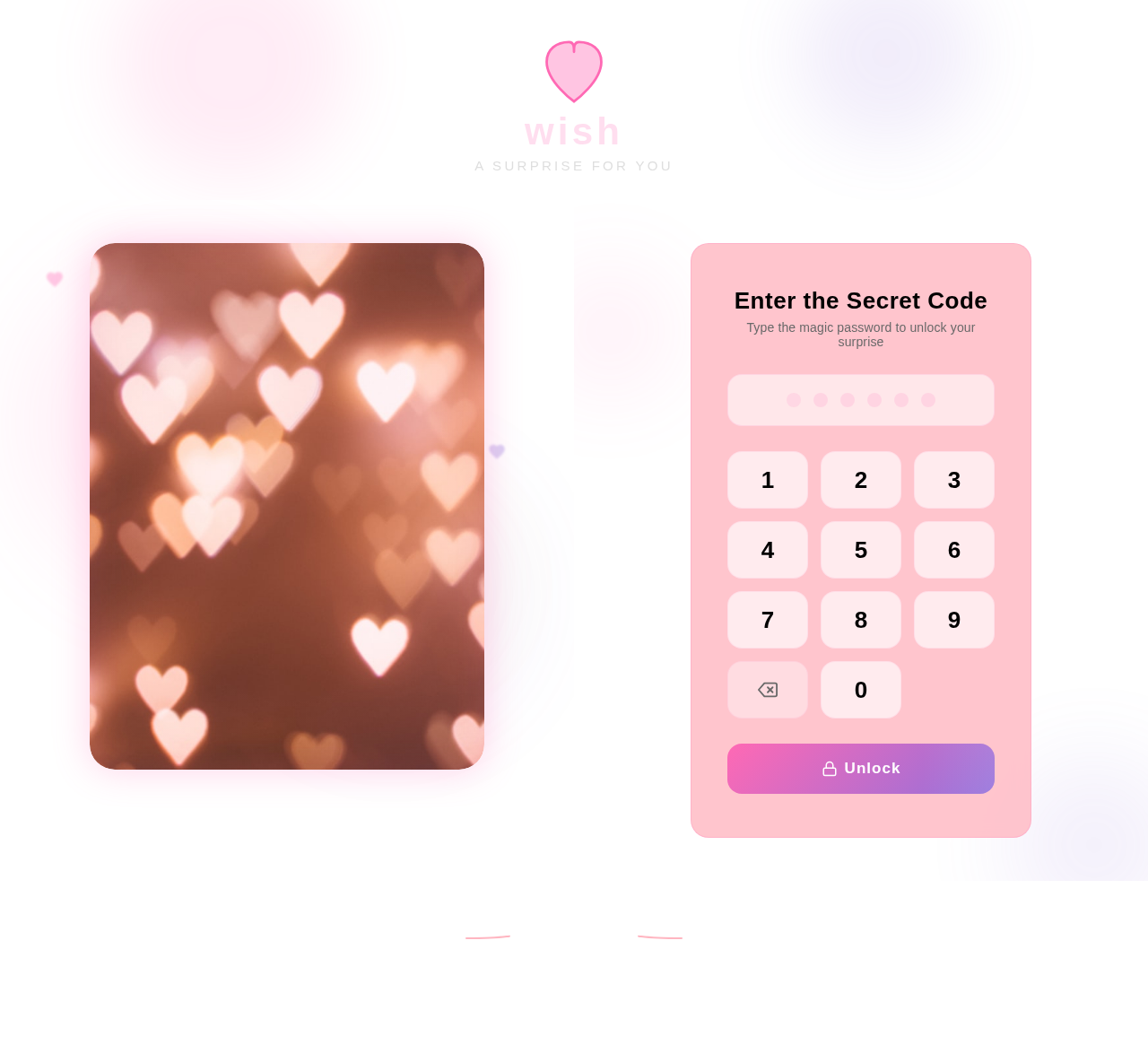

Enter the Secret Code
Type the magic password to unlock your surprise
No comments yet. Be the first!