wise-simple
 Diya Trivedi
start a simple single page design of calculator

Comments (0)
Sign in to leave a comment
System Requirements
System Requirements Document for wise-simple
Introduction
wise-simple is a simple calculator delivered as a single-page design. The product intent is narrow and explicit: a person opens one page, enters numbers and arithmetic operators, sees the computed result, and can clear the current calculation to start over. There is no account, no saved history, no multi-page navigation, and no adjacent product surface — the entire product is the one calculator page.
The audience is the anonymous everyday user who wants fast, trustworthy arithmetic in a single, legible surface. The design language is "systematic clarity": the calculator is treated as information signage, with a visible grid, colour-coded keys, and an oversized tabular result numeral as the hero typography of the page.
System Overview
wise-simple is a single-page web calculator. The current delivery consists of:
- Frontend (React application UI): renders the one Calculator page — the expression line, the oversized result display, the 4×5 keypad, and the key-category legend.
- Backend (shared FastAPI process): the provisioned shared application process for APIs and domain modules. The accepted calculator behavior is client-side arithmetic on the single page; the backend is available infrastructure and does not itself introduce product requirements, persistence, or identity.
- Database (MariaDB): provisioned application-owned storage. No accepted workflow in this product requires durable domain data, so no domain entities, authentication, or persistence behavior are derived from its presence.
Actors:
- Calculator User (active human persona): an anonymous visitor who enters numbers and operators, reads the expression and result, and clears to reset.
- System process (non-persona): the in-page arithmetic evaluation that produces the displayed result from the entered expression.
Accepted behavior: number and operator entry, expression display, result computation and display, and clearing the current calculation to start over — all within the single Calculator page.
Access: the Calculator page is anonymously reachable with no identity requirement. No application-owned identity, sign-in, or session continuity is required by any accepted journey.
Narrow exclusions: no accounts, no saved calculation history, no multi-page navigation, no scientific or programmer modes, no unit conversion, and no persistence of calculations.
Removed from scope
- None — no concept was explicitly removed by the user.
Product Interpretation and Delivery Boundary
The user asked to "start a simple single page design of calculator." That is the whole current product: one page, one calculator, anonymous use. The single-page constraint is hard — the Calculator page is the only destination, and every accepted interaction (entry, display, result, clear) happens inside it. There is no separate entry, onboarding, or account surface, because no accepted journey requires identity or continuity across visits.
Everything the Calculator User does is first-party custom UI on the Calculator page. The backend and database are provisioned infrastructure that the current accepted behavior does not depend on; they remain available for the application but do not create product scope. Nothing in this document is deferred to a future horizon beyond the single current page.
Page Content and Component Coverage
Calculator
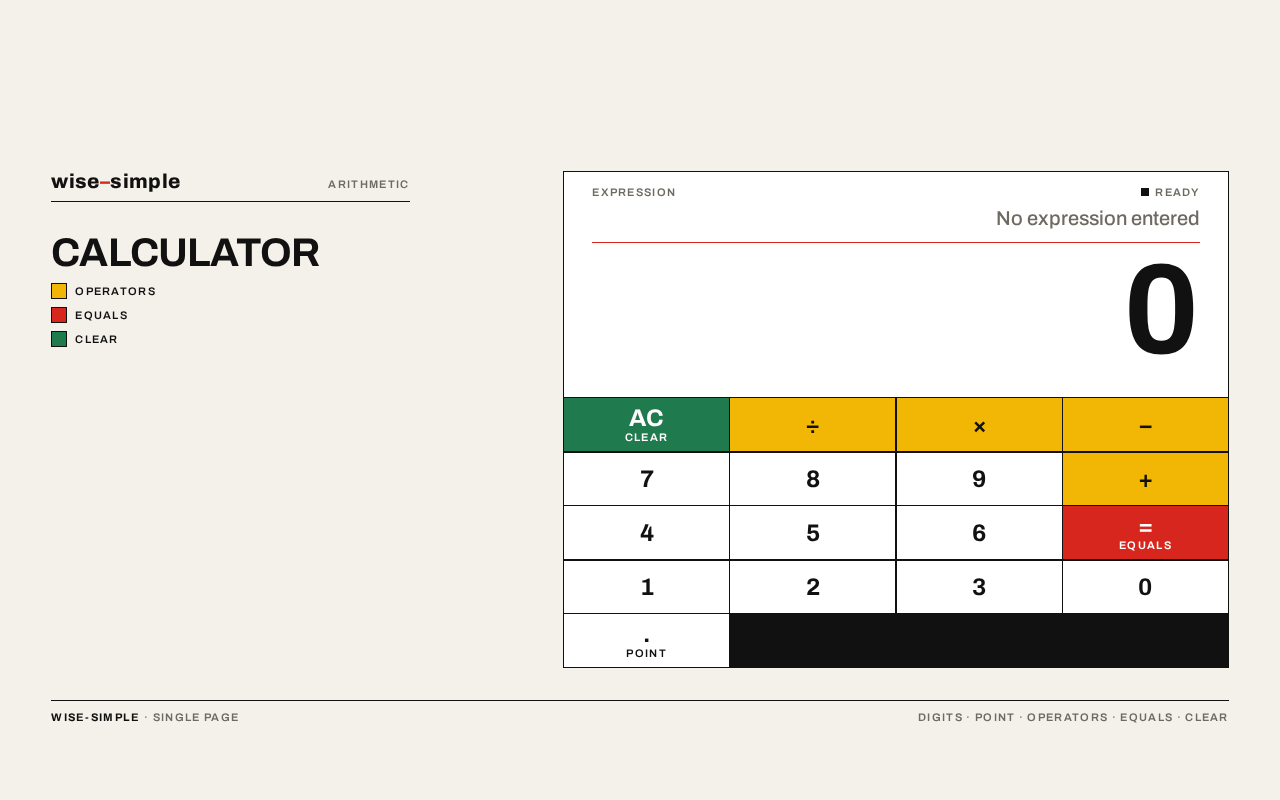
The single page of the product. Anonymous, no identity required. It presents the calculator as signage: a warm paper ground, a flush-left title and key-category legend, and a white calculator panel occupying the right portion of a strict grid.
Information and state
- Expression line: the full-width line at the top of the panel showing the sequence of entered numbers and operators (e.g.
12 × 4). Empty at first use. - Result display: the oversized tabular numeral (up to 128px, flush right) showing the current computed result, sitting above a single 1.5px red rule. At first use it shows
0. - Active operator state: the currently selected operator key is shown inverted (ink-on-red) while active.
- Key-category legend: a small flush-left legend in the left columns naming the colour-coded key categories (operators, equals, clear), like a map key.
Primary actions
- Enter digits
0–9and a decimal point via the keypad. - Select an arithmetic operator (
+,−,×,÷) via the mustard operator keys. - Evaluate the expression via the red equals key.
- Clear the current calculation via the green clear key, resetting expression and result to the starting state.
Supporting actions
- Read the running expression and the current result at any time.
- Correct input by clearing and re-entering.
Domain entities
- Calculation: the transient expression (operands and operators) and its computed result. It exists only in the page's current state; it is not persisted.
Component responsibilities
- Page title / wordmark: flush-left heading in the left columns, aligned to the panel's top edge.
- Legend: uppercase, letterspaced micro-labels mapping colour to key category.
- Calculator panel: white surface with hard edges, containing the expression line, the result display above the red rule, and the keypad.
- Keypad: a 4×5 grid of equal flat cells separated by 1.5px ink rules; white digit keys with ink borders, mustard operator blocks, one red equals block, one green clear key; thick monoline glyphs at key centre.
- Result display: the hero typography — Archivo 700, tight tracking, tabular numerals, flush right.
States
- Loading: not applicable — the page renders its static calculator immediately; no data fetch is required for accepted behavior.
- Empty / first use: expression line empty, result display shows
0, no operator active. - Success: after equals, the result display shows the computed value; the expression line shows the evaluated expression.
- Error: if the entered expression cannot be evaluated (for example division by zero or a malformed expression), the display shows an error indication instead of a numeric result, and the user recovers by pressing clear and re-entering.
- Recovery: the clear key always returns the page to the empty/first-use state.
Functional Requirements
FR-1 — Single-page calculator delivery (explicit) As a Calculator User, I should get the entire calculator as one simple single page, so that I can do arithmetic without navigating anywhere.
- Trigger: opening the product.
- Observable result: the Calculator page renders with the expression line, result display, and keypad; there are no other pages or navigation destinations.
- Access: anonymous; no identity required.
- Failure/recovery: not applicable — the page is the product.
- Continuation: the user proceeds directly to entering a calculation.
FR-2 — Enter numbers and operators (explicit) As a Calculator User, I should enter numbers and arithmetic operators, so that I can build the calculation I want to compute.
- Trigger: pressing digit keys, the decimal point, and operator keys on the keypad.
- Observable result: the expression line shows the entered sequence; the active operator key is shown inverted while active.
- Access: anonymous.
- Failure/recovery: input can be corrected by clearing and re-entering.
- Continuation: the user presses equals to compute, or continues building the expression.
FR-3 — Compute and display the result (explicit) As a Calculator User, I should see the computed result of my entered expression, so that I get the arithmetic answer I came for.
- Trigger: pressing the equals key with an entered expression.
- Observable result: the result display shows the computed value as the oversized tabular numeral; the expression line shows the evaluated expression.
- Access: anonymous.
- Failure/recovery: if the expression cannot be evaluated (e.g. division by zero), the display shows an error indication; the user clears and re-enters.
- Continuation: the user reads the result, then clears to start a new calculation or continues entering.
FR-4 — Clear the current calculation (explicit) As a Calculator User, I should clear the current calculation, so that I can start over cleanly.
- Trigger: pressing the clear key.
- Observable result: the expression line empties and the result display returns to
0; no operator is active. - Access: anonymous.
- Failure/recovery: not applicable — clear always succeeds and is the recovery path for any error state.
- Continuation: the user begins a new calculation from the empty state.
User Personas
Calculator User
Product context. An anonymous visitor who needs everyday arithmetic done quickly on a single page. They arrive with no account and no prior state; the page is the whole product.
Primary goal. Enter a calculation and read a trustworthy result with as little friction as possible, then clear and move on.
Distinct accepted responsibilities.
- Enters numbers and arithmetic operators to build an expression.
- Reads the running expression and the computed result.
- Clears the current calculation to start over, including recovering from an error state.
Relevant inputs and decisions. Which digits and operators to enter; when to press equals to compute; when to clear versus continue entering.
Interactions with other participants. None beyond the page itself — the Calculator User is the only active human participant, and the arithmetic evaluation is a system process with no separate human counterparty.
Observable success. The result display shows the correct computed value for the entered expression, and the clear key returns the page to a clean starting state on demand.
Core User Flows
Flow 1 — Perform a calculation
- The Calculator User opens wise-simple and lands on the Calculator page (anonymous; no sign-in).
- The page shows the empty expression line and a result display of
0. - The user presses digit keys to enter the first operand; the expression line updates as digits are entered.
- The user presses an operator key (
+,−,×, or÷); the key inverts to its active state and the operator appears in the expression line. - The user presses digit keys to enter the second operand.
- The user presses the red equals key; the system evaluates the expression and the result display shows the computed value as the oversized tabular numeral, with the evaluated expression above it.
- The user reads the result. To do another calculation, they continue with Flow 2.
Flow 2 — Clear and start over
- From any state on the Calculator page — mid-entry, after a result, or after an error — the Calculator User presses the green clear key.
- The expression line empties, the result display returns to
0, and no operator remains active. - The user begins a new calculation by returning to Flow 1, step 3.
Flow 3 — Recover from an unevaluable expression
- The Calculator User enters an expression that cannot be evaluated (for example, division by zero) and presses equals.
- The result display shows an error indication instead of a numeric result.
- The user presses the clear key; the page returns to the empty/first-use state.
- The user re-enters a valid calculation and presses equals to obtain a result.
Visuals Colors and Theme
The creative direction is authoritative: Systematic clarity — a calculator as signage, after Massimo Vignelli. The headline idea: the numbers are the hero, the keys are wayfinding, and the page reads like a transit map rather than a gadget.
Colour tokens (light mode)
| Role | Hex | Use |
|---|---|---|
| Background (paper) | #F4F1EA | Page ground |
| Surface | #FFFFFF | Calculator panel, digit keys |
| Text (ink) | #111111 | All type, digits, rules, key borders |
| Primary (Vignelli red) | #D7261E | Equals key, active operator, the single rule under the display |
| Accent (mustard) | #F2B705 | Operator keys |
| Clear (transit green) | #1F7A4D | Clear key only |
| Muted | #6E6A62 | Labels and secondary text |
Proportion: 70% paper/white, 20% ink, 10% colour — colour is coding, never decoration. No more than three accent colours on the page.
Typography
- Single family: Archivo (Helvetica-class grotesque) for headings and body. No light weights, no italics; hierarchy by weight and rule only.
- Result display: Archivo 700, tracking
-0.02em, tabular numerals, flush right,clamp(56px, 14vw, 128px). - Page title: 40/28/20. Key legends: 20/18/16. Micro-labels: 13/12/11, weight 600, uppercase,
0.12emletterspacing. - Scale: 1.333 modular; only five sizes on the page.
Shape language. Hard edges and right angles only: 0px radius on keys, display panel, and rules. Keys are flat white rectangles with a 1.5px ink border; the equals key is a solid red block; operator keys are solid mustard blocks with ink glyphs. Horizontal rules of 1.5px ink separate display from keypad and keypad rows from each other. No shadows, no rounded corners, no gradients.
Layout. Strict 12-column grid on the paper ground. Left columns (1–4) hold the page title and the colour-coded key-category legend, flush left, bottom-aligned. Right block (columns 6–12) is the white calculator panel: full-width expression line at top, oversized result flush right beneath a red rule, then a 4×5 keypad of equal cells separated by 1.5px ink rules. On mobile the legend collapses to a single line above the panel and the keypad spans full width; at 768px the legend moves beside the panel; at 1280px the asymmetric split opens up with generous margins.
Imagery. No photography. The visual content is the interface itself: the grid, the rules, the colour-coded keys, and the oversized numerals. Optional small pictogram glyphs (÷ × − + = C) drawn as thick monoline symbols at key centre, consistent stroke weight, treated as signage pictograms.
Readability constraint. Headlines, labels, numbers, and controls stay entirely inside the viewport and their container at 375px, 768px, and 1280px, wrapping or scaling to fit; no element covers any part of them.
Signature Design Concept
The first screen is the calculator as a piece of signage, not a centred card on a gradient. A warm paper ground (#F4F1EA) fills the viewport. A large flush-left page title sits in the left columns, and the white calculator panel occupies the right two-thirds, its top edge aligned to the title's cap height. The dominant element is the oversized result numeral — up to 128px, tabular, flush right against the panel edge — sitting above a single 1.5px red rule. Below it, the keypad is a grid of flat bordered cells with mustard operator blocks, one red equals block, and one green clear key, all separated by visible 1.5px ink rules. A small flush-left legend in the margin names the key categories like a map key. No drop shadows, no blobs, no blue button.
Interaction Model & Motion Direction
Interaction Model: Static (direction) Motion Tempo: still Hero Dimensionality: flat
Landing Hero Motion Brief
- Focal subject: the oversized tabular result numeral, flush right above the single red rule, with the colour-coded keypad beneath it.
- Input → transformation → outcome thesis: a key press (input) instantly updates the expression line and, on equals, the result numeral (transformation), so the display always shows the current authoritative state of the calculation (outcome). No decorative motion is added.
- Motion vocabulary: instant state feedback only — an operator key inverts to ink-on-red while active; a pressed key flashes to its inverted state for 80ms. No easing theatrics; no transition longer than 120ms.
- Composed first frame: paper ground, flush-left title and legend in the left columns, white panel on the right with an empty expression line, a
0result numeral above the red rule, and the full keypad visible. - Reduced-motion state: identical static arrangement; the 80ms key flash is the only feedback and remains instantaneous state indication, with no animation required to use the calculator.
Non-Functional Requirements
- Single-page constraint (explicit): the product must be a simple single-page design; the Calculator page is the only destination.
- Anonymous access (required_inference): the Calculator page is reachable without identity; no sign-in, account, or session continuity is required by any accepted journey.
- Legibility and readability (explicit, from creative direction): readable text and controls stay whole inside the viewport and their container at 375px, 768px, and 1280px; no element covers them.
- Visual discipline (explicit, from creative direction): no rounded corners, drop shadows, gradients, blobs, or decorative illustration; no blue/indigo primary accent; no Inter, Roboto, Arial, or neutral system fonts; no more than five type sizes or three accent colours.
- Responsiveness (explicit, from creative direction): legend collapses above the panel on mobile, moves beside the panel at 768px, and the asymmetric split opens at 1280px.
- Performance (required_inference): the page renders its static calculator immediately with no data fetch required for accepted behavior; key feedback is instant (≤120ms).
Tech Stack
- Frontend: React application UI rendering the single Calculator page.
- Backend: shared FastAPI process for application APIs and domain modules (provisioned; not required by current accepted calculator behavior).
- Database: MariaDB for application-owned persistent data (provisioned; no accepted workflow requires persistence).
- Typography: Archivo (Helvetica-class grotesque), loaded as a web font.
Assumptions and Constraints
- Assumption: the calculator performs standard arithmetic on entered numbers and operators; the accepted behavior is client-side evaluation on the single page.
- Assumption: the provisioned backend and database remain available infrastructure but do not create product requirements, persistence, or identity for this product.
- Constraint (explicit): the product is a simple single-page design; exactly one page, the Calculator.
- Constraint (explicit): users enter numbers and arithmetic operators to compute a result, and can clear the current calculation to start over.
- Constraint (explicit, creative direction): the visual language is Vignelli-style systematic clarity with the specified palette, Archivo typography, hard edges, and still motion.
Glossary
- Calculator page: the single page of wise-simple containing the expression line, result display, keypad, and legend.
- Expression line: the full-width line at the top of the panel showing the entered sequence of numbers and operators.
- Result display: the oversized tabular numeral showing the current computed result, flush right above the red rule.
- Keypad: the 4×5 grid of flat, colour-coded keys (digits, operators, equals, clear).
- Clear key: the green key that resets the expression and result to the starting state.
- Calculator User: the anonymous active human persona who performs arithmetic on the page.
wise–simple
Arithmetic
Calculator
- Operators
- Equals
- Clear
wise–simple
Arithmetic
Calculator
- Operators
- Equals
- Clear
No comments yet. Be the first!