wise-dayflow
 Numraj Pokhrel
See your improvement. 💰 How it makes money Free plan: Basic planning and reminders. Premium: €5.99/month for advanced AI features. Pro: €11.99/month for advanced analytics and integrations. 🎨 Branding Name: DayFlow Colors: Lavender, white, and dark navy. Style: Minimalist, modern, premium. Platform: iOS and Android


Comments (0)
Sign in to leave a comment
System Requirements
System Requirements Document for DayFlow
1. Introduction
DayFlow is a premium daily planning application for iOS and Android that gives busy people calm control of their day. It combines basic planning and reminders with optional paid tiers: Premium (€5.99/month) unlocks advanced AI features, and Pro (€11.99/month) unlocks advanced analytics and integrations. The product is branded around lavender, white, and dark navy in a minimalist, modern, premium style.
The audience is individuals who want a quiet, trustworthy daily planning habit rather than a noisy productivity suite. The product is delivered as a first-party mobile application (iOS and Android) backed by a shared application backend, with application-owned identity so each person's plans, reminders, subscription state, and connected integrations remain private and resumable.
2. System Overview
DayFlow is a mobile-first planning product. A person creates an account, plans their day and sets reminders on the free plan, and may upgrade to Premium for advanced AI planning help or to Pro for advanced analytics and integrations. All plans, reminders, subscription state, and integration connections are owned by the application and persist across sessions and devices.
2a. Product Interpretation and Delivery Boundary
DayFlow is delivered as a first-party React application UI (rendered for iOS and Android) served by a shared FastAPI backend with MariaDB for application-owned persistent data. The backend calls model providers through a LiteLLM gateway, which is backed by its own PostgreSQL store kept separate from application data.
Access is application-owned. Anonymous visitors can read the Landing page, create an account on Sign Up, and verify identity on Login. Private planning state, billing, AI features, analytics, and integrations require a signed-in identity. Paid capabilities are gated by the person's active subscription tier: the free plan covers basic planning and reminders only; Premium adds advanced AI features; Pro adds advanced analytics and integrations. Tier gating is a subscription-entitlement boundary, not a separate role-based permission system over shared state.
Current scope is the free planning and reminder experience, the two paid tiers and their checkout, and the paid feature surfaces. Nothing beyond the stated plans, features, branding, and platforms is in scope.
Removed from scope
- None.
2b. Source Content Inventory
Not applicable — no reference directive supplies a content_source.
2c. Page Content and Component Coverage
Landing
- Information/state: Anonymous public entry. Product name DayFlow; hero headline "Your day, in quiet order"; subline "Plan the day and set reminders on iOS and Android. Add AI help when you need it."; call to action "Start planning"; a summary of the three plans (Free — basic planning and reminders; Premium — €5.99/month, advanced AI features; Pro — €11.99/month, advanced analytics and integrations); platform statement (iOS and Android).
- Primary action: "Start planning" leads to Sign Up.
- Supporting actions: Navigate to Login for returning users; read plan and price rows.
- Domain entities: Plan tier (Free, Premium, Pro) with price and feature summary.
- Component responsibilities: Hero headline block; dark navy plan panel as hero subject with one lavender action; aligned label/value price rows with hairline rules; phone render overlapping the panel edge at low scale.
- States: Loading — static content, no spinner required; empty — not applicable; success — page renders fully; error — if plan summary cannot load, show the static plan copy and keep the call to action available; recovery — retry loading plan summary without blocking entry.
Sign Up
- Information/state: Anonymous identity-establishment surface. Fields for creating a DayFlow account; explanation that an account keeps plans, reminders, and subscription private.
- Primary action: Create account and continue into the signed-in experience.
- Supporting actions: Navigate to Login if the person already has an account; return to Landing.
- Domain entities: Account identity.
- Component responsibilities: Credential entry form; inline validation; submit control.
- States: Loading — submit disabled with progress indication; empty — blank form with guidance; success — account created and person signed in, continuing to Plans; error — invalid or already-used credentials shown inline with the form preserved; recovery — correct and resubmit.
Login
- Information/state: Anonymous returning-verification surface for people with an existing DayFlow account.
- Primary action: Verify identity and enter the signed-in experience.
- Supporting actions: Navigate to Sign Up; return to Landing.
- Domain entities: Account identity.
- Component responsibilities: Credential entry form; inline validation; submit control.
- States: Loading — submit disabled with progress indication; empty — blank form; success — signed in and continuing to Plans; error — incorrect credentials shown inline without revealing which field failed; recovery — retry or move to Sign Up.
Plans
- Information/state: Signed-in Planner's daily planning surface. The day's plan entries and their reminders; reminder status (upcoming, due, done); current plan tier shown so the Planner knows what is available.
- Primary action: Create a plan entry for the day and set a reminder on it.
- Supporting actions: Edit or remove a plan entry; mark a reminder done; open Plans & Billing to upgrade; open AI Assistant (Premium) or Analytics and Integrations (Pro) when entitled.
- Domain entities: Plan entry, reminder, plan tier.
- Component responsibilities: Day plan list; entry composer; reminder control; tier indicator; navigation to paid surfaces.
- States: Loading — plan list skeleton; empty — guidance to create the first plan entry; success — new entry and reminder appear in the list with reminder status; error — save failure keeps the composed entry and shows a retry; recovery — retry save or discard.
Plans & Billing
- Information/state: Signed-in surface listing the three plans with aligned label/value price rows: Free (basic planning and reminders), Premium (€5.99/month, advanced AI features), Pro (€11.99/month, advanced analytics and integrations). Current subscription tier and its renewal state.
- Primary action: Select Premium or Pro and complete payment.
- Supporting actions: Review plan feature rows; return to Plans.
- Domain entities: Plan tier, price, subscription.
- Component responsibilities: Plan comparison rows with hairline rules; selection control; payment step; current-tier indicator.
- States: Loading — plan rows skeleton; empty — not applicable; success — subscription active and paid surfaces unlocked; error — payment declined or interrupted, selection preserved with a clear message; recovery — retry payment or keep the current tier.
AI Assistant
- Information/state: Premium subscriber's advanced AI planning surface. A request area for AI help with daily planning and the AI's returned planning suggestions, tied to the subscriber's day.
- Primary action: Ask the AI for help planning the day and receive suggestions.
- Supporting actions: Apply a suggestion into the day's plan; ask again; return to Plans.
- Domain entities: AI planning request, AI suggestion, plan entry.
- Component responsibilities: Request input; suggestion display; apply-to-plan control; entitlement indicator.
- States: Loading — request in progress with progress indication; empty — prompt to describe what help is needed; success — suggestions returned and readable; error — model or gateway failure shown with the request preserved; recovery — retry the request.
Analytics
- Information/state: Pro subscriber's advanced analytics surface summarizing planning activity over time.
- Primary action: Review advanced analytics of planning activity.
- Supporting actions: Adjust the period reviewed; return to Plans.
- Domain entities: Planning activity records, analytics summary.
- Component responsibilities: Period selector; analytics summary display; entitlement indicator.
- States: Loading — analytics skeleton; empty — guidance shown when there is not yet enough activity; success — analytics rendered; error — load failure with retry; recovery — retry or change period.
Integrations
- Information/state: Pro subscriber's integrations surface listing available integrations and each connection's state (not connected, connected).
- Primary action: Connect an integration.
- Supporting actions: Disconnect a connected integration; return to Plans.
- Domain entities: Integration, connection state.
- Component responsibilities: Integration list; connect/disconnect controls; connection state indicator; entitlement indicator.
- States: Loading — integration list skeleton; empty — guidance when no integrations are available; success — connection state updates to connected; error — connection failure shown with the integration left in its prior state; recovery — retry connect or disconnect.
3. Functional Requirements
FR-1 — Product identity and platforms (explicit) As a Planner, I should use DayFlow on iOS and Android, so that I can plan my day on the device I carry.
- Trigger/input: the person opens DayFlow on an iOS or Android device.
- Observable result: the DayFlow application loads with its lavender, white, and dark navy minimalist, modern, premium presentation.
- Access state: anonymous on Landing; signed-in for private surfaces.
- Failure/recovery: if the app cannot reach the backend, show a retry and keep the last loaded state readable.
- Continuation: proceed to Landing (anonymous) or Plans (signed in).
FR-2 — Anonymous product entry (required_inference) As a Planner, I should understand what DayFlow offers and its plans before signing up, so that I can decide to start.
- Trigger/input: the person opens DayFlow without an account.
- Observable result: the Landing page shows the product name, hero headline, subline, "Start planning" call to action, the three plans with prices, and the iOS/Android platform statement.
- Access state: anonymous.
- Failure/recovery: if plan summary data fails to load, static plan copy remains and the call to action stays available.
- Continuation: "Start planning" leads to Sign Up; returning users go to Login.
FR-3 — Self-service enrollment (required_inference) As a Planner, I should create a DayFlow account, so that my plans, reminders, and subscription stay private to me.
- Trigger/input: the person submits account details on Sign Up.
- Observable result: the account is created and the person is signed in, continuing to Plans.
- Access state: anonymous entry; signed-in after success.
- Failure/recovery: invalid or already-used details are shown inline with the form preserved; the person corrects and resubmits.
- Continuation: the signed-in Planner lands on Plans.
FR-4 — Returning verification (required_inference) As a Planner, I should sign back in to DayFlow, so that I can resume my plans and paid features.
- Trigger/input: the person submits credentials on Login.
- Observable result: identity is verified and the person continues to Plans with their saved state.
- Access state: anonymous entry; signed-in after success.
- Failure/recovery: incorrect credentials are shown inline without revealing which field failed; the person retries or moves to Sign Up.
- Continuation: the signed-in Planner lands on Plans.
FR-5 — Basic planning on the free plan (explicit) As a Planner, I should make a basic plan for my day on the free plan, so that I know what I intend to do.
- Trigger/input: the signed-in Planner creates a plan entry on Plans.
- Observable result: the entry is saved and appears in the day's plan list.
- Access state: signed in; free plan.
- Failure/recovery: a failed save keeps the composed entry and offers retry or discard.
- Continuation: the Planner can edit or remove the entry.
FR-6 — Reminders on the free plan (explicit) As a Planner, I should set reminders on my plan on the free plan, so that I am prompted at the right time.
- Trigger/input: the signed-in Planner sets a reminder on a plan entry.
- Observable result: the reminder is saved with a status (upcoming, due, done) and shown on the entry.
- Access state: signed in; free plan.
- Failure/recovery: a failed reminder save keeps the entry and shows a retry.
- Continuation: the Planner marks the reminder done when it is handled.
FR-7 — Plan and price presentation (explicit) As a Planner, I should see the three plans and their prices clearly, so that I can choose the right tier.
- Trigger/input: the person views Landing or Plans & Billing.
- Observable result: Free (basic planning and reminders), Premium (€5.99/month, advanced AI features), and Pro (€11.99/month, advanced analytics and integrations) are shown as aligned label/value rows with hairline rules.
- Access state: anonymous on Landing; signed in on Plans & Billing.
- Failure/recovery: if live plan data fails, the static plan copy remains readable.
- Continuation: the signed-in person proceeds to select a paid tier.
FR-8 — Premium subscription (required_inference) As a Planner, I should select and pay for Premium at €5.99 per month, so that I can use advanced AI features.
- Trigger/input: the signed-in person selects Premium on Plans & Billing and completes payment.
- Observable result: the Premium subscription becomes active and the AI Assistant is unlocked.
- Access state: signed in.
- Failure/recovery: a declined or interrupted payment preserves the selection and shows a clear message; the person retries or keeps the current tier.
- Continuation: the Premium subscriber opens AI Assistant.
FR-9 — Pro subscription (required_inference) As a Planner, I should select and pay for Pro at €11.99 per month, so that I can use advanced analytics and integrations.
- Trigger/input: the signed-in person selects Pro on Plans & Billing and completes payment.
- Observable result: the Pro subscription becomes active and Analytics and Integrations are unlocked.
- Access state: signed in.
- Failure/recovery: a declined or interrupted payment preserves the selection and shows a clear message; the person retries or keeps the current tier.
- Continuation: the Pro subscriber opens Analytics or Integrations.
FR-10 — Advanced AI planning help (explicit) As a Premium subscriber, I should get advanced AI help for daily planning, so that my day is planned with less effort.
- Trigger/input: the Premium subscriber submits a planning request on AI Assistant.
- Observable result: AI planning suggestions are returned and displayed, and can be applied into the day's plan.
- Access state: signed in; Premium or Pro entitlement.
- Failure/recovery: a model or gateway failure shows an error with the request preserved; the subscriber retries.
- Continuation: the subscriber applies a suggestion or asks again.
FR-11 — Advanced analytics (explicit) As a Pro subscriber, I should view advanced analytics of my planning activity, so that I can see how my planning is going.
- Trigger/input: the Pro subscriber opens Analytics and selects a period.
- Observable result: an analytics summary of planning activity is displayed for the selected period.
- Access state: signed in; Pro entitlement.
- Failure/recovery: a load failure shows a retry; the subscriber retries or changes the period.
- Continuation: the subscriber reviews another period or returns to Plans.
FR-12 — Integrations (explicit) As a Pro subscriber, I should connect integrations, so that DayFlow works with the tools I already use.
- Trigger/input: the Pro subscriber selects an integration on Integrations and connects it.
- Observable result: the integration's connection state changes to connected; disconnecting returns it to not connected.
- Access state: signed in; Pro entitlement.
- Failure/recovery: a failed connection leaves the integration in its prior state with a clear message; the subscriber retries.
- Continuation: the subscriber connects another integration or returns to Plans.
4. User Personas
Planner
The Planner is the base DayFlow user on the free plan. Their context is a busy day they want to hold in quiet order on an iOS or Android device. Their primary goal is to make a basic plan for the day and set reminders so nothing slips. Their distinct accepted responsibilities are creating and maintaining plan entries and setting reminders; they also see the plan tiers and can move to Plans & Billing to upgrade. Their inputs are the day's intended activities and reminder times; their decisions are what to plan, when to be reminded, and whether to upgrade. They interact with the Premium subscriber and Pro subscriber roles only in that the same person may upgrade into them; the Planner's own work stays on Plans. Observable success: the day's plan and its reminders are saved and visible, with reminder status readable.
Premium subscriber
The Premium subscriber is a Planner who pays €5.99 per month for advanced AI features. Their context is a day that needs help shaping, not just recording. Their primary goal is to get AI help for daily planning. Their distinct accepted responsibility is submitting planning requests to the AI Assistant and applying the returned suggestions into the day's plan. Their inputs are a description of the help they need; their decisions are whether to apply a suggestion or ask again. They interact with the Planner role by drawing on the same day's plan, and with the Pro subscriber role only as a possible further upgrade. Observable success: AI suggestions are returned, readable, and applied into the plan.
Pro subscriber
The Pro subscriber is a Planner who pays €11.99 per month for advanced analytics and integrations. Their context is a planning habit they want to understand and connect to other tools. Their primary goals are to review advanced analytics of planning activity and to connect integrations. Their distinct accepted responsibilities are selecting an analytics period and reading the summary, and connecting or disconnecting integrations. Their inputs are the period to review and the integration to connect; their decisions are which period matters and which integrations to enable. They interact with the Planner role through the same planning activity that analytics summarize. Observable success: analytics render for the chosen period and integration connection state updates truthfully.
5. Core User Flows
Flow A — Anonymous visitor discovers DayFlow and starts planning (Planner)
- The person opens DayFlow on iOS or Android without an account and lands on Landing.
- Landing shows the headline "Your day, in quiet order", the subline, the "Start planning" call to action, the three plan rows (Free, Premium €5.99/month, Pro €11.99/month), and the iOS/Android statement.
- The person reads the plan rows and decides to start.
- The person taps "Start planning" and arrives at Sign Up.
- The person enters account details and submits. On invalid or already-used details, inline errors appear and the form is preserved; the person corrects and resubmits.
- On success the account is created, the person is signed in, and continues to Plans.
Flow B — Returning Planner resumes their day (Planner)
- The person opens DayFlow and chooses Login from Landing.
- The person enters credentials and submits. On incorrect credentials, an inline error appears without revealing which field failed; the person retries or moves to Sign Up.
- On success the person is signed in and continues to Plans with their saved plan and reminders.
Flow C — Planner makes a basic plan and sets a reminder (Planner, free plan)
- The signed-in Planner is on Plans and sees the day's plan list and current tier.
- The Planner creates a plan entry. If the save fails, the composed entry is kept with a retry; the Planner retries or discards.
- On success the entry appears in the day's plan list.
- The Planner sets a reminder on the entry. If the reminder save fails, the entry is kept with a retry.
- On success the reminder is saved with a status (upcoming, due, done) and shown on the entry.
- When the reminder is handled, the Planner marks it done and the status updates.
- The Planner may edit or remove the entry, or open Plans & Billing to consider an upgrade.
Flow D — Planner upgrades to Premium (Planner → Premium subscriber)
- The signed-in Planner opens Plans & Billing from Plans.
- Plans & Billing shows the three plans as aligned label/value rows with hairline rules and marks the current tier.
- The Planner selects Premium at €5.99/month and completes payment.
- If payment is declined or interrupted, the selection is preserved with a clear message; the Planner retries or keeps the current tier.
- On success the Premium subscription is active and the AI Assistant is unlocked.
- The Planner continues to AI Assistant as a Premium subscriber.
Flow E — Premium subscriber gets AI help for the day (Premium subscriber)
- The Premium subscriber opens AI Assistant from Plans.
- The subscriber describes the planning help they need and submits the request. While the request runs, progress is shown.
- On a model or gateway failure, an error is shown with the request preserved; the subscriber retries.
- On success the AI planning suggestions are returned and displayed.
- The subscriber applies a suggestion into the day's plan, or asks again.
- The applied suggestion appears in the day's plan on Plans.
Flow F — Planner upgrades to Pro (Planner → Pro subscriber)
- The signed-in Planner opens Plans & Billing from Plans.
- The Planner selects Pro at €11.99/month and completes payment.
- If payment is declined or interrupted, the selection is preserved with a clear message; the Planner retries or keeps the current tier.
- On success the Pro subscription is active and Analytics and Integrations are unlocked.
- The Planner continues to Analytics or Integrations as a Pro subscriber.
Flow G — Pro subscriber reviews advanced analytics (Pro subscriber)
- The Pro subscriber opens Analytics from Plans.
- The subscriber selects the period to review.
- While analytics load, a skeleton is shown. If the load fails, a retry is offered; the subscriber retries or changes the period.
- On success the analytics summary of planning activity is displayed for the selected period.
- If there is not yet enough activity, guidance is shown instead of a summary.
- The subscriber reviews another period or returns to Plans.
Flow H — Pro subscriber connects an integration (Pro subscriber)
- The Pro subscriber opens Integrations from Plans.
- The subscriber sees the available integrations and each connection state.
- The subscriber selects an integration and connects it. If the connection fails, the integration stays in its prior state with a clear message; the subscriber retries.
- On success the integration's state shows connected.
- The subscriber may disconnect a connected integration, returning it to not connected, or connect another integration.
6. Visuals Colors and Theme
The visual direction is quiet precision after Jony Ive: calm order and trust, material honesty, restraint.
Light mode tokens
- Background:
#F7F5FB(lavender-white ground) - Surface:
#FFFFFF - Text:
#141A33(dark navy) - Primary:
#8B7BD8(lavender — marks one action only) - Accent:
#141A33(dark navy — second ground for the plan panel) - Muted:
#6B6F85 - Divider:
#E6E2F0(hairline 1px)
White and soft lavender-white grounds fill roughly 80 percent of any view; dark navy text and buttons carry the weight; lavender marks a single action per view.
Typography
- Headings: Inter Tight — Light 300, tight tracking.
- Body: Inter Tight.
- Labels: Inter Tight 500, uppercase, small.
- Scale: 1.333 modular — display 44/64/96, section 28, body 17, label 12.
Shape language
- Soft continuous-curve radii from 16px to 28px.
- Hairline 1px dividers in
#E6E2F0. - No shadows except one soft ambient glow under the phone subject.
Layout
- Single-column focus with wide margins.
- Large product panel sits right of the headline on desktop and stacks under it on mobile.
- Plans and prices use aligned label and value rows with hairline rules.
Imagery
- One studio-lit phone render on a plain lavender-white ground; macro detail of the plan panel.
- No stock people and no clip art.
7. Signature Design Concept
The public entry (Landing) is composed as a single quiet spread. The left column holds a 96px Light Inter Tight headline, "Your day, in quiet order", over a white ground, with the subline and one lavender "Start planning" action beneath it. The right half is a dark navy #141A33 plan panel with soft 28px corners, carrying the three plan rows as aligned label/value pairs separated by hairline rules. A studio-lit phone render overlaps the panel edge at low scale, with one soft ambient glow beneath it. The panel is the hero subject, not a card grid; the lavender action is the only saturated mark on the page. On mobile the panel stacks under the headline and the phone render keeps its overlap without covering any readable text or control.
8. Interaction Model & Motion Direction
Interaction Model: Animated Motion Tempo: restrained Hero Dimensionality: layered_2d
Landing Hero Motion Brief
- Focal subject: the dark navy plan panel with the overlapping studio-lit phone render.
- Input → transformation → outcome thesis: on load, the plan panel reveals once with a slow physical ease; the reminder rows inside it fade in one by one; the outcome is a fully composed, readable plan panel with the single lavender action ready.
- Motion vocabulary: slow physical easing of 600ms; one reveal of the plan panel on load; reminder rows fade in one by one; no bounce and no particles.
- Composed first frame: headline, subline, and call to action already in place over the white ground; the plan panel at its resting position with rows settling in.
- Reduced-motion state: the plan panel and all reminder rows appear immediately in their final arrangement, fully readable, with no reveal or fade.
9. Non-Functional Requirements
- Platforms (explicit): DayFlow runs on iOS and Android.
- Brand palette (explicit): lavender, white, and dark navy, applied per the tokens in Section 6.
- Style (explicit): minimalist, modern, premium.
- Free plan boundary (explicit): the free plan gives basic planning and reminders only; advanced AI features, advanced analytics, and integrations are not available on the free plan.
- Premium price (explicit): €5.99 per month.
- Pro price (explicit): €11.99 per month.
- Identity continuity (required_inference): plans, reminders, subscription state, and integration connections are bound to the signed-in account and persist across sessions and devices.
- Entitlement gating (required_inference): AI Assistant requires an active Premium or Pro subscription; Analytics and Integrations require an active Pro subscription. Gating is by subscription entitlement, not by a separate role-based permission system.
- Readable text and controls (explicit, from the design direction): headlines, wordmarks, labels, numbers, and card text and controls stay entirely inside the viewport and their container at 375px, 768px, and 1280px, wrapping or scaling to fit, with no other element covering them.
- Reduced motion (explicit, from the design direction): with
prefers-reduced-motion, a usable static arrangement is provided.
10. Tech Stack
- Frontend: React application UI, rendered for iOS and Android.
- Backend: shared FastAPI process hosting application APIs and domain modules (plans, reminders, subscriptions, AI requests, analytics, integrations).
- Application database: MariaDB for application-owned persistent data.
- AI gateway: LiteLLM gateway for the backend's model-provider calls, backed by its own PostgreSQL store kept separate from application-owned storage.
- Infrastructure: docker-compose services —
backend,database(MariaDB),frontend,litellm,postgres(LiteLLM support). The backend calls LiteLLM; LiteLLM uses PostgreSQL; the backend uses MariaDB.
11. Assumptions and Constraints
- A-1 (assumption): Payment for Premium and Pro is handled through a payment step within Plans & Billing; the specific payment provider is not specified by the user and is left to implementation.
- A-2 (assumption): The set of available integrations is not enumerated by the user; the Integrations surface lists whatever integrations the product offers and shows each connection state.
- A-3 (assumption): "Advanced analytics" content is not enumerated by the user; the Analytics surface summarizes planning activity over a selectable period.
- A-4 (constraint): The free plan is limited to basic planning and reminders; AI features, analytics, and integrations are paid-tier capabilities.
- A-5 (constraint): Prices are fixed at €5.99/month for Premium and €11.99/month for Pro.
- A-6 (constraint): The product is delivered on iOS and Android only.
12. Glossary
- DayFlow: The product name.
- Planner: The base user who makes daily plans and sets reminders on the free plan.
- Premium subscriber: A Planner with an active Premium subscription (€5.99/month) using advanced AI features.
- Pro subscriber: A Planner with an active Pro subscription (€11.99/month) using advanced analytics and integrations.
- Plan entry: A single item in a day's plan.
- Reminder: A prompt attached to a plan entry, with status upcoming, due, or done.
- Plan tier: Free, Premium, or Pro.
- Entitlement: The paid capability unlocked by an active subscription tier.
- Integration: An external tool connected to DayFlow by a Pro subscriber.
- LiteLLM: The gateway through which the backend calls model providers.
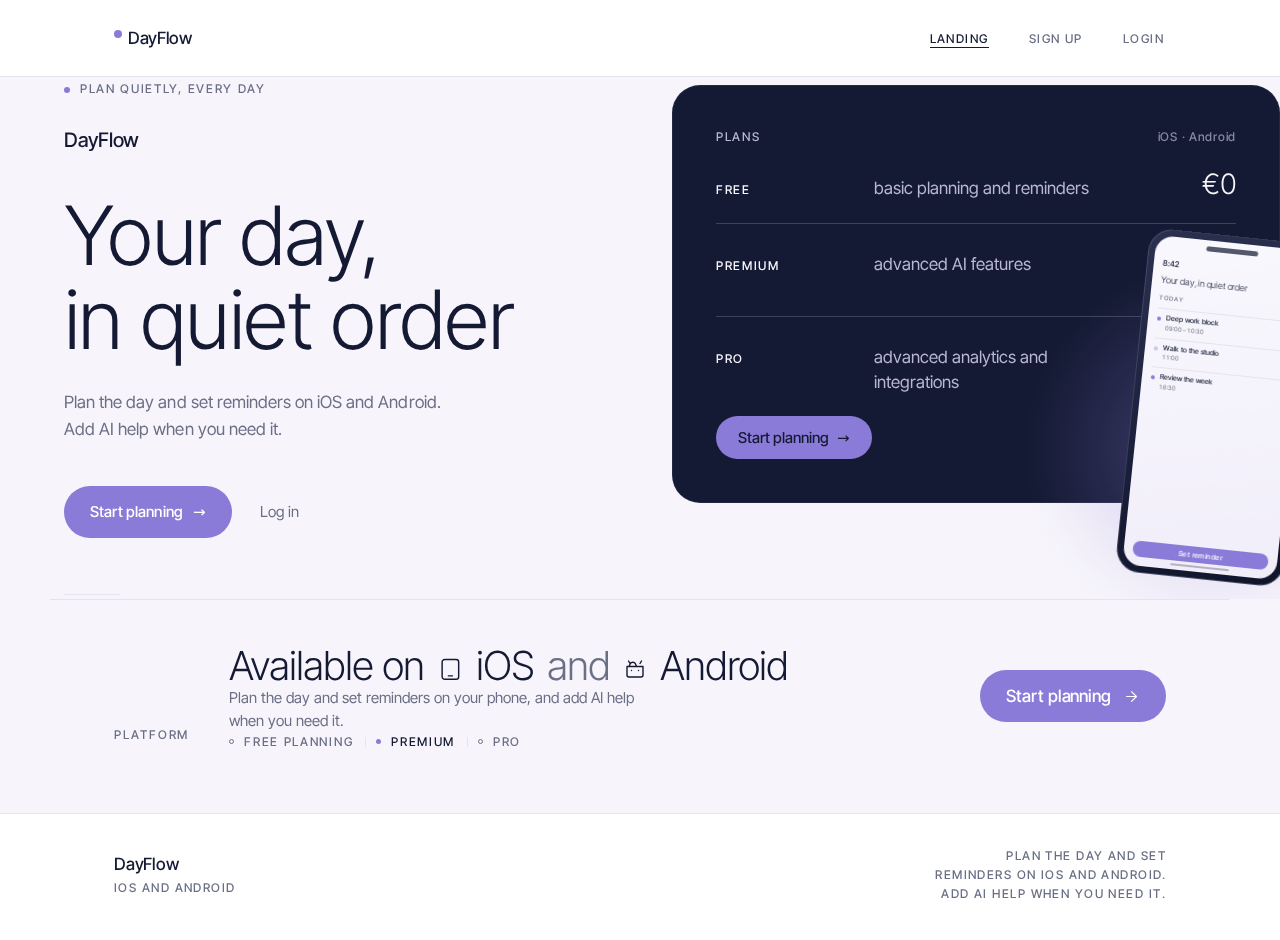
Plan quietly, every day
DayFlowYour day,in quiet order
Plan the day and set reminders on iOS and Android. Add AI help when you need it.
Plans
- Free€0
basic planning and reminders
- Premium€5.99per month
advanced AI features
- Pro€11.99per month
advanced analytics and integrations
Platform
Available oniOSAndroid
Plan the day and set reminders on your phone, and add AI help when you need it.
- Free planning
- Premium
- Pro
Plan quietly, every day
DayFlowYour day,in quiet order
Plan the day and set reminders on iOS and Android. Add AI help when you need it.
Plans
- Free€0
basic planning and reminders
- Premium€5.99per month
advanced AI features
- Pro€11.99per month
advanced analytics and integrations
Platform
Available oniOSAndroid
Plan the day and set reminders on your phone, and add AI help when you need it.
- Free planning
- Premium
- Pro
No comments yet. Be the first!