
winter-https

byDipesh Raut

https://com75g.axshare.com/#id=b7c68n&p=manage_visits&g=1 this is my axure deisng want to create into web app

LandingManage Visits PageAuthentication
Landing

Comments (0)

No comments yet. Be the first!

System Requirements

System Requirement Document
Page 1 of 6

System Requirements Document for winter-https

1. Introduction

The project "winter-https" aims to convert an Axure design for managing visits into a web application. This document outlines the system requirements necessary to achieve this goal.

2. System Overview

The "winter-https" project is a web application designed to manage visits. It will provide users with the ability to schedule, update, and cancel visits through a cohesive interface. The application will ensure secure access and persistent identity to manage durable private records.

Page 2 of 6

2a. Product Interpretation and Delivery Boundary

  • Domain Descriptor: Visit Management

    • Source Evidence: The product is intended to manage visits as per the source requirement.
    • Confidence: 0.9
  • What is being built: A first-party web application for managing visits, including scheduling, updating, and canceling visits.

  • Excluded Assumptions: Generic e-commerce features, User account management.

  • First-party Custom Pages:

    • Manage Visits Page: A single workspace for managing visits.
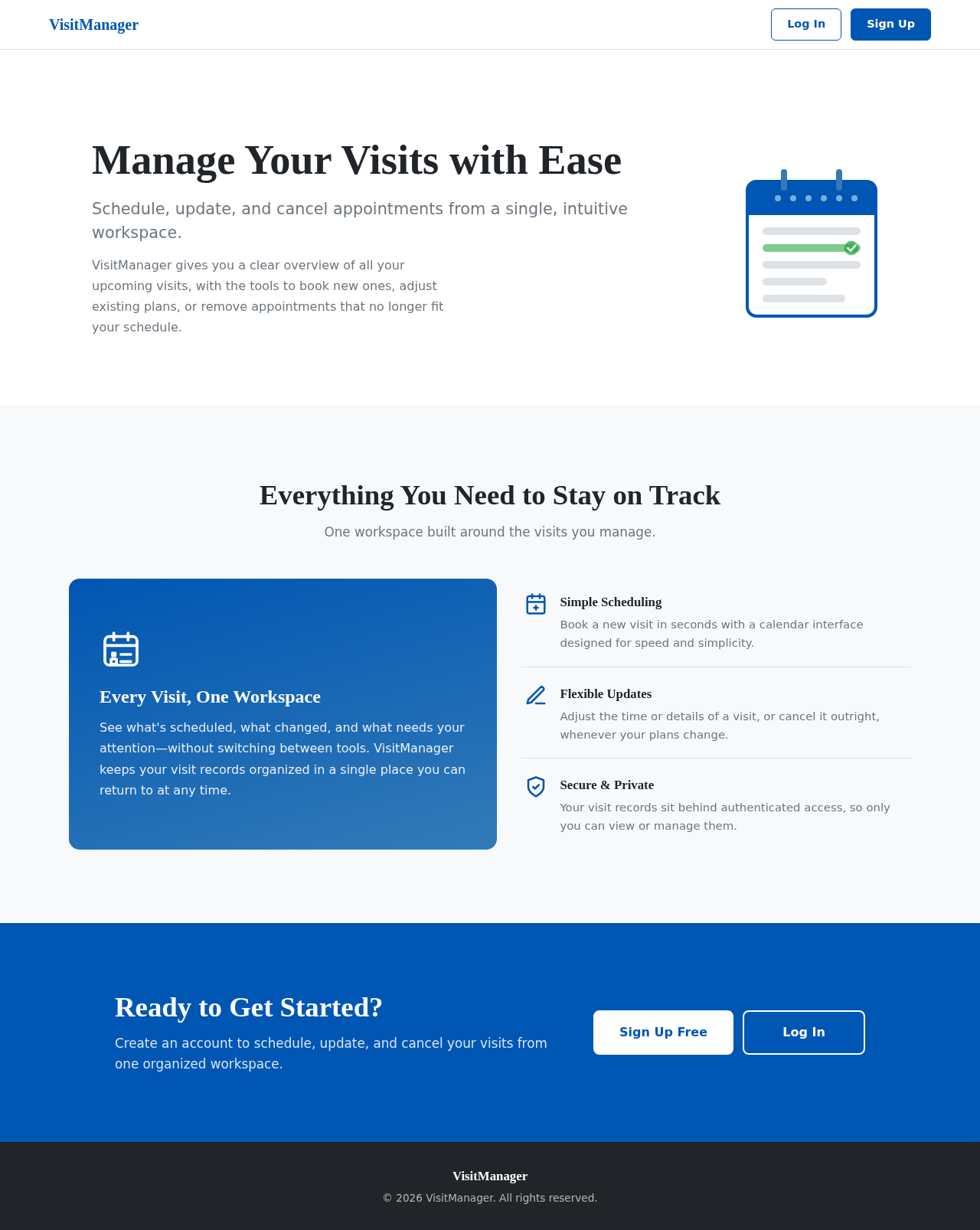
    • Landing Page: A public entry point to orient and acquire users.
    • Authentication Page: For account sign-up, login, and session access.
  • Access: Application-owned identity is required for managing visits.

  • Behavior Contracts:

    • Manage Visits:
      • Actor: User
      • Trigger: User accesses the web app to manage visits.
      • Inputs: Visit details, User preferences
      • Outcomes: Visits are scheduled, updated, or canceled.
      • State Changes: Visit records
      • State Lifetime: Durable
      • Identity Continuity: Persistent
      • Audience Entry: Public
      • Human Touchpoints: Web app interface
      • Failure Outcome: Visit management fails and user is notified.
      • Access Owner: Application
Page 3 of 6

2b. Source Content Inventory

  • Content Source: The Axure design reference is authoritative for the structure and domain context but is not accessible without authentication.

2c. Page Content and Component Coverage

  • Manage Visits Page:

    • Information: Visit details, scheduling options, user preferences.
    • Actions: Schedule, update, cancel visits.
    • Components: Form fields for visit details, calendar view, confirmation dialogs.
    • States: Loading, success, error, empty state for no scheduled visits.
  • Landing Page:

    • Information: Introduction to the application, benefits of managing visits.
    • Actions: Navigate to sign-up or login.
    • Components: Welcome message, call-to-action buttons.
    • States: Default, hover, click.
  • Authentication Page:

    • Information: Sign-up and login forms.
    • Actions: Create account, login, password recovery.
    • Components: Input fields, submit buttons, error messages.
    • States: Loading, success, error.
Page 4 of 6

3. Functional Requirements as Story Points

  • As a User, I should be able to schedule a visit so that I can manage my appointments.
  • As a User, I should be able to update a scheduled visit to accommodate changes.
  • As a User, I should be able to cancel a visit if it is no longer needed.
  • As a User, I should be able to sign up for an account to access visit management features.
  • As a User, I should be able to log in to manage my visits securely.
  • As a User, I should be able to recover my password if I forget it.

4. User Personas

  • User: The primary persona who interacts with the web app to manage visits.

5. Core User Flows

  1. Accessing the Application:

    • User navigates to the Landing Page.
    • User chooses to sign up or log in.
  2. Managing Visits:

    • User logs in and accesses the Manage Visits Page.
    • User schedules, updates, or cancels visits as needed.
  3. Authentication:

    • User enters credentials on the Authentication Page.
    • User gains access to visit management features.
Page 5 of 6

6. Visuals Colors and Theme

  • Primary: #0056b3
  • Primary Light: #337ab7
  • Secondary: #6c757d
  • Accent: #28a745
  • Highlight: #ffc107
  • Background: #f8f9fa
  • Surface: #ffffff
  • Text: #212529
  • Text Muted: #6c757d
  • Border: #dee2e6

7. Signature Design Concept

The "Manage Visits Page" will feature a clean and intuitive layout with a focus on usability. The design will incorporate a calendar view for easy scheduling and a responsive form for inputting visit details. The color scheme will use the primary and secondary colors to guide user actions and highlight important information.

8. Interaction Model & Motion Direction

  • Manage Visits Page: Animated with moderate scroll-triggered reveals and hover transitions to enhance user interaction.
  • Landing Page: Animated with a welcoming introduction and call-to-action buttons.
  • Authentication Page: Static with clear form fields and error handling.
Page 6 of 6

9. Non-Functional Requirements

  • Security: The application must ensure secure access control to protect user data.
  • Performance: The application should load quickly and handle multiple users efficiently.

10. Tech Stack

  • Frontend: React for Web
  • Backend: Python, FastAPI
  • Database: MySQL or MariaDB
  • Local Orchestration: Docker, docker-compose

11. Assumptions and Constraints

  • The application will require user authentication to access visit management features.
  • The Axure design serves as the primary reference for the application's structure and functionality.

12. Glossary

  • Axure: A design tool used for creating prototypes and wireframes.
  • Visit Management: The process of scheduling, updating, and canceling appointments or visits.
  • Authentication: The process of verifying a user's identity to grant access to the application.

This document outlines the requirements for the "winter-https" project, ensuring a comprehensive understanding of the system's functionality and design.

Landing design preview
Landing: User orients to the visit management application
Authentication: User signs up or logs in
Manage Visits Page: 1. User submits visit details to schedule, update, or cancel a visit
Manage Visits Page: Process: Visit record scheduled, updated, or canceled
Manage Visits Page: 2. Failure: Visit management fails and user is notified
Landing design preview
Landing: User orients to the visit management application
Authentication: User signs up or logs in
Manage Visits Page: 1. User submits visit details to schedule, update, or cancel a visit
Manage Visits Page: Process: Visit record scheduled, updated, or canceled
Manage Visits Page: 2. Failure: Visit management fails and user is notified