windy-infrastructure

byTri@l!23

Attached document has the details of what I want to build and how far we have got in the set up of the initial infrastructure. First summarize what you have understood and then let's build a plan for the next steps before we go ahead and execute

LandingBrowseLoansRatingRequestsMy BooksNew ListingChatSign UpHandoffProfile
Landing

Comments (0)

No comments yet. Be the first!

System Requirements

System Requirements Document for windy-infrastructure

1. Introduction

1.1 Shelf Righteous Readers — Project Summary

Last updated: 22 November 2026

1.2 Shelf Righteous Readers — Project Summary / Goal

1.3 Shelf Righteous Readers — Project Summary / Product decisions locked

| Area | Decision |

|---|---|

1.4 Shelf Righteous Readers — Project Summary / Product decisions locked / Karma rules in detail

  • The project is to be built based on the attached project summary document, which describes what is wanted and the current state of initial infrastructure setup.
  • Project name: windy-infrastructure.
  • Before execution, first summarize understanding of the attached document, then build a plan for next steps.

2. System Overview

Page 1 of 18

2.1 Shelf Righteous Readers — Project Summary

Community lending library web app for India. Peer-to-peer book lending among registered users; no central library.

2.2 Shelf Righteous Readers — Project Summary / Goal

A community lending library web app for India. No central library — registered users lend and borrow books peer-to-peer. Mobile-browser first (PWA, not native). Starting small, cost-optimized, no sign-up friction beyond what is needed.

2.3 Shelf Righteous Readers — Project Summary / Technical decisions

Page 2 of 18

2.4 Shelf Righteous Readers — Project Summary / Data model

Nine tables:

| Table | Purpose |

|---|---|

| users | Profile, karma, karma_lend, restricted_until, blocked_until |

|---|---|

| books | Listings, unique_code, status, condition |

|---|---|

| borrow_requests | Requests with requested_days (1–14) |

|---|---|

| loans | Active and completed loans |

|---|---|

| handoff_tokens | Short-lived QR tokens for borrow/return |

|---|---|

| ratings | Post-return ratings |

|---|---|

| messages | Chat between borrower and lender |

| restrictions | Restriction history |

Page 3 of 18

3. Functional Requirements

3.1 Shelf Righteous Readers — Project Summary / Product decisions locked

| Auth | Username + email + OTP (no password) |

| ISBN lookup | Skipped for MVP — free-text title/author, optional cover photo |

| Book condition | Declared at listing: New / Good / Fair / Worn |

| Geo discovery | PIN code → lat/lng lookup table, 2 km search radius |

| Borrow duration | Max 14 days |

| Karma start | 30 |

| Karma floor | 0 |

| Borrow minimum | 10 |

| Tiers | 10–49 → 1 book · 50–149 → 2 books · 150+ → 3 books |

| Lending bonus | 20% of lending karma counts toward effective borrowing karma |

| Damaged return | −30 karma + 30-day restriction (capped at 1 concurrent loan) |

| Overdue | >7 days past due → hard block until returned |

| Handoff | QR scan confirms instantly; other party gets 24h window to dispute |

| Report button | Ships in MVP1 — writes a row, emails owner, no automated action |

Page 4 of 18

3.2 Shelf Righteous Readers — Project Summary / Product decisions locked / Karma rules in detail

  • Effective borrowing karma = karma + floor(karma_lend × 0.2)

  • Tier derived from effective borrowing karma, not raw karma

  • Restriction (from a damaged return) caps concurrent loans at 1 regardless of tier

  • Overdue block is cleared automatically when the overdue book is returned

  • Karma floor of 0 applies to all deductions

3.3 Shelf Righteous Readers — Project Summary / Data model

| reports | Report button writes here |

3.4 Shelf Righteous Readers — Project Summary / QR handoff flow

  • Borrow meetup: borrower shows QR → lender scans → status borrowed

  • Return meetup: lender shows QR → borrower scans → status returned → rating screen

  • Token: 5-minute expiry, single-use, server-validated, correct-counterparty enforced

  • Self-scan rejected

Page 5 of 18

3.5 Shelf Righteous Readers — Project Summary / Build order

  1. Auth — signup, OTP, session

  2. Listing + browse — book entry, 2 km search

  3. Borrow flow — request → accept → chat

  4. QR screens — generate + scan

  5. PWA polish + deploy

3.6 Shelf Righteous Readers — Project Summary / Open items

  • confirm_handoff due-date bug — computes due date from a fragile interval; fix by adding requested_days to loans and using now() + (requested_days || ' days')::interval
Page 6 of 18

4. User Personas

Shelf Righteous Readers is a peer-to-peer community lending library for India: there is no central library, and registered users lend and borrow books among themselves. The product is a mobile-browser-first PWA, not a native app, and is deliberately cost-optimized with no sign-up friction beyond what is needed.

RoleResponsibilities and goalsInputsDecisionsAccess
Registered user (lender and borrower)Lends books they own and borrows books from other users; acts as both sides of the peer-to-peer exchangeUsername, email, OTPWhich books to list as available to lend; which listed books to request to borrowSigned-in access via username + email + OTP (no password)

A single registered-user role covers both lending and borrowing, because the product model makes every participant a potential lender and borrower. No separate administrator, librarian or moderator role is established by the available evidence; the absence of a central library means no such operational role exists in the product.

4.1 Journey: joining and participating

  1. The user opens the web app in a mobile browser (PWA; no native install required).
  2. The user registers with a username and email address and verifies via OTP — no password is created or remembered.
  3. Once registered, the user can list books they are willing to lend to other registered users.
  4. The user can browse and request books listed by other registered users, borrowing peer-to-peer rather than from a central collection.

Observable success: the user completes sign-up without a password, and can both offer and obtain books through other registered users.

Page 7 of 18

4.2 Working preference affecting persona support

The primary user is non-technical and needs step-by-step, click-by-click guidance for anything involving a browser or an account. Onboarding and account-related flows should therefore be written for that audience rather than assuming technical familiarity.

Default (not user-specified): persona naming and the grouping of lending and borrowing into one role are presentation choices; the underlying capabilities and access model come from the product decisions above.

5. Core User Flows

5.1 Register and sign in

Trigger: a visitor wants to lend or borrow.

  1. Visitor enters username and email; no password is used.
  2. System sends an OTP to the email; the visitor submits it.
  3. Session is established and the account starts with 30 karma. Failure/recovery: an invalid or expired OTP returns the visitor to the OTP step; the account is not created until verification succeeds.

5.2 List a book

Trigger: a registered user has a book to lend.

  1. Lender enters free-text title and author (no ISBN lookup in MVP) and optionally adds a cover photo.
  2. Lender declares condition: New / Good / Fair / Worn.
  3. Listing is saved and becomes discoverable within the 2 km radius of nearby borrowers.
Page 8 of 18

5.3 Discover books nearby

Trigger: a borrower wants a book.

  1. Borrower supplies a PIN code; the system resolves it to lat/lng via the lookup table.
  2. System returns listings within a 2 km search radius.
  3. Borrower opens a listing to view details and the lender. Failure/recovery: a PIN code absent from the lookup table yields no results; the borrower can retry with another PIN code.

5.4 Request and agree a borrow

Trigger: a borrower has found a listing.

  1. Borrower sends a borrow request; the maximum duration is 14 days.
  2. Lender accepts (or declines, ending the flow).
  3. On acceptance, a chat opens between borrower and lender to arrange the meetup. Concurrency: the number of concurrent loans a borrower may hold follows their tier — 10–49 karma → 1 book, 50–149 → 2 books, 150+ → 3 books.

5.5 QR handoff at borrow meetup

Trigger: borrower and lender meet.

  1. Borrower shows their QR; lender scans it.
  2. Status changes to borrowed instantly.
  3. The other party (borrower) receives a 24-hour window to dispute the handoff. Failure/recovery: self-scan is rejected, so a party cannot confirm their own handoff; the pair must scan each other's codes.
Page 9 of 18

5.6 Return and rate

Trigger: the loan is due to be returned.

  1. Lender shows their QR; borrower scans it.
  2. Status changes to returned.
  3. Borrower is shown the rating screen and submits a rating. Failure/recovery: the lender likewise has a 24-hour dispute window after the return scan.

5.7 Overdue and damaged handling

Trigger: a loan passes its due date, or a book comes back damaged.

  1. Overdue beyond 7 days past due triggers a hard block until the book is returned.
  2. A damaged return applies −30 karma and a 30-day restriction capped at 1 concurrent loan. Continuation: once the book is returned (overdue) or the restriction period ends (damaged), the borrower resumes normal borrowing within their tier limits.

5.8 Report a problem

Trigger: a user encounters an issue with a listing, handoff or another user.

  1. User taps the Report button and submits the report.
  2. A row is written to reports and the owner is emailed.
  3. No automated action is taken in MVP1; resolution is manual.
Page 10 of 18

5.9 Install and use as a PWA

Trigger: a user opens the app on a mobile browser.

  1. The app loads as a mobile-browser-first PWA (not native).
  2. Users can add it to their home screen and continue the flows above.

Default (not specified in evidence): the exact wording of OTP, dispute and rating screens, and the dispute-resolution outcome, are left to detailed requirements.

6. Visuals Colors and Theme

[Design proposal; unspecified choices are defaults.]

Muse: Charles & Ray Eames. Shelf Righteous Readers (project name: windy-infrastructure) uses warm modernism for neighbors who share books: human, trustworthy, ordered and joyful rather than corporate.

Page 11 of 18
  • Light-mode palette: background #F4EBDD (warm cream), surface #FBF6EC (paper), text #2B2620 (walnut ink), primary #1F6E6B (teal actions), accent #D2452F (tomato-red hot signal), muted #8A7E6C (secondary text). Cream ground and walnut ink carry most of the page; teal marks actions and tomato red marks one hot signal. No blue or indigo primary.
  • Typography: Jost Medium for headings and display labels, tight tracking on display; Lora Regular for body copy at a calm reading size. 1.25 modular scale: 56/44/32/22/16px, display clamped from 40px mobile to 96px desktop.
  • Shape and layout: soft-corner organic-modern panels, modular blocks, thin walnut rules dividing sections like gallery walls, and a 12-column grid with offset panels and asymmetric image blocks beside stacked text. No gradient blobs, glass panels or identical hover-lift card grids.
  • Imagery: warm still-life photography of books on wood and cloth, with restrained mid-century pattern accents and hand-drawn marks. No stock corporate photography.
  • Signature moves: oversized Jost headline stacked over a solid teal block spanning the left half of the hero; book listings as gallery panels with a thin walnut rule and a mustard condition tag; karma as a small Eames-dot ladder of filled circles, not a number bar; section openers as a wide cream band with one hand-drawn book mark and a numbered label.
  • Readable text and controls stay whole at 375px, 768px and 1280px — headlines, wordmarks, labels, numbers, card text and controls wrap or scale (e.g. clamp(...)) to stay inside the viewport and their container, and nothing covers them. Imagery and decoration may crop, bleed, rotate or overlap freely.
Page 12 of 18

7. Signature Design Concept

[Design proposal; unspecified choices are defaults.]

Signature Design Concept — The Neighbour Shelf Gallery

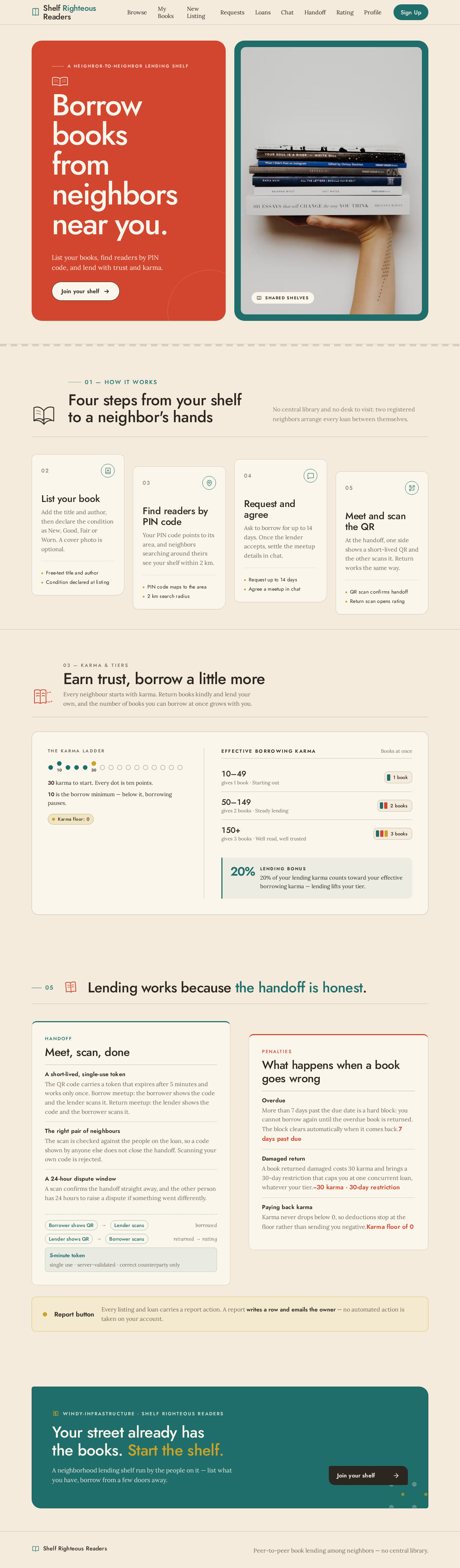
The public entry makes a community lending library feel tangible: a full-bleed warm cream first screen frames a large tomato-red panel carrying the stacked Jost headline “Borrow books from neighbors near you”, while a warm photographed stack of books sits in a teal-framed block on the right. Beneath the headline, the accepted subline “List your books, find readers by PIN code, and lend with trust and karma.” and the walnut-ink CTA “Join your shelf.”

The same visual grammar carries into accepted book listings and lending states: offset gallery panels, honest rules, mustard condition tags, hand-drawn book marks and the filled-dot karma ladder. This is a visual recomposition of the peer-to-peer, PIN-code-based lending product for India — not a new destination or behavior. Calm, tactile surfaces keep trust, locality and readable book information leading the experience.

8. Interaction Model & Motion Direction

[Design proposal; unspecified choices are defaults.]

Interaction Model: Animated Motion Tempo: restrained Hero Dimensionality: layered_2d

Page 13 of 18

8.1 Landing Hero Motion Brief

  • Focal subject: the photographed stack of books in the teal-framed block, paired with the tomato-red headline panel.
  • Input → transformation → outcome: as the public entry loads, the existing hero content resolves from a quiet cream field into the complete shelf invitation — headline panel, then book image — making the action to join the local lending community immediately clear. No new interaction or destination is introduced.
  • Motion vocabulary: gentle film-like fades, a slow photographic pan and one purposeful reveal per section. No bounce, gradient blob, glass effect or excessive hover choreography.
  • Composed first frame: warm cream ground, fully legible tomato-red headline panel on the left, teal-framed book still life on the right, walnut CTA beneath the headline. Decorative marks may crop or bleed; no readable text or control is covered or clipped.
  • Reduced-motion state: the complete hero presented statically in the same two-part composition, fades and pans removed; at narrow widths panels stack or scroll intentionally with every text block and control fully readable.

Listing imagery may use a slow pan; cards and controls never rely on motion to communicate condition, karma or action state.

9. Non-Functional Requirements

9.1 Shelf Righteous Readers — Project Summary

Mobile-browser first (PWA, not native). Starting small, cost-optimized (~₹0/month at 1,000 users).

Page 14 of 18

9.2 Shelf Righteous Readers — Project Summary / Goal

A community lending library web app for India. No central library — registered users lend and borrow books peer-to-peer. Mobile-browser first (PWA, not native). Starting small, cost-optimized, no sign-up friction beyond what is needed.

9.3 Shelf Righteous Readers — Project Summary / Working preferences

  • Testing: test-first (red → green → refactor) for every feature

10. Tech Stack

10.1 Shelf Righteous Readers — Project Summary / Infrastructure set up — complete

| Item | Status |

|---|---|

| Supabase project | Created — https://riouzoriiahgodhpillx.supabase.co |

| Supabase CLI | Installed, logged in, linked to project |

| Email auth | Enabled, confirm-email on, OTP expiry 10 min |

| API keys | Publishable key in use (safe to expose — RLS is the real protection) |

| GitHub repo | github.com/madhoks/shelf-righteous-readers (private) |

| Vercel | Account created, authorized via GitHub — no project yet |

Page 15 of 18

10.2 Shelf Righteous Readers — Project Summary / Technical decisions

| Area | Decision |

|---|---|

| Stack | Next.js 15 App Router + TypeScript + Tailwind |

| Database | Supabase Postgres |

| Auth | Supabase Auth (OTP variant) |

| Realtime | Supabase Realtime (chat) |

| Storage | Supabase Storage (cover photos) |

| Hosting | Vercel free tier |

| Migrations | Supabase CLI migrations — version-controlled SQL in supabase/migrations/ |

| Geo | Postgres earthdistance / cube extensions |

| QR generation | qrcode npm, client-side |

| QR scanning | @zxing/browser or BarcodeDetector API |

| Testing | Vitest (unit), Playwright (e2e) — test-first |

10.3 Shelf Righteous Readers — Project Summary / Data model

Full schema, karma engine, QR handoff logic, and 2 km geosearch are written as SQL migrations.

Page 16 of 18

11. Assumptions and Constraints

11.1 Shelf Righteous Readers — Project Summary / Product decisions locked

| Community trust | Relies on trust for MVP1; automated moderation deferred |

11.2 Shelf Righteous Readers — Project Summary / Infrastructure set up — complete

| Email sender | Built-in Supabase sender for now (2 emails/hour project-wide — needs custom SMTP before real users) |

11.3 Shelf Righteous Readers — Project Summary / Technical decisions

| Migration discipline | Forward-only by default; write a down migration alongside every up (free tier has no backups) |

11.4 Shelf Righteous Readers — Project Summary / Build order

  1. Foundation — scaffold, karma engine, handoff logic, geo (with tests)

11.5 Shelf Righteous Readers — Project Summary / Open items

  • Custom SMTP — required before inviting real users (built-in sender caps at 2 emails/hour project-wide)

  • RLS policies — not yet written; security-critical since the publishable key is public

  • Free-tier pause — Supabase pauses projects after 7 days inactivity; needs a scheduled ping before launch

Page 17 of 18

11.6 Shelf Righteous Readers — Project Summary / Working preferences

  • Code delivery: deliver code as downloadable files, not as content to copy-paste from chat

  • Guidance style: non-technical — needs step-by-step, click-by-click instructions for anything involving a browser or account

  • Secrets: never paste the secret key (sb_secret_...) anywhere; publishable key is safe to share

11.7 Shelf Righteous Readers — Project Summary / Notes on memory

This file is the durable copy of project context. Keep it in the repo (e.g. docs/project-summary.md) and paste it into a new chat if context needs to be restored.

12. Glossary

12.1 Shelf Righteous Readers — Project Summary / Data model

Supporting enums: book_condition, book_status, request_status, loan_status, handoff_phase, restriction_kind.

Page 18 of 18
Live
Landing design preview

visitor wants to borrow

OTP sent to email

OTP invalid or expired

resubmit valid OTP

verification succeeds, session established

PIN code absent from lookup table

retry with another PIN code

listings found within 2 km

borrower chooses listing

lender declines

lender accepts

meetup arranged

lender scans borrower QR

handoff confirmed

loan due for return

return scan confirmed

rating submitted

view standing

issue encountered

overdue block cleared on return

Landing: Open app in mobile browser

Sign Up: Enter username and email

Sign Up: 1. Submit OTP from email

Sign Up: 2. Retry OTP after invalid or expired code

Browse: 1. Enter PIN code

Browse: 2. Retry with another PIN code

Browse: Open nearby listing details

Requests: Send borrow request up to 14 days

Requests: View declined request outcome

Chat: Arrange meetup with lender

Handoff: Show borrow QR to lender

Handoff: View borrowed status and dispute window

Loans: Track active loan and due date

Handoff: Scan lender return QR

Rating: Submit rating for lender

Loans: View returned loan status

Profile: View karma and tier limits

Profile: Submit problem report

Loans: Resume borrowing after block clears

Live
Landing design preview

visitor wants to borrow

OTP sent to email

OTP invalid or expired

resubmit valid OTP

verification succeeds, session established

PIN code absent from lookup table

retry with another PIN code

listings found within 2 km

borrower chooses listing

lender declines

lender accepts

meetup arranged

lender scans borrower QR

handoff confirmed

loan due for return

return scan confirmed

rating submitted

view standing

issue encountered

overdue block cleared on return

Landing: Open app in mobile browser

Sign Up: Enter username and email

Sign Up: 1. Submit OTP from email

Sign Up: 2. Retry OTP after invalid or expired code

Browse: 1. Enter PIN code

Browse: 2. Retry with another PIN code

Browse: Open nearby listing details

Requests: Send borrow request up to 14 days

Requests: View declined request outcome

Chat: Arrange meetup with lender

Handoff: Show borrow QR to lender

Handoff: View borrowed status and dispute window

Loans: Track active loan and due date

Handoff: Scan lender return QR

Rating: Submit rating for lender

Loans: View returned loan status

Profile: View karma and tier limits

Profile: Submit problem report

Loans: Resume borrowing after block clears