wild-start
 Diya Trivedi
start a project to build a simple single page design of calculator

Comments (0)
Sign in to leave a comment
System Requirements
System Requirements Document for wild-start
1. Introduction
wild-start is a simple calculator delivered as a single-page design. The product intent is narrow and explicit: give a visitor one page on which to perform everyday arithmetic — entering numbers and operators, seeing the running expression and the result, and clearing the display to start a new calculation — without navigating anywhere else. The design must be simple and must remain a single page.
The audience is the everyday visitor who needs a quick sum: a consumer utility that should feel immediate, tactile and a little joyful rather than clinical. The page is the anonymous public entry to the product; no account, sign-in, or saved history is part of the accepted scope.
2. System Overview
wild-start is a single-page web calculator. The current delivery consists of:
- frontend — a React application that renders the one Calculator page: the oversized
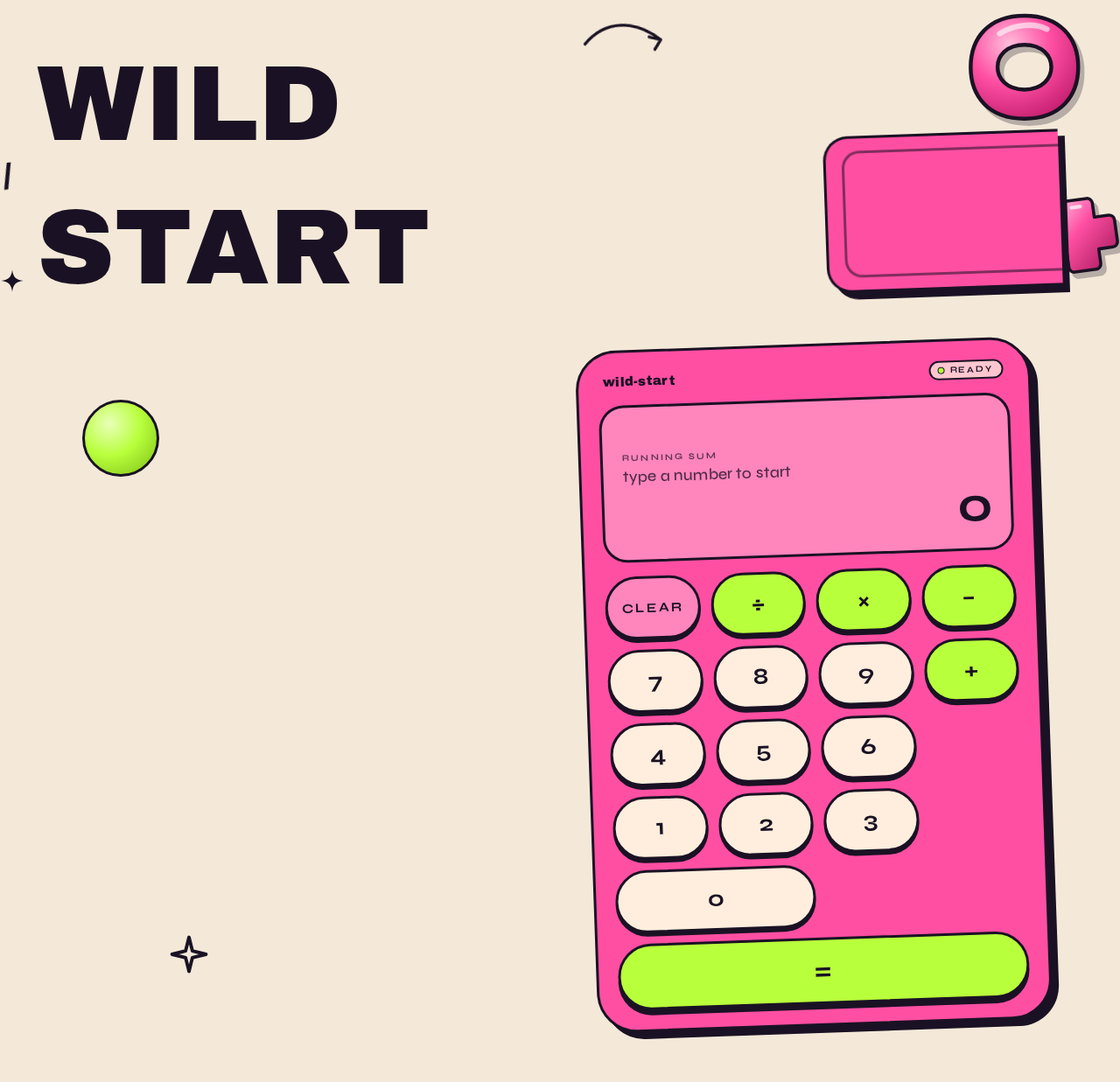
WILD / STARTwordmark, the hot-pink calculator card, the display strip, the 4-column key grid, and the decorative 3D props. - backend — a shared FastAPI process reserved for application APIs and domain modules. The accepted calculator scope is client-side arithmetic on a single page; the backend is provisioned infrastructure and is not required to carry calculator behavior.
- database — MariaDB, provisioned as application-owned persistent storage. The accepted scope defines no durable calculator records, no accounts, and no history, so no domain entities are derived from the database's presence alone.
Actors: one active human persona, the Calculator user, who is the anonymous visitor to the Calculator page. There are no system, provider, or external actors in the accepted behavior.
Accepted behavior: number entry, operator entry, expression display, result display, and clearing for a new calculation, all on the single Calculator page.
Removed from scope
- None. No concept was removed by the user; the only refinement restates the original single-page calculator request.
2a. Product Interpretation and Delivery Boundary
wild-start is delivered as one first-party page, Calculator, which is the anonymous public entry. A visitor arrives, sees the product wordmark and the calculator, and works entirely within that page. Access is open: there is no identity establishment, no sign-in, no session continuity requirement, and no protected destination. Nothing in the accepted scope requires the application to remember a visitor between visits, so no account or authentication surface exists.
The calculator's arithmetic is a single-page interaction. The provisioned backend and database remain available infrastructure for the application but carry no accepted calculator requirement; they are not a boundary the visitor crosses. There is no future-horizon requirement in the accepted thread, so no future section is defined.
2c. Page Content and Component Coverage
Calculator
The single page of the product, anonymously reachable, hosting the whole calculator lifecycle.
- Information and state
- Current expression: the sequence of entered numbers and operators, shown in the display strip.
- Current result: the computed value, shown in the display strip in Syne at 48–64px with tabular numerals.
- Idle/empty state: display shows a starting zero or empty expression with the result area at rest.
- Entering state: expression grows as digits and operators are appended.
- Computed state: result is shown and pops in with a scale-from-0.9 spring.
- Cleared state: display returns to the idle starting state for a new calculation.
- Primary actions
- Digit keys (0–9) append digits to the current number.
- Operator keys (+, −, ×, ÷) as circular lime badges set the pending operation.
- Equals key as a full-width lime pill spanning all four columns computes and shows the result.
- Clear key resets the display to start a new calculation.
- Supporting actions and components
- Oversized stacked
WILD / STARTwordmark in Archivo Black, bleeding off the left edge, with a staggered word reveal on load. - Hot-pink calculator card, rotated −2deg, thick 3px ink border, hard 8px black offset shadow.
- Display strip spanning the full card width.
- 4-column key grid with 12px gaps and capsule keys.
- Oversized stacked
- Decorative glossy 3D props (lime sphere, pink torus, floating plus) layered in front of and behind the card, with slight scroll parallax.
- Thick black outline doodles (arrows, sparkles) as hand-drawn accents.
- Domain entities
- Expression (ordered list of entered operands and operators).
- Operand (a number being entered).
- Operator (one of +, −, ×, ÷).
- Result (the computed numeric value).
- No persisted entity; all state is in-page.
- Component responsibilities
- Wordmark: brand display only.
- Calculator card: container and layout for display and keys.
- Display strip: renders expression and result.
- Key grid: renders digit, operator, equals, and clear keys and dispatches their actions.
- Decorative props and doodles: purely visual, never covering readable text or controls.
- States
- Loading: not applicable — the page renders its static composition immediately.
- Empty: idle display ready for first input.
- Success: correct result shown after equals.
- Error: an invalid expression (for example a trailing operator or division by zero) leaves the display in a recoverable state; the visitor can clear and start again.
- Recovery: Clear always returns the page to the idle state.
- Reduced motion: with
prefers-reduced-motion, wordmark reveal, key press spring, result pop, badge rotation, and prop parallax drop to instant state changes.
3. Functional Requirements
-
FR-1 — Single-page calculator delivery (explicit) As a Calculator user, I should get a simple calculator on a single page, so that I can do arithmetic without navigating elsewhere.
- Trigger: visiting the page.
- Observable result: the Calculator page renders with wordmark, display strip, and key grid.
- Access: anonymous, no identity required.
- Failure/recovery: not applicable; the page is static on load.
- Continuation: the visitor proceeds to enter a calculation.
-
FR-2 — Number entry (explicit) As a Calculator user, I should press digit keys to enter numbers, so that I can build the operands of my calculation.
- Trigger: pressing a digit key (0–9).
- Observable result: the digit is appended to the current number and shown in the display strip.
- Access: anonymous.
- Failure/recovery: none beyond Clear.
- Continuation: the visitor presses an operator or equals.
-
FR-3 — Operator entry (explicit) As a Calculator user, I should press operator keys to choose an operation, so that I can combine operands.
- Trigger: pressing +, −, ×, or ÷.
- Observable result: the operator is recorded and shown in the expression.
- Access: anonymous.
- Failure/recovery: a trailing or repeated operator leaves the expression in a recoverable state; Clear resets.
- Continuation: the visitor enters the next operand.
-
FR-4 — Expression display (explicit) As a Calculator user, I should see the running expression, so that I can confirm what I have entered.
- Trigger: any digit or operator entry.
- Observable result: the display strip shows the current expression.
- Access: anonymous.
- Failure/recovery: Clear empties the expression.
- Continuation: the visitor presses equals.
-
FR-5 — Result display (explicit) As a Calculator user, I should press equals and see the result, so that I get my answer.
- Trigger: pressing the equals key.
- Observable result: the computed result appears in the display strip, popping in with a scale-from-0.9 spring.
- Access: anonymous.
- Failure/recovery: an invalid expression (for example division by zero) leaves the display recoverable; Clear resets.
- Continuation: the visitor can clear for a new calculation.
- FR-6 — Clear for a new calculation (explicit)
As a Calculator user, I should clear the display, so that I can start a new calculation.
- Trigger: pressing the clear key.
- Observable result: the display returns to the idle starting state.
- Access: anonymous.
- Failure/recovery: Clear is itself the recovery path.
- Continuation: the visitor begins a new calculation.
4. User Personas
Calculator user
- Product context: an anonymous visitor who lands on the single Calculator page needing a quick sum. They are not signed in and are not expected to be; the page is the whole product.
- Primary goal: get a correct arithmetic result on one page without navigating elsewhere.
- Distinct accepted responsibilities: entering numbers, choosing operators, reading the running expression, pressing equals to see the result, and clearing the display to start a new calculation.
- Relevant inputs or decisions: which digits to enter, which operator to apply, when to press equals, and when to clear.
- Interactions with other accepted participants: none — the Calculator user is the only active human persona and completes the whole lifecycle alone.
- Observable success: a correct result appears in the display strip after equals, and the page is ready for a new calculation after Clear.
- Constraints carried from source: the experience must be simple and confined to a single page.
5. Core User Flows
Flow A — Perform a calculation
- The Calculator user opens the Calculator page (anonymous; no sign-in).
- The page renders the
WILD / STARTwordmark with a staggered word reveal and the hot-pink calculator card with its display strip in the idle state. - The visitor presses digit keys; each digit is appended to the current number and shown in the display strip.
- The visitor presses an operator key (+, −, ×, ÷); the operator is recorded and shown in the expression.
- The visitor enters the next operand with digit keys.
- The visitor presses the full-width lime equals key; the result is computed and appears in the display strip, popping in with a scale-from-0.9 spring.
- Failure/recovery: if the expression is invalid (for example a trailing operator or division by zero), the display stays recoverable and the visitor presses Clear to reset.
- Continuation: the visitor either continues with the result or presses Clear to start a new calculation (Flow B).
Flow B — Clear and start a new calculation
- From any display state on the Calculator page, the visitor presses the clear key.
- The display returns to the idle starting state.
- The visitor begins a new calculation following Flow A from step 3.
6. Visuals Colors and Theme
The creative direction is authoritative for this section. Muse: Jessica Walsh; headline concept: a calculator that feels like a toy you trust.
- Mode: light only.
- Colour tokens (exact hex by role):
- Background (page ground):
#F4E9D8— warm cream, fills the page; no white-first layout. - Surface (calculator body):
#FF4FA3— hot pink field. - Text (ink):
#1A1224— high contrast on pink and cream. - Primary:
#FF4FA3— hot pink. - Accent:
#B8FF3C— lime, used for operator/equals signal only; one hot signal per screen. - Muted:
#7A6B5E— taupe, secondary labels only.
- Background (page ground):
- Typography:
- Headings: Archivo Black, heavy display sizes, tight leading (0.9), lowercase or sentence case, oversized and slightly off-grid.
- Numbers and labels: Syne, medium weight, wide tracking on micro-labels.
- Body: Syne.
- Scale: 1.4 modular — 96 / 68 / 48 / 32 / 20 / 16, with display
clamp(48px, 9vw, 128px)for the hero wordmark.
- Shape language: big pill buttons and capsule keys; chunky rounded calculator body with an offset hard shadow; sticker-like circular operator badges; overlapping colour blocks at section edges; no hairlines — borders are thick (3–4px) and confident.
- Layout: asymmetric two-zone composition — the oversized typographic wordmark bleeds off the left edge while the calculator sits in a pink capsule card on the right, slightly rotated −2deg. On mobile the wordmark stacks above and the calculator becomes full-width. Keys in a 4-column grid with generous 12px gaps; the display strip spans the full card width.
- Imagery style: no photography. Surreal glossy 3D props — a lime sphere, a pink torus, a floating plus sign — scattered as decorative stickers around the calculator, plus thick black outline doodles (arrows, sparkles) as hand-drawn accents. Type and colour blocks carry the composition.
- Avoid: white or near-white page ground; centred headline-plus-subtext-plus-button hero; gradient blobs or glassmorphism panels; grids of identical hover-lift cards; blue or indigo accents; Inter, Roboto, or system-ui fonts; hairline borders and neutral grey chrome; photography-heavy or stock-people imagery.
7. Signature Design Concept
The public entry is the Calculator page itself, composed as a full-bleed cream ground (#F4E9D8) carrying a giant Archivo Black wordmark set as WILD / START stacked, clamp(48px, 9vw, 128px), bleeding off the left viewport edge. A hot-pink capsule card (#FF4FA3, 3px ink border, hard 8px black offset shadow, rotated −2deg) holds the live calculator and overlaps the wordmark's last letter. Three glossy 3D props — a lime sphere, a pink torus, and a floating plus — sit behind and in front of the card at different depths, with thick black outline doodles as accents. The display strip spans the card width in Syne with tabular numerals; the equals key is a full-width lime pill across all four columns, and every other operator is a circular lime badge. There is no centred headline-plus-button stack and no gradient blob. All readable text and controls stay whole inside the viewport and their container at 375px, 768px, and 1280px; decoration may bleed, rotate, and overlap freely but never covers readable text or a control.
8. Interaction Model & Motion Direction
Interaction Model: Animated Motion Tempo: expressive Hero Dimensionality: layered_2d
Landing Hero Motion Brief
- Focal subject: the hot-pink calculator card overlapping the bleeding
WILD / STARTwordmark, with glossy 3D props layered around it. - Input → transformation → outcome thesis: on load, the stacked wordmark reveals word by word in a staggered sequence; as the visitor presses keys, keys scale to 0.94 with a 120ms spring; on equals, the result number pops in with a scale-from-0.9 spring; operator badges rotate 4deg on hover; the decorative props parallax slightly on scroll. Every motion is tied to accepted calculator behavior or the accepted composition — nothing new is introduced.
- Motion vocabulary: bouncy but purposeful — 120ms spring key press, scale-from-0.9 result pop, 4deg badge rotation, staggered word reveal, slight prop parallax.
- Composed first frame: cream ground,
WILD / STARTstacked and bleeding left, pink capsule card rotated −2deg with hard black offset shadow, display strip at rest, lime equals pill and circular operator badges visible, three glossy props at different depths. - Reduced-motion state: with
prefers-reduced-motion, all of the above drop to instant state changes; the static arrangement remains fully usable and every readable element stays whole.
9. Non-Functional Requirements
- NFR-1 — Single page (explicit): the product is delivered as exactly one page; no additional routes or destinations.
- NFR-2 — Simplicity (explicit): the design and interaction remain simple; no adjacent calculator features beyond number entry, operator entry, expression display, result display, and clearing.
- NFR-3 — Readability at every viewport (explicit, from creative direction): headlines, wordmarks, labels, numbers, and controls stay entirely inside the viewport and their container at 375px, 768px, and 1280px, wrapping or scaling to fit; no element covers any part of them. Decoration may bleed, rotate, or overlap but never covers readable text or a control.
- NFR-4 — Reduced motion (explicit, from creative direction): with
prefers-reduced-motion, motion drops to instant state changes and a usable static arrangement is provided. - NFR-5 — Accessible contrast (required_inference): ink
#1A1224on pink#FF4FA3and on cream#F4E9D8is used at high contrast so display numbers and labels remain legible. - NFR-6 — No identity requirement (explicit): the page is anonymously reachable; no account, sign-in, or session continuity is required.
10. Tech Stack
- Frontend: React application UI rendering the single Calculator page.
- Backend: shared FastAPI process for application APIs and domain modules (provisioned; no accepted calculator API required).
- Database: MariaDB for application-owned persistent data (provisioned; no accepted calculator entities).
- Containerization: Docker / docker-compose for the frontend, backend, and database services.
- Fonts: Archivo Black (headings) and Syne (numbers, labels, body), as specified by the creative direction.
11. Assumptions and Constraints
- A-1 (explicit): The product is a simple calculator delivered as a single page; the page count is exactly one.
- A-2 (explicit): The design must be simple.
- A-3 (required_inference): The Calculator page is the anonymous public entry; no identity establishment is needed because no durable actor-specific state, commitment, or value transfer exists.
- A-4 (required_inference): Calculator arithmetic is performed in-page; the provisioned backend and database carry no accepted calculator requirement and are not used to persist calculations.
- A-5 (required_inference): Invalid expressions (trailing operator, division by zero) are recoverable via Clear; no separate error page exists.
- A-6 (explicit, from creative direction): Light mode only; the palette, fonts, shape language, layout, motion, and imagery follow the creative direction exactly.
12. Glossary
- Calculator page — the single page of wild-start; the anonymous public entry hosting the wordmark, display strip, and key grid.
- Expression — the ordered sequence of entered operands and operators shown in the display strip.
- Operand — a number being entered by the visitor.
- Operator — one of +, −, ×, ÷, chosen via a circular lime badge.
- Result — the computed numeric value shown after equals.
- Clear — the action that resets the display to the idle starting state for a new calculation.
- Calculator user — the single active human persona; the anonymous visitor performing arithmetic on the Calculator page.
wildstart
No comments yet. Be the first!