wild-landing
 King Ff
http://electric-jack.mayatek.ng/ I want to build alike this landing page and also showcase other products maybe after purchase or a client clicking the link. Give me more ideas on how to go about it. Thanks


Comments (0)
Sign in to leave a comment
System Requirements
System Requirements Document for Electric Jack
1. Introduction
Electric Jack is a public product landing page. Its intent is to present the Electric Jack product story with the energy and directness of a poster, and to give visitors a clear path from the landing page to a showcase of other products — reached either after a purchase or by following a shared link that a client clicks.
The audience is twofold: site visitors who arrive at the public landing page and read the offer, and clients who open a shared link and review the showcased products. Both audiences are anonymous; nothing in the accepted requirements asks for accounts, sign-in, or private state.
The visual and structural reference is http://electric-jack.mayatek.ng/. That page could not be retrieved (502 Bad Gateway), so no layout, typography, colour, motion, or component pattern from it is verified. The reference therefore remains an inspiration-only pointer; the concrete visual system in this document comes from the supplied creative direction.
2. System Overview
2a. Product Interpretation and Delivery Boundary
Electric Jack is delivered as a first-party web application with two public, anonymously reachable pages:
- Landing — the public entry. It carries the type-poster hero, the product story, and the call to action that leads to the showcase.
- Products — the showcase of other products, opened either after a purchase or by a client clicking a shared link.
Both pages are public and require no identity, no session, and no purchase verification to view. The "after purchase" and "client clicking the link" phrasing describes how a visitor arrives at the showcase, not a gated access rule: the accepted requirements never state that the showcase is restricted, and the planning contract records both pages with no access requirement. No account establishment, sign-in, or permission model is part of the current product.
The showcase content is authored as part of the product itself (a curated catalogue of other products), not fetched from an external commerce provider. There is no checkout, cart, payment, or order lifecycle in scope; "after purchase" is an arrival context, not a transaction the product performs.
Everything else — accounts, checkout, admin authoring tools, analytics dashboards, personalization — is outside the current delivery boundary and is not implied by this document.
2b. Source Content Inventory
Not applicable. The only reference directive (http://electric-jack.mayatek.ng/) is declared inspiration_only for visual_inspiration and structure_reference; it is not a content_source, and it was unreachable, so it supplies no verified facts, copy, or media.
2c. Page Content and Component Coverage
Landing
Information and state
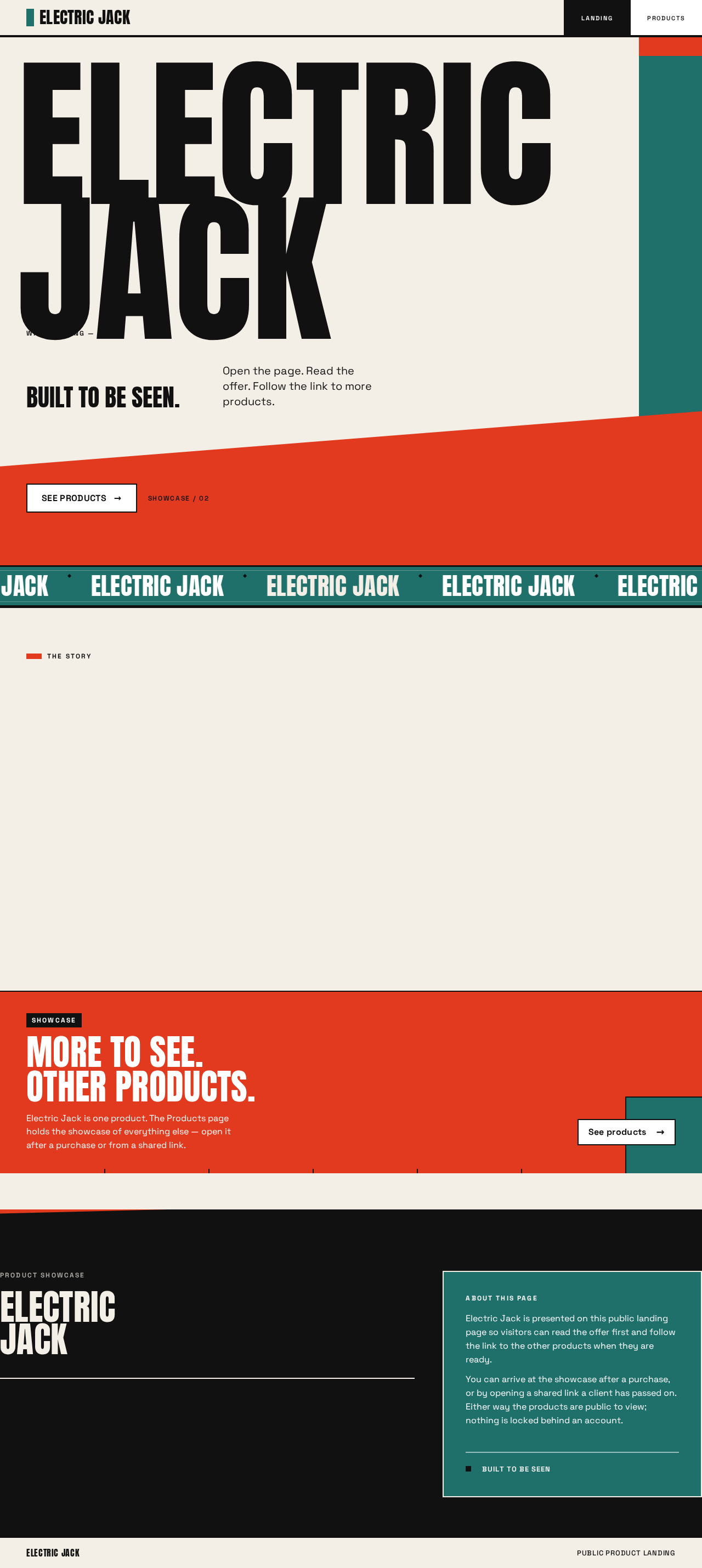
- Product name "Electric Jack" as the dominant hero wordmark, stacked in three lines and filling the viewport width.
- Hero headline: "Electric Jack. Built to be seen."
- Hero subline: "Open the page. Read the offer. Follow the link to more products."
- Primary call to action: "See products".
- A short product-story section describing what Electric Jack is and who it is for (copy authored from the product context; no invented specifications).
- A teaser strip pointing to the showcase of other products.
- Static page state only: no loading, empty, or error states are required because the page renders authored content.
Primary actions
- Activate "See products" to navigate to the Products page.
Supporting actions
- Scroll through the poster sections.
- Follow the in-page teaser link to the Products page.
Domain entities
- Product story content (headline, subline, story copy).
- Showcase teaser (label and destination).
Component responsibilities
- Type-poster hero — full-viewport warm-paper ground
#F4EFE6; "Electric Jack" in Anton uppercase atclamp(64px, 14vw, 176px), stacked in three lines; a red#E23A1Ediagonal band crossing the lower third holding the CTA in black on white; a teal#1F6F6Bblock at the right edge. No centred subtext block, no gradient. - Hero CTA button — hard-edged white rectangle on the red band, black label "See products", keyboard focusable, navigates to Products.
- Name marquee — one line of the product name moving on a teal band below the hero; pauses and becomes a static wrapped line under
prefers-reduced-motion. - Story block — black type on warm paper, Space Grotesk body at the 20/16 steps, with a black rule above.
- Showcase teaser — flat colour tile with a black rule and a link to Products.
States
- Loading: not applicable (authored static content).
- Empty: not applicable.
- Success: hero renders with wordmark, subline, and CTA fully inside the viewport at 375px, 768px, and 1280px.
- Error: not applicable.
- Recovery: not applicable.
Products
Information and state
- Page title identifying the showcase of other products.
- A dense grid of product tiles, each with the product name, a short description, and a high-contrast product cutout inside a flat colour tile.
- An arrival context line acknowledging how the visitor got here (after a purchase or from a shared link) without gating content.
- A link back to the Landing page.
Primary actions
- Browse the product tiles.
- Open a product tile's detail view (in-page expansion or a detail panel) to read the fuller description.
Supporting actions
- Return to Landing.
- Scroll the grid.
Domain entities
- Showcased product: name, short description, longer description, tile colour assignment (red, teal, or black), cutout image reference.
Component responsibilities
- Showcase header — Anton title, black rule, arrival-context line in Space Grotesk.
- Product grid — 12-column poster grid of flat colour tiles with hard edges and black rules; no rounded corners, no shadows.
- Product tile — colour block, cutout image, product name, short description, and an expand control.
- Product detail panel — longer description revealed from the tile, with a close control returning focus to the tile.
- Back-to-landing link — returns to Landing.
States
- Loading: a brief skeleton of flat colour blocks while the catalogue is fetched from the backend.
- Empty: if the catalogue returns no products, a flat colour block states that no products are listed yet and offers the back-to-landing link.
- Success: every tile's name, description, and control remain fully inside the viewport and its tile at 375px, 768px, and 1280px.
- Error: if the catalogue request fails, an error block states the products could not be loaded and offers a retry control.
- Recovery: retry re-requests the catalogue; the back-to-landing link always remains available.
3. Functional Requirements
FR-1 — Public landing page in the reference style (explicit) As a site visitor, I should open a public landing page built in the style of the referenced page so that I immediately understand what Electric Jack is.
- Trigger: the visitor navigates to the site root.
- Observable result: the Landing page renders with the type-poster hero, the product name, the headline, the subline, and the "See products" call to action.
- Access: public, no identity required.
- Failure/recovery: if the page fails to render, the visitor can reload; no partial state is persisted.
- Continuation: the visitor scrolls the story or activates the call to action.
FR-2 — Showcase other products after a purchase (explicit) As a site visitor who has just purchased, I should be able to reach a showcase of other products so that I can discover what else is offered.
- Trigger: the visitor arrives at the showcase after a purchase (for example by following the post-purchase link).
- Observable result: the Products page opens and lists the showcased products as tiles.
- Access: public; the arrival context is acknowledged in the page copy but does not gate content.
- Failure/recovery: if the catalogue fails to load, an error block with a retry control appears; the back-to-landing link remains available.
- Continuation: the visitor browses tiles or returns to Landing.
FR-3 — Showcase other products when a client clicks a link (explicit) As a client, I should open a shared link and land directly on the showcase of other products so that I can review the product offer.
- Trigger: the client follows a shared link to the Products page.
- Observable result: the Products page opens at the showcase with the arrival-context line and the product grid.
- Access: public, no identity required.
- Failure/recovery: same error block and retry as FR-2.
- Continuation: the client opens a product tile's detail or returns to Landing.
FR-4 — Navigate from the landing page to the showcase (required_inference) As a site visitor, I should activate the "See products" call to action so that I move from the landing page to the showcase.
- Trigger: the visitor activates the hero CTA or the in-page teaser link.
- Observable result: the Products page loads and the visitor sees the showcase header and grid.
- Access: public.
- Failure/recovery: if navigation fails, the visitor remains on Landing and can retry the control.
- Continuation: the visitor browses the showcase.
FR-5 — Read a showcased product's detail (required_inference) As a site visitor or client, I should open a product tile so that I can read the fuller description of that product.
- Trigger: the visitor activates a tile's expand control.
- Observable result: the detail panel opens with the longer description; focus moves into the panel.
- Access: public.
- Failure/recovery: the close control returns focus to the originating tile.
- Continuation: the visitor opens another tile or returns to Landing.
FR-6 — Return from the showcase to the landing page (required_inference) As a site visitor or client, I should follow the back-to-landing link so that I can re-read the offer.
- Trigger: the visitor activates the back-to-landing link.
- Observable result: the Landing page renders.
- Access: public.
- Continuation: the visitor re-reads the story or re-enters the showcase.
4. User Personas
Site visitor
- Product context: arrives at the public landing page, often without prior knowledge of Electric Jack, and reads the offer on a page whose typography is the main structure.
- Primary goal: understand what Electric Jack is and what else is offered, quickly and memorably.
- Distinct accepted responsibilities: reads the hero and story, activates "See products", and — when arriving after a purchase — browses the showcase to discover other products.
- Relevant inputs or decisions: whether the offer is clear enough to continue; which product tile to open.
- Interactions with other participants: none directly; the visitor and the client share the same public pages but do not interact with each other.
- Observable success: the visitor reaches the Products page and opens at least one product detail, or returns to Landing having read the offer.
Client
- Product context: receives a shared link and opens the showcase directly, typically to review the product offer on behalf of a purchasing decision.
- Primary goal: review the showcased products through the shared link without friction.
- Distinct accepted responsibilities: opens the shared link, reads the arrival-context line, browses the product grid, and opens product details to evaluate the offer.
- Relevant inputs or decisions: which products are relevant to the review; whether to return to the landing page for the full story.
- Interactions with other participants: none directly; the client's entry point differs from the site visitor's, which is what makes the role distinct.
- Observable success: the client opens the shared link, sees the showcase, and reads at least one product detail.
5. Core User Flows
Flow A — Site visitor reads the landing page and moves to the showcase
- The site visitor navigates to the site root. The Landing page renders the type-poster hero: "Electric Jack" stacked in three lines, the headline "Electric Jack. Built to be seen.", the subline, and the "See products" CTA on the red diagonal band.
- The visitor scrolls through the story block and the showcase teaser.
- The visitor activates "See products" (or the teaser link). The Products page loads.
- The visitor sees the showcase header and the product grid.
- Failure/recovery: if the Products catalogue request fails, an error block with a retry control appears; the visitor retries or follows the back-to-landing link.
- Continuation: the visitor opens a product tile (Flow C) or returns to Landing (Flow D).
Flow B — Client opens a shared link to the showcase
- The client follows a shared link that points at the Products page.
- The Products page loads and shows the arrival-context line acknowledging the shared-link entry, followed by the product grid.
- The client browses the tiles and opens one to read its detail (Flow C).
- Failure/recovery: if the catalogue fails to load, the error block and retry control appear; the client retries or returns to Landing.
- Continuation: the client returns to Landing (Flow D) to read the full offer.
Flow C — Visitor or client opens a product detail
- On the Products page, the visitor or client activates a tile's expand control.
- The detail panel opens with the longer description; focus moves into the panel.
- The visitor or client reads the description and activates the close control.
- Focus returns to the originating tile.
- Continuation: the visitor or client opens another tile or returns to Landing.
Flow D — Return to the landing page
- On the Products page, the visitor or client activates the back-to-landing link.
- The Landing page renders.
- Continuation: the visitor re-reads the story or re-enters the showcase via "See products".
Flow E — Visitor arrives at the showcase after a purchase
- After completing a purchase, the site visitor follows the post-purchase link to the Products page.
- The Products page loads and shows the arrival-context line acknowledging the post-purchase entry, followed by the product grid.
- The visitor browses the tiles and opens one to read its detail (Flow C).
- Continuation: the visitor returns to Landing (Flow D) or continues browsing.
6. Visuals Colors and Theme
The creative direction is authoritative for this section.
- Muse and headline: Paula Scher — loud type and colour blocks for a product showcase landing page. The page must feel energetic, direct, and memorable, not quiet or corporate.
- Mode: light.
- Colour tokens by role:
- Background (warm paper ground, ~60%):
#F4EFE6 - Surface:
#FFFFFF - Text and rules (~25%):
#111111 - Primary (red, ~10%):
#E23A1E - Accent (teal, ~5%):
#1F6F6B - Muted:
#8A857C
- Background (warm paper ground, ~60%):
- Font families: headings Anton, uppercase with tight leading and stacked lines; body Space Grotesk.
- Type scale (1.5 modular): 64 / 44 / 30 / 20 / 16. Hero headline
clamp(64px, 14vw, 176px). - Shape language: hard edges and full-bleed rectangles; diagonal red and teal bands cut the page; no rounded corners and no soft shadows.
- Layout: poster grid on 12 columns; the headline fills the first screen; products sit in a dense grid of flat colour tiles with black rules.
- Spacing rhythm: generous full-bleed blocks separated by black rules; dense tile gutters in the product grid.
- Imagery style: typography is the image; product shots sit in high-contrast cutouts inside flat colour tiles.
- Avoid: rounded cards, soft shadows, blue or indigo accents, gradient blobs, glass panels, centred headline with subtext and a small button.
7. Signature Design Concept
The public entry is a full-viewport type poster on warm paper. "Electric Jack" fills the viewport width in Anton at 176px on desktop, stacked in three lines. A red #E23A1E diagonal band crosses the lower third and holds the "See products" CTA in black on white. A teal #1F6F6B block sits at the right edge. Below the hero, a teal band carries a moving marquee of the product name. The story block and showcase teaser follow as flat colour tiles with black rules. No centred subtext block and no gradient.
The concept recomposes only accepted content — the product name, headline, subline, CTA, story, and teaser — into a poster structure; it introduces no new behaviour or destination.
8. Interaction Model & Motion Direction
Interaction Model: Animated Motion Tempo: expressive Hero Dimensionality: flat
Landing Hero Motion Brief
- Focal subject: the "Electric Jack" wordmark as the image itself, stacked in three lines on warm paper.
- Input → transformation → outcome thesis: as the page loads, the three wordmark lines enter in a stagger; the red diagonal band wipes in across the lower third and settles holding the CTA; the teal block slides in at the right edge. The outcome is a composed poster with the CTA fully readable and focusable.
- Motion vocabulary: staggered word entry, colour-block wipe-in on scroll, one moving type marquee on a teal band below the hero.
- Composed first frame: warm paper ground, the first wordmark line already visible, the red band and teal block not yet arrived.
- Reduced-motion state: under
prefers-reduced-motion, all entries resolve instantly to the composed poster; the marquee becomes a static wrapped line so every word remains fully readable.
9. Non-Functional Requirements
- NFR-1 — Readable text and controls at every viewport (explicit, from the creative direction's readability rule): headlines, wordmarks, labels, numbers, tile text, and controls stay entirely inside the viewport and their container at 375px, 768px, and 1280px, wrapping or scaling (for example
clamp(...)with its mobile size) to fit; no other element covers any part of them. Imagery and decoration may be cropped, bled, rotated, or overlapped as the direction asks, provided they cover no readable text or control. - NFR-2 — Moving content remains readable (explicit): the marquee may cross the viewport edge by design; every item must become fully readable as it passes. Under
prefers-reduced-motion, the marquee becomes a static wrapped arrangement. - NFR-3 — Public access (explicit): both pages are reachable without identity, session, or purchase verification.
- NFR-4 — Performance (required_inference): the Landing page's hero renders without layout shift; fonts are loaded with
font-display: swapso the wordmark is readable before Anton resolves. - NFR-5 — Accessibility (required_inference): the CTA and tile expand controls are keyboard focusable with visible focus; the detail panel traps and restores focus; colour contrast of black on white and black on
#F4EFE6meets WCAG AA for body text.
10. Tech Stack
- Frontend: React application UI (provisioned scaffold).
- Backend: shared FastAPI process serving the product catalogue API for the Products page (provisioned scaffold; extended with a catalogue route and module rather than a new service).
- Database: MariaDB storing the showcased product catalogue (name, short description, longer description, tile colour, cutout image reference).
- Deployment: Docker / docker-compose for the three services (frontend, backend, database).
- Typography: Anton and Space Grotesk loaded as web fonts.
11. Assumptions and Constraints
- A-1 (assumption): The reference page
http://electric-jack.mayatek.ng/was unreachable (502), so no structural or visual fact from it is reproduced; the creative direction supplies the visual system. - A-2 (assumption): "After purchase" and "client clicking the link" describe arrival contexts for the showcase; neither gates access, because the planning contract records both pages with no access requirement and no accepted requirement states a restriction.
- A-3 (assumption): The showcased products are a curated catalogue authored as part of the product, not fetched from an external commerce provider.
- A-4 (constraint): No checkout, cart, payment, order lifecycle, account, sign-in, or admin authoring tool is in scope.
- A-5 (constraint): The creative direction's "avoid" list is binding: no rounded cards, soft shadows, blue or indigo accents, gradient blobs, glass panels, or centred headline with subtext and a small button.
12. Glossary
- Landing — the public entry page carrying the type-poster hero, story, and CTA.
- Products — the public showcase page listing other products as tiles.
- Showcase — the collection of other products presented on the Products page.
- Type poster — a layout in which typography, not imagery, is the primary visual structure.
- Marquee — a moving line of text that crosses the viewport by design.
- Arrival context — the line on the Products page acknowledging whether the visitor arrived after a purchase or from a shared link.
- Tile — a flat colour block in the product grid holding a cutout image, name, description, and expand control.
Electric Jack. Built to be seen.
Built to be seen.
Open the page. Read the offer. Follow the link to more products.
A toolMade to beHandled.
Electric Jack is a single product presented with its own emphasis: one page, one name, one clear way forward. It is made for people who put their tools to work and want the thing in their hands to feel as deliberate as the work itself.
This landing page is built around the name. Electric Jack leads, the offer follows, and every rule, block and line of type exists to keep the visitor moving toward what the product is.
From here, the path is short. Follow the link to the products page to see what sits alongside Electric Jack, or return to the top and read the offer again.
- 01Visitors who want to understand the product in a single read.
- 02Clients reviewing the offer through a shared link.
- 03Buyers who arrive after a purchase to see what else is offered.
Electric Jack. Built to be seen.
Built to be seen.
Open the page. Read the offer. Follow the link to more products.
A toolMade to beHandled.
Electric Jack is a single product presented with its own emphasis: one page, one name, one clear way forward. It is made for people who put their tools to work and want the thing in their hands to feel as deliberate as the work itself.
This landing page is built around the name. Electric Jack leads, the offer follows, and every rule, block and line of type exists to keep the visitor moving toward what the product is.
From here, the path is short. Follow the link to the products page to see what sits alongside Electric Jack, or return to the top and read the offer again.
- 01Visitors who want to understand the product in a single read.
- 02Clients reviewing the offer through a shared link.
- 03Buyers who arrive after a purchase to see what else is offered.
No comments yet. Be the first!