wild-hu
 Jeel Gohel
hu

Comments (0)
Sign in to leave a comment
System Requirements
System Requirements Document for wild-hu
1. Introduction
wild-hu is a basic web site for testing APIs. It gives engineers and testers a single browser-based instrument for firing an HTTP request at an API endpoint and reading the exact response that comes back — the method, the URL, the headers, the body, the status code, and the timing — without leaving the browser for a terminal or a desktop client.
The product intent is deliberately narrow: one request, one response, one exact reading. The site is not a workspace, a collection manager, or a collaboration platform. It is a precision instrument whose whole job is to show exact codes and exact payloads, and whose interface is built to stay out of the way of that reading.
The audience is developers and QA/testers who already understand HTTP, who live in terminals and browser inspectors, and who distrust marketing gloss. They want to type a URL, choose a method, send, and see the truth. The site is public and requires no account: opening it and sending a request is the entire first-use experience.
2. System Overview
wild-hu is delivered as a first-party web application with two pages:
- Landing — the anonymous public entry. It states what the product is, shows the request bar as the hero artefact, and carries the coded status legend. From here the visitor proceeds to the tester.
- API Tester — the working instrument face. It owns the accepted interaction of composing an HTTP request, sending it to an endpoint, and viewing the returned response.
Both pages are reachable without any account, sign-in, or identity establishment. There is no application-owned identity in the current product: no user record, no saved history, no private state to resume. A visitor who reloads the page starts a fresh, empty request. This is a deliberate consequence of the accepted scope — a basic testing site — and not an omission to be filled with adjacent account features.
The system has one human actor, the API Tester, and one non-persona actor: the target API endpoint, an external HTTP server owned by whoever the tester chooses to call. wild-hu does not own, host, or proxy that endpoint; it sends the tester's request to it and renders whatever comes back.
Current delivery boundary. Current work covers: the Landing entry surface, the API Tester instrument, request composition (method, URL, headers, body), request dispatch, response rendering (status code, status text, headers, body, elapsed time, response size), the coded status alphabet, and the error/recovery states for malformed input, network failure, timeout, and cancellation.
Narrow exclusions. The current product does not include: accounts, sign-in, or saved request history; collections, folders, or environments; automated test suites, assertions, or CI integration; team sharing or collaboration; API mocking or proxying; authentication helpers such as OAuth flows or token vaults; or any analytics or telemetry surface. These are not prohibited forever — they are simply not part of the accepted current scope, and nothing in this document should be read as building them.
2a. Product Interpretation and Delivery Boundary
What the product is. A browser page that sends one HTTP request and shows you exactly what came back. The tester supplies a method, a URL, optional headers, and an optional body; the site dispatches that request from the browser and renders the response as a ruled data sheet: a status square with its numeric code, the status text, the response headers, the body, the elapsed time, and the size.
Who owns what. wild-hu owns the request bar, the request editor, the response viewer, the status legend, and the error states. The target API endpoint is external and owns its own behaviour — its availability, its latency, its status codes, and its payloads are outside wild-hu's control, and the site's job is to report them faithfully rather than to interpret or correct them. The browser's own networking layer performs the dispatch; wild-hu does not run a server-side proxy for the tester's requests in the current scope.
Access. Both pages are public and anonymous. No account is created, no session is established, and no state persists between visits. Because there is no durable actor-specific state, no commitment, and no value transfer that must remain bound to a particular person, application-owned identity is not required and is not introduced.
Current versus future. Everything described in sections 2c, 3, and 5 is current. Anything a reader might expect from a fuller API client — saved requests, collections, environments, assertions, sharing — is future at best and is not specified here. The one thing the current product must do well is the request/response cycle, read exactly.
2c. Page Content and Component Coverage
Landing
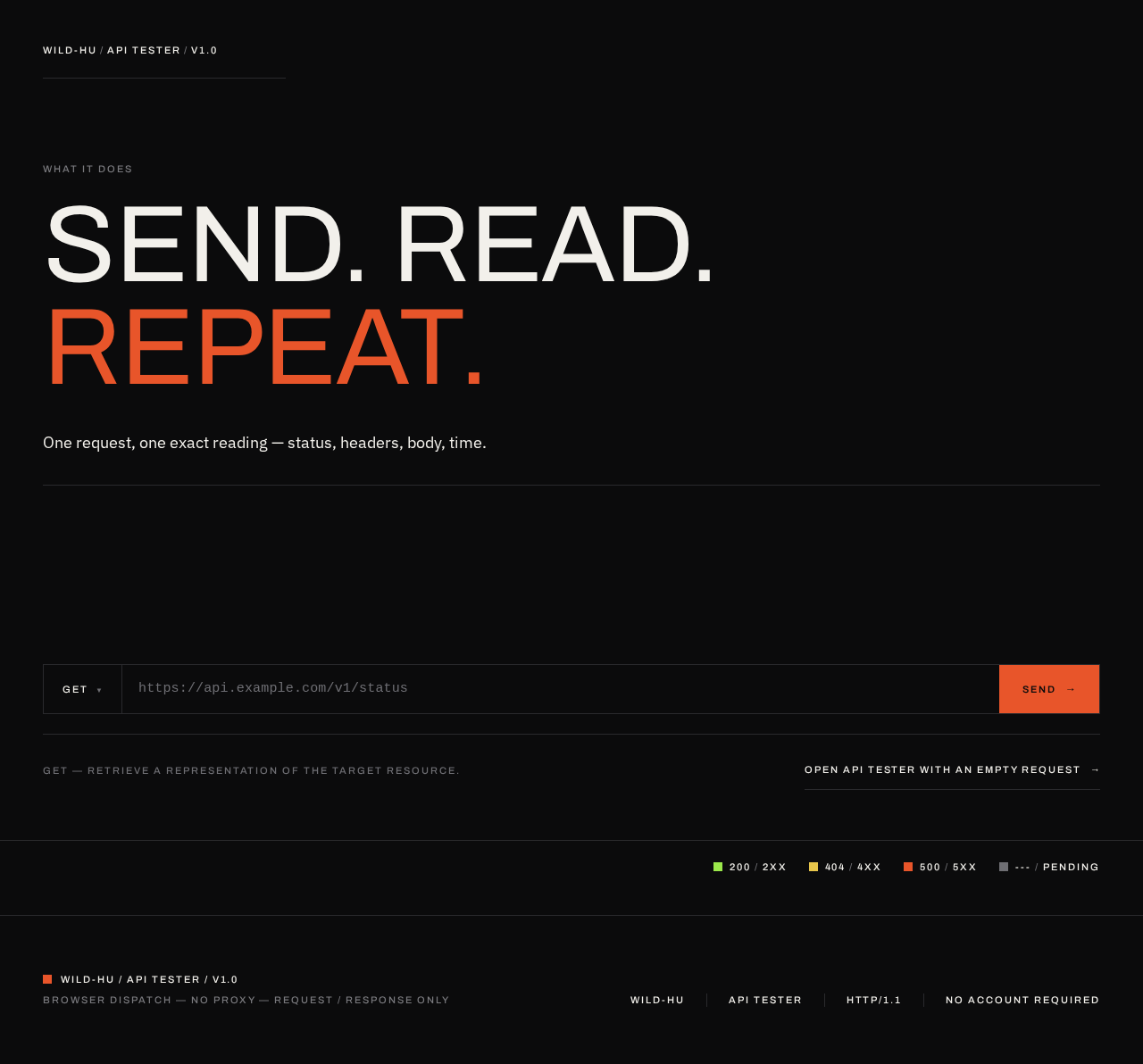
Information and state. The page is a full-bleed ink-black field. Its content is: a top-left metadata block reading WILD-HU / API TESTER / v1.0; the oversized display statement SEND. READ. REPEAT.; one line of body copy describing what the tool does; the request bar as the hero artefact; and a bottom-right coded status legend. There is no conventional header bar, no nav menu, and no centred headline-plus-subtext-plus-button stack.
Primary action. Proceed into the API Tester. The request bar on the Landing page is the entry gesture: the visitor can type an endpoint into the URL field and press SEND, which carries them into the API Tester with that URL pre-filled and the request ready to dispatch. A secondary, quieter path is a direct link into the API Tester with an empty request.
Supporting actions. Choose the HTTP method from the method chip (GET, POST, PUT, PATCH, DELETE, HEAD, OPTIONS). Read the status legend to learn the colour code before using the tool.
Domain entities. None persisted. The only entity in play is the in-flight request the visitor is composing.
Component responsibilities.
- Metadata block — 11px uppercase Archivo at 0.18em tracking, top-left of the grid; identifies the product, its role, and its version.
- Display statement — Archivo 400 at
clamp(40px, 9.5vw, 132px), flush-left across nine columns, ragged-right; the third word in Saville orange, the rest off-white. - Body line — IBM Plex Sans 18px, off-white, ragged-right, max 46 characters.
- Request bar — a single 56px-tall rectangle spanning the grid, 1px
#2A2A2Dborder, divided by vertical hairlines into method chip / URL field / SEND block. The SEND block is solid Saville orange and bleeds flush to the grid edge. - Status legend — four 10px squares with their numeric codes, bottom-right, in 11px uppercase Archivo.
States.
- Loading — not applicable; the Landing page is static and renders immediately.
- Empty — the URL field shows a live monospaced placeholder endpoint rather than an empty box.
- Success — pressing SEND with a valid URL navigates to the API Tester with the request pre-filled and dispatches it.
- Error — pressing SEND with an empty or malformed URL does not navigate; the URL field takes the focused-field border in Saville orange and a single line of off-white text states that a valid URL is required.
- Recovery — the visitor corrects the URL and presses SEND again; no state is lost.
API Tester
Information and state. A two-zone instrument face. The request bar spans all twelve columns at the top. Below it, a 5/7 split: the request editor on the left, the response viewer on the right. Everything is flush-left, ragged-right, aligned to visible column rules. The page carries the same top-left metadata block and bottom-right status legend as the Landing page.
Primary action. Send the composed request and read the response.
Supporting actions. Change the HTTP method; edit the URL; add, edit, and remove request headers as ruled rows; edit the request body as monospaced text; cancel an in-flight request; clear the request and start over; copy the response body to the clipboard.
Domain entities.
- Request — method, URL, headers (ordered name/value pairs), body (text).
- Response — status code, status text, headers (ordered name/value pairs), body (text), elapsed time in milliseconds, response size in bytes.
- Status class — 2xx, 3xx, 4xx, 5xx, or pending, each mapped to one coded colour.
Component responsibilities.
- Request bar — method chip, monospaced URL field, SEND block, divided by 1px hairlines inside one rectangle. On focus, a single 1px rule draws across the bar.
- Method chip — shows the active method; Saville orange when active, off-white otherwise; opens the method list.
- URL field — IBM Plex Mono 14–15px, tabular numerals, off-white on black; validates on send.
- SEND block — solid Saville orange, flush to the grid edge; becomes a CANCEL control while a request is in flight.
- Request editor — method, headers, and body as monospaced ruled rows on
#141416with hairline row rules; header rows have a name field, a value field, and a remove control; an add-header control appends a new ruled row. - Response viewer — a ruled data sheet: a status square plus numeric code and status text at the top, then elapsed time and size, then response headers, then the body as monospaced lines with hairline row rules and tabular numerals.
- Status square — a 10px square of coded colour, always paired with its numeric code; never a pill or a badge.
- Status legend — the same four-square legend as the Landing page.
States.
- Loading / pending — the status square is
#6E6E73and reads---; the SEND block reads CANCEL; the response viewer shows an empty ruled sheet with no rows. - Empty — before any request has been sent, the response viewer shows a single line of muted text stating that no response has been received yet, and the request editor shows one empty header row.
- Success — the status square takes the coded colour for the response class, the numeric code and status text render, elapsed time and size render, headers and body render as ruled rows, and the body reveals line by line at 12ms per line, stopping dead when the body ends.
- Error — malformed input — an unparseable or empty URL does not dispatch; the URL field takes the focused-field border in Saville orange and a single off-white line states the problem.
- Error — network failure — the request could not reach the endpoint; the status square is
#E8552A, the code readsERR, and a single off-white line names the failure (for example, the endpoint refused the connection or the host could not be resolved). - Error — timeout — the request exceeded the client timeout; the status square is
#E8552A, the code readsTIMEOUT, and the elapsed time is shown. - Error — blocked by CORS — the browser refused to expose the response; the status square is
#E8552A, the code readsCORS, and a single off-white line explains that the endpoint did not permit the browser to read the response. - Cancelled — the tester cancels an in-flight request; the status square returns to
#6E6E73, the code readsCANCELLED, and the response viewer keeps whatever had already rendered. - Recovery — every error state leaves the composed request intact so the tester can correct the URL, adjust headers, or retry; pressing SEND again clears the previous response and starts a fresh reading.
3. Functional Requirements
FR-1 — Open the site and understand what it does
As an API Tester I should open the wild-hu site and immediately understand that it is a tool for sending HTTP requests and reading responses so that I can decide whether it does what I need without reading documentation.
- Provenance:
required_inference(Landing page rationale: mandatory anonymous public entry that explains the product before any protected work). - Trigger: the tester navigates to the site root.
- Observable result: the Landing page renders with the metadata block, the display statement, one line of body copy, the request bar, and the status legend.
- Access state: anonymous; no account, no sign-in.
- Failure/recovery: not applicable; the page is static.
- Continuation: the tester proceeds into the API Tester.
FR-2 — Compose an HTTP request
As an API Tester I should choose an HTTP method, enter a URL, and optionally add request headers and a request body so that I can describe exactly the request I want to send.
- Provenance:
explicit(build a basic web site for testing APIs). - Trigger: the tester interacts with the request bar and the request editor on the API Tester page.
- Observable result: the method chip shows the selected method; the URL field shows the entered URL; each added header appears as a ruled row with a name and a value; the body appears as monospaced text.
- Access state: anonymous.
- Failure/recovery: an empty or malformed URL is flagged on send and the request is not dispatched; the composed request is preserved.
- Continuation: the tester sends the request.
FR-3 — Send the request to the endpoint
As an API Tester I should press SEND and have wild-hu dispatch my request to the endpoint I named so that I can observe how that endpoint actually behaves.
- Provenance:
explicit(build a basic web site for testing APIs). - Trigger: the tester presses SEND with a valid URL.
- Observable result: the request is dispatched from the browser to the named endpoint; the status square turns
#6E6E73and reads---; the SEND block becomes CANCEL. - Access state: anonymous.
- Failure/recovery: if the URL is invalid the request is not dispatched and the URL field is flagged; if dispatch fails the error states in FR-6 apply.
- Continuation: the response renders, or an error state renders.
FR-4 — Read the response status
As an API Tester I should see the response status as a coded colour square paired with its exact numeric code and status text so that I can read the outcome at a glance and still have the exact code when I need it.
- Provenance:
explicit(build a basic web site for testing APIs) with the coded status alphabet supplied by the creative direction. - Trigger: a response arrives.
- Observable result: a 10px square in the coded colour —
#9BE84Bfor 2xx,#E8C64Bfor 3xx and 4xx,#E8552Afor 5xx and errors,#6E6E73for pending — beside the numeric code and the status text in IBM Plex Mono. - Access state: anonymous.
- Failure/recovery: colour is never the only signal; the numeric code is always present, so the reading survives any colour-vision limitation.
- Continuation: the tester reads the headers and body.
FR-5 — Read the response headers, body, timing, and size
As an API Tester I should see the response headers, the response body, the elapsed time, and the response size rendered as a ruled data sheet so that I can inspect exactly what the endpoint returned and how long it took.
- Provenance:
explicit(build a basic web site for testing APIs). - Trigger: a response arrives.
- Observable result: response headers render as ruled rows; the body renders as monospaced lines with hairline row rules and tabular numerals, revealing line by line at 12ms per line and stopping when the body ends; elapsed time in milliseconds and size in bytes render above the headers.
- Access state: anonymous.
- Failure/recovery: a body that is not text is shown as a single line stating that the body is not displayable as text, with the size still reported.
- Continuation: the tester copies the body, edits the request, or sends another request.
FR-6 — See and recover from a failed request
As an API Tester I should be told plainly when a request could not be completed and be able to retry without losing my work so that I can distinguish a broken endpoint from a broken request.
- Provenance:
required_inference(indispensable failure and recovery mechanics for the accepted send-and-read lifecycle). - Trigger: the request fails to reach the endpoint, exceeds the client timeout, is blocked by CORS, or is cancelled by the tester.
- Observable result: the status square is
#E8552Awith the codeERR,TIMEOUT, orCORS, or#6E6E73with the codeCANCELLED, and a single off-white line names the failure. - Access state: anonymous.
- Failure/recovery: the composed request is preserved in every case; pressing SEND again clears the previous reading and starts fresh.
- Continuation: the tester corrects the request and retries.
FR-7 — Cancel an in-flight request
As an API Tester I should be able to cancel a request that is taking too long so that I am not held hostage by a slow or hanging endpoint.
- Provenance:
required_inference(indispensable control over the accepted send lifecycle). - Trigger: the tester presses CANCEL while a request is in flight.
- Observable result: the request is aborted; the status square returns to
#6E6E73and readsCANCELLED; whatever had already rendered in the response viewer remains. - Access state: anonymous.
- Failure/recovery: the composed request is preserved and can be sent again.
- Continuation: the tester edits the request or retries.
FR-8 — Clear the request and start over
As an API Tester I should be able to clear the request editor and the response viewer so that I can start a fresh reading without reloading the page.
- Provenance:
required_inference(indispensable continuation mechanic for repeated use of the accepted send-and-read lifecycle). - Trigger: the tester activates the clear control.
- Observable result: the method returns to GET, the URL field empties to its placeholder, the request editor returns to one empty header row with an empty body, and the response viewer returns to its empty state.
- Access state: anonymous.
- Failure/recovery: not applicable; clearing is immediate and reversible only by retyping.
- Continuation: the tester composes a new request.
FR-9 — Copy the response body
As an API Tester I should be able to copy the response body to my clipboard so that I can paste it into an issue, a test, or another tool.
- Provenance:
required_inference(indispensable handoff of the accepted response reading into the tester's other work). - Trigger: the tester activates the copy control on the response viewer.
- Observable result: the response body is placed on the clipboard and the control briefly confirms the copy.
- Access state: anonymous.
- Failure/recovery: if the clipboard is unavailable, a single off-white line states that the copy failed and the body remains selectable for manual copying.
- Continuation: the tester pastes the body elsewhere.
4. User Personas
API Tester
Product context. The API Tester is a developer or QA engineer working against an HTTP API — their own, a colleague's, or a third party's. They are usually mid-task: a build is failing, an endpoint is returning something unexpected, a contract needs checking, or a payload needs inspecting. They already know HTTP. They know what a 404 means, they know what a header is, and they do not need the tool to explain any of it. What they need is a place to type a URL, pick a method, send, and see the truth without ceremony.
Primary goal. Send one HTTP request to one endpoint and read exactly what came back — the status code, the headers, the body, the time, and the size — with enough fidelity to act on it.
Distinct accepted responsibilities.
- Deciding what to send: choosing the method, composing the URL, and adding only the headers and body the endpoint requires.
- Committing to the send: pressing SEND and accepting that the request will leave the browser for an endpoint wild-hu does not control.
- Reading the response: interpreting the coded status square together with its numeric code, then reading headers, body, timing, and size.
- Distinguishing failure modes: telling apart a malformed request, an unreachable endpoint, a timeout, a CORS block, and a genuine error response from the server.
- Recovering and iterating: correcting the request and sending again, cancelling a request that hangs, clearing the instrument, and copying a body out into other work.
Relevant inputs and decisions. The method and URL are the primary inputs; headers and body are conditional on what the endpoint expects. The recurring decision is whether the response is the endpoint's fault or the request's fault — which is exactly what the coded status alphabet and the distinct error states are there to answer.
Interactions with other accepted participants. The only other participant in the lifecycle is the target API endpoint, an external HTTP server owned by someone else. The tester's interaction with it is indirect: they name it, wild-hu dispatches to it, and it answers. The tester never negotiates with wild-hu about the endpoint's behaviour; wild-hu reports it.
Observable success. The tester sees the exact status code, the exact headers, and the exact body they were looking for, in a form they can read at a glance and copy out — and knows, without ambiguity, whether a failure came from their request or from the endpoint.
What makes this role distinct. There is no second human role in this product. The API Tester is simultaneously the author of the request and the reader of the response; there is no reviewer, approver, or recipient to hand off to, and no shared state for anyone else to see. That is why the product has no accounts, no sharing, and no history: the entire lifecycle begins and ends with one person at one instrument.
5. Core User Flows
Flow 1 — First visit: understand the tool and send a first request
- The API Tester opens the wild-hu site root in a browser. No account is required and none is offered.
- The Landing page renders: the top-left metadata block reads
WILD-HU / API TESTER / v1.0; the display statementSEND. READ. REPEAT.sits flush-left across nine columns with the third word in Saville orange; one line of body copy describes the tool; the request bar spans the grid; the coded status legend sits bottom-right. - The tester reads the status legend and learns the code:
#9BE84Bfor 2xx,#E8C64Bfor 3xx and 4xx,#E8552Afor 5xx and errors,#6E6E73for pending. - The tester clicks the method chip and selects
GETfrom the method list. The chip takes Saville orange. - The tester types an endpoint into the monospaced URL field. A single 1px rule draws across the request bar as the field takes focus.
- The tester presses the solid Saville orange SEND block.
- The site navigates to the API Tester page with the method and URL pre-filled, and dispatches the request. The status square turns
#6E6E73and reads---; the SEND block becomes CANCEL. - The response arrives. The status square takes its coded colour, the numeric code and status text render beside it, elapsed time and size render above the headers, the response headers render as ruled rows, and the body reveals line by line at 12ms per line, stopping when the body ends.
- The tester reads the result. If the code is what they expected, the flow ends here. If not, they continue to Flow 3.
Flow 2 — Compose and send a request with headers and a body
- The API Tester is on the API Tester page with an empty request.
- The tester selects
POSTfrom the method chip. - The tester enters the endpoint URL in the URL field.
- In the request editor on the left of the 5/7 split, the tester adds a header: they type
Content-Typein the name field andapplication/jsonin the value field of the first ruled row. - The tester activates the add-header control. A new ruled row appears. They add
Authorizationand its value. - The tester types a JSON payload into the body area as monospaced text.
- The tester presses SEND. The request is dispatched with the method, URL, headers, and body as composed.
- The response arrives and renders as in Flow 1, step 8.
- The tester activates the copy control on the response viewer. The body is placed on the clipboard and the control briefly confirms the copy.
- The tester pastes the body into their issue tracker, test file, or another tool. The flow ends.
Flow 3 — Diagnose a failure and recover
- The API Tester has sent a request and the reading is not what they expected.
- Case A — malformed input. The URL was empty or unparseable. The request was never dispatched; the URL field carries the focused-field border in Saville orange and a single off-white line states that a valid URL is required. The tester corrects the URL and presses SEND again.
- Case B — network failure. The endpoint could not be reached. The status square is
#E8552Aand the code readsERR; a single off-white line names the failure, such as the host not resolving or the connection being refused. The tester checks the URL and their network, corrects the request, and presses SEND again. - Case C — timeout. The endpoint did not answer within the client timeout. The status square is
#E8552A, the code readsTIMEOUT, and the elapsed time is shown. The tester either retries or presses CANCEL on a subsequent attempt. - Case D — CORS block. The browser refused to expose the response because the endpoint did not permit it. The status square is
#E8552A, the code readsCORS, and a single off-white line explains that the endpoint did not permit the browser to read the response. The tester understands that the endpoint answered but the browser withheld the body, and adjusts their expectation or their endpoint's configuration. - Case E — a genuine error response. The endpoint answered with a 4xx or 5xx. The status square takes
#E8C64Bor#E8552Aaccordingly, and the exact numeric code, status text, headers, and body all render. The tester reads the body to find out what the endpoint objected to. - In every case the composed request is preserved. The tester edits the URL, headers, or body and presses SEND again; the previous reading is cleared and a fresh one begins.
- The tester reaches a reading they can act on. The flow ends.
Flow 4 — Cancel a hanging request and start over
- The API Tester has pressed SEND and the request is in flight. The status square reads
---in#6E6E73and the SEND block reads CANCEL. - The endpoint is slow or hanging. The tester presses CANCEL.
- The request is aborted. The status square returns to
#6E6E73and readsCANCELLED. Whatever had already rendered in the response viewer remains on screen. - The tester decides the request needs a different shape. They activate the clear control.
- The method returns to GET, the URL field empties to its placeholder, the request editor returns to one empty header row with an empty body, and the response viewer returns to its empty state.
- The tester composes a new request and presses SEND. The flow continues as in Flow 1, step 8.
6. Visuals, Colors, and Theme
The creative direction is authoritative for this section. The muse is Peter Saville; the headline idea is one coded artefact, a lot of silence. The tool is treated as a piece of scientific apparatus, not a SaaS dashboard: an ink-black instrument face with a single exact spot colour, hard edges, hairlines, and gallery-like emptiness.
Colour tokens (dark mode)
| Role | Hex | Use |
|---|---|---|
| Background | #0B0B0C | Full-bleed page ground; the instrument face. |
| Surface | #141416 | Panels one step lighter — request editor, response viewer. |
| Text | #F2F0EB | All type, off-white on black; contrast > 15:1. |
| Primary | #E8552A | Saville orange. The only identity colour: primary action, active method chip, focused field border, 5xx and error status. Nothing else. |
| Accent | #9BE84B | 2xx status only. |
| Status — 3xx/4xx | #E8C64B | 3xx and 4xx status only. |
| Status — pending | #6E6E73 | Pending, cancelled, and muted text. |
| Rule | #2A2A2D | 1px hairlines: borders, row rules, grid rules. |
Status colour is a code system, never decoration. Every status square is paired with its numeric code so colour is never the only signal.
Typography
- Headings: Archivo. 500–600 in wide-tracked uppercase for section plates and micro-labels at 0.18em tracking; 400 in tight, very large sizes for the one display statement. Never bold-heavy — the scale does the shouting, not the weight.
- Body: IBM Plex Sans.
- Data and body copy in the instrument: IBM Plex Mono at 14–15px with tabular numerals.
- Labels: 11px uppercase Archivo at 0.18em tracking.
- Scale: 1.333 modular — 132 / 64 / 40 / 28 / 18 / 15 / 13.
- Display sizes:
clamp(40px, 9.5vw, 132px)for the hero statement;clamp(28px, 4vw, 48px)for page titles.
Shape language
Hard edges and hairlines only. Radii 0–2px. 1px rules at #2A2A2D. Panels butt directly against each other rather than float. The request bar is a single 56px-tall rectangle divided by vertical hairlines into method / URL / send — one object, not three cards. Status is a 10px square of coded colour plus a monospaced number, never a pill or a badge. No shadows, no glows, no rounded blobs.
Layout
A 12-column grid with a 48px outer margin (24px on mobile) and a huge empty band above the fold. The Landing page is a full-height black field whose only artefact is the centred request bar, with a small metadata block top-left and the code legend bottom-right. The API Tester page is a two-zone instrument face: the request bar spanning columns 1–12 at the top, then a 5/7 split with the request editor on the left and the response viewer on the right. Everything is flush-left, ragged-right, aligned to visible column rules.
Imagery
No photography, no illustration, no 3D. The imagery is the artefact itself: a scientific-diagram treatment of the request/response cycle drawn in 1px white lines on black (client box → arrow → server box → arrow back), a colour-code legend rendered as a row of labelled squares, and monospaced JSON as the only "picture" on the page. Found-diagram austerity; everything else is silence.
Avoid
Any blue or indigo primary (#0057FF, #2563EB, #4F46E5) — the only identity colour is Saville orange #E8552A. Rounded cards, floating panels, drop shadows, glassmorphism. Gradient blobs, glows, or any decorative background behind the request bar. Pill-shaped status badges, or colour without the numeric code beside it. Inter, Roboto, Poppins, system-ui, or any neutral template sans for headings or body. Bouncy or springy motion, hover-lift cards, animated illustrations. Photography, 3D renders, emoji, or character illustration anywhere on the site. A centred hero stack of headline + subtext + button with a nav bar above it.
7. Signature Design Concept
The instrument is the hero.
The Landing page is a full-bleed #0B0B0C field — not a card, not a gradient, not a hero image. The dominant element is the request bar: a single 56px-tall, full-grid-width black rectangle with a 1px #2A2A2D border, split by vertical hairlines into a method chip (GET, in Saville orange when active), a monospaced URL field showing a live placeholder endpoint, and a solid #E8552A SEND block flush to the right grid edge. It is one object, not three cards.
Above it, at the top-left of the grid, a small metadata block reads WILD-HU / API TESTER / v1.0 in 11px uppercase Archivo at 0.18em tracking. Below the bar, one line of off-white body copy at 18px, ragged-right, max 46 characters. In the lower-right corner, the coded status legend: four 10px squares with their codes.
The oversized display statement SEND. READ. REPEAT. is set in Archivo 400 at clamp(40px, 9.5vw, 132px), flush-left across nine columns, with the third word in #E8552A and the rest off-white.
There is no centred headline, no subtext stack, no blue button, no blob. The instrument is the hero, and the emptiness around it is the composition. The signature moves are: the request bar as a single ruled artefact; the coded status alphabet repeated as a corner legend on both pages; the oversized display statement; metadata blocks instead of a nav bar; and the response viewer as a ruled data sheet with a 12ms-per-line streaming reveal that stops dead when the body ends.
8. Interaction Model & Motion Direction
Interaction Model: Static (direction) Motion Tempo: still Hero Dimensionality: flat
Landing Hero Motion Brief
Focal subject. The request bar — the single ruled artefact that is the product's whole identity.
Input → transformation → outcome thesis. The visitor focuses the URL field; a single 1px rule draws across the request bar; the visitor presses SEND and the bar's SEND block hands off to the API Tester, where the status square swaps colour instantly as the response lands. The motion is mechanical feedback, not animation: the instrument responds to being operated.
Motion vocabulary. One slow fade-and-settle on first load (240ms, no bounce). A single 1px rule that draws across the request bar on focus. A status square that swaps colour instantly with no transition. Response body lines revealing at 12ms per line while streaming, then stopping dead.
Composed first frame. The full-bleed #0B0B0C field at rest: metadata block top-left, display statement flush-left across nine columns, the request bar spanning the grid with its hairline divisions, one line of body copy below, the four-square status legend bottom-right. Nothing moves until the visitor touches the bar.
Reduced-motion state. With prefers-reduced-motion: reduce, the first-load fade becomes instant, the focus rule is drawn statically rather than animated, and the response body renders in full rather than line by line. Every state remains fully readable and every control remains operable.
9. Non-Functional Requirements
- NFR-1 — Browser-only dispatch. Requests are dispatched from the browser to the named endpoint. wild-hu does not proxy the tester's requests through a server in the current scope. Provenance:
required_inferencefrom the accepted "web site for testing APIs" scope; a browser-based tester is the minimal truthful implementation. - NFR-2 — No account, no persistence. Both pages are anonymous. No user record, session, saved request, or history is created or stored. Reloading the page starts a fresh, empty request. Provenance:
explicit— the accepted scope is a basic testing site with no identity requirement, and no durable actor-specific state exists that would justify one. - NFR-3 — Colour is never the only signal. Every status square is paired with its numeric code and status text. Provenance:
explicitfrom the creative direction's coded status alphabet. - NFR-4 — Readable text and controls stay whole. Headlines, the wordmark, labels, numbers, and all controls stay entirely inside the viewport and their container at 375px, 768px, and 1280px, wrapping or scaling (for example
font-size: clamp(...)with its mobile size) to fit. No other element covers any part of them. Provenance:explicitfrom the creative direction's readability rule. - NFR-5 — Reduced motion. With
prefers-reduced-motion: reduce, all reveals become instant and the focus rule is drawn statically. Provenance:explicitfrom the creative direction. - NFR-6 — Contrast. Body text and controls are off-white
#F2F0EBon#0B0B0C, a contrast ratio above 15:1. Provenance:explicitfrom the creative direction. - NFR-7 — Client timeout. A request that does not complete within a bounded client timeout is reported as
TIMEOUTrather than hanging indefinitely. Provenance:required_inference— the accepted send lifecycle needs a terminal state for an unresponsive endpoint. - NFR-8 — No telemetry surface. The product exposes no analytics or telemetry UI. Provenance:
explicit— no such capability is in the accepted scope.
10. Tech Stack
- Frontend: React, built as a single-page application with two routes — Landing and API Tester. [Default — not specified by user]
- Backend: Python / FastAPI, serving the built frontend and any static assets. The current product requires no request-proxying API; the backend exists to serve the application. [Default — not specified by user]
- Storage: none. The current product persists nothing. [Default — not specified by user, consistent with NFR-2]
- Packaging: Docker with
docker-compose.ymlas the runnable service inventory — one application service. [Default — not specified by user] - Kubernetes: not required for the current deployment. [Default — not specified by user]
No source-specified technology choices were given, so the above are labeled defaults and carry no product behaviour.
11. Assumptions and Constraints
- A-1. The target API endpoints the tester calls are external and owned by others. wild-hu reports their behaviour and does not control it. (Assumption; consistent with the external-actor boundary.)
- A-2. The tester's browser permits the request. Endpoints that do not send permissive CORS headers will produce the
CORSstate rather than a readable body; this is a browser and endpoint constraint, not a wild-hu defect. (Assumption; drives FR-6 Case D.) - A-3. The tester understands HTTP and does not need the tool to explain methods, status codes, or headers. (Assumption; drives the austere, un-explaining interface.)
- A-4. No account, sign-in, or persisted history is in scope. This is a constraint of the accepted requirement, not a limitation to be worked around. (Constraint.)
- A-5. The creative direction is authoritative for palette, typography, shape, layout, imagery, and motion. Where it is silent, labeled defaults apply. (Constraint.)
- A-6. The generic indigo/blue-on-white SaaS template is forbidden for this project. (Constraint.)
- A-7. The current product is a single-purpose testing surface. Collections, environments, assertions, sharing, mocking, and CI integration are out of scope and are not to be inferred from the product category. (Constraint.)
12. Glossary
- API Tester — the single human persona of wild-hu; the person composing and sending requests and reading responses.
- Request bar — the single 56px-tall ruled rectangle divided by hairlines into method chip, URL field, and SEND block; the product's signature artefact.
- Method chip — the control showing the active HTTP method; Saville orange when active.
- SEND block — the solid Saville orange block flush to the grid edge that dispatches the request; becomes CANCEL while a request is in flight.
- Request editor — the left zone of the API Tester's 5/7 split; method, headers, and body as monospaced ruled rows.
- Response viewer — the right zone of the API Tester's 5/7 split; the ruled data sheet showing status, timing, size, headers, and body.
- Status square — a 10px square of coded colour, always paired with its numeric code; never a pill or badge.
- Coded status alphabet — the mapping of status class to colour:
#9BE84Bfor 2xx,#E8C64Bfor 3xx and 4xx,#E8552Afor 5xx and errors,#6E6E73for pending. - Status legend — the four-square code legend rendered bottom-right on both pages.
- Pending — the state of a request that has been dispatched but has not yet produced a response; square
#6E6E73, code---. - CORS block — the state in which the browser refuses to expose a response because the endpoint did not permit it; square
#E8552A, codeCORS. - Target API endpoint — the external HTTP server the tester names and wild-hu dispatches to; a non-persona external actor.
- Metadata block — the 11px uppercase tracked Archivo block reading
WILD-HU / API TESTER / v1.0, top-left of the grid, replacing a conventional header bar.
What it does
SEND. READ. REPEAT.
One request, one exact reading — status, headers, body, time.
Status code legend
- 200 / 2XX
- 404 / 4XX
- 500 / 5XX
- --- / PENDING
No comments yet. Be the first!