Page 1 of 13
System Requirements Document for wifi-cracker
1. Introduction
wifi-cracker is a working Wi-Fi security testing tool. It exists so that an authorized Wi-Fi security tester can run a cracking attempt against a target wireless network and obtain the network key (or a clear failure outcome) for that authorized assessment.
The product intent derived from the authoritative requirement thread is narrow and concrete: provide a functioning Wi-Fi cracking tool. The tool is operated by a single human role — the Wi-Fi Security Tester — who selects a target network, runs a cracking attempt, watches the attempt execute, and receives the recovered credential or a failure result. Attempts and their outcomes are durable so the tester can return to them.
The audience is a technical operator performing authorized network penetration assessments. The product is presented as specialized field equipment: a dark, luminous, HUD-style instrument whose live data — signal, handshake capture, key recovery — is the primary visual material.
Page 2 of 13
2. System Overview
wifi-cracker is delivered as a first-party web application with custom UI and application-owned identity. The tester establishes identity through self-service enrollment, verifies identity on return, and then works inside protected testing surfaces.
Current accepted behavior:
- A public entry surface explains the tool, its intended tester, and its testing workflow before identity is established.
- Self-service enrollment and returning verification establish and restore tester identity.
- A protected Tests surface is the revisitable overview of the tester's Wi-Fi testing attempts and their credential or failure outcomes.
- A protected New Test surface is the focused workspace where the tester selects a target network, runs a cracking attempt, and sees the resulting credential or failure outcome.
- Backend execution performs the cracking attempt and durable storage retains each attempt and its credential or failure outcome.
Actors:
- Wi-Fi Security Tester — the sole active human persona.
- Application backend — non-persona system actor that executes cracking attempts and persists attempts and outcomes.
Narrow exclusions: no additional personas, no additional pages, no adjacent account-management capabilities, and no capabilities beyond running and reviewing Wi-Fi cracking attempts are introduced.
Page 3 of 13
2a. Product Interpretation and Delivery Boundary
Delivery is first-party and application-owned. The public entry surface is anonymously reachable and carries no protected state. Identity establishment (self-service enrollment) and returning verification are anonymous entry interactions owned by their own access surfaces, because a protected destination cannot own the interaction that grants access to itself. The Tests and New Test destinations require login and hold tester-specific durable state.
The cracking attempt itself is executed by the application backend; the tester's interaction with it — selecting the target, starting the attempt, watching progress, and receiving the outcome — is owned by first-party custom UI. No provider-owned or external-only surface is established for the cracking workflow.
Current horizon: the working cracking tool, its identity surfaces, its attempt overview, its focused test workspace, and backend execution/storage. No future-horizon capabilities are accepted in the authoritative thread.
2c. Page Content and Component Coverage
Page 4 of 13
Landing
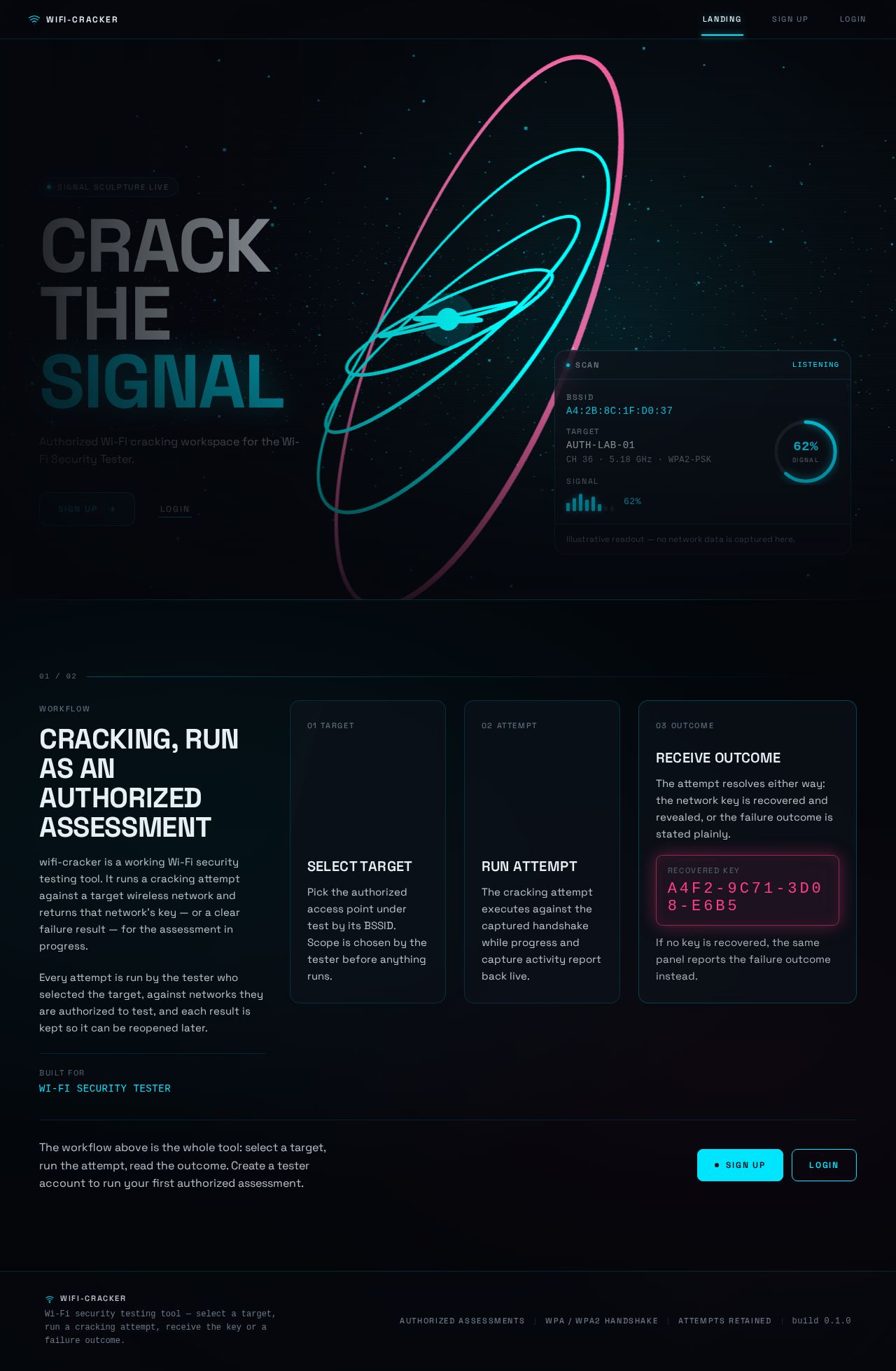
- Information/state: Anonymous public entry. Explains what wifi-cracker is, who it is for (the authorized Wi-Fi Security Tester), and how the testing workflow proceeds (select target → run cracking attempt → receive key or failure). No protected state is shown.
- Primary actions: Proceed to Sign Up; proceed to Login.
- Supporting actions: Read the workflow explanation; view the illustrative scan panel.
- Domain entities: None persisted; presentation only.
- Component responsibilities:
- Hero signal sculpture (real-time WebGL concentric glowing rings + drifting particle field), slowly rotating and parallaxing to cursor.
- Headline "CRACK THE SIGNAL" overlaid on the left third.
- Floating glass HUD panel at lower right showing an illustrative scan readout: BSSID, signal strength bars, cyan progress arc, with a tiny uppercase micro-label tag.
- Thin top navigation bar with uppercase micro-labels and a cyan active indicator line.
- States: Loading (hero scene initializing), empty (no data — illustrative readout only), success (scene rendered), error (WebGL unavailable → static fallback composition preserving headline and panel), recovery (fallback remains fully navigable to Sign Up / Login).
Sign Up
- Information/state: Anonymous enrollment surface. Collects the minimum identity information needed to create the tester's account.
- Primary actions: Submit enrollment to create the account and enter the protected application.
- Supporting actions: Navigate to Login if already enrolled.
- Domain entities: Tester identity (account).
- Component responsibilities: Enrollment form with labeled fields; submit control; inline validation messaging; link to Login.
- States: Loading (submission in flight), empty (pristine form), success (account created → protected entry), error (validation failure or enrollment rejected, with the specific reason and preserved input), recovery (correct and resubmit).
Page 5 of 13
Login
- Information/state: Anonymous returning-verification surface.
- Primary actions: Submit credentials to verify identity and resume access to durable attempts and outcomes.
- Supporting actions: Navigate to Sign Up if not yet enrolled.
- Domain entities: Tester identity (account).
- Component responsibilities: Credential form; submit control; inline error messaging; link to Sign Up.
- States: Loading (verification in flight), empty (pristine form), success (verified → protected entry), error (verification failed, with reason and preserved input), recovery (retry or proceed to Sign Up).
Tests
- Information/state: Protected, revisitable overview of the tester's Wi-Fi testing attempts and their credential or failure outcomes. Each attempt row is styled as a HUD log entry with a live status pulse.
- Primary actions: Open an attempt to review its credential or failure outcome; start a new attempt via New Test.
- Supporting actions: Scan the list for status and outcome; read attempt metadata (target BSSID, timestamps, status).
- Domain entities: Testing attempt; target network (BSSID); outcome (recovered key or failure).
- Component responsibilities: Attempt list with HUD log rows; per-row status pulse; per-row outcome indicator; recovered-key display where an attempt succeeded; navigation to New Test.
- States: Loading (attempts fetching), empty (no attempts yet, with a clear path to New Test), success (attempts listed with outcomes), error (fetch failed, with retry), recovery (retry restores the list).
Page 6 of 13
New Test
- Information/state: Protected focused workspace. Left column: target selector and parameter panel. Right column: live cracking console with streaming output and a radial progress arc around a central percentage readout.
- Primary actions: Select a target network; start the cracking attempt; observe progress; receive the recovered key or failure outcome.
- Supporting actions: Copy the recovered key from the reveal panel; return to Tests.
- Domain entities: Target network (BSSID, signal strength); testing attempt; cracking parameters; recovered key; failure outcome.
- Component responsibilities:
- Target selector and parameter panel (left column), with uppercase micro-label tags.
- Live cracking console (right column) streaming output character-by-character with cyan glow.
- Radial progress arc with central percentage readout.
- Recovered-key reveal: full-width magenta-glowing panel with the key string in monospace at 28px, letter-spaced, with a copy-to-clipboard action cut into the panel edge.
- Failure outcome presentation when no key is recovered.
- States: Loading (target list fetching; attempt initializing), empty (no target selected — start disabled), success (key recovered and revealed in the magenta panel), error (attempt failed or target unreachable, with the reason and a retry path), recovery (reselect target or rerun the attempt; the failed attempt remains recorded in Tests).
Page 7 of 13
3. Functional Requirements
FR-1 — Working Wi-Fi cracking tool (explicit)
As a Wi-Fi Security Tester, I should have a working Wi-Fi cracking tool so that I can run a cracking attempt against an authorized target network and obtain its key.
- Trigger/input: the tester starts a cracking attempt against a selected target network.
- Observable result: the attempt executes and produces either the recovered network key or a failure outcome.
- Access state: requires login.
- Failure/recovery: if the attempt does not recover a key, the failure outcome is surfaced and the tester can rerun the attempt.
- Continuation: the attempt and its outcome are recorded and revisitable in Tests.
FR-2 — Self-service enrollment (required_inference)
As a Wi-Fi Security Tester, I should be able to enroll myself so that I can begin using the tool without an invitation or provisioning step.
- Trigger/input: the tester submits enrollment information on Sign Up.
- Observable result: a tester account is created and the tester enters the protected application.
- Access state: anonymous entry.
- Failure/recovery: validation or enrollment failure is shown with its reason and the input is preserved for correction.
- Continuation: the tester proceeds to the protected testing surfaces.
FR-3 — Returning verification (required_inference)
As a Wi-Fi Security Tester, I should be able to verify my identity on return so that I can resume access to my durable testing attempts and outcomes.
- Trigger/input: the tester submits credentials on Login.
- Observable result: identity is verified and the tester's attempts and outcomes become available again.
- Access state: anonymous entry.
- Failure/recovery: verification failure is shown with its reason; the tester can retry or proceed to Sign Up.
- Continuation: the tester resumes work in Tests or New Test.
FR-4 — Attempt overview and review (required_inference)
As a Wi-Fi Security Tester, I should be able to review my Wi-Fi testing attempts and their credential or failure outcomes so that I can revisit what each attempt produced.
- Trigger/input: the tester opens Tests.
- Observable result: the tester's attempts are listed as HUD log entries with status and outcome, including the recovered key where an attempt succeeded.
- Access state: requires login.
- Failure/recovery: if the list cannot be fetched, the failure is shown with a retry that restores the list.
- Continuation: the tester opens an attempt for detail or starts a new attempt.
FR-5 — Target selection and attempt execution (required_inference)
As a Wi-Fi Security Tester, I should be able to select a target network and run a cracking attempt so that I can recover the key for an authorized target.
- Trigger/input: the tester selects a target network and starts the attempt on New Test.
- Observable result: the cracking console streams output and the radial progress arc advances; the attempt ends in a recovered key or a failure outcome.
- Access state: requires login.
- Failure/recovery: an unreachable target or failed attempt is reported with its reason and a retry path; the failed attempt remains recorded.
- Continuation: on success the key is revealed for copying; the tester returns to Tests.
FR-6 — Backend execution and durable storage (required_inference)
As a Wi-Fi Security Tester, I should have my cracking attempts executed and their outcomes stored so that results persist across sessions.
- Trigger/input: the tester starts an attempt from New Test.
- Observable result: the backend executes the attempt and persists the attempt record with its credential or failure outcome.
- Access state: operates on behalf of the logged-in tester.
- Failure/recovery: execution failure is persisted as a failure outcome and surfaced to the tester.
- Continuation: the persisted attempt appears in Tests.
Page 8 of 13
4. User Personas
Wi-Fi Security Tester
- Product context: A technical operator performing authorized Wi-Fi network penetration assessments. They use wifi-cracker as a specialized instrument, not a general-purpose application.
- Primary goal: Recover the network key for a Wi-Fi network they are authorized to assess.
- Distinct accepted responsibilities: Selecting a target network; configuring and starting a cracking attempt; observing the attempt execute; receiving and copying the recovered key or reading a failure outcome; reviewing past attempts and their outcomes.
- Relevant inputs or decisions: Which target network to assess; when to start the attempt; whether to retry after a failure; whether to copy the recovered key.
- Interactions with other accepted participants: The tester initiates work that the application backend executes and persists; the tester is the sole human participant and the sole recipient of the outcome.
- Observable success: The recovered network key is displayed in the magenta reveal panel and can be copied; the attempt is recorded in Tests with its outcome.
- What makes this role distinct: The role's work is a single high-stakes, live, data-streaming operation — watching a cracking attempt run and reading its result — rather than browsing, authoring, or collaborating. Its success criterion is a concrete recovered credential.
5. Core User Flows
Flow A — First-time tester enrolls and runs a first attempt
- The tester arrives at Landing anonymously. The hero signal sculpture renders and the illustrative scan panel shows a sample readout.
- The tester reads the workflow explanation and chooses Sign Up.
- On Sign Up, the tester submits enrollment information. The account is created and the tester enters the protected application.
- The tester lands on Tests, which is empty and offers a clear path to New Test.
- The tester opens New Test. The target selector and parameter panel appear in the left column; the cracking console is idle in the right column.
- The tester selects a target network. The start control becomes available.
- The tester starts the attempt. The console streams output character-by-character and the radial progress arc advances around the central percentage readout.
- On success, the recovered key is revealed in the full-width magenta-glowing panel in monospace; the tester copies it via the copy-to-clipboard action cut into the panel edge.
- The tester returns to Tests, where the attempt now appears as a HUD log entry with its outcome.
- Failure/recovery: if the attempt does not recover a key, the failure outcome is shown with its reason and a retry path; the failed attempt is still recorded in Tests, and the tester can reselect a target or rerun the attempt.
Page 9 of 13
Flow B — Returning tester resumes and reviews outcomes
- The tester arrives at Landing anonymously and chooses Login.
- On Login, the tester submits credentials. Identity is verified and the tester's durable attempts and outcomes become available.
- The tester opens Tests and scans the HUD log rows, reading each attempt's status pulse, target BSSID, timestamps, and outcome.
- The tester opens a successful attempt and reads the recovered key, or opens a failed attempt and reads its failure outcome.
- Failure/recovery: if verification fails, the reason is shown and the tester retries or proceeds to Sign Up; if the attempt list cannot be fetched, a retry restores it.
- Continuation: the tester starts a new attempt via New Test (Flow A, steps 5–9).
Page 10 of 13
6. Visuals Colors and Theme
Muse: Gleb Kuznetsov. Headline direction: "CRACK THE SIGNAL" — cinematic future-tech HUD for an authorized Wi-Fi security tester.
Mode: Dark mode only. No light-mode surfaces.
Color tokens (exact hex by role):
| Role | Hex | Usage |
|---|
| Background (void) | #05070C | Dominant full-bleed ground |
| Surface (glass panel) | #0B1119 | Floating HUD panels |
| Text | #E6F0F5 | Body and headings at ~90% opacity |
| Primary (signal) | #00E5FF | Active states, live data, progress arcs, recovered-key reveal |
| Accent (danger/success flash) | #FF3D8B | Danger/warning/unauthorized-target flags and the "cracked" success flash |
| Muted | #5A6B7A | Metadata and disabled states |
Panel borders: 1px cyan-tinted at 15% opacity with subtle backdrop blur. No pure white (#FFFFFF) anywhere. No blue-indigo SaaS primary.
Typography:
- Headings: Space Grotesk — wide geometric sans, uppercase for micro-labels and HUD tags, tight tracking on large display sizes, medium-to-bold weight. Display headlines at 64–120px with 0.9 line-height.
- Body: Space Grotesk at 15–16px with 1.6 line-height.
- Data readouts, BSSIDs, timestamps, and key strings: JetBrains Mono.
- Type scale (1.333 modular): 96 / 64 / 40 / 28 / 20 / 16 / 14 / 12.
- Micro-labels: uppercase Space Grotesk at 11px with 0.15em tracking.
Shape language: Full-bleed dark canvas with floating glass panels at 12–16px radius, 1px cyan-tinted borders at 15% opacity, subtle backdrop blur. Thin luminous strokes and radial progress arcs. No hard drop shadows — depth comes from glow and layering.
Spacing rhythm: Generous, HUD-like breathing room around panels; panels float over the void rather than sitting in a grid.
Imagery style: Abstract 3D forms only — a glowing Wi-Fi signal sculpture (concentric torus rings + particle field), volumetric data streams, glass panels with luminous edges. No stock photography, no flat clip art, no people. The product's own data is the visual material.
Page 11 of 13
7. Signature Design Concept
The Landing page is a full-bleed dark void (#05070C) filling the viewport. Its dominant element is a volumetric 3D Wi-Fi signal sculpture — concentric glowing cyan rings radiating from a central point, with a drifting particle field and faint magenta accents on the outer ring — rendered in real-time WebGL (Three.js / React Three Fiber), slowly rotating and parallaxing to cursor. The headline "CRACK THE SIGNAL" sits in Space Grotesk at 96–120px, uppercase, tight tracking, in off-white, overlaid on the left third. A floating glass HUD panel at the lower right shows an illustrative live scan: BSSID, signal strength bars, and a cyan progress arc, tagged with a tiny uppercase micro-label. There is no centered headline + subtext + button stack and no gradient blob — the 3D signal sculpture is the hero. The only controls are the accepted navigation to Sign Up and Login.
Page 12 of 13
8. Interaction Model & Motion Direction
Interaction Model: Animated
Motion Tempo: cinematic
Hero Dimensionality: webgl
Landing Hero Motion Brief
- Focal subject: the volumetric Wi-Fi signal sculpture — concentric glowing cyan rings radiating from a central point, with a drifting particle field and faint magenta accents on the outer ring.
- Input → transformation → outcome thesis: cursor position and scroll drive the sculpture's slow orbit and parallax; the rings and particle field respond continuously, communicating that the tool is alive and working, and settling into a composed state as the tester moves toward the accepted entry controls.
- Motion vocabulary: continuous slow orbit; cursor parallax; light sweeps across glass panels; scroll-scrubbed camera moves; cyan pulses on state changes; magenta flash on success.
- Composed first frame: full-bleed
#05070C void; the signal sculpture centered and already in slow rotation; "CRACK THE SIGNAL" overlaid on the left third; the glass scan panel floating at the lower right with its micro-label tag.
- Reduced-motion state: the sculpture holds a static composed frame with no orbit, parallax, or scroll-scrubbed camera movement; the headline and scan panel remain fully legible and the navigation to Sign Up and Login remains fully available.
Landing Hero 3D Scene Brief — DIRECTION-DERIVED
A single crafted real-time object: concentric glowing torus rings radiating from a central emissive point, surrounded by a drifting particle field, with faint magenta emissive accents on the outermost ring. The scene shows the product's defining state — a signal radiating from a source, the moment before a cracking attempt resolves. Rendered in Three.js / React Three Fiber with emissive materials and bloom; slowly rotating and parallaxing to cursor; reduced-motion holds a static composed frame.
9. Non-Functional Requirements
- NFR-1 — Durable attempt storage (required_inference): Testing attempts and their credential or failure outcomes must persist so the tester can revisit them across sessions. Rationale: FR-4 and FR-6 require revisitable outcomes.
- NFR-2 — Live streaming output (explicit, from creative direction): The cracking console must stream output character-by-character with cyan glow, and the radial progress arc must advance with the attempt. Rationale: the direction establishes the live cracking console as a signature move and the product's core moment as a live, data-streaming event.
- NFR-3 — Dark-mode-only rendering (explicit, from creative direction): The application renders dark mode only, with no light-mode surfaces and no pure white grounds.
- NFR-4 — Real-time WebGL hero (explicit, from creative direction): The Landing hero is rendered in real-time WebGL and must degrade to a static composed fallback when WebGL is unavailable, preserving headline, scan panel, and navigation.
- NFR-5 — Reduced-motion support (required_inference): All motion must have a reduced-motion state that preserves legibility and full access to accepted controls.
Page 13 of 13
10. Tech Stack
- Frontend: React, with Three.js / React Three Fiber for the real-time WebGL hero signal sculpture.
- Backend: Python / FastAPI, executing cracking attempts and serving attempt and outcome data.
- Storage: Durable storage for tester identity, testing attempts, and their credential or failure outcomes.
- Packaging: Docker / docker-compose for local and deployment packaging.
11. Assumptions and Constraints
- A-1 (assumption): The tester operates only against networks they are authorized to assess; the tool is presented as an authorized-assessment instrument.
- A-2 (assumption): The cracking attempt is executed by the application backend; the tester's interaction with it is owned by first-party custom UI.
- A-3 (constraint): The active human persona set is closed at exactly one role — the Wi-Fi Security Tester. No additional personas are introduced.
- A-4 (constraint): The page inventory is closed at exactly five pages — Landing, Sign Up, Login, Tests, New Test — with Landing, Sign Up, and Login anonymously reachable and Tests and New Test requiring login.
- A-5 (constraint): No adjacent account-management capabilities (password reset, profile editing, role management) are introduced.
- A-6 (constraint): The generic indigo/blue-on-white SaaS template look is forbidden; the dark, luminous HUD register is mandatory.
- A-7 (constraint): No stock photography, flat clip art, or human imagery is used.
12. Glossary
- Wi-Fi Security Tester — the sole active human persona; an operator running authorized Wi-Fi cracking assessments.
- Cracking attempt — a single execution of the Wi-Fi cracking workflow against a selected target network, producing a recovered key or a failure outcome.
- Target network — the Wi-Fi network selected for assessment, identified by its BSSID.
- BSSID — the identifier of a wireless access point, displayed in monospace in the HUD readouts.
- Recovered key — the network key obtained from a successful cracking attempt, revealed in the magenta-glowing panel.
- Failure outcome — the recorded result of an attempt that did not recover a key.
- HUD log entry — the row style used in Tests to present an attempt with its status pulse and outcome.
- Signal sculpture — the real-time WebGL hero subject on Landing: concentric glowing rings with a drifting particle field.
 Divyesh Senjaliya

No comments yet. Be the first!